Union.ai on EKS Pattern¤
Union.ai empowers AI development teams to rapidly ship high-quality code to production by offering optimized performance, resource efficiency, and workflow authoring experience. With Union.ai your team can:
- Run complex AI workloads with performance, scale, and efficiency.
- Scale out to multiple regions, clusters, and clouds as needed for resource availability, scale, or compliance.
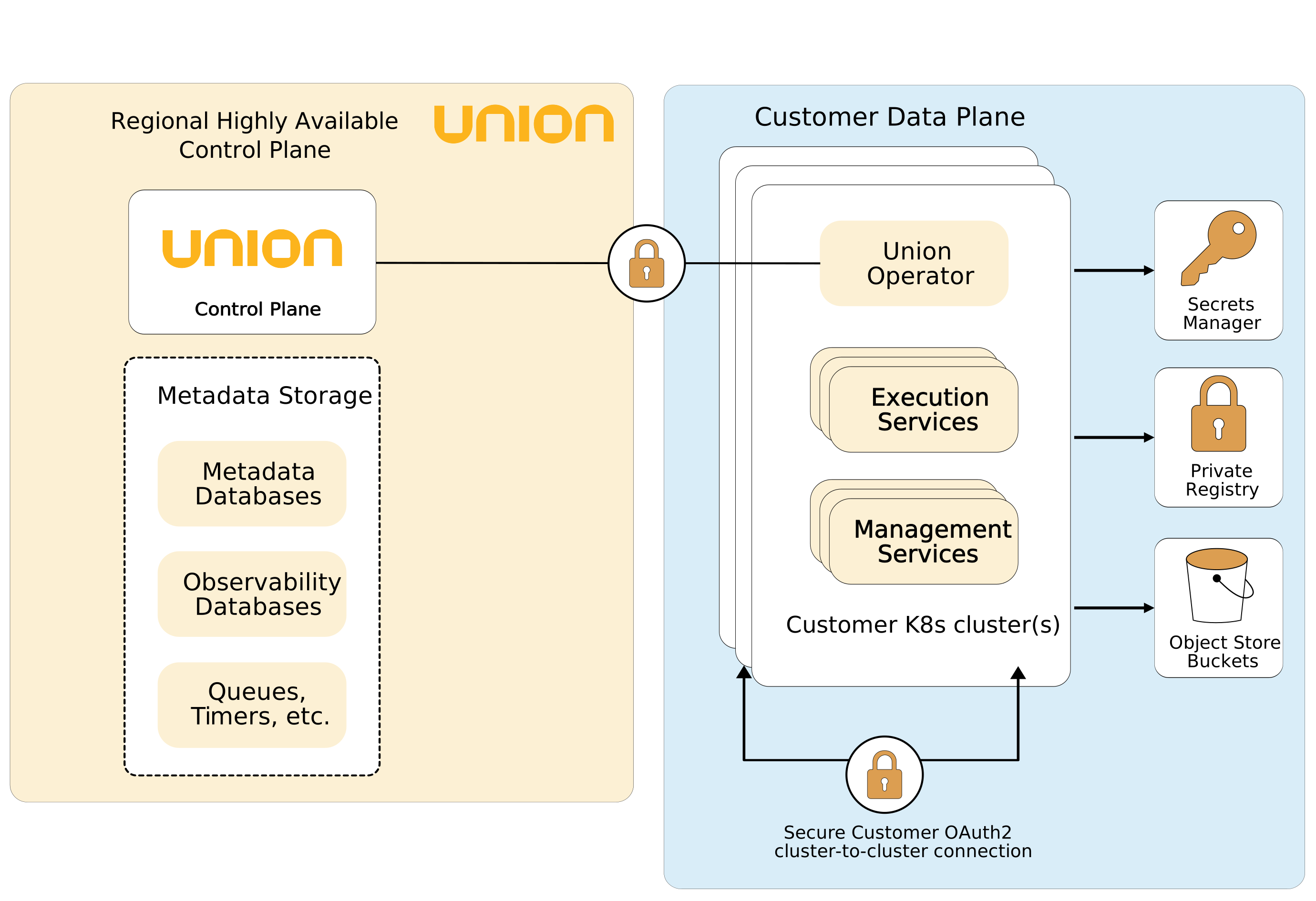
Union.ai’s modular architecture allows for great flexibility and control. The customer can decide how many clusters to have, their shape, and who has access to what. All communication is encrypted.
Prerequisites¤
Ensure that you have installed the following tools on your machine:
Installing uctl¤
On Mac:
brew tap unionai/homebrew-tap
brew install uctl
With cURL:
curl -sL https://raw.githubusercontent.com/unionai/uctl/main/install.sh | bash
Deployment¤
Setup Union Credentials¤
Both the control plane URL and cluster name will be provided by Union. Union will also provide authentication information for your account to access the hosted control plane.
export UNION_CONTROL_PLANE_URL=<YOUR_UNION_CONTROL_PLANE_URL>
export UNION_CLUSTER_NAME=<YOUR_SELECTED_CLUSTER_NAME>
export UNION_ORG_NAME=<YOUR_SELECTED_ORG_NAME>

uctl config init --host=$UNION_CONTROL_PLANE_URL
uctl selfserve provision-dataplane-resources --clusterName $UNION_CLUSTER_NAME --provider aws
This command will output the ID, name, and secret used by Union services to communicate with the control plane.
Create Union Secrets in AWS Secrets Manager¤
export UNION_SECRET_NAME=union-secret
aws secretsmanager create-secret --name $UNION_SECRET_NAME \
  --secret-string "{\"host\":\"$UNION_CONTROL_PLANE_URL\",\"clusterName\":\"$UNION_CLUSTER_NAME\",\"orgName\":\"$UNION_ORG_NAME\"}"

export UNION_CLIENT_SECRET_NAME=union-client-secret
export UNION_CLIENT_ID_SECRET_VALUE=<CLUSTERAUTHCLIENTID_FROM_SELFSERVE_COMMAND>
export UNION_SECRET_SECRET_VALUE=<CLUSTERAUTHCLIENTSECRET_FROM_SELFSERVE_COMMAND>

aws secretsmanager create-secret --name $UNION_CLIENT_SECRET_NAME \
  --secret-string "{\"clientId\":\"$UNION_CLIENT_ID_SECRET_VALUE\",\"clientSecret\":\"$UNION_SECRET_SECRET_VALUE\"}"
Clone the repository:¤
git clone https://github.com/aws-samples/cdk-eks-blueprints-patterns.git
cd cdk-eks-blueprints-patterns
Run the following commands:¤
make deps
make build
make pattern unionai deploy
Validation¤
Run the command:
kubectl get deploy -A
Output should be:
NAMESPACE     NAME                                                  READY   UP-TO-DATE   AVAILABLE   AGE
kube-system   blueprints-addon-metrics-server                       1/1     1            1           57d
kube-system   blueprints-addon-union-dataplane-kube-state-metrics   1/1     1            1           57d
unionai       executor                                              1/1     1            1           57d
unionai       flytepropeller                                        1/1     1            1           57d
unionai       flytepropeller-webhook                                1/1     1            1           57d
unionai       opencost                                              1/1     1            1           57d
unionai       prometheus-operator                                   1/1     1            1           57d
unionai       syncresources                                         1/1     1            1           57d
unionai       union-operator                                        1/1     1            1           57d
unionai       union-operator-proxy                                  1/1     1            1           57d
To validate the cluster has been successfully registered to the Union control plane run the command:
uctl get cluster
Output should be:
 ----------- ------- --------------- -----------
| NAME      | ORG   | STATE         | HEALTH    |
 ----------- ------- --------------- -----------
| <cluster> | <org> | STATE_ENABLED | HEALTHY   |
 ----------- ------- --------------- -----------
1 rows
8. Register and run example workflows¤
uctl register examples --project=union-health-monitoring --domain=development
uctl validate snacks --project=union-health-monitoring --domain=development
 ---------------------- ----------------------------------- ---------- -------------------------------- -------------- ----------- ---------------
| NAME                 | LAUNCH PLAN NAME                  | VERSION  | STARTED AT                     | ELAPSED TIME | RESULT    | ERROR MESSAGE |
 ---------------------- ----------------------------------- ---------- -------------------------------- -------------- ----------- ---------------
| alskkhcd6wx5m6cqjlwm | basics.hello_world.hello_world_wf | v0.3.341 | 2025-05-09T18:30:02.968183352Z | 4.452440953s | SUCCEEDED |               |
 ---------------------- ----------------------------------- ---------- -------------------------------- -------------- ----------- ---------------
1 rows