sample-aiml-security-assessment
AI/ML Security Assessment Framework - Developer Guide
Table of Contents
- Agentic Development
- Architecture Overview
- Assessment Structure
- Adding New AI/ML Service Assessments
- Adding a New Check Inside an Existing Service
- Assessment Best Practices
- Testing Your Extensions
- Monitoring and Debugging
- Development Roadmap
- Report Generation Architecture
- Assessment History (Changes Since Last Assessment)
- Extending or Adding Lenses
- Adding a Compliance Standard (OWASP-style)
- Documentation and Screenshots
- CI/CD Workflows
- Support and Resources
Agentic Development
This repository includes instructions for developers using AI coding agents:
- AGENTS.md is the canonical repository guidance. It defines
the required
.venv/toolchain, separate pytest sessions, architecture and schema contracts, status semantics, pagination requirements, IAM coverage in both SAM runtime templates, deployment-role separation, mapping checks, identifier hygiene, and the pre-commit review gates. - CLAUDE.md is a compatibility entry point for tools that look
specifically for that filename. It delegates to
AGENTS.mdso the instructions have a single source of truth.
AI-assisted development should begin by loading the repository-root
AGENTS.md, then use this guide for implementation workflows and architecture
details. Human reviewers should evaluate agent-generated changes against the
same instructions. Update AGENTS.md when repository-wide agent guidance
changes; keep CLAUDE.md as the delegation shim unless a tool requires
additional compatibility syntax.
Architecture Overview
The AI/ML Security Assessment Framework is a serverless, multi-account security assessment solution for AWS AI/ML workloads. It performs 94 core security checks across Amazon Bedrock, Amazon SageMaker AI, Amazon Bedrock AgentCore, and AWS Agent Registry, plus 38 always-on Agentic AI Security checks, with optional 64-check Responsible AI GRC and 12-check OWASP Top 10 for LLM assessments, generating interactive HTML reports with findings and remediation guidance.
The current deployment is validated only in the standard AWS commercial
partition (aws). Partition-aware implementation details must not be treated
as support for AWS GovCloud (US) (aws-us-gov) or AWS China (aws-cn).
Adding either partition requires service-availability review, partition-safe
Step Functions integrations and generated URLs, and end-to-end validation of
both single-account and multi-account deployment modes.
Security Design Principles
- Runtime assessment Lambda roles are read-oriented and scoped to the APIs needed by each assessment
- AWS CodeBuild and member-account roles require deployment permissions because they create or update the SAM assessment stacks before running checks
- Cross-account trust is limited to the specific AWS CodeBuild role in the central assessment account
- Amazon S3 buckets enforce SSL-only access
- Assessment data is encrypted in transit and at rest
- No persistent credentials are stored in AWS CodeBuild
Architecture Diagrams
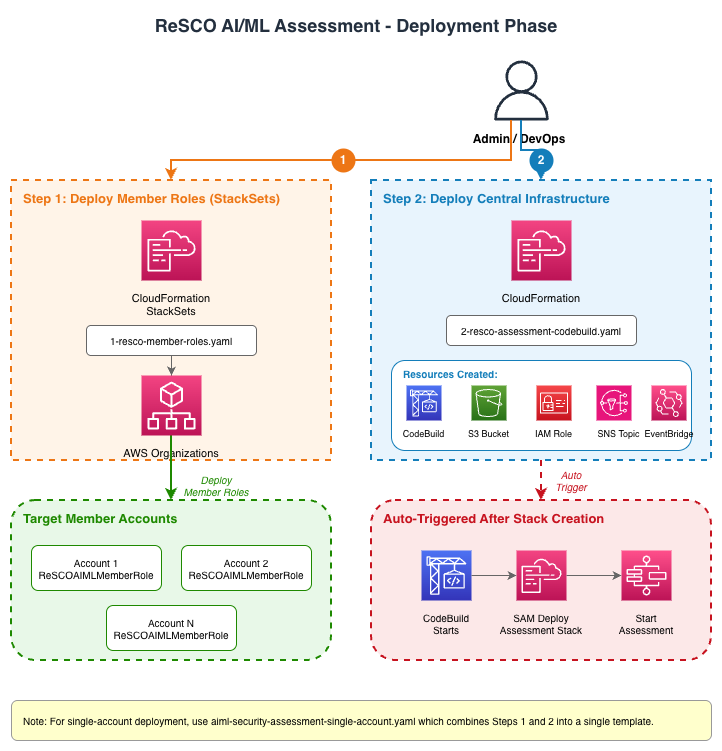
Phase 1: Deployment Setup (AWS CloudFormation)
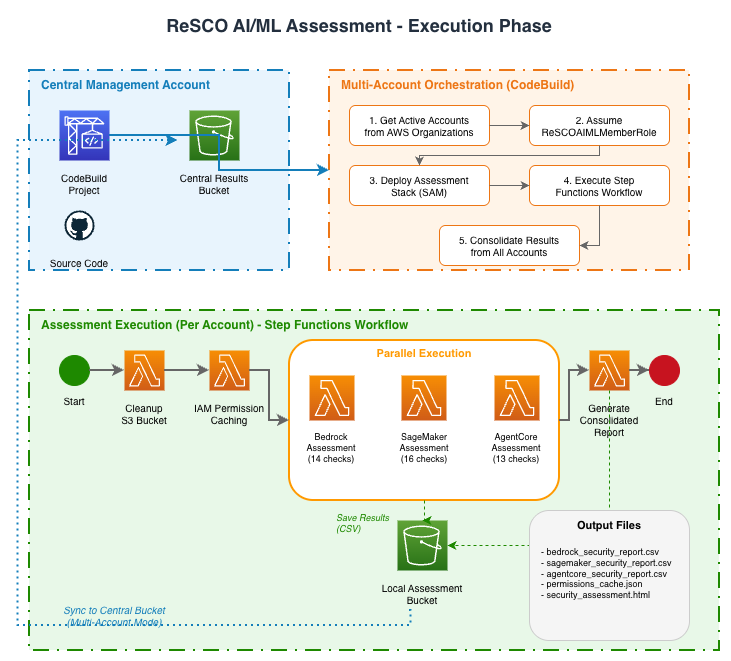
Phase 2: Assessment Execution (AWS CodeBuild)
Service-Level Assessment Architecture
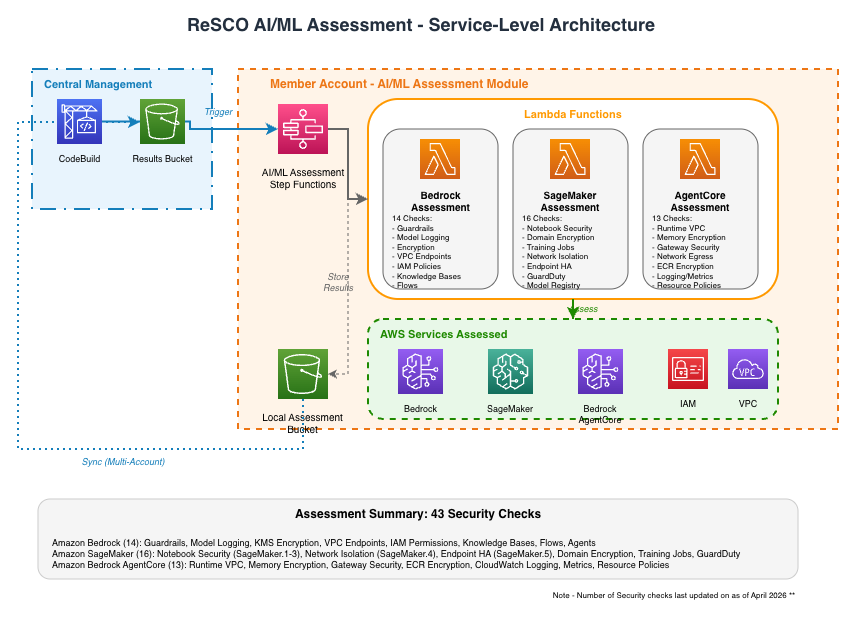
Two-Phase Architecture
Phase 1: Infrastructure Deployment
Step 1: Member Account Roles (1-aiml-security-member-roles.yaml)
- AWS CloudFormation StackSets Deployment: Deploys
AIMLSecurityMemberRoleto all target accounts - Cross-Account Trust: Establishes trust relationship with the central assessment account
- Deployment Permissions: Grants only the cross-account deployment, Step Functions execution-polling, and report-retrieval permissions needed by CodeBuild to create or update per-account SAM stacks. The SAM-created Lambda execution roles hold assessment-service API permissions.
Step 2: Central Infrastructure (2-aiml-security-codebuild.yaml)
- AWS CodeBuild Project: Orchestrates multi-account deployments and assessments
- Amazon S3 Bucket: Central storage for consolidated assessment results
- AWS IAM Role:
MultiAccountCodeBuildRolewith cross-account access permissions - Amazon SNS Topic: Optional email notifications for assessment completion
- Amazon EventBridge Rules: Automated workflow triggers
- AWS Lambda Trigger: Automatically starts AWS CodeBuild after stack creation
Phase 2: Assessment Execution (AWS CodeBuild Orchestration)
AWS CodeBuild Execution Flow
- Account Discovery: In multi-account mode, lists active accounts from AWS Organizations or uses
MultiAccountListOverride - Role Assumption: In multi-account mode, assumes
AIMLSecurityMemberRolein each target account - AWS SAM Deployment: Deploys or updates the AI/ML assessment stack through AWS SAM
- Assessment Execution: Triggers AWS Step Functions workflow in each account, passing
enableResponsibleAIGRCandenableOWASPfrom the deployment parameters - Results Consolidation: Syncs per-account reports to the infrastructure bucket and creates a consolidated report for multi-account runs
Project Structure
sample-aiml-security-assessment/
├── AGENTS.md                         # Canonical AI coding-agent guidance
├── CLAUDE.md                         # Compatibility shim that loads AGENTS.md
├── aiml-security-assessment/
│   ├── functions/security/
│   │   ├── bedrock_assessments/      # Bedrock security checks (40)
│   │   ├── sagemaker_assessments/    # SageMaker checks (29; SM-29 reserved)
│   │   ├── agentcore_assessments/    # AgentCore security checks (17)
│   │   ├── agent_registry_assessments/  # AWS Agent Registry checks (8)
│   │   ├── responsible_ai_grc_assessments/  # Optional Responsible AI GRC checks (64)
│   │   ├── owasp_assessments/        # Optional OWASP Top 10 for LLM checks (12)
│   │   ├── responsible_ai_grc_tests/ # Responsible AI GRC-specific unit and coverage tests
│   │   ├── iam_permission_caching/   # AWS IAM permissions cache
│   │   ├── cleanup_bucket/           # Amazon S3 cleanup
│   │   ├── resolve_regions/          # Multi-region resolution Lambda
│   │   └── generate_consolidated_report/  # HTML/CSV report generation
│   ├── statemachine/                 # AWS Step Functions definition
│   ├── images/                       # SAM application images
│   ├── template.yaml                 # AWS SAM template (single-account)
│   ├── template-multi-account.yaml   # AWS SAM template (multi-account)
│   ├── samconfig.toml                # SAM deployment configuration
│   ├── envvars.json                  # Environment variables for local testing
│   └── testfile.json                 # Test event file for local invocation
├── assessment_history/               # Changes-since-last-assessment report (CodeBuild post-build)
├── deployment/                       # AWS CloudFormation templates
├── docs/                             # Documentation
│   ├── DEVELOPER_GUIDE.md            # This guide
│   ├── ASSESSMENT_HISTORY.md         # Changes since last assessment report
│   ├── SECURITY_CHECKS.md            # Security checks reference (core + Agentic)
│   ├── SECURITY_CHECKS_RESPONSIBLE_AI_GRC.md  # Responsible AI GRC checks reference
│   ├── SECURITY_CHECKS_OWASP.md      # OWASP Top 10 for LLM checks reference
│   ├── SECURITY_CHECKS_RESPONSIBLE_AI_GRC_SEVERITY_METHODOLOGY.md  # Severity model
│   ├── SECURITY_CHECKS_RESPONSIBLE_AI_GRC_SEVERITY_REGISTER.md     # Per-finding severities
│   ├── TROUBLESHOOTING.md            # Troubleshooting guide
│   ├── CLEANUP.md                    # Resource removal guide
│   ├── diagrams/                     # Architecture diagrams
│   └── icons/                        # AWS service icons
├── sample-reports/                   # Sample assessment reports
│   ├── scripts/                      # Screenshot capture and changes-sample scripts
│   ├── *.html                        # Sample HTML reports
│   └── *.png                         # Report screenshots
├── tests/                            # Unit tests for assessment functions
│   └── requirements.txt              # Test dependencies
├── .github/workflows/                # PR lint, test, SAM validate, and security scans
├── buildspec.yml                     # AWS CodeBuild orchestration
└── consolidate_html_reports.py       # Multi-account report consolidation
Member Account Resources (Deployed by AWS SAM)
- AWS SAM Application: AI/ML security assessment stack
- AWS Step Functions: Single workflow orchestrating all assessments
- AWS Lambda Functions: One per core service (Amazon Bedrock, Amazon SageMaker AI, Amazon Bedrock AgentCore, and AWS Agent Registry), one Responsible AI GRC assessment Lambda invoked when Responsible AI GRC or OWASP needs FS-* source rows, one OWASP assessment Lambda invoked only when enabled, plus utilities
- Local Amazon S3 Bucket: Storage for account-specific results
Assessment Execution Workflow
AWS CodeBuild Orchestration
# buildspec.yml execution flow
1. Get active accounts from AWS Organizations
2. For each account:
   - Assume AIMLSecurityMemberRole
   - Deploy AI/ML assessment stack through AWS SAM
   - Start AWS Step Functions execution
3. Wait for completion and consolidate results
AWS Step Functions (Per Module)
{
  "Comment": "AI/ML Assessment Module",
  "StartAt": "Cleanup S3 Bucket",
  "States": {
    "Cleanup S3 Bucket": {
      "Type": "Task",
      "Next": "IAM Permission Caching"
    },
    "IAM Permission Caching": {
      "Type": "Task",
      "Next": "Resolve Target Regions"
    },
    "Resolve Target Regions": {
      "Type": "Task",
      "Comment": "Resolves target regions from TARGET_REGIONS env var",
      "Next": "Scan Regions"
    },
    "Scan Regions": {
      "Type": "Map",
      "ItemsPath": "$.ResolvedRegions.regions",
      "MaxConcurrency": ${MaxRegionConcurrency},
      "ItemProcessor": {
        "ProcessorConfig": {"Mode": "INLINE"},
        "StartAt": "Run Security Assessments",
        "States": {
          "Run Security Assessments": {
            "Type": "Parallel",
            "Branches": [
              {"StartAt": "Bedrock Security Assessment", "States": {...}},
              {"StartAt": "Sagemaker Security Assessment", "States": {...}},
              {"StartAt": "AgentCore Security Assessment", "States": {...}},
              {"StartAt": "AWS Agent Registry Security Assessment", "States": {...}},
              {
                "StartAt": "Responsible AI GRC Enabled?",
                "States": {
                  "Responsible AI GRC Enabled?": {
                    "Type": "Choice",
                    "Comment": "Runs Responsible AI GRC when enableResponsibleAIGRC or enableOWASP is true and RegionIndex is 0"
                  },
                  "Responsible AI GRC Security Assessment": {"Type": "Task", "Resource": "arn:aws:states:::lambda:invoke", "End": true},
                  "Responsible AI GRC Assessment Skipped": {"Type": "Pass", "End": true}
                }
              }
            ],
            "Next": "OWASP Enabled?"
          },
          "OWASP Enabled?": {
            "Type": "Choice",
            "Choices": [
              {
                "Variable": "$.OriginalInput.enableOWASP",
                "StringEquals": "true",
                "Next": "OWASP Security Assessment"
              }
            ],
            "Default": "OWASP Assessment Skipped"
          },
          "OWASP Security Assessment": {
            "Type": "Task",
            "Resource": "arn:aws:states:::lambda:invoke",
            "End": true
          },
          "OWASP Assessment Skipped": {
            "Type": "Pass",
            "End": true
          }
        }
      },
      "Next": "Generate Consolidated Report"
    },
    "Generate Consolidated Report": {
      "Type": "Task",
      "End": true
    }
  }
}
Service Selection
EnableBedrockAssessment, EnableSageMakerAssessment,
EnableAgentCoreAssessment, and EnableAgentRegistryAssessment are string
parameters accepting true or false, defaulting to true. Both SAM templates
substitute these values into the initial Configure Service Assessments Pass
state. It writes $.ServiceSelection before cleanup and region resolution; the
regional Choice gates read that map through $.OriginalInput.ServiceSelection.
This keeps direct SAM executions consistent with CodeBuild deployments and
prevents execution input from overriding a deployment’s selected scope.
Both top-level deployment templates expose the switches as ENABLE_BEDROCK,
ENABLE_SAGEMAKER, ENABLE_AGENTCORE, and ENABLE_AGENT_REGISTRY CodeBuild
variables. The root buildspec.yml validates and forwards them to all three SAM
deployment sites (member, management, and single account). Its artifact checks
require CSVs only for enabled services. No change to the member-role StackSet
is needed; this feature adds no API calls or IAM permissions.
The report Lambda validates every selected service’s CSV for every resolved region, but does not require deselected artifacts. Missing selected artifacts still fail report generation. Both report modes label deselected areas Not selected, exclude their rows, and explain reduced lens coverage. An all-disabled selection may produce an HTML report without service CSVs.
Agentic AI rows come only from selected source assessments (Bedrock, AgentCore, and Agent Registry). OWASP receives the same selection map and skips reads of deselected source CSVs, while preserving missing-artifact notices for selected sources. Its native checks and Responsible AI GRC dependency still run when OWASP is enabled. Responsible AI GRC remains independently controlled and can scan services omitted from the direct-service selection. Neither service selection nor a skipped branch removes deployed Lambdas or IAM policies.
The post-build phase independently reapplies default-enabled flags for older CodeBuild projects with no service-selection environment variables. Artifact validation must still reject missing selected-service CSVs in that upgrade path.
OWASP reads only BR/SM/AC direct evidence, never Agent Registry CSVs. For each OW ID whose mapped sources include a deselected service, it emits one N/A/Informational selection-coverage row per regional invocation. Existing rows from remaining sources are preserved; a sole-source control such as OW-07 stays visible as unassessed when Bedrock is off. Missing selected artifacts still use OW-00 and are not conflated with intentional deselection.
GRC intentionally remains independent and can call deselected services’ APIs. It also runs when OWASP alone is enabled. Disable both optional areas to run only the selected direct assessments. GRC remediation must be self-contained rather than refer to a direct-service check that might have been omitted.
Direct-service scores exclude GRC, Agentic AI, and compliance rows. Changing selection changes the score denominator and can raise or lower the pass rate; compare reports with the same scope. Central buckets retain historical CSVs; downstream readers must filter by execution ID, as the consolidation path does.
Catalog totals describe the available controls, not the number executed by every
selection. The default sample reports still illustrate all services enabled.
Regression coverage in tests/test_service_selection.py exercises all 16 direct
service combinations, both deployment paths, artifact requirements, OWASP source
selection, and single-/multi-account reporting.
Assessment Structure
The framework includes 94 core security checks across Amazon Bedrock, Amazon SageMaker AI, Amazon Bedrock AgentCore, and AWS Agent Registry, plus 38 always-on Agentic AI Security checks, 64 optional Responsible AI GRC checks when EnableResponsibleAIGRCAssessment is enabled, and 12 optional OWASP Top 10 for LLM checks when EnableOWASPAssessment is enabled. For the complete list of checks with descriptions, see the Security Checks Reference.
AWS Lambda Functions
Each core service assessment AWS Lambda function:
- Receives execution context and target region from AWS Step Functions (via the Map state)
- Verifies the service is available in the target region (returns N/A finding if not)
- Reads cached AWS IAM permissions from Amazon S3
- Creates regional boto3 clients with explicit
region_nameparameter - Performs security checks against AWS APIs in the target region
- Generates CSV report with findings (includes
Regioncolumn) - Uploads results to Amazon S3 with region-suffixed filename
- Returns findings summary to AWS Step Functions
AWS Agent Registry is a separate regional assessment Lambda. It creates its
own agent-registry-control client, writes
agent_registry_security_report_<execution_id>_<region>.csv, and runs
independently of Amazon Bedrock AgentCore availability because the services
have separate endpoints.
The Responsible AI GRC assessment Lambda is different. It is deployed in both SAM templates, but Step Functions invokes it only from the first region iteration (RegionIndex == 0) when the execution input includes "enableResponsibleAIGRC": "true" or "enableOWASP": "true". The OWASP path uses FS-* findings as hidden source rows unless the capability was explicitly enabled. It receives the full TargetRegions list and emits findings with Region values so the report can display the same regional filters as the core services.
Compatibility contracts. The
FS-*check IDs are permanent.EnableFinServAssessment/ENABLE_FINSERVare retained permanently as a legacy alias for the primaryEnableResponsibleAIGRCAssessment/ENABLE_RESPONSIBLE_AI_GRC/enableResponsibleAIGRCnames — see Responsible AI GRC alias migration guide — and archived reports/CSVs generated before this rename keep their original filenames and selectors. See Responsible AI GRC — scope, sources, and compatibility for the full list of what changed and what stayed the same.The alias stops at the CloudFormation parameter / CodeBuild environment variable layer — it is not a compatibility contract for the Step Functions execution input.
buildspec.ymlresolvesEnableFinServAssessment/ENABLE_FINSERVinto the effectiveENABLE_RESPONSIBLE_AI_GRCvalue and passes only"enableResponsibleAIGRC"intoStartExecution. The state machine’sResponsible AI GRC Enabled?Choice state does not have a passthrough branch for a legacy"enableFinServ"execution-input key: if"enableFinServ": "true"reachesStartExecutiondirectly (bypassing CodeBuild/buildspec entirely, e.g. a hand-written script or an old runbook), the execution fails immediately with errorLegacyEnableFinServInputRejectedinstead of silently skipping the Responsible AI GRC checks. Use"enableResponsibleAIGRC": "true"(or"enableOWASP": "true") in the execution input instead.
Additional Functions:
- AWS IAM Permission Caching: Pre-fetches AWS IAM policies to optimize assessment (global, runs once)
- Cleanup Bucket: Removes current assessment objects before each run. Version history and delete markers remain until removed manually using the Cleanup Guide.
- Resolve Regions: Resolves target regions from
TargetRegionsparameter for the Map state - Generate Consolidated Report: Creates HTML report from CSV findings with region filtering
Optional Policy Baseline Propagation
Organization-specific baselines are CloudFormation parameters rather than
hard-coded scanner assumptions. Keep each parameter wired through both direct
SAM templates, both top-level deployment templates, the corresponding CodeBuild
environment variable, and every sam deploy path in buildspec.yml.
| CloudFormation parameter | Lambda environment variable | Check |
|---|---|---|
RequireBedrockZeroDataRetention |
REQUIRE_BEDROCK_ZERO_DATA_RETENTION |
BR-37 |
RequireMarketplaceEndpointCMK |
REQUIRE_MARKETPLACE_ENDPOINT_CMK |
BR-40 |
RequireAgentCoreOnlineEvaluation |
REQUIRE_AGENTCORE_ONLINE_EVALUATION |
AC-17 |
RequireAgentRegistryManualApproval |
REQUIRE_AGENT_REGISTRY_MANUAL_APPROVAL |
AR-03 |
RequireAgentRegistryCMK |
REQUIRE_AGENT_REGISTRY_CMK |
AR-05 |
AgentCoreTokenVaultId |
AGENTCORE_TOKEN_VAULT_ID |
AC-14 |
ApprovedExternalAccountIds |
AIML_APPROVED_EXTERNAL_ACCOUNT_IDS |
SM-30 |
ApprovedOrganizationIds |
AIML_APPROVED_ORG_IDS |
SM-30 |
The top-level deployment templates expose the approved-account and
approved-organization values to CodeBuild as APPROVED_EXTERNAL_ACCOUNT_IDS
and APPROVED_ORGANIZATION_IDS; buildspec.yml then maps them to the SAM
parameters shown above. Add or rename a baseline only when all layers and the
public deployment documentation are updated together.
Adding New AI/ML Service Assessments
To add a new AI/ML service (for example, Amazon Comprehend, Amazon Textract):
Step 1: Create Service Assessment Function
- Create Function Directory (One function per service):
# Example: Adding Comprehend security assessment
mkdir -p aiml-security-assessment/functions/security/comprehend_assessments
cd aiml-security-assessment/functions/security/comprehend_assessments
- Create Function Files:
# app.py
import boto3
import os
import json
from botocore.config import Config
from botocore.exceptions import ClientError, EndpointConnectionError
from schema import create_finding

boto3_config = Config(retries=dict(max_attempts=10, mode="adaptive"))


def lambda_handler(event, context):
    """Main assessment handler for new service"""
    all_findings = []

    # Extract target region from Step Functions Map state
    region = event.get("Region", os.environ.get("AWS_REGION", "us-east-1"))

    # Verify service availability in this region
    try:
        test_client = boto3.client("comprehend", config=boto3_config, region_name=region)
        test_client.list_endpoints(MaxResults=1)
    except EndpointConnectionError:
        # Service not available — create an Informational N/A finding, write
        # the regional CSV artifact, then return its URL. Do not return early
        # without an artifact: that makes the assessment area look empty.
        return write_unavailable_report(
            execution_id=event["Execution"]["Name"],
            region=region,
            detail=f"Comprehend is not available in {region}.",
        )
    except ClientError as error:
        if is_region_unsupported(error):
            return write_unavailable_report(
                execution_id=event["Execution"]["Name"],
                region=region,
                detail=f"Comprehend is not available in {region}.",
            )
        raise

    # Get cached permissions
    execution_id = event["Execution"]["Name"]
    permission_cache = get_permissions_cache(execution_id)

    # Run assessment checks (pass region to each)
    findings = check_new_service_security(permission_cache, region=region)
    all_findings.append(findings)

    # Generate and upload report (include region in S3 key)
    csv_content = generate_csv_report(all_findings)
    bucket_name = os.environ.get("AIML_ASSESSMENT_BUCKET_NAME")
    s3_url = write_to_s3(execution_id, csv_content, bucket_name, region=region)

    return {
        "statusCode": 200,
        "body": {
            "message": "New service assessment completed",
            "findings": all_findings,
            "report_url": s3_url,
        },
    }


def check_new_service_security(permission_cache, region: str = ""):
    """Implement your security checks here"""
    findings = {
        "check_name": "New Service Security Check",
        "status": "PASS",
        "details": "",
        "csv_data": [],
    }

    # Create regional client
    client = boto3.client("comprehend", config=boto3_config, region_name=region)

    # Your assessment logic here
    # Pass region= to all create_finding() calls

    return findings
- Create Requirements File:
# requirements.txt
boto3==1.43.85
botocore==1.43.85
- Create Schema File:
# schema.py
from enum import Enum


class SeverityEnum(str, Enum):
    HIGH = "High"
    MEDIUM = "Medium"
    LOW = "Low"
    INFORMATIONAL = "Informational"


class StatusEnum(str, Enum):
    FAILED = "Failed"
    PASSED = "Passed"
    NA = "N/A"


def create_finding(
    check_id, finding_name, finding_details, resolution, reference, severity, status, region=""
):
    """Create standardized finding format

    Args:
        check_id: Unique check identifier (for example, BR-01, SM-01, AC-01, AR-01)
        finding_name: Name of the finding
        finding_details: Detailed description
        resolution: Steps to resolve. N/A findings can still include an
            explanatory "No action required" or permission-remediation message.
        reference: Documentation URL
        severity: SeverityEnum value
        status: StatusEnum value (Failed, Passed, or N/A)
        region: AWS region where the finding was identified
    """
    return {
        "Check_ID": check_id,
        "Finding": finding_name,
        "Finding_Details": finding_details,
        "Resolution": resolution,
        "Reference": reference,
        "Severity": severity,
        "Status": status,
        "Region": region,
    }
Step 2: Update AWS SAM Template
Add your new function to both SAM templates:
aiml-security-assessment/template.yamlaiml-security-assessment/template-multi-account.yaml
  ComprehendSecurityAssessmentFunction:
    Type: AWS::Serverless::Function
    Properties:
      FunctionName: !Sub 'aiml-security-${AWS::StackName}-ComprehendAssessment'
      CodeUri: functions/security/comprehend_assessments/
      Handler: app.lambda_handler
      Runtime: python3.12
      Timeout: 600
      MemorySize: 1024
      Environment:
        Variables:
          AIML_ASSESSMENT_BUCKET_NAME: !Ref AIMLAssessmentBucket
          TARGET_REGIONS: !Ref TargetRegions
      Policies:
        - Statement:
            - Sid: ComprehendReportWrite
              Effect: Allow
              Action:
                - s3:PutObject
              Resource: !Sub '${AIMLAssessmentBucket.Arn}/comprehend_security_report_*.csv'
            - Sid: ComprehendReadPermissions
              Effect: Allow
              Action:
                # Example only: grant the exact operations used by app.py.
                - comprehend:ListEndpoints
                - comprehend:DescribeEndpoint
              Resource: '*'
Step 3: Update AWS Step Functions Definition
Add the new service to the Run Security Assessments parallel branch inside the Scan Regions Map state in aiml-security-assessment/statemachine/assessments.asl.json. Also add the function ARN substitution and LambdaInvokePolicy for the new function in both SAM templates.
{
  "Parallel Service Assessments": {
    "Type": "Parallel",
    "Branches": [
      {
        "StartAt": "Bedrock Security Assessment",
        "States": {"Bedrock Security Assessment": {"Type": "Task", "Resource": "arn:aws:states:::lambda:invoke", "End": true}}
      },
      {
        "StartAt": "SageMaker Security Assessment",
        "States": {"SageMaker Security Assessment": {"Type": "Task", "Resource": "arn:aws:states:::lambda:invoke", "End": true}}
      },
      {
        "StartAt": "AgentCore Security Assessment",
        "States": {"AgentCore Security Assessment": {"Type": "Task", "Resource": "arn:aws:states:::lambda:invoke", "End": true}}
      },
      {
        "StartAt": "AWS Agent Registry Security Assessment",
        "States": {"AWS Agent Registry Security Assessment": {"Type": "Task", "Resource": "arn:aws:states:::lambda:invoke", "End": true}}
      },
      {
        "StartAt": "Comprehend Security Assessment",
        "States": {"Comprehend Security Assessment": {"Type": "Task", "Resource": "arn:aws:states:::lambda:invoke", "End": true}}
      }
    ]
  }
}
Step 4: Update AWS IAM Permissions
Add every exact assessment-service action used by the new function to that
function’s Policies block in both SAM templates. Do not use service-wide
wildcards such as comprehend:List*, and do not add assessment-service actions
to
deployment/1-aiml-security-member-roles.yaml,
deployment/2-aiml-security-codebuild.yaml, or
deployment/aiml-security-single-account.yaml. Those templates contain
deployment/orchestration roles, not assessment runtime roles. Add the exact
runtime actions and prefix-scoped report-object access only to the new Lambda’s
policy statements in both SAM templates.
Before merging a new check, validate every new boto3 operation and its exact IAM action against the AWS Knowledge MCP documentation tools. Confirm the client (control-plane versus data-plane), IAM prefix, and any resource or condition-key constraints; add grants to both SAM templates in the same change.
Step 5: Test Locally
Test your new assessment function locally:
cd aiml-security-assessment
sam build --template template.yaml
sam local invoke ComprehendSecurityAssessmentFunction --event testfile.json
Adding a New Check Inside an Existing Service
Most day-to-day contributions add or update individual security checks inside the existing assessment packages (Bedrock, SageMaker, AgentCore, or AWS Agent Registry) rather than creating an entire new service package.
-
Define the check contract before coding: Record the
Check_ID, exact resource and regional or account-global scope, AWS client and operation, response field and allowed values, successful empty-response behavior, and what evidence producesPassed,Failed, orN/A. Verify the request/response shape and enum values against the installed botocore service model and AWS documentation. An HTTP 200 or an empty response does not establish compliance; distinguish account-level policies from resource-level settings. Compare the resulting predicate with the catalog description and remediation before writing tests. -
Locate the target file: Choose
bedrock_assessments/app.py,sagemaker_assessments/app.py,agentcore_assessments/app.py, oragent_registry_assessments/app.py. New checks must follow the existing function structure and naming patterns inside that file. -
Implement the check: Write a function that returns a dict with a
"csv_data"list of findings. Always passregion=region(or the loop variable) to everycreate_finding()call. Use the sharedschema.pyhelpers where present. Keep each check’s ID consistent in normal findings and handler fallback/error findings. - Status and severity semantics (critical):
- Access-denied, region-unavailable, or “service not present” paths must return
status="N/A". Unsupported regional APIs and features areInformational; follow the target package’s severity convention for access-denied and other could-not-assess results (Responsible AI GRC usesLow). - Use the
is_region_unsupported()anddescribe_api_error()helpers inbedrock_assessments/app.py(or equivalent patterns) instead of raw string matching. - Never emit a row with
status="Failed"andresolution="No action required". - A completed empty inventory needs an explicit
N/Arow for each affected check. An access-denied or partial inventory must not claim that no resources exist. KeepPassedresolution text free of remediation instructions. - For optional policy baselines (e.g.,
REQUIRE_MARKETPLACE_ENDPOINT_CMK=false), emitN/A+Informationalwhen the hardening gap is observed; reservePassedonly for controls that were checked and satisfied.
- Access-denied, region-unavailable, or “service not present” paths must return
-
Inventory scope, pagination, and error isolation: Use
get_paginator()or the_agentcore_list_allpattern for list APIs, and test a non-compliant item on a later page. If a safety cap or deadline truncates the list, retain the findings collected and add anN/Aincomplete-inventory notice; do not claim “all resources” passed. Wrap per-resource detail calls in individual try/except blocks so one throttle or delete race does not erase other resources’ findings. Run account-global inventories once or de-duplicate them with a truthfulRegionvalue. -
Synthesized mappings (if applicable): If the new check should also appear under the Agentic AI lens (AG- prefix) or an OWASP category, update the corresponding mapping dictionary. Values in
OWASP_CHECK_MAPPINGSare lists because one source check can emit multiple OW- rows. Allocate new AG numbers by hand across the Bedrock, AgentCore, and Agent Registry mapping files and native checks to avoid collisions (current catalog ends at AG-38). -
Add tests: Use SDK-shaped responses for compliant/pass, non-compliant/fail (or advisory
N/Awhen that is the defined result), no-resource, access-denied, region-unavailable, and unexpected-error cases, including a successful empty response when the API can return one. Empty-inventory tests alone do not exercise a check’s compliance predicate. Shared inventories need later-page, list-error, and per-resource detail-error cases; account-global inventories need a two-region case. Assert the exactCheck_IDon fallback rows and that a failed check leaves the other checks’ rows in the CSV. Seetests/test_bedrock_checks.pyandtests/test_sagemaker_checks.pyfor patterns. -
Update documentation: Align the check’s actual evidence, resource scope, status behavior, severity, and remediation with
docs/SECURITY_CHECKS.mdand the applicabledocs/SECURITY_CHECKS_*.mdcatalog. ReviewREADME.md, this guide,docs/TROUBLESHOOTING.md,CHANGELOG.md, and relevant scope, sample-report, and diagram documents; update every changed count, table-of-contents entry, prefix table, and deep link. Do not promise a control or report state the implementation does not establish. - Run the gates before committing:
ruff checkandruff format --checkonly on the changed.pyfiles (match CI scope).- The three required pytest sessions:
tests/(which includestest_consolidate_responsible_ai_grc.py),responsible_ai_grc_tests/, and the report-pipeline session. cfn-linton any edited templates.- Full review checklist in AGENTS.md: validate each new assessment API grant in both SAM templates on the owning Lambda role. For a new Lambda, add it to IAM coverage tests; include every S3 artifact producer and list/read consumer. Do not add assessment-runtime APIs to deployment or member roles. Also review API names, status semantics, mapping drift, CSV schema, and the remaining checklist items.
- Generate and verify the HTML report (mandatory before opening a PR): Follow the Report Verification steps in the Testing Your Extensions section. Open the generated reports and confirm your new check renders correctly in the table, sidebar, filters, and both light/dark modes.
Assessment Best Practices
1. Security Check Implementation
- Use Cached Permissions: Always use the AWS IAM permission cache to avoid API throttling
- Handle Exceptions: Implement proper error handling and logging
- Follow Least Privilege: Only request necessary permissions
- Standardize Findings: Use the
create_finding()function for consistent output - Check ID Convention: Use service prefixes for check IDs (BR-XX for Amazon Bedrock, SM-XX for Amazon SageMaker AI, AC-XX for Amazon Bedrock AgentCore, AR-XX for AWS Agent Registry, AG-XX for Agentic AI Security, FS-XX for Responsible AI GRC checks)
- Status Semantics: Use correct status values:
Passed: Resources were checked and met the assessed best practiceFailed: Resources were checked and found non-compliantN/A: The check is not applicable, requires manual review, targets an unavailable API or region, or could not determine a result. Use the target package’s severity convention: advisory and unavailable-feature results are Informational, while Responsible AI GRC could-not-assess results are Low.
- Severity Values: Use appropriate severity levels:
High: Critical security issues requiring immediate attentionMedium: Important security improvements recommendedLow: Minor optimizations suggestedInformational: Advisory information, no-resource results, or unavailable-feature N/A dispositions
2. Performance Optimization
- Batch API Calls: Use pagination and batch operations where possible
- Implement Retries: Use exponential backoff for AWS API calls
- Cache Results: Store intermediate results to avoid redundant API calls
- Set Appropriate Timeouts: Configure AWS Lambda timeout based on assessment complexity
3. Error Handling
- Handle expected access-denied, unsupported-region, empty-response, and resource-deleted cases at the level where their meaning is known. Do not classify credential failures or programming errors as region unavailability.
- Isolate detail calls per resource. A transient error on one item should add
an
N/Aincomplete row for that item while preserving findings already collected. A confirmed delete race may be skipped. - Wrap each check call in the handler so an unexpected exception becomes one
visible
N/A“Incomplete” row under the sameCheck_IDand the handler still writes its CSV. See_run_check_safely()inagent_registry_assessments/app.py. An exception escaping at check scope can abort every subsequent check. - Let an artifact-write failure raise after logging so Step Functions can
enter its
Catchpath. Returning{"statusCode": 500}without raising makes the Lambda invocation appear successful and can leave the report without a visible assessment result.
Testing Your Extensions
1. Local Testing
# Test an individual SAM function
cd aiml-security-assessment
sam build --template template.yaml
sam local invoke NewServiceSecurityAssessmentFunction --event test-event.json
2. Integration Testing
# Deploy to test account
sam deploy --stack-name aiml-security-test --capabilities CAPABILITY_IAM

# Execute AWS Step Functions
aws stepfunctions start-execution \
  --state-machine-arn arn:aws:states:region:account:stateMachine:TestStateMachine \
  --input '{"accountId":"123456789012","enableResponsibleAIGRC":"false","enableOWASP":"false"}'
3. Multi-Account Testing
- Deploy member roles to test accounts using AWS CloudFormation StackSets
- Deploy central infrastructure with test parameters
- Monitor AWS CodeBuild logs for deployment and execution status
- Verify results in central Amazon S3 bucket
4. Report Verification (Required Before Opening a PR)
When adding a new check, extending a lens (AG-), or introducing a new compliance standard (OW-, NR-, EU-, etc.), you must generate the HTML report from the test fixtures and verify the output before creating a pull request. This catches data-routing, template, and rendering issues that unit tests alone may not surface.
# Generate viewable HTML reports from the fixture data
(cd aiml-security-assessment/functions/security/generate_consolidated_report \
  && ../../../../.venv/bin/python -m pytest test_generate_report.py \
    -k "generate_viewable_report or generate_multi_account_report" -s --tb=no)
The generated reports are written under aiml-security-assessment/functions/security/generate_consolidated_report/test_reports/. Open the single-account and multi-account HTML files in a browser (desktop and mobile viewports) and verify:
- Your new
Check_ID(for example BR-41, SM-31, AR-09, AG-33, OW-13, or NR-01) appears in the findings table with the expected Finding name, Severity badge, Status, Region, and Resolution text. - The row is correctly routed into the sidebar navigation:
- Core service checks (BR-, SM-, AC-*) appear under “By Service”.
- AG-* findings appear under “By Lens” → Agentic AI Security.
- OW-, and any new NR-/EU-* standards appear under “By Compliance Standard”.
- For a new compliance standard, its sidebar link, filter option, dashboard card, findings section, Assessment Scope chip, and source link use the same report slug and show the right counts and scope. A disabled standard does not appear as an empty or clean assessment.
- Filters (region, severity, status, search) continue to work for both existing and new rows.
- Long finding details or remediation text do not overflow or break the table layout.
- Dark mode, responsive design, and the executive dashboard summary reflect the new content accurately.
If the report looks correct, commit the generated test_reports/*.html files only if your change intentionally updates the canonical fixtures; otherwise they are git-ignored or regenerated on demand.
Monitoring and Debugging
For detailed troubleshooting guidance, common issues, and debugging tips, see the Troubleshooting Guide.
Development Roadmap
Current Status
- AI/ML Assessment: 94 core checks across Amazon Bedrock, Amazon SageMaker AI, Amazon Bedrock AgentCore, and AWS Agent Registry, 38 always-on Agentic AI Security checks, plus 64 optional Responsible AI GRC checks and 12 optional OWASP Top 10 for LLM checks (see Security Checks Reference)
Potential Additions
- Amazon Comprehend: Data privacy, access controls, entity recognition security
- Amazon Textract: Document processing security, PII detection
- Amazon Rekognition: Image analysis security, content moderation
- Amazon Polly/Amazon Transcribe: Voice AI security assessments
Development Pattern
- Each AWS AI/ML service gets its own dedicated AWS Lambda function
- AWS Step Functions orchestrates parallel execution of service assessments
- Multi-region scans use a Step Functions Map state with configurable
MaxRegionConcurrency - Responsible AI GRC checks are opt-in through
EnableResponsibleAIGRCAssessment; the Lambda is deployed by default and also runs as a hidden OWASP source dependency whenEnableOWASPAssessmentis enabled - OWASP checks are opt-in through
EnableOWASPAssessment; the Lambda is deployed by default but invoked only when enabled - Results are consolidated into a single HTML/CSV report
- AWS CodeBuild orchestrates deployment and execution across multiple accounts
Report Generation Architecture
Shared Template Module
Report generation uses a single shared template (report_template.py) for both deployment modes:
aiml-security-assessment/functions/security/generate_consolidated_report/
├── app.py              # Lambda handler (single-account)
├── report_template.py  # Shared HTML/CSS/JS template
└── ...

consolidate_html_reports.py  # CodeBuild script (multi-account)
How It Works
| Component | Mode | Description |
|---|---|---|
app.py (AWS Lambda) |
mode='single' |
Generates per-account HTML reports during AWS Step Functions execution |
consolidate_html_reports.py |
mode='multi' |
Consolidates all account reports in AWS CodeBuild post-build phase |
Both call generate_html_report() from report_template.py with different parameters.
Modifying the Report Template
To update report styling, layout, or features:
- Edit
report_template.pyonly - changes apply to both single and multi-account reports - Run the report generator tests from the report package directory:
../../../../.venv/bin/python -m pytest test_generate_report.py -v - Key functions:
get_html_template()- HTML/CSS/JS structuregenerate_table_rows()- Finding row generationgenerate_html_report()- Main entry point withmodeparameter (‘single’ or ‘multi’)
Assessment History (Changes Since Last Assessment)
The assessment_history/ package at the repository root compares each
account’s current run with its previous usable run and writes the changes
report. buildspec.yml runs it in the post-build phase (run_changes_report),
after the existing reports. It reads the findings CSVs in the central bucket
and never fails the build. User-facing behavior is in
Changes Since Last Assessment.
| Module | Role |
|---|---|
models.py |
Record shapes, change states, area routing, CSV columns |
normalize.py |
Day counts and dates blanked out before matching, each tied to the scanner code that writes it |
compare.py |
Pairs two runs’ rows and labels each; no AWS calls |
discover.py |
Groups an account folder’s CSVs into runs, picks the previous usable run (complete files, and a run record that doesn’t say it failed), reads the CSVs |
render_common.py, render_changes.py |
The HTML page, reusing report_template.py’s CSS, escaping, names, and icons |
__main__.py |
python3 -m assessment_history compare: S3 mode for the build, local-folder mode for people |
When you change something it depends on:
- A check that writes a day count or date into
Finding_Details: add a pattern toVOLATILE_PATTERNSinnormalize.py, or anIGNORED_SOURCESentry with a reason.tests/test_assessment_history_normalize.pyfails until you do. - A new findings CSV prefix or assessment area: update
PREFIX_TO_MODULEindiscover.pyand the module and area lists inmodels.py. Files with an unknown prefix are logged and not read. - A new compliance standard:
COMPLIANCE_PREFIX_TO_AREAinmodels.pymust matchCOMPLIANCE_STANDARDSinreport_template.py; a test checks it. report_template.py: the changes page reuses its styling and helpers; guard tests fail if something it relies on moves.- A sample report: rerun
sample-reports/scripts/build_changes_sample.pyand review the diff.
Run the package’s tests with its 100% line and branch coverage bar (CI runs the same check):
.venv/bin/python -m pytest tests/test_assessment_history_*.py \
  --cov=assessment_history --cov-branch --cov-report=term-missing \
  --cov-fail-under=100
Extending or Adding Lenses
The Agentic AI Security lens (AG-01 through AG-38) is synthesized at runtime, not produced by a separate scanner. It re-uses findings from the core Bedrock, AgentCore, and AWS Agent Registry assessments plus a small number of native gateway checks.
- Mapping dictionaries live in three places:
bedrock_assessments/app.py→AGENTIC_BEDROCK_CHECK_MAPPINGSagentcore_assessments/app.py→AGENTIC_AGENTCORE_CHECK_MAPPINGSagent_registry_assessments/app.py→AGENTIC_AGENT_REGISTRY_CHECK_MAPPINGS
- Native checks (currently AG-24 through AG-27) are implemented directly inside the AgentCore assessment package because they require the
bedrock-agentcore-controlclient. - When adding new AG checks, manually allocate numbers to avoid collisions across all three mapping dictionaries and the native checks. The current high-water mark for the catalog is AG-38.
- The HTML report routes the lens through the
AG-prefix as its dedicated Agentic AI assessment area.COMPLIANCE_STANDARDSis the separate registry for OWASP and future compliance standards. - Follow the same cross-file execution, artifact, and report checks as a new compliance standard (CloudFormation parameters are not required for the always-on Agentic lens, but any new native checks still need IAM grants in both SAM runtime templates).
- Update
docs/SECURITY_CHECKS.mdand run the full mapping-drift, test-coverage, and gate checklist before merging. - Generate and verify the HTML report (mandatory before opening a PR): Follow the Report Verification steps in the Testing Your Extensions section. Confirm AG-* findings appear under the correct lens section, with proper severity and routing.
Adding a Compliance Standard (OWASP-style)
The HTML presentation under “By Compliance Standard” is data-driven. Adding a new standard such as NIST AI RMF or the EU AI Act follows the OWASP pattern, but the execution flag, artifact access, and required-artifact checks must also be wired. Concrete steps:
- Choose a 2–3 letter prefix that satisfies
^[A-Z]{2,3}-\d{2}$:- OWASP →
OW-(already implemented) - NIST AI RMF → suggested
NR- - EU AI Act → suggested
EU-
- OWASP →
- Create a new Lambda package under
aiml-security-assessment/functions/security/<slug>_assessments/:- Copy
owasp_assessments/schema.pyverbatim. - Copy
owasp_assessments/requirements.txt. - Author
app.pyfollowing the OWASP pattern: read per-service CSVs from S3, apply your<STANDARD>_CHECK_MAPPINGSdict, run any native checks, write<slug>_security_report_<execution>_<region>.csv. - For every native control, complete the check contract and test cases above. Do not treat a rendered row as proof that its AWS API predicate is correct.
- Copy
- Wire the opt-in flag through deployment and execution, following the
EnableOWASPAssessmentdeployment pattern:deployment/aiml-security-single-account.yaml(parameter definition, parameter group, CodeBuild env var)deployment/2-aiml-security-codebuild.yaml(parameter definition, parameter group, CodeBuild env var)buildspec.yml(ENABLE_<STANDARD>export and every applicableaws stepfunctions start-executioninput)aiml-security-assessment/template.yaml(new function resource,LambdaInvokePolicy, definition-substitution entry, and any SAM-level parameter exposed for direct deployments)aiml-security-assessment/template-multi-account.yaml(same)aiml-security-assessment/statemachine/assessments.asl.json(flag reference and enabled/skipped branches; see step 5) Verify that any declared SAM parameter is consumed by the state machine. A directStartExecutionmust supply the flag in its input when the state machine expects it; a CodeBuild environment variable alone does not set that direct-execution input.
- Add IAM grants for APIs and CSV artifacts in the two SAM runtime
templates per AGENTS.md. Scope each grant correctly:
- In
aiml-security-assessment/template.yamlandaiml-security-assessment/template-multi-account.yaml, add the grant to the specific function’sPoliciesblock that actually makes the call — not to another function’s policy. - Grant the new Lambda write access to its exact CSV key pattern. For
each Lambda that consumes the CSV, including the report Lambda, add
s3:ListBucketon the relevant prefix when it lists keys ands3:GetObjecton the matching object ARN when it reads them. Check both SAM templates and any source-CSV readers. - Do not add assessment-service read actions to
deployment/1-aiml-security-member-roles.yaml,deployment/2-aiml-security-codebuild.yaml, ordeployment/aiml-security-single-account.yaml. Those deployment roles only create/update the SAM stack, poll executions, and retrieve reports. New deployment-time AWS operations require a separate least-privilege review of the affected orchestration role. - The canonical multi-account member role uses one customer-managed policy
document. Keep it within the 5,500-character rendered budget enforced by
tests/test_member_role_policy_size.py.
- In
- Add the Step Functions Choice state in
aiml-security-assessment/statemachine/assessments.asl.json:- Add a
<Standard> Enabled?Choice state that reads$.OriginalInput.enable<Standard>. - Add the
<Standard> Security AssessmentTask state that invokes the new function. - Chain:
Run Security Assessments (Parallel)→OWASP Enabled?→ … →<Standard> Enabled?→ … → back to the region map end. ReplaceEnd: truewithNexton each preceding success, skipped, or incomplete route that must reach the new choice. - Preserve
OriginalInput,Execution,Region,RegionIndex, and other downstream fields across success, skipped, and caught-error paths. SetResultPathexplicitly on result-producing Task/Pass states and onCatch; aCatchResultPathdoes not protect the success path. Test each path through the nextChoiceand report-generation state.
- Add a
- Register the standard in the report by appending a new dict to
COMPLIANCE_STANDARDSinreport_template.py. Each entry needsslug,name,prefix,icon,icon_small,reference_url,section_title, and truthfulscope_text. Theslugand Check_ID prefix must be unique. Choose an icon colour distinct from the existing report navigation colours.- The shared loop in
generate_html_report()builds the “By Compliance Standard” sidebar entry, filter option, dashboard card, findings section and summary, Assessment Scope chip, and source link when the standard has rows. Extend this registry instead of copying an OWASP-specific HTML block. - If the HTML structure itself must change, edit the shared loop and any
affected
get_html_template()placeholders together. Keep oneslugacross the sectionid, finding-rowdata-service, filter option value, summarydata-filter-service, and scope-chipdata-scope-service. Review affected CSS/JavaScript selectors. The Assessment Scope block also uses exactstr.replace()anchors after rendering; update those anchors when changing their source markup, since a missed match fails silently.
- The shared loop in
-
Check both routing and artifact completeness. The report generator (
aiml-security-assessment/functions/security/generate_consolidated_report/app.py) and the multi-account consolidator (consolidate_html_reports.py) both iterateCOMPLIANCE_STANDARDSto initialiseservice_stats/service_findingsand to route rows by Check_ID prefix. This handles presentation and row routing, but it does not add the new CSV to the report Lambda’sper_region_categories/expected_artifactsvalidation or grant permission to list and read it. Extend those selected-artifact checks, map any CSV filename fragment that differs from the report slug, and verify CodeBuild stages the CSV for the multi-account consolidator. A selected standard with a missing, unreadable, or header-only CSV must be reported as incomplete, not displayed with zero findings. -
Update docs: add a
SECURITY_CHECKS_<STANDARD>.mdin the OWASP style, bump the check count inREADME.mdanddocs/SECURITY_CHECKS.md. -
Add tests: mapping emission, native-check behavior, enabled/skipped Step Functions paths, artifact completeness, routing, and report-template rendering. Use representative synthetic CSVs with positive, negative, N/A, and empty-inventory findings; test missing and unreadable artifacts separately. Include IAM coverage assertions for the new Lambda and report reader in both SAM templates. See
tests/test_owasp_checks.pyandtests/test_report_template_owasp.pyas templates. - Generate and verify the HTML report (mandatory before opening a PR): Follow the Report Verification steps. In single- and multi-account output, check sidebar navigation, filter behavior, card and section counts, severity and status, Assessment Scope chips and source text, and desktop/mobile and light/dark rendering. Test enabled, disabled, and empty-result cases. When changing the Assessment Scope markup, verify the post-render insertion is actually present in the generated HTML.
Documentation and Screenshots
Updating Sample Reports
When you modify the report template or add new features, update the sample reports and screenshots:
1. Generate New Sample Reports
After making changes to report_template.py, regenerate sample reports from a fresh assessment run or from the local report test fixtures. The existing test_generate_report.py file is a pytest/unittest test module, not a standalone --mode/--output CLI.
# Generate local viewable reports from fixtures
(cd aiml-security-assessment/functions/security/generate_consolidated_report \
  && ../../../../.venv/bin/python -m pytest test_generate_report.py \
    -k "generate_viewable_report or generate_multi_account_report" -s)
The fixture reports are written under aiml-security-assessment/functions/security/generate_consolidated_report/test_reports/. Use them to validate report rendering before refreshing the canonical files in sample-reports/.
2. Capture Screenshots
The repository includes an automated screenshot capture tool:
# Prepare or verify the optional screenshot environment without changing files
./sample-reports/scripts/capture_screenshots.py --check-dependencies

# Capture and optimize screenshots
./sample-reports/scripts/capture_screenshots.py
The repository-root .venv must already exist and use Python 3.12. The script
re-launches itself with .venv/bin/python, installs
sample-reports/dev-requirements.txt into that environment when needed, and
installs Chromium under .venv/playwright-browsers.
What the script does:
- Verifies the repository Python environment and screenshot dependencies
- Opens HTML reports in a headless browser
- Expands the viewport to include every left-navigation section, including compliance standards
- Captures key views (dashboard, findings table, dark mode)
- Automatically optimizes images (target: 200-300KB each)
- Converts large PNGs to JPEG if needed
- Saves screenshots in
sample-reports/folder
What gets generated:
The script captures 4 screenshots:
dashboard-overview-light.png- Executive dashboard in light modedashboard-overview-dark.png- Executive dashboard in dark modefindings-table.png- Detailed findings table with filtersmulti-account-summary.png- Multi-account consolidated view
All screenshots are automatically optimized (target: 200-300KB each, ~700KB total).
Customization:
Edit sample-reports/scripts/capture_screenshots.py to customize:
# Viewport size
VIEWPORT_WIDTH = 1440
VIEWPORT_HEIGHT = 900

# Image quality
JPEG_QUALITY = 85  # Range: 1-100
PNG_OPTIMIZE = True

# Add new screenshots to SCREENSHOTS list
SCREENSHOTS = [
    {
        "name": "my-screenshot",
        "file": "security_assessment_single_account.html",
        "description": "My Custom View",
        "actions": [
            {"type": "wait", "selector": ".element", "timeout": 2000},
            {"type": "click", "selector": ".button"},
            {"type": "scroll", "position": 500},
        ],
        "clip": {"x": 0, "y": 0, "width": 1440, "height": 800},
    }
]
Available action types:
wait- Wait for selector (for example,{"type": "wait", "selector": ".metrics", "timeout": 2000})click- Click element (for example,{"type": "click", "selector": ".theme-toggle"})scroll- Scroll to position (for example,{"type": "scroll", "position": 500})wait_time- Wait milliseconds (for example,{"type": "wait_time", "ms": 300})
Troubleshooting:
| Issue | Solution |
|---|---|
.venv not found |
Create it with python3.12 -m venv .venv, then bootstrap the repository dependencies |
| Playwright or Chromium missing | Run ./sample-reports/scripts/capture_screenshots.py --check-dependencies |
| Sample reports not found | Run from repository root |
| Screenshots too large | Lower JPEG_QUALITY or reduce viewport size |
| Browser launch fails | Run playwright install-deps (Linux only) |
3. Update README
After generating new screenshots, update the README to reference them:
### Sample Assessment Reports
**Preview:**
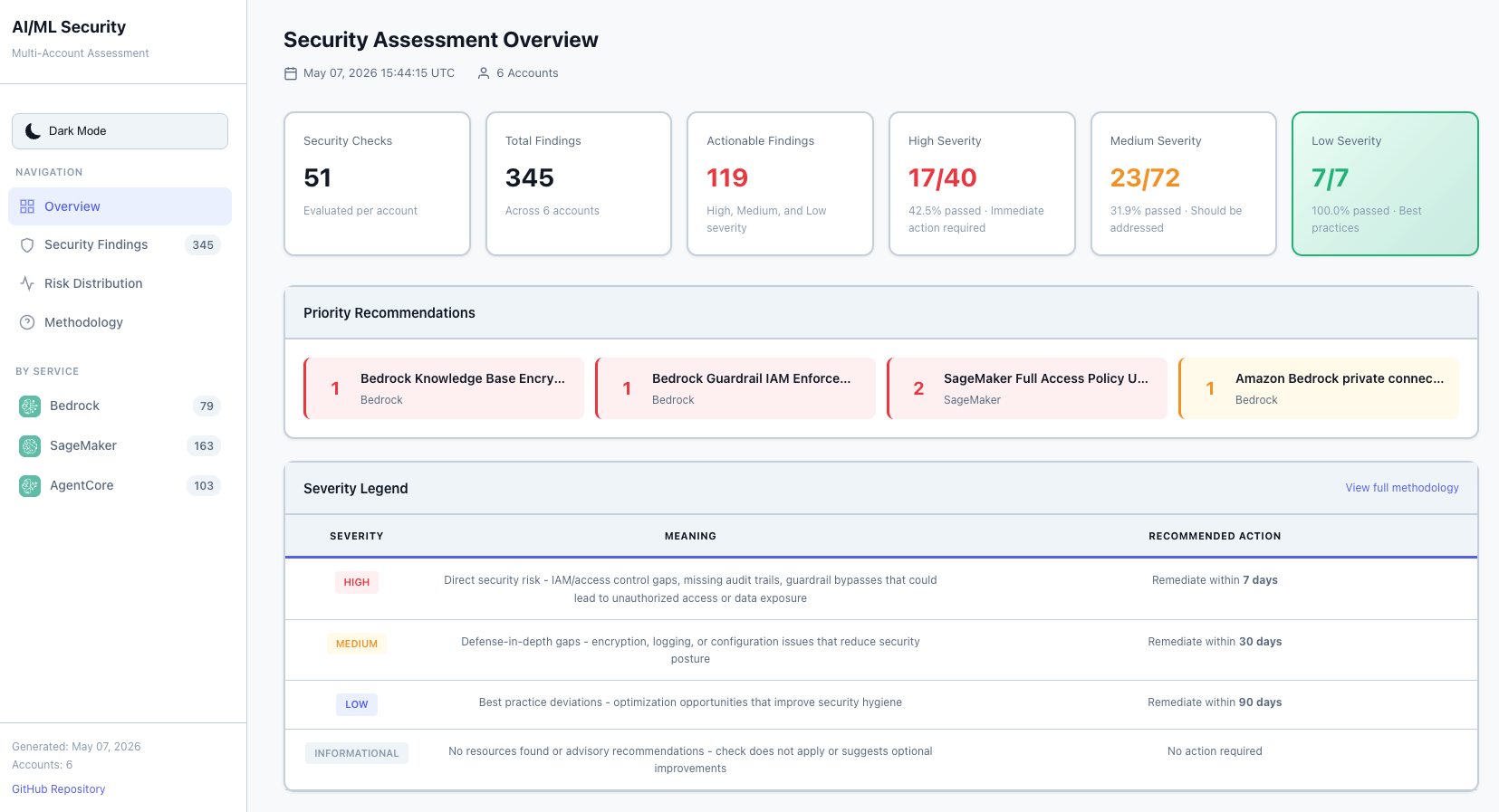
*Executive summary with severity counts and assessment-area breakdown*
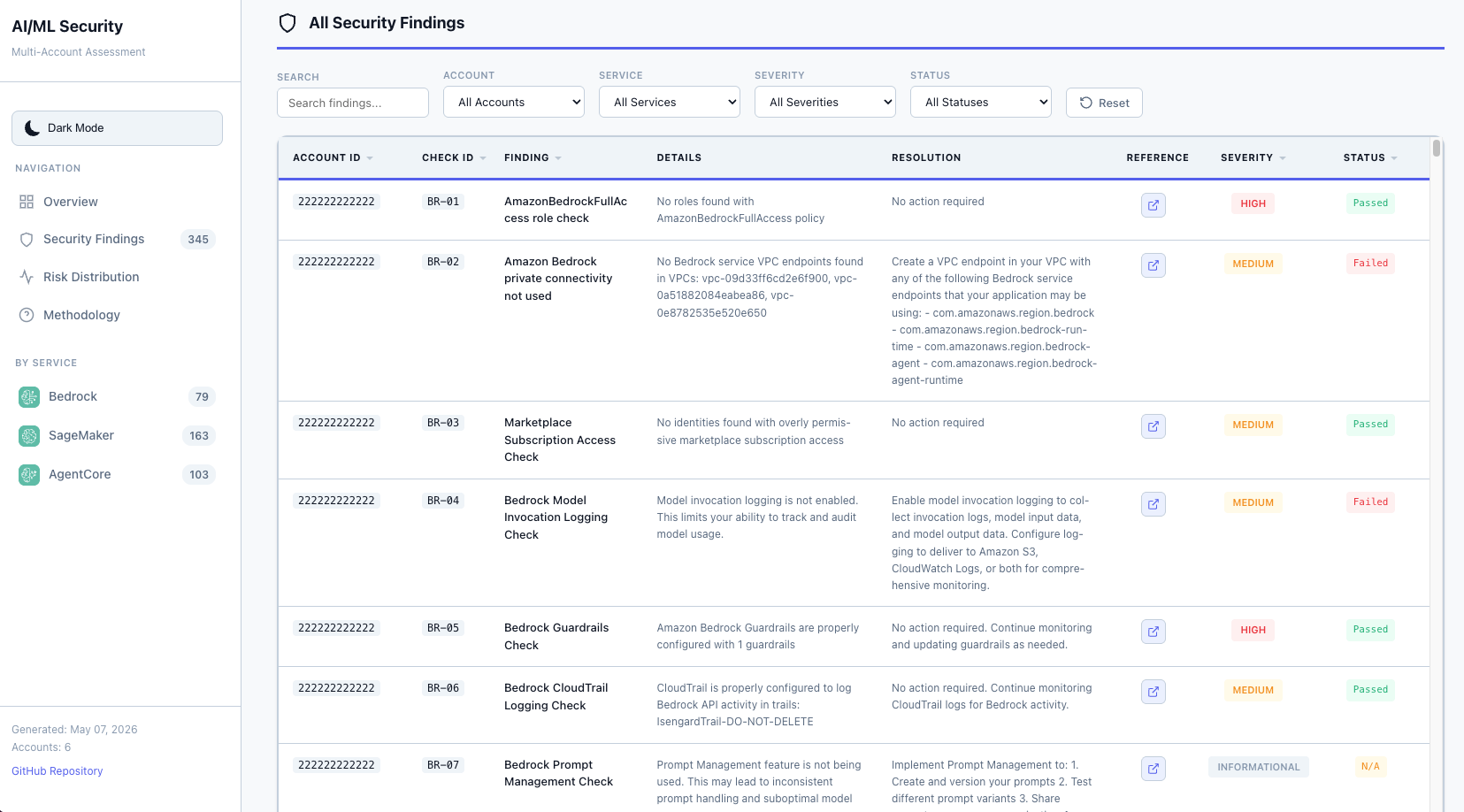
*Interactive findings table with filtering capabilities*
4. Rebuild the Changes Sample
The changes sample and the assessment-history golden saved answers are built from the two sample reports. After regenerating a sample report, run:
.venv/bin/python sample-reports/scripts/build_changes_sample.py
Review the diff under sample-reports/ and
tests/fixtures/assessment_history/golden/. --check verifies without writing.
Then refresh its screenshot with
./sample-reports/scripts/capture_changes_screenshot.py, which captures only
the changes page and doesn’t rewrite any report.
Documentation Best Practices
- Keep screenshots optimized: Target 200-300KB per image
- Use descriptive filenames:
dashboard-overview-light.png, notscreenshot1.png - Update both HTML and screenshots when making UI changes
- Test screenshots render correctly in GitHub’s markdown preview
- All screenshot tooling: Located in
sample-reports/for easy organization
Declaring Deployment Impact
Every releasable behavior or deployment change must update the root
CHANGELOG.md under Unreleased; a release does not need to be created for
every merged change. Use one or more of these deployment-impact categories:
- No deployment required — documentation, tests, examples, or CI-only changes.
- CodeBuild run required — deployable assessment code, dependencies, AWS SAM templates, state machine, buildspec, or multi-account report consolidator changed.
- Single-account infrastructure update required —
deployment/aiml-security-single-account.yamlchanged. - Multi-account member-role StackSet update required —
deployment/1-aiml-security-member-roles.yamlchanged. This update must complete before CodeBuild runs. - Multi-account central infrastructure update required —
deployment/2-aiml-security-codebuild.yamlchanged.
The changelog should list the exact changed deployment templates and give the
required order. When a release is pinned by tag or commit, it should also remind
users to update the GitHubBranch stack parameter. When a version is tagged,
move the accumulated entries into a dated version section and recreate an empty
Unreleased section. The end-user procedure and repository-diff fallback are documented in
Upgrading to a New Release.
CI/CD Workflows
GitHub Actions workflows run automatically to validate code quality and security on every pull request.
PR Checks
| Workflow | File | What It Checks |
|---|---|---|
| Python Code Quality | .github/workflows/python-lint.yml |
ruff check (lint) and ruff format --check (formatting) on changed .py files |
| Python Tests | .github/workflows/python-tests.yml |
Runs upstream tests, Responsible AI GRC tests, and report-pipeline tests in separate pytest sessions |
| CloudFormation Lint | .github/workflows/cfn-lint.yml |
Validates deployment and SAM templates with cfn-lint |
| SAM Validate & Build | .github/workflows/sam-validate.yml |
Runs sam validate --lint on both SAM templates and sam build on the single-account template |
| ASH Security Scan | .github/workflows/ash-security-scan.yml |
Scans changed files for secrets, dependency vulnerabilities, and IaC misconfigurations |
Additional workflows run post-merge or on schedule:
| Workflow | File | Trigger |
|---|---|---|
| ASH Full Repository Scan | .github/workflows/ash-full-repository-scan.yml |
Push to main, monthly schedule, manual |
| Labeler | .github/workflows/label.yml |
Auto-labels PRs by changed paths (bedrock, sagemaker, agentcore, deployment, docs) |
cfn-lint suppressions are configured in .cfnlintrc at the repository root for IAM actions not yet in cfn-lint’s database (for example, bedrock-agentcore actions).
Running Checks Locally
Before pushing, run these checks locally to catch issues early:
# Bootstrap or refresh the repository-local virtual environment
.venv/bin/pip install -r tests/requirements.txt \
  -r aiml-security-assessment/functions/security/agent_registry_assessments/requirements.txt \
  -r aiml-security-assessment/functions/security/agentcore_assessments/requirements.txt \
  -r aiml-security-assessment/functions/security/bedrock_assessments/requirements.txt \
  -r aiml-security-assessment/functions/security/cleanup_bucket/requirements.txt \
  -r aiml-security-assessment/functions/security/responsible_ai_grc_assessments/requirements.txt \
  -r aiml-security-assessment/functions/security/generate_consolidated_report/requirements.txt \
  -r aiml-security-assessment/functions/security/iam_permission_caching/requirements.txt \
  -r aiml-security-assessment/functions/security/owasp_assessments/requirements.txt \
  -r aiml-security-assessment/functions/security/resolve_regions/requirements.txt \
  -r aiml-security-assessment/functions/security/sagemaker_assessments/requirements.txt
.venv/bin/pip check

# Match CI by checking Python files changed relative to main
changed_py=$(git diff --name-only --diff-filter=ACMR origin/main...HEAD -- '*.py')
.venv/bin/ruff check $changed_py
.venv/bin/ruff format --check $changed_py

# Unit tests. tests/ is one session; the Responsible AI GRC and report-pipeline
# suites need their own sessions because they live outside tests/.
export AIML_ASSESSMENT_BUCKET_NAME=test-assessment-bucket
export AWS_DEFAULT_REGION=us-east-1
export AWS_ACCESS_KEY_ID=testing
export AWS_SECRET_ACCESS_KEY=testing

.venv/bin/python -m pytest tests/ -v --tb=short
.venv/bin/python -m pytest aiml-security-assessment/functions/security/responsible_ai_grc_tests/ -v --tb=short

(cd aiml-security-assessment/functions/security/generate_consolidated_report \
  && ../../../../.venv/bin/python -m pytest test_generate_report.py -v --tb=short)

# CloudFormation lint
.venv/bin/cfn-lint deployment/*.yaml \
  aiml-security-assessment/template.yaml \
  aiml-security-assessment/template-multi-account.yaml

# SAM validate and build
(cd aiml-security-assessment \
  && sam validate --template template.yaml --lint \
  && sam validate --template template-multi-account.yaml --lint \
  && sam build --template template.yaml \
  && sam build --template template-multi-account.yaml)
Support and Resources
Documentation
This developer guide provides the foundation for extending the AI/ML Security Assessment Framework. As you add new AI/ML services and security checks, please update this documentation to help future contributors understand and build upon your work.