EKS Overview
View EKS clusters and Kubernetes resources in the selected account and region scope. AWSops queries cloud and cluster resources read-only; registration stores app settings only.
Key Features
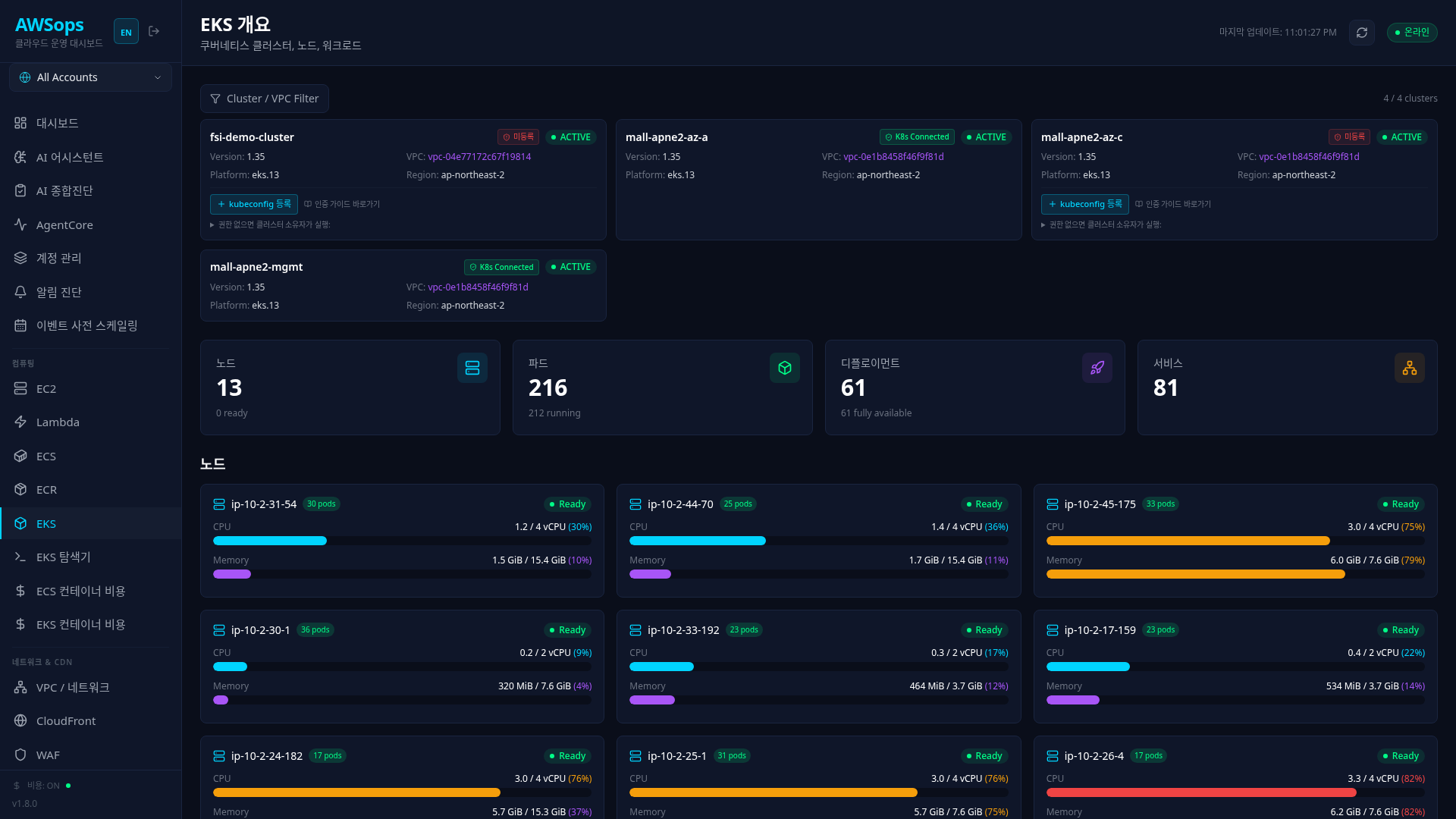
Account, Region, and Cluster Filters
Select accounts and regions in the top filter, then narrow by cluster or VPC. Multi-select is supported. Changes refresh the list and aggregates without registering another cluster. Account/region-qualified identities keep same-named clusters distinct.
:::info Observed scope Counts and charts describe successfully observed resources in the selected scope. Partial failures and query limits are disclosed and do not prove that unobserved resources are absent. All-region discovery currently covers configured regions and regions of registered clusters; narrow the selection to query a specific region. :::
Cluster Cards and Connection State
Cards show Cluster Name, Status, Kubernetes Version, Account, Region, VPC ID, and Platform Version. The Connected badge means a default entry path or saved authentication is configured; it does not validate saved credentials or guarantee reachability. Counts appear after live reads succeed. The Connected KPI counts clusters with successful live reads in the displayed scope.
Cross-Account Query Registration
Registration and unregistration are admin-only.
- Register and enable the target account in Accounts, configure its regions, and supply the external ID when its trust policy requires one. The usual target role is
AWSopsReadOnlyRole; it must be assumable by the web task and permitted to read EKS metadata. - Select the target account and region. For a member account, default metadata discovery and Kubernetes token signing both use that account's registered read-only role. Host-account clusters retain the web task role as their default identity. AWSops does not send the host task-role bearer to member clusters.
- The cluster owner runs only two commands for the applicable role:
aws eks create-access-entry --type STANDARDand a cluster-scopedAmazonEKSViewPolicyassociation (associate-access-policy). There is no kubeconfig, kubectl or RBAC step. View does not read Kubernetes Secrets. Do not attach Secrets-readableAmazonEKSAdminViewPolicyto this shared role. Access policies are additive, so if an AdminView association exists the owner must remove it withdisassociate-access-policy. Entries created from the earlier guide (groupawsops:eks-readonlyplus node-read RBAC) keep working; they are no longer required. Host clusters retain their existing Terraform permission configuration. - When an administrator opens the EKS page, the app verifies the registered role's Access Entry with
DescribeAccessEntryand lists verified, unregistered member clusters first, in an Access Entry verified callout above the cluster list. Nothing is registered automatically: the cluster is registered only when the administrator clicks Register for query, which directly verifies the selected cluster withDescribeClusterand checks the existing Access Entry. The app writes only the Aurora registration row; it never creates or changes Access Entries, policies or RBAC. Registration and detail navigation preserve account and region. A cluster an administrator unregisters stays unregistered until someone clicks Register for query again.
Optional read permissions: View does not allow Secrets. The OpenCost API proxy separately needs GET on services/proxy limited to its service in namespace opencost; K8sGPT separately needs a read binding for results in result.core.k8sgpt.ai. Bind these to a Kubernetes group the owner adds to the Access Entry. The owner adds only the permissions required for enabled features; the app does not apply them.
Diagnosis and ENI prerequisites: CloudWatch diagnostics require cloudwatch:GetMetricData and cloudwatch:ListMetrics on the target read role. Container Insights metrics must actually be published. The ENI panel needs the selected account/region in the inventory collection scope and a completed EC2 inventory collection. Permission failures, absent metric series, and uncollected inventory are different states; AWSops does not grant permissions or install agents automatically.
The owner runs displayed onboarding commands; the app does not run them. make configure → eks.tf remains the host-account Terraform provisioning path. Once the owner prepares the Access Entry, a member-account cluster shows as verified on the administrator's EKS page and is registered when the administrator clicks Register for query, independently of the host EventBridge observer. Host-account clusters outside the default region still require manual query registration.
Explicit Authentication Options
- ServiceAccount token: use a read-only SA identity authorized inside the target cluster. Its Kubernetes authentication does not require an IAM Access Entry, but target-account metadata discovery and API-server connectivity are still required.
- AssumeRole: use a role the web task can assume and the target Kubernetes API authorizes. For a member cluster, the role ARN must belong to that same member account; a host/other-account role is rejected. Supply the external ID if required. The default deployment grants assumption of
AWSopsReadOnlyRole; other roles need separate operator authorization.
Registration Errors
400 indicates an invalid ID, selector or auth body; 413 indicates an oversized body. 404 means the selected cluster was not found. 409 means the required Access Entry is absent or could not be verified. 403 can mean the account/region or role identity is not allowed. 503 indicates unavailable discovery or storage. These errors do not establish a successful empty fleet. Check the displayed target and give its onboarding guide to the cluster owner.
Live Resources and Detail Pages
- Nodes / Pods / Deployments / Services open their respective scoped resource pages.
- Node panels show capacity, allocatable resources, requests, and Pod information; request ratios are reservations, not measured CPU/memory utilization.
- Because the View policy has no
nodesread, member-cluster node lists are built from EC2/node-group APIs (DescribeInstances,ListNodegroups/DescribeNodegroup,DescribeInstanceTypes) with the registered member read role and labeled EC2/node-group view. They carry no kubelet status, labels or taints; allocatable shows instance-type capacity (an upper bound), and Fargate nodes are excluded. Ready is shown as "EC2 running N · Ready unknown", and these nodes are excluded from the reserved-% calculation. If only the node read fails, Pods, Deployments and Services still show. - ENI details use scoped EC2 inventory and instance-level CloudWatch traffic when available.
- Pod-status, namespace, instance-type charts and Warning Events summarize observed data. Unreachable clusters remain disclosed.
- A connected card's title opens the cluster detail view. OpenCost status/configuration and resource requests retain the cluster identity.
:::tip Access and data availability A configured badge alone does not prove a valid token, read policy, or network path. Use the actual live-read result and failure notice. For member defaults, grant the registered member role access; do not repair the failure by broadening the host role's cluster access. :::