EKS Explorer
A page for exploring Kubernetes resources with a K9s-style terminal UI.
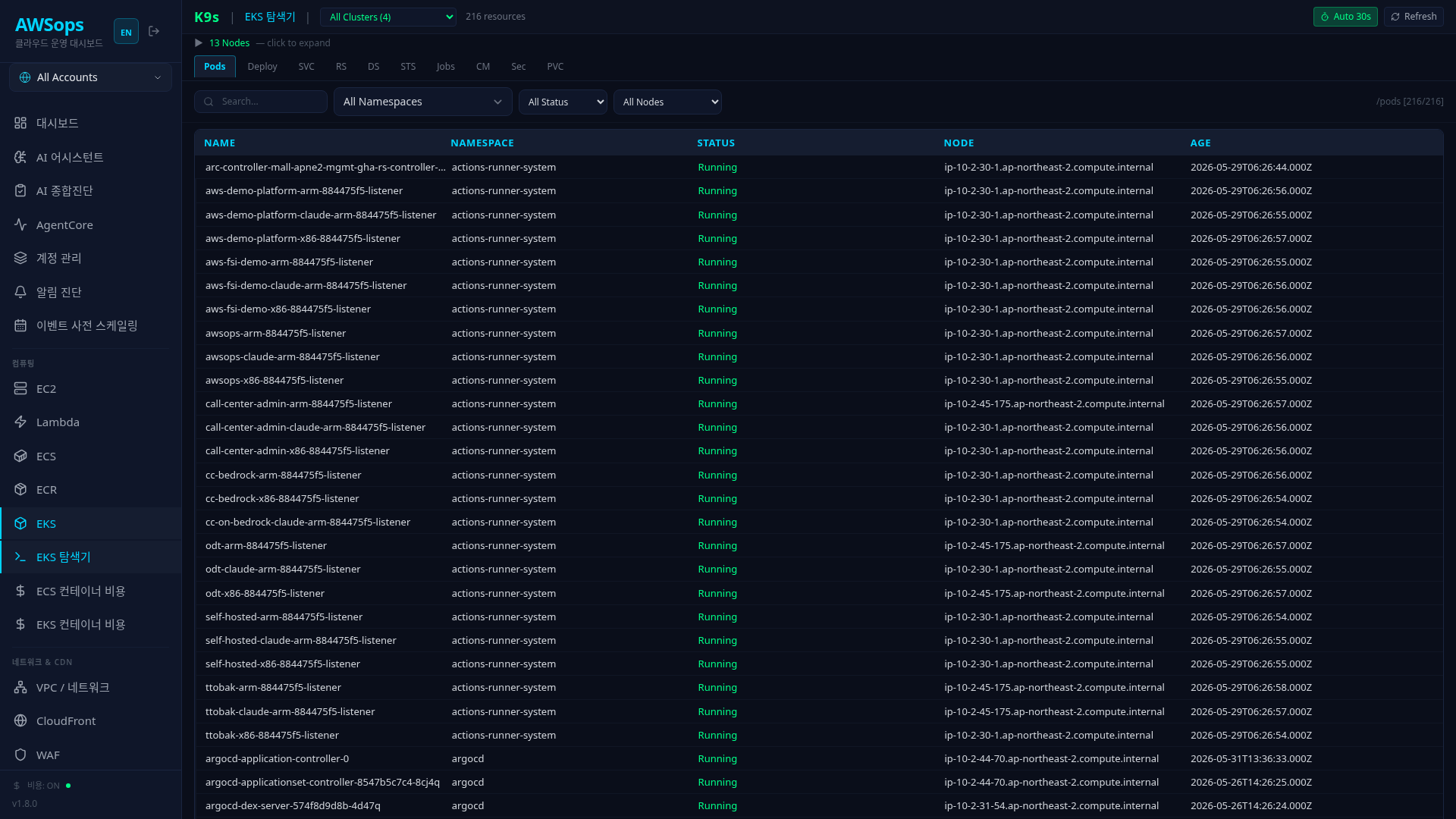
:::info Selected scope and observed results The top account/region filter applies to this page. Totals count resources actually queried in the selected registered-cluster scope, not every AWS resource. Same-named cluster options include account and region. Partial failures or query-limit notices mean results may be incomplete; narrow the scope and retry. :::
Key Features
Top Bar
- K9s | Explorer: Current page indicator
- Cluster selection: Select cluster from dropdown
- Resource count: Number of currently displayed resources
- Auto Refresh: 30-second auto-refresh toggle
- Refresh: Manual refresh button
Node Header (Collapse/Expand)
Click to display node list and resource usage:
- CPU/Memory usage bar per node
- Node count display
Resource Tabs
Switch between 10 types of Kubernetes resources via tabs:
| Tab | Resource | Key Columns |
|---|---|---|
| Pods | Pod | NAME, NAMESPACE, STATUS, NODE, AGE |
| Deploy | Deployment | NAME, NAMESPACE, DESIRED, AVAILABLE, READY |
| SVC | Service | NAME, NAMESPACE, TYPE, CLUSTER-IP, AGE |
| RS | ReplicaSet | NAME, NAMESPACE, DESIRED, READY, AVAILABLE |
| DS | DaemonSet | NAME, NAMESPACE, DESIRED, CURRENT, READY |
| STS | StatefulSet | NAME, NAMESPACE, DESIRED, READY |
| Jobs | Job | NAME, NAMESPACE, ACTIVE, SUCCEEDED, FAILED |
| CM | ConfigMap | NAME, NAMESPACE, AGE |
| Sec | Secret | NAME, NAMESPACE, TYPE, AGE |
| PVC | PersistentVolumeClaim | NAME, NAMESPACE, STATUS, STORAGECLASS, CAPACITY |
Filters
- Search: Text search (all fields)
- Namespace: Namespace filter
- Status: Status filter (Running, Pending, etc.)
- Node: Node filter (Pods tab)
- Clear: Reset filters
Pagination
- Rows per page: 25, 50, 100, 200
- Page navigation: Prev / Next
Detail Panel
Click a resource to open the detail panel on the right:
- Detailed information in YAML format
- Customized information display per resource type
Status Bar
- Keyboard shortcut guide (Tab, Enter, Esc, /)
- Auto-refresh status display
- Current resource type and namespace
How to Use
- Click Compute > K8s > Explorer in the sidebar
- Select a cluster at the top
- Click tabs to switch between resource types
- Use search and filters to find specific resources
- Click a resource to view detailed information
Keyboard Shortcuts
| Key | Action |
|---|---|
| Tab | Switch resource tabs |
| Enter | View selected resource details |
| Esc | Close detail panel |
| / | Focus search box |
Tips
:::tip Namespace Filter Usage Use the namespace dropdown to view only resources in a specific namespace. You can exclude system namespaces (kube-system) and view only application namespaces. :::
:::tip Auto Refresh Enable Auto 30s during operational monitoring to automatically refresh data every 30 seconds. :::
:::info AI Analysis You can analyze with the AI Assistant using queries like "kube-system namespace Pod list", "Find Pending status Pods", "Analyze Pods on a specific node", etc. :::
Related Pages
- EKS Overview - Cluster view in the selected scope
- EKS Pods - Pod detailed dashboard
- EKS Deployments - Deployment details
- EKS Services - Service details