EKS Services
A page for viewing the list and network configuration of Kubernetes Services.
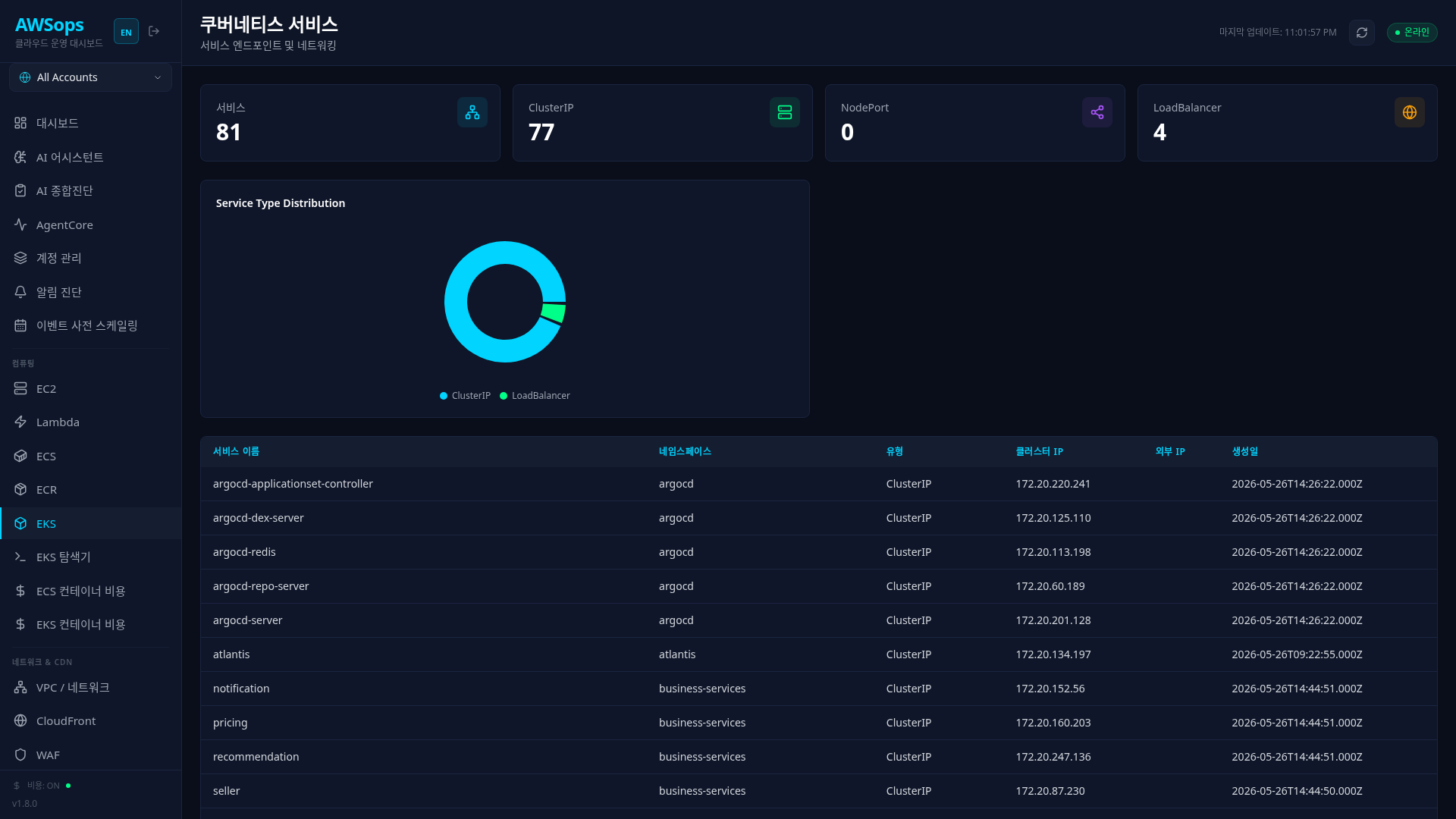
:::info Selected scope and observed results The top account/region filter applies to this page. Totals count resources actually queried in the selected registered-cluster scope, not every AWS resource. Same-named cluster options include account and region. Partial failures or query-limit notices mean results may be incomplete; narrow the scope and retry. :::
Key Features
Stats Cards
- Total Services: Observed Service count in the selected scope (cyan)
- ClusterIP: ClusterIP type service count (green)
- NodePort: NodePort type service count (purple)
- LoadBalancer: LoadBalancer type service count (orange)
Service Type Distribution Chart
Visualize service type distribution with a pie chart:
- ClusterIP, NodePort, LoadBalancer, Other (ExternalName, etc.)
Service Resources Charts
Two top-15 bar charts of per-service resource requests:
- CPU per Service (millicores) / Memory per Service (MiB) — each Service's selector is joined to Running pods in the same (cluster, namespace) and their scheduler-effective requests (max of app-container sum and init-container max, plus overhead) are summed
- Values are requests (reservations), not live usage (stated in the caption)
- Services without a selector (ExternalName / manual Endpoints) or with no matching Running pods are excluded rather than charted as 0, and a cluster whose pods fetch failed is excluded from the charts with its name shown in the caption
Service Table
| Column | Description |
|---|---|
| Name | Service name |
| Namespace | Namespace |
| Type | Service type |
| Cluster IP | Cluster internal IP |
| External IP | External IP (LoadBalancer type) |
| Created | Creation time |
Understanding Service Types
ClusterIP (Default)
- Accessible only within the cluster
- Used for internal service-to-service communication
- Examples: Backend API, Database
NodePort
- Externally accessible via a specific port on all nodes
- Port range: 30000-32767
- Primarily used in development/test environments
LoadBalancer
- Automatically creates cloud load balancer (AWS ELB/NLB)
- Routes external traffic to the service
- Used for production external services
ExternalName
- Maps external DNS names to internal cluster names
- Creates CNAME records
How to Use
- Click Compute > K8s > Services in the sidebar
- Review service type distribution from the stats cards
- Check External IP for LoadBalancer services
- Check Cluster IP for each service in the table
AWS Integration
LoadBalancer Type + AWS
- AWS ELB/NLB automatically provisioned on Service creation
- Control settings via Annotations:
service.beta.kubernetes.io/aws-load-balancer-type: nlbservice.beta.kubernetes.io/aws-load-balancer-internal: "true"
Cost Considerations
- LoadBalancer type incurs AWS ELB cost for each service
- Use single ALB for multiple services: AWS Load Balancer Controller + Ingress
Tips
:::tip LoadBalancer External IP Check
If External IP is <pending>:
- AWS Load Balancer is being provisioned
- Check for missing subnet tags
- Check IAM permissions :::
:::tip ClusterIP Service Access ClusterIP services cannot be directly accessed from outside the cluster. Use LoadBalancer or Ingress for external access. :::
:::info AI Analysis You can analyze with the AI Assistant using queries like "Service list", "LoadBalancer service status", "Find LoadBalancers without External IP", etc. :::
Related Pages
- EKS Overview - Cluster view in the selected scope
- EKS Deployments - Deployments connected to Services
- VPC - Network configuration and load balancers
- EKS Explorer - Ingress details