CloudTrail
A page for viewing CloudTrail trails and events that record API activity in your AWS account.
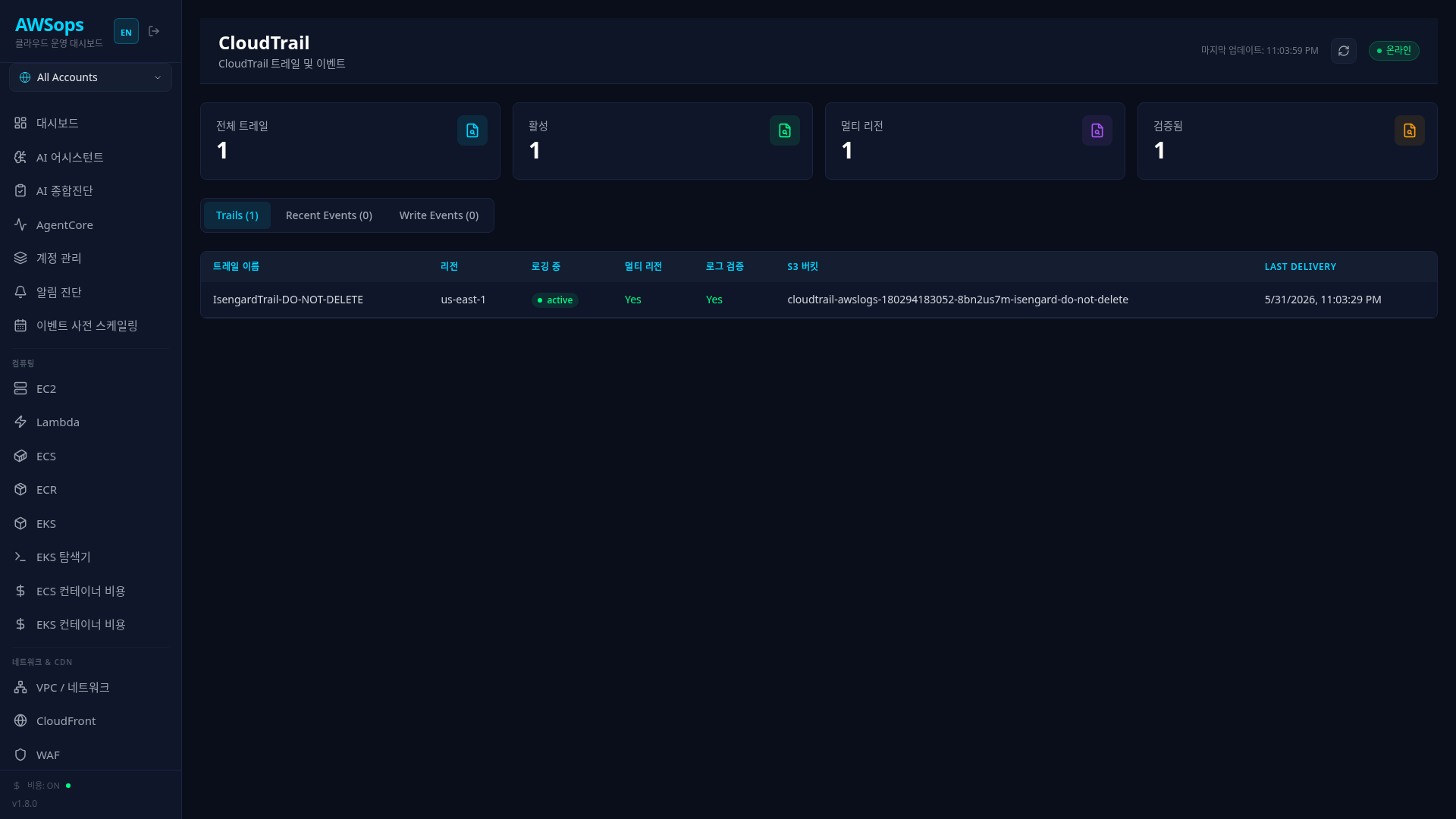
Key Features
Trail Summary
- Total Trails: Total number of trails
- Active: Number of trails with logging enabled
- Multi-Region: Number of multi-region trails
- Log Validated: Number of trails with log file validation enabled
Tab Structure
| Tab | Content |
|---|---|
| Trails | Trail list, configuration, S3 bucket — the Last Delivery (UTC) column is the most recent SUCCESSFUL delivery time (a stale success can persist through a current failure — the failure signal is latest_delivery_error in the detail panel) |
| Recent Events | Recent API events (all events) |
| Write Events | Write events only (resource change audit) |
:::info Lazy Loading The Events and Write Events tabs load data only when clicked. This optimization prevents CloudFront timeout (30 seconds). :::
Trail Details
Click on a trail row to view in the slide panel:
- Identity: Name, ARN, account, region, home region
- Logging: Logging status, multi-region/organization trail, log file validation, start/stop logging times, and the last delivery time AND delivery error for S3, CloudWatch Logs, and digest each (
latest_delivery_erroretc. — the delivery-FAILURE signal lives here) - Storage: S3 bucket/prefix, log group, CW Logs IAM role
- Security: KMS key, SNS topic, event/insight selectors
- Tags: Resource tags
Event Details
Click on an event row to view:
- Event: ID, name, source, time, user (Access Key is admin-only)
- Resource: Resource type and name
- Raw Event (admin only): Projected event data in JSON format — userIdentity is reduced to selected identity attributes and credential-family keys are masked by a deny-list (defense-in-depth, not a completeness guarantee — review before copying out)
How to Use
- Trails Tab: Check trail configuration and status
- Events Tab: View recent API activity (Read + Write)
- Write Events Tab: Filter for resource change events for audit
- View Details: Click a row to view full information
:::tip Read vs Write Events
- Read: Query operations like DescribeInstances, GetObject
- Write: Change operations like CreateInstance, DeleteBucket Focus on the Write Events tab for security audits. :::
Usage Tips
Security Best Practices Check
- Multi-Region: Required to log activity across all regions
- Log Validation: Detects log file tampering
- KMS Encryption: Encrypts log files stored in S3
Detecting Suspicious Activity
Check the following in the Write Events tab:
- API calls at unusual times
- Unknown usernames (admins can additionally check Access Keys)
- Large number of delete (Delete*) events
- IAM-related change events
CloudWatch Logs Integration
If a CloudWatch Log Group is configured in trail details, you can use real-time alerts and metric filters.
:::info Event Retention Period CloudTrail event history is retained for 90 days by default. Create a trail to store events in S3 for long-term retention. :::
AI Analysis Tips
Example questions using the Monitoring Gateway in AI Assistant:
- "Analyze security-related events that occurred today"
- "Show recent activity history for a specific user"
- "Find suspicious patterns among delete events"
- "Check if this trail configuration follows security best practices"
Related Pages
- CloudWatch - Alarm management
- IAM - User and role management
- Compliance - CIS benchmarks