CloudFront
A page to monitor and manage Amazon CloudFront CDN distributions.
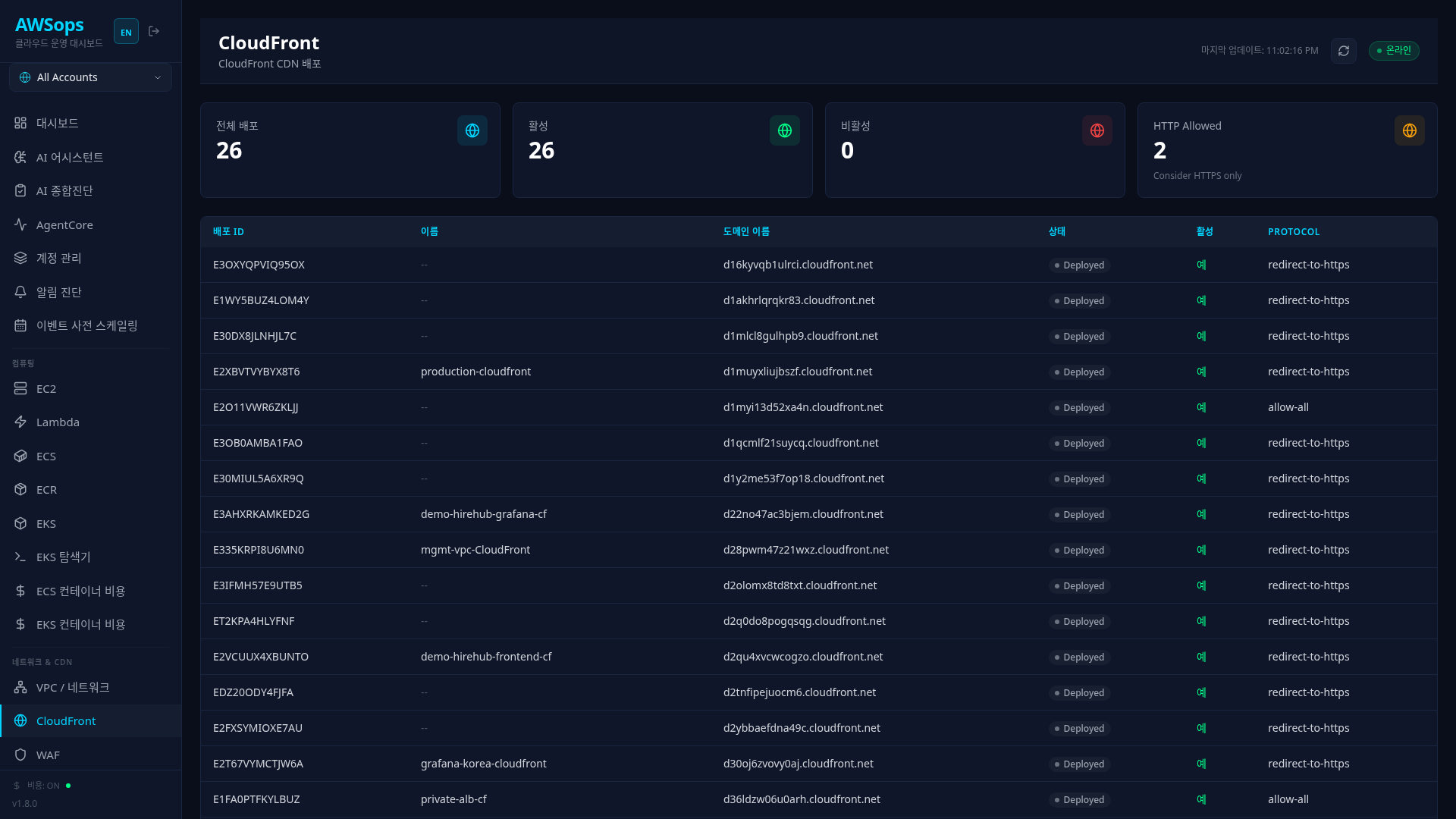
Key Features
Summary Statistics
View overall CloudFront distribution status in the top cards:
| Metric | Description |
|---|---|
| Distributions | Total number of distributions |
| Enabled | Number of enabled distributions |
| Disabled | Number of disabled distributions |
| HTTP Allowed | Distributions allowing HTTP (security warning) |
:::info HTTP Allowed Warning When the HTTP Allowed card appears in orange, HTTPS-only configuration is recommended. A "Consider HTTPS only" message is displayed. :::
Distribution List
View all CloudFront distributions in the table:
- Distribution ID: Unique identifier
- Name: Distribution name (tag-based)
- Domain: CloudFront domain (xxx.cloudfront.net)
- Status: Deployed, InProgress, etc.
- Enabled: Enabled status
- Protocol: Viewer Protocol Policy
Detail Panel
Click a distribution row to view detailed information:
Distribution Section
- ID, ARN, Domain
- HTTP Version, IPv6 support
- Price Class (PriceClass_All, PriceClass_100, etc.)
- WAF ACL association status
Origins Section
- Each origin's ID and Domain
- S3, ALB, Custom Origin identification
Aliases (CNAMEs) Section
- List of alternate domain names
Tags Section
- Resource tag key-value pairs
How to Use
Check Distribution Status
- Navigate to the CloudFront page
- Review overall status in the top summary cards
- Find specific distributions in the table
- Check deployment status in the Status column
View Distribution Details
- Click a distribution row in the table
- The right slide panel opens
- Review detailed information by section:
- Distribution: Basic settings
- Origins: Origin server configuration
- Aliases: CNAME settings
- Tags: Resource tags
Review Security Settings
- Check the HTTP Allowed card (0 is safe)
- Verify Protocol in distribution details
- Check WAF ACL association (for enhanced security)
Tips
:::tip HTTPS Configuration Recommended All CloudFront distributions should use redirect-to-https or https-only Viewer Protocol Policy. The card turns green when HTTP Allowed reaches 0. :::
:::tip WAF Integration For production distributions, associate a WAF Web ACL to block web attacks (SQL Injection, XSS, etc.). Check the association status in the WAF ACL field of the detail panel. :::
:::info Price Class Optimization Pricing and performance vary by Price Class:
- PriceClass_All: All edge locations worldwide (best performance, highest cost)
- PriceClass_200: Most regions (balanced)
- PriceClass_100: North America/Europe only (lowest cost) :::