Custom Agents
Configure custom personas, reusable instructions and read-only tool permissions at /customization. Open Integrations → Agents & Skills to reach this page.
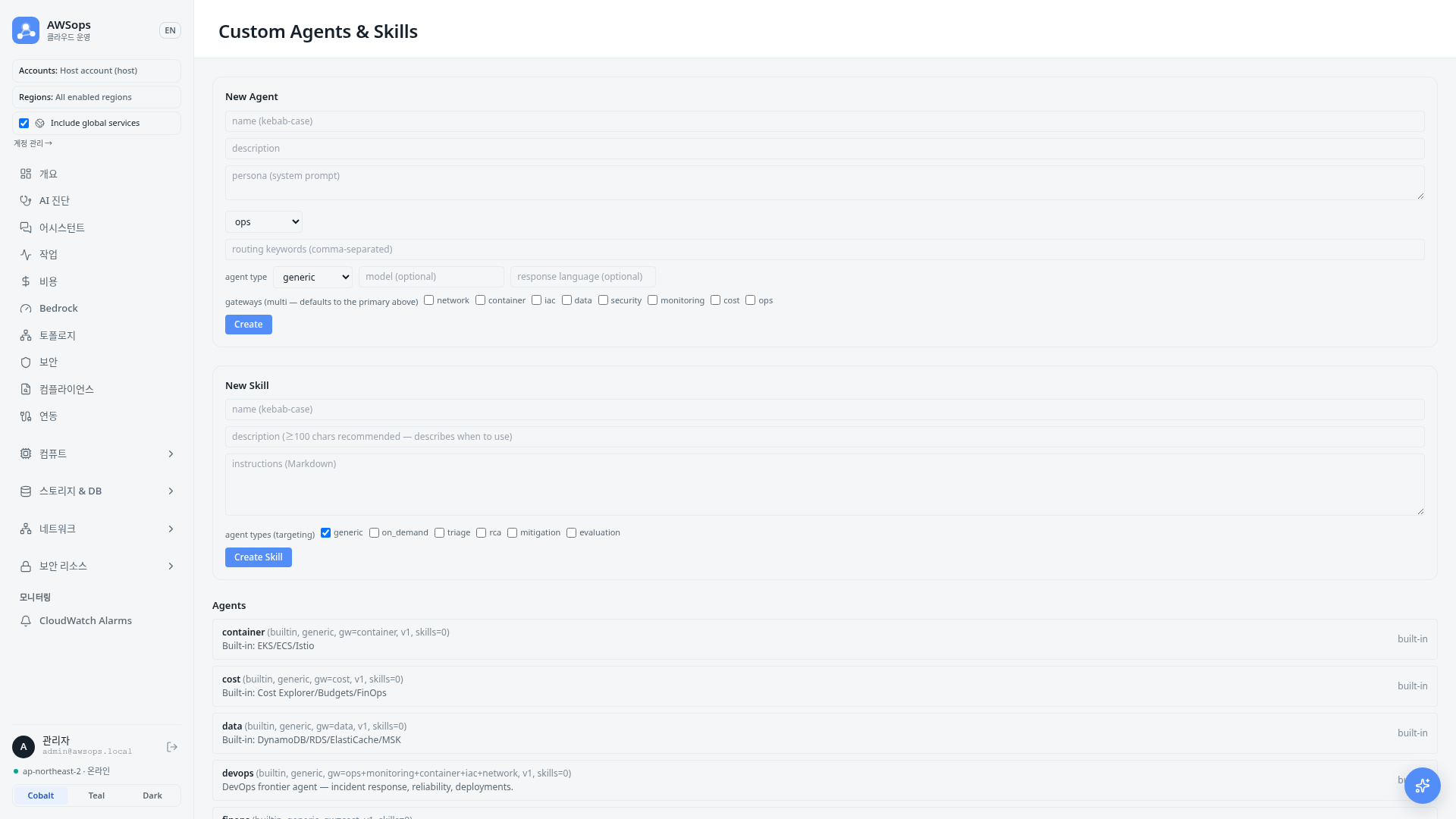
:::info Admin only Catalog writes require the Cognito admin group or the configured SSM admin allowlist. Connector credentials stay server-side and are not shown after saving. :::
Register and attach
- In New Agent, enter a kebab-case name, description, persona, gateway and routing keywords. Optional agent types are
generic,on_demand,triage,rca,mitigationandevaluation; choosing a type does not enable remediation or autonomous execution. - Names matching built-in routing keys, such as
ops,security,observability,code, orauto, are reserved. Existing conflicting custom rows remain stored but cannot shadow built-in routing. Create a nonreserved name and update its bindings and account membership. - New Skill creates instruction-only skills. To declare tool grants, an admin uses
POST /api/customizationwithkind: "skill"andtoolAllowlist. A grant such asiam-mcp-target___list_usersmust belong to the selected gateway. A bare name is accepted only when unique there; unknown, ambiguous and foreign-target names grant nothing. - Attach a skill through the existing admin API:
PUT /api/customizationwith{"op":"attach","agentId":1,"skillId":2,"ord":0}, replacing the example IDs with catalog IDs. Selecting a skill in Agent Space does not attach it. - Toggle new or edited items on in the Agents / Skills lists; saves start them disabled. Built-in rows cannot be toggled here.
- Save the account's Agent Space with the intended agents and integrations. A confirmed missing space preserves legacy global membership; after creating a space, only its selected custom agents qualify. Its skill selection is stored metadata, not a runtime permission control. Runtime instructions come from enabled, attached skills.
Gateway choices are network, container, iac, data, security, monitoring, cost, ops, and observability. New Skill also offers agent types (targeting) checkboxes. In Agent Space, edit the comma-separated Tool allowlist (account cap) and click Save Agent Space; each successful save increments its version. During loading or a failed policy read the form is disabled, previously loaded values remain visible, and Retry policy load must succeed before saving.
Tool restrictions and revocation
The account tool allowlist is a ceiling on custom-agent grants. An empty account list means no account cap; a nonempty cap with no eligible intersection means deny-all. Built-in agents are independent of custom policy.
Legacy gateway inheritance applies only when the agent has no restriction history, no account cap and no integration tool grant. A cap cannot create tool grants for an instruction-only skill. An instruction-only agent with an integration grant receives only eligible integration tools, not the whole gateway catalog. Integration tools use exact names, cannot grant gateway-qualified tools, and remain within their server/credential boundary.
Once a bound skill declares a nonempty tool list, the agent retains that policy history. Disabling the skill, editing its list to [], detaching it or deleting it after detachment cannot restore unrestricted gateway reads. The persona and instructions can still work with no tools. To restore access, attach or update an explicitly scoped skill, enable it, and confirm that its grants intersect the account cap. Clearing lists is not a reset mechanism.
Data-source endpoints, credentials and schema refresh are managed in the Integrations hub. The advanced registry contains legacy integration kinds; its presence does not authorize ungoverned BYO-MCP or frozen transports. The administrator-only custom_mcp integration is a governed path, used within per-account enablement and its exposed-tool ceiling. Official presets remain gated, ClickHouse stdio remains frozen, and READ_WRITE metadata is proposal-only. No registration changes those gates.
Known tools for multiple gateways may share a skill; each attached agent must retain an effective grant in its own gateway. Unknown or ambiguous names and bindings with no effective grant are rejected before writing (400); unavailable validation returns 503. Instruction-only [] remains valid. Restricted agents cannot grant the bare vendor tools of frozen ClickHouse stdio: reattaching a skill cannot restore them. Keep CLICKHOUSE_OFFICIAL_MCP off; this catalog covers the gateway/Lambda path only.
Availability and rollout
GET /api/customizationreturns HTTP 503 if its policy read fails. Retry after database availability is restored; an error is not an empty or unrestricted configuration.- An unavailable or disabled explicit custom chat pin returns an HTTP 200 SSE guide without invoking a substitute. Automatic policy failure uses independent built-in routing with a visible, saved notice, including an Assistant fallback. Built-in pins remain usable in basic mode; product help bypasses custom selection when hybrid routing is enabled.
- Apply
01M2K0BTQ4P4QHHFHR44ZK1YW6_agent_tool_policy_history.sqlthrough the reviewed standalone migration flow before the updated web reader, then deploy the agent runtime through the existing release process. Automatic Web migration rejects its ALTER/trigger statements; do not bypass that gate. Review existing names and saved tool lists. The migration backfills current bindings, including disabled restrictive skills; it cannot recover restrictions deleted before migration. Verify those older records manually. - An empty configured result is encoded fail-closed for both old and new exact-match runtimes. Source merge alone is not evidence that the migration or runtime has been deployed. AWS mutation, autonomy and connector write flags remain unchanged.
Related pages
- Datasource Explorer — explore connected observability sources
- AI Assistant — use the configured assistant