AI Assistant
The AI Assistant is powered by Amazon Bedrock AgentCore, enabling you to analyze and manage AWS infrastructure using natural language.
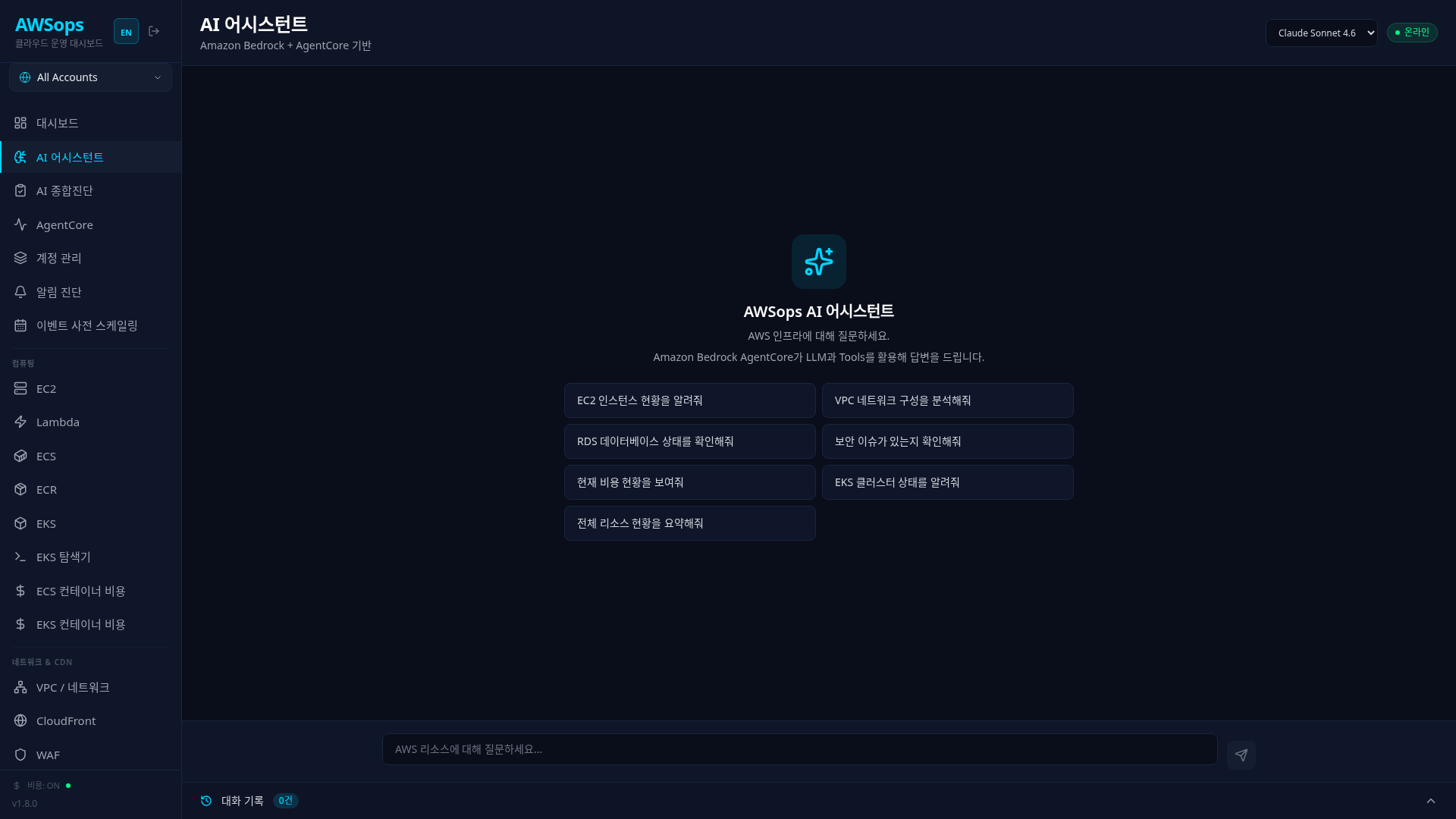
Architecture
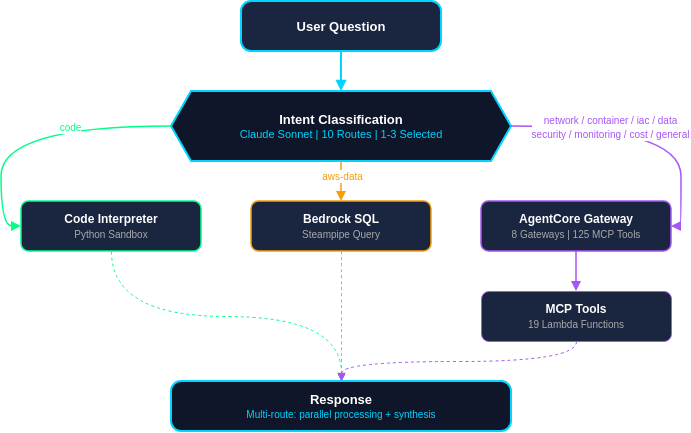
11-Route Classification
The AI Assistant analyzes questions and automatically routes them to the most appropriate destination.
Routing Table
| Priority | Route | Gateway | Tools | Description |
|---|---|---|---|---|
| 1 | code | - | - | Python code execution, calculations, visualization |
| 2 | network | Network | 17 | VPC, TGW, VPN, Flow Logs, Reachability |
| 3 | container | Container | 24 | EKS, ECS, Istio troubleshooting |
| 4 | iac | IaC | 12 | CDK, CloudFormation, Terraform |
| 5 | data | Data | 24 | DynamoDB, RDS, ElastiCache, MSK |
| 6 | security | Security | 14 | IAM, policy simulation, security summary |
| 7 | monitoring | Monitoring | 16 | CloudWatch, CloudTrail |
| 8 | cost | Cost | 9 | Cost analysis, forecasting, budgets |
| 9 | datasource | - | 7 DS | External observability (Prometheus/Loki/Tempo/ClickHouse/Jaeger/Dynatrace/Datadog) — natural language → query |
| 10 | aws-data | Ops | SQL | Resource lists/status (Steampipe SQL) |
| 11 | general | Ops | 9 | General AWS questions, documentation search |
Route Details
1. code - Code Interpreter
Used when Python code execution is required.
Example questions:
- "Visualize AWS cost data as a chart"
- "Calculate random number statistics"
- "Create code to parse JSON data"
2. network - Network Gateway
Used for VPC networking, Transit Gateway, VPN, and traffic analysis.
Key tools:
list_vpcs,get_vpc_network_details,describe_networklist_transit_gateways,get_tgw_routes,get_all_tgw_routeslist_vpn_connections,list_network_firewallsanalyze_reachability,query_flow_logs
Example questions:
- "Analyze TGW routes"
- "Diagnose VPN connection status"
- "Check if EC2 instances can communicate"
- "Query denied traffic from VPC Flow Logs"
3. container - Container Gateway
Used for EKS, ECS, and Istio service mesh troubleshooting.
Key tools:
list_eks_clusters,get_eks_vpc_config,get_eks_insightsecs_resource_management,ecs_troubleshooting_toolistio_overview,list_virtual_services,check_sidecar_injection
Example questions:
- "Diagnose EKS cluster status"
- "Check if ECS service is healthy"
- "Check Istio sidecar injection status"
4. iac - IaC Gateway
Used for Infrastructure as Code related tasks.
Key tools:
validate_cloudformation_template,check_cloudformation_template_compliancesearch_cdk_documentation,cdk_best_practicesSearchAwsProviderDocs,terraform_best_practices
Example questions:
- "Tell me CDK best practices"
- "Analyze CloudFormation stack error"
- "Search for Terraform VPC module"
5. data - Data Gateway
Used for AWS database and streaming services.
Key tools:
list_tables,describe_table,query_table,dynamodb_data_modelinglist_db_instances,describe_db_instance,execute_sqllist_cache_clusters,elasticache_best_practiceslist_clusters(MSK),msk_best_practices
Example questions:
- "Show DynamoDB table details"
- "Check RDS instance status"
- "Tell me ElastiCache best practices"
6. security - Security Gateway
Used for IAM and security-related analysis.
Key tools:
list_users,list_roles,list_policieslist_access_keys,simulate_principal_policyget_account_security_summary
Example questions:
- "Show IAM user list with Access Key status"
- "Simulate if this role can access S3"
- "Give me an account security summary"
7. monitoring - Monitoring Gateway
Used for CloudWatch and CloudTrail analysis.
Key tools:
get_metric_data,analyze_metric,get_active_alarmsdescribe_log_groups,execute_log_insights_querylookup_events,lake_query
Example questions:
- "Show EC2 CPU usage trends"
- "Query recent IAM events from CloudTrail"
- "Show active alarm list"
8. cost - Cost Gateway
Used for cost analysis and optimization.
Key tools:
get_cost_and_usage,get_cost_and_usage_comparisonsget_cost_forecast,get_pricinglist_budgets
Example questions:
- "Analyze this month's costs"
- "Compare costs by service"
- "Forecast next month's costs"
9. datasource - External observability (natural language → query)
Used for questions about connected external observability platforms (Prometheus/Loki/Tempo/ClickHouse/Jaeger/Dynatrace/Datadog).
How it works:
- Claude converts the natural-language question into the platform's query language (PromQL/LogQL/TraceQL/SQL)
- Runs the query against datasources that pass the SSRF allowlist
- Analyzes the result and responds
Example questions:
- "Show the 5xx trend for the payment service" (Prometheus)
- "Find error logs in the last hour" (Loki)
- "Analyze slow traces" (Tempo/Jaeger)
10. aws-data - Bedrock + Steampipe SQL
Used for resource lists, status, and count queries.
Processing flow:
- Claude Sonnet generates SQL from the question
- Query executes directly on Steampipe pg Pool
- Bedrock analyzes results and generates response
Example questions:
- "Show EC2 instance list"
- "Check how many S3 buckets we have"
- "Analyze VPC network configuration"
- "Summarize all resources"
11. general - Ops Gateway
Used for general AWS questions, documentation search, and best practices.
Key tools:
search_documentation,read_documentationrecommend,list_regions,get_regional_availability
Example questions:
- "Check if this service is available in Seoul region"
- "What's the difference between ECS and EKS?"
- "Recommend a serverless architecture"
Multi-Route
When a single question spans multiple domains, it's classified into up to 3 routes for parallel processing.
Examples:
"Analyze VPC security groups and costs"
→ ["network", "cost"]

"Do a security check and verify IAM users"
→ ["security"]
:::info Multi-Route Response During multi-route processing, responses from each Gateway are synthesized into a single unified answer. :::
SSE Streaming
Responses are streamed via Server-Sent Events (SSE).
Progress Indicator
Analyzing question...
→ Calling Network Gateway...
→ Generating response...
Streaming Events
| Event | Description | Data |
|---|---|---|
status | Progress status messages | { step, message } |
chunk | Real-time text streaming | { delta: string } |
done | Complete response data | { content, route, usedTools, ... } |
error | Error messages | { message } |
Streaming Modes
Three streaming modes are automatically selected based on the response path:
| Mode | Applied Path | Method |
|---|---|---|
| Real Streaming | Multi-route synthesis | Bedrock Converse API — token-level immediate delivery |
| Simulated Streaming | Single Gateway response | 50-char chunks + 15ms delay — typing effect |
| Direct Streaming | aws-data (Steampipe+Bedrock) | Bedrock native streaming |
:::info Multi-Route Synthesis Streaming
When synthesizing results from 2-3 parallel routes, the Bedrock Converse Stream API (ConverseStreamCommand) streams the synthesis process in real-time. Users can see the synthesized results as they are generated.
:::
Tool Usage Display
MCP tools used are displayed at the bottom of the response.
Tools: list_vpcs, get_vpc_network_details, analyze_reachability
Queried: aws_vpc, aws_vpc_subnet, aws_vpc_security_group
Conversation History
Session Context
The current session's conversation is maintained, enabling follow-up questions.
User: "Show VPC list"
AI: (VPC list response)

User: "Tell me details about the default VPC from that list"
AI: (References previous context to provide default VPC details)
While a domain's flow is on screen in the /topology site flow view, that flow is sent with your question as data (not as an instruction to the AI) to the built-in agents only (never to custom agents) and is not saved in the conversation history.
Saved History
Conversation history is saved per user and can be viewed in the panel at the bottom of the screen.
- Saved info: Question, response summary, route, response time, timestamp
- Retention period: 365 days
- Search: Search previous conversations by keyword
Session Statistics
Current session statistics are displayed at the bottom of the screen.
5 queries │ avg 3.2s │ 100% │ aws-data:3 security:1 network:1
- queries: Total question count
- avg: Average response time
- Success rate: Ratio of successful responses
- Route distribution: Call count by route
Related Question Suggestions
Related follow-up questions are suggested by route after each response.
| Route | Example Suggestions |
|---|---|
| security | "Show IAM user list with Access Key status" |
| network | "Show VPC subnets and route tables" |
| container | "Check EKS node CPU/memory usage" |
| cost | "Compare costs by service" |
Next Steps
- AgentCore Details - Gateway and tool details
- Dashboard - Return to dashboard