IAM
The IAM (Identity and Access Management) page allows you to view and manage users, roles, and policies in your AWS account at a glance.
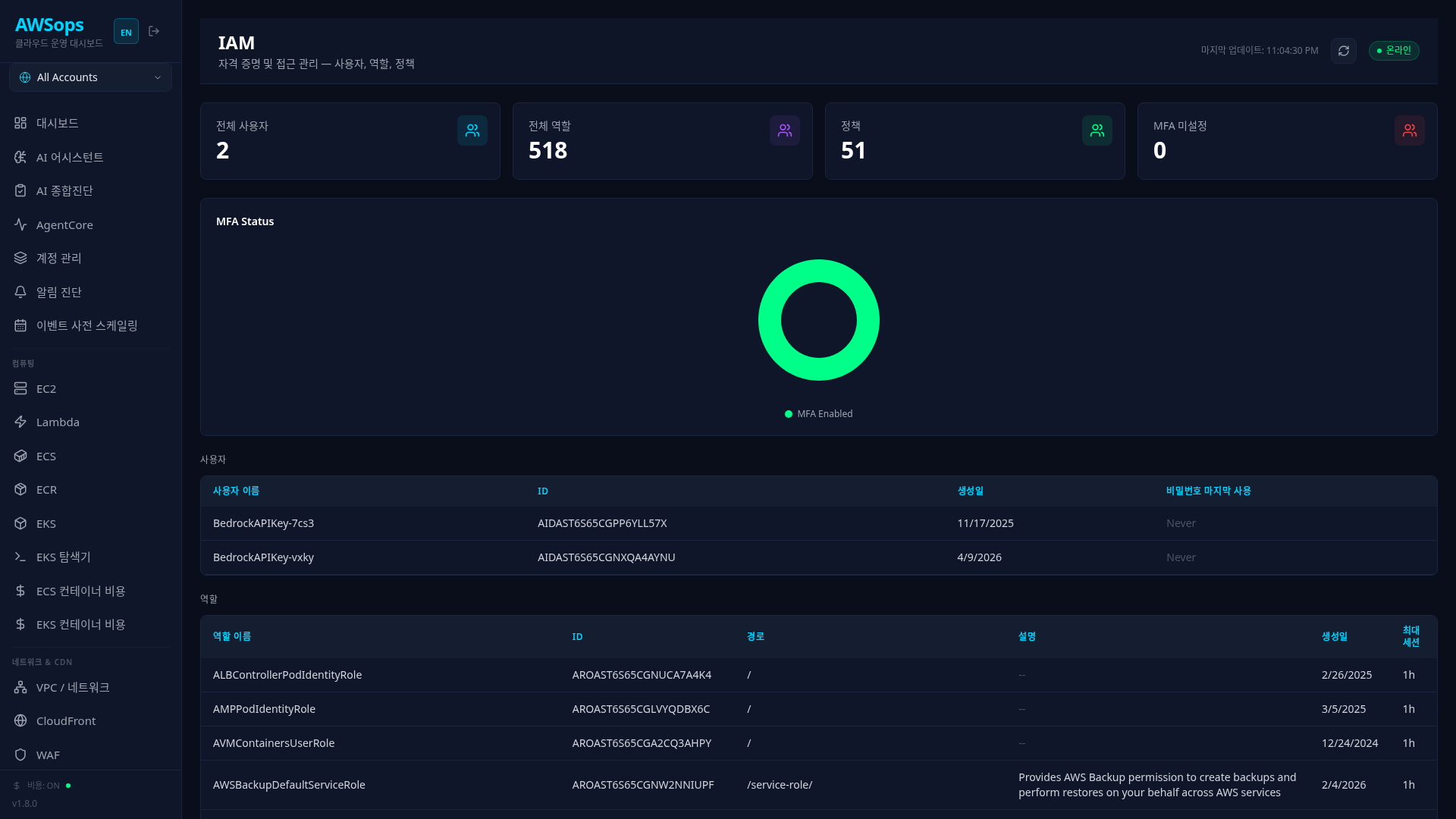
Key Features
Summary Statistics
At the top of the page, you can view the IAM resource status:
- Users: Total number of IAM users
- Roles: Total number of IAM roles
- Custom Policies: Number of customer-managed policies
- MFA Not Enabled: Number of users without MFA enabled
:::tip MFA Security Recommendation A warning banner appears at the top if there are users without MFA enabled. We recommend enabling MFA for all IAM users. :::
MFA Status Chart
A pie chart visualizes the MFA enablement status:
- Green: Users with MFA enabled
- Red: Users without MFA enabled
IAM Users List
Displays all IAM users in a table format:
| Column | Description |
|---|---|
| Username | User name |
| User ID | Unique ID assigned by AWS |
| Created | User creation date |
| Password Last Used | Last password usage date (console login) |
User Details
Click a user in the table to view detailed information in a slide panel:
- Username, ID, ARN
- Path
- Creation date and last password usage date
- Tag information
IAM Roles List
Displays all IAM roles in a table format:
| Column | Description |
|---|---|
| Role Name | Role name |
| Role ID | Unique ID assigned by AWS |
| Path | Role path |
| Description | Role description |
| Created | Role creation date |
| Max Session | Maximum session duration |
Role Details
Click a role in the table to view detailed information:
Basic Information
- Role name, ID, ARN, path
- Description and creation date
- Maximum session duration
- Permissions Boundary ARN
Last Used Information
- Last used date and time
- Last used region
Instance Profiles
- List of attached instance profile ARNs
Trust Policy
- Displays
AssumeRolePolicyDocumentin JSON format - Shows which entities (services, accounts, users) can assume this role
:::info SCP-blocked hydrate columns
iam_user.mfa_enabled and iam_role.attached_policy_arns require additional AWS lookups. When the role query fails, sync retries once without attached_policy_arns; GetRole and instance-profile lookups remain and may also fail. Only a successful fallback refreshes base role rows. The missing policy list remains unassessed (unknown_attribute_count), and the S3 access section displays “Not synced.” If both queries fail, the type is failed, pruning is skipped and last-good rows are preserved. Final status still follows the normal reachability/write lifecycle. Check inventory_sync_hydrate_fallback.remedy: a confirmed capacity problem calls for reviewed refill tuning; an IAM/SCP denial requires review of iam:ListAttachedRolePolicies permission. Rate tuning cannot repair a denial. The user-MFA query has no such fallback; MFA statistics use a separate summary query.
:::
:::info Trust Policy Analysis
The trust policy defines the principals that can assume the role. Check the Principal field for allowed services, account IDs, and user ARNs.
:::
Data Refresh
Click the refresh button in the upper right corner to invalidate the cache and fetch the latest data.
:::tip Cache Policy IAM data is cached for 5 minutes. Use the refresh button if you need immediate updates. :::