AgentCore
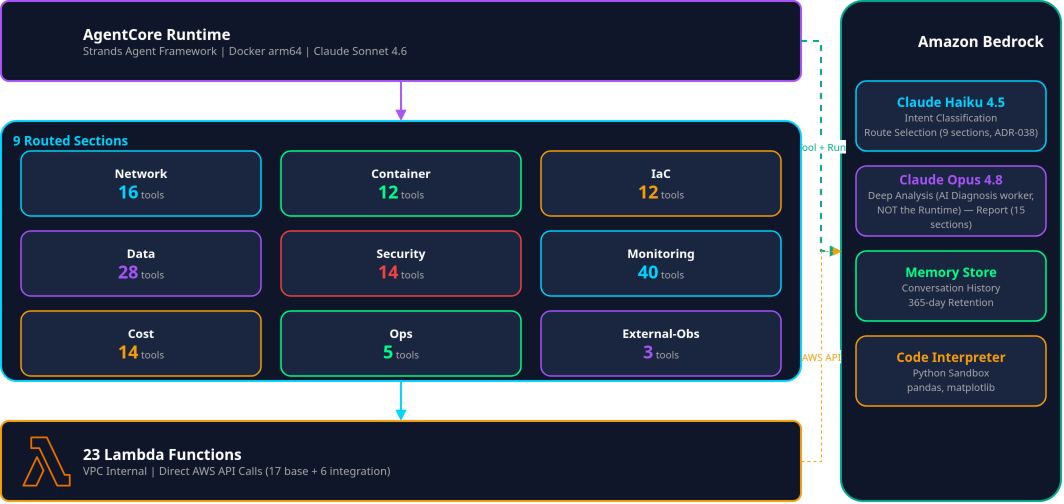
AgentCore는 Amazon Bedrock AgentCore Runtime과 Gateway를 기반으로 AI 어시스턴트(/assistant)의 도구 실행을 담당합니다. v1의 단일 EC2 임베디드 방식과 달리, v2는 Runtime + 9개 섹션 Gateway + Memory + Code Interpreter를 모두 서버리스로 분리했습니다.
:::tip 고객 세션 포인트
8개 AWS 도메인 Gateway + external-obs(외부 관측성) = 9개 라우팅 섹션 · 전체 카탈로그 기준 160개 MCP 도구(Lambda 타깃 27개 정의분 — 벤더 호스팅 mcpServer 타깃 제외) · 30개 Lambda 슬라이스(21개는 agentcore_enabled, 9개는 integrations_enabled 게이트, 둘 다 기본 off)를 서버리스로 운영하고, 분류기가 질문을 1~3개 라우트로 분류해 병렬 호출 후 합성합니다. → 왜 AWSops인가
:::
아키텍처
AI 라우팅 흐름
배포 요구사항
| 항목 | 요구사항 |
|---|---|
| Docker | arm64 필수 (docker buildx --platform linux/arm64 --load, make agentcore가 빌드+push까지 수행) |
| agent.py | GATEWAYS_JSON env로 Gateway URL을 주입받음(계정별 하드코딩 없음) |
| Code Interpreter / Memory | 이름에 하이픈 불가, 언더스코어만 사용 |
| Memory Store | 최대 365일 보관(eventExpiryDuration) |
| 설정 source of truth | SSM /ops/awsops-v2/agentcore/{runtime_arn,interpreter_id,memory_id} — provision.py가 기록, web BFF가 런타임에 읽음(UI에는 노출되지 않음) |
| Runtime 업데이트 | 멱등 provisioner(scripts/v2/agentcore/provision.py)로 변경 요청을 제출합니다. 갓 생성한 Gateway는 READY 확인 후 재실행합니다. 지속적인 FAILED는 원인 진단이 필요하며 자동 삭제·재생성하지 않습니다. |
AgentCore Runtime
구성
| 항목 | 설명 |
|---|---|
| 엔진 | Strands Agent Framework |
| 컨테이너 | Docker arm64 (ECR 저장, make agentcore) |
| 실행 환경 | AgentCore 관리형 서비스(Bedrock AgentCore Runtime) |
| 모델 | 채팅 Runtime 기본값은 GPT-6 Luna이며 Terraform 변수 agentcore_chat_model_id로 Claude Sonnet 5.5로 되돌릴 수 있습니다(적용된 값이 매 프로비저닝마다 반영). Explore 쿼리 생성은 GPT-6.1 Terra → Claude Sonnet 5.5 fallback, AI 진단은 Sonnet 5.5 / Deep 선택은 Opus 5.5, 라우팅·도움말은 Haiku 5.5를 사용합니다 |
상태
- READY: 정상 작동 중
- CREATING: 생성 중
- UPDATING: 업데이트 중
- FAILED: 오류 상태
Gateway 상세
v2는 8개 AWS 도메인 Gateway(awsops-v2-{network,container,data,security,cost,monitoring,iac,ops}-gateway) + external-obs(외부 관측성·연동 커넥터를 호스팅하는 라우팅 섹션, 챗 라우팅 키는 observability로 별칭)로 구성됩니다. 도구 수는 전체 카탈로그(scripts/v2/agentcore/catalog.py) 기준이며, 활성화는 agentcore_enabled/integrations_enabled 플래그로 게이트됩니다(신규 설치 기본 off). 라이브 환경은 함대 배포 완료 — 9개 게이트웨이 전부 READY MCP 타깃 보유, 챗 섹션 16키 활성(2026-08-02).
Network Gateway (17 tools)
VPC, ENI, Reachability, Flow Logs, TGW, VPN, Network Firewall 도구를 제공합니다.
| 카테고리 | 도구 |
|---|---|
| flow-monitor | query_flow_logs |
| reachability-read | check_reachability |
| network-mcp | get_path_trace_methodology, find_ip_address, get_eni_details, list_vpcs, get_vpc_network_details, get_vpc_flow_logs, describe_network, list_transit_gateways, get_tgw_details, get_tgw_routes, get_all_tgw_routes, list_tgw_peerings, list_vpn_connections, list_network_firewalls, get_firewall_rules |
Container Gateway (19 tools)
EKS, ECS, Istio 서비스 메시 관련 도구를 제공합니다.
| 카테고리 | 도구 |
|---|---|
| istio-read | mesh_overview, list_virtual_services, list_destination_rules, list_istio_gateways, list_service_entries, list_authorization_policies, list_peer_authentications |
| eks-mcp | list_eks_clusters, get_eks_vpc_config, get_eks_insights, get_cloudwatch_logs, get_cloudwatch_metrics, get_eks_metrics_guidance, get_policies_for_role, search_eks_troubleshoot_guide, generate_app_manifest |
| ecs-mcp | ecs_resource_management, ecs_troubleshooting_tool, wait_for_service_ready |
IaC Gateway (12 tools)
Infrastructure as Code 관련 도구를 제공합니다.
| 카테고리 | 도구 |
|---|---|
| iac-mcp | validate_cloudformation_template, check_cloudformation_template_compliance, troubleshoot_cloudformation_deployment, search_cdk_documentation, search_cloudformation_documentation, cdk_best_practices, read_iac_documentation_page |
| terraform-mcp | SearchAwsProviderDocs, SearchAwsccProviderDocs, SearchSpecificAwsIaModules, SearchUserProvidedModule, terraform_best_practices |
Data Gateway (24 tools)
AWS 데이터베이스 및 스트리밍 서비스 도구를 제공합니다.
| 카테고리 | 도구 |
|---|---|
| rds-mcp | list_db_instances, list_db_clusters, describe_db_instance, describe_db_cluster, execute_sql, list_snapshots |
| dynamodb-mcp | list_tables, describe_table, query_table, get_item, dynamodb_data_modeling, compute_performances_and_costs |
| msk-mcp | list_clusters, get_cluster_info, get_configuration_info, get_bootstrap_brokers, list_nodes, msk_best_practices |
| valkey-mcp | list_cache_clusters, describe_cache_cluster, list_replication_groups, describe_replication_group, list_serverless_caches, elasticache_best_practices |
Security Gateway (14 tools)
IAM 및 보안 분석 도구를 제공합니다. (P1f에 배포된 슬라이스)
| 도구 | 설명 |
|---|---|
list_users / get_user | IAM 사용자 목록/상세 |
list_roles / get_role_details | IAM 역할 목록/상세 |
list_groups / get_group | IAM 그룹 목록/상세 |
list_policies | 정책 목록 |
list_user_policies / list_role_policies | 사용자/역할 정책 목록 |
get_user_policy / get_role_policy | 사용자/역할 인라인 정책 |
list_access_keys | Access Key 목록 |
simulate_principal_policy | 정책 시뮬레이션 |
get_account_security_summary | 계정 보안 요약 |
Monitoring Gateway (36 tools)
CloudWatch, CloudTrail(AWS 네이티브)에 더해 OpenSearch, Loki/Tempo/Mimir(관측성 스택) 도구를 제공합니다(Prometheus·ClickHouse는 External-Obs 담당).
| 카테고리 | 도구 |
|---|---|
| cloudwatch-mcp (11) | 메트릭/알람/로그 인사이트 조회 |
| cloudtrail-mcp (5) | lookup_events, list_event_data_stores, lake_query, get_query_status, get_query_results |
| opensearch-mcp (4) | OpenSearch 도메인/인덱스 조회 |
loki-mcp / tempo-mcp / mimir-mcp (loki 5 · tempo 5 · mimir 6, integrations_enabled) | LogQL/TraceQL 조회 — Loki/Tempo/Mimir는 이 Gateway에 잔류(Prometheus·ClickHouse는 External-Obs로 이동) |
Cost Gateway (14 tools)
비용 분석·예측·FinOps 도구를 제공합니다.
| 카테고리 | 도구 |
|---|---|
| cost-mcp (9) | get_today_date, get_cost_and_usage, get_cost_and_usage_comparisons, get_cost_comparison_drivers, get_cost_forecast, get_dimension_values, get_tag_values, get_pricing, list_budgets |
| finops-mcp (5) | Compute Optimizer 리사이징, RI/SP 추천, Cost Optimization Hub, Trusted Advisor |
Ops Gateway (11 tools)
AWS 문서 검색·운영 도우미·인벤토리 조회 도구를 제공합니다.
| 카테고리 | 도구 |
|---|---|
| core-helpers | prompt_understanding, suggest_aws_commands |
| inventory-read | find_unused_resources, get_topology, query_inventory, inventory_summary |
| aws-knowledge | search_documentation, read_documentation, recommend, list_regions, get_regional_availability |
External-Obs (13 tools, 라우팅 키: observability)
외부 관측성·연동 커넥터를 호스팅하는 9번째 라우팅 섹션. 카탈로그에는 notion-mcp(3 tools)가 정의되어 있습니다(integrations_enabled 게이트, 기본 off). Prometheus(6 tools)·ClickHouse(4 tools) 커넥터 타깃도 이 섹션에 배치됩니다(catalog.py — prometheus-mcp-target/clickhouse-mcp-target의 gateway=external-obs).
Code Interpreter
Python 코드 실행을 위한 샌드박스 환경을 제공합니다.
특징
- 격리된 환경: 안전한 Python 실행
- 데이터 분석: pandas, numpy 등 라이브러리 지원
- 시각화: matplotlib, plotly 등 차트 생성
- 파일 처리: JSON, CSV 등 데이터 파싱
사용 예시
"AWS 비용 데이터를 월별 추이 차트로 시각화해줘"
"이 JSON 데이터를 파싱해서 통계를 계산해줘"
라우팅 표시 (AI 어시스턴트)
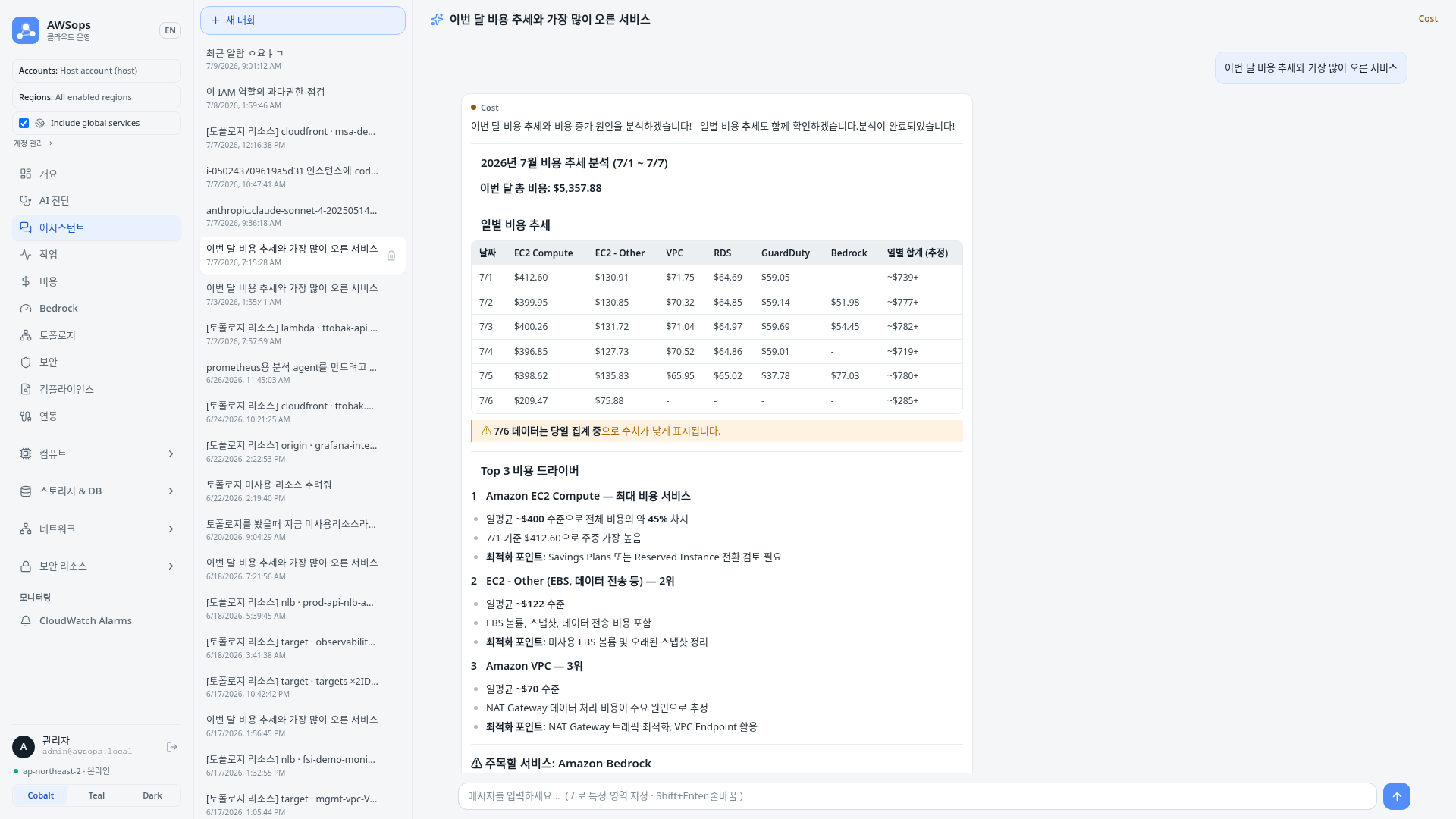
v2는 v1의 별도 "AgentCore" 대시보드 페이지(호출 통계·설정 조회) 대신, AI 어시스턴트 채팅 화면 안에서 라우팅 정보를 인라인으로 보여줍니다.
- 답변마다 어떤 섹션(Gateway)이 처리했는지 배지로 표시됩니다.
- 여러 도메인을 병렬 조회해 합성한 답변은
multi:network+data처럼 기여한 각 Gateway의 "via" 칩으로 표시됩니다. - 다른 라우트로 다시 물어볼 수 있는 대안 라우트 칩(최대 2개)도 함께 제공됩니다.
- 채팅 레일에서 최근 대화 스레드 목록을 확인할 수 있습니다(전문 검색 기능은 아직 없음).
AgentCore Runtime ARN·Memory ID 등 설정 값은 SSM에만 존재하며 UI에는 노출되지 않습니다(운영자는 terraform output/SSM으로 확인).
알려진 제한사항
| 항목 | 제한 |
|---|---|
| Docker 아키텍처 | arm64 필수 |
| Code Interpreter / Memory 이름 | 하이픈 불가, 언더스코어만 |
| 대화 이력 보관 | 최대 365일 |
| AgentCore 응답 | 최종 텍스트만 반환(도구 추론은 타이핑 효과로 스트리밍) |
| 도구 활성화 플래그 | 30개 슬라이스는 agentcore_enabled(21)·integrations_enabled(9) 게이트 — 라이브 환경은 함대 배포 완료(2026-08-02), 신규 설치 기본값은 off |
| 벤더 mcpServer 타깃 | external-obs의 벤더 호스팅 mcpServer 타깃(Datadog·Dynatrace·New Relic)은 capability=read가 프로토콜 수준에서 강제되지 않음 — read-only 보장은 Lambda 타깃 기준이며, 엔드포인트 미설정 시 SKIP. 런타임에서는 fail-closed 도구 allowlist(OFFICIAL_MCP_TOOL_ALLOWLIST_JSON — 카탈로그에 전사된 read 도구만 통과, agent/agent.py)가 보완 |