Spec-Driven Presentation Maker (SDPM)
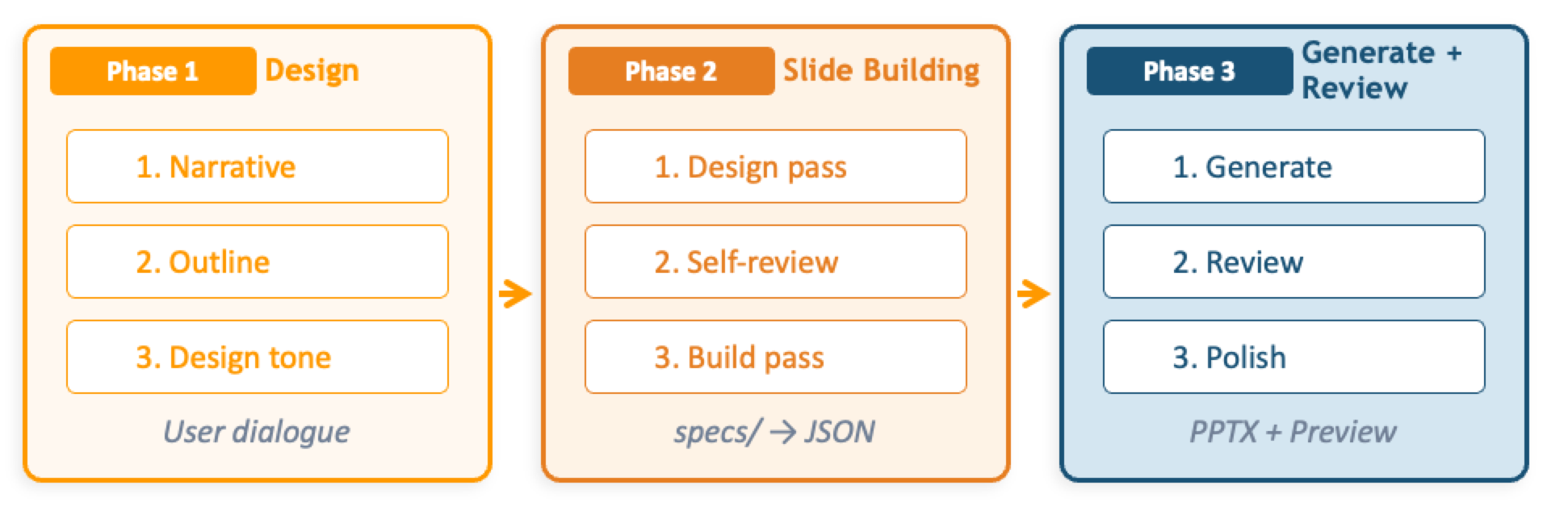
Spec-Driven Presentation Maker is an open-source application that creates presentation materials using generative AI. It uses a spec-driven development approach — design 'what to convey' first, and let AI build 'how to present it' — to generate structured, high-quality slides.
Key Features
- Spec-Driven Design: Define logical structure as a specification from source materials
- AI Auto-Build: AI automatically builds slides following templates
- 4-Layer Architecture: From Kiro CLI skill to full-stack web app
- MCP Support: Available with Claude Desktop, VS Code, Kiro and other MCP clients
Deploy to AWS
You can deploy using the button below. Please click after logging into AWS.
Parameter Settings
You can configure the following parameters during deployment:
- NotificationEmailAddress: Email address to receive deployment notifications
- DeploymentLayer: Deployment layer (default: layer4)
layer3: MCP Server onlylayer4: Full stack with Agent + Web UI
- ModelId (default: global.anthropic.claude-sonnet-4-6): Amazon Bedrock model ID to use for presentation generation. Select a model that is available in your target AWS Region and enabled for your account
- EnableInvocationLogging (default: false): Enable Bedrock Model Invocation Logging
- AllowedIpV4AddressRanges: Optional IPv4 allow list for access restrictions. Specify the CIDR ranges that should be allowed to access the application
- AllowedIpV6AddressRanges: Optional IPv6 allow list for access restrictions. Specify the CIDR ranges that should be allowed to access the application
Security Considerations
We recommend setting AllowedIpV4AddressRanges / AllowedIpV6AddressRanges to restrict access by source IP.
Post-Deployment Setup
After clicking the deployment button, you will receive an email titled AWS Notification - Subscription Confirmation after a short while. Click the Confirm subscription link to start receiving deployment start and completion notifications.
When deployment is complete, you'll receive a notification email containing access information such as the CloudFront URL. A Cognito user is automatically created with your notification email address, and a temporary password is sent in a separate email.
For Layer 4 (Full Stack):
- Check the temporary password email
- Access the web app via the CloudFront URL and change your password on first login
For Layer 3 (MCP Server Only):
- Connect to the deployed MCP server endpoint using an MCP client (Claude Desktop, VS Code, Kiro, etc.)
For MCP client connection instructions, see the Agent Connection Guide in the SDPM repository.
Uninstallation
We recommend using go-to-k/delstack to delete deployed resources. See the Uninstall Guide in the SDPM repository for detailed steps.