Patterns & Architecture for Workflow Agents
Builders designing a production-grade event-driven workflow agent or evaluating multi-agent patterns. If you haven't started building yet, the quickstart is a faster entry point.
Reference architecture and recommended multi-agent patterns for event-driven automation on AgentCore.
Reference Architecture
A production-ready event-driven workflow automation agent on AgentCore.
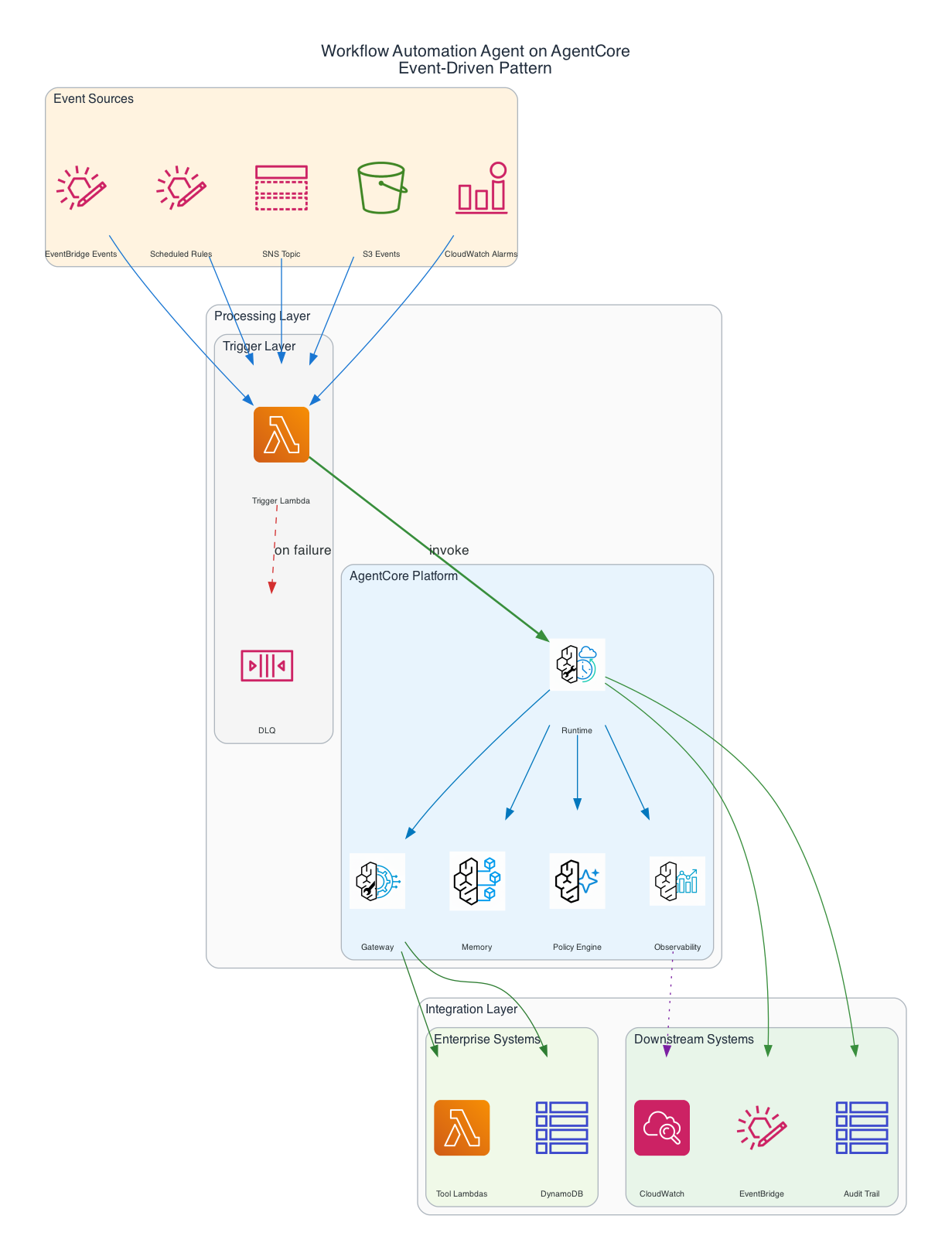
Events arrive from sources such as EventBridge, SNS, SQS, or S3 and are normalized by a trigger Lambda before being sent to the AgentCore Runtime. The agent reasons against its memory and a Cedar policy engine, executes actions through the MCP gateway, and publishes a completion event plus an audit record on exit.
Recommended Patterns
AgentCore supports a range of multi-agent patterns. The ones below are the most common starting points for workflow automation. For agents-as-tools and swarm patterns, also see Strands multi-agent patterns.
| Pattern | When to Use | Example |
|---|---|---|
| Single Agent + Tools | One decision domain, clear input → output mapping | IT Incident Response |
| Dual-Agent (Decide + Act) | Separation of reasoning from execution for compliance | Claims Processing |
| Agents-as-Tools | Multi-domain orchestration with specialized sub-agents | Iberdrola IT Ops |
| Human-in-the-Loop | High-stakes actions requiring approval before execution | Thomson Reuters |
| Confidence-Gated | Auto-execute above threshold, escalate below | Triage (auto-route easy, escalate hard) |
| Fan-Out (parallel tools) | Enrich from multiple sources simultaneously before reason | Incident enrichment from 5+ data sources |
All AgentCore patterns work for workflow agents. For the full catalog including Swarm and other patterns, see the Architectural Patterns Reference.
Pattern Selection Guide
Start with Single Agent + Tools when:
- Your workflow has one decision domain
- Input → output mapping is relatively clear
- You have fewer than 10 tools
Move to Dual-Agent (Decide + Act) when:
- Compliance requires separation of reasoning from execution
- You want to audit the decision independently of the action
- Different models or permissions for deciding vs. acting
Use Agents-as-Tools when:
- The workflow spans multiple domains (IT + security + compliance)
- Specialized agents handle distinct sub-problems
- You want to add capabilities without modifying the orchestrator
Add Human-in-the-Loop when:
- Actions are irreversible or high-stakes
- Confidence scoring is below threshold
- Regulatory requirements mandate human approval
Use Confidence-Gated when:
- You want gradual automation (auto-handle easy cases, escalate hard ones)
- The same workflow applies to both high and low confidence scenarios
- You're building trust in the system incrementally
Your Journey to Production
From event handler to autonomous workflow agent in five stages.
- Define Your Trigger — Identify the event that starts the workflow (alert, ticket, schedule, webhook).
- Build Your Tools — Wrap your APIs, databases, and services as Lambda-backed MCP tools with typed schemas.
- Implement the Agent — Write the system prompt, wire tools, and define the reasoning loop with Strands SDK.
- Add Guardrails — Configure Cedar policies to bound the agent's autonomy. Set up online evaluations.
- Deploy & Monitor — Push to AgentCore Runtime. Monitor tool selection accuracy and goal success via CloudWatch.
Everything produced by the samples on this page is a prototype until you have applied the controls in Preparing for production. Do not use a prototype endpoint to serve real user traffic.