AgentCore Visual Workflow Platform
A visual workflow builder for AWS Bedrock AgentCore that lets you design, configure, and deploy AI agents through a drag-and-drop canvas interface. Inspired by n8n's node-based editor, built for AWS Bedrock AgentCore. Deployed to AWS with API Gateway, Lambda, Step Functions, DynamoDB, and CloudFront — fully serverless, pay-per-request.
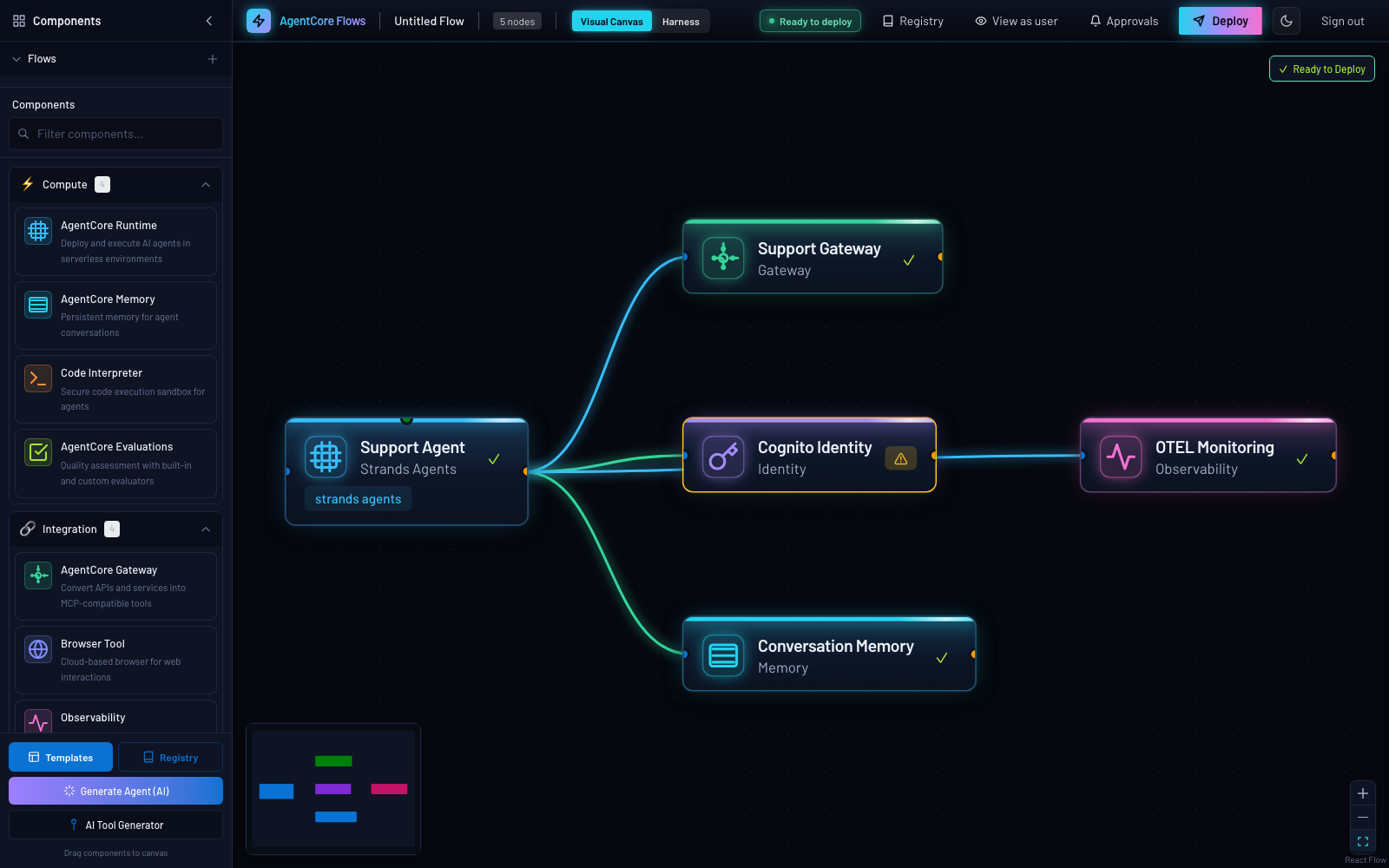
More screenshots
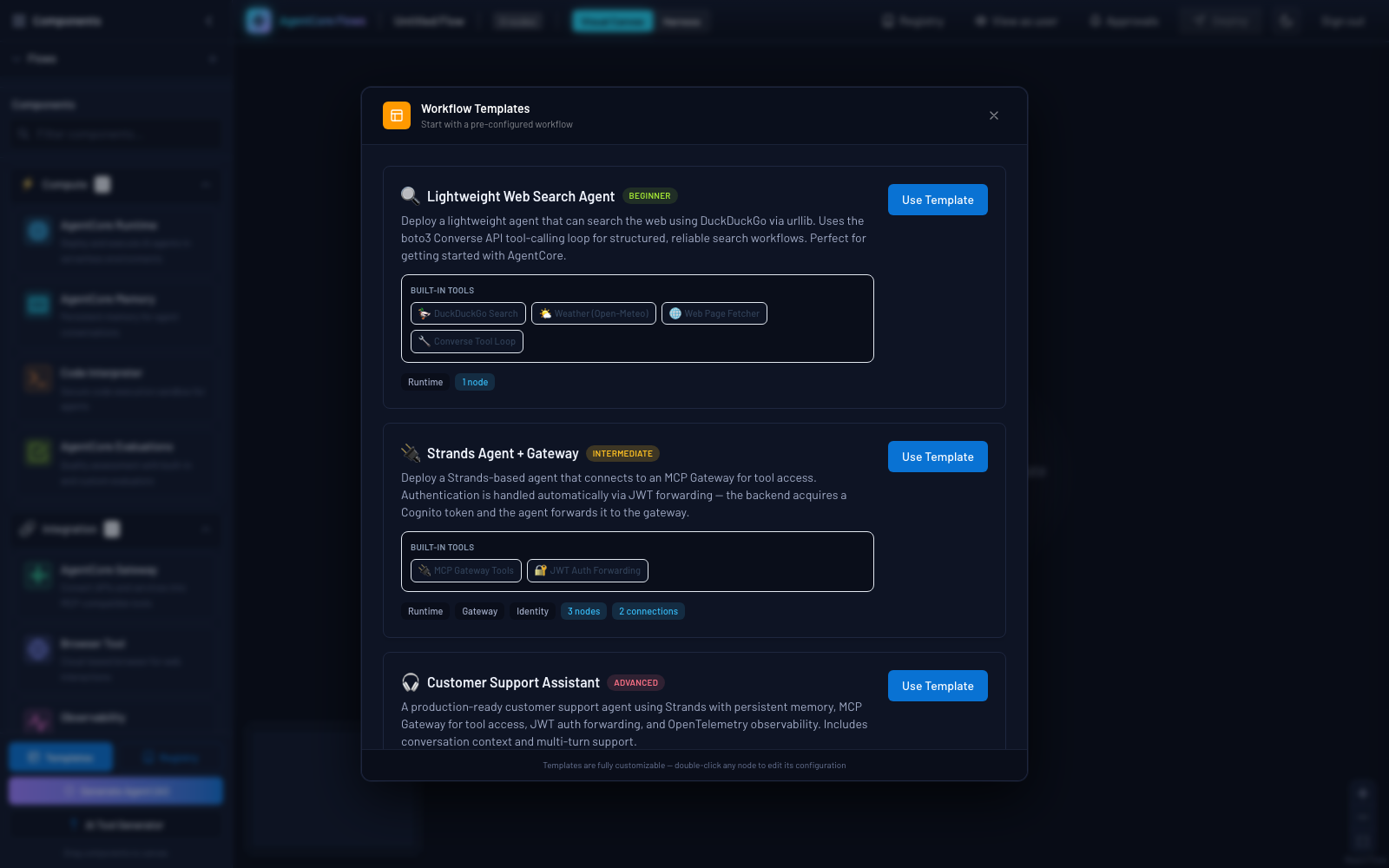
Template gallery — six one-click starting points from beginner to advanced:
Architecture
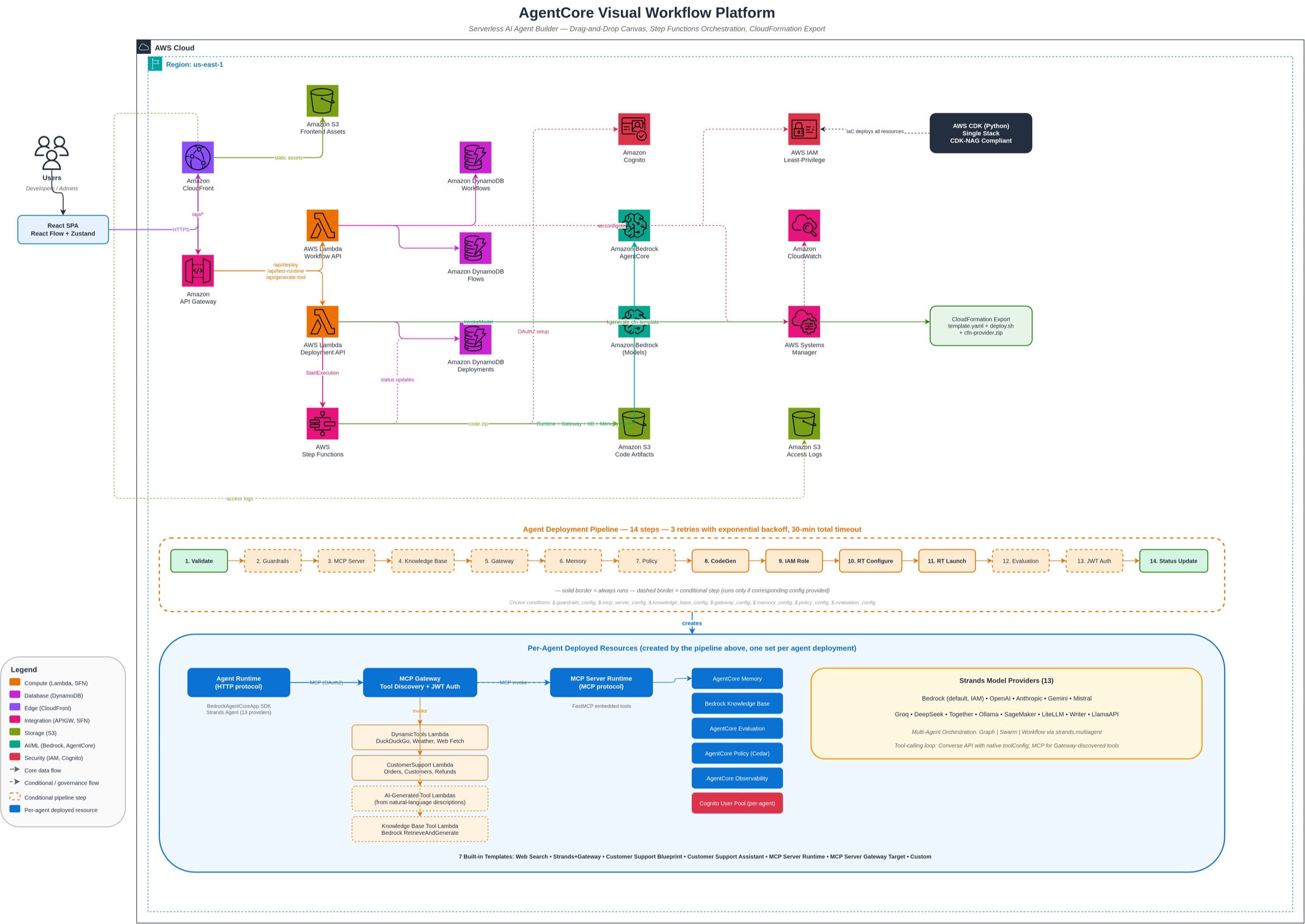
The editable diagram source is at
docs/architecture.drawio(opens in new tab). Open it in draw.io (opens in new tab) to view or edit.
Key Features
- Visual Canvas — Drag-and-drop AgentCore components (Runtime, Gateway, Memory, Knowledge Base, Browser, Identity, Observability, Policy, Connectors) and wire them together with real-time validation.
- Two authoring paths, one deploy pipeline — Build agents on the canvas (code-generated AgentCore Runtime) or as a config-driven AgentCore Harness (
deploymentMode: "runtime" | "harness"); both share the same Gateway, Memory, connector, test, and teardown surfaces. - Real SaaS connectors — Jira, Asana, Slack, GitHub, Salesforce, or any OpenAPI spec as Gateway targets with API-key or OAuth2 outbound auth; credentials live only in Secrets Manager.
- Template Gallery + CloudFormation Export — Six one-click templates, plus downloadable self-contained CloudFormation stacks (
deploy.sh,teardown.sh, code artifacts) so external users can deploy without the platform. - AI generation — Describe a tool or a whole agent in natural language; Claude on Bedrock generates a deployable Lambda tool or a validated canvas spec.
- Multi-target gateways — One gateway can carry multiple targets of different families at once (Lambda tools, external MCP servers from a curated catalog or a custom endpoint, OpenAPI specs, Smithy models), each with the right outbound auth.
- Dynamic Gateway tool pipeline — Selected tools deploy as a single Lambda behind an MCP Gateway with Cognito OAuth2; agents discover them at runtime via
tools/list. - Bring your own LiteLLM — Point an agent at a LiteLLM MCP proxy instead of AgentCore Gateway, or carry it inside one as an MCP target, and/or make a LiteLLM proxy the authoritative agent catalog. All opt-in and additive; the AgentCore Gateway and the built-in registry remain the defaults. See Bring your own LiteLLM.
- 13 model providers & multi-agent patterns — Bedrock (default), OpenAI, Anthropic, Gemini, Mistral, Ollama, Groq, DeepSeek, Together, LiteLLM, SageMaker, Writer, LlamaAPI; Graph / Swarm / Workflow orchestration via Strands Agents SDK.
- Knowledge Base (RAG) — 5 data source types, 3 vector stores (S3 Vectors, OpenSearch Serverless auto-provisioned, Aurora PostgreSQL), configurable parsing/chunking, plus agentic retrieval strategies.
- Enterprise governance — Scope-based RBAC/ABAC, Cedar policy enforcement, agent registry with approval workflow, versioning & rollback, cost budgets, audit analytics, HITL approvals, VPC-egress runtimes, OIDC federation. See Enterprise Capabilities.
- Full manifest-driven teardown — Every deploy records the sub-resources it creates; delete tears down everything (runtime, gateway, Cognito, secrets, KB, vector stores, IAM roles) with no orphans.
Prerequisites
- AWS CLI v2 — configured with credentials for the target account (
aws configure) - Node.js 20+ (CI runs on 22)
- Python 3.12+
- Any AWS region —
us-east-1is the default; see Deploying to another region for the two things that differ elsewhere.
No Docker installation required. CDK is invoked via npx (no global install needed).
Quickstart
# Minimal deploy (dev environment, us-east-1)
COGNITO_USERS="user@example.com" ./scripts/deploy.sh

# Specific environment
COGNITO_USERS="user@example.com" ENVIRONMENT_NAME=prod ./scripts/deploy.sh

# Another region (Frankfurt)
COGNITO_USERS="user@example.com" AWS_REGION=eu-central-1 ./scripts/deploy.sh
The deploy script validates prerequisites and AWS credentials, installs backend/Lambda Python dependencies, builds the AgentCore dependency bundles, runs cdk deploy via npx (API Gateway, Lambda, Step Functions, DynamoDB, S3, CloudFront), then builds and uploads the frontend and prints the URLs. Lambda code is packaged automatically by CDK — no Docker build or ECR push required. A first-time deploy takes roughly 15–20 minutes.
To also export OTLP traces from every platform Lambda and deployed agent to a backend like Langfuse, see the platform-level OTEL deploy mode in Observability.
Deploying to another region
Set AWS_REGION. Everything is derived from it — Bedrock cross-region inference
profiles, Lambda regions, the frontend's VITE_AWS_REGION, and the generated
agent code. Two things genuinely differ outside us-east-1, both handled
automatically:
us-east-1 | Any other region | |
|---|---|---|
| WAF | One CLOUDFRONT-scoped WebACL on the CloudFront distribution | The same rule set as a REGIONAL WebACL on the Cognito user pool. The distribution runs without an edge ACL — AWS accepts only CLOUDFRONT-scoped ACLs there and creates those exclusively in us-east-1. Pass CLOUDFRONT_WEB_ACL_ARN=arn:... to also attach one you created in us-east-1. |
| Account-global names | Unqualified (unchanged) | Suffixed with the region, so two regions can coexist in one account |
Because us-east-1 keeps its unqualified names, adding a second region does not
rename or replace anything in an existing us-east-1 deployment.
One region-specific caveat worth knowing before you pick a region: Bedrock's
cross-region inference prefixes are us., eu. and apac., and the apac.
family covers only the older Claude models. In APAC, current-generation models
are published under country prefixes (jp. in ap-northeast-1, au. in
ap-southeast-2) or as global., so an APAC deployment may need its model ID set
explicitly. us-* and eu-* regions need no such adjustment.
Accessing the Platform
After deployment completes, the script prints two URLs:
- Frontend —
https://dXXXXXXXXXX.cloudfront.net— the visual workflow builder. - Backend API —
https://XXXXXXXXXX.execute-api.region.amazonaws.com— the API Gateway endpoint (CloudFront routes/api/*here automatically).
You can retrieve these at any time from the CloudFormation stack outputs (CloudFrontUrl, ApiGatewayUrl, S3BucketName):
aws cloudformation describe-stacks --stack-name agentcore-workflow-dev \
  --region us-east-1 \
  --query "Stacks[0].Outputs" --output table
Substitute the region you deployed to. The stack, the user pool and the distribution all live in that one region.
First sign-in — assign a persona
COGNITO_USERS pre-creates Cognito users but assigns them to no group. Group membership grants capability scopes, so a brand-new user signs in effectively read-only (browse works; Clone/publish are disabled) until you assign a group:
Always pass
--region <the region you deployed to>—us-east-1below, but useeu-central-1if that is where you deployed. Without it the AWS CLI falls back to your shell/profile default region, the pool lookup returns empty, and$POOL_IDis blank, soadmin-add-user-to-groupfails withInvalid length for parameter UserPoolId, value: 0.
POOL_ID=$(aws cognito-idp list-user-pools --max-results 40 --region us-east-1 \
  --query "UserPools[?Name=='agentcore-workflow-dev-users'].Id | [0]" --output text)

# Full access (all scopes) + admin UI + registry approver:
for g in g-admins-super t-admin registry-admin; do
  aws cognito-idp admin-add-user-to-group --user-pool-id "$POOL_ID" \
    --username you@example.com --group-name "$g" --region us-east-1
done

# ...or a standard end-user who can build/deploy/invoke + browse & clone the registry:
for g in g-users-default t-user; do
  aws cognito-idp admin-add-user-to-group --user-pool-id "$POOL_ID" \
    --username you@example.com --group-name "$g" --region us-east-1
done
Sign out and back in after changing groups — scopes are read from the ID token at sign-in. See Personas and Registry & RBAC for the full model.
Bring your own LiteLLM
If you already run a LiteLLM proxy, it can serve two roles here: as an MCP gateway for individual agents, and as the agent catalog behind the Registry. The two are independent — enable either, both, or neither.
For the gateway role there are two different ways to wire it, and they are not the same thing, so the choice is worth making deliberately. Together with plain AgentCore Gateway, an agent on the canvas has three supported shapes:
| On the canvas | What gets created | Use when |
|---|---|---|
| Gateway node, Provider = AgentCore (default) | A real AgentCore Gateway with your Lambda / OpenAPI / Smithy / MCP targets | The default. Nothing about it changes. |
| Gateway node, Provider = LiteLLM | No AgentCore Gateway at all — the agent talks straight to your proxy | LiteLLM replaces the gateway. Your proxy already aggregates every tool the agent needs. |
Gateway node, Provider = AgentCore, with a Custom endpoint… MCP target pointed at LiteLLM | An AgentCore Gateway that carries your proxy as one mcpServer target | You want LiteLLM's tools alongside Lambda/OpenAPI targets, or you want AgentCore's inbound Cognito auth, semantic search and observability in front of it. |
The second and third are covered below; the third is a normal MCP target and needs no LiteLLM-specific setting beyond the endpoint and key.
All of this is additive. AgentCore Gateway stays the default gateway, the built-in DynamoDB catalog stays the default registry, and existing canvases, stored flows and deployed agents are unaffected until someone explicitly opts in. Nothing is migrated and nothing is deleted when you switch either one back.
As the gateway itself, per agent
On the canvas, open the Gateway node and set Provider to
LiteLLM MCP Gateway (your own proxy), then fill in:
| Field | Notes |
|---|---|
| Base URL | The proxy root (e.g. https://litellm.example.com), not an MCP path. https only. |
| Virtual Key | Sent as x-litellm-api-key: Bearer <key>. Write-only — minted into Secrets Manager on deploy and never returned to the browser or stored on the canvas. |
| MCP Servers (optional) | Comma-separated server aliases (github, jira) to scope this agent to. Blank means every server the key can see. |
Choosing litellm replaces the AgentCore target list entirely — there is no
Lambda/OpenAPI/Smithy target configuration on this path. At deploy time the
platform:
- Runs the base URL through the same SSRF guard as every other outbound URL (
https-only; private, loopback and link-local ranges rejected, including the instance-metadata address). - Mints the virtual key into Secrets Manager and drops the raw value before the deployment event is re-emitted.
- Probes the proxy —
GET /v1/mcp/server, thenGET /mcp-rest/tools/list— and fails the deploy loudly if it serves zero tools, rather than shipping an agent with no tools. - Resolves the agent's MCP endpoint to
{base}/mcp/, adding thex-mcp-serversheader when you scoped it.
The generated agent authenticates with a static bearer key
(GATEWAY_AUTH_MODE=static_bearer) instead of the Cognito client-credentials
exchange AgentCore Gateway uses. Teardown deletes only the virtual-key secret —
your proxy is external, so the platform records it as informational and never
issues a delete against it.
The proxy must be reachable from the deploy Lambda. The control plane has no VPC egress, so a VPC-private LiteLLM cannot be probed and the deploy will fail at step 3 even though a VPC-mode Runtime could reach it at invoke time.
There is also a platform-wide fallback, but read what it does before setting it: it applies only to a gateway config that carries no provider field at all. A per-agent choice always wins, and the canvas always writes one — so this row changes nothing for agents built in the UI. What it does reach is configs that omit the field: canvases saved before this feature existed, imported JSON, and direct API deploys.
It is a tie-breaker, not a switch. The row carries no base URL or virtual key, so a config it applies to has no LiteLLM connection details and its deploy fails with
LiteLLM gateway requires a base URL (litellm_base_url). On a stack with pre-existing canvases, setting this tolitellmcan therefore break AgentCore gateways that were working. Prefer the per-agent selector above.
Set it (there is no API route for this) with:
aws dynamodb put-item --region us-east-1 \
  --table-name agentcore-workflow-dev-tag-policy \
  --item '{"org_id":{"S":"default"},"sk":{"S":"SETTING#gateway_provider"},"value":{"S":"litellm"}}'
A per-agent choice on the canvas always wins over the default. A missing row, an
unreadable table, or an unrecognized value all resolve to agentcore, so the
existing behavior is what you get whenever anything is uncertain. The Lambda
environment variable DEFAULT_GATEWAY_PROVIDER overrides the row if set.
As a target inside an AgentCore Gateway
The opposite trade from the section above: keep the AgentCore Gateway and hang the LiteLLM proxy off it as one MCP target, so its tools sit next to your Lambda and OpenAPI targets behind AgentCore's inbound Cognito auth.
Leave Provider on AgentCore, add a target of type MCP Server, pick
Custom endpoint…, and fill in:
| Field | Value for a LiteLLM proxy |
|---|---|
| MCP Endpoint URL | https://litellm.example.com/mcp/ for every server the key can see, or https://litellm.example.com/<alias>/mcp to pin one |
| Outbound Auth | API key |
| API Key | The virtual key |
| API Key Header | Leave blank for Authorization, or set x-litellm-api-key |
| Key Format | Bearer <key> (the default) |
One thing differs from the provider path: server scoping is done in the URL,
not with the x-mcp-servers header — a Gateway target has no way to send an extra
header per request.
Readiness is still enforced. The deploy waits for the new target to finish
AgentCore's own initialize handshake against the proxy and fails with the
reason if it does not connect, so a wrong endpoint or key is a failed deploy
rather than an agent that quietly has no tools.
Tool names get two prefixes on this path — the Gateway prepends the target name, and LiteLLM has already prepended its server alias — which can push the combined name past the 64-character limit Bedrock enforces on tool names. Where that happens the deployed agent shortens the name it shows the model (the tool's own name plus a short unique suffix) and still calls the gateway by the full name, so nothing is dropped and no configuration change is needed. Expect the shortened form in agent traces.
The key format matters here. A custom MCP endpoint sends
Authorization: Bearer <key>by default. That is what LiteLLM's MCP endpoint accepts — a bareAuthorization: <key>with no scheme is rejected. Change Key Format toRaw keyonly for a server that documents a bare value (anx-api-keystyle server); it will break LiteLLM.
As the agent registry
Open the Registry modal and find the LiteLLM Registry card, then enter the proxy base URL and a virtual key:
- Connect & test — saves and probes the proxy without switching the catalog over, so you can confirm reachability first.
- Connect & make authoritative (or Make authoritative afterwards) — LiteLLM becomes the catalog.
- Disconnect & use platform catalog — reverts, and clears the stored connection, so the base URL has to be re-entered to reconnect.
These calls are registry-admin-only; the API answers 403 for anyone else.
verified: false after a save is not an error — it means the control plane could
not reach the proxy, which is normal for a VPC-private LiteLLM.
What LiteLLM can and cannot back. LiteLLM exposes no create/update/delete API
for MCP server records — registration happens in its Admin UI or config.yaml —
and its records have no canvas snapshot, owner, or review state. So:
| Registry surface | With LiteLLM active |
|---|---|
| list / search / get | Served by LiteLLM — it is the catalog |
| Pre-deploy governance gate | Served by LiteLLM — present-and-enabled is the approval signal |
| publish / update / delete / clone from a canvas | Platform sidecar in DynamoDB — fully mutable |
| the same operations on a projected LiteLLM entry | 501, naming LiteLLM, rather than silently accepting a write that would then diverge |
The read-only limit is therefore per entry, not per operation: rows projected
from LiteLLM are read-only, rows published from a canvas stay fully mutable, and
on a slug collision the sidecar row wins. GET /api/registry/litellm-config
returns this as machine-readable capabilities.
The governance gate stays fail-closed — if the catalog cannot be read, deploys
referencing an integration return 503 rather than proceeding ungoverned. Your
existing DynamoDB entries are never read from, written to, or deleted while
LiteLLM is active, and they are all still there when you disconnect.
Note that not every LiteLLM release reports an enablement flag. Where it does not, presence in the server list is the approval signal, so remove a server from LiteLLM to stop it being deployable rather than relying on a disable toggle.
Verifying against a real proxy
scripts/verify-litellm.py exercises both paths against a live LiteLLM. It issues
reads only, and asserts that writes to projected entries are refused.
Its docstring has the full setup recipe — no Docker needed, but budget time and
read the two warnings there before starting. LiteLLM's MCP endpoints require a
Postgres database (without one they return No connected db.), and first startup
spends roughly half an hour baselining 158 schema migrations during which
/health/liveliness returns nothing at all and the proxy looks like it has
crashed. It hasn't.
Full details: MCP Gateway Integration for the gateway path and the endpoint wire shapes, Registry & RBAC for the catalog path, and API Reference for every endpoint and configuration variable.
Cleanup
# Tear down all resources (prompts for confirmation)
./scripts/cleanup.sh

# Tear down a specific environment
ENVIRONMENT_NAME=prod ./scripts/cleanup.sh

# Non-interactive teardown (CI / scripted) — skips the confirmation prompt
FORCE_DESTROY=true ./scripts/cleanup.sh

# Also sweep resources that carry no owner tag (see below — off by default)
CLEANUP_INCLUDE_UNTAGGED=1 ./scripts/cleanup.sh
The cleanup script validates credentials, deletes every AgentCore resource the
platform created (runtimes, gateways, memories, KBs, vector stores, Cognito
pools, secrets, IAM roles), empties the S3 buckets, runs cdk destroy on the
stack, and verifies all resources are removed.
Safe to run with more than one deployment in the account
Deploying and deleting repeatedly is expected, and so is running two deployments
side by side — dev + prod, two teams, or the same environment in two regions. The
resources above have account-global names with no deployment identity in them
(Cognito AgentCore*, secrets under agentcore-connector/ and agentcore-otel/,
IAM roles AgentCoreMemory-* and AgentCoreRuntime-*), so a sweep by name prefix
would delete a co-resident deployment's resources.
Everything the platform creates is therefore tagged
AgentCoreStack={project}-{env}-{region} at creation, and teardown deletes only
what carries its own value. The region is part of the identity because IAM roles are
not regional, so a us-east-1 teardown must not claim a Frankfurt deployment's roles.
ManagedBy=agentcore-flows is also present but is not the gate — it names the
product, so it is on every deployment's resources alike.
Two consequences worth knowing:
- Untagged resources are skipped, and teardown tells you what it left and why. A
resource created before this tag existed looks identical to one belonging to another
deployment; skipping costs a manual delete, deleting a foreign credential cannot be
undone. Pass
CLEANUP_INCLUDE_UNTAGGED=1to sweep those too — safe only if this is the account's sole deployment. - CloudFormation-owned resources are left to
cdk destroy. The shared runtime execution role (AgentCoreRuntime-{project}-{env}[-{region}]-shared) is skipped by the orphan sweep by design; deleting it out from under a running deployment costs a redeploy plus AgentCore's 17–20 minute IAM propagation wait.
Two escape hatches exist in cleanup.sh and both are off by default for this
reason. CLEANUP_INCLUDE_UNTAGGED=1 additionally sweeps untagged resources.
CLEANUP_INCLUDE_FOREIGN_RUNTIMES=1 sweeps every AgentCore runtime, gateway,
memory, policy engine and credential provider in the region regardless of owner —
use it only in a single-tenant account you are willing to empty.
scripts/verify-cleanup-ownership.sh proves this against real AWS: it plants decoys
in every swept namespace — owned by this stack, owned by a different stack, and
untagged — runs the real sweep, and asserts only its own are gone. It removes
everything it plants. Run it in a scratch account, not production; it executes the
real teardown sweep.
Running Tests
cd backend && pip install -e ".[dev]" && pytest   # backend unit + property tests
cd infra && pip install -r requirements.txt && pytest tests/ -v   # CDK assertions
cd frontend && npm install && npm test            # frontend tests
Integration tests run against a real deployed stack — see Development.
Documentation
| Doc | Contents |
|---|---|
| Enterprise Capabilities | Versioning & rollback, Cedar policy enforcement, evaluation, cost analytics, registry, prompt library, triggers, connectors, HITL, governance & FinOps |
| Security & Hardening | Infrastructure hardening, CDK-NAG, tenant isolation, SSRF guards, pre-commit hooks |
| Observability | Per-canvas and platform-level OTEL modes, OTEL deploy configuration |
| Deployment Internals | Infrastructure & agent deploy flows, gateway tool pipeline, code architecture, CFN export, packaging, templates, project structure |
| API Reference | Every API endpoint, configuration variables, SSM parameters |
| Registry & RBAC | Agent registry roles, approval workflow, persona assignment |
| Personas | Platform-wide group → scope model |
| RBAC Rollout | Advisory → enforce rollout procedure |
| Costs | AWS resources created + infrastructure pricing estimates |
| Development | Local development, full test matrix, tech stack |
| Data Retention | TTLs, PII posture, audit access |
| MCP Catalog (opens in new tab) | External MCP catalog servers as Gateway targets |
| MCP Gateway Integration | MCP protocol details for gateway-connected agents |
License
MIT-0 (MIT No Attribution). See LICENSE (opens in new tab).