Build and ship agents visually
BuildAgentCore Visual Workflow Platform
Visual workflow builder for Amazon Bedrock AgentCore: design, configure, and deploy agents through a drag-and-drop canvas with templates and enterprise governance.
What it is
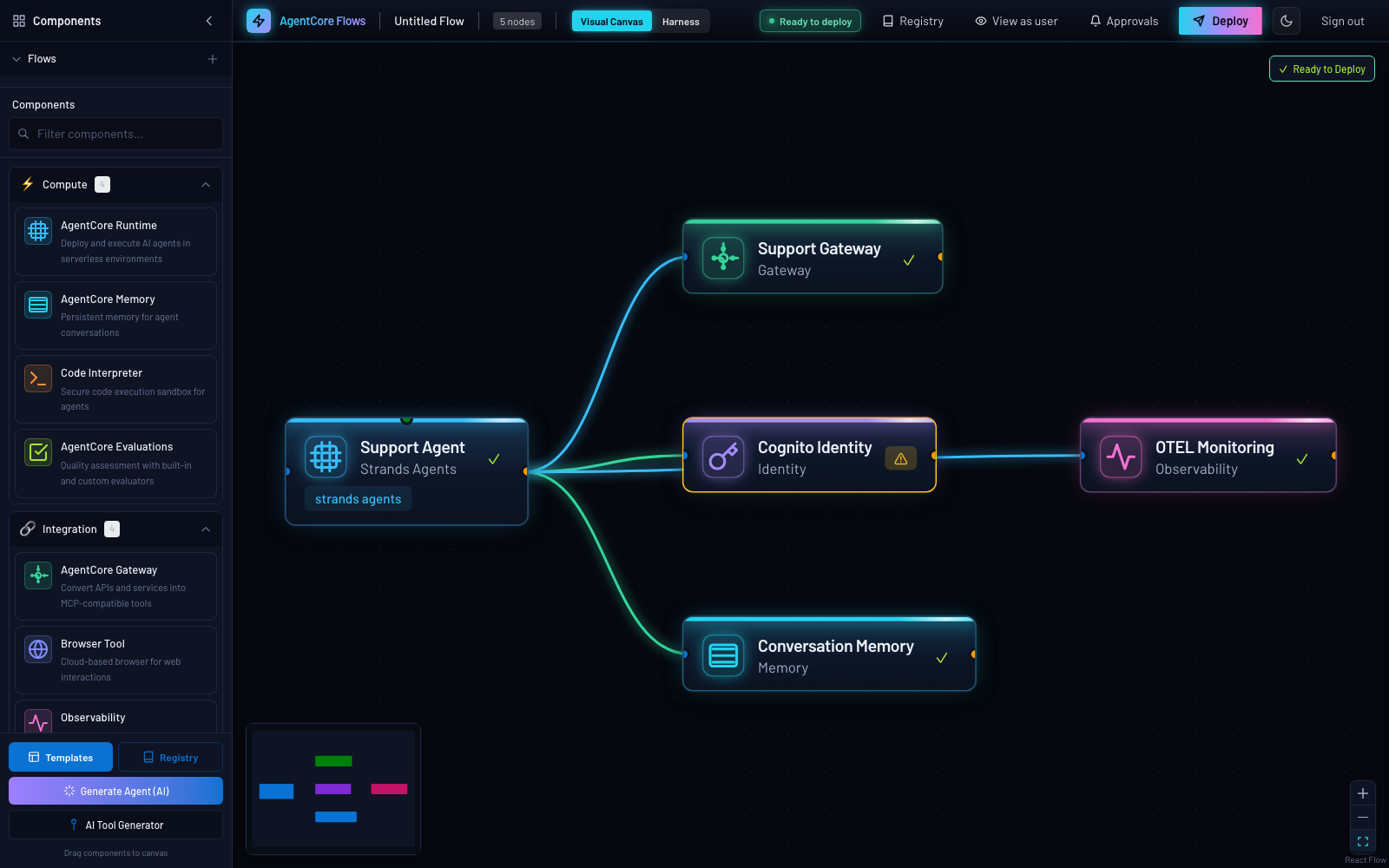
- Drag-and-drop AgentCore components: Runtime, Gateway, Memory, Knowledge Base, Browser, Identity, Observability, Policy, Connectors
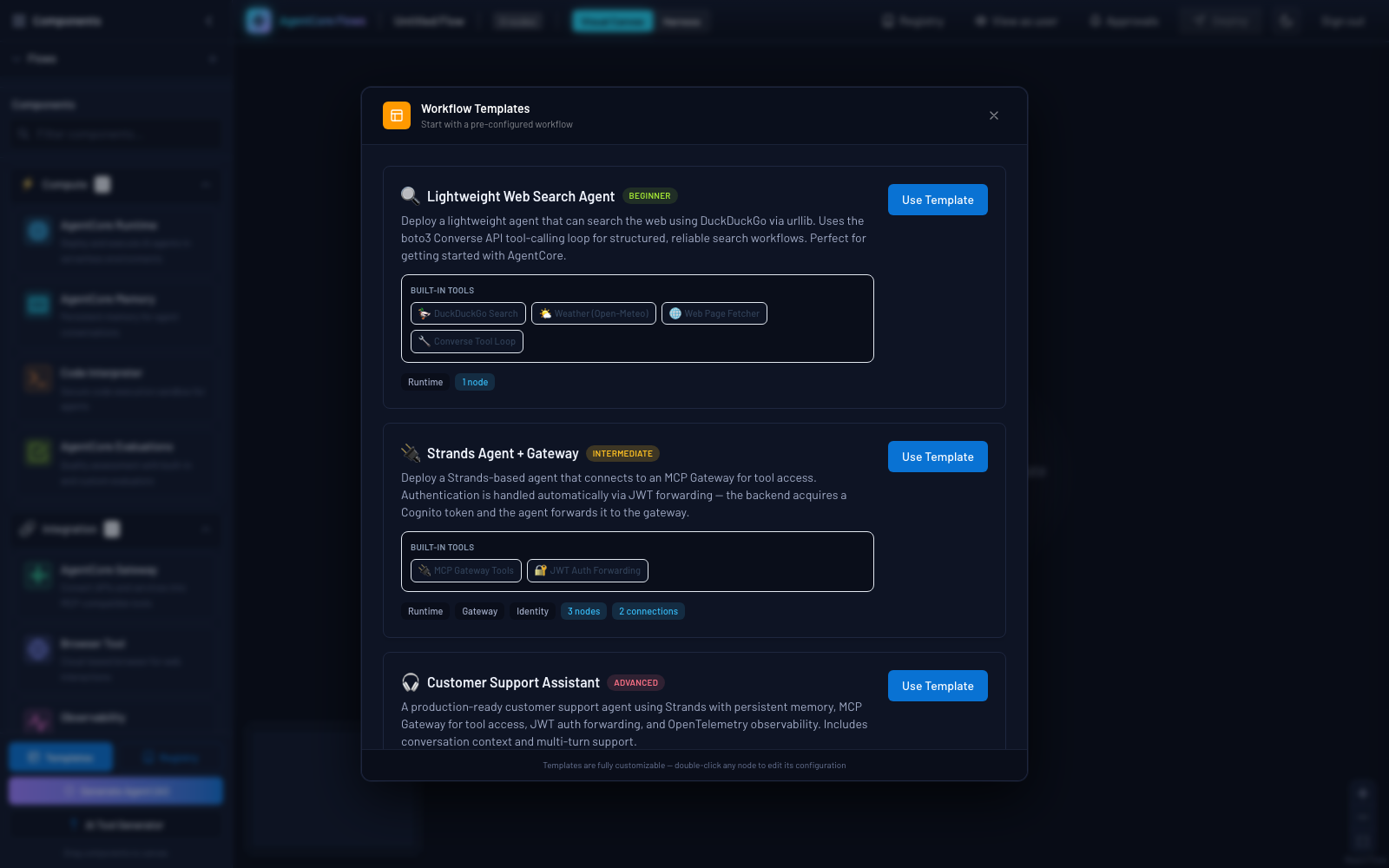
- Template gallery with six one-click templates
- CloudFormation and Python export
- Real SaaS connectors: Jira, Asana, Slack, GitHub, Salesforce, or any OpenAPI spec
- 13 model providers
- Scope-based RBAC (advisory by default) and Cedar policy enforcement per Policy node
- Agent registry with approval workflow, versioning and rollback, cost budgets, audit analytics
- Manifest-driven teardown with no orphans
Status
- Version
- 0.1.0 plus unreleased changes CHANGELOG.md (opens in new tab)
- Status
- Version 0.1.0 released 2026-07-17, with unreleased changes recorded in CHANGELOG.md CHANGELOG.md (opens in new tab)
Recent changes: commit history for Agentic-ai-self-service on GitHub (opens in new tab)
No open advisories are tracked for this project.
At a glance
| Fact | Value | Source |
|---|---|---|
| Validated regions | Any AWS region; us-east-1 is the default Outside us-east-1 the WAF web ACL is REGIONAL on the Cognito user pool and the CloudFront distribution runs without an edge ACL. APAC regions may need the model ID set explicitly. | README.md: Prerequisites (opens in new tab) |
| Default region | us-east-1 | README.md: Quickstart (opens in new tab) |
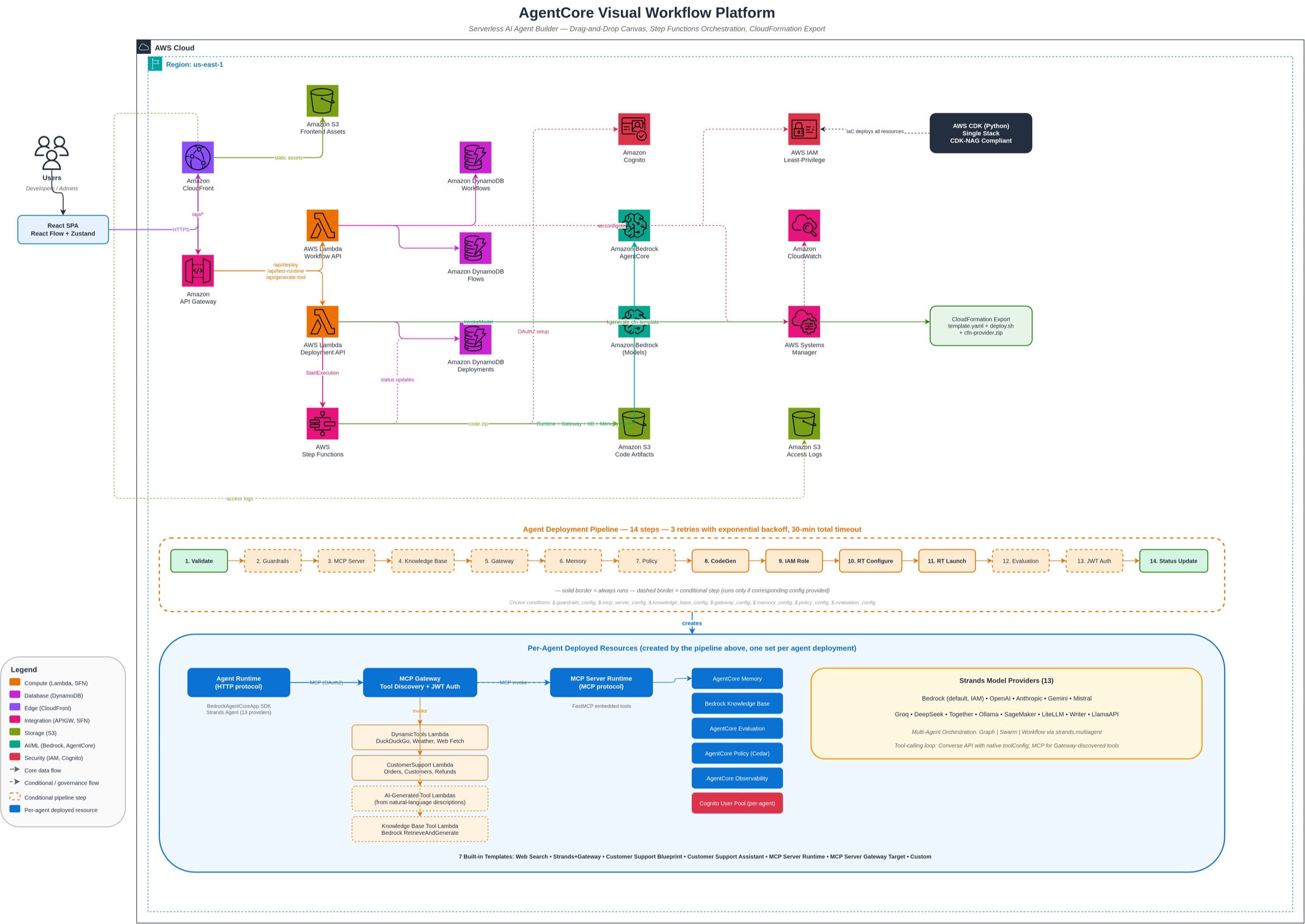
| What it deploys | Serverless stack: API Gateway, Lambda, Step Functions, DynamoDB, S3 and CloudFront, plus a Cognito user pool and a WAF web ACL | README.md: Quickstart (opens in new tab) |
| First deploy | Roughly 15 to 20 minutes for a first-time deploy | README.md: Quickstart (opens in new tab) |
| Hands-on time | not documented The README documents the deploy time only and publishes no hands-on figure. | none |
| Cost | About $0.02 to $0.39 per month for the platform infrastructure at low to moderate usage (docs/COSTS.md estimate, us-east-1 list prices) Excludes the WAF web ACL that infra/stacks/platform_stack.py always creates, which is billed separately and for which the repository publishes no figure, and all agent inference, AgentCore and vector-store usage. | COSTS.md: Monthly Cost Estimates (opens in new tab) |
| Infrastructure as code | AWS CDK (Python) run through npx; serverless stack of API Gateway, Lambda, Step Functions, DynamoDB, S3 and CloudFront | README.md: Quickstart (opens in new tab) |
| Account topology | Single account and single region per deployment; several deployments can coexist in one account (dev and prod, or two regions) Multi-region and multi-account deploy is opt-in and off by default (docs/ENTERPRISE_CAPABILITIES.md); a cross-account role template ships as docs/cross-account-deploy-role.json. | README.md: Safe to run with more than one deployment in the account (opens in new tab) |
| Auth and policy | Cognito user pool with group-based scopes (RBAC advisory by default), owner-scoped tenant isolation, and Cedar ENFORCE per Policy node | README.md (opens in new tab) |
| Status | Version 0.1.0 released 2026-07-17, with unreleased changes recorded in CHANGELOG.md | CHANGELOG.md (opens in new tab) |
| Teardown | Run ./scripts/cleanup.sh (prompts for confirmation). It deletes every AgentCore resource the platform created, empties the S3 buckets and runs cdk destroy. | README.md: Cleanup (opens in new tab) |
| Version | 0.1.0 plus unreleased changes | CHANGELOG.md (opens in new tab) |
Quickstart
Deploy the platform
Prerequisites: Self-Service prerequisites on the Start pages.
One script validates prerequisites, deploys the CDK stack, builds the frontend and prints the URLs.
Expected time: Roughly 15 to 20 minutes for a first-time deploy README.md: Quickstart (opens in new tab)
Clone the repository and enter the project folder
git clone https://github.com/aws-samples/sample-ai-agent-factory.git
cd sample-ai-agent-factory/Agentic-ai-self-service
Folder names are exact and case-sensitive.
Deploy with at least one Cognito user
# Minimal deploy (dev environment, us-east-1)
COGNITO_USERS="user@example.com" ./scripts/deploy.sh

# Specific environment
COGNITO_USERS="user@example.com" ENVIRONMENT_NAME=prod ./scripts/deploy.sh

# Another region (Frankfurt)
COGNITO_USERS="user@example.com" AWS_REGION=eu-central-1 ./scripts/deploy.sh
A first-time deploy takes roughly 15 to 20 minutes. Lambda code is packaged by CDK; no Docker build or ECR push is needed.
Assign a persona on first sign-in
POOL_ID=$(aws cognito-idp list-user-pools --max-results 40 --region us-east-1 \
  --query "UserPools[?Name=='agentcore-workflow-dev-users'].Id | [0]" --output text)

# Full access (all scopes) + admin UI + registry approver:
for g in g-admins-super t-admin registry-admin; do
  aws cognito-idp admin-add-user-to-group --user-pool-id "$POOL_ID" \
    --username you@example.com --group-name "$g" --region us-east-1
done
COGNITO_USERS creates users with no group, so a new user is read-only until you assign one. Always pass the region you deployed to. Sign out and back in after changing groups.
Source: README.md (opens in new tab)
Open the frontend URL the script printed
The script prints the CloudFront frontend URL and the API Gateway URL. Both are also CloudFormation stack outputs.
Source: README.md: Accessing the Platform (opens in new tab)
After the first deploy
First sign-in: assign a persona
COGNITO_USERS pre-creates Cognito users but assigns them to no group. Group membership grants capability scopes, so a brand-new user signs in effectively read-only (browse works; Clone and publish are disabled) until you assign a group. Sign out and back in after changing groups.
Source: README.md (opens in new tab)
Templates
Template gallery: six one-click starting points from beginner to advanced. README.md (opens in new tab)
Bring your own LiteLLM
If you already run a LiteLLM proxy, the README describes two roles for it: an MCP gateway for individual agents, and the agent catalog behind the Registry. For the gateway role an agent on the canvas has three supported shapes. Read the full section in the rendered README.
| On the canvas | What gets created | Use when |
|---|---|---|
| Gateway node, Provider = AgentCore (default) | A real AgentCore Gateway with your Lambda, OpenAPI, Smithy or MCP targets. | The default. Nothing about it changes. |
| Gateway node, Provider = LiteLLM | No AgentCore Gateway at all. The agent talks straight to your proxy. | LiteLLM replaces the gateway. Your proxy already aggregates every tool the agent needs. |
| Gateway node, Provider = AgentCore, with a Custom endpoint MCP target pointed at LiteLLM | An AgentCore Gateway that carries your proxy as one mcpServer target. | You want LiteLLM tools alongside Lambda or OpenAPI targets, or you want AgentCore inbound Cognito auth, semantic search and observability in front of it. |
Source: README.md: Bring your own LiteLLM (opens in new tab)
- A LiteLLM proxy can also be the agent catalog behind the Registry. The gateway role and the registry role are independent. README.md: Bring your own LiteLLM (opens in new tab)
- All of this is additive. AgentCore Gateway stays the default gateway and the built-in DynamoDB catalog stays the default registry until someone opts in. README.md: Bring your own LiteLLM (opens in new tab)
Enterprise capabilities
Enterprise Platform Capabilities on this site covers Versioning and rollback, Cedar policy enforcement, evaluation, cost analytics, registry, prompt library, triggers, connectors, HITL, governance and FinOps. README.md: Documentation (opens in new tab)
Architecture and figures
Known limitations and support envelope
Each item is copied from the project README or docs without paraphrase.
- WAF outside us-east-1. The same rule set as a
REGIONALWebACL on the Cognito user pool. The distribution runs without an edge ACL README.md: Deploying to another region (opens in new tab) - APAC inference prefixes. One region-specific caveat worth knowing before you pick a region: Bedrock's cross-region inference prefixes are
us.,eu.andapac., and theapac.family covers only the older Claude models. In APAC, current-generation models are published under country prefixes (jp.inap-northeast-1,au.inap-southeast-2) or asglobal., so an APAC deployment may need its model ID set explicitly.us-*andeu-*regions need no such adjustment. README.md: Deploying to another region (opens in new tab) - RBAC is advisory by default. Scope-based RBAC (
services/rbac.py) ships advisory by default (RBAC_ENFORCE=false): every request is allowed, but a request that would be denied logsRBAC advisory (would-deny): .... RBAC_ROLLOUT.md: RBAC Enforcement Rollout Runbook (opens in new tab) - Control plane has no VPC egress. The proxy must be reachable from the deploy Lambda. The control plane has no VPC egress, so a VPC-private LiteLLM cannot be probed and the deploy will fail at step 3 even though a VPC-mode Runtime could reach it at invoke time. README.md: As the gateway itself, per agent (opens in new tab)
Evidence
The README lists three local test suites and points to integration tests and live verification scripts that run against a deployed stack.
What runs against live AWS
Integration tests run against a real deployed stack with zero mocking: they deploy each built-in template, invoke the deployed runtimes, verify responses, and clean up all resources. The backend, CDK and frontend suites below run locally.
Source: README.md: Running Tests (opens in new tab), DEVELOPMENT.md: Integration Tests (opens in new tab)
Backend unit and property tests
cd backend && pip install -e ".[dev]" && pytest # backend unit + property testsWhat a pass proves: The backend logic holds under unit tests and property-based tests (Pytest with Hypothesis).
Source: README.md: Running Tests (opens in new tab), DEVELOPMENT.md (opens in new tab)
CDK assertions
cd infra && pip install -r requirements.txt && pytest tests/ -v # CDK assertionsWhat a pass proves: The synthesized CloudFormation template contains the expected serverless resources (API Gateway, Lambda, Step Functions, DynamoDB) and none of the removed ones (VPC, ECS, ALB, ECR, CodeBuild).
Source: README.md: Running Tests (opens in new tab), DEVELOPMENT.md (opens in new tab)
Frontend tests
cd frontend && npm install && npm test # frontend testsWhat a pass proves: The frontend passes its unit and property tests (Vitest with fast-check).
Source: README.md: Running Tests (opens in new tab), DEVELOPMENT.md (opens in new tab)
Integration tests against a deployed stack
cd backend

# Set required environment variables
export API_GATEWAY_URL="https://XXXXXXXXXX.execute-api.us-east-1.amazonaws.com"
export AWS_REGION="us-east-1"

# Run integration tests only
pytest -m integration -v
What a pass proves: Each built-in template deploys, the deployed runtimes answer, and every resource is cleaned up afterwards. Needs AWS credentials, a deployed stack and the API Gateway URL.
Source: DEVELOPMENT.md: Integration Tests (opens in new tab)
Live verification scripts
What a pass proves: Standalone probes drive the shipped product code against the real external system and print a PASS or FAIL line per check, exiting non-zero on any failure.
Source: DEVELOPMENT.md: Live verification scripts (opens in new tab)
Documentation on this site
- README: AgentCore Visual Workflow Platform
- API Reference & Configuration
- Costs & AWS Resources
- Data Retention & PII Notes
- Deployment Internals
- Local Development & Testing
- Enterprise Platform Capabilities
- External MCP → AgentCore Gateway: authorization architecture
- Observability
- Personas & Access (RBAC/ABAC)
- RBAC Enforcement Rollout Runbook
- Agent Registry: Roles & Approval
- Security & Hardening
- Changelog
- MCP Catalog (on GitHub) (opens in new tab): External MCP catalog servers as Gateway targets. README.md (opens in new tab)
Teardown
Deploy the platform
The cleanup script deletes every AgentCore resource the platform created, empties the S3 buckets and runs cdk destroy. It prompts for confirmation.
./scripts/cleanup.sh