Learn the platform patterns hands-on
LearnBuilding an Enterprise Agentic AI Platform
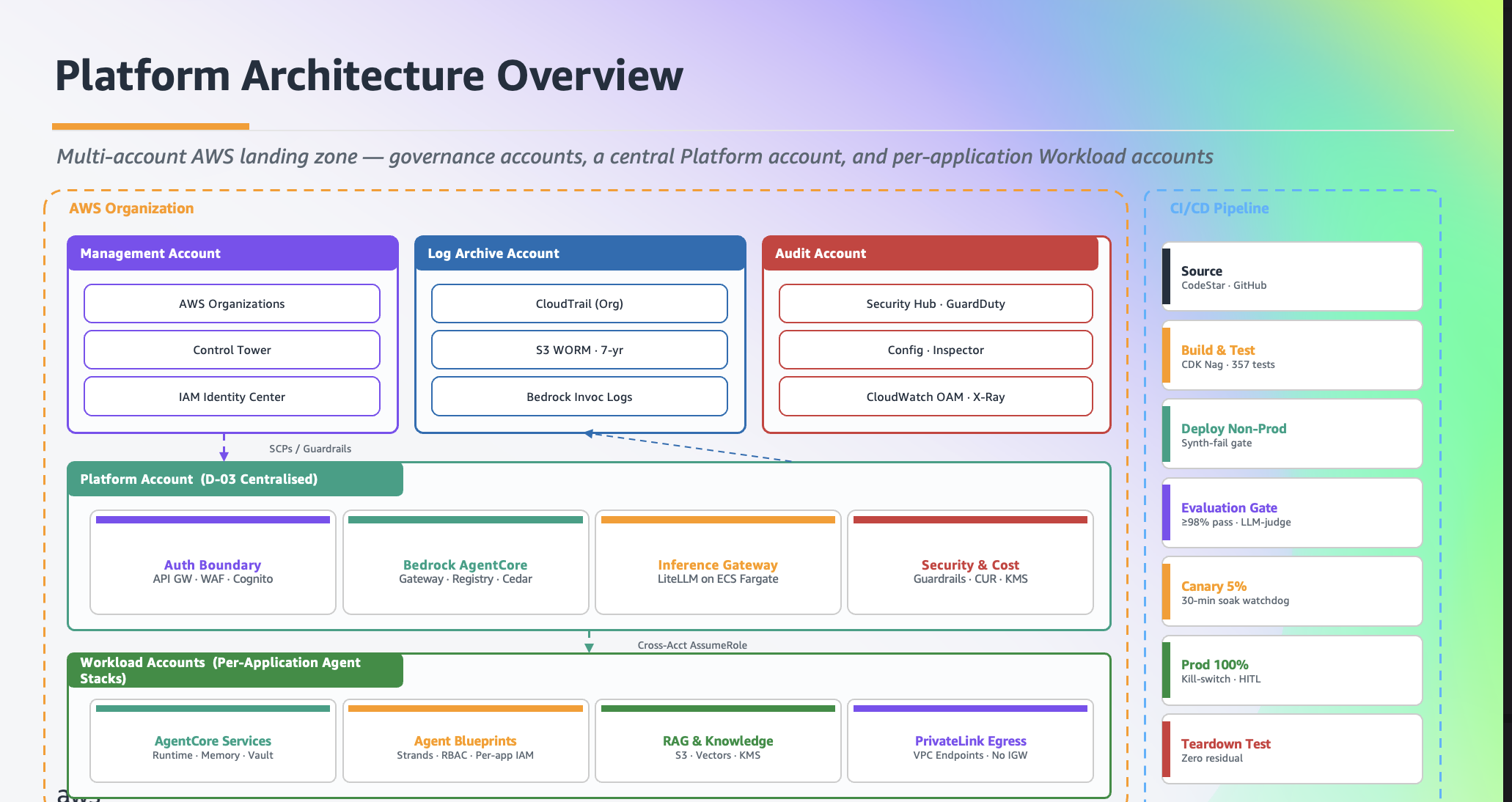
Hands-on AWS workshop for building an enterprise landing-zone pattern for agentic AI on Amazon Bedrock and Amazon Bedrock AgentCore.
What it is
- Five modules (1, 2, 3a, 3b, 4) with a track selector at the end of Module 1
- Three workshop tracks: Fast Path, Build the Platform, Full Journey
- Hands-on with real AWS resources in a browser-based Code Editor IDE
- Run it at an AWS event or self-paced in your own account with one deploy script
- CLI walkthrough or notebook walkthrough for most module sections
Status
- Version
- not documented The workshop has no version badge, tag or CHANGELOG. contentspec.yaml declares only the Workshop Studio schema version 2.0.
- Status
- Published on AWS Builder Center (Workshop Studio); last published 2026-08-18 Workshop Studio catalog (opens in new tab) Publication state and date come from the Workshop Studio catalog entry, not from the repository, which holds no publish record to quote.
Advisory: GitHub issue #2
Open since 2026-06-30. The LLM Gateway CloudFormation template and THIRD_PARTY_LICENSES.md reference the LiteLLM image at docker.litellm.ai/berriai/litellm-database (tag v1.84.0). The issue asks for the image to be pulled from ghcr.io instead.
At a glance
| Fact | Value | Source |
|---|---|---|
| Validated regions | AWS-run events: us-west-2. Self-paced: us-west-2 (default), us-east-1, or eu-west-1. Other regions are not supported. The contentspec.yaml deployableRegions list is us-west-2, us-east-1 and eu-west-1. Workshop Studio events provision the account in us-west-2 (content/introduction/getting-started/aws-event.en.md). | contentspec.yaml (opens in new tab) |
| Default region | us-west-2 | README.md: Quick start (self-paced) (opens in new tab) |
| What it deploys | Five CloudFormation stacks: LLM Gateway, MCP Registry, Tools Gateway, AgentCore, Code Editor IDE | README.md: Quick start (self-paced) (opens in new tab) |
| First deploy | About 30 to 45 minutes for the self-paced deploy script (five CloudFormation stacks) The self-paced guide (content/introduction/getting-started/self-service.en.md) notes that the Registry stack alone takes 20 to 30 minutes. At an AWS event the account arrives pre-provisioned, so there is nothing to deploy. | README.md: Quick start (self-paced) (opens in new tab) |
| Hands-on time | 1.5 to 4 hours depending on the track | contentspec.yaml (opens in new tab) |
| Cost | About $15 to $30 for a one-day run in us-west-2 (workshop estimate) At an AWS-run event the account is provided and the cost is covered. Cost accrues per hour whether or not the environment is in use. | index.en.md: Cost (opens in new tab) |
| Infrastructure as code | CloudFormation, run by the self-paced deploy script; Module 4 deploys the FAST agent with the AWS CDK from inside the IDE | README.md: Quick start (self-paced) (opens in new tab) |
| Account topology | Single AWS account; a dedicated, disposable account is recommended | README.md: Prerequisites (self-paced) (opens in new tab) |
| Auth and policy | Cognito JWT on the Tools Gateway and the AgentCore Registry; group-based access in interceptors and Cedar policies (Module 3b); scoped IAM deploy policies Module 3b Part C creates an AgentCore Policy Engine with Cedar policies. The CLI path stops short of attaching it to the Gateway; the notebook attaches it in LOG_ONLY mode, not ENFORCE, because ENFORCE would empty tools/list in that setup (content/module-3b/step-7/index.en.md). | README.md: What you'll build (opens in new tab) |
| Status | Published on AWS Builder Center (Workshop Studio); last published 2026-08-18 Publication state and date come from the Workshop Studio catalog entry, not from the repository, which holds no publish record to quote. | Workshop Studio catalog (opens in new tab) |
| Teardown | Follow the workshop Cleanup module for Module 4 and Module 3a resources, then run ./deploy-cfn.sh destroy from the workshop folder. At an AWS event Workshop Studio cleans up the account automatically. | README.md: Delete Everything (opens in new tab) |
| Version | not documented The workshop has no version badge, tag or CHANGELOG. contentspec.yaml declares only the Workshop Studio schema version 2.0. | none |
Quickstart
At an AWS event
Prerequisites: Workshop prerequisites on the Start pages.
Workshop Studio provisions a pre-configured account for you. There is nothing to deploy.
Expected time: No deploy; start the modules as soon as you have the account README.md: Running the workshop (opens in new tab)
Open the workshop (opens in new tab)
The workshop guide is published on AWS Builder Center (Workshop Studio).
Source: README.md (opens in new tab)
Sign in to the pre-provisioned AWS account
All workshop resources are deployed to us-west-2. Log out of other AWS console sessions first.
Source: aws-event.en.md: Before you start (opens in new tab)
Open the workshop IDE from the Event outputs
On the Event dashboard, find the row with stack name code-editor and open the URL value.
Source: aws-event.en.md: Open the workshop IDE (opens in new tab)
Start at Module 1 and pick a track
Module 1 ends with a track selector: Fast Path, Build the Platform, or Full Journey.
Self-paced in your own account
Prerequisites: Workshop prerequisites on the Start pages.
One deploy script provisions the same five CloudFormation stacks and browser IDE that events use. Use a dedicated account you can tear down.
Expected time: About 30 to 45 minutes for the self-paced deploy script (five CloudFormation stacks) README.md: Quick start (self-paced) (opens in new tab) The self-paced guide (content/introduction/getting-started/self-service.en.md) notes that the Registry stack alone takes 20 to 30 minutes. At an AWS event the account arrives pre-provisioned, so there is nothing to deploy.
Clone the repository and enter the project folder
git clone https://github.com/aws-samples/sample-ai-agent-factory.git
cd sample-ai-agent-factory/workshop-building-agentic-ai-platform
Folder names are exact and case-sensitive.
Source: README.md: Quick start (self-paced) (opens in new tab)
Set a validated region
aws configure set region us-west-2 # or us-east-1, eu-west-1us-west-2 is the default. us-east-1 and eu-west-1 are also validated. Other regions are not supported.
Source: README.md: Quick start (self-paced) (opens in new tab)
Deploy all five stacks
./scripts/self-service-deploy.shAbout 30 to 45 minutes. The script runs a preflight check, then prints the IDE URL and password at the end.
Source: README.md: Quick start (self-paced) (opens in new tab)
Verify the environment
./scripts/self-test.sh -r "$(aws configure get region)"Expect 5 passed, 0 failed.
Source: README.md: Quick start (self-paced) (opens in new tab)
Open the IDE and start at Module 1
Sign in with the generated IdePassword. Run every module command inside the IDE terminal or notebooks, not on your laptop.
Source: README.md: Quick start (self-paced) (opens in new tab)
Tracks
The workshop has three tracks of its own. All tracks share Module 1, which ends with a track selector.
| Track | Best for | You do | Duration |
|---|---|---|---|
| 1. Fast Path | AI/ML engineers who want to build an agent | Jump straight to Module 4; the platform is pre-deployed | About 1.5 to 2 hours |
| 2. Build the Platform | Platform engineers | Modules 1, 2, 3a, 3b (stops before the agent) | About 2 to 3 hours |
| 3. Full Journey | Solutions architects, tech leads | Modules 1, 2, 3a, 3b, 4 end-to-end | About 3 to 4 hours |
Modules
- Module 1: The Vision. Why enterprises need a platform approach to agentic AI, not just individual agents (all tracks).
- Module 2: LLM Gateway. Deploy LiteLLM Proxy on ECS Fargate for governed, cost-attributed access to Amazon Bedrock models.
- Module 3a: MCP Registry + Tools Gateway. Register tools in the MCP Gateway & Registry, then layer an AgentCore Tools Gateway on top for JWT auth, audit, and guardrails.
- Module 3b: AgentCore Registry & Gateway. AWS-native tool governance with Amazon Bedrock AgentCore, Cedar-based authorization, and EventBridge-driven approval workflows.Not the same as the MCP Gateway project on this site: Module 3b attaches its Cedar policy in LOG_ONLY mode and teaches the Registry approval workflow, while the MCP Gateway project runs its policy engine in ENFORCE mode. See MCP Gateway in the glossary. Source: index.en.md (opens in new tab), README.md: Verified architecture (opens in new tab)
- Module 4: Build Your Agent. Deploy a full-stack travel agent using FAST (Fullstack AgentCore Solution Template) on Amazon Bedrock AgentCore, wired to the platform via either the MCP path or the AgentCore path.
Notebooks
The notebooks run inside the browser Code Editor IDE that the workshop provisions, not on your laptop. Open them from /workshop/source/<module>/notebooks/ in the IDE and select the workshop kernel (workshop-fast for Module 4b). README.md (opens in new tab)
Folder names under source/ predate the module renumbering: module-4a-tools-gateway holds the Module 3a Tools Gateway notebooks. Source: README.md: Repository structure (opens in new tab)
module-2-llm-gateway
- Module 2 -- Step 1: LLM Gateway Architecture Overview (opens in new tab)step-1-architecture.ipynb
- Module 2 -- Step 2: Explore the LLM Gateway (opens in new tab)step-2-deploy.ipynb
- Module 2 -- Step 3: Virtual Keys and Teams (opens in new tab)step-3-virtual-keys.ipynb
- Module 2 -- Step 4: Test Model Access (opens in new tab)step-4-test-models.ipynb
- Module 2 -- Step 5: Enterprise Guardrails (opens in new tab)step-5-guardrails.ipynb
- Module 2 -- Step 6: Spend Tracking and Administration (opens in new tab)step-6-spend-tracking.ipynb
- Module 2 -- Step 7: Cleanup (opens in new tab)step-7-cleanup.ipynb
- Module 2: LLM Gateway (LiteLLM Proxy): End-to-End Walkthrough (opens in new tab)walkthrough.ipynb
module-3a-mcp-registry
- Module 3 -- Verify MCP Gateway & Registry (opens in new tab)01-verify-registry.ipynb
module-3b-agentcore
- Architecture Overview: AgentCore Registry & Gateway (opens in new tab)01-architecture.ipynb
- Verify the AgentCore Infrastructure (opens in new tab)02-deploy.ipynb
- Create the AgentCore Registry (opens in new tab)03-create-registry.ipynb
- Register Tools in the AgentCore Registry (opens in new tab)04-register-tools.ipynb
- Discover & Search the Registry (opens in new tab)05-discover-search.ipynb
- Test the AgentCore Gateway (opens in new tab)06-test-gateway.ipynb
- Add Guardrails & Access Control (opens in new tab)07-guardrails.ipynb
- Cleanup (opens in new tab)08-cleanup.ipynb
module-4a-tools-gateway
- Two Paths to Tools (opens in new tab)01-two-paths.ipynb
- Explore the Tools Gateway Stack and Create the Gateway (opens in new tab)02-explore-stack.ipynb
- Curate Tools into Gateway Targets (opens in new tab)03-curate-tools.ipynb
- Sync Registry to AgentCore Gateway (opens in new tab)04-sync-catalog.ipynb
- Test Both Paths Side-by-Side (opens in new tab)05-test-both-paths.ipynb
- Add Bedrock Guardrails (opens in new tab)06-bedrock-guardrails.ipynb
module-4b-fast
- Architecture and Prerequisites (opens in new tab)01-architecture-prereqs.ipynb
- Deploy FAST (opens in new tab)02-deploy-fast.ipynb
- Connect to the LLM Gateway (opens in new tab)03-connect-llm-gateway.ipynb
- Connect to Tools Gateway (MCP path: Module 3a) (opens in new tab)04a-connect-gateway-mcp.ipynb
- Connect to Tools Gateway (AgentCore path: Module 3b) (opens in new tab)04b-connect-gateway-agentcore.ipynb
- Run the Agent (opens in new tab)05-run-the-agent.ipynb
- Observe the Infrastructure (opens in new tab)06-observe.ipynb
- Register the Agent in the Registry (Optional) (opens in new tab)07-register-agent.ipynb
- Cleanup (opens in new tab)08-cleanup.ipynb
Architecture and figures
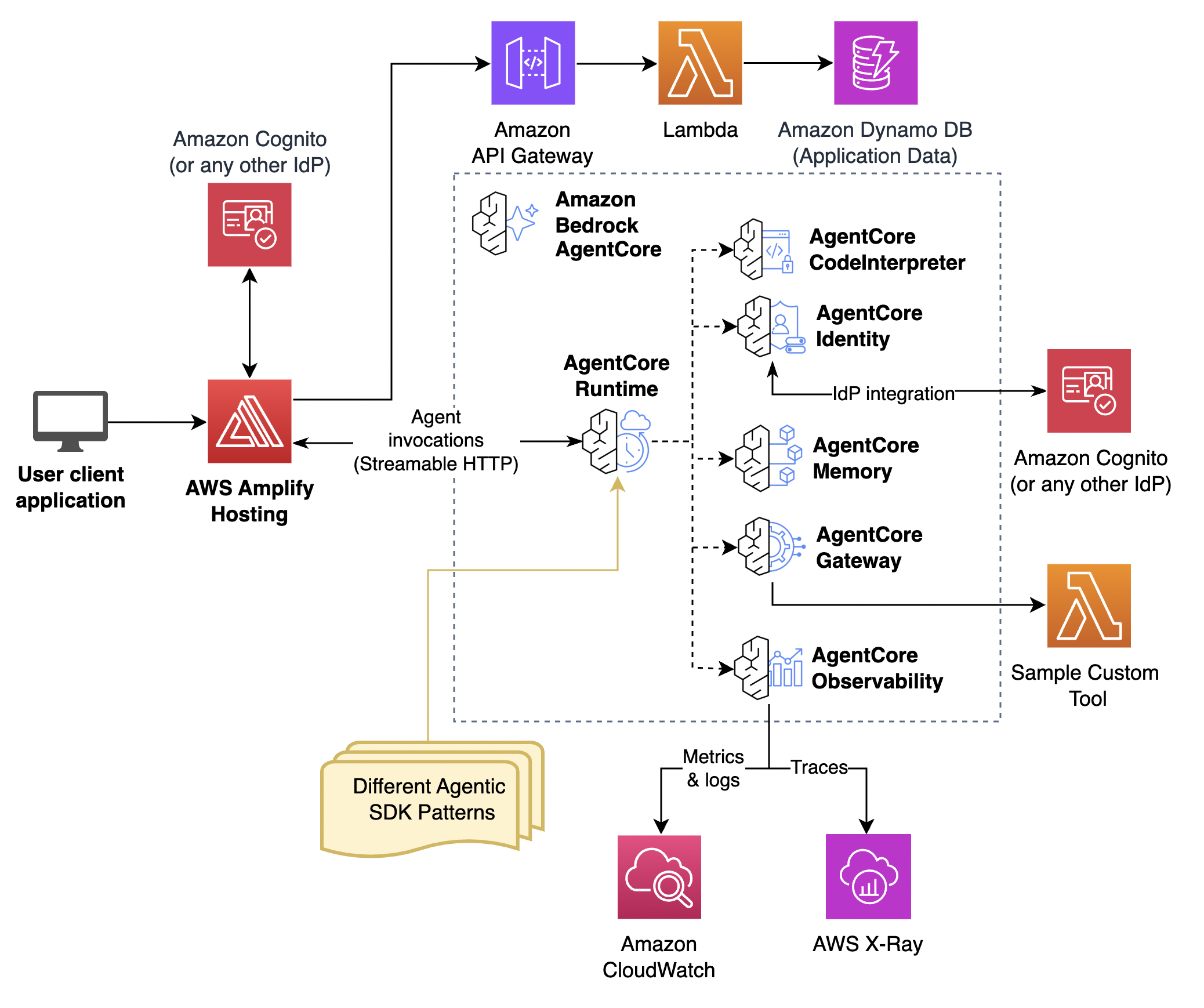
The image in the page header is the platform architecture from the README. README.md (opens in new tab)
Known limitations and support envelope
Each item is copied from the project README or docs without paraphrase.
- Region lock. Other regions are not supported README.md: Prerequisites (self-paced) (opens in new tab)
- AgentCore Registry availability. the Amazon Bedrock AgentCore Registry control plane is not yet generally available everywhere, which breaks Modules 3b and 4. README.md: Prerequisites (self-paced) (opens in new tab)
- Model access. Model access must be granted per region. README.md: Prerequisites (self-paced) (opens in new tab)
- Where commands run. Run everything in the IDE terminal/notebooks, not your local machine. README.md (opens in new tab)
Evidence
A self-paced deployment is checked by a post-deploy health check; the workshop content and its infrastructure copies are guarded by parity scripts that run against the repository.
What runs against live AWS
self-test.sh runs against the deployed account: it verifies the four platform stacks plus the IDE and that key endpoints respond, and exits non-zero if any check fails. The parity scripts and the module unit tests need no AWS account.
Source: self-test.sh (opens in new tab)
Post-deploy health check (scripts/self-test.sh)
./scripts/self-test.sh -r "$(aws configure get region)" # expect: 5 passed, 0 failedWhat a pass proves: The five stacks are deployed in the region you chose and their key endpoints respond. Expect 5 passed, 0 failed before starting Module 1.
Source: workshop-building-agentic-ai-platform/README.md: Quick start (self-paced) (opens in new tab), workshop-building-agentic-ai-platform/README.md: Repository structure (opens in new tab)
CLI and notebook parity (scripts/verify-walkthrough-parity.py)
What a pass proves: A CLI walkthrough page and its notebook write the same source files, so participants on either path run identical code.
Assets bucket parity (scripts/verify-assets-parity.py)
What a pass proves: The assets/ copy served from the shared assets bucket matches the git-tracked static/ and content/ sources, so a fix pushed to git cannot leave a stale copy behind.
Participant IAM policy parity (scripts/verify-ide-policy-parity.py)
What a pass proves: The five participant IAM policy files match the copies embedded in code-editor.yaml, and each stays under the IAM managed-policy size quota.
Contributor gates: cfn-lint and the module unit tests
What a pass proves: Changed CloudFormation templates lint clean and the module unit tests pass before a change is pushed.
Documentation on this site
- README: Building an enterprise agentic AI platform on Amazon Bedrock AgentCore
Teardown
At an AWS event
Nothing to do. Workshop Studio cleans up the account when the event ends.
Source: index.en.md (opens in new tab)
Self-paced in your own account
Tear everything down to stop charges.
./deploy-cfn.sh destroy