AI Analysis Pipeline
Overview
Section titled “Overview”The Segment Analyzer is a ReAct (Reasoning + Acting) agent built on Strands SDK. It combines upstream preprocessing results (OCR, BDA, PDF text, Transcribe) with AI tools to iteratively analyze documents and videos. The agent autonomously generates questions, invokes tools to obtain answers, and synthesizes findings through multiple passes for in-depth analysis.
End-to-End Analysis Flow
Section titled “End-to-End Analysis Flow”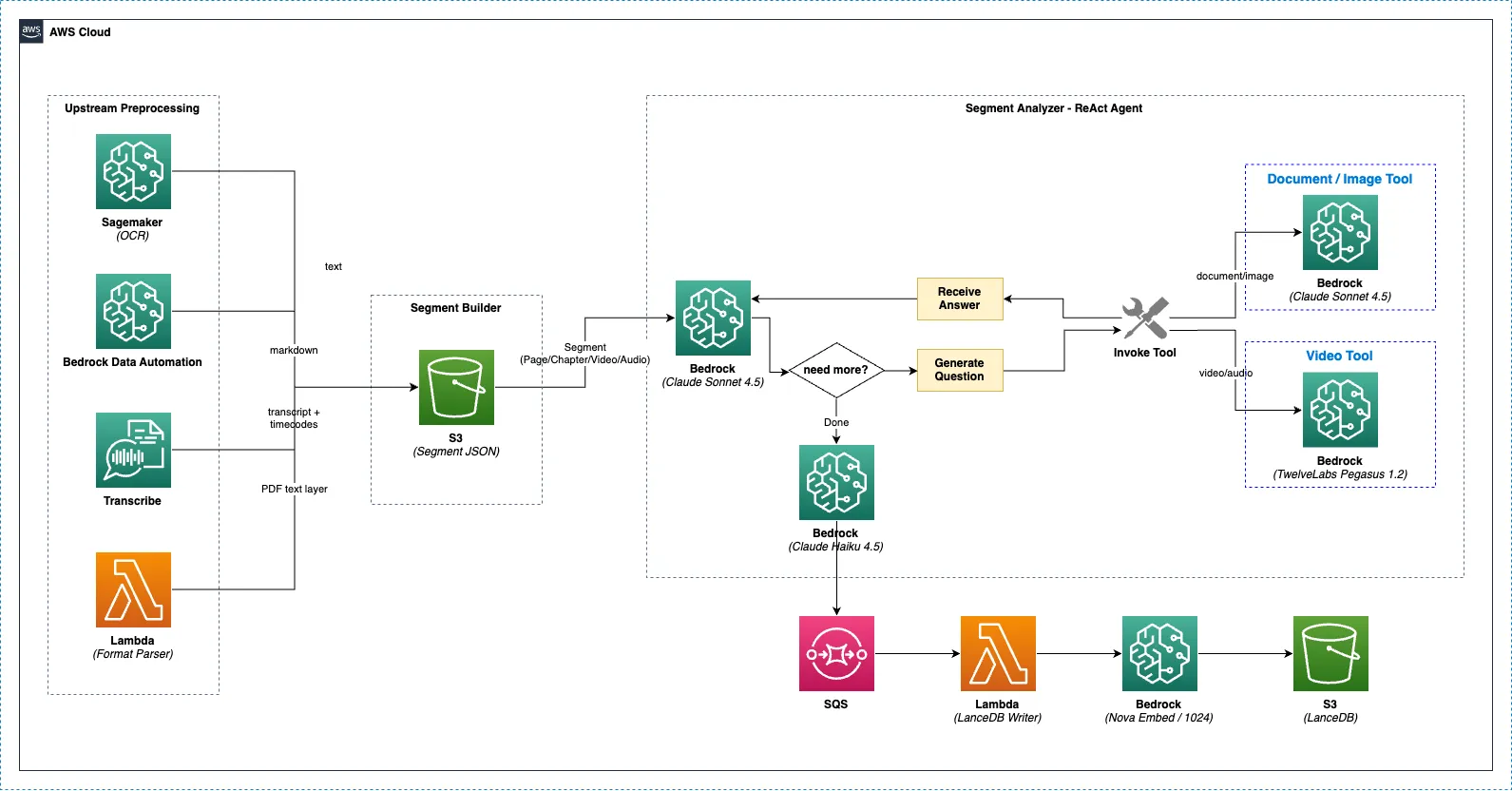
Upstream Preprocessing (parallel) ├─ PaddleOCR (Lambda/SageMaker) ── text extraction (automatic) ├─ Bedrock Data Automation ── document structure analysis (optional) ├─ Format Parser ── PDF text layer extraction (automatic, PDF only) └─ AWS Transcribe ── audio/video transcription (automatic) ↓ Segment Builder (merge all results → S3 segment JSON) ↓ Segment Analyzer (ReAct Agent) ├─ Documents/Images → Claude Sonnet 5 + image analysis tools └─ Videos/Audio → Claude Sonnet 5 + Pegasus video analysis tool ↓ Analysis Finalizer → SQS → LanceDB Writer ↓ Document Summarizer (Claude Haiku 4.5)Upstream Preprocessing
Section titled “Upstream Preprocessing”Before the Segment Analyzer begins, multiple preprocessors extract information from the original files. For detailed preprocessing flows by file type, see Preprocessing Pipeline.
PaddleOCR
Section titled “PaddleOCR”Extracts text from documents and images. See OCR on SageMaker for details.
Bedrock Data Automation (Optional)
Section titled “Bedrock Data Automation (Optional)”Uses AWS BDA to analyze document structure (tables, layouts, etc.) in markdown format. Can be enabled/disabled in project settings.
AWS Transcribe
Section titled “AWS Transcribe”Converts speech from audio/video files to text. Generates timestamped segment-level transcripts.
Format Parser
Section titled “Format Parser”| Item | Value |
|---|---|
| Target | PDF files only (application/pdf) |
| Library | pypdf |
| Action | Page-by-page text layer extraction |
| Purpose | Obtain accurate text from digital PDFs without OCR |
Digital PDFs contain text layers that provide more accurate text than OCR. These results are provided as context to the Segment Analyzer alongside OCR/BDA results.
Segment Builder
Section titled “Segment Builder”Merges all preprocessing results into a single segment JSON.
Document/Image Segment
Section titled “Document/Image Segment”{ "segment_index": 0, "segment_type": "PAGE", "image_uri": "s3://.../preprocessed/page_0000.png", "paddleocr": "Text extracted by OCR...", "bda_indexer": "BDA markdown result...", "format_parser": "PDF text layer...", "ai_analysis": []}Video/Audio Segment
Section titled “Video/Audio Segment”{ "segment_index": 0, "segment_type": "CHAPTER", "file_uri": "s3://.../video.mp4", "start_timecode_smpte": "00:00:00:00", "end_timecode_smpte": "00:05:30:00", "transcribe": "Full transcript...", "transcribe_segments": [ {"id": 0, "transcript": "...", "start_time": "0.0", "end_time": "5.2"} ], "bda_indexer": "Chapter summary...", "ai_analysis": []}Segment Analyzer (ReAct Agent)
Section titled “Segment Analyzer (ReAct Agent)”How It Works
Section titled “How It Works”The Segment Analyzer uses an iterative question-answer approach. After reviewing the context (OCR, BDA, PDF text, etc.), the agent autonomously generates targeted questions, invokes tools, collects responses, and synthesizes them. This process repeats multiple times for thorough analysis.
Agent reviews context → "I need to identify the document type" → analyze_image("What is the type and structure of this document?") → Claude Sonnet 5 examines the image and responds → "There's a table that needs detailed analysis" → analyze_image("Extract the table structure and data") → Claude Sonnet 5 responds → "I should check the technical drawing dimensions" → analyze_image("What are the dimensions and specifications shown?") → Claude Sonnet 5 responds → Synthesize all results into final analysisAdaptive Analysis Depth
Section titled “Adaptive Analysis Depth”The agent automatically adjusts analysis depth based on content complexity.
| Complexity | Tool Calls | Examples |
|---|---|---|
| Minimal | 1 | Blank pages, simple text |
| Normal | 2-3 | Standard document pages |
| Deep | 4+ | Technical drawings, complex tables, diagrams |
Document/Image Analysis
Section titled “Document/Image Analysis”Models Used
Section titled “Models Used”| Model | Purpose |
|---|---|
| Claude Sonnet 5 | ReAct agent (reasoning + tool call decisions) |
| Claude Sonnet 5 (Vision) | Image analysis tool (processes image + question internally) |
Available Tools
Section titled “Available Tools”analyze_image
Section titled “analyze_image”Analyzes document images by asking specific questions. Uses Claude Sonnet 5’s Vision capability to directly examine images and provide answers.
@tooldef analyze_image(question: str) -> str:    """Analyze the document image with a specific question.
    Ask targeted questions about text content, visual elements,    diagrams, tables, or any other details you need to understand.    """
Example questions:
- “Describe the type and overall structure of this document”
- “Extract all data contained in the table”
- “Read the dimensions and specifications shown in the technical drawing”
- “Analyze the data points and trends in the chart”
rotate_image
Section titled “rotate_image”Corrects orientation when document images are rotated.
@tooldef rotate_image(degrees: int) -> str:    """Rotate the current document image by specified degrees.
    Use this tool when text appears upside down, sideways, or at an angle.    """
Analysis Process
Section titled “Analysis Process”Input: Image + OCR text + BDA result (optional) + PDF text (PDF only) ↓[Step 1] Orientation check → rotate_image if needed ↓[Step 2] Document overview → analyze_image("What type of document is this?") ↓[Step 3] Text extraction → analyze_image("Extract all text content") ↓[Step 4] Tables/charts → analyze_image("Analyze tables and charts") ↓[Step 5] Details → analyze_image("Extract technical specs and dimensions") ↓Final synthesis → Consolidate all tool responses into structured analysisVideo/Audio Analysis
Section titled “Video/Audio Analysis”Models Used
Section titled “Models Used”| Model | Purpose |
|---|---|
| Claude Sonnet 5 | ReAct agent (reasoning + tool call decisions) |
| TwelveLabs Pegasus 1.2 | Video analysis tool (analyzes video directly internally) |
Available Tools
Section titled “Available Tools”analyze_video
Section titled “analyze_video”Analyzes video segments by asking specific questions. The TwelveLabs Pegasus 1.2 model directly watches and analyzes videos from S3.
@tooldef analyze_video(question: str) -> str:    """Analyze the video segment with a specific question.
    Ask targeted questions about visual content, actions, scenes,    objects, people, text overlays, or any other details you need to understand.    """
Example questions:
- “What actions are being performed in this video?”
- “Describe the main objects and people on screen”
- “Read any text displayed on screen”
- “What are the key events in this segment?”
Pegasus Model Invocation
Section titled “Pegasus Model Invocation”{ "inputPrompt": "What actions are being performed in this video segment?", "mediaSource": { "s3Location": { "uri": "s3://bucket/projects/p1/documents/d1/video.mp4", "bucketOwner": "123456789012" } }}Pegasus analyzes video files directly from S3. Segments are split based on chapter information (timecodes) extracted by BDA.
Analysis Process
Section titled “Analysis Process”Input: Video URI + Transcribe result + BDA chapter summary (optional) + timecodes ↓[Step 1] Content overview → analyze_video("Describe the main content") ↓[Step 2] Visual elements → analyze_video("What actions and objects are visible?") ↓[Step 3] Audio content → analyze_video("Summarize the spoken content") ↓[Step 4] Key events → analyze_video("What are the key events?") ↓Final synthesis → Combine Transcribe + Pegasus responses into timeline-based analysisDocument vs Video Comparison
Section titled “Document vs Video Comparison”| Aspect | Documents/Images | Videos/Audio |
|---|---|---|
| Segment Type | PAGE | CHAPTER, VIDEO, AUDIO |
| Input Data | Image URI | Video URI + timecodes |
| Preprocessing Data | OCR + BDA (optional) + PDF text | Transcribe + BDA (optional) |
| Agent Model | Claude Sonnet 5 | Claude Sonnet 5 |
| Analysis Tool Model | Claude Sonnet 5 (Vision) | TwelveLabs Pegasus 1.2 |
| Tools | analyze_image, rotate_image | analyze_video |
| Analysis Focus | Text, tables, diagrams, layout | Actions, scenes, speech, visual events |
Document Summarizer
Section titled “Document Summarizer”After all segment analyses are complete, the Document Summarizer generates an overall document summary.
| Item | Value |
|---|---|
| Model | Claude Haiku 4.5 (claude-4-5-haiku) |
| Input | All segment AI analysis results (max 50,000 chars) |
| Output | Structured document summary |
Summary structure: 1. Document overview (1-2 sentences) 2. Key findings (3-5 items) 3. Important data points 4. ConclusionWhy Claude Haiku: Deep analysis is already completed by the Segment Analyzer, so a fast and cost-effective model is sufficient for the summarization step.
Analysis Result Storage
Section titled “Analysis Result Storage”Each tool call result is stored sequentially in the ai_analysis array.
{ "ai_analysis": [ { "analysis_query": "What is the type and structure of this document?", "content": "This is a technical specification document..." }, { "analysis_query": "Extract the table data", "content": "The table contains the following items..." } ]}After analysis completes, the Analysis Finalizer generates content_combined (all analysis results merged) and sends it to LanceDB Writer via SQS. LanceDB Writer performs vector embedding with Nova Embed and stores it in LanceDB.
Multi-language Support
Section titled “Multi-language Support”The Segment Analyzer generates analysis results in the project’s configured language. Supports Korean, English, Japanese, and Chinese.
Reanalysis
Section titled “Reanalysis”Previously analyzed segments can be reanalyzed with custom instructions. During reanalysis, user-specified instructions are applied instead of the project default prompt.