

Infrastructure & Security
Infrastructure & Security
Section titled “Infrastructure & Security”Table of Contents
Section titled “Table of Contents”- Overview
- Architecture Diagram
- Processing Flow
- Nested Stack Structure
- Authentication
- Encryption
- Networking
- WAF (Web Application Firewall)
- CloudFront CDN
- IAM
- Observability
- Data Retention
- Related Documentation
Overview
Section titled “Overview”LMA is deployed as a set of 11 nested CloudFormation stacks providing a fully serverless, event-driven architecture. This document describes the infrastructure components, security controls, and operational characteristics of the system.
Architecture Diagram
Section titled “Architecture Diagram”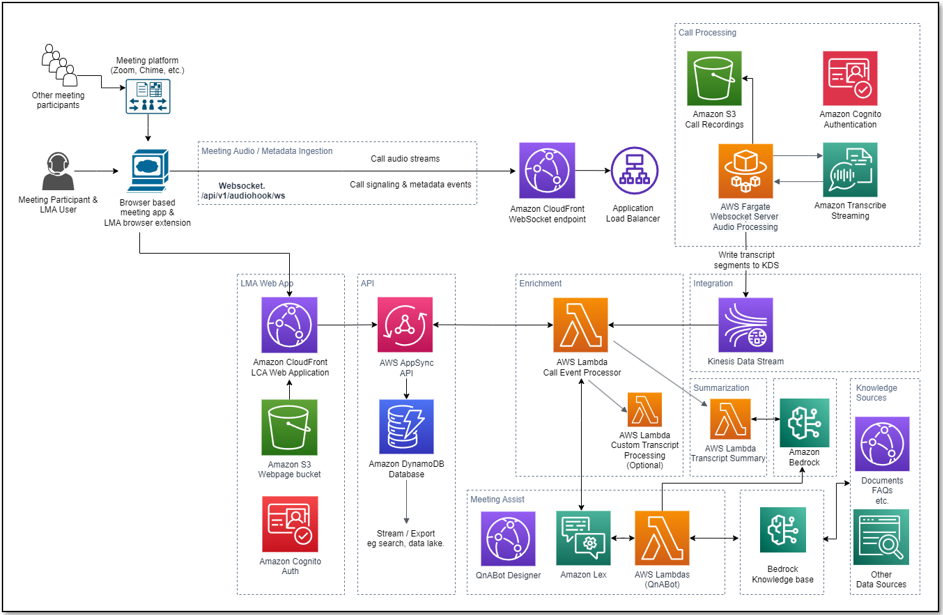
Processing Flow
Section titled “Processing Flow”- User starts meeting via the Stream Audio tab or by launching a Virtual Participant.
- A secure WebSocket connection is established to the Fargate-based WebSocket server.
- Two-channel audio is streamed to Amazon Transcribe.
- Transcription results are written to a Kinesis Data Stream in real time.
- The Call Event Processor Lambda consumes from Kinesis, processes transcript segments, and integrates with the Strands agent for meeting assistance.
- Results are persisted to DynamoDB via AppSync mutations.
- Real-time updates are pushed to the UI via AppSync GraphQL subscriptions.
- End-to-end latency is typically a few seconds.
Nested Stack Structure
Section titled “Nested Stack Structure”| Stack | Purpose |
|---|---|
| lma-ai-stack | Core stack: Lambda functions, AppSync API, DynamoDB, Cognito, CloudFront UI |
| lma-websocket-transcriber-stack | WebSocket server on ECS Fargate with Application Load Balancer |
| lma-virtual-participant-stack | VP ECS tasks and Step Functions scheduler |
| lma-vpc-stack | VPC, public/private subnets (2 AZs), NAT gateway, security groups |
| lma-cognito-stack | Cognito User Pool and Identity Pool |
| lma-meetingassist-setup-stack | Strands agent configuration |
| lma-bedrockkb-stack | Bedrock Knowledge Base setup |
| lma-llm-template-setup-stack | LLM prompt templates (DynamoDB) |
| lma-chat-button-config-stack | Chat button configuration (DynamoDB) |
| lma-nova-sonic-config-stack | Nova Sonic voice assistant configuration |
Authentication
Section titled “Authentication”LMA uses Amazon Cognito User Pool for authentication with the following features:
- Optional multi-factor authentication (MFA)
- JWT token verification with signature validation
- Admin group for elevated access privileges
- Self-registration with configurable email domain restrictions
Encryption
Section titled “Encryption”At Rest
Section titled “At Rest”- Customer-managed KMS key encrypts DynamoDB tables, S3 buckets, and CloudWatch Log groups
- All sensitive data is encrypted using AES-256 via KMS
In Transit
Section titled “In Transit”- HTTPS/TLS for all connections including WebSocket, AppSync, and CloudFront
- All API communications are encrypted end-to-end
Networking
Section titled “Networking”- VPC with public and private subnets across 2 Availability Zones for high availability
- NAT gateway for outbound internet access from private subnets
- Application Load Balancer for the WebSocket server endpoint
- Security groups for network-level access control between components
- Optional: Use an existing VPC and subnets instead of the auto-created network infrastructure
WAF (Web Application Firewall)
Section titled “WAF (Web Application Firewall)”LMA includes an optional AWS WAFv2 Web Application Firewall that can restrict access to regional resources by IP address. WAF is disabled by default (zero additional cost) and can be enabled by customers who need IP-based access control.
Configuration
Section titled “Configuration”Set the WAFAllowedIPv4Ranges parameter to a comma-separated list of IPv4 CIDR ranges to enable WAF:
| Parameter | Default | Description |
|---|---|---|
WAFAllowedIPv4Ranges | 0.0.0.0/0 | Allowed IPv4 CIDR ranges. Default disables WAF. Example: 192.168.1.0/24, 10.0.0.0/16 |
How it works
Section titled “How it works”- Disabled (default): When set to
0.0.0.0/0, no WAF resources are created. All IPs can access the API. - Enabled: When set to specific CIDR ranges, a REGIONAL WAFv2 WebACL is created with an IP-based allow-list rule. The default action is Block, meaning only traffic from the specified IP ranges is allowed.
Protected resources
Section titled “Protected resources”When WAF is enabled, the WebACL is automatically associated with:
- MCP API Gateway (when
EnableMCPServeristrue) — protects the REST API used for API key-authenticated MCP access
The WAF WebACL uses REGIONAL scope, making it compatible with API Gateway REST APIs, Application Load Balancers, and AppSync APIs in the same region. Future resources can be associated with the same WebACL by adding additional AWS::WAFv2::WebACLAssociation resources.
- WAF disabled (default): $0/month
- WAF enabled: ~$7/month base (WebACL + rules) + $0.60 per million requests
API Gateway security
Section titled “API Gateway security”The MCP API Gateway includes the following security controls regardless of WAF enablement:
| Control | Description |
|---|---|
| Custom Lambda Authorizer | Validates API keys via SHA-256 hash lookup in DynamoDB |
| Request Validation | API Gateway validates request parameters before forwarding |
| Access Logging | Structured JSON access logs with per-request details sent to CloudWatch |
| Execution Logging | API Gateway execution logs (authorizer decisions, integration telemetry) at INFO level |
| Throttling | Rate limiting at 100 req/sec with burst limit of 50 |
| Metrics | CloudWatch metrics enabled for monitoring |
CloudFront CDN
Section titled “CloudFront CDN”- Configurable price class: PriceClass_100 (North America and Europe), PriceClass_200 (adds Asia, Africa, Middle East), or PriceClass_All (all edge locations)
- Optional geographic restrictions via ISO 3166-1 alpha-2 country codes to limit access by region
- Least-privilege policies for all IAM roles created by the stack
- Optional permissions boundary via the
InstallationPermissionsBoundaryArnparameter, applied to all roles created during installation
Observability
Section titled “Observability”- AWS X-Ray tracing for distributed request tracing across Lambda functions and API calls
- CloudWatch Logs with configurable retention (1 to 3653 days)
- CloudWatch metrics for Lambda, ECS, and AppSync services
Data Retention
Section titled “Data Retention”| Data Type | Retention | Configuration |
|---|---|---|
| Meeting records | Configurable, default 90 days | DynamoDB TTL via MeetingRecordExpirationInDays parameter |
| Audio recordings | Configurable | S3 lifecycle policy |
| Transcript KB data | Configurable | S3 lifecycle policy |
| CloudWatch logs | Configurable | CloudWatchLogsExpirationInDays parameter |
The stack parameter EnableDataRetentionOnDelete controls whether DynamoDB tables, S3 buckets, and KMS keys are retained when the stack is deleted. When enabled, these resources persist after stack deletion to prevent data loss.