

Meetings Query Tool
Meetings Query Tool
Section titled “Meetings Query Tool”Table of Contents
Section titled “Table of Contents”- Overview
- How It Works
- Using the Query Tool
- User-Based Access Control
- Configuration
- Related Documentation
Overview
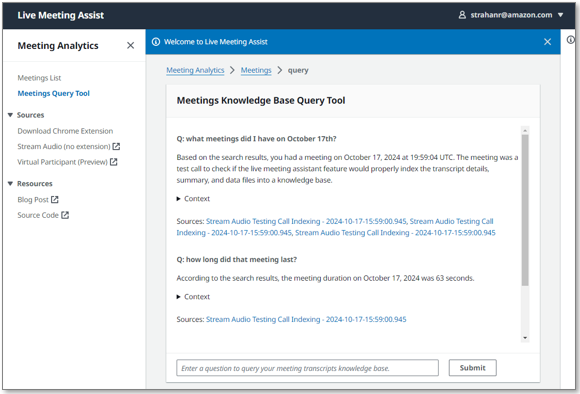
Section titled “Overview”The Meetings Query Tool provides a chat interface for performing semantic search across all past meeting transcripts, summaries, and metadata. Powered by a dedicated Amazon Bedrock Knowledge Base, it enables users to ask natural-language questions about their meeting history and receive answers with citations and direct links to the relevant meeting records.
How It Works
Section titled “How It Works”The Meetings Query Tool relies on a Bedrock Knowledge Base that is automatically created and maintained by LMA:
-
Knowledge Base creation — When the Transcript Knowledge Base CloudFormation parameter is set to BEDROCK_KNOWLEDGE_BASE (Create) (the default), LMA provisions a dedicated Bedrock Knowledge Base for meeting data.
-
Data ingestion — When each meeting ends, LMA writes the meeting summary, full transcript, and metadata (including owner, callId, timestamps, and duration) to an S3 bucket.
-
Retention management — An S3 lifecycle policy manages data retention based on the transcript retention parameter (default: 90 days). Expired meeting data is automatically deleted.
-
Knowledge Base synchronization — An Amazon EventBridge scheduler triggers a sync of the KB data source every 15 minutes, ingesting any new or updated meeting data from S3.
-
Availability — New meetings typically become available for querying within 15-30 minutes after the meeting ends, depending on when the next sync cycle runs.
Using the Query Tool
Section titled “Using the Query Tool”- Navigate to Meetings Query Tool in the LMA UI navigation menu.
- Enter your question about past meetings in the chat interface. For example:
- “What did we discuss about the product roadmap last week?”
- “Were there any action items from Monday’s standup?”
- “Summarize recent meetings about the Q3 budget.”
- The assistant returns an answer based on your meeting history, including citations that reference the source meetings.
- Click Open Context to view the referenced meeting excerpts and sources.
- Shift+Click on meeting links to open the full meeting details in a new browser tab.
User-Based Access Control
Section titled “User-Based Access Control”The Meetings Query Tool enforces User-Based Access Control (UBAC) to ensure users can only query meetings they are authorized to access:
- Your authenticated username is matched against the owner field in the meeting metadata.
- Non-admin users can only query and receive results from meetings they own.
- Admin users can query all meetings across all users.
This ensures that sensitive meeting content is only accessible to authorized participants.
Configuration
Section titled “Configuration”The Meetings Query Tool is controlled by the Transcript Knowledge Base CloudFormation parameter:
| Value | Description |
|---|---|
| BEDROCK_KNOWLEDGE_BASE (Create) | Creates and maintains a Bedrock Knowledge Base for meeting transcripts. This is the default setting and enables the Meetings Query Tool. |
| DISABLED | Disables the Transcript Knowledge Base. The Meetings Query Tool will not be available. |