Amazon Bedrock Agents Integration
Amazon Bedrock Agents are fully managed agents that can complete tasks based on your organization's data and user input. Agents orchestrate interactions between foundation models, data sources, software applications, and user conversations. This integration allows you to leverage pre-built Bedrock Agents within the GenAI Chatbot, enabling sophisticated task automation and multi-step reasoning capabilities.
Note
Bedrock Agents integration is different from the AgentCore feature. Bedrock Agents are pre-configured agents managed through Amazon Bedrock, while AgentCore allows you to deploy custom agent runtimes.
Prerequisites
- Create and deploy an Amazon Bedrock Agent in your AWS account through the Amazon Bedrock console
- Note your Agent ID and Alias ID - you'll need these during configuration
- IAM Permissions - The CDK deployment automatically configures the required permissions (
bedrock:InvokeAgentandbedrock:ListAgents)
Configuration
Using Magic Config CLI
The easiest way to configure Bedrock Agents is through the interactive Magic Config CLI:
npm run configWhen prompted:
- Amazon Bedrock Agent ID: Enter your agent ID, or leave empty to fetch all available agents from your account
- Amazon Bedrock Agent Alias ID: Enter your alias ID, or leave empty to use the draft alias (
TSTALIASID)
The CLI will generate the appropriate configuration in your bin/config.json file.
Manual Configuration
You can also manually configure Bedrock Agents by setting environment variables in your bin/config.json:
{
  "bedrockAgentEnable": true,
  "bedrockAgentId": "YOUR_AGENT_ID",
  "bedrockAgentAliasId": "YOUR_ALIAS_ID"
}
Configuration Options:
bedrockAgentEnable: Set totrueto enable Bedrock Agents integrationbedrockAgentId: Your Bedrock Agent ID (e.g.,ABCDEFGHIJ)bedrockAgentAliasId: Your Agent Alias ID (defaults toTSTALIASIDfor draft agents if not specified)
Draft Alias
The special alias TSTALIASID is AWS-managed and used for testing draft versions of your agent. Learn more in the AWS Bedrock Agent Testing Documentation.
Using Bedrock Agents
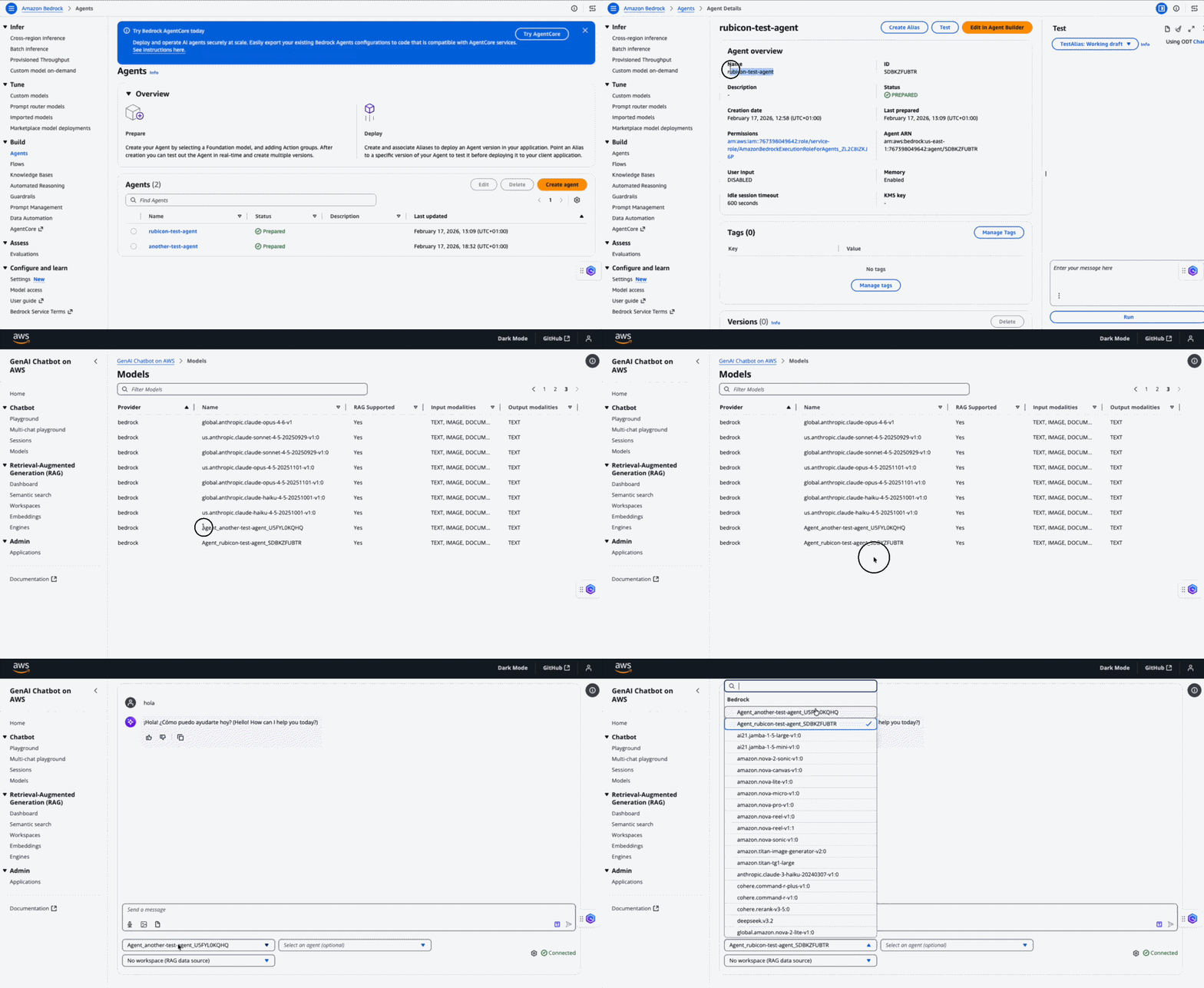
Agent Discovery
The chatbot automatically discovers available Bedrock Agents in your account:
- Agents are listed using the
list_agents()function - Agent information includes name, status, available aliases, and versions
- Only users with appropriate IAM permissions can access agent listings
Agent Selection
In the chat interface:
- Bedrock Agents appear in the model selection dropdown
- Agents are identified by their agent name and ID
- Select an agent just like you would select a foundation model
- The system automatically uses the configured alias ID for invocation
Conversation Flow
When you interact with a Bedrock Agent:
- User Input: You send a message through the chat interface
- Agent Invocation: The system invokes your Bedrock Agent with the message
- Agent Processing: The agent orchestrates actions, calls tools, and accesses data sources
- Response: The agent's response is streamed back to the chat interface
- Session Management: Conversation history is maintained for context continuity
Key Features:
- Streaming Responses: Agent responses stream in real-time for better user experience
- Session Continuity: Each conversation maintains its own session state
- Trace Support: Enable trace logging to debug agent behavior (configurable)
- Error Handling: Graceful error recovery with informative messages
Troubleshooting
Agent Not Available
- Verify your agent is created and in
PREPAREDorVERSIONEDstatus in Bedrock - Confirm the agent ID matches exactly (case-sensitive)
- Check IAM permissions for
bedrock:InvokeAgentandbedrock:ListAgents - Ensure the agent is in the same region as your deployment
Invocation Errors
- Alias Not Found: Verify the alias ID exists for your agent
- Session Errors: Check CloudWatch logs for session management issues
- Timeout: Increase the timeout value if your agent requires more processing time
- Permission Denied: Confirm the Lambda execution role has necessary Bedrock permissions
Performance Considerations
- Agents may take longer than direct model calls due to orchestration complexity
- Monitor CloudWatch metrics for agent invocation times
- Consider using versioned aliases for production workloads instead of draft
- Session state is maintained server-side by Bedrock for optimal performance
Best Practices
- Use Versioned Aliases: Create versioned aliases for production deployments instead of using the draft alias
- Enable Tracing: Keep trace logging enabled during development for easier debugging
- Monitor Costs: Bedrock Agents incur charges based on invocations and processing time
- Test Thoroughly: Use the draft alias (
TSTALIASID) for testing before deploying to production