Amazon Quick for Supply Chain
Conversational supply chain intelligence on Amazon Bedrock AgentCore and Amazon Quick, using a supervisor/orchestrator pattern over MCP tools.
End-to-end Order Management & Supply Chain solution built on a supervisor–orchestrator pattern: Amazon Quick is the supervisor that discovers and orchestrates specialized tools, AWS AgentCore hosts the business-rule MCP servers and the reasoning agent, and the AWS Agent Registry is the governed discovery catalog. Structured data lives in your database of choice (Snowflake, PostgreSQL/RDS, or any SQLAlchemy-supported engine), CRM data in Salesforce (optional), and unstructured documents in an S3 knowledge base surfaced in the Quick Space (for RAG).
Deployment runs in three phases - (1) the AgentCore infrastructure as one CloudFormation/SAM stack, (2) synthetic data generation + S3 upload, and (3) the Amazon Quick datasets, knowledge base, Space, and agent - with a small set of console-only manual steps in between.
Table of Contents
- Architecture
- How Users Interact (End-to-End Flow)
- Repository Layout
- Prerequisites
- Deployment at a glance
- Deploy - Phase 1: AgentCore infrastructure
- Deploy - Phase 2: Synthetic data + S3
- Manual steps (AWS console - required between Phase 2 and 3)
- Deploy - Phase 3: Quick datasets, KB, Space, agent
- End-to-End Order
- Test / Demo Flow
- Components Reference
- Design Principles
- Troubleshooting
- Teardown
Architecture
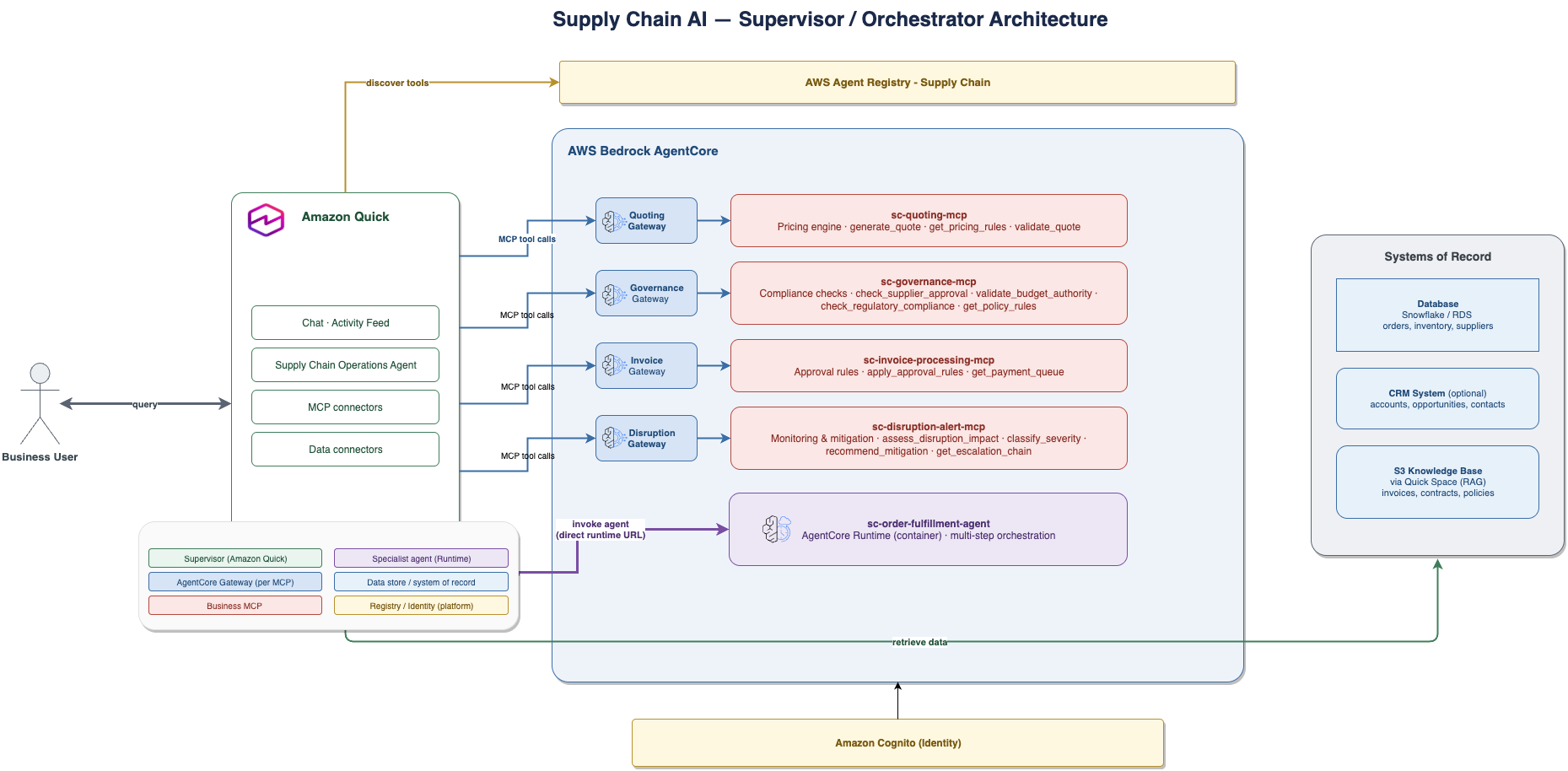
High-level architecture: Amazon Quick (supervisor) over the AgentCore-hosted MCP business-rule servers and the order-fulfillment reasoning agent, with the AWS Agent Registry as the discovery catalog and data in the Quick Space (datasets + S3 knowledge base).
Amazon Quick (Supervisor / Orchestrator)
  │
  ├── Database (via Quick Space)      ── Structured data (orders, inventory, suppliers…)
  ├── Salesforce connector (optional) ── CRM data (accounts, opportunities, contacts)
  ├── S3 knowledge base (via Space)   ── Unstructured docs (invoices, contracts) for RAG
  ├── AWS Agent Registry              ── Discovery catalog (6 records)
  │
  ├── sc-quoting-mcp                  ── Pricing rules            (AgentCore Gateway → Lambda)
  ├── sc-governance-mcp               ── Compliance rules         (AgentCore Gateway → Lambda)
  ├── sc-invoice-processing-mcp       ── Approval rules           (AgentCore Gateway → Lambda)
  ├── sc-disruption-alert-mcp         ── Impact assessment        (AgentCore Gateway → Lambda)
  │
  └── sc-order-fulfillment-agent      ── Multi-step reasoning      (AgentCore Runtime, container)
        │  reached DIRECTLY via its runtime invocation URL
        │  (registered as an AGENT record; connector configured manually)
        ├── calls sc-quoting-mcp
        ├── calls sc-governance-mcp
        ├── calls sc-invoice-processing-mcp
        └── calls sc-disruption-alert-mcp
Layer mapping (supervisor–orchestrator pattern):
| Layer | Role | Implementation |
|---|---|---|
| User Experience | Discovery, decisions, notifications | Amazon Quick UI + connectors |
| Agent Interaction | Skills / super-agents | Quick Skill supply-chain-ops |
| Agent↔Agent | Routing + orchestration | AgentCore Gateway (MCP) + Runtime |
| Service Layer | Single-task agents | 4 business MCPs + 1 Agent (in Agent Registry) |
| Data / RBAC | AuthN/Z | Cognito (JWT) + resource-server scopes |
| Data Stores | Structured + unstructured | Database (Snowflake/RDS/…), Salesforce, S3 knowledge base |
How Users Interact (End-to-End Flow)
A business user works entirely in Amazon Quick Chat using natural language. Quick (the supervisor) owns the data connectors and UX; it queries data, calls the MCP business-rule tools, optionally invokes the reasoning agent, and returns a decision or a branded document.
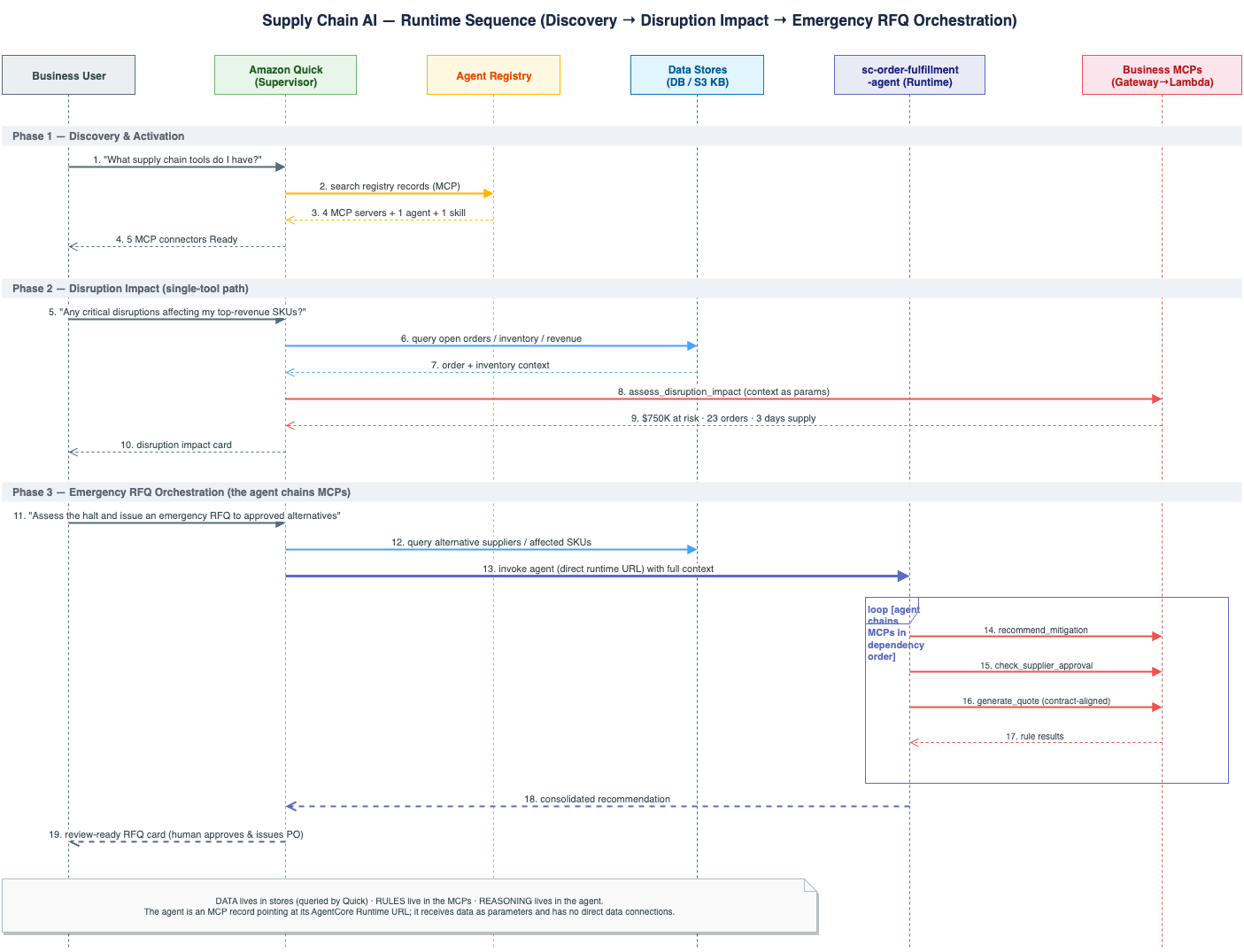
Sequence of a request: the user asks Quick, Quick queries the Space data, passes the facts to the relevant MCP business-rule server (or the order-fulfillment agent for multi-step requests), then synthesizes the answer and confirms any writes.
The pattern for every request:
User asks Quick → Quick queries data (Space datasets / Salesforce / docs) → Quick passes
that data to the relevant MCP → MCP applies rules → Quick synthesizes the
answer (often a branded HTML/DOCX artifact) and asks for approval on writes.
Golden-path walkthrough (≈5 min)
| # | User says (in Quick Chat) | What happens |
|---|---|---|
| 1 | "What supply chain capabilities do we have?" | Quick searches the Agent Registry → lists the 6 records (4 business MCPs, 1 agent [AGENT record], 1 skill). |
| 2 | "Activate the Supply Chain Operations skill." | The supply-chain-ops skill loads and connects the MCP tools. |
| 3 | [attach Invoice_SUP-INV-40003.txt from synthetic_data/documents/] "Process this invoice." |
Quick extracts the doc, queries the matching PO from the Space datasets, calls sc-invoice-processing-mcp → detects a variance → DIRECTOR_REVIEW decision card. (Invoice_SUP-INV-40001.txt is the clean AUTO-APPROVE case.) |
| 4 | "Generate a quote for Sample Manufacturing Co 03, 1000 units of Sample Component 03 (SKU-103), align with contract CTR-2026-003." | Quick pulls tier/contract/product data from the Space datasets, calls sc-quoting-mcp → renders a branded HTML + DOCX quote. |
| 5 | "Any active disruptions? Assess impact and find alternatives." | Quick invokes the sc-order-fulfillment-agent connector (the AgentCore Runtime, reached directly via its runtime invocation URL) → the agent chains disruption + governance + quoting MCPs → returns a contingency plan. |
More prompts that invoke the sc-order-fulfillment-agent
These are multi-step requests (3+ MCPs / combined reasoning), so Quick routes them to the order-fulfillment agent rather than a single MCP. They use real generated entities so they run as-is.
| User says (in Quick Chat) | What the agent chains |
|---|---|
| "Process our open orders end-to-end and flag anything that needs review." | disruption + governance + invoice + quoting → consolidated per-order plan |
| "New order for Sample Manufacturing Co 03: 1000 units SKU-103. Validate the customer, generate a quote against contract CTR-2026-003, and check compliance before we commit." | quoting + governance (+ inventory) → quote + go/no-go |
| "ALERT-002 just hit APAC. Assess the impact on our open orders, find alternative suppliers, and re-quote the affected lines." | disruption → governance (approved alternates) → quoting (re-quote) → contingency plan |
| "Can we fulfill a 5,000-unit order of SKU-103 for an Enterprise customer this quarter? Check inventory, supplier capacity, and pricing." | inventory/data + governance + quoting → feasibility answer |
| "Supplier Sample Supplier Co 04 is flagged. Assess exposure across open POs and invoices, and recommend mitigation." | governance + invoice + disruption reasoning → risk + mitigation |
Routing note: single-tool asks (one quote, one supplier check, the payment queue) go directly to the relevant MCP — not the agent. Use the agent only when the request spans multiple domains or needs combined reasoning (see the skill's "When to call the agent" table in
skill/SKILL.md).
Representative single-tool asks
| Ask | Tools exercised |
|---|---|
| "Is a given supplier approved?" | Space datasets → sc-governance-mcp.check_supplier_approval |
| "Does our Regional Manager have budget authority for a $72,000 PO?" | sc-governance-mcp.validate_budget_authority |
| "Show me the payment queue." | sc-invoice-processing-mcp.get_payment_queue |
| "Which products are below reorder point?" | Space datasets (direct query) |
| "A major port just closed - what's our exposure?" | Web search + Space datasets + sc-disruption-alert-mcp |
Who owns what
- Quick = Supervisor agent - owns all data connectors, the UX, and executes writes.
sc-order-fulfillment-agent= Specialist agent - owns multi-step reasoning; receives data as parameters (it has no direct data connections).- MCPs = deterministic tools - apply business rules only; they hold no data.
Repository Layout
.
├── README.md                        ← You are here (the single source of docs)
├── template.yaml                    ← Unified SAM stack: Cognito + 4 Lambdas + 4 Gateways + 4 Targets + Runtime
├── deploy_agentcore.sh              ← PHASE 1: build container → sam deploy → register (Cognito + 4 MCPs + Runtime + 6 registry records)
├── generate_and_upload.sh           ← PHASE 2: generate synthetic_data/ → upload dataset CSVs + KB docs to S3
├── setup_quick.sh                   ← PHASE 3: Quick datasets + S3 KB + Space + agent (from the S3 bucket)
│
├── src/
│   ├── agents/
│   │   ├── order-fulfillment/       ← Agent container for AgentCore Runtime (main.py, Dockerfile)
│   │   ├── mcp-quoting/             ← generate_quote, get_pricing_rules, validate_quote
│   │   ├── mcp-governance/          ← supplier/budget/regulatory checks, audit
│   │   ├── mcp-invoice-processing/  ← apply_approval_rules, get_payment_queue
│   │   └── mcp-disruption-alert/    ← assess_disruption_impact, classify_severity, recommend_mitigation, get_escalation_chain
│   └── common/auth_helper.py        ← shared auth utilities
│
├── registry/
│   └── deploy_registry.py           ← Registers records to the standalone AWS Agent Registry (GA)
│
├── generate_synthetic_data/         ← Separate, idempotent data pipeline (see "Phase 2")
│   ├── load_data.sh                 ← One-shot data orchestrator (generate → DB → S3 → Salesforce)
│   ├── pipeline/                    ← Loader package (import as generate_synthetic_data.pipeline.*)
│   │   ├── config.py  db_loader.py (engine-aware)  s3_uploader.py  salesforce_prep.py
│   │   ├── snowflake_loader.py (back-compat shortcut)  requirements.txt
│   │   └── loaders/                 ← base.py + snowflake / postgres / sqlalchemy engines
│   ├── generators/                  ← generate_all_data.py, generate_documents.py, schema.py (schema + DDL)
│   └── mock/                        ← Salesforce mock JSON fixtures
├── synthetic_data/                  ← GENERATED data artifacts - produced at runtime (gitignored)
│   ├── structured/tables/*.csv      ← 19 per-table CSVs (no SQL; schema lives in generators/schema.py)
│   ├── documents/                   ← invoices & contracts + GENERATION_GUIDE.md
│   └── salesforce/                  ← Accounts.csv, Contacts.csv, Opportunities.csv
├── skill/                           ← The `supply-chain-ops` Quick desktop skill (Quick Skills standard)
│   ├── SKILL.md                     ← Frontmatter + workflow
│   ├── references/                  ← Lookup data (connectors, data-queries, routing, presentation, branding)
│   ├── assets/                      ← quote-template.html
│   └── README.md                    ← Skill install notes
├── agent/
│   └── AGENT_INSTRUCTIONS.md        ← CustomInstructions body for the Quick agent (used by setup_quick.sh)
└── docs/                            ← Architecture/sequence diagrams + console screenshots (PNG)
Agent Registry (GA): records live in the standalone
agent-registryservice (ARNsarn:aws:agent-registry:..., consoleconsole.aws.amazon.com/agent-registry), not the legacy registry embedded in Bedrock AgentCore. Registration requires boto3 ≥ 1.43.94 (already handled bydeploy_agentcore.sh, which uses the project venv).
Prerequisites
- An AWS account with Amazon Bedrock AgentCore + AWS Agent Registry access (regions: us-east-1, us-west-2, eu-west-1, ap-northeast-1, ap-southeast-2)
- AWS CLI v2, AWS SAM CLI, and Docker (the agent runs as an arm64 container)
- Python 3.12+ with boto3 ≥ 1.43.94 for the registry step
- Credentials for the target account exported/active (
aws sts get-caller-identityshould show it) - (For data) a database (Snowflake, PostgreSQL/RDS, or any SQLAlchemy engine), an S3 bucket, and optionally a Salesforce org
- (For the UX) Amazon Quick
Deployment at a glance
| Step | Script / Action | What it does |
|---|---|---|
| Phase 1 | deploy_agentcore.sh [env] [--recreate] |
Build+push the agent container, sam deploy the stack (Cognito + 4 MCP Lambdas + gateways + targets + runtime), register 6 records to the Agent Registry. |
| Phase 2 | generate_and_upload.sh [--bucket <name>] |
Generate synthetic data, create the S3 bucket, upload dataset CSVs (structured/) + documents (knowledge-base/). Prints the bucket name. |
| Manual | AWS console | (1) Grant Quick/QuickSight access to Amazon S3 and Amazon Athena. (2) Link the AWS Agent Registry in Quick + create the MCP connectors. |
| Phase 3 | setup_quick.sh --s3-bucket <b> (--quicksight-user <u> \| --quicksight-group <g>) [--action-connectors <ids>] |
Create QuickSight datasets + S3 knowledge base + Space + the Quick agent (attached to the Space), and share as owner. |
Supporting code: registry/deploy_registry.py (registry records),
generate_synthetic_data/ (data generators + DB loaders),
agent/AGENT_INSTRUCTIONS.md (the Quick agent's instructions).
Deploy - Phase 1: AgentCore infrastructure
Deploy the entire AgentCore stack + Agent Registry with one command. No separate Cognito or gateway steps, no manual CLI resource creation:
./deploy_agentcore.sh dev                # deploy/update (default env: dev)
./deploy_agentcore.sh dev --recreate     # DESTROY the existing stack + registry, then redeploy fresh
What it creates, in order:
- (with
--recreate) Tears down the existing Agent Registry (records + registry) and the CloudFormation stack, waiting for deletion to finish. - Ensures an ECR repository and builds + pushes the agent container (
linux/arm64). sam buildthen onesam deployoftemplate.yaml, creating:- Cognito user pool + resource server + one app client (user-based
authorization-code OAuth — used by the Quick connectors and by the runtime,
which signs in as the test user) + domain, plus a test user
(
supply-chain-test-user) for the connector OAuth sign-in - 4 business MCP Lambdas (quoting, governance, invoice-processing, disruption-alert)
- 4 AgentCore Gateways (
CUSTOM_JWT) + 4 Gateway Targets (Lambda + tool schemas) - 1 AgentCore Runtime (the agent container) + least-privilege IAM roles
- Prints stack outputs (gateway URLs, runtime ARN, pool/client/domain).
- Registers all 6 records to the standalone AWS Agent Registry and approves them
(
registry/deploy_registry.py).
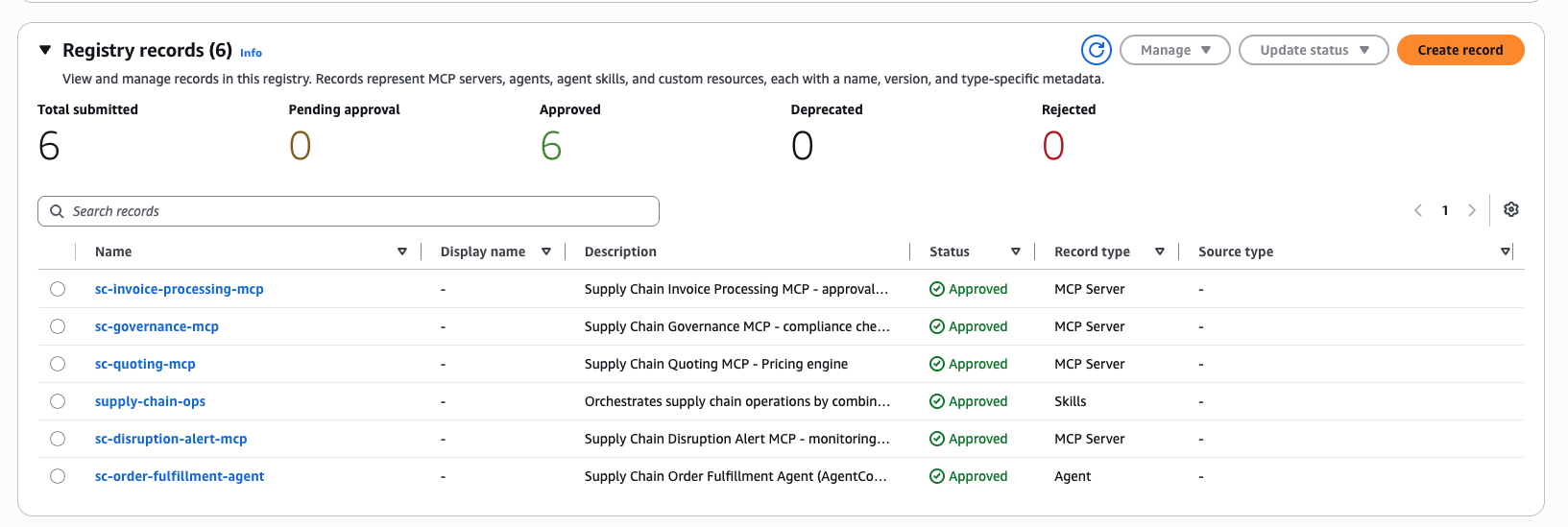
AWS Agent Registry console → Registry records: all 6 records Approved — the 4
business MCPs (Record type MCP Server), sc-order-fulfillment-agent (Record type
Agent), and supply-chain-ops (Record type Skills).
It is account/region-agnostic (account via STS, region via AWS_REGION,
default us-east-1) and idempotent - re-running updates the same resources.
Auth note: This solution uses a single Cognito app client with the authorization-code (user) OAuth flow. The Quick MCP connectors sign in with it interactively, and the order-fulfillment runtime signs in as the test user (
USER_PASSWORD_AUTH) to mint a token for calling the gateways. The gateways'CUSTOM_JWTauthorizer validates the pool issuer + this client id (it does not require a machine-to-machine grant), so one client covers both paths. The Quick Redirect URL is pre-registered as the client's callback (region-aware).
Verify Phase 1
REGION=us-east-1
aws cloudformation describe-stacks --stack-name sc-agents-dev --region $REGION \
  --query "Stacks[0].StackStatus" --output text                     # CREATE_COMPLETE
aws bedrock-agentcore-control list-gateways --region $REGION \
  --query "items[?starts_with(name,'sc-')].{n:name,s:status}" --output table   # 4 READY
aws bedrock-agentcore-control list-agent-runtimes --region $REGION \
  --query "agentRuntimes[?starts_with(agentRuntimeName,'sc_')].status" --output text  # READY
Deploy - Phase 2: Synthetic data + S3
Generate the demo data and upload it to S3. No QuickSight calls - datasets, KB, Space, and agent are all created later in Phase 3.
./generate_and_upload.sh                       # bucket: sc-supply-chain-data-<account>-<region>
./generate_and_upload.sh --bucket my-bucket    # use a custom bucket name
AWS_REGION=us-west-2 ./generate_and_upload.sh  # target another region
What it does:
- Runs
generate_all_data.py --output ./synthetic_data/to (re)generate the synthetic, deterministic dataset (seeded - no real names/emails/addresses). - Creates the S3 bucket if missing (region-aware) with AES256 default encryption.
- Uploads:
synthetic_data/structured/tables/*.csv→s3://<bucket>/structured/synthetic_data/documents/*→s3://<bucket>/knowledge-base/- Prints the bucket name - you pass it to Phase 3 (
setup_quick.sh --s3-bucket <bucket>).
All data is synthetic and deterministic - generated from a seeded Python
generator (random.Random(42)), so every run produces the same data with no
real company names, emails, or addresses (uses Sample … names, example.com
emails, 555-… phones). The schema lives in
generate_synthetic_data/generators/schema.py.
Optional: use any database you prefer. This sample stores the structured data in S3 (the datasets + knowledge base are built from the S3 bucket in Phase 3). If you'd rather use a database, load
synthetic_data/structured/tables/*.csvinto whatever DB you run (Snowflake / PostgreSQL / RDS / any SQLAlchemy engine viaDB_ENGINE) and connect it to the Space as a data source. Seegenerate_synthetic_data/pipeline/(db_loader.py, engine loaders); the schema +CREATE TABLEDDL come fromgenerate_synthetic_data/generators/schema.py(single source of truth). Salesforce is likewise optional (salesforce_prep.py); the same CRM data is in the CSVs and Quick reads it there.
Manual steps (AWS console - required between Phase 2 and 3)
These two steps are done once in the console. Do them after Phase 2 and before Phase 3.
1. Grant Amazon Quick / QuickSight access to Amazon S3 AND Amazon Athena. Amazon QuickSight console → Manage QuickSight → Security & permissions → QuickSight access to AWS services → Manage, then:
- Amazon S3 → Select S3 buckets → check the bucket that Phase 2 printed
(default
sc-supply-chain-data-<account>-<region>). - Amazon Athena → check it as well.
Then Save. Phase 3 serves each table through a single Athena data source
over a Glue database, so QuickSight needs both S3 and Athena access. Without
S3, dataset/KB creation fails with an S3 access error. Without Athena, the
Athena data source is created in CREATION_FAILED (ACCESS_DENIED — "the
QuickSight service role … has not been created yet"), and then every dataset
create fails, leaving the Space with no structured data.
See the S3 integration guide.

QuickSight → Security & permissions → Amazon S3: the Phase 2 bucket
(sc-supply-chain-data-<account>-<region>) checked for access (and write, for
Athena query results).

Same panel: Amazon Athena must also be checked (alongside Amazon S3). This lets QuickSight create the Athena data source Phase 3 uses to catalog the CSV tables. Missing it is the #1 cause of Phase 3 creating 0 datasets.
2. Link the AWS Agent Registry in Quick + create the MCP connectors.
- Link the registry (admin, one-time): Quick admin console → Manage account →
Permissions → AWS Agent Registry → toggle on
sc-supply-chain-registryand confirm. (Prereqs, all satisfied by Phase 1: same account + region, AWS_IAM authorizer, status READY.)
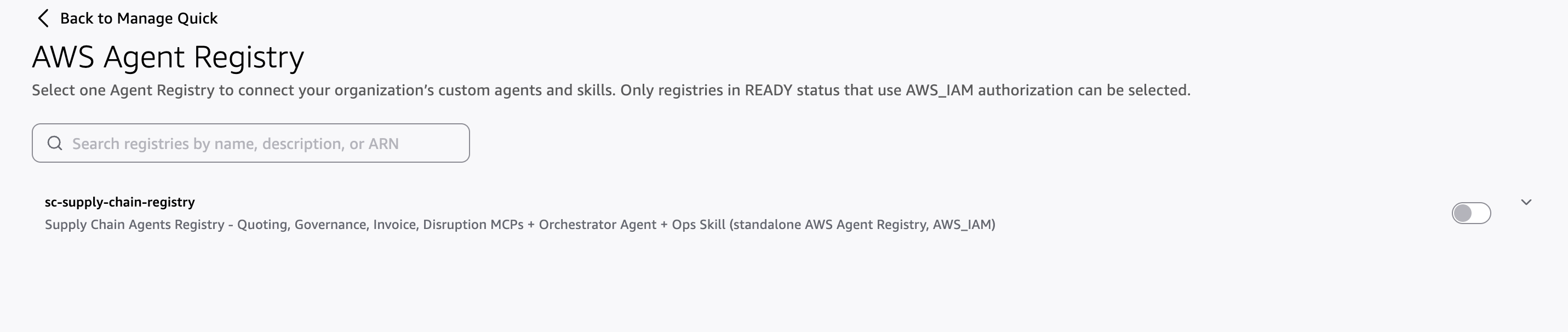
Manage account → Permissions → AWS Agent Registry: sc-supply-chain-registry
appears because it meets the prerequisites (READY, AWS_IAM). Toggle is off before linking.
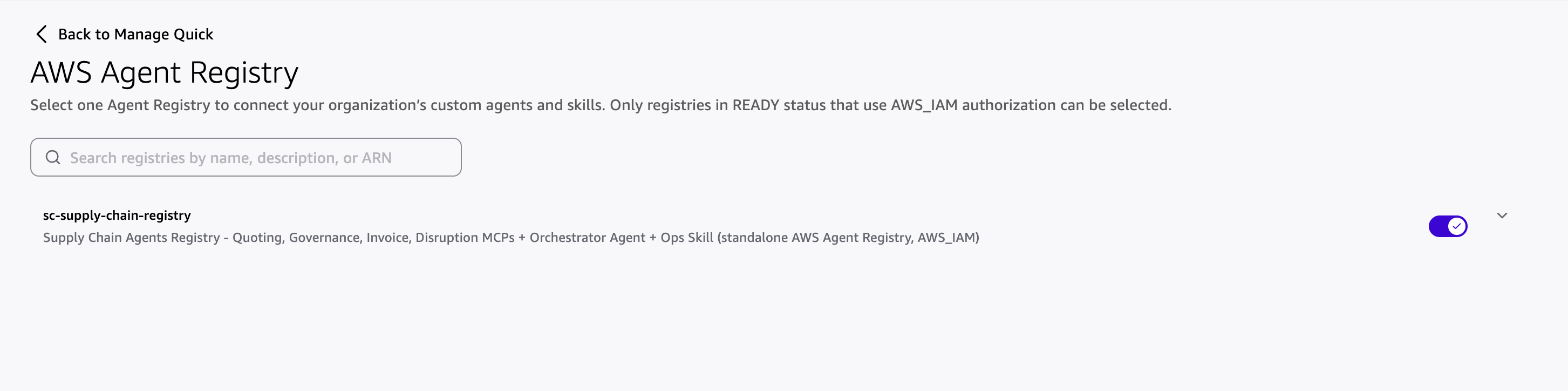
After turning the toggle on and confirming, the registry is linked. Quick
provisions its managed service role (aws-quicksight-agent-registry-role-v0)
so the Connectors page can read the registry's records.
- Create + configure the MCP connectors (from the registry cards): linking the
registry only makes the cards appear — each card is a pre-populated template that
still has to be configured and created before it works. On the Connectors
page → Create for your team tab you'll see 4 MCP server cards — the 4
business MCPs (quoting, governance, invoice, disruption). The
sc-order-fulfillment-agent is registered as an AGENT record , which
Quick does not auto-surface as a connector, so it is configured manually in
a separate step (see step 8 below). Repeat these steps for each of the 4 MCP cards:
-
Find the card — search or browse the Create for your team tab (registry cards appear here, not on the Available tab). Each comes pre-populated with its MCP server URL, name, and description from the registry.
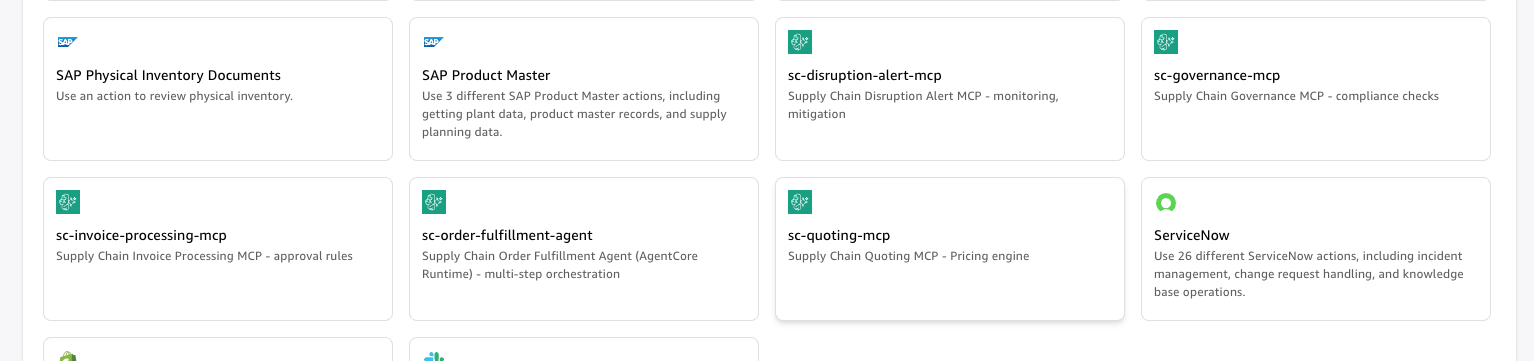
Connectors → Create for your team: the registry surfaces the 4 business MCP cards (
sc-quoting-mcp,sc-governance-mcp,sc-invoice-processing-mcp,sc-disruption-alert-mcp). Thesc-order-fulfillment-agent(AGENT record) and thesupply-chain-ops(skill) are intentionally not shown — Quick surfaces onlymcpServerrecords as connector cards. 2. Choose the connector to begin setup. 3. Authenticate — the Agent Registry does not store credentials, so each user configures OAuth here. Choose User authentication → Auth configuration:OAUTH2_AUTHORIZATION_CODE("Custom user based OAuth"), then fill in the fields.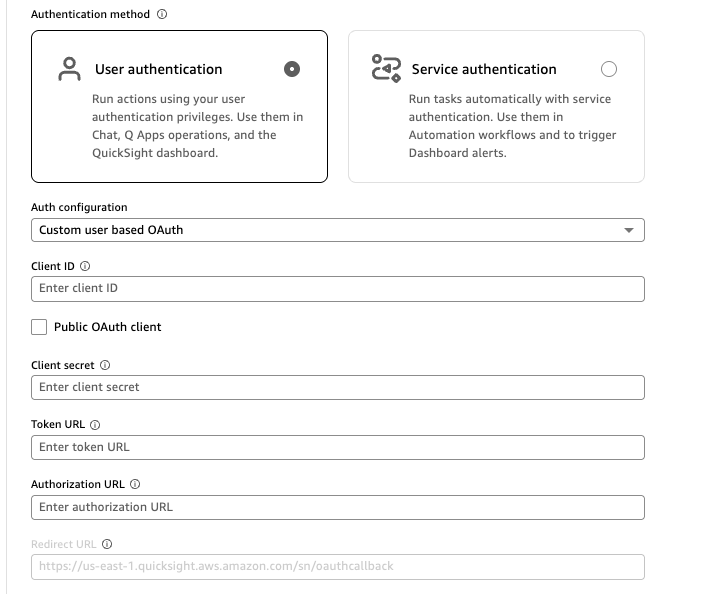
Easiest source of the values: the console output. At the end of Phase 1,
deploy_agentcore.shprints a ready-to-copy table with every value below — Client ID, Client secret, Token URL, Authorization URL, Redirect URL, and the sign-in user/password. Just copy from there. (They also come from the stack outputs, shown in the table for reference.)Connector field Value / where to get it Client ID Printed by deploy_agentcore.sh(stack outputCognitoClientId).Public OAuth client Leave unchecked (this is a confidential client with a secret). Client secret Printed by deploy_agentcore.sh(oraws cognito-idp describe-user-pool-client --user-pool-id <UserPoolId> --client-id <CognitoClientId> --query "UserPoolClient.ClientSecret" --output text).Token URL Printed by deploy_agentcore.sh(stack outputTokenEndpoint,https://<domain>/oauth2/token).Authorization URL Printed by deploy_agentcore.sh(stack outputAuthorizeEndpoint,https://<domain>/oauth2/authorize).Redirect URL Printed by deploy_agentcore.sh(https://<region>.quicksight.aws.amazon.com/sn/oauthcallback) — already registered as a callback on the app client by Phase 1 (region-aware).Sign in with the Cognito user printed in the same table (
supply-chain-test-user/ its password — see Authentication). Every tool call then carries that signed-in user's token.One app client (
CognitoClientId). Phase 1 creates a single user-based (authorization-code) Cognito app client with the region-aware Quick Redirect URL pre-registered as its callback, so the OAuth redirect just works (noredirect_mismatch/unauthorized_client, no manual callback setup).deploy_agentcore.shprints its Client ID + secret. 4. Manage permissions — choose which tools to turn on or off for that MCP (e.g.generate_quote,check_supplier_approval,apply_approval_rules, …). 5. Create and continue. 6. Share the connector with the appropriate user groups. Note: once a connector is set up, make sure to share it with the right teammates / user groups — otherwise only you can use it, and the Space/agent won't work for others on your team. 7. Note the connector's ID — you optionally pass the 4 MCP connector IDs to Phase 3 via--action-connectors <id1,id2,id3,id4>so the Quick agent is created with them already attached. -
Manually add the
sc-order-fulfillment-agentconnector. Because it is registered as an AGENT record, it does not appear as a pre-built card — so you create it yourself from the same tab:- Connectors → Create for your team → Model Context Protocol → Create new.
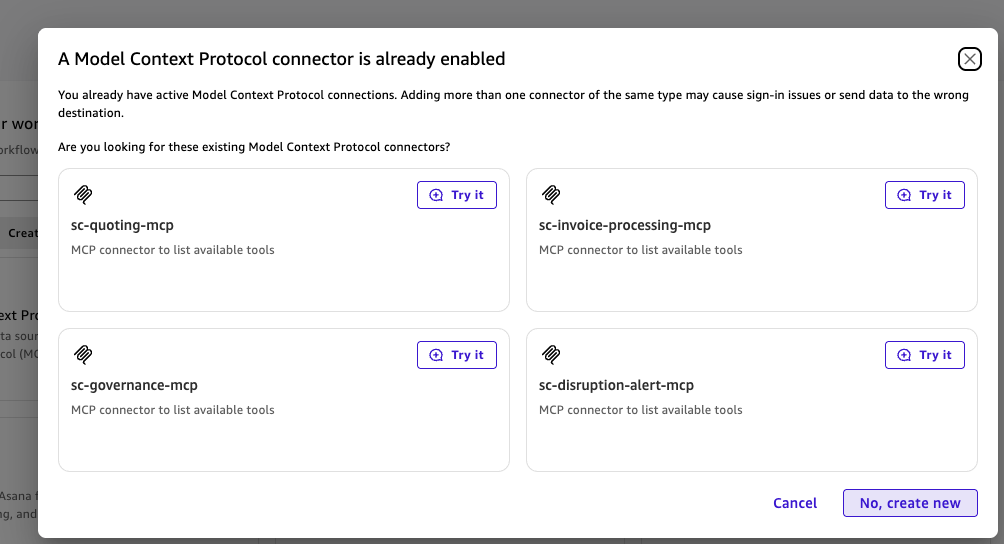
When you choose Create new, Quick may warn that MCP connectors already exist (listing the 4 business MCPs) — click No, create new to proceed with the
sc-order-fulfillment-agentconnector rather than reusing an existing one. - Name:sc-order-fulfillment-agent- Description:Supply Chain Order Fulfillment Agent multi-step orchestration across quoting, governance, invoice, and disruption tools- MCP server URL / endpoint: the AgentCore Runtime direct invocation URL (printed bydeploy_agentcore.shas Agent endpoint), of the form:https://bedrock-agentcore.<region>.amazonaws.com/runtimes/<url-encoded-runtime-arn>/invocations?qualifier=DEFAULT- Authenticate: same User authentication → OAUTH2_AUTHORIZATION_CODE values as the MCP cards above (same Client ID, secret, Token/Authorization/Redirect URLs, and test-user sign-in). - Create and continue, then share it with the appropriate groups.
Registry-sourced connectors are classified as Custom MCP connectors in Quick. Removing the registry link later does not delete connectors you already created.
See the Agent Registry integration guide.
Deploy - Phase 3: Quick datasets, KB, Space, agent
Build the Amazon Quick layer from the S3 bucket populated in Phase 2. This reads
the table list directly from the S3 structured/ prefix (so it works even
without local synthetic_data/).
./setup_quick.sh --s3-bucket <bucket> --quicksight-user  <username>     # share with a user
./setup_quick.sh --s3-bucket <bucket> --quicksight-group <groupname>    # ...or a group
./setup_quick.sh --s3-bucket <bucket> --quicksight-user <u> \
                 --action-connectors <id1,id2,id3,id4>                  # ...and attach the MCP connectors
Mandatory args: --s3-bucket <bucket> and exactly one of
--quicksight-user / --quicksight-group (the script errors and exits non-zero
if the bucket is missing, if no principal is given, or if both are given).
What it does:
- Ensures the Amazon Quick Space exists (
create-space, idempotent; default idsupply-chain-management, override with--space-id). - Discovers the CSV tables via
aws s3 ls s3://<bucket>/structured/, then creates a a QuickSight dataset per table (SPICE import mode; columns inferred from each CSV header). - Creates an S3 knowledge base over
s3://<bucket>/knowledge-base/(default idsc-supply-chain-kb, override with--kb-id). - Attaches the datasets + KB to the Space (
update-space-resourceswithDATA_SET+KNOWLEDGE_BASE). - Creates/updates the Amazon Quick agent (default id
sc-supply-chain-agent), attached to the Space (--spaces), with instructions fromagent/AGENT_INSTRUCTIONS.md, starter prompts, a welcome message, and - if--action-connectorsis passed - the MCP connectors from the manual step. - Shares every dataset, data source, the KB, the Space, and the agent with
the given user/group as owner (resolves the ARN via
describe-user/describe-group, failing clearly if it can't).
Optional flags: --namespace (default default), --space-id
(default supply-chain-management), --kb-id (default sc-supply-chain-kb),
--agent-id (default sc-supply-chain-agent).
Finally, install the supply-chain-ops skill in your Quick desktop client (see
"install the Supply Chain Operations skill" below), then demo in Quick Chat.
Manual step after Phase 3 — attach the action connectors to the Agent
Phase 3 creates the Space, datasets, KB, Topic, and agent. The action
connectors you created earlier (the 4 business MCPs + sc-order-fulfillment-agent)
are independent Quick resources, so add them directly to the Supply Chain
Operations Agent (UI only):
- Go to Quick → Agents → Supply Chain Operations Agent and edit it.
- In the agent's Actions section, click Add, and select all the
connectors you created —
sc-quoting-mcp,sc-governance-mcp,sc-invoice-processing-mcp,sc-disruption-alert-mcp, andsc-order-fulfillment-agent. - Save. The agent can now call these action connectors.
Alternatively, pass the 4 MCP connector IDs to Phase 3 via
--action-connectors <id1,id2,id3,id4>sosetup_quick.shattaches them to the agent automatically (thesc-order-fulfillment-agentconnector is still added manually here since it's created by hand).Make sure each connector was shared with the right teammates / user groups (see the connector setup step) so the agent works for everyone on your team, not just you.
Manual step after Phase 3 — install the Supply Chain Operations skill (Quick desktop)
The golden-path action "Activate the Supply Chain Operations skill" requires the
supply-chain-ops skill to be installed in your Quick desktop client. The skill
is a directory (skill/) with SKILL.md, references/, and assets/.
- Copy the whole skill directory into the Quick desktop skills folder (create it if missing):
cp -R skill ~/.quickwork/profiles/<your-profile>/skills/supply-chain-ops
- Configure it (see
skill/README.md). The skill takes runtime inputs, not hardcoded values: space_id: the Space id, which defaults tosupply-chain-management.approver_email: the default recipient for emailed quotes (optional).- (Optional) to rebrand, edit
skill/references/branding.md(color tokens and company name; the brand shows as a styled text wordmark, there is no logo). - In Quick, the skill now activates on supply-chain phrases (e.g. "Activate the Supply Chain Operations skill") and connects the connector tools + Space data.
The skill is what loads/orchestrates the 4 business MCPs + the order-fulfillment agent + the Space (data/documents). Without it installed, Quick Chat can still use the individual connectors, but the one-line "Activate the Supply Chain Operations skill" golden-path step won't be available.
End-to-End Order
1. ./deploy_agentcore.sh dev
      → AgentCore infra: Cognito + 4 MCPs (Lambda+Gateway+Target) + Runtime + 6 Agent Registry records

2. ./generate_and_upload.sh [--bucket <name>]
      → generate synthetic_data/ → upload dataset CSVs + KB docs to S3 (prints the bucket name)

   ── MANUAL (AWS console, between Phase 2 and 3) ──
   a) Grant Amazon Quick/QuickSight access to Amazon S3 + Amazon Athena
      (Manage QuickSight → Security & permissions → S3 → check the bucket; also check Athena).
   b) Link the AWS Agent Registry in Quick (Manage account → Permissions → AWS Agent Registry)
      and create the MCP connectors from the cards (note the connector IDs).

3. ./setup_quick.sh --s3-bucket <bucket> (--quicksight-user <u> | --quicksight-group <g>) [--action-connectors <ids>]
      → datasets from s3://<bucket>/structured/ + S3 KB from s3://<bucket>/knowledge-base/
        + Space (datasets+KB attached) + Quick agent (attached to the Space); shared as owner

4. Install the `supply-chain-ops` skill in Quick desktop, then demo in Quick Chat (see "Test / Demo Flow").
Phases 1–3 are scripted. The steps between Phase 2 and Phase 3 are the only manual steps (see "Manual steps" above).
Test / Demo Flow
Open Amazon Quick Chat (or the Supply Chain Operations Agent) and run the
golden path. Each step shows the data → rule → decision pattern.
| # | Say this | Expected result |
|---|---|---|
| 1 | "What supply chain capabilities do we have?" | Lists the registry-sourced connectors (4 MCPs + the order-fulfillment agent). |
| 2 | "Show me all open orders." | Quick queries the Space datasets → returns the orders table. |
| 3 | "Which products are below reorder point?" | Space (inventory dataset) → flagged SKUs. |
| 4 | [attach Invoice_SUP-INV-40003.txt from synthetic_data/documents/] "Should we approve this invoice?" |
Quick reads the doc (KB) + matches the PO in the datasets → calls governance + invoice MCPs → AUTO-APPROVE or DIRECTOR_REVIEW with the variance %. |
| 5 | "Generate a quote for Sample Manufacturing Co 03, 1000 units of Sample Component 03 (SKU-103), aligned to contract CTR-2026-003." | Pulls tier/contract/product from datasets → quoting MCP → branded quote. |
| 6 | "Is Sample Supplier Co 04 an approved vendor?" | governance MCP check_supplier_approval with the supplier record. |
| 7 | "Any active disruptions? Assess impact and recommend mitigation." | disruption MCP → severity + affected orders + mitigation. |
| 8 | "Process our open orders end-to-end and flag anything that needs review." | The order-fulfillment agent orchestrates across quoting + governance + invoice + disruption (agent-to-agent) → consolidated plan. |
Use synthetic entity names/SKUs from the generated CSVs (e.g. open
synthetic_data/structured/tables/ACCOUNTS.csv and PRODUCTS.csv) - all data is
synthetic (Sample … names, example.com emails).
Smoke-test the deployed infra (no Quick needed):
REGION=us-east-1
aws cloudformation describe-stacks --stack-name sc-agents-dev --region $REGION \
  --query "Stacks[0].StackStatus" --output text                                  # CREATE_COMPLETE
aws bedrock-agentcore-control list-gateways --region $REGION \
  --query "length(items[?starts_with(name,'sc-') && status=='READY'])"           # 4
aws bedrock-agentcore-control list-agent-runtimes --region $REGION \
  --query "agentRuntimes[?starts_with(agentRuntimeName,'sc_')].status | [0]"     # READY
Components Reference
Agent - sc-order-fulfillment-agent (AgentCore Runtime)
Multi-step reasoning across quoting, governance, invoice, and disruption domains. Model: Claude Sonnet 4. Receives data from Quick as parameters; calls the MCPs as tools. Why an agent (not an MCP): autonomous multi-turn reasoning.
MCPs (AgentCore Gateway → Lambda)
| MCP | Tools |
|---|---|
sc-quoting-mcp |
generate_quote, get_pricing_rules, validate_quote |
sc-governance-mcp |
check_supplier_approval, validate_budget_authority, check_regulatory_compliance, get_policy_rules |
sc-invoice-processing-mcp |
apply_approval_rules, get_payment_queue |
sc-disruption-alert-mcp |
assess_disruption_impact, classify_severity, recommend_mitigation, get_escalation_chain |
Agent (AGENT record):
sc-order-fulfillment-agentis the AgentCore Runtime running an MCP server (it exposes the callable toolrun_order_fulfillment), registered as an AGENT record (agent card) whose endpoint is the runtime's direct invocation URL (https://bedrock-agentcore.<region>.amazonaws.com/runtimes/<url-encoded-runtime-arn>/invocations?qualifier=DEFAULT). Quick does not auto-surface AGENT records as connector cards, so this connector is configured manually (see Phase-2→3 manual steps, step 8) using the endpoint above.deploy_agentcore.shprints the exact Agent endpoint.Runtime implementation notes (why the connector shows a callable tool):
- The runtime uses
ProtocolConfiguration: MCPand the container serves a FastMCP streamable-http server on port 8000 at/mcp(the AgentCore MCP protocol contract — HTTP protocol uses 8080; MCP uses 8000). A plain HTTP/invocationsruntime exposes no MCP tools, so a Quick connector to it would only show an emptylistTools.- The runtime has an inbound
CustomJWTAuthorizer(Cognito discovery URL +AllowedClients= the app client), so it accepts Quick's OAuth token. Without it the runtime defaults to SigV4 and rejects the connector ("Authorization method mismatch").
Authentication
- One shared Cognito user pool (
sc-supply-chain-pool) and one app client (CognitoClientId), using the authorization-code (user) OAuth flow. - Connector sign-in is user-based. Users sign in (e.g.
supply-chain-test-user) through this client; the region-aware Quick Redirect URL is pre-registered as its callback. Each tool call carries that user's token. - The order-fulfillment runtime uses the same client, signing in as the test
user (
USER_PASSWORD_AUTH) to mint a token the gateways accept — theCUSTOM_JWTauthorizer checks the pool issuer + client id, not the grant type. - Resource server
supply-chain-apidefines per-domain scopes (quoting.read/write,governance.read/write,invoice.read/write,disruption.read,orchestrator.full). - Test user for connector sign-in. Phase 1 also creates a Cognito user
supply-chain-test-user(username is theTestUserNamestack output) with a permanent password from theTestUserPasswordparameter (defaultAmazonQuick1@; demo-only — override at deploy time for anything real). Use it for the interactive OAuth (CUSTOM_JWT) sign-in when creating the MCP connectors. CloudFormation creates the user, anddeploy_agentcore.shsets the permanent password post-deploy (Cognito has no CFN resource to set one directly). - Username: from the stack output
TestUserName—aws cloudformation describe-stacks --stack-name sc-agents-dev --query "Stacks[0].Outputs[?OutputKey=='TestUserName'].OutputValue" --output text - Password:
AmazonQuick1@by default (the value of theTestUserPasswordparameter you deployed with). > Where do I find the password? It is not visible in CloudFormation — >TestUserPasswordis aNoEchoparameter, so it is masked (****) in the > stack's Parameters tab and cannot be returned as a stack Output > (CloudFormation never renders secret values). The password is simply the value > you deployed with: the demo default isAmazonQuick1@. Change it at deploy > time withTestUserPassword=<your-password>(orTEST_USER_PASSWORDenv var > fordeploy_agentcore.sh). To rotate it after deploy:aws cognito-idp admin-set-user-password --user-pool-id <UserPoolId> --username supply-chain-test-user --password '<new>' --permanent.
Data stores
- Database (
SUPPLY_CHAIN.SCM) - orders, inventory, suppliers, contracts, shipments, sales history, etc. Any engine: Snowflake (default), PostgreSQL/RDS, or any SQLAlchemy-supported DB (selected viaDB_ENGINE). - Salesforce (optional) - accounts, opportunities, contacts (else mirrored in the database).
- S3 knowledge base (via the Quick Space) - invoices, contracts, policies (RAG).
Design Principles
Data vs. rules separation
| Data type | Store | Accessed by |
|---|---|---|
| Orders, inventory, shipments, suppliers | Database (Snowflake/RDS/…) | Quick (direct) |
| Customers, pipeline, contacts | Salesforce (or the database) | Quick (direct) |
| Invoices, contracts, policies | S3 knowledge base (via Space) | Quick (RAG) |
| Pricing/approval/compliance rules | MCPs | Quick (tool calls) |
| Multi-step reasoning | Agent (Runtime) | Quick (direct runtime URL, MCP connector) |
MCPs hold only deterministic business rules (tier discounts, tolerance thresholds, budget authority, regulatory checks, severity classification). They do not hold data - product catalogs, quote history, supplier records, and inventory all live in the database. The invariant: Quick queries data → passes it to an MCP → the MCP applies rules → returns a decision.
Troubleshooting
| Symptom | Fix |
|---|---|
Requires capabilities: [CAPABILITY_NAMED_IAM] |
Already handled in deploy_agentcore.sh (it passes CAPABILITY_NAMED_IAM). |
Connector OAuth error redirect_mismatch or unauthorized_client |
You're using the wrong client, or a stale one. Use the single CognitoClientId app client (authorization-code flow) whose region-aware Quick Redirect URL is pre-registered — deploy_agentcore.sh prints its ID/secret. |
Runtime CREATE_FAILED: Access denied while validating ECR URI |
The runtime role needs ECR pull perms - already included in template.yaml. |
Registry step fails / agent-registry-control not found |
Use boto3 ≥ 1.43.94 (the project venv has it; deploy_agentcore.sh uses it). |
Records stuck in DRAFT |
They auto-approve after leaving CREATING; deploy_registry.py polls + resubmits. |
| MCP card doesn't appear in Quick | Registry only surfaces mcpServer records; ensure region/account match and status is READY/APPROVED. |
| Space query returns empty | Datasets may still be ingesting - wait for READY. |
| KB/dataset creation or Space query fails with an S3 access/permission error | Grant Quick/QuickSight access to the S3 bucket: Manage QuickSight → Security & permissions → QuickSight access to AWS services → Amazon S3 → Manage → check the sc-supply-chain-data-… bucket (the "Manual steps" between Phase 2 and 3). See the S3 integration guide. |
Phase 3 creates 0 datasets / Athena data source shows CREATION_FAILED (ACCESS_DENIED — the QuickSight service role … has not been created yet) |
QuickSight lacks Amazon Athena access. Manage QuickSight → Security & permissions → QuickSight access to AWS services → Manage → check Amazon Athena (and confirm Amazon S3 includes the data bucket) → Save. Then re-run setup_quick.sh — it deletes the failed data source and recreates it. |
Teardown
# One-click: destroy the registry + stack, then redeploy fresh
./deploy_agentcore.sh dev --recreate

# Or tear down only (no redeploy):
#   1) delete the Agent Registry records + registry (standalone service)
python registry/deploy_registry.py --region us-east-1 --delete
#   2) delete the app stack (Cognito, Lambdas, gateways, targets, runtime)
aws cloudformation delete-stack --stack-name sc-agents-dev --region us-east-1
aws cloudformation wait stack-delete-complete --stack-name sc-agents-dev --region us-east-1
The data pipeline creates external resources (an S3 bucket, and optionally your
database objects or Salesforce records) that are not part of the stack -
remove the S3 bucket (sc-supply-chain-data-…) and any external DB/Salesforce
data in their respective systems if desired.