Quick Observability Agent - Natural Language Monitoring
Quick Observability MCP integration with AWS Quick. This solution creates an MCP integration that enables natural language monitoring of Quick, and builds a queryable data lake + Quick Sight datasets for deep historical analysis and dashboards. It combines live CloudWatch/CloudTrail queries with an Athena-backed data lake that captures every Quick vended log type, all CloudTrail events, and all AWS/QuickSight CloudWatch metrics.
Components:
- AgentCore Gateway: Amazon Bedrock AgentCore Gateway with Lambda target
- Lambda Function: single-tool MCP handler (
quick_observability) that runs read-only Athena SQL - Observability data lake: S3 bucket + Glue Data Catalog + Athena workgroup
- CloudWatch Logs delivery: all 7 Quick vended log types delivered to S3 (and 3 also to CloudWatch Log Groups for live Insights queries)
- Poller Lambdas: 5-minute CloudTrail poller + CloudWatch-metrics poller that snapshot data into the lake
- Quick Sight datasets: one Athena data source + one SPICE dataset per table, ready for dashboards
- Quick Integration: MCP Actions for conversational monitoring
- Data Sources: CloudWatch Logs, CloudWatch Metrics, CloudTrail, and the Athena data lake
🎯 Purpose
This solution enables:
- Natural Language Monitoring: Query Quick metrics through conversation
- Deep analysis: Athena SQL over 9 tables for per-user storage, per-user and per-agent agent-hours, last-login, monthly and weekly active user (MAU/WAU) trends, asset usage by capability, and full audit history
- Comprehensive coverage: every Quick vended log type, all CloudTrail management + data events, and the full AWS/QuickSight CloudWatch metric catalog
- Dashboards: Quick Sight datasets over the same data for building detailed dashboards
- Dynamic Schema Discovery: discover log fields and data-lake tables for custom queries
🏗️ Architecture
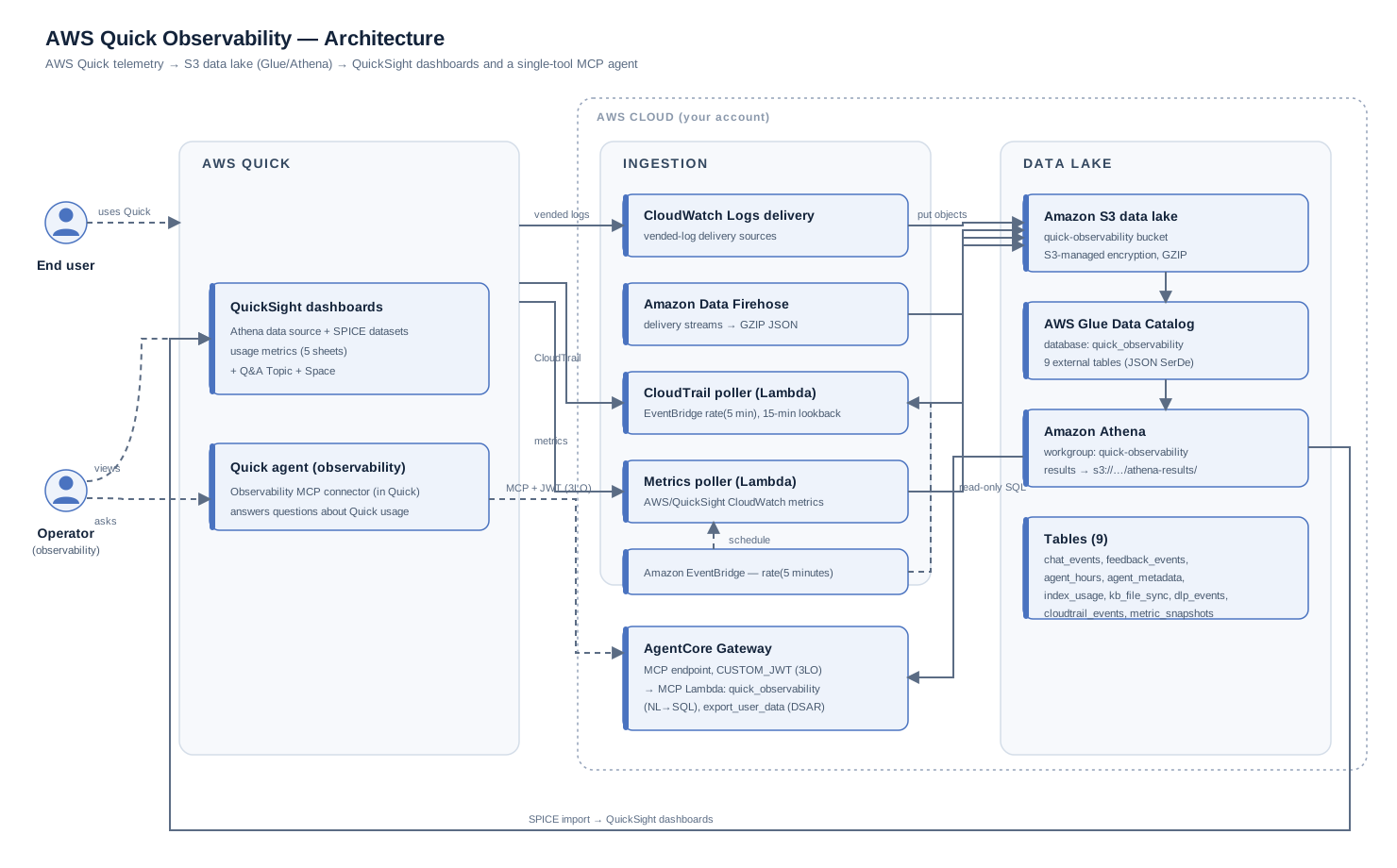
Data-lake tables (Glue/Athena): chat_events, feedback_events, agent_hours, agent_metadata, index_usage, kb_file_sync, dlp_events (7 vended-log types), plus cloudtrail_events and metric_snapshots (poller output).
📁 Project Structure
The project folder is organized as follows:
observability-agent/
├── app.py                                    # CDK deployment entry point
├── deploy.sh                                 # One-command deploy: cdk deploy + setup_quick.sh
├── setup_quick.sh                            # Post-deploy: share datasets + create Quick Space/Topic
├── cdk.json                                  # CDK configuration
├── pyproject.toml                            # Project dependencies
├── tools/                                    # MCP Lambda function code
│   ├── quick_observability_lambda.py   # AgentCore MCP handler (single tool)
│   ├── quick_observability_tools.json  # MCP tool definition (quick_observability)
│   ├── athena_client.py                     # Athena query helper
│   └── requirements.txt                     # Lambda dependencies
├── pollers/                                  # Scheduled ingestion Lambdas
│   ├── cloudtrail_poller.py                 # CloudTrail → S3 data lake
│   └── metrics_poller.py                    # AWS/QuickSight metrics → S3 data lake
├── cdk/                                      # Infrastructure code
│   ├── quick_observability_mcp_stack.py # Gateway + delivery + pollers + QuickSight
│   ├── data_lake.py                         # S3 + Glue + Athena construct
│   ├── table_schemas.py                     # Table/column definitions (shared)
│   └── quicksight_datasets.py               # QuickSight Athena data source + datasets
├── images/                                   # architecture diagram used in this README
├── README.md                                 # This file
└── LICENSE                                   # MIT-0 License
🚀 Quick Start
Check the prerequisites, then clone, deploy, and collect the stack outputs.
Prerequisites
Before you begin, ensure you have:
- An AWS account with appropriate permissions
- AWS CLI configured with credentials
- Node.js and npm installed
- Python 3.9 or later
- AWS CDK CLI installed (
npm install -g aws-cdk) - AWS Quick Sight Enterprise Edition with Quick enabled
Required IAM Permissions:
- CloudFormation (create/update stacks)
- Lambda (create/update functions)
- IAM (create roles and policies)
- CloudWatch Logs (create log groups, put resource policies)
- Cognito (create user pools and clients)
- API Gateway (create APIs)
1. Clone Repository (Sparse Checkout)
Clone only this project with a sparse checkout:
# Clone repository with sparse checkout
git clone --filter=blob:none --sparse https://github.com/aws-samples/sample-amazon-quick-suite-knowledge-hub.git
cd sample-amazon-quick-suite-knowledge-hub

# Configure sparse checkout for this integration only
git sparse-checkout set docs/manage\ quick/observability-agent
cd "docs/manage quick/observability-agent"
2. Deploy AgentCore Gateway
Recommended: one command (prompts for the inputs and runs every step in order):
uv sync
./deploy.sh
deploy.sh asks for your AWS region and the Quick Sight user(s)/group(s) to share with, then runs cdk deploy followed by setup_quick.sh (dataset sharing + Topic + Space). It uses a global cdk if present, otherwise falls back to npx aws-cdk@2. For non-interactive/CI use, pass everything as flags:
./deploy.sh --region us-east-1 --quicksight-group observability-admins
# or several principals:
./deploy.sh --region us-east-1 --quicksight-user alice --quicksight-user bob
# deploy only, skip sharing (run setup_quick.sh yourself later):
./deploy.sh --skip-share
Manual equivalent (run the steps yourself)
npm install -g aws-cdk
uv sync
cdk deploy --require-approval never
./setup_quick.sh --quicksight-group observability-admins
To grant Quick Sight users/groups owner access on the data source and datasets at deploy time instead of via setup_quick.sh, pass their ARNs. This does NOT create the Topic/Space, which only setup_quick.sh does:
cdk deploy --require-approval never \
  --parameters QuickSightPrincipalArns=arn:aws:quicksight:us-east-1:111122223333:user/default/admin
After deployment there is one remaining manual step (no API/CloudFormation path): register the MCP connector in AWS Quick and create the agent. See Step 1: Configure MCP Action under Quick Integration below.
What gets deployed:
- AgentCore Gateway with user-based 3LO OAuth (Cognito hosted UI), plus a demo
observability_user - MCP Lambda function exposing a single
quick_observabilitytool (natural language → Athena SQL) - Observability data lake: S3 bucket + Glue database (9 tables) + Athena workgroup
- CloudWatch Logs delivery for all 7 Quick vended log types to S3 (chat/feedback/agent-hours also to CloudWatch Log Groups)
- CloudTrail poller + CloudWatch-metrics poller Lambdas on a 5-minute schedule
- Quick Sight Athena data source + one SPICE dataset per table
3. Get Outputs
Read the stack outputs from the console or the CLI.
Option 1: AWS Console (Recommended)
In the console, open the stack's outputs:
- Go to AWS CloudFormation in the AWS Console
- Find the quick-observability-mcp stack
- Choose the Outputs tab
- Copy the required values for Quick integration
Option 2: CLI Commands
aws cloudformation describe-stacks --stack-name quick-observability-mcp --query 'Stacks[0].Outputs'
Key outputs for Quick Actions:
GatewayUrl- AgentCore Gateway endpointClientId- OAuth2 client IDClientSecret- OAuth2 client secretCognitoTokenUrl- OAuth2 token endpoint
Data-lake / dashboard outputs:
DataLakeBucket- S3 bucket holding all observability dataGlueDatabase- Glue/Athena database (quick_observability)AthenaWorkGroup- Athena workgroup for queriesQuickSightDataSourceId- Quick Sight Athena data source for building dashboards
🔧 The single MCP tool: quick_observability
The MCP server exposes exactly one tool, quick_observability. You ask a question in natural language, and the Quick agent translates it into read-only Athena SQL. The agent calls the tool, which runs the query against the data lake and returns the rows. The tool's description carries the full schema of all 9 tables plus key conventions, so the agent builds correct SQL without guessing column names.
Input: sql (a single read-only statement: SELECT/WITH/SHOW/DESCRIBE/EXPLAIN), optional max_rows (default 1000). Writes and multiple statements are rejected.
Tables it can query (database quick_observability): chat_events, feedback_events, agent_hours, agent_metadata, index_usage, kb_file_sync, dlp_events, cloudtrail_events, metric_snapshots.
Key conventions baked into the tool:
- There is no username/email column. A user is identified by
user_arn(for example,.../user/default/vineet). Filter by name withuser_arn LIKE '%vineet%'. - All time columns are epoch seconds (
bigint). Convert withfrom_unixtime(col); for a window useevent_timestamp >= to_unixtime(current_timestamp - interval '30' day). - Agent hours:
SUM(usage_hours); per-agentGROUP BY service_resource_arn, per-userGROUP BY user_arn, Included vs ExtraGROUP BY usage_group.
Example: "how many agent hours did vineet use?" The agent generates and runs:
SELECT SUM(usage_hours) AS total_agent_hours
FROM agent_hours
WHERE user_arn LIKE '%vineet%'
  AND event_timestamp >= to_unixtime(current_timestamp - interval '30' day)
With a per-agent / Included-vs-Extra breakdown:
SELECT service_resource_arn, reporting_service, usage_group,
       SUM(usage_hours) AS hours
FROM agent_hours
WHERE user_arn LIKE '%vineet%'
GROUP BY service_resource_arn, reporting_service, usage_group
ORDER BY hours DESC
Why one tool? Every question now resolves to Athena SQL over the same 9 tables. A single well-described tool is easier for users and gives the model one clear capability to call.
SHOW TABLES/DESCRIBE <table>let the agent re-check the schema at runtime if needed.
🧾 DSAR / data-portability export: export_user_data
A second tool, export_user_data, supports admin-run data subject access / portability
requests. Given a user (full user_arn or bare name), it gathers that user's rows across
the pipeline tables (chat_events, feedback_events, agent_hours, agent_metadata,
index_usage, dlp_events, cloudtrail_events) into a single portable JSON bundle. It writes
the bundle to the data lake's dsar-exports/ prefix and returns a short-lived pre-signed
download URL.
Scope: important. This exports only data captured by this pipeline (the CHAT_LOGS vended stream plus metrics/audit). It does not include memories, knowledge graph, spaces, agents, or uploaded-file content, which this pipeline does not capture. Those require a separate path. Chat prompt/response text is present only if the optional CHAT_LOGS content fields are enabled; otherwise the export is metadata-only.
Example (through the agent): "Export all data we have for user vineet" → the agent calls
export_user_data with user_arn and returns the row counts, the tables included, and the
download link.
📊 Building Quick Sight dashboards
The stack creates a Quick Sight Athena data source and one SPICE dataset per table (Quick Observability - <table>). To build dashboards:
- In Quick Sight, open Datasets and find the
Quick Observability - *datasets. - Refresh (SPICE ingestion) the datasets you want. Data appears as the pollers run and vended logs are delivered.
- Create an analysis on, for example,
agent_hoursfor per-user/per-agent hours,metric_snapshotsfor metric trends,chat_eventsfor active-user and conversation trends, orcloudtrail_eventsfor an audit dashboard. - Timestamps are epoch seconds; add a calculated field
epochDate(event_timestamp)(or the table's timestamp column) for date axes.
The MCP tool and the dashboards read the same Glue tables, so numbers reconcile between conversational queries and dashboards.
👥 Share the datasets and create a Quick Space (setup_quick.sh)
The CDK stack creates the Quick Sight data source and the 9 datasets. Quick Sight resources are owned by the deploying service, though, and are not visible to a human user until explicitly shared. AWS Quick Spaces and Topics are also not expressible in CloudFormation. The setup_quick.sh script does these post-deploy steps for you:
- Grants the principal(s) you provide CO_OWNER on the Athena data source and all 9 datasets (so they appear in Quick Sight).
- Creates a Dataset Q&A Topic (
Quick Observability) over the datasets and shares it. - Creates a Quick Space (
quick-observability), attaches the 9 datasets + the Topic, and shares the Space as OWNER.
You must tell the script who to share with. There is no single "right" principal. In a real deployment you decide which users or groups should see this data. Pass one or more Quick Sight users and/or groups; the flags are repeatable:
cd infrastructure/observability-agent

# share with specific users
./setup_quick.sh --quicksight-user alice --quicksight-user bob

# or a group (recommended for teams), optionally mixed with users
./setup_quick.sh --quicksight-group observability-admins --quicksight-user alice
Options: --region (default us-east-1), --namespace (default default), --space-id / --topic-id (defaults quick-observability). The script is idempotent: re-running updates sharing and re-attaches resources.
Best practice: prefer sharing with a Quick Sight group rather than individual users, so membership changes don't require re-running the script. Grant the narrowest set of principals that actually need the observability data.
Topic relationships
The Topic declares the genuine join relationships between datasets so Dataset Q&A can answer cross-dataset questions:
feedback_events.conversation_id→chat_events.conversation_id(feedback belongs to a conversation)chat_events.agent_id→agent_metadata.agent_id(a conversation references an agent)
Most tables also share a user_arn column, but that is a shared dimension, not a parent-child key. Joining fact tables on user_arn would fan out and corrupt aggregates (for example, agent hours × chat rows), so those joins are intentionally not declared. You can still filter or compare any dataset by user. If you add new datasets with real foreign keys, extend the DataSetRelations block in setup_quick.sh.
🎨 Quick Integration
Complete guide to integrate Quick Observability with AWS Quick using MCP Actions.
Integration prerequisites
From your CDK deployment, you'll need:
GatewayUrl- AgentCore Gateway endpointClientId- Cognito Client IDClientSecret- Cognito Client SecretCognitoTokenUrl- OAuth2 token endpointObservabilityUsername- demo Cognito user (observability_user)- the password you supplied at deploy time via
-c observabilityUserPassword=...(or theObservabilityUserPasswordparameter)
Step 1: Configure MCP Action
Create the MCP action that connects AWS Quick to the AgentCore Gateway.
1.1 Access Integrations
Open the MCP action setup:
- Navigate to Integrations in AWS Quick
- Choose Actions
- Choose the + button for Model Context Protocol
1.2 Configure MCP Server
Fill in the MCP configuration:
- Name: Quick Observability
- Description: Natural language monitoring for Quick using CloudWatch Logs, Metrics, and CloudTrail
- MCP Server Endpoint: Paste your
GatewayUrlfrom CDK deployment outputs - Choose Next
1.3 Configure Authentication
Set up per-user sign-in for the connector:
- For Authentication, select User Authentication (3LO / authorization-code)
- Each user signs in through the Cognito hosted UI (browser), and the resulting user token is presented to the Gateway. This matches the quick-legal-hold-agent and what the AWS Quick MCP connector expects.
-
Fill in the authentication values from your CDK deployment outputs:
-
Client ID → Paste your
ClientId(ensure no leading/trailing spaces) - Client Secret → Paste your
ClientSecret(ensure no leading/trailing spaces) - Authorization URL → Paste your
CognitoAuthorizeUrl - Token URL → Paste your
CognitoTokenUrl - Scopes →
OAuthScopesoutput (openid email profile <pool>/invoke) - Redirect URI →
QuickRedirectUrioutput (already registered on the client) - Sign-in when prompted →
observability_user/ the password you set with-c observabilityUserPassword=...when you deployed
Demo credential:
observability_useris created automatically by the stack. Its password is the value you pass at deploy time with-c observabilityUserPassword=...(or the NoEchoObservabilityUserPasswordparameter), and it is never hardcoded. The user exists only in the account where you deploy.Identity provider note: This sample uses Amazon Cognito as the OIDC identity provider so it works out of the box. In a real deployment, use whichever identity provider your organization already uses instead. Examples are AWS IAM Identity Center, Okta, Microsoft Entra ID / Azure AD, Ping, or any OIDC-compliant IdP. The AgentCore Gateway is configured with a
CUSTOM_JWTauthorizer, so point its discovery URL and allowed clients/audience at your IdP. Then configure the Quick MCP connector with that IdP's authorize/token URLs. Cognito is only the stand-in for this reference implementation.
1.4 Complete Setup
Finish creating the action:
- Choose Create and Continue
- Select Next
- Select Next
Step 2: Create Quick Agent
Create the chat agent that calls the MCP action.
2.1 Access Agents
Start a new agent:
- Navigate to Agents in AWS Quick
- Choose Create agent
2.2 Configure Agent
Enter the agent details:
- Agent name: Quick Observability Agent
- Description: Natural language monitoring for Quick using CloudWatch Logs, Metrics, and CloudTrail
2.3 Add Agent Instructions
Copy the following instructions and paste them into the Agent Instructions field, without changes, so the agent knows the tables, the SQL conventions, and how to answer:
You are the Quick Observability Agent. You answer questions about an AWS Quick environment using ONE tool, quick_observability, which runs read-only Athena SQL over the Quick observability data lake. Translate the user's question into SQL, call the tool, then interpret the rows for the user.

TABLES (database quick_observability):
• chat_events — chat messages/queries (user_arn, conversation_id, user_message, status_code, agent_id, flow_id, message_scope, ...)
• feedback_events — thumbs up/down (feedback_type, feedback_reason, ...)
• agent_hours — agent-hours usage (user_arn, subscription_type ENTERPRISE/PROFESSIONAL, reporting_service FLOW/AUTOMATION/RESEARCH, usage_group Included/Extra, usage_hours, service_resource_arn = the specific agent)
• agent_metadata — agent create/update/delete
• index_usage — per-user storage (consumed_source_size, consumed_index_size, consumed_source_doc_count)
• kb_file_sync — knowledge-base document sync status/errors
• dlp_events — data-loss-prevention policy actions
• cloudtrail_events — audit trail (management + InvokeAction); time column is event_time; also has user_name, user_identity_arn, on_behalf_of_user_id
• metric_snapshots — AWS/QuickSight CloudWatch metrics over time; time column is snapshot_timestamp; filter by metric_name

HOW TO WRITE SQL:
1. There is NO username/email column — a user is user_arn like '.../user/default/vineet'. Filter a person by name with: user_arn LIKE '%vineet%'.
2. All time columns are epoch SECONDS (bigint). Convert with from_unixtime(col). For a window: event_timestamp >= to_unixtime(current_timestamp - interval '30' day).
3. Agent hours: SUM(usage_hours). Per agent → GROUP BY service_resource_arn; per user → GROUP BY user_arn; Included vs Extra → GROUP BY usage_group; per surface → GROUP BY reporting_service.
4. Active users: COUNT(DISTINCT user_arn) from chat_events over the window (DAU/WAU/MAU = 1/7/30 days).
5. Use SHOW TABLES or DESCRIBE <table> if you need to re-check the schema.
6. Only read-only statements (SELECT/WITH/SHOW/DESCRIBE/EXPLAIN), one statement, no semicolon.

EXAMPLES:
• "How many agent hours did vineet use?" →
  SELECT SUM(usage_hours) AS total_agent_hours FROM agent_hours WHERE user_arn LIKE '%vineet%' AND event_timestamp >= to_unixtime(current_timestamp - interval '30' day)
• "Agent hours by vineet, per agent and Included/Extra" →
  SELECT service_resource_arn, reporting_service, usage_group, SUM(usage_hours) AS hours FROM agent_hours WHERE user_arn LIKE '%vineet%' GROUP BY service_resource_arn, reporting_service, usage_group ORDER BY hours DESC
• "Monthly active users" →
  SELECT COUNT(DISTINCT user_arn) AS mau FROM chat_events WHERE event_timestamp >= to_unixtime(current_timestamp - interval '30' day)
• "Storage per user" →
  SELECT user_arn, SUM(consumed_source_size) AS source_bytes, SUM(consumed_index_size) AS index_bytes FROM index_usage GROUP BY user_arn ORDER BY source_bytes DESC

RESPONSE FRAMEWORK:
1. Acknowledge what you're checking
2. Run one or more quick_observability queries
3. Present data with context and interpretation
4. Highlight key findings and anomalies
5. Provide actionable recommendations and follow-up options

DATA INTERPRETATION:
• Error rates >5%: Flag as concerning
• Capacity >80%: Alert proactively
• Zero rows: Explain the data lake may be empty if Quick is unused, logging was just enabled, or the pollers haven't run yet
• Anomalies: Highlight and ask if expected

RESPONSE STYLE:
• Professional yet approachable, data-driven, never fabricate data
• Clear explanations without jargon; always provide next steps

OPENING MESSAGE:
"Hello! I'm your Quick Observability Agent. Ask me anything about your Quick environment — chat activity and errors, user feedback, agent-hours usage (per user or per agent), active users (DAU/WAU/MAU), storage per user, knowledge-base sync, DLP, metric trends, or the audit trail. What would you like to know?"

KEY CONSTRAINTS:
• The data lake holds data from deployment forward; CloudTrail/metrics appear after the pollers run (every 5 minutes)
• Never fabricate data; if a query returns nothing, say so and explain why
• Explain technical terms clearly
2.4 Add Action to Agent
Attach the MCP action to the agent:
- Scroll to Actions section
- Choose Add action
- Select Quick Observability (the MCP action you just created)
- Choose Save
Step 3: Test the Agent
Open the agent and try these queries, which cover agent hours, active users, storage, chat errors, audit events, and metric trends:
"How many agent hours did vineet use this month?"
"Break down vineet's agent hours by agent and Included vs Extra"
"How many monthly active users do we have?"
"Which users consume the most storage?"
"Show me chat errors in the last 24 hours"
"Who created or deleted dashboards this week?"
"What's the SPICE capacity consumed trend over the last 30 days?"
💡 Usage Examples
Everything is natural language, and the agent writes the SQL. All example blocks below show what you type to the agent.
Agent hours (per user and per agent)
Ask for one user's agent hours, split by agent:
"How many agent hours did vineet use this month, and break it down per agent?"
Usage analysis
Ask for activity counts over a period, such as active users, conversations, and queries in one week:
"How many active users this week, and how many conversations and queries?"
Storage
Find the users who consume the most storage, from the per-user index_usage table:
"Which users are consuming the most storage?"
Audit
Review recent changes from the CloudTrail audit data:
"Who created, updated, or deleted dashboards and datasets in the last 7 days?"
Metric trends
Track a CloudWatch metric over time, here SPICE capacity consumed against its limit:
"Show the SPICE consumed vs limit trend over the last 30 days"
🐛 Troubleshooting
Find the symptom you see, then work through the checks listed under it.
MCP Authentication Issues:
- Verify OAuth2 credentials in Quick MCP Actions
- Check Cognito token endpoint configuration
- Ensure client secret is correctly copied (no spaces)
No Data in CloudWatch Logs / data lake:
- CloudWatch Logs delivery and S3 delivery were enabled when the stack was deployed
- Only has data from deployment time forward (not historical)
- The 3 live log groups:
/aws/quick/chat,/aws/quick/feedback,/aws/quick/agent-hours - All 7 vended log types are delivered to the
DataLakeBucketS3 bucket (one prefix per table) - CloudTrail and metric data appear after the pollers run (every 5 minutes); backfill is bounded by CloudTrail's 90-day window
- Verify Quick is actively being used
Query Returns Zero Rows:
- Check the time window in the generated SQL
- Verify the data lake has data for that period (
SHOW TABLES, thenSELECT count(*) FROM <table>) - CloudTrail/metric tables populate only after the pollers have run (every 5 minutes)
AgentCore Gateway:
- Monitor AgentCore Gateway throttling limits
- Check Lambda timeout (300s) and memory (512MB)
- Review CloudWatch Logs:
/aws/lambda/quick-observability-*
📝 License
This library is licensed under the MIT-0 License. See the repository LICENSE.
🧹 Cleanup
To remove all deployed resources and avoid ongoing charges:
cdk destroy
This will delete:
- Lambda functions (MCP + pollers)
- AgentCore Gateway
- Cognito User Pool
- CloudWatch Log Groups (⚠️ Note: Log data will be permanently deleted)
- Glue database/tables, Athena workgroup, Quick Sight data source and datasets
- IAM roles and policies
Note: The
DataLakeBucketS3 bucket is created with aRETAINremoval policy, so your collected observability data is not deleted bycdk destroy. Delete the bucket manually if you no longer need the data.Cost Considerations: This solution incurs costs for Lambda invocations, CloudWatch Logs storage, CloudWatch Metrics queries, and API Gateway requests. Monitor your usage in AWS Cost Explorer.
🔒 Security Best Practices
Apply these practices when you run the sample:
- Credentials: Never commit
ClientSecretto version control - IAM Roles: The Lambda function uses least-privilege IAM permissions
- Encryption: All data in transit is encrypted using TLS
- Logging: CloudWatch Logs are retained for 30-90 days (configurable)
- Authentication: Per-user 3LO OAuth (authorization-code) via the Cognito hosted UI; the Gateway validates the resulting user JWT (
CUSTOM_JWT). Cognito is the sample OIDC provider. Swap in your own OIDC IdP for real use (see the identity-provider note above). - Demo credential:
observability_useris a demo login created by the stack; its password is supplied at deploy time via-c observabilityUserPassword=...(NoEcho parameter, never hardcoded) - Rotation: Consider rotating the Cognito user password and OAuth credentials periodically
📚 Additional Resources
These references cover the services the sample uses: