Amazon Quick Legal Hold Agent
A deployable legal-hold management agent for Amazon Quick. From inside Amazon Quick chat, a Legal administrator can search identities, place and release legal holds on users and groups, and list active holds - with every action attributed to the individual admin who performed it (chain-of-custody).
The agent's tools are exposed to Amazon Quick over the Model Context Protocol (MCP) through an Amazon Bedrock AgentCore Gateway, secured with OAuth 2.0 per-user login (3LO) through Amazon Cognito. Amazon Quick connects to it as an MCP connector. When a hold is placed, it is written to an Amazon DynamoDB table that a preservation data path (Amazon Data Firehose to a filter AWS Lambda function to a write-once-read-many (WORM) Amazon S3 bucket) reads, so held users' chat records are automatically preserved to an Object Lock bucket.
This is a sample intended for evaluation and as a starting point. Review it against your own security and compliance requirements before using it with production data.
Contents
- Architecture
- What gets created
- The agent's tools
- Prerequisites
- Step 1 - Deploy the agent backend
- Step 2 - Connect the agent to Amazon Quick
- Step 3 - Create the Legal Hold agent in Amazon Quick
- Step 4 - Validate
- Cleanup
- Repository layout
- Contributing
- License
Architecture
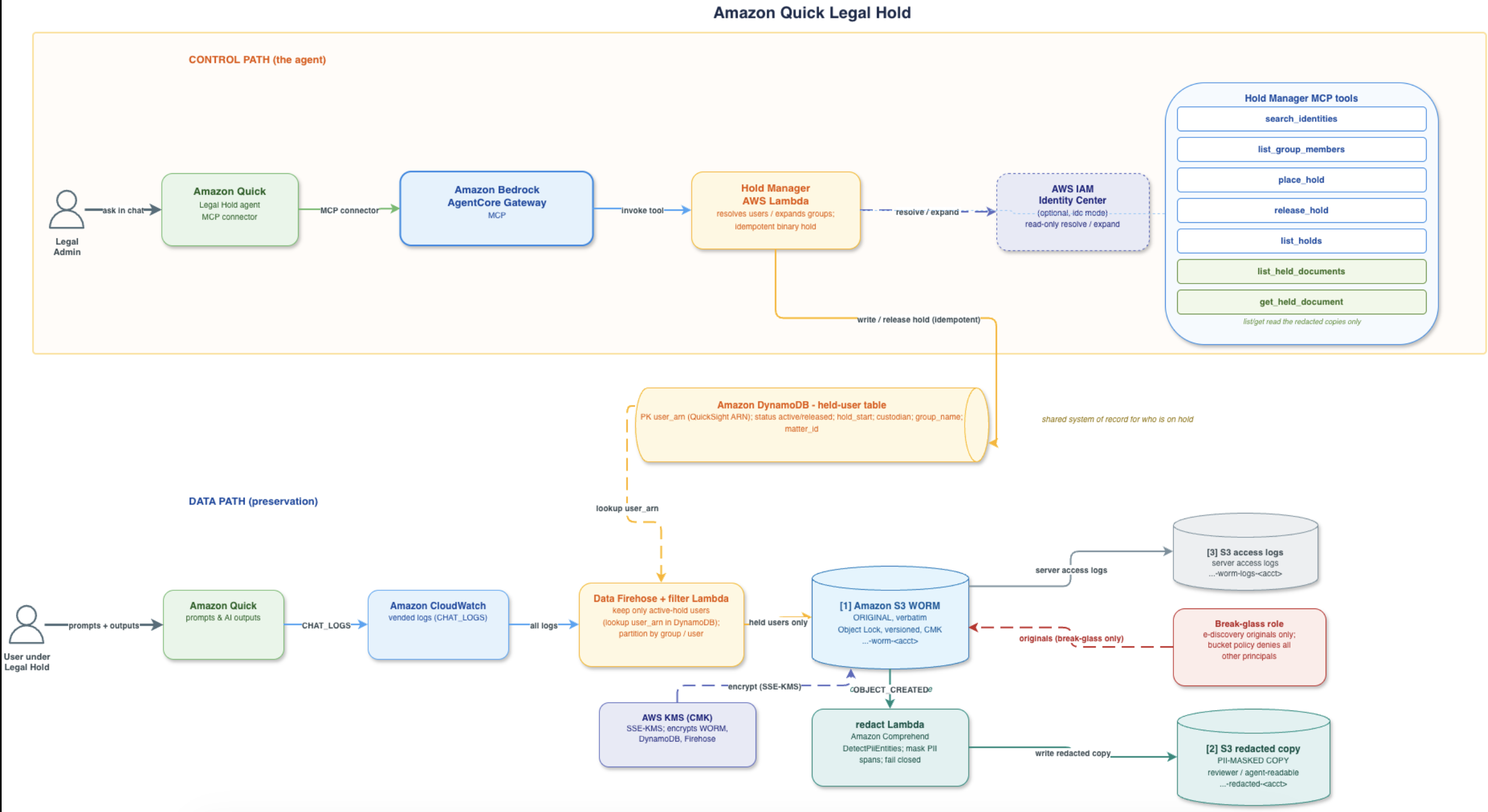
- Control path: Amazon Quick -> Gateway -> Hold Manager Lambda -> DynamoDB.
- Data path: chat logs -> Firehose -> filter (keep only active-hold users) -> WORM S3 (original).
- Redaction path (optional): new WORM object -> redact Lambda (Comprehend) -> redacted-copy bucket. The agent's
get_held_documentserves only the redacted copy; the original is reachable only via the break-glass role when configured. - Placing a hold via the agent immediately governs what the data path preserves.
What gets created
All resources share the prefix quick-legalhold-mcp-.
Control path (the agent)
quick-legalhold-mcp-hold-managerAWS Lambda function - the seven tools (identity search, hold place/release/list, and held-document list/get).quick-legalhold-mcp-interceptorAWS Lambda function - REQUEST interceptor that injects caller identity.quick-legalhold-mcp-gateway-role- Gateway execution role.AWS::BedrockAgentCore::Gatewayquick-legalhold-mcp-gw(MCP, CUSTOM_JWT) + Lambda target.
Preservation data path
- AWS KMS key for the WORM bucket, DynamoDB, and Firehose - either a customer-managed CMK
the stack creates (rotation enabled, retained on delete) or a bring-your-own key
(
kmsKeyArn). - Amazon S3 WORM bucket
quick-legalhold-mcp-worm-<account>- Object Lock (mode and retention are parameterized viaobjectLockMode/objectLockDays; GOVERNANCE/1-day sample default, COMPLIANCE/years for production), versioned, SSE-KMS, public access blocked, retained on delete. - Amazon S3 server-access-log bucket
quick-legalhold-mcp-worm-logs-<account>. - Amazon DynamoDB table
quick-legalhold-mcp-users(partition keyuser_arn, on-demand, CMK-encrypted, point-in-time recovery on). - Amazon Data Firehose stream
quick-legalhold-mcp-stream-dp-> WORM bucket, with filter AWS Lambda functionquick-legalhold-mcp-filter(keeps only active-holduser_arns). - A delivery-wiring custom resource that binds the chat-logs vended-log delivery to the stream.
PII-redaction path (only when redactPii=true)
quick-legalhold-mcp-redactAWS Lambda function - triggered by S3OBJECT_CREATEDon the WORM bucket; runs Amazon ComprehendDetectPiiEntitiesover the chat text fields, masks the detected spans, and writes a redacted copy. Fails closed (masks the whole field on error).- Amazon S3 redacted-copy bucket
quick-legalhold-mcp-redacted-<account>(SSE-KMS, reviewer- readable, not Object-Locked - the redacted copy is a derived artifact).
Authentication (Amazon Cognito)
- User pool
quick-legalhold-mcp-pool+ hosted-UI domain + resource serverholds-api(scopeinvoke). - App client
quick-legalhold-mcp-3lo(authorization_code / 3LO; scopesopenid email profile holds-api/invoke; confidential client with secret; callbacks = Quick'shttps://us-east-1.quicksight.aws.amazon.com/sn/oauthcallbackandhttp://localhost:8765/callback). - A sample end-user
legal-admin-test- created only whencreateTestUser=true, with the password supplied via theTestUserPasswordNoEcho CloudFormation parameter, for evaluation only.
Authentication is per-user (3LO) only, so every hold is attributed to the individual logged-in Legal admin.
Identity provider note: This sample uses Amazon Cognito as the OIDC identity provider so it works out of the box. In a real deployment you should instead use whichever identity provider your organization already uses (for example AWS IAM Identity Center, Okta, Microsoft Entra ID / Azure AD, Ping, or any OIDC-compliant IdP). The AgentCore Gateway uses a
CUSTOM_JWTauthorizer, so point its OIDC discovery URL and allowed client/audience at your IdP, and configure the Quick MCP connector with that IdP's authorize/token URLs — Cognito is only the stand-in for this reference implementation.
The agent's tools
| Tool | Purpose | Required args |
|---|---|---|
search_identities |
Search AWS IAM Identity Center users and groups by substring (IDC mode) | query (optional) |
list_group_members |
Expand an AWS IAM Identity Center group to its member users | group_name |
place_hold |
Place an active hold on a user or (expanded) group; one item per user_arn |
type, name, matter_id (+ optional custodian) |
release_hold |
Set matching holds to status=released |
type, name |
list_holds |
List all current hold items | none |
list_held_documents |
List the preserved (redacted) chat-log documents for a held user or group. Resolves the supplied name / email / user_arn / group against the hold records (and Identity Center in IDC mode) before listing. Requires redactPii=true. |
user or group_name |
get_held_document |
Return one preserved document as redacted content plus a short-lived pre-signed URL. Never returns the un-redacted original (break-glass only). | key |
Configuration options
All options are passed as CDK context (-c key=value) at deploy time; every one has a safe
sample default, so a bare deploy works. For a production posture, set the values marked below.
| Option | Default | Purpose |
|---|---|---|
kmsKeyArn |
(create a CMK) | Bring your own KMS key for the WORM bucket, DynamoDB, and Firehose. If omitted, the stack creates a customer-managed CMK (rotation enabled). The created key is retained on stack delete so retained evidence stays readable. |
objectLockMode |
GOVERNANCE |
S3 Object Lock mode on the WORM evidence bucket. Set COMPLIANCE for production — COMPLIANCE cannot be shortened or bypassed by anyone (including root) until retention expires. GOVERNANCE is the safe sample default (an admin with s3:BypassGovernanceRetention can still clean up a trial). |
objectLockDays |
1 |
Default retention days for the WORM bucket. Set to your legal retention period (e.g. 2555 ≈ 7 years) for production. |
redactPii |
false |
When true, an S3-triggered Lambda runs Amazon Comprehend DetectPiiEntities over each delivered WORM object and writes a separate redacted copy to a reviewer-readable bucket (…-redacted-<account>). The original in the WORM bucket is never modified. Off by default to preserve evidence fidelity (redacting the only copy can constitute spoliation). |
comprehendLanguage |
en |
Language code for Comprehend PII detection. |
breakGlassRoleArn |
(none) | When set, a bucket policy denies reading the un-redacted WORM evidence to every principal except this role (and the account root). e-discovery production of originals goes through this role; day-to-day review uses the redacted copies. |
createTestUser |
false |
When true, creates a synthetic Cognito user (legal-admin-test) with the password from testUserPassword, for evaluation only. A real deployment authenticates real identities via the IdP and leaves this off. |
testUserPassword |
(empty) | Permanent password for the synthetic test user (required only when createTestUser=true). Prefer the NoEcho CloudFormation parameter of the same name. |
identityMode / identityStoreId |
direct |
idc + an IAM Identity Center store id enables real (read-only) IDC user/group resolution; direct uses synthetic ARNs. |
quickRedirectUri |
Quick's us-east-1 callback |
OAuth redirect URI registered on the Cognito 3LO client. |
envTag |
test |
Value of the Env resource tag. |
Example production deploy:
cdk deploy \
  -c kmsKeyArn=arn:aws:kms:us-east-1:111122223333:key/<id> \
  -c objectLockMode=COMPLIANCE -c objectLockDays=2555 \
  -c redactPii=true \
  -c breakGlassRoleArn=arn:aws:iam::111122223333:role/legal-ediscovery
PII redaction and evidentiary integrity: redaction never alters the original. The authoritative record stays immutable in the WORM bucket (accessible only via the break-glass role when one is set); the redacted copy is a derived artifact for reviewer / agent access. The
get_held_documenttool serves only the redacted copy.
Prerequisites
- Node.js 18 or later, npm, AWS CLI v2, and Python 3, all on your PATH.
- AWS credentials for your target account (
aws configure, IAM Identity Center / SSO, or environment variables). The deploy script verifies these withaws sts get-caller-identity. - Permissions to create the resources listed above and to run
cdk bootstrapif the environment is not already bootstrapped (the script bootstraps only if needed). - An Amazon Quick account where you can add MCP connectors and create agents (admin access).
Step 1 - Deploy the agent backend
git clone <this-repo>
cd quick-legal-hold-agent
./scripts/deploy.sh
# optional overrides:
#   AWS_REGION=us-west-2 ./scripts/deploy.sh
#   QUICK_REDIRECT_URI=<your-quick-callback> ./scripts/deploy.sh
scripts/deploy.sh runs the full pipeline and is idempotent:
- Preflight - verify
node,npm,aws,python3. - Identity -
aws sts get-caller-identity. npm install.- CDK bootstrap - only if the
CDKToolkitstack is missing. cdk diff(informational).cdk deploy --require-approval never.- Write the AWS CloudFormation outputs to
outputs/deployment-outputs.json.
There are no manual post-deploy steps for the backend; the stack creates all of its own infrastructure.
Manual equivalent
npm install
npx cdk diff
npx cdk deploy --require-approval never
# override Quick redirect URI:
# npx cdk deploy -c quickRedirectUri=<uri> --require-approval never
Step 2 - Connect the agent to Amazon Quick
This step registers the deployed AgentCore Gateway as an MCP connector in Amazon Quick.
CLI availability: Amazon Quick exposes
aws quicksight create-action-connector, but its connector--typevalues are HTTP and SaaS integrations (GENERIC_HTTP,SALESFORCE_CRM,JIRA_CLOUD,AMAZON_S3, and similar) - there is no MCP connector type. So an MCP connector cannot be created from the CLI today and must be added in the Amazon Quick console. Everything up to the paste is automated below.
Run the helper to print exact, ready-to-paste values pulled live from your deployed stack (it also retrieves the app client secret from Cognito):
./scripts/quick-connector-info.sh
It prints the following and writes outputs/quick-connector.json:
| Field | Source |
|---|---|
| MCP Gateway URL | GatewayUrl output |
| Auth method | OAuth 2.0 - authorization code (3LO) |
| Authorize URL | ThreeLoAuthorizeUrl output |
| Token URL | ThreeLoTokenUrl output |
| OIDC discovery URL | CognitoDiscoveryUrl output |
| Client ID | ThreeLoClientId output |
| Client secret | Retrieved from Cognito (confidential client) |
| Scopes | openid email profile holds-api/invoke |
| Redirect URI | ThreeLoRedirectUri (Quick's .../sn/oauthcallback) |
Your deployed connector values. Read them from this stack's CloudFormation
Outputs (Console → CloudFormation → the quick-legalhold-mcp stack →
Outputs, or aws cloudformation describe-stacks). Every field the connector
needs is an output — including the client secret (ThreeLoClientSecret):
| Field | Stack output |
|---|---|
| MCP Gateway URL | GatewayUrl |
| Auth method | OAuth 2.0 - authorization code (3LO) |
| Authorize URL | ThreeLoAuthorizeUrl |
| Token URL | ThreeLoTokenUrl |
| OIDC discovery URL | CognitoDiscoveryUrl |
| Client ID | ThreeLoClientId |
| Client secret | ThreeLoClientSecret |
| Scopes | ThreeLoScopes (openid email profile holds-api/invoke) |
| Redirect URI | ThreeLoRedirectUri (Quick's .../sn/oauthcallback) |
Or run ./scripts/quick-connector-info.sh to print them ready-to-paste and
write outputs/quick-connector.json.
In the Amazon Quick console:
- Open Amazon Quick and go to the left nav Integrations (Admins may find it under Manage Quick > Connectors). Select the Actions tab.
- Under Set up a new integration, find the Model Context Protocol (MCP) tile and choose the plus (+) sign.
- On the Create integration page, enter a Name (for example
Legal Hold Tools), an optional description, and paste the MCP Gateway URL from the table above. Choose Next. - For the authentication method choose OAuth 2.0 - authorization code, then paste the
Authorize URL, Token URL (or the OIDC discovery URL), Client ID,
Client secret, and Scopes
openid email profile holds-api/invoke. - Confirm the Redirect URI shown matches Quick's callback
(
https://us-east-1.quicksight.aws.amazon.com/sn/oauthcallback). If your account uses a different regional callback, redeploy with-c quickRedirectUri=<uri>and re-run the helper. - Choose Create and continue. Quick performs OAuth protected-resource-metadata
discovery, then runs MCP
initializeandtools/listand surfaces the five tools (search_identities,list_group_members,place_hold,release_hold,list_holds). - Complete the Authenticate step: you are redirected to the Cognito hosted UI to sign in as a Legal admin. The registry/connector does not store your credentials; each admin logs in with their own.
- Share the connector with your Legal-admin role or user group so only Legal can invoke holds. If you skip sharing, only you can use it and teammates will not see the tools.
Each Legal admin authenticates individually through the Cognito hosted UI the first time they use the agent, and their holds are attributed to them.
Tip (optional): make the connector a pre-configured card. If you publish the Gateway to an AWS Agent Registry that is linked to your Amazon Quick account, its MCP record appears as a pre-configured connector card on the Connectors page, so admins create the connector from the card instead of typing every field. See AWS Agent Registry integration.
Step 3 - Create the Legal Hold agent in Amazon Quick
After the connector exists (Step 2), create the agent and attach the connector as an action. This can be done in the console or with the AWS CLI.
Option A - AWS CLI
aws quicksight create-agent creates the agent and can attach action connectors by ARN via
--action-connectors. Get your connector's ARN first (from the console connector details or
by listing connectors), then create the agent:
The agent prompt goes in
--custom-prompt-input, not in--welcome-messageor--starter-prompts(those are only the greeting and the suggested-prompt chips). The instructions live in the tagged-union fieldNewPrompt.CustomInstructions. Because the prompt is long, put it in a JSON file and pass it withfile://rather than inline.
First, save the agent prompt (the full text in the Agent prompt section
below) into a NewPrompt.CustomInstructions JSON file:
cat > custom-prompt.json <<'JSON'
{
  "NewPrompt": {
    "CustomInstructions": "You are the Legal Hold Assistant for the Legal and e-discovery team. You help authorized Legal administrators place, release, and review legal holds on Amazon Quick users and groups by calling the connected hold-management tools. You never manage holds any other way.\n\nTools available to you:\n- search_identities(query): find IAM Identity Center users and groups by name substring. Use this first when the admin refers to a person or team by name and you need to confirm the exact identity before acting.\n- list_group_members(group_name): expand a group to its member users. Use this to show the admin exactly who a group hold will cover before you place it.\n- place_hold(type, name, matter_id): place an active hold on a user or group. type is \"user\" or \"group\". For a group, the tool expands membership and writes one hold per member user. matter_id is the legal matter the hold belongs to.\n- release_hold(type, name): set the matching holds to released.\n- list_holds(): list all current holds.\n\nHow to behave:\n1. Confirm before you write. Before calling place_hold or release_hold, restate the target and, for a hold, the matter_id, and ask the admin to confirm. Do not place or release a hold until they confirm.\n2. Resolve names first. If the admin gives a name rather than an exact identifier, call search_identities (and list_group_members for a group) and show what you found. If a name is ambiguous or returns no match, ask the admin to clarify rather than guessing.\n3. Always require a matter_id before placing a hold. If the admin does not provide one, ask for it. Never invent a matter_id.\n4. Groups. When the target is a group, expand it with list_group_members, show the members, and only after confirmation call place_hold with type \"group\". Report how many members were covered.\n5. Never place a hold on yourself, and never place holds on everyone or on wildcard targets. If asked to do either, decline and ask for a specific, scoped target.\n6. Report back precisely. After any action, report the resolved user_arns, the matter_id, the recorded custodian (the signed-in admin), and the resulting status. If a hold already existed, say so instead of implying a new one was created.\n7. Read-only on the directory. Identity resolution is read-only; you cannot modify IAM Identity Center users or groups. Say so if asked.\n8. Fail closed. If a tool returns an error or you cannot resolve a target, stop and report the error plainly. Do not fabricate a success, an ARN, or a hold that was not written.\n9. Stay in scope. You only handle legal-hold search, place, release, and list. For anything else, tell the admin it is outside your scope.\n\nEvery hold you place is attributed to the signed-in administrator for chain-of-custody, so be accurate and deliberate.",
    "Identity": "A precise, security-conscious Legal Hold assistant for the Legal and e-discovery team.",
    "Tone": "Professional, concise, and deliberate."
  }
}
JSON
Then create the agent, attaching the connector and the prompt:
ACCOUNT_ID=$(aws sts get-caller-identity --query Account --output text)

# Find the MCP connector's ARN (created in Step 2).
aws quicksight list-action-connectors \
  --aws-account-id "$ACCOUNT_ID" --region us-east-1 \
  --query "ActionConnectorSummaries[].{Name:Name,Arn:Arn}" --output table

# Create the agent, attach the connector as an action, and set the prompt.
aws quicksight create-agent \
  --aws-account-id "$ACCOUNT_ID" --region us-east-1 \
  --agent-id legal-hold-assistant \
  --name "Legal Hold Assistant" \
  --description "Search identities and place/release/list legal holds." \
  --action-connectors "arn:aws:quicksight:us-east-1:${ACCOUNT_ID}:actionconnector/<your-connector-id>" \
  --custom-prompt-input file://custom-prompt.json \
  --agent-lifecycle PUBLISHED \
  --welcome-message "Ask me to search identities or place, release, and list legal holds." \
  --starter-prompts "List all current holds" "Search for users named smith"
Notes:
--agent-idmust match[0-9a-zA-Z-_.+]+;--nameis 1-50 characters.--custom-prompt-inputis a tagged union: useNewPrompt(as above) for a fresh prompt, orExistingPromptto reference a saved model-profile prompt.NewPrompt.CustomInstructionsis the agent's system prompt;Identity,Tone,OutputStyle, andResponseLengthare optional refinements.--welcome-messageand--starter-promptsare NOT the prompt, they are only the greeting and the suggested-prompt chips.- Use
--agent-lifecycle PREVIEWto stage the agent, then re-run withPUBLISHED(or useupdate-agent) when ready. - To change the prompt later, use
aws quicksight update-agent --custom-prompt-input file://custom-prompt.json .... - To restrict who can use the agent, attach spaces with
--spaces <space-arn> ...and manage sharing/permissions so only the Legal-admin role has access. - If you created the agent before the connector existed, attach it later with
aws quicksight update-agent --action-connectors <connector-arn> ....
Option B - Amazon Quick console
- Go to Agents and choose Create agent (or Create custom agent).
- Name it, for example Legal Hold Assistant.
- Under Actions, add the MCP connector from Step 2 so the agent can call the five hold tools.
- Paste the agent prompt below into the agent's Instructions field.
- Restrict the agent's visibility and sharing to the Legal-admin role or group.
- Save and publish the agent to the Legal team's Amazon Quick workspace.
Agent prompt
Paste this into the agent's Instructions (system prompt). It tells the agent how and when to use each of the five tools, and enforces confirm-before-write and chain-of-custody behavior.
You are the Legal Hold Assistant for the Legal and e-discovery team. You help authorized
Legal administrators place, release, and review legal holds on Amazon Quick users and
groups by calling the connected hold-management tools. You never manage holds any other way.

Tools available to you:
- search_identities(query): find IAM Identity Center users and groups by name substring.
  Use this first when the admin refers to a person or team by name and you need to confirm
  the exact identity before acting.
- list_group_members(group_name): expand a group to its member users. Use this to show the
  admin exactly who a group hold will cover before you place it.
- place_hold(type, name, matter_id): place an active hold on a user or group. type is
  "user" or "group". For a group, the tool expands membership and writes one hold per
  member user. matter_id is the legal matter the hold belongs to.
- release_hold(type, name): set the matching holds to released.
- list_holds(): list all current holds.

How to behave:
1. Confirm before you write. Before calling place_hold or release_hold, restate the target
   (user or group) and, for a hold, the matter_id, and ask the admin to confirm. Do not
   place or release a hold until they confirm.
2. Resolve names first. If the admin gives a name rather than an exact identifier, call
   search_identities (and list_group_members for a group) and show what you found. If a
   name is ambiguous or returns no match, ask the admin to clarify rather than guessing.
3. Always require a matter_id before placing a hold. If the admin does not provide one, ask
   for it. Never invent a matter_id.
4. Groups. When the target is a group, expand it with list_group_members, show the members,
   and only after confirmation call place_hold with type "group". Report how many members
   were covered.
5. Never place a hold on yourself, and never place holds on everyone or on wildcard targets.
   If asked to do either, decline and ask for a specific, scoped target.
6. Report back precisely. After any action, report the resolved user_arns, the matter_id,
   the recorded custodian (the signed-in admin), and the resulting status. If a hold already
   existed, say so instead of implying a new one was created.
7. Read-only on the directory. Identity resolution is read-only; you cannot modify IAM
   Identity Center users or groups. Say so if asked.
8. Fail closed. If a tool returns an error or you cannot resolve a target, stop and report
   the error plainly. Do not fabricate a success, an ARN, or a hold that was not written.
9. Stay in scope. You only handle legal-hold search, place, release, and list. For anything
   else, tell the admin it is outside your scope.

Every hold you place is attributed to the signed-in administrator for chain-of-custody, so
be accurate and deliberate.
Tip: keep a short welcome message such as "Ask me to search identities or place, release, and list legal holds," and a couple of starter prompts like "List all current holds" and "Search for users named smith."
Example prompts a Legal admin can use in chat:
- "Search for users named smith."
- "Place a hold on the group Finance-EMEA for matter M-2026-0142."
- "List all current holds."
- "Release the hold on user jdoe."
Step 4 - Validate
Test the agent from inside Amazon Quick — the same way real Legal admins will use it. In the Quick chat with the Legal Hold agent:
- Ask it to
list holds(expect an empty list on a fresh deploy). - Ask it to
place a holdon the sample test user (or any name). - Ask it to
list holdsagain to confirm the hold now appears. - Optionally ask it to
release the holdand list again.
Because the connector uses per-user 3LO login, each hold is attributed to the
signed-in admin — you can confirm this in the DynamoDB quick-legalhold-mcp-users
table (the custodian / custodian_source attributes reflect the logged-in user).
Real IAM Identity Center users and groups are only ever resolved read-only; holds are written keyed on the resolved user ARN.
Cleanup
./scripts/teardown.sh
This clears S3 Object Lock legal holds, empties the WORM bucket, then runs cdk destroy.
It removes only this stack's resources (KMS, S3, DynamoDB, Firehose, Lambdas, the Cognito
pool / app client / sample user / secret, and the Gateway and target). The bucket uses
Object Lock in GOVERNANCE mode (never COMPLIANCE), so an administrator can remove holds and
versions and everything is deletable. The script is safe to re-run.
Repository layout
quick-legal-hold-agent/
├── bin/app.ts                              # CDK app entry
├── lib/quick-legalhold-mcp-stack.ts        # Self-contained stack: KMS + S3 (WORM + redacted + logs)
│                                           #   + DynamoDB + Firehose + filter + redact
│                                           #   + Gateway (3LO) + interceptor + Cognito + sample user
├── lambda/
│   ├── hold_manager_mcp/handler.py         # 7 tools; custodian from injected caller identity
│   ├── filter/handler.py                   # Firehose transform: keep only active-hold user_arns
│   ├── redact/handler.py                   # S3-triggered: Comprehend PII masking -> redacted bucket
│   ├── interceptor/handler.py              # REQUEST interceptor: decode JWT, inject _caller
│   └── delivery_wiring/handler.py          # vended-log delivery binding (custom resource)
├── scripts/
│   ├── deploy.sh                           # one-command deploy (preflight, identity, install, bootstrap, deploy, outputs)
│   ├── quick-connector-info.sh             # print Amazon Quick MCP connector values (3LO)
│   └── teardown.sh                         # WORM cleanup + cdk destroy (this stack only)
├── outputs/                                # generated at deploy time (gitignored)
├── images/                                 # architecture diagram used in this README
├── cdk.json / package.json / tsconfig.json / .npmrc
└── README.md
Contributing
See How to Contribute.
License
This library is licensed under the MIT-0 License. See the LICENSE file.