Brain and hands: an agent that runs every command in a claimed sandbox
Before you start, review the prerequisites and shared setup
on the home page, and run the hello sandbox
blueprint first so you have a cluster with the runtime classes. This blueprint builds on
warm pool, whose SandboxTemplate,
SandboxWarmPool and SandboxClaim it uses. The commands below use files from this
repository, so clone it if you have not already, and run them from this blueprint's folder:
git clone https://github.com/aws-samples/sample-eks-nitro-sandbox.git
cd sample-eks-nitro-sandbox/examples/agent-sandbox/brain-and-hands
It also needs docker on your machine to build the brain image, and an Amazon Bedrock
model your account can invoke. Your own credentials need bedrock:GetInferenceProfile as
well as the usual EKS, ECR and IAM permissions, because setup reads the model ARNs the
inference profile routes to in order to scope the brain's role to them. Beyond the cluster,
a run costs the Amazon Bedrock tokens the agent spends, one ECR repository, and the capacity
of one long-lived ordinary pod plus the warm pod the pool keeps booted. The pods set no CPU
or memory requests, so each guest gets a small default size.
Overview
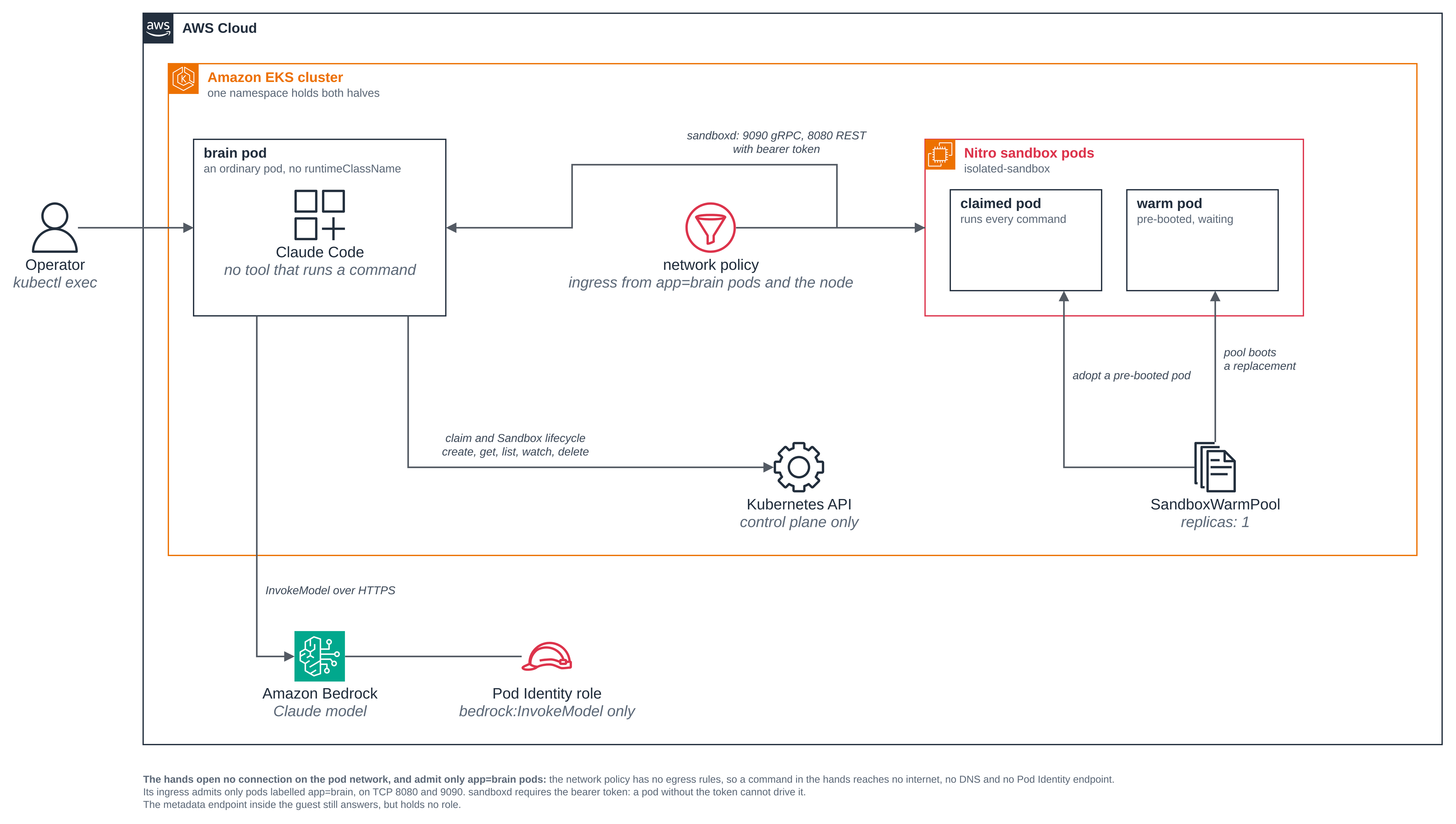
An agent that both runs arbitrary code and talks to a model does both of those things in one process, on one pod, with one set of credentials. This blueprint takes the agent apart along that line. The brain reasons and holds the credentials, and has no tool that runs a command. The hands run every command, in a pre-booted Nitro sandbox pod claimed from a warm pool. The brain reaches them through the agent-sandbox MCP server, which talks to sandboxd, the agent-sandbox runtime daemon, inside each hands pod: gRPC on port 9090 for commands, REST on port 8080 for files. The Kubernetes API carries the claim and Sandbox lifecycle only -- create, read, list, watch and delete a claim, and read the Sandbox it adopts -- so a session's commands, files and output never travel over it.
Be precise about what that buys, because it is easy to overstate. Code the model decides to run never runs on the half that holds the credentials, and it cannot open a connection of its own on the pod network. It is not an exfiltration boundary: every command's output comes back to the brain and goes into the next model request, and nothing in this blueprint restricts where the brain can connect. What this blueprint does not limit below sets out where the boundaries actually are.
The brain is Claude Code, chosen because its tools can be removed in configuration, but the pattern fits any agent that speaks MCP and whose own shell or code-execution tool can be removed. It follows the design Anthropic describes in Scaling Managed Agents: decoupling the brain from the hands, which the warm pool page names at the end; this blueprint is the worked version of it.
- The thing that reasons and the thing that runs code are different pods. The brain is
an ordinary pod with no
runtimeClassName. The hands are sandbox pods withruntimeClassName: isolated-sandbox. Step 4 shows the brain's own list of tools, with no shell tool in it, and step 8 shows the hands running with their own kernel build, their own boot and virtio disks. - The brain's only execution path is the agent-sandbox MCP server. Every tool that runs
a command is denied by name in the image's
settings.json, which Claude Code's documentation says removes the tool from the agent's context entirely. What is left is the upstream MCP server, run over stdio inside the brain, with the arguments that choose a namespace, a pool or a pod's labels hidden from the model. Step 5 shows the tool schema the model is given. - Commands and files go to sandboxd, not through the Kubernetes API. The brain's RBAC
Role covers claims and Sandboxes only: no
pods/exec, nopods/log, nopods/portforward. Step 6 runs a command and moves a file anyway, and step 12 shows the API refusing the brain every one of those subresources. - The hands open no connection on the pod network, and only
app=brainpods reach them. The template's network policy has no egress rules, so a command in the hands cannot open a connection on the pod network; its ingress admits only pods in this namespace labelledapp=brain, on TCP 8080 and 9090; and sandboxd refuses any request without the bearer token the brain holds. Steps 9 and 10 show a connection out refused, a pod without that label refused, and a request without the token refused. - A claim adopts a pod that is already booted. A
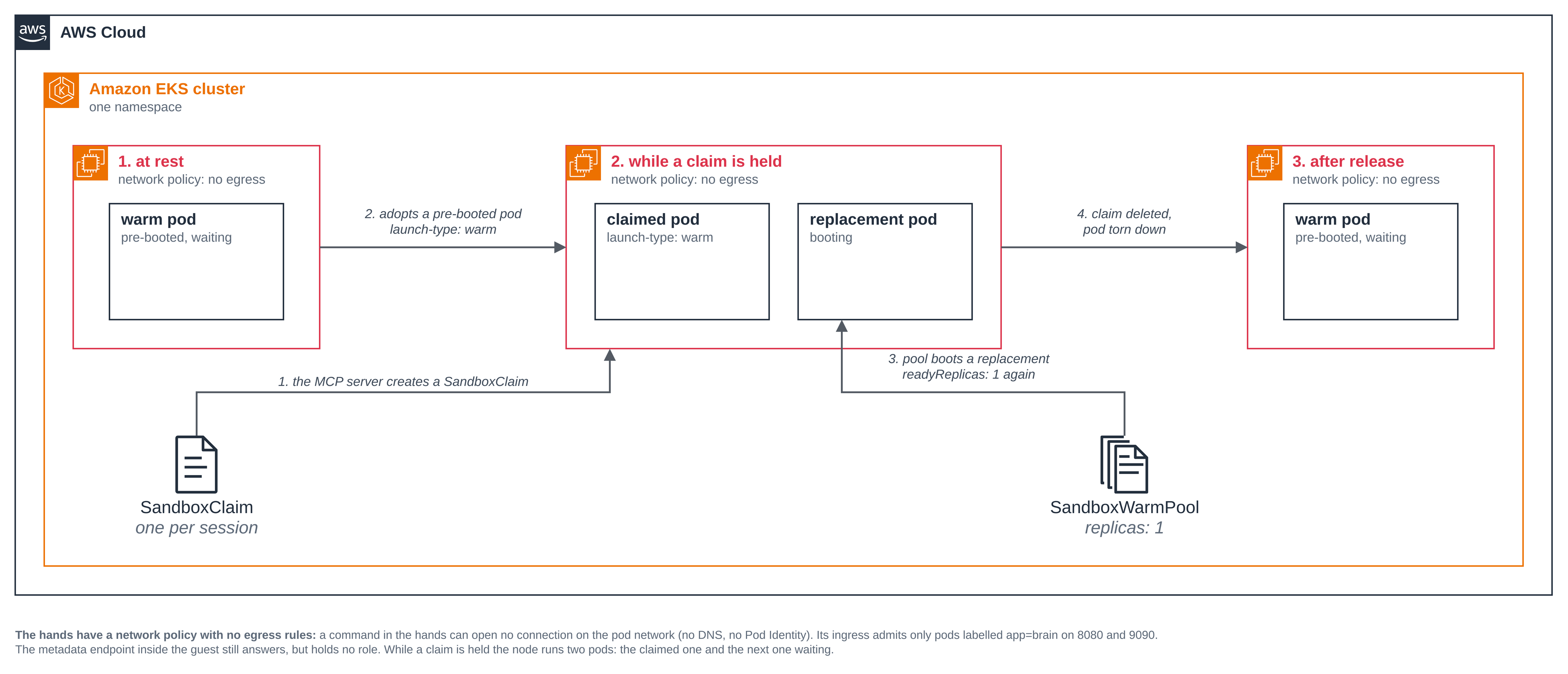
SandboxWarmPoolkeeps a pod booted; aSandboxClaimadopts it. Step 7 shows the pod adopted from the pool and the pool booting a replacement while the claim is held. - The hands hold no credential, and the brain's role is the only one the blueprint makes.
The hands have no Pod Identity association, no IAM role and no ServiceAccount token, which
step 11 checks by name without printing a value. The only policy the blueprint puts on the
brain's role allows
bedrock:InvokeModelandbedrock:InvokeModelWithResponseStreamon the one model it is configured with, shown in full in step 11.
Figure 1: The brain and the hands, in two pods. The brain reasons and holds the credentials but has no tool that runs a command; the hands run every command; the brain reaches them through sandboxd on two ports that the hands' network policy opens only to pods labelled app=brain.
What this blueprint does not limit
It is worth being precise about where the boundaries are, because three of them are not where a reader might assume.
The hands' policy is the only thing between them and the network. The hands have a pod
network, because that is how sandboxd is reached. What keeps them from using it is the
network policy the agent-sandbox controller applies from the template, and a network policy
holds only while enforcement is on for the cluster. Step 1 has you turn it on and
setup.sh checks it. If you change the template, keep networkPolicy with no egress
list: supplying any egress rule opens exactly that, and setting
networkPolicyManagement: Unmanaged drops the policy altogether.
The hands can reach the sandbox's metadata endpoint. With a network, a Nitro sandbox
serves instance metadata at 169.254.169.254 from inside the guest, so the egress policy,
which is enforced on the node, does not reach it. It holds no role: step 11 shows its iam/
path returning 404. It is not the same thing as "no instance metadata", and the page does not
claim that.
The split is not an exfiltration boundary. The hands cannot open a connection on the pod network, but their output is meant to reach the model: the MCP server returns it to the brain, and the brain puts it in the next request. So anything the hands can read, the brain can carry, and nothing in this blueprint restricts where the brain can connect. What the split does is keep attacker-controlled code off the half that holds the credentials. If you need the stronger property, restrict the brain's egress as well, with the network policy blueprint.
The brain's RBAC Role is namespace-bounded, not claim-bounded. Kubernetes RBAC selects resources by name, never by label, and the MCP server names each claim it makes, so the Role covers every claim and Sandbox in the namespace. The MCP server only acts on claims its own session created: it labels each claim with the session's ID and checks the label on every call. That is an application-level control, and it is the softer of the two. The claim name is a tool argument, as it is upstream; the namespace and the pool are not.
Versions
| Component | Pin |
|---|---|
| agent-sandbox controller (kubernetes-sigs/agent-sandbox) | v1.0.10 |
sandboxd image (registry.k8s.io/agent-sandbox/sandboxd) |
v1.0.10, the first release with a released sandboxd image |
agent-sandbox MCP server (clients/integrations/mcp-server) |
the v1.0.10 tag, installed from the release archive: it is not published to PyPI or as an image |
k8s-agent-sandbox Python SDK, with the async and grpc extras |
as the MCP server at that tag requires (>=1.0.6,<2.0); the run used 1.0.10 |
Claude Code (@anthropic-ai/claude-code) |
2.1.310 |
Keep the sandboxd image and the MCP server on the same tag, v1.0.10. The controller may
be that release or newer; setup.sh accepts v1.0.10 or later.
The Claude Code pin matters more than a version pin usually does: which tools exist, and
what a deny rule does to one, are that version's documented behaviour, and step 4 reads the
tool list from the running agent rather than assuming it. Nothing else is pinned beyond the
images in the manifests (public.ecr.aws/docker/library/node:22-bookworm-slim for the brain
and public.ecr.aws/docker/library/python:3.12-slim for the hands).
Files
| File | What it is |
|---|---|
Dockerfile |
The brain image: Claude Code, the agent-sandbox MCP server and the agent configuration, baked in. |
brain/hands_mcp.py |
Serves the upstream MCP server over stdio, with the namespace, the pool and the pod's labels and annotations hidden from the model, and reads the sandboxd token from its file. |
brain/settings.json |
The permission rules: every tool that runs a command denied by name, and the hands MCP server's tools allowed. |
brain/.mcp.json |
Registers brain/hands_mcp.py as an MCP server named hands. |
brain/claude.json |
Marks /workspace trusted and the MCP server enabled, so a non-interactive run does not stop at the trust prompt. |
brain/CLAUDE.md |
The agent's project instructions: how paths work in the hands. |
deploy/warm-pool.yaml |
The hands: a SandboxTemplate that runs sandboxd with its network policy, and a SandboxWarmPool that keeps one booted. |
deploy/brain.yaml |
The brain Deployment. No runtimeClassName: the brain is not the sandboxed half. |
deploy/rbac.yaml |
The brain's ServiceAccount, Role and RoleBinding, and the whole of what it may do. |
iam/bedrock-invoke-policy.json |
The brain's only AWS permission: invoke a model. |
iam/pod-identity-trust.json |
The trust policy that lets EKS Pod Identity assume the role. |
scripts/setup.sh |
Check the shared installs and the cluster setting, build and push the brain image, create the role, the token and the cluster objects. |
scripts/cleanup.sh |
Delete everything the blueprint created, and leave the agent-sandbox install alone. |
scripts/common.sh |
The names, the pinned context, the readings and the guards the scripts share. |
.env.example |
The local values the blueprint needs, with no values filled in. |
The scripts read .env (copy it from .env.example). NAMESPACE defaults to
brain-and-hands and reaches every object they apply. Set KUBE_CONTEXT to the context of
the cluster you ran Getting started on, so a run never depends on the machine's current
context, which on a shared cluster another session can change mid-run.
Step 1: Install agent-sandbox and turn on network policy enforcement, once per
cluster. Both are shared: another workload on the cluster may depend on the agent-sandbox
version that is there, and enforcement applies to every network policy on the cluster. So
setup.sh checks both and changes neither. Install agent-sandbox yourself at the pinned
version:
kubectl apply -f https://github.com/kubernetes-sigs/agent-sandbox/releases/download/v1.0.10/sandbox-with-extensions.yaml
kubectl -n agent-sandbox-system rollout status deploy/agent-sandbox-controller
If it is already on your cluster at v1.0.10 or later, leave it as it is. setup.sh reads its
image, and stops with the command above when a CRD is missing, the controller is not
Available, or its version is older than v1.0.10.
EKS Auto Mode accepts network policies without enforcing them until the Network Policy
Controller is turned on, through the amazon-vpc-cni ConfigMap in kube-system
(EKS network policy documentation).
If you have run the network policy blueprint it is
already on:
kubectl get configmap -n kube-system amazon-vpc-cni \
  -o jsonpath='{.data.enable-network-policy-controller}{"\n"}'
If that does not print true, turn it on. Pods that no policy selects are unaffected:
kubectl patch configmap -n kube-system amazon-vpc-cni --type merge \
  -p '{"data":{"enable-network-policy-controller":"true"}}'
Step 2: Set the local values. Copy .env.example to .env, which git
ignores, and fill in your cluster:
cp .env.example .env
CLUSTER_NAME=          # the EKS cluster the Pod Identity association is created on
AWS_REGION=us-west-2
AWS_PROFILE=           # the AWS CLI profile for the cluster's account, if not your default
KUBE_CONTEXT=          # pin the context, so a run never uses the machine's current one
NAMESPACE=brain-and-hands
BEDROCK_MODEL_ID=us.anthropic.claude-sonnet-5-5
ECR_REPOSITORY=brain-and-hands
POD_IDENTITY_ROLE_NAME=brain-and-hands-brain
List the models your account can invoke with
aws bedrock list-inference-profiles --region $AWS_REGION --query 'inferenceProfileSummaries[].inferenceProfileId'.
Step 3: Stand it up. scripts/setup.sh checks the shared installs
and the enforcement setting first, so a missing prerequisite stops the run before anything is
created, then builds and pushes the brain image, creates the brain's role, mints the sandboxd
token, and applies the hands and the brain. The scripts read .env themselves; the commands
after setup use the same names, so load them into your shell first, and send every kubectl
below to the context .env names. The function adds --context only when KUBE_CONTEXT
is set, and an empty AWS_PROFILE is unset so the AWS CLI uses its default credentials:
set -a; . ./.env; set +a
[ -n "$AWS_PROFILE" ] || unset AWS_PROFILE
unalias kubectl 2>/dev/null
kubectl() { if [ -n "$KUBE_CONTEXT" ]; then command kubectl --context "$KUBE_CONTEXT" "$@"; else command kubectl "$@"; fi; }
./scripts/setup.sh 2>&1 | tee setup.log
The run below used AWS_REGION=us-east-1, so that Region appears in its output; the
account ID is shown as <ACCOUNT_ID>. Abridged: the docker build and docker push
transcripts are cut.
context: sandbox-demo (pinned)   namespace: brain-and-hands   region: us-east-1
reusing the agent-sandbox install as it is (registry.k8s.io/agent-sandbox/agent-sandbox-controller:v1.0.10); this sample was built against v1.0.10
network policy enforcement is on (amazon-vpc-cni enable-network-policy-controller=true)

== 1/7 namespace brain-and-hands ==
namespace/brain-and-hands created
namespace/brain-and-hands labeled
created namespace brain-and-hands, labelled app.kubernetes.io/managed-by=brain-and-hands

== 2/7 ECR repository brain-and-hands ==
created ECR repository brain-and-hands, tagged ManagedBy=brain-and-hands

== 3/7 build and push the brain image ==
  <ACCOUNT_ID>.dkr.ecr.us-east-1.amazonaws.com/brain-and-hands:e4e6d2f5a44b9138
e4e6d2f5a44b9138: digest: sha256:320aab689152371f15f4137233f0e286ce05fda4392693740dcea7b230c9939f size: 3663

== 4/7 the brain's Bedrock role, through EKS Pod Identity ==
created IAM role brain-and-hands-brain, tagged ManagedBy=brain-and-hands
  role: arn:aws:iam::<ACCOUNT_ID>:role/brain-and-hands-brain
  permissions: bedrock-invoke, two actions on us.anthropic.claude-sonnet-5-5 only

== 5/7 the brain's identity and RBAC ==
serviceaccount/brain created
role.rbac.authorization.k8s.io/brain created
rolebinding.rbac.authorization.k8s.io/brain created
  created Pod Identity association <ASSOCIATION_ID> for brain-and-hands/brain

== 6/7 the sandboxd token ==
  created secret/hands-token
  sandboxd will require the token whose sha256 is 20cb31f13043...

== 7/7 the hands, then the brain ==
sandboxtemplate.extensions.agents.x-k8s.io/hands created
sandboxwarmpool.extensions.agents.x-k8s.io/hands-pool created
deployment.apps/brain created
Waiting for deployment "brain" rollout to finish: 0 of 1 updated replicas are available...
deployment "brain" successfully rolled out
  waiting for the pool to boot its warm pod (the first sandboxed pod on a cold cluster waits for a sandbox-capable node)
  readyReplicas=0/1
  readyReplicas=0/1
NAME         READY   DESIRED   AGE
hands-pool   1       1         26s
NAME    READY   UP-TO-DATE   AVAILABLE   AGE
brain   1/1     1            1           25s
the brain is up with a warm pod waiting. Drive it:
  kubectl -n brain-and-hands exec deploy/brain -- claude -p 'Create a sandbox, print its kernel, and tell me whether you can reach the internet from it.'
Tear it down:   ./scripts/cleanup.sh
The token is 32 random bytes. It goes into a Secret that only the brain mounts, and the
hands get its SHA-256 digest on sandboxd's command line, so the pod spec of the hands, and
the environment of every process sandboxd starts, hold nothing that opens sandboxd. The image
tag is a digest of the Dockerfile and everything under brain/, so a change to either
produces a new tag and a push cannot serve a stale image.
kubectl -n $NAMESPACE get sandboxwarmpool,deploy,pods,networkpolicy
NAME                                                    READY   DESIRED   AGE
sandboxwarmpool.extensions.agents.x-k8s.io/hands-pool   1       1         28s

NAME                    READY   UP-TO-DATE   AVAILABLE   AGE
deployment.apps/brain   1/1     1            1           26s

NAME                         READY   STATUS    RESTARTS   AGE
pod/brain-6768bbd499-rpg7f   1/1     Running   0          26s
pod/hands-pool-7b5xp         1/1     Running   0          28s

NAME                                                   POD-SELECTOR                                         AGE
networkpolicy.networking.k8s.io/hands-network-policy   agents.x-k8s.io/sandbox-template-ref-hash=04187fa9   28s
Two pods, an ordinary one and a sandboxed one waiting to be claimed, and the one network policy the agent-sandbox controller wrote from the template.
Step 4: The brain has no tool that runs a command. In Claude Code, permission rules
name a tool and what it may do, and a deny rule that names a whole tool does more than block
calls to it: "A bare tool name like Bash removes the tool from Claude's context entirely,
so Claude never sees it" (Configure permissions).
brain/settings.json uses that, and is baked into the image rather
than mounted, so the image is what decides which tools the agent has:
{
  "permissions": {
    "defaultMode": "default",
    "deny": [
      "Bash",
      "PowerShell",
      "Monitor",
      "LSP",
      "Workflow",
      "Agent",
      "Skill",
      "EnterWorktree",
      "ExitWorktree",
      "WebFetch",
      "WebSearch"
    ],
    "allow": [
      "mcp__hands",
      "Read",
      "Glob",
      "Grep"
    ]
  },
  "enableAllProjectMcpServers": true
}
Each denied name is a tool that runs a command or starts a process at the pinned version,
taken from the tools reference: Bash
and PowerShell are shells, Monitor runs a command in the background, LSP starts
language servers, Workflow and Agent run subagents that would have their own tools,
Skill executes a skill, and the two worktree tools run git and move the session's
working directory. WebFetch and WebSearch are denied because the brain reaches its model
through its own client and needs no web access of its own. mcp__hands allows every tool
the hands MCP server provides.
A list of names is only as good as the list it was checked against, so ask the running agent instead:
kubectl -n $NAMESPACE exec deploy/brain -- \
  claude -p 'List the exact names of every tool you have available, one per line, and nothing else.'
Edit
Glob
Grep
ListAgents
Read
ReportFindings
ScheduleWakeup
ToolSearch
Write
CronCreate
CronDelete
CronList
ListMcpResourcesTool
NotebookEdit
ReadMcpResourceDirTool
ReadMcpResourceTool
SendMessage
TaskStop
mcp__hands__create_sandbox
mcp__hands__delete_sandbox
mcp__hands__download_file
mcp__hands__execute_command
mcp__hands__file_exists
mcp__hands__get_sandbox_status
mcp__hands__list_files
mcp__hands__upload_file
Now ask it to run something locally:
kubectl -n $NAMESPACE exec deploy/brain -- \
  claude -p 'Run "id -un && hostname" directly on your own machine, in your own shell, without using any sandbox. If you cannot, say exactly which tool you would need and whether you have it.'
No, I can't run that on my own machine. I have no shell tool of my own. The tools I have are file read/write/edit, glob, grep, and a few others, and none of them runs commands.

To run `id -un && hostname` directly, I would need a shell tool such as Bash. I don't have one.

The only way I can run commands is through the `hands` MCP server's `execute_command`, and that runs inside a sandbox, not on my own machine. You asked me not to use a sandbox, so I haven't run anything. If a sandbox is fine, tell me and I'll create one and run the command there. The output would then be the sandbox's user and hostname, not my own machine's.
The permission rules are enforced by Claude Code, not by the model, so this is not the model choosing to be careful: the tool is not in its context to call.
Step 5: The tools it does have. brain/.mcp.json registers
brain/hands_mcp.py as the hands MCP server. It is the upstream
agent-sandbox MCP server, unchanged, served in two ways that differ from upstream's image:
- Over stdio, as a child of the agent. The upstream image serves streamable HTTP on
0.0.0.0:8000with no authentication, so any pod that can reach that port could drive it. Over stdio there is no listener at all. - With the arguments that choose where a sandbox comes from hidden.
namespaceon every tool, andwarmpool,labels,pod_labelsandpod_annotationsoncreate_sandbox, are taken out of the schema the model sees and filled in from the pod's environment, using FastMCP's tool transforms:
for name in TOOLS_WITH_NAMESPACE:
    args = {"namespace": _hidden(NAMESPACE)}
    if name == "create_sandbox":
        args["warmpool"] = _hidden(WARMPOOL)
        args["labels"] = _hidden()
        args["pod_labels"] = _hidden()
        args["pod_annotations"] = _hidden()
    transforms[name] = ToolTransformConfig(arguments=args)
mcp.add_transform(ToolTransform(transforms))
The launcher prints the schema the model is given:
kubectl -n $NAMESPACE exec deploy/brain -- python3 /opt/brain/hands_mcp.py --print-tools
{"name": "create_sandbox", "arguments": ["sandbox_ready_timeout", "shutdown_after_seconds"]}
{"name": "delete_sandbox", "arguments": ["sandbox_claim_name"]}
{"name": "execute_command", "arguments": ["command", "max_output_chars", "sandbox_claim_name", "timeout"]}
{"name": "upload_file", "arguments": ["binary", "content", "path", "sandbox_claim_name", "timeout"]}
{"name": "download_file", "arguments": ["binary", "path", "sandbox_claim_name", "timeout"]}
{"name": "list_files", "arguments": ["max_entries", "path", "sandbox_claim_name", "timeout"]}
{"name": "file_exists", "arguments": ["path", "sandbox_claim_name", "timeout"]}
{"name": "get_sandbox_status", "arguments": ["sandbox_claim_name"]}
How the server reaches the hands is its own configuration, set in
deploy/brain.yaml:
- { name: K8S_SANDBOX_CONNECTION__TYPE, value: sandboxd-in-cluster }
- { name: K8S_SANDBOX_CONNECTION__MODE, value: in-cluster-pod-ip }
sandboxd-in-cluster dials sandboxd in the claimed pod directly, with no sandbox router
and no kubectl port-forward. in-cluster-pod-ip takes the address from the Sandbox's
status.podIPs, so the template needs no Service. Upstream notes the trade-off: an address
read from status can, in principle, be one a recycled pod now holds. Here the token is what
stops that from mattering, since a pod that is not one of these hands does not accept it.
Step 6: Drive it. The brain is idle until you give it something to do. You reach it with
kubectl exec, and it reaches the hands:
kubectl -n $NAMESPACE exec deploy/brain -- \
  claude -p 'Create a sandbox. In it, print the kernel build with "uname -rv", write a Python file that prints 6*7 and run it, then try to fetch https://example.com with python3. Report what each one returned, and delete the sandbox at the end.'
Here is what each step returned:

1. **`uname -rv`** returned `6.18.54 #1 SMP PREEMPT_DYNAMIC Thu Oct 22 17:38:11 UTC 2026`.
2. **Python file:** I wrote `answer.py` containing `print(6*7)` and ran it. It printed `42`.
3. **Fetching https://example.com with python3:** this failed. `urllib.request.urlopen` raised `URLError: [Errno -3] Temporary failure in name resolution`. The sandbox couldn't resolve the hostname, so it most likely has no outbound network or DNS. I didn't try other ways of reaching the site.
4. **Cleanup:** I deleted the sandbox, `sandbox-claim-a9d9fcb3`.
[turn took 34s]
That is the whole pattern in one turn: the model decided to run a command, the command ran in a pre-booted sandbox pod, a file went in and its output came back, all through sandboxd, and the attempt to reach the network from there failed.
Step 7: The claim adopted a pod that was already running, and the pool refilled. A
SandboxClaim with a warmPoolRef adopts a booted pod rather than starting one. That is
the whole reason a claim is fast: nothing boots on the claim path. The pool does the booting
beforehand, and again afterwards, so the cost moves off the path a session waits on.
Figure 2: The life of one claim against a warm pool. A claim adopts a pod that is already booted; the pool boots a replacement behind it.
Ask the agent to create one and keep it, then read the claim and the pool:
kubectl -n $NAMESPACE exec deploy/brain -- claude -p 'Create a sandbox, report its claim name and status, and do not delete it.'
kubectl -n $NAMESPACE get sandboxclaim
kubectl -n $NAMESPACE get sandbox \
  -o custom-columns='NAME:.metadata.name,LAUNCH-TYPE:.metadata.labels.agents\.x-k8s\.io/launch-type'
kubectl -n $NAMESPACE get sandboxwarmpool hands-pool
sleep 20; echo "# 20 seconds later"; kubectl -n $NAMESPACE get sandboxwarmpool hands-pool
The sandbox is created and ready. I haven't deleted it, as you asked.

- **Claim name:** `sandbox-claim-df610a69`
- **Status:** `SandboxReady` (ready: true, message "Pod is Ready")

It uses the default auto-shutdown of 300 seconds (5 minutes), so it will shut itself down after that unless you extend it.

NAME                     READY   SANDBOX            REASON              AGE
sandbox-claim-df610a69   True    hands-pool-mbsw2   DependenciesReady   6s
NAME               LAUNCH-TYPE
hands-pool-mbsw2   warm
hands-pool-mfvxq   warm
NAME         READY   DESIRED   AGE
hands-pool           1         116s

# 20 seconds later
NAME         READY   DESIRED   AGE
hands-pool   1       1         2m17s
The claim is Ready, and the launch-type label says the pod it holds was adopted from the
pool rather than cold-started. The pool had no warm pod
ready right after the claim and was back to one within 20 seconds, so while a session holds
a pod the steady state is two pods: the claimed one and the next one waiting. Size
replicas to your peak claim rate rather than your total session count, as the
warm pool page sets out.
A claude -p run is one MCP session, and the server only acts on claims its own session
created, so a later run cannot drive the claim this one left behind. Each run creates its
own; step 13 deletes what is left.
Step 8: The hands ran in a sandbox. Three readings together show the pod's containers
ran in a VM of their own, and the brain gives the ordinary-pod comparison for each. Run them
as you, with kubectl exec, rather than through the brain, so the comparison is on the same
footing for both pods:
HANDS=$(kubectl -n $NAMESPACE get sandboxclaim -o jsonpath='{.items[0].status.sandbox.name}')
REPLACEMENT=$(kubectl -n $NAMESPACE get pods -l app=hands --no-headers \
  -o custom-columns=N:.metadata.name | grep -vx "$HANDS" | head -1)
R='echo "kernel:        $(uname -rv)"; echo "product name:  $(cat /sys/class/dmi/id/product_name)";
   echo "disks:         $(ls /sys/block | tr "\n" " ")"; echo "uptime:        $(cut -d" " -f1 /proc/uptime)s"'
echo "--- the claimed sandbox pod ---";  kubectl -n $NAMESPACE exec $HANDS -c hands -- sh -c "$R"
echo "--- the pool's replacement pod ---"; kubectl -n $NAMESPACE exec $REPLACEMENT -c hands -- sh -c "$R"
echo "--- the brain, an ordinary pod ---"; kubectl -n $NAMESPACE exec deploy/brain -- sh -c "$R"
--- the claimed sandbox pod ---
kernel:        6.18.54 #1 SMP PREEMPT_DYNAMIC Thu Oct 22 17:38:11 UTC 2026
product name:  m8a.enclave
disks:         dm-0 vda vdb vdc vdd
uptime:        94.49s
--- the pool's replacement pod ---
kernel:        6.18.54 #1 SMP PREEMPT_DYNAMIC Thu Oct 22 17:38:11 UTC 2026
product name:  m8a.enclave
disks:         dm-0 vda vdb vdc vdd
uptime:        32.53s
--- the brain, an ordinary pod ---
kernel:        6.18.56 #2 SMP PREEMPT_DYNAMIC Fri Oct 30 22:32:37 UTC 2026
product name:  m8a.large
disks:         dm-0 loop0 loop1 loop2 loop3 loop4 loop5 loop6 loop7 nvme0n1 nvme1n1 zram0
uptime:        17571.28s
The three pods ran on the same node (the next block shows it), and the readings still split two against one:
| Reading | The sandbox pods | The brain, an ordinary pod |
|---|---|---|
uname -rv |
6.18.54 #1, the guest kernel |
6.18.56 #2, its node's kernel |
/sys/class/dmi/id/product_name |
m8a.enclave, the VM |
m8a.large, the EC2 instance |
ls /sys/block |
vda vdb vdc vdd, virtio devices |
nvme0n1 nvme1n1, the instance's disks |
/proc/uptime |
94s and 33s, each pod's own age | 17571s, the node's uptime |
The two uptimes are the clearest reading: both sandbox pods share a node with the brain, and each reports its own boot, a minute apart, because each got its own VM.
kubectl -n $NAMESPACE get pods \
  -o custom-columns='NAME:.metadata.name,NODE:.spec.nodeName,RUNTIMECLASS:.spec.runtimeClassName'
NAME                     NODE                  RUNTIMECLASS
brain-6768bbd499-rpg7f   <NODE_A>   <none>
hands-pool-mbsw2         <NODE_A>   isolated-sandbox
hands-pool-mfvxq         <NODE_A>   isolated-sandbox
The runtime class shows what was asked for rather than what ran, which is why the readings above come first.
Step 9: The hands open no connection on the pod network, and admit only app=brain pods.
The policy is part of the
template in deploy/warm-pool.yaml, and the agent-sandbox
controller writes it as one NetworkPolicy for every pod made from the template:
spec:
  networkPolicyManagement: Managed
  networkPolicy:
    ingress:
      - from:
          - podSelector:
              matchLabels:
                app: brain
        ports:
          - { protocol: TCP, port: 8080 }  # sandboxd REST: files and /v1/health
          - { protocol: TCP, port: 9090 }  # sandboxd gRPC: ProcessService
Supplying networkPolicy replaces the controller's default, which admits the sandbox router
and lets egress reach the public internet. The controller writes both policy types, so with
no egress list at all every connection the hands try to open on the pod network is
denied. Ingress is open to pods labelled app=brain, and to the pod's own node, which
Kubernetes always allows: that is how the kubelet's readiness probe reaches /v1/health. Read the object it
wrote:
kubectl -n $NAMESPACE get networkpolicy hands-network-policy -o yaml
Abridged: the object's server-set metadata (timestamps, UIDs, finalizers, the owner
reference's API version and UID) is cut; spec is shown whole.
apiVersion: networking.k8s.io/v1
kind: NetworkPolicy
metadata:
  name: hands-network-policy
  namespace: brain-and-hands
  ownerReferences:
  - kind: SandboxTemplate
    name: hands
spec:
  ingress:
  - from:
    - podSelector:
        matchLabels:
          app: brain
    ports:
    - port: 8080
      protocol: TCP
    - port: 9090
      protocol: TCP
  podSelector:
    matchLabels:
      agents.x-k8s.io/sandbox-template-ref-hash: 04187fa9
  policyTypes:
  - Ingress
  - Egress
From inside the hands, no connection the model opens on the pod network succeeds, by name or by address:
kubectl -n $NAMESPACE exec $HANDS -c hands -- python3 -c 'import socket; socket.gethostbyname("amazonaws.com")'
kubectl -n $NAMESPACE exec $HANDS -c hands -- python3 -c 'import socket; socket.create_connection(("1.1.1.1", 443), timeout=5)'
Traceback (most recent call last):
  File "<string>", line 1, in <module>
socket.gaierror: [Errno -3] Temporary failure in name resolution
command terminated with exit code 1

Traceback (most recent call last):
  File "<string>", line 1, in <module>
  File "/usr/local/lib/python3.12/socket.py", line 865, in create_connection
    raise exceptions[0]
  File "/usr/local/lib/python3.12/socket.py", line 850, in create_connection
    sock.connect(sa)
TimeoutError: timed out
command terminated with exit code 1
Both legs matter: the first could be DNS alone, and the second rules that out by skipping DNS entirely. Replies to the brain's own connections are not egress, which is why sandboxd's answers still reach it.
And the other direction. A pod in the same namespace that is not labelled app=brain cannot
reach either port, while the brain reaches both:
HIP=$(kubectl -n $NAMESPACE get pod $HANDS -o jsonpath='{.status.podIP}')
PROBE='
import socket, sys
for port in (8080, 9090):
    s = socket.socket(); s.settimeout(5)
    try:
        s.connect((sys.argv[1], port)); print(port, "connected")
    except Exception as e:
        print(port, type(e).__name__ + ":", e)
    finally:
        s.close()
'
kubectl -n $NAMESPACE run not-the-brain --restart=Never \
  --image=public.ecr.aws/docker/library/python:3.12-slim -- sleep 300
kubectl -n $NAMESPACE wait --for=condition=Ready pod/not-the-brain --timeout=120s
echo "--- from not-the-brain ---"; kubectl -n $NAMESPACE exec not-the-brain -- python3 -c "$PROBE" "$HIP"
echo "--- from the brain ---";     kubectl -n $NAMESPACE exec deploy/brain -- python3 -c "$PROBE" "$HIP"
kubectl -n $NAMESPACE delete pod not-the-brain
--- from not-the-brain ---
8080 TimeoutError: timed out
9090 TimeoutError: timed out
--- from the brain ---
8080 connected
9090 connected
Step 10: sandboxd refuses a request without the token. The policy decides who can reach
the ports; the token decides who sandboxd answers. Only GET /v1/health is open, so the
kubelet's readiness probe works:
kubectl -n $NAMESPACE exec deploy/brain -- python3 -c '
import urllib.request, urllib.error, sys
tok = open("/var/run/hands/token").read().strip()
for path, auth, label in (("/v1/health", None, "no token"), ("/v1/files/", None, "no token"),
                          ("/v1/files/", "Bearer not-the-token", "wrong token"),
                          ("/v1/files/", "Bearer " + tok, "the brain token")):
    r = urllib.request.Request("http://" + sys.argv[1] + ":8080" + path,
                               headers={"Authorization": auth} if auth else {})
    try:
        with urllib.request.urlopen(r, timeout=5) as resp: print(f"{path:12} {label:16} {resp.status}")
    except urllib.error.HTTPError as e: print(f"{path:12} {label:16} {e.code} {e.read().decode().strip()}")
' "$HIP"
/v1/health   no token         200
/v1/files/   no token         401 {"code":"UNAUTHENTICATED","message":"missing or invalid bearer token"}
/v1/files/   wrong token      401 {"code":"UNAUTHENTICATED","message":"missing or invalid bearer token"}
/v1/files/   the brain token  200
The token is read from /var/run/hands/token by the launcher and set only in the MCP
server's own process. The brain's Secret is the only place it is stored, and the hands hold
its digest.
Step 11: The hands hold no credential, and the brain's role is the only one. A command the model runs in the hands finds nothing to authenticate with. Checked by variable name, so no value is printed:
kubectl -n $NAMESPACE exec $HANDS -c hands -- sh -c \
  'env | cut -d= -f1 | grep -E "^(AWS|ANTHROPIC|CLAUDE|BEDROCK|K8S_SANDBOX)" || echo "(none)"'
kubectl -n $NAMESPACE exec $HANDS -c hands -- ls /var/run/secrets/kubernetes.io/serviceaccount/
kubectl -n $NAMESPACE exec $HANDS -c hands -- python3 -c 'import socket; socket.create_connection(("169.254.170.23", 80), timeout=3)'
kubectl -n $NAMESPACE exec $HANDS -c hands -- python3 -c '
import urllib.request, urllib.error
def req(method, path, headers={}):
    r = urllib.request.Request("http://169.254.169.254" + path, method=method, headers=headers)
    try:
        with urllib.request.urlopen(r, timeout=5) as resp: return resp.status, resp.read()
    except urllib.error.HTTPError as e: return e.code, b""
st, tok = req("PUT", "/latest/api/token", {"X-aws-ec2-metadata-token-ttl-seconds": "60"})
print("PUT /latest/api/token:", st)
st, _ = req("GET", "/latest/meta-data/iam/security-credentials/", {"X-aws-ec2-metadata-token": tok.decode()})
print("GET /latest/meta-data/iam/security-credentials/:", st)
'
(none)

ls: cannot access '/var/run/secrets/kubernetes.io/serviceaccount/': No such file or directory
command terminated with exit code 2

Traceback (most recent call last):
  File "<string>", line 1, in <module>
  File "/usr/local/lib/python3.12/socket.py", line 865, in create_connection
    raise exceptions[0]
  File "/usr/local/lib/python3.12/socket.py", line 850, in create_connection
    sock.connect(sa)
TimeoutError: timed out
command terminated with exit code 1

PUT /latest/api/token: 200
GET /latest/meta-data/iam/security-credentials/: 404
No AWS, model or MCP server variables; no ServiceAccount token, because the template sets
automountServiceAccountToken: false; and the EKS Pod Identity address is not reachable,
because the policy denies all egress. The metadata endpoint is a different case, as
What this blueprint does not limit says: it is served
inside the guest, so it answers, and its iam/ path returns 404 because the pod has no
role.
Only the brain has an association, and the association names a namespace and a ServiceAccount, so it delivers the role to the brain's ServiceAccount in this namespace:
aws eks list-pod-identity-associations --cluster-name $CLUSTER_NAME --namespace $NAMESPACE \
  --query 'associations[].{serviceAccount:serviceAccount,associationId:associationId}' --output table
-------------------------------------------
|       ListPodIdentityAssociations       |
+----------------------+------------------+
|     associationId    | serviceAccount   |
+----------------------+------------------+
|  <ASSOCIATION_ID> |  brain           |
+----------------------+------------------+
That role is the whole of what the blueprint grants in AWS, so it is worth reading in full.
setup.sh renders it from iam/bedrock-invoke-policy.json
with your Region, account and BEDROCK_MODEL_ID, so it names the one model the brain is
configured with rather than any model:
aws iam get-role-policy --role-name $POD_IDENTITY_ROLE_NAME --policy-name bedrock-invoke --query PolicyDocument
aws iam list-attached-role-policies --role-name $POD_IDENTITY_ROLE_NAME --query AttachedPolicies
aws iam list-role-policies --role-name $POD_IDENTITY_ROLE_NAME --query PolicyNames
{
    "Version": "2012-10-17",
    "Statement": [
        {
            "Sid": "InvokeTheOneInferenceProfileTheBrainUses",
            "Effect": "Allow",
            "Action": [
                "bedrock:InvokeModel",
                "bedrock:InvokeModelWithResponseStream"
            ],
            "Resource": "arn:aws:bedrock:us-east-1:<ACCOUNT_ID>:inference-profile/us.anthropic.claude-sonnet-5-5"
        },
        {
            "Sid": "InvokeTheFoundationModelsThatProfileRoutesTo",
            "Effect": "Allow",
            "Action": [
                "bedrock:InvokeModel",
                "bedrock:InvokeModelWithResponseStream"
            ],
            "Resource": [
                "arn:aws:bedrock:us-east-1::foundation-model/anthropic.claude-sonnet-5-5",
                "arn:aws:bedrock:us-east-2::foundation-model/anthropic.claude-sonnet-5-5",
                "arn:aws:bedrock:us-west-2::foundation-model/anthropic.claude-sonnet-5-5"
            ]
        }
    ]
}
[]
[
    "bedrock-invoke"
]
Two actions, on the one model the brain is configured with. It takes two statements because
a cross-Region inference profile such as us.anthropic.claude-sonnet-5-5 needs two
resources: the profile, which is addressed in your own account, and the foundation models it
routes to, one per Region behind it. Those ARNs are read from the profile itself at apply
time, with aws bedrock get-inference-profile, rather than derived from its ID, because a
derived prefix with a trailing wildcard would also allow any other model whose ID started the
same way.
Read the scope precisely. Those two statements are the whole of what this blueprint attaches
to this role, and setup.sh refuses to reuse a tagged role that has picked up anything
else, so the run you get matches the policy above. That is not the same as saying nothing
else can ever reach the role: a trust policy edited afterwards, or a second Pod Identity
association elsewhere naming the same role, are outside what the blueprint creates or checks.
Step 12: What the brain may do on the Kubernetes API. Ask the API rather than reading the Role, using the ServiceAccount as the subject:
SA=system:serviceaccount:$NAMESPACE:brain
ci() { printf '  %-52s in %-16s -> %s\n' "$1" "$2" "$(kubectl auth can-i $1 --as "$SA" -n "$2" 2>/dev/null)"; }
echo "=== the brain's own namespace: what it may do ==="
for v in "create sandboxclaims.extensions.agents.x-k8s.io" "list sandboxclaims.extensions.agents.x-k8s.io" \
         "watch sandboxclaims.extensions.agents.x-k8s.io" "delete sandboxclaims.extensions.agents.x-k8s.io" \
         "get sandboxes.agents.x-k8s.io" "watch sandboxes.agents.x-k8s.io"; do ci "$v" "$NAMESPACE"; done
echo "=== the brain's own namespace: what it may NOT do ==="
for v in "create pods --subresource=exec" "get pods --subresource=log" "create pods --subresource=portforward" \
         "get pods" "create pods" "get secrets" "create sandboxtemplates.extensions.agents.x-k8s.io" \
         "delete sandboxwarmpools.extensions.agents.x-k8s.io"; do ci "$v" "$NAMESPACE"; done
echo "=== another namespace: the same ServiceAccount ==="
for v in "create sandboxclaims.extensions.agents.x-k8s.io" "get sandboxes.agents.x-k8s.io"; do ci "$v" default; done
echo "=== cluster-scoped ==="
for v in "list nodes" "list namespaces"; do
  printf '  %-52s %-19s -> %s\n' "$v" "(cluster-wide)" "$(kubectl auth can-i $v --as "$SA" 2>/dev/null)"; done
=== the brain's own namespace: what it may do ===
  create sandboxclaims.extensions.agents.x-k8s.io      in brain-and-hands  -> yes
  list sandboxclaims.extensions.agents.x-k8s.io        in brain-and-hands  -> yes
  watch sandboxclaims.extensions.agents.x-k8s.io       in brain-and-hands  -> yes
  delete sandboxclaims.extensions.agents.x-k8s.io      in brain-and-hands  -> yes
  get sandboxes.agents.x-k8s.io                        in brain-and-hands  -> yes
  watch sandboxes.agents.x-k8s.io                      in brain-and-hands  -> yes
=== the brain's own namespace: what it may NOT do ===
  create pods --subresource=exec                       in brain-and-hands  -> no
  get pods --subresource=log                           in brain-and-hands  -> no
  create pods --subresource=portforward                in brain-and-hands  -> no
  get pods                                             in brain-and-hands  -> no
  create pods                                          in brain-and-hands  -> no
  get secrets                                          in brain-and-hands  -> no
  create sandboxtemplates.extensions.agents.x-k8s.io   in brain-and-hands  -> no
  delete sandboxwarmpools.extensions.agents.x-k8s.io   in brain-and-hands  -> no
=== another namespace: the same ServiceAccount ===
  create sandboxclaims.extensions.agents.x-k8s.io      in default          -> no
  get sandboxes.agents.x-k8s.io                        in default          -> no
=== cluster-scoped ===
  list nodes                                           (cluster-wide)      -> no
  list namespaces                                      (cluster-wide)      -> no
The brain can create, read, list, watch and delete claims and read Sandboxes in its own
namespace, and nothing else: no exec, no logs, no port-forward, no pods at all, no
Secrets, no other namespace and nothing cluster-scoped. Every command and file in steps 6
and 7 went through sandboxd with the Role exactly as shown, which is what says the
Kubernetes API carried none of it.
Step 13: Delete the claims. When a session ends the agent deletes its claim with
delete_sandbox, the pod is torn down, and nothing from that session survives into the
next one. A claim the agent leaves behind, such as the one step 7 kept, goes when its
shutdown_after_seconds passes (300 by default, a tool argument the model can change) or
when you delete it:
CLAIM=$(kubectl -n $NAMESPACE get sandboxclaim -o jsonpath='{.items[0].metadata.name}')
kubectl -n $NAMESPACE delete sandboxclaim "$CLAIM"
sleep 45; kubectl -n $NAMESPACE get sandboxclaim,sandboxwarmpool,pods
sandboxclaim.extensions.agents.x-k8s.io "sandbox-claim-df610a69" deleted from brain-and-hands namespace
NAME                                                    READY   DESIRED   AGE
sandboxwarmpool.extensions.agents.x-k8s.io/hands-pool   1       1         4m47s

NAME                         READY   STATUS    RESTARTS   AGE
pod/brain-6768bbd499-rpg7f   1/1     Running   0          4m45s
pod/hands-pool-mfvxq         1/1     Running   0          2m58s
Good to know
- The brain is not sandboxed, and that is the design. It is the half that holds the credentials and talks to the model, so it is the half with a network. Putting the whole agent in a sandbox is the coding agent blueprint; this one is the contrast.
- The Kubernetes API is the control plane here, not the data plane. Claims go through it; commands, files and output go to sandboxd on the pod network. At scale that keeps a busy agent's traffic off the API server.
- Nothing in this blueprint limits where the brain can connect. Its limits are its tool configuration, its IAM role and its RBAC Role, each read back above. If you need egress restricted as well, take the mechanism from the network policy blueprint.
- Keep only the brain and the hands in this namespace. The hands' policy admits any pod
here labelled
app=brain, and the brain's Role covers every claim and Sandbox here. - Run the MCP server over stdio, or put authentication in front of it. The upstream server has none of its own. Over stdio, as here, the agent that started it is its only client.
claude -pneeds the project already trusted.brain/claude.jsonmarks/workspacetrusted and the MCP server enabled. Without it a non-interactive run stops at the trust prompt, which leavessettings.jsonunread and the MCP server never loaded: the agent would then have its default tools, including a shell.- Commands run in the hands image. sandboxd is copied into the hands container by an
init container and run as its command, so commands find
python3and a shell frompython:3.12-slim. To give the agent other tools, change that image. - The file tools are rooted at
/workspace; commands are not. sandboxd resolves every path a file tool gets under its--root-dir, so an upload to/tmp/main.pylands at/workspace/tmp/main.py, where a command reading/tmp/main.pydoes not find it. The upstream tool descriptions do not say so, and a model picks absolute paths, sobrain/CLAUDE.mdtells the agent to give the file tools relative paths and to read them from/workspacein its commands. - The hands set no CPU or memory requests, so each guest gets a small default size, enough for the commands this blueprint runs. A real workload sets the requests it needs: the sandbox is sized from them, not from the limits.
karpenter.sh/do-not-disrupt: "true"on the template pins the node under an idle warm pod, since nothing would reschedule a pre-booted pod if consolidation removed the node under it. It also keeps that node out of consolidation, which is the trade-off.
Clean up
Set the variables again if you are in a new shell, then run the clean up. It deletes in reverse order of creation, starting with the brain so nothing claims another pod while it runs, and the pool before the template it references:
./scripts/cleanup.sh
context: sandbox-demo (pinned)   namespace: brain-and-hands   region: us-east-1

== 1/9 delete the brain ==
deployment.apps "brain" deleted from brain-and-hands namespace

== 2/9 delete the session claims so their pods are released ==
  no sandbox claims in brain-and-hands

== 3/9 delete the warm pool so it stops booting replacements ==
sandboxwarmpool.extensions.agents.x-k8s.io "hands-pool" deleted from brain-and-hands namespace
  waiting for the pool's sandboxes to terminate
    the pool's sandboxes are gone

== 4/9 delete the SandboxTemplate ==
sandboxtemplate.extensions.agents.x-k8s.io "hands" deleted from brain-and-hands namespace

== 5/9 delete the brain's RBAC, ServiceAccount and sandboxd token ==
rolebinding.rbac.authorization.k8s.io "brain" deleted from brain-and-hands namespace
role.rbac.authorization.k8s.io "brain" deleted from brain-and-hands namespace
serviceaccount "brain" deleted from brain-and-hands namespace
secret "hands-token" deleted from brain-and-hands namespace

== 6/9 delete the Pod Identity association ==
  Pod Identity association <ASSOCIATION_ID> is gone

== 7/9 delete the IAM role brain-and-hands-brain ==
  IAM role brain-and-hands-brain is gone

== 8/9 delete the ECR repository brain-and-hands ==
  ECR repository brain-and-hands is gone

== 9/9 delete namespace brain-and-hands ==
namespace "brain-and-hands" deleted
  namespace brain-and-hands deleted

The agent-sandbox controller is left as it is: it is a shared install, and
another workload on the cluster may rely on it.
A local copy of the brain image may still be on your machine: docker image ls

clean up complete: the brain, the claims, the pool, the template, the RBAC, the token,
the Pod Identity association, the IAM role, the ECR repository and the namespace are gone.
The script deletes a repository or a role only when it carries the blueprint's
ManagedBy=brain-and-hands tag, and nothing inside the namespace unless the namespace
carries the blueprint's label. A read that fails counts as "could not determine", which is a
failure and never "gone", and the script exits non-zero when it skipped something or could
not confirm a delete.
What stays. The agent-sandbox controller is a shared install and another workload on the cluster may rely on it, so the clean up leaves it, and network policy enforcement stays on. Remove the controller yourself, with its CRDs and every Sandbox resource in the cluster, only if nothing else is using it:
kubectl delete -f https://github.com/kubernetes-sigs/agent-sandbox/releases/download/v1.0.10/sandbox-with-extensions.yaml
Turn enforcement off again only if you turned it on for this blueprint and nothing else relies
on it, by setting enable-network-policy-controller back to "false" in the same
ConfigMap.
A local copy of the brain image may still be on your machine: docker image ls and
docker image rm the brain-and-hands tag. If this is the last blueprint you ran, follow the
hello sandbox clean up to remove the
namespace and the cluster.