A procurement analyst confined by OpenShell, with its credentials in another pod
A procurement analyst compares three supplier proposals and writes a recommendation that cites all three. OpenShell decides which files it can open, what identity it runs as, which destinations it may reach and which HTTP operations it may perform. All of that happens inside one Nitro sandbox. The analyst is given a placeholder rather than the real supplier key: OpenShell's supervisor keeps the key in a pod of its own, outside the sandbox, and substitutes it there on a request the policy admits.
Then the operator adds one rule to the policy, and the analyst submits its draft in the same pod, with no restart.
Before you start, review the prerequisites and shared setup on the home page and the Subagent security section page, which describes the analyst, the case and the files this blueprint shares with the other two. Run these blueprints first, which this one builds on and which it does not re-explain:
- Getting started > Hello sandbox: the one-line opt-in, and how a pod shows that it ran in a sandbox.
- Getting started > Coding agent: Amazon Bedrock through EKS Pod Identity.
- Getting started > Warm pool: the agent-sandbox controller, which OpenShell's Kubernetes driver uses to create the analyst's pod and its workspace volume.
- AI agents > Claude Managed Agents:
a sandboxed pod with
automountServiceAccountToken: false, and credentials shown by variable name and never by value.
This is not the OpenShell platform install. The planned OpenShell on Amazon EKS blueprint (#37) is the one for that: the Helm chart's options, workspace modes and the platform lifecycle. This page installs the smallest gateway that can drive a single sandbox, and spends its length on the policy around one analyst instead. So it does not cover workspace operations, template readiness or burst settings, gateway high availability, OIDC, or any compute driver other than Kubernetes.
The commands below use files from this repository, so clone it if you have not already, and run them from this blueprint's folder:
git clone https://github.com/aws-samples/sample-eks-nitro-sandbox.git
cd sample-eks-nitro-sandbox/examples/subagent-security/openshell
For this blueprint you also need aws,
kubectl,
helm,
docker, jq,
curl, openssl and python3 on your machine, an Amazon Bedrock inference profile your
account can invoke, and a cluster whose Kubernetes version serves
MutatingAdmissionPolicy, which is
stable and enabled by default from Kubernetes 1.36.
The scripts build and push three images to Amazon ECR and download the pinned OpenShell
CLI. A run costs one Bedrock turn, a few small Amazon S3 objects, and one gateway pod, one
sandboxed workload pod, one supervisor pod, one supplier API pod and one bridge pod kept
running until you clean up, plus two EBS volumes: the gateway's 1 GiB database volume and the
workload pod's 2 GiB workspace volume.
Every output block on this page is from one real run of this blueprint, run id
286b39b900024323a25e1f067b11a385. Values from the account it ran on are replaced by
placeholders, because this repository is public: <ACCOUNT_ID>, and <NODE_NAME> and
<SUPERVISOR_NODE_NAME> for the nodes the workload pod and the supervisor pod ran on. The
cluster is sandbox-demo, the name this repository's blueprints share, and the run was in
us-east-1; yours are whatever you set in .env. Run ids, pod names, kernel builds, uptimes, device
lists, token counts and the model's own prose are exactly as the run printed them. Where a
block shows a file from this folder rather than a run's output, it says so.
Overview
Two boundaries, doing different jobs. runtimeClassName: isolated-sandbox is the one
line that puts the analyst's workload pod in a Nitro sandbox: its containers and their own
kernel run in a lightweight VM with hardware-level isolation from the node. OpenShell is the
boundary inside that pod, between its own runtime and the analyst process it starts. The
difference from the other two blueprints in this section is where the credential lives: here it
is outside the sandbox altogether.
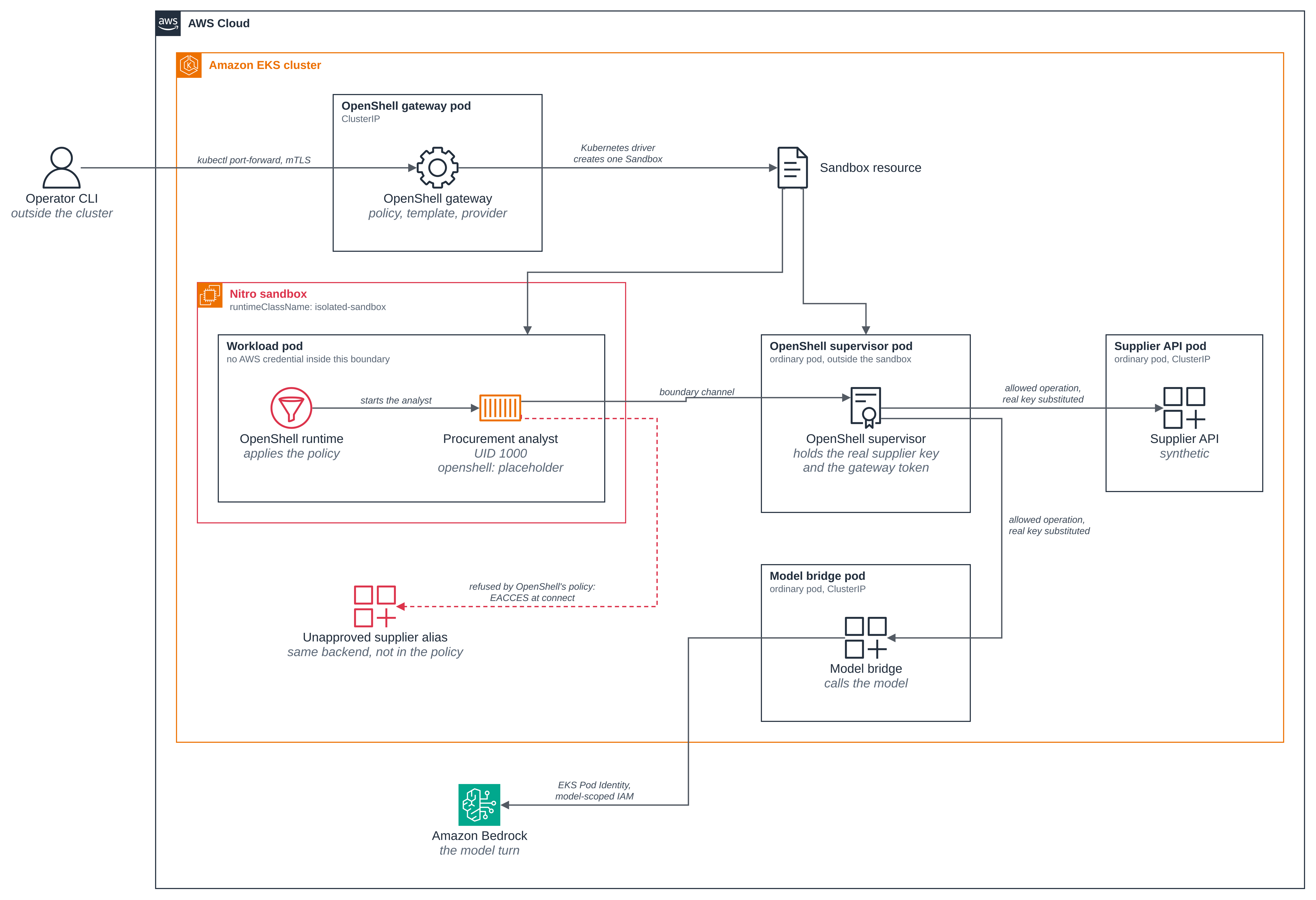
- One sandbox, two pods. The operator gives the gateway a policy, a template and a
provider. Its Kubernetes driver creates a
Sandbox, the agent-sandbox controller creates the workload pod inside the Nitro sandbox, and the driver creates a paired supervisor pod that is an ordinary pod on a node. - The analyst holds a placeholder, and the supervisor holds the key. The analyst's
credential variable contains an
openshell:placeholder. The supervisor, outside the sandbox, substitutes the real supplier key on a request the policy admits. The run shows the placeholder, shows that its keyed digest differs from the real key's, and shows the supplier API accepting the request anyway. - The analyst's container mounts no Secret and no service-account token. The supervisor pod mounts a projected token for the gateway's audience; the analyst's container mounts neither that nor any Secret, and the directory where OpenShell staged its boundary material at pod start is already empty when the analyst runs.
- Each refusal is attributed to the mechanism that makes it. The filesystem and the
network refusals are the OpenShell policy this page shows. The missing capabilities and
NoNewPrivscome from the pod spec OpenShell's driver generates. The refused transition to root comes from a fixed seccomp filter in OpenShell's own in-pod runtime. They are different mechanisms and the page keeps them apart. - Every refusal has a control where the same call succeeds. A process in the analyst's own container, at the same UID and on the same files but not started by OpenShell, reads the file the analyst cannot. A process in another pod reaches the host the analyst cannot, with the same real key. Without those, a refusal could be the server's doing, a route, or a file mode.
- AWS stays outside the sandbox. Only the model bridge has AWS credentials, through EKS Pod Identity, and only for Bedrock on the one inference profile you name. The analyst has no AWS role, and the run shows it has no AWS credential variables at all.
Figure 1: The two boundaries, and which component is given which credential. The Nitro sandbox holds the workload pod, where OpenShell's runtime starts the analyst under its policy and gives it a placeholder; the real supplier key and the gateway token are delivered to the supervisor pod outside that boundary, and the only AWS credential in the blueprint belongs to the model bridge.
Design: why the model call is outside the sandbox
nono has its trusted controller call Amazon Bedrock from inside the Nitro sandbox, over EKS Pod Identity, and the planned bubblewrap blueprint does the same. This one does not, and that is not a gap against them — it is a different confinement shape, and upstream's own design agrees with it.
What nono and the planned bubblewrap blueprint confine, and what OpenShell
confines, are not the same process. In nono, the tool's own confinement mechanism wraps the
tool subprocesses — the reader, the evaluator, the writer — and the trusted controller that
starts them runs in the pod unconfined by that mechanism. That controller keeps the pod's own
environment, filesystem and network, so it calls boto3 against Bedrock the same way any pod
with Pod Identity would. The planned bubblewrap blueprint (see the
section page) confines the same three tool subprocesses with bwrap instead,
for the same reason. Here, OpenShell confines the analyst process itself: there is no
separate unconfined controller inside this pod. Every file the analyst opens, every
destination it reaches and every credential it is given passes through OpenShell's policy
first, with no process in this pod exempt from it the way nono's and bubblewrap's controllers
are.
OpenShell's own Bedrock provider profile is bridge-fronted by design, not by this blueprint's
choice. The providers/aws-bedrock.yaml
profile shipped with the pinned release says so directly:
This profile supports a bridge-fronted shape only: operators point
BEDROCK_BASE_URLat a translating bridge or Bedrock-compatible proxy that handles AWS auth in its own pod, and the bridge — not this profile — is responsible for declaring its own egress endpoint and binary attribution. As a result the profile is intentionally non-egress-granting:endpointsandbinariesare empty so that selectingaws-bedrockdoes not implicitly punch a hole to AWS for any sandbox.Direct AWS Bedrock with router-side SigV4 signing is a separate follow-up; until that lands the AWS_* credentials below are declarative schema only — none are required, none are auto-discovered, and the router does not consume them.
OpenShell's own network policy documentation adds why a sandbox-side Pod Identity call could
not work here even with a future endpoint rule: "Network policy never authorizes an outbound
endpoint whose destination is loopback, link-local, or unspecified, including the cloud
metadata address 169.254.169.254" (Restrict Destination
Addresses,
at the pinned revision). The EKS Pod Identity agent that would hand the analyst its AWS
credentials sits at a link-local address for the same SSRF-prevention reason, so this is
blocked unconditionally rather than being a rule this blueprint could ask an operator to widen.
Reaching Bedrock from inside the sandbox would need the SigV4-signing follow-up the profile
above names, which this release does not ship.
So the bridge is the documented upstream pattern, not a workaround this blueprint improvised.
The model bridge keeps exactly this shape: it is a separate pod, outside the sandbox, that
holds the real AWS credential through its own EKS Pod Identity role and handles the Bedrock
call on the analyst's behalf — the pattern the profile above describes, with analyst-bridge
as that translating bridge. The result is the property this page states throughout: the AWS
credential needed for the model turn stays outside the sandbox at every point, while the
analyst still gets a real model call for its recommendation. This is an intentional design
choice, not an omission to close in a later revision of this blueprint.
Versions
Everything is pinned to one OpenShell release, so the operator CLI, the gateway, the
supervisor and the in-pod runtime are the same version.
versions.json holds every pin and says why each is there.
| Component | Pinned to |
|---|---|
| OpenShell | v0.1.6, commit ac7f615cd12d5cc49cb16eb1f5f10ffeb1e90f47 |
| OpenShell chart | 0.1.6, by the SHA-256 of the archive Helm pulls |
| OpenShell gateway, supervisor and sandbox runtime images | by digest, in versions.json |
| OpenShell CLI | the release's own x86_64-unknown-linux-musl binary, by SHA-256 |
| agent-sandbox | reused as installed on the cluster, as in Getting started > Warm pool |
| Analyst and bridge base image | python:3.13-slim |
| Python dependencies | ../analyst/requirements.txt, hash-pinned |
A release tag rather than a commit on main is deliberate. OpenShell publishes a chart and
images for every commit, under a 0.0.0-dev.<commit> tag, and a release publishes those
plus the CLI as a static binary with a checksum. Pinning the release means a reader gets a
CLI without compiling one, and gets artifacts that are still published later.
Files
Everything under ../analyst/ is shared with the other Subagent security
blueprints and listed on the section page. This blueprint uses
the shared business.py and worker.py unchanged, and adds:
| File | What it is |
|---|---|
versions.json |
Every pin: the release, the chart checksum, the image digests and the CLI checksum |
Dockerfile |
The analyst and the bridge in one image, on the shared analyst code |
supervisor/Dockerfile |
The upstream supervisor image with this run's blueprint certificate authorities added |
src/policies.py |
The policy generator: the initial policy, the one-rule update and the provider profile |
policy/initial.json |
The policy the sandbox is created with, as this page shows it |
policy/draft-enabled.json |
The same policy with one more rule, applied while the pod runs |
policy/supplier-profile.json |
The provider profile: how to authenticate, and nothing about where |
src/analyst_probes.py |
The analyst as OpenShell runs it: the shared worker plus this blueprint's probes |
src/bridge.py |
The model bridge: an OpenAI-compatible completion endpoint over Bedrock Converse |
deploy/gateway-values.yaml |
The gateway's Helm values |
deploy/storage-class.yaml |
The blueprint's own EBS StorageClass, created only when no default class fits |
deploy/nitro-adapter.yaml |
The namespace-scoped admission policy that adapts OpenShell's pod to a sandbox |
deploy/bridge.yaml |
The model bridge Deployment and its ClusterIP Service |
deploy/ordinary-pod.yaml |
An ordinary pod on the same node, for the comparison in the last step |
scripts/setup.sh |
Builds the images and creates everything the blueprint needs |
scripts/run.sh |
Creates one fresh sandbox, runs the case and checks every claim |
scripts/walkthrough.py |
The checks themselves, which run.sh runs |
scripts/clean.sh |
Removes what this blueprint created, and says what stays |
scripts/policies.sh |
Regenerates policy/ from src/policies.py |
.env.example |
The local values the blueprint needs; copy to .env, which git ignores |
What this blueprint does and does not bound
This matters before the steps, because the blueprint is about confinement and it would be easy to read more into it than it shows.
What OpenShell bounds here, and the run demonstrates: the one analyst process its runtime starts inside the workload pod. Which paths it may read and write, what identity it runs as, which destination and port it may connect to, which executable may use that destination, and which HTTP method and path pairs the supervisor will forward, with the real credential substituted outside the guest.
What nothing in this blueprint bounds: the pods' own egress. This blueprint ships no network
policy. OpenShell's Kubernetes driver creates NetworkPolicy objects for the pods it
generates, as part of how it works, but that is upstream behaviour this blueprint neither
configures nor relies on, and this page claims no limit from it. To restrict a sandbox's
egress on the node, see
Isolation > Network policy, which is the blueprint
for that mechanism.
Keeping those apart is what makes the refusals here mean something. When the analyst is
refused a hostname it is refused by OpenShell, at connect(), with EACCES, and the
supervisor writes its own record of the refusal naming the host and the binary. A pod-level
network block looks different: a timeout, or an unreachable address, with nothing in the
supervisor's log. The run requires the errno and the supervisor's record together, so a
timeout, a TLS error or an authentication failure can never satisfy it.
Steps
Step 1: Set your local values. Copy the example file and fill in your cluster's name
and Region. .env is gitignored, so nothing from your own account reaches a tracked file.
STORAGE_CLASS can stay empty, and step 2 says how setup chooses one.
cp .env.example .env
$EDITOR .env
Step 2: Build the images and create everything the blueprint needs. One script. It reuses
the agent-sandbox controller already on the cluster rather than installing or upgrading it,
and stops with the command if it is absent. It also leaves the isolated-sandbox
RuntimeClass alone when it already carries OpenShell's approval label, which it did here,
because every OpenShell gateway on a cluster shares that label.
It also chooses the StorageClass, and never changes one. The gateway makes two claims,
one for its own database and one for each sandbox's workspace, and the chart names no
StorageClass for them unless told to, so on a cluster with no default class both would stay
Pending. Setup uses the class named in STORAGE_CLASS when you set one, after checking
that it is ebs.csi.eks.amazonaws.com with reclaimPolicy: Delete. Otherwise it uses the
cluster's default class when exactly one is ebs.csi.eks.amazonaws.com, gp3, encrypted and
reclaimPolicy: Delete. Failing that, it uses the blueprint's own class,
subagent-security-openshell-gp3, from
deploy/storage-class.yaml: it creates that class with
kubectl create only when it is absent, and stops before creating anything if a class with
that name is there without the blueprint's app.kubernetes.io/managed-by label. Whichever
class it picks goes into both server.dataStorageClass and server.workspaceStorageClass in
the rendered deploy/gateway-values.yaml. On the cluster this
run used, no default class fit, so setup created the blueprint's own.
The first five stages are the ones every Subagent security blueprint shares, which is why they count out of seven: this blueprint does not use the sixth, the analyst's own IAM role, because here only the model bridge has an AWS identity.
./scripts/setup.sh
==> 1/7 tools, cluster and cluster-wide settings
  account:  <ACCOUNT_ID>
  region:   us-east-1
  context:  sandbox-demo
  model:    global.anthropic.claude-sonnet-4-5-20250929-v1:0
  agent-sandbox: reusing the install already on this cluster
  runtime class: isolated-sandbox already carries openshell.ai/sandbox-attachable=true
  storage class: no default class is ebs.csi.eks.amazonaws.com, gp3, encrypted and reclaimPolicy Delete, so this sample uses its own
storageclass.storage.k8s.io/subagent-security-openshell-gp3 created
==> 2/7 namespace subagent-security-openshell and the analyst ServiceAccount
namespace/subagent-security-openshell created
serviceaccount/analyst created
==> 3/7 the supplier API key and its sample certificate authority
secret/supplier-key created
  created the supplier-key Secret
secret/supplier-tls created
configmap/supplier-ca created
  created a 30-day sample certificate authority and the supplier-tls Secret
==> 4/7 the synthetic supplier API
  created the ECR repository pod-isolation/subagent-analyst-subagent-security-openshell-supplier-api
  built and pushed pod-isolation/subagent-analyst-subagent-security-openshell-supplier-api:6477c8d7c039259448ff
service/supplier-api created
service/supplier-api-alias created
deployment.apps/supplier-api created
deployment "supplier-api" successfully rolled out
==> 5/7 the S3 bucket and the proposals
  created the bucket subagent-analyst-subagent-security-openshell-<ACCOUNT_ID>
  seeded the case, 3 proposals and one other case's object
==> the pinned OpenShell CLI and chart (v0.1.6)
  reusing the verified CLI at tmp/subagent-security-openshell/local/openshell-v0.1.6
  verified chart 0.1.6 against its pinned checksum
==> the admission adapter that adapts OpenShell's pod to a Nitro sandbox
mutatingadmissionpolicy.admissionregistration.k8s.io/openshell-analyst-nitro-adapter created
mutatingadmissionpolicybinding.admissionregistration.k8s.io/openshell-analyst-nitro-adapter created
  applied openshell-analyst-nitro-adapter, scoped to namespaces labelled managed-by=subagent-security-openshell
==> the model bridge's IAM role and its EKS Pod Identity association
  created the IAM role subagent-analyst-subagent-security-openshell-bridge
  created the Pod Identity association a-9oeruxjph9qae1jjr
==> the analyst image, the CA-extended supervisor image and the model bridge
  created the ECR repository pod-isolation/subagent-analyst-subagent-security-openshell
  built and pushed pod-isolation/subagent-analyst-subagent-security-openshell:11a91fcb7e9b47ba5a14
secret/bridge-tls created
configmap/bridge-ca created
  created a 30-day certificate authority and the bridge-tls Secret
  built and pushed supervisor-588cea6629e24d2a0894
service/analyst-bridge created
deployment.apps/analyst-bridge created
deployment "analyst-bridge" successfully rolled out
==> the OpenShell gateway
secret/openshell-analyst-kek created
  created the gateway's key-encryption-key Secret
  rendered chart: all Services are ClusterIP, and no Ingress, Gateway or Route
Release "openshell-analyst" does not exist. Installing it now.
NAME: openshell-analyst
NAMESPACE: subagent-security-openshell
STATUS: deployed
REVISION: 1
==> ready
  namespace:   subagent-security-openshell
  gateway:     openshell-analyst (OpenShell v0.1.6)
  bucket:      subagent-analyst-subagent-security-openshell-<ACCOUNT_ID>
  bridge role: subagent-analyst-subagent-security-openshell-bridge
  model:       global.anthropic.claude-sonnet-4-5-20250929-v1:0
  storage:     subagent-security-openshell-gp3
Abridged: the Docker build output, Docker's credential-store warning, the rollout's
intermediate "waiting" lines, Helm's timestamp and test lines, the run record's path and the
closing hint are cut, and this machine's directory prefix is cut from the CLI's path. The CLI
line says "reusing" because the clean up keeps the downloaded, verified CLI under tmp/.
Two things in that output are worth stopping on. The chart is checked before it is installed, both against its pinned checksum and by rendering it and looking for anything reachable from outside the cluster: this blueprint's own manifests are easy to read, and the chart is the one part whose objects it did not write. The supervisor image is built here, from the pinned upstream image with this run's two blueprint certificate authorities appended to its trust bundle. The supervisor verifies TLS against the certificates in its own image, and both authorities are generated per run, so without that step every relayed request would fail with a certificate error. A certificate error is not a policy refusal, and a page that showed one as though it were would be wrong about the thing it is teaching.
Step 3: Run one procurement case. The walkthrough creates a fresh sandbox from the template, runs the analyst inside it, and prints a line for each claim it checks. It stops at the first claim that does not hold, so nothing below is a claim the run skipped.
./scripts/run.sh
==> run 286b39b900024323a25e1f067b11a385 in tmp/subagent-security-openshell/runs/286b39b900024323a25e1f067b11a385
  policies rendered for subagent-security-openshell into tmp/subagent-security-openshell/runs/286b39b900024323a25e1f067b11a385

==> connecting to the OpenShell gateway
  gateway client certificate: tmp/subagent-security-openshell/cli-run.a0t6f7dp/openshell/gateways/analyst/mtls
  gateway: 127.0.0.1:40799 -> service/openshell-analyst:8080
  imported the provider profile procurement-supplier
  created the provider supplier from the key in this run's Secret

==> the sandbox
  created the template procurement-analyst on <ACCOUNT_ID>.dkr.ecr.us-east-1.amazonaws.com/pod-isolation/subagent-analyst-subagent-security-openshell:11a91fcb7e9b47ba5a14
  creating the sandbox analyst-286b39b900; this takes a few minutes when a sandbox node has to be provisioned
  created the sandbox analyst-286b39b900
  workload pod:   default--analyst-286b39b900 on <NODE_NAME>
  supervisor pod: os-supervisor-970cd370-c10a-4720-9d88-89df80c4c550 on <SUPERVISOR_NODE_NAME>

==> what the sandbox is, and what the analyst holds
PASS the analyst's workload pod runs with runtimeClassName isolated-sandbox
PASS the supervisor pod has no runtimeClassName, so it is an ordinary pod outside the sandbox
PASS the analyst's own container mounts no Secret or projected volume (found none)
PASS the workload pod sets automountServiceAccountToken: false
PASS the supervisor container holds the service-account token for the openshell-gateway audience, on the other side of the boundary (audiences: openshell-gateway)
PASS the analyst runs as uid 1000 and gid 1000, the identity the policy names
PASS NoNewPrivs is set on the analyst process, from the generated pod spec
PASS the analyst process holds no effective capability (CapEff 0000000000000000)
PASS the analyst has no AWS variable, no AWS credential variable and no other model key in its environment
PASS the analyst holds a credential and it is an openshell: placeholder
PASS the analyst reported a credential digest to compare, of the expected length and alphabet
PASS the credential the analyst holds is not the real supplier key, by salted digest of each
PASS the analyst sees only a sandbox guest's virtio and device-mapper disks and no instance NVMe device (dm-0, vda, vda1, vda2, vdb, vdb1, vdb2, vdc, vdd, vde)
  guest kernel 6.18.54 on a node running 6.18.56

==> what the analyst may touch
PASS the analyst can read the case file inside its granted path
PASS the analyst is refused EACCES opening the same case file for writing, in a read-only grant
PASS the analyst is refused EACCES reading the canary outside every grant
PASS the analyst can create a file in its writable workspace
PASS the analyst cannot open OpenShell's staged boundary material (errno 2 ENOENT)
PASS the analyst cannot open a Kubernetes service-account token (errno 2)
PASS the analyst is refused EPERM becoming root, by OpenShell's own seccomp filter

==> the same operations outside OpenShell's confinement
PASS the trusted control in the analyst's own container reads the canary and opens the case file for writing, so both refusals above are OpenShell's policy (case file mode 0o666)
PASS outside OpenShell the supplier API answers every operation the analyst was refused, and refuses a wrong key: [200, 200, 200, 200, 200, 401]

==> what the analyst may reach
PASS the analyst is refused EACCES connecting to the alias host the policy does not name
PASS OpenShell's supervisor logged this refusal itself, naming the alias host, port 8443, /usr/local/bin/python3.13 and reason transparent_tcp_policy_denied
PASS OpenShell refuses POST /purchase-orders with a 403 policy_denied naming that rule
PASS OpenShell refuses PATCH /suppliers/northstar with a 403 policy_denied naming that rule
PASS OpenShell refuses GET /cases/rfp-other/suppliers with a 403 policy_denied naming that rule
PASS OpenShell refuses POST /cases/rfp-001/recommendations with a 403 policy_denied naming that rule
PASS the one supplier operation the policy allows returns 200

==> the work, and one rule added while it runs
PASS the analyst recommends the supplier the deterministic comparison names
PASS the model's analysis cites every original proposal
PASS the completion came from the configured model global.anthropic.claude-sonnet-4-5-20250929-v1:0
PASS the completion reports a non-zero token usage, so a real model turn happened
PASS the Bedrock call used the bridge's EKS Pod Identity credentials, which is the only AWS identity in this sample
  before the update: {"workload": {"uid": "20ec35e9-bdd8-4585-9e27-f3489a61f986", "restarts": {"agent": 0}}, "supervisor": {"uid": "baea1180-59a4-4917-abf2-44f92a74a261", "restarts": {"supervisor": 0}}}
PASS before the update, the analyst's own draft submission is refused by rule
  applied the one-rule policy update to the running sandbox
PASS after the update, the identical draft submission is accepted with 201
PASS after the update, the purchase order is still refused: the update added one rule and nothing else
PASS both pods are the same objects they were before the update, by uid
PASS no container in either pod has restarted ({"workload": {"uid": "20ec35e9-bdd8-4585-9e27-f3489a61f986", "restarts": {"agent": 0}}, "supervisor": {"uid": "baea1180-59a4-4917-abf2-44f92a74a261", "restarts": {"supervisor": 0}}})

==> the servers' own records
PASS the supplier API and the bridge have request logs to correlate against
PASS the allowed request 286b39b900024323a25e1f067b11a385-allowed arrived upstream exactly once, authenticated
PASS the allowed request 286b39b900024323a25e1f067b11a385-draft arrived upstream exactly once, authenticated
PASS none of this run's 7 refused requests reached the supplier API or the bridge (none)
  uploaded s3://subagent-analyst-subagent-security-openshell-<ACCOUNT_ID>/reports/rfp-001/286b39b900024323a25e1f067b11a385/recommendation.md

==> done
  checks:         43, all passed
  run id:         286b39b900024323a25e1f067b11a385
  run directory:  tmp/subagent-security-openshell/runs/286b39b900024323a25e1f067b11a385
  S3 report:      s3://subagent-analyst-subagent-security-openshell-<ACCOUNT_ID>/reports/rfp-001/286b39b900024323a25e1f067b11a385/recommendation.md
  the sandbox analyst-286b39b900 is still running; ./scripts/clean.sh removes it with the rest
This machine's directory prefix is cut from the paths, and the two node names are the placeholders above. In this run the supervisor pod was scheduled on a different node from the workload pod.
The rest of this page is those checks, one group at a time, with the configuration each one reads.
Step 4: Read the recommendation. The analyst's output is a Markdown report naming one
supplier and citing all three proposals, saved to the analyst's own workspace volume at
/sandbox/output/ and copied out by run.sh.
The heading comes from the recommended_supplier field the application checked, not from
the model's prose, so the headline and the gate always read the same value. The deterministic
comparison in the shared business.py picked Northstar before
the model was called, and the model's job was to explain that comparison.
# Procurement recommendation

**Case:** rfp-001, equipping a new customer service office with 100 workstations

**Recommended supplier:** Northstar Office Systems (`northstar`)

# Procurement Recommendation: RFP-001

## Requirements
- **Budget:** $125,000 USD
- **Delivery:** ≤30 days
- **Warranty:** ≥24 months

## Supplier Comparison

| Supplier | Price (USD) | Delivery (days) | Warranty (months) | Status | Source |
|----------|-------------|-----------------|-------------------|--------|--------|
| **Northstar Office Systems** | $120,000 | 28 | 36 | ✅ **Eligible** | `proposals/rfp-001/northstar.json` |
| Harbor Supply Partners | $105,000 | 45 | 24 | ❌ Ineligible (late delivery) | `proposals/rfp-001/harbor.json` |
| Cedar Workplace Group | $130,000 | 21 | 36 | ❌ Ineligible (over budget) | `proposals/rfp-001/cedar.json` |

## Recommendation: Northstar Office Systems

**Northstar Office Systems** (`proposals/rfp-001/northstar.json`) is the only eligible supplier, meeting all requirements:
- ✅ Price of $120,000 is within the $125,000 budget ($5,000 under)
- ✅ 28-day delivery meets the 30-day requirement
- ✅ 36-month warranty exceeds the 24-month minimum

**Harbor Supply Partners** (`proposals/rfp-001/harbor.json`) offers the lowest price at $105,000 but fails the delivery requirement (45 days > 30 days).

**Cedar Workplace Group** (`proposals/rfp-001/cedar.json`) provides fast delivery (21 days) and extended warranty (36 months) but exceeds the budget by $5,000.

*This is a draft recommendation and does not constitute a purchase order.*
The whole report, below the heading the application adds, is the model's own text. Harbor is the cheapest bid and loses on delivery, which is why the comparison qualifies suppliers before it compares price.
Step 5: Follow the one sandbox to its two pods. The gateway's Kubernetes driver creates
a single Sandbox, and two pods end up owning it: the analyst's workload pod in the Nitro
sandbox, and a supervisor pod that is an ordinary pod. The label
openshell.ai/boundary-role tells them apart.
export NAMESPACE=subagent-security-openshell
kubectl get pods -n $NAMESPACE -L openshell.ai/boundary-role
kubectl get pod default--analyst-286b39b900 -n $NAMESPACE -o jsonpath='{.spec.runtimeClassName}{"\n"}'
kubectl get pod -l openshell.ai/boundary-role=supervisor -n $NAMESPACE -o jsonpath='[{.items[0].spec.runtimeClassName}]{"\n"}'
NAME                                                 READY   STATUS    RESTARTS   AGE     BOUNDARY-ROLE
analyst-bridge-5f4555bfb9-7nm6p                      1/1     Running   0          3m3s
default--analyst-286b39b900                          1/1     Running   0          3m22s   workload
openshell-analyst-0                                  1/1     Running   0          4m46s
os-supervisor-970cd370-c10a-4720-9d88-89df80c4c550   1/1     Running   0          3m22s   supervisor
supplier-api-84cdb8b765-hk7xt                        1/1     Running   0          3m3s

isolated-sandbox

[]
Only the workload pod carries the sandbox runtime class; the supervisor's is empty, so it is an ordinary pod.
The gateway's two claims, its own database and the workload pod's workspace, both name the StorageClass setup chose in step 2:
kubectl get pvc -n $NAMESPACE
NAME                                    STATUS   VOLUME                                     CAPACITY   ACCESS MODES   STORAGECLASS                      VOLUMEATTRIBUTESCLASS   AGE
openshell-data-openshell-analyst-0      Bound    pvc-342b38a7-33be-4f45-a5c6-79888d698cc1   1Gi        RWO            subagent-security-openshell-gp3   <unset>                 4m49s
workspace-default--analyst-286b39b900   Bound    pvc-83491b20-5392-4617-8177-97d6a590a13c   2Gi        RWO            subagent-security-openshell-gp3   <unset>                 3m25s
Step 6: See where the credential is, and where it is not. This is the claim the page rests on, so it is read from the live pod specs rather than from the manifests.
The analyst's container mounts no Secret and no projected volume, and the pod turns off the ordinary Kubernetes token:
kubectl get pod default--analyst-286b39b900 -n $NAMESPACE \
  -o jsonpath='{.spec.automountServiceAccountToken}{"\n"}{range .spec.containers[?(@.name=="agent")].volumeMounts[*]}{.name}{" "}{end}{"\n"}'
false
openshell-runtime openshell-runtime-state openshell-pod-identity openshell-run workspace
None of those five is a Secret or a projected token: four are memory-backed or downward-API
volumes OpenShell's runtime uses, and workspace is the analyst's own EBS volume.
There is one Secret volume on that pod, and the analyst's container does not mount it. OpenShell's bootstrap init container mounts it to stage the boundary material, and that is why this check is written against a container and not against the pod. A pod-scoped check here would find a Secret and look correct while saying nothing about what the analyst can reach:
kubectl get pod default--analyst-286b39b900 -n $NAMESPACE -o jsonpath='{range .spec.volumes[?(@.secret)]}{.name}{"\n"}{end}'
kubectl get pod default--analyst-286b39b900 -n $NAMESPACE -o jsonpath='{range .spec.initContainers[*]}{.name}{" "}{end}{"\n"}'
openshell-sandbox-bootstrap

openshell-sandbox-bootstrap workspace-init
By the time the analyst runs, that staged material is gone, which step 7 shows. The supervisor pod is where the credentials are:
kubectl get pod -l openshell.ai/boundary-role=supervisor -n $NAMESPACE \
  -o jsonpath='{range .items[0].spec.volumes[*]}{.name}{"="}{range .projected.sources[*]}{.serviceAccountToken.audience}{end}{" "}{end}{"\n"}'
bootstrap= sa-token=openshell-gateway run= logs= client-tls=
sa-token is a projected token for the openshell-gateway audience, and bootstrap and
client-tls are Secrets. The supervisor holds all three; the analyst's container holds none
of them.
Step 7: Look at the file boundary. OpenShell applies the filesystem policy when it
starts the analyst. Here is the whole of it, from
policy/initial.json, which is a file in this folder rather than run
output:
"filesystem_policy": {
  "include_workdir": false,
  "read_only": [
    "/usr", "/lib", "/etc", "/proc", "/dev/urandom", "/opt/analyst", "/opt/openshell"
  ],
  "read_write": ["/sandbox", "/tmp", "/dev/null"]
},
"landlock": { "compatibility": "hard_requirement" }
include_workdir: false means the analyst's working directory is not granted just because
it is the working directory. hard_requirement means the sandbox fails to start if the
kernel cannot enforce these rules rather than running without them, so the sandbox having
started is itself part of the evidence. Enforcement is
Landlock, which needs ABI v3 or
later, and the sandbox guest's own kernel provides it.
Five of those seven read-only paths OpenShell would add anyway: once a policy has any
network rule it puts /usr, /lib, /etc, /app, /var/log, /proc and /dev/urandom
in its own baseline. They are written out so the file says what the analyst can actually
open. The two this blueprint adds are its code and its inputs.
The probes open paths without reading or writing a byte, so a probe against credential material never pulls its bytes into output this page publishes:
open-probe /opt/analyst/fixtures/case.json read    -> {"allowed": true}
open-probe /opt/analyst/fixtures/case.json write   -> {"denied_errno": 13, "errno_name": "EACCES"}
open-probe /protected/canary read                  -> {"denied_errno": 13, "errno_name": "EACCES"}
open-probe /sandbox/probe.txt create               -> {"allowed": true}
open-probe /.openshell/state/bootstrap/boundary.json read -> {"denied_errno": 2, "errno_name": "ENOENT"}
open-probe /var/run/secrets/kubernetes.io/serviceaccount/token read -> {"denied_errno": 2, "errno_name": "ENOENT"}
Reformatted from the run's calls.json into one line per probe.
The last two are a different claim from the four above them, and the errno is how you tell.
EACCES is OpenShell refusing an open. ENOENT is the file not being there: the boundary
material OpenShell staged at pod start has already been consumed and removed, and no
Kubernetes token was ever mounted. The run accepts either for those two and records which it
saw, because "refused" and "absent" are not the same statement.
Now the control, which is what makes the two EACCES results attributable. It runs in the
analyst's own container, through kubectl exec instead of through OpenShell, so the pod,
the image, the UID and the files are identical and the only difference is that this process
was not started under the policy:
kubectl exec default--analyst-286b39b900 -c agent -n $NAMESPACE -- python3 -c '
import os
print("uid", os.getuid())
print("canary", open("/protected/canary").read().strip())
os.close(os.open("/opt/analyst/fixtures/case.json", os.O_WRONLY))
print("opened case.json for writing: True")
print("case.json mode", oct(os.stat("/opt/analyst/fixtures/case.json").st_mode & 0o777))'
uid 1000
canary synthetic-private-canary
opened case.json for writing: True
case.json mode 0o666
The same UID, in the same container, reads the canary the analyst was refused and opens for
writing the file the analyst was refused. The file is mode 0666, so no Unix permission was
ever in the way. The refusals in the block above are the OpenShell policy and nothing else.
Step 8: Read the analyst's process identity, and watch it fail to become root. Three things are true of the analyst process, and they come from three different places, which is why the page does not credit the policy with all of them.
OpenShell's process block is only an identity, and that is its whole schema:
"process": { "run_as_user": "1000", "run_as_group": "1000" }
There is no capability field and no no_new_privs field there. Those come from the pod spec
OpenShell's Kubernetes driver generates, which this blueprint does not write and does not
change:
kubectl get pod default--analyst-286b39b900 -n $NAMESPACE -o jsonpath='{.spec.containers[0].securityContext}{"\n"}'
{"allowPrivilegeEscalation":false,"capabilities":{"drop":["ALL"]},"runAsGroup":1000,"runAsNonRoot":true,"runAsUser":1000}
And the live process agrees, read from inside the sandbox by the identity probe:
{
  "uid": 1000,
  "gid": 1000,
  "no_new_privs": "1",
  "cap_eff": "0000000000000000",
  "aws_names": [],
  "aws_credential_names": [],
  "model_key_names": [],
  "api_key_present": true,
  "api_key_length": 59,
  "api_key_is_placeholder": true
}
Abridged: the kernel, uptime and device fields are in step 12, and the credential digest is left out here because the next paragraph is what it is for.
aws_names is empty, so the analyst has no AWS variable of any kind, let alone a credential
one. api_key_is_placeholder is the analyst's credential beginning openshell:, reported by
prefix and length and never by value. The run also computes a salted, deliberately slow
digest of that value inside the sandbox and the same digest of the real key outside it,
and requires the two to differ: equal digests would mean the real key had reached the
analyst, and the run fails. Neither value is ever printed.
The refused transition to root is a third mechanism again, a fixed seccomp filter inside OpenShell's own in-pod runtime that is not policy-configurable:
setuid-root -> {"denied_errno": 1}
Errno 1 is EPERM.
Step 9: Allow one destination, and refuse a second name for the same server. The network
policy names the destination, the port, the protocol and the executable allowed to use it.
From policy/initial.json, a file in this folder:
"network_policies": {
  "supplier": {
    "endpoints": [
      {
        "host": "supplier-api.<NAMESPACE>.svc.cluster.local",
        "port": 8443,
        "protocol": "rest",
        "enforcement": "enforce",
        "credential_binding": { "provider": "supplier" },
        "rules": [ { "allow": { "method": "GET", "path": "/cases/rfp-001/suppliers" } } ]
      },
      {
        "host": "analyst-bridge.<NAMESPACE>.svc.cluster.local",
        "port": 8443,
        "protocol": "rest",
        "enforcement": "enforce",
        "credential_binding": { "provider": "supplier" },
        "rules": [ { "allow": { "method": "POST", "path": "/v1/chat/completions" } } ]
      }
    ],
    "binaries": [ { "path": "/usr/local/bin/python3.13" } ]
  }
}
The two destinations are separate entries so that an operation allowed on one is not allowed
on the other. enforcement: enforce is what makes a non-matching request a refusal rather
than an audit record. <NAMESPACE> is substituted at apply time.
The shared setup gives the supplier API two Service names for the same pod,
supplier-api and supplier-api-alias. Only the first is in the policy. The analyst asks
for the second:
api https://supplier-api-alias.subagent-security-openshell.svc.cluster.local:8443/cases/rfp-001/suppliers GET
  -> {"denied_errno": 13}
Errno 13 is EACCES, returned at connect(). OpenShell's supervisor records the same
refusal from its own side, naming the host, the binary and the reason:
kubectl logs os-supervisor-970cd370-c10a-4720-9d88-89df80c4c550 -c supervisor -n $NAMESPACE | grep DENIED
2026-11-07T15:08:00.559Z OCSF NET:REFUSE [MED] DENIED supplier-api-alias.subagent-security-openshell.svc.cluster.local [reason:policy_dns_ineligible]
2026-11-07T15:08:00.563Z OCSF NET:OPEN [MED] DENIED /usr/local/bin/python3.13(0) -> supplier-api-alias.subagent-security-openshell.svc.cluster.local:8443 [reason:transparent_tcp_policy_denied]
Abridged: the six HTTP refusals the supervisor also logged, for the operations in steps 10 and 11, are cut.
And the control shows that name is perfectly reachable. The trusted control, in the bridge
pod with the same real key, gets 200 from the alias:
[200, 200, 200, 200, 200, 401]
Those are, in order: the allowed read, the alias host, a purchase order, a supplier
record change, another case's data, and the same request with a wrong key. The first five
are operations the analyst was refused, and the server accepts every one of them. The last is
401, which shows the other five were authenticated rather than a server that accepts
anything.
The network control runs in the bridge pod rather than in the analyst's container, unlike
step 7's control. The reason is simply that the bridge pod is one this blueprint knows can reach
the supplier API, because it is an ordinary pod that the run has already seen answer on that
network; the run does not measure what the workload pod could reach on its own, and this page
makes no claim about that either way. Taken together, the immediate EACCES, the
supervisor's own record naming the host, the port, the executable and its reason, and the
alias answering 200 from another pod leave the refusal attributable to the policy.
Step 10: Refuse an operation inside an approved destination. Reaching an approved host is not permission to do anything on it. The analyst tries four operations the policy does not list, on the host it is allowed to reach:
POST  /purchase-orders               -> 403 policy_denied
PATCH /suppliers/northstar           -> 403 policy_denied
GET   /cases/rfp-other/suppliers     -> 403 policy_denied
POST  /cases/rfp-001/recommendations -> 403 policy_denied
The refusal is structured, and the run requires exactly this shape rather than any 403:
{
  "error": "policy_denied",
  "policy": "supplier",
  "rule": "POST /purchase-orders",
  "detail": "POST /purchase-orders not permitted by policy",
  "layer": "l7",
  "protocol": "rest",
  "method": "POST",
  "path": "/purchase-orders",
  "host": "supplier-api.subagent-security-openshell.svc.cluster.local",
  "port": 8443,
  "binary": "/usr/local/bin/python3.13"
}
Abridged: a rule_missing object repeating these fields and an empty next_steps are cut.
layer: "l7" says the decision was made on the HTTP request, and binary is the executable
the policy matched. A timeout, a TLS error, a connection error or a backend 401 would none
of them satisfy this check, which matters because those are what a misconfiguration looks
like. The one operation the policy does allow returns 200.
Step 11: Change the policy without replacing the pod. The analyst has its recommendation,
and the initial policy does not let it submit one. The operator adds one rule.
src/policies.py produces the update, and it is the initial policy plus a
single entry:
{ "allow": { "method": "POST", "path": "/cases/rfp-001/recommendations" } }
Figure 2: One rule added, live. The operator changes the policy through the gateway and the analyst's draft submission goes from refused to accepted in the same pod, while a purchase order is still refused.
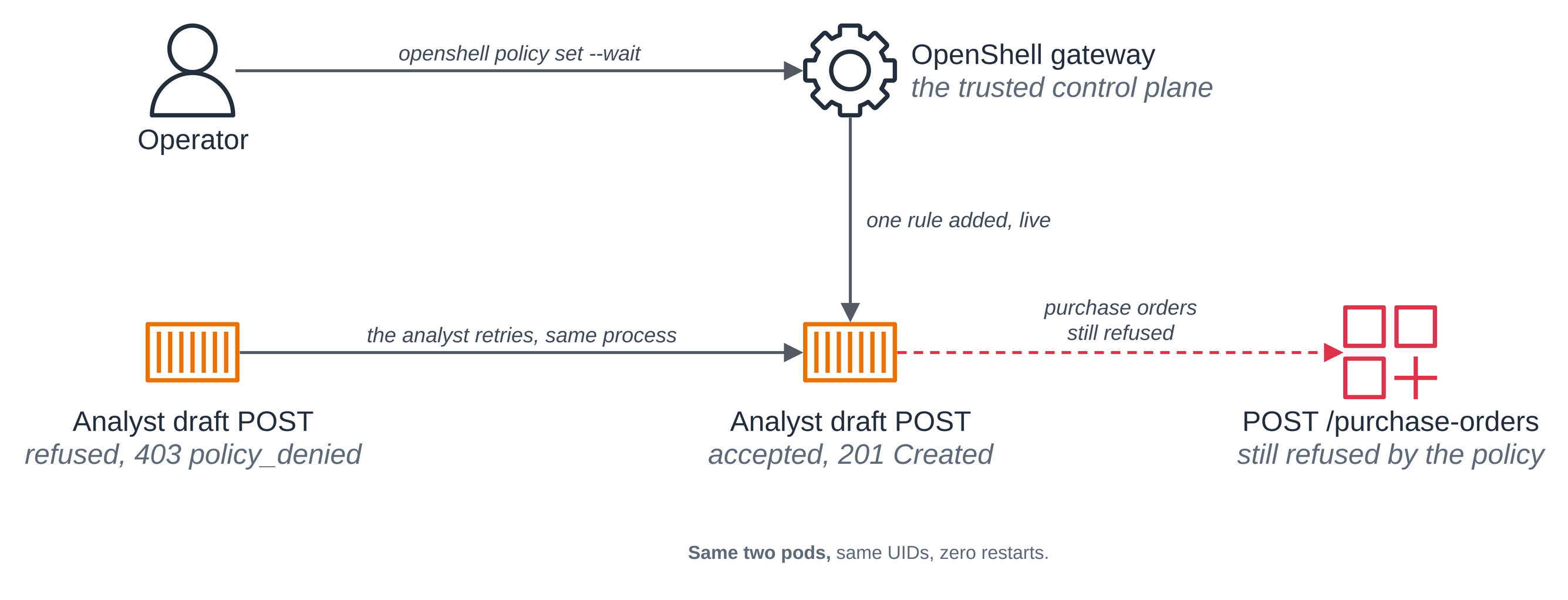
The operator applies the complete policy through the gateway, which is the trusted control
plane for the change. openshell policy set --wait returns once the running sandbox has
loaded the new revision; run.sh does this itself and records the result:
  before the update: {"workload": {"uid": "20ec35e9-bdd8-4585-9e27-f3489a61f986", "restarts": {"agent": 0}}, "supervisor": {"uid": "baea1180-59a4-4917-abf2-44f92a74a261", "restarts": {"supervisor": 0}}}
PASS before the update, the analyst's own draft submission is refused by rule
  applied the one-rule policy update to the running sandbox
PASS after the update, the identical draft submission is accepted with 201
PASS after the update, the purchase order is still refused: the update added one rule and nothing else
PASS both pods are the same objects they were before the update, by uid
PASS no container in either pod has restarted ({"workload": {"uid": "20ec35e9-bdd8-4585-9e27-f3489a61f986", "restarts": {"agent": 0}}, "supervisor": {"uid": "baea1180-59a4-4917-abf2-44f92a74a261", "restarts": {"supervisor": 0}}})
These are the lines run.sh printed in step 3, unchanged. The record after the update is the
one inside the last line.
Both pods are the same objects, by uid, and no container restarted. The restart counts are read from the pods rather than asserted. The purchase order is still refused, because the update added one rule and nothing else. Only the network rules can change this way: OpenShell's filesystem, Landlock and process settings are fixed for the life of a sandbox, and a change to those is rejected rather than applied, which is why this page shows a network rule and not a new readable path.
The servers' own logs close the loop. The two allowed request ids arrive exactly once each and authenticated, and none of this run's seven refused ids reaches the supplier API or the bridge at all:
PASS the allowed request 286b39b900024323a25e1f067b11a385-allowed arrived upstream exactly once, authenticated
PASS the allowed request 286b39b900024323a25e1f067b11a385-draft arrived upstream exactly once, authenticated
PASS none of this run's 7 refused requests reached the supplier API or the bridge (none)
An empty log cannot satisfy both halves of that, which is why the run checks the logs are non-empty before it checks what is absent from them.
Step 12: Show that the workload pod ran in a sandbox. The analyst's own account of the machine it is on, read from inside the guest, then the same readings from an ordinary pod pinned to the same node.
kubectl exec default--analyst-286b39b900 -c agent -n $NAMESPACE -- sh -c 'uname -rv; cut -d" " -f1 /proc/uptime; ls /sys/block | tr "\n" " "; echo; cat /sys/class/dmi/id/product_name'
kubectl get pod default--analyst-286b39b900 -n $NAMESPACE --no-headers | awk '{print "pod age: "$5}'
6.18.54 #1 SMP PREEMPT_DYNAMIC Thu Oct 22 17:38:11 UTC 2026
198.14
dm-0 vda vdb vdc vdd vde
c8a.enclave

pod age: 3m50s
Now an ordinary pod on the same node. Pinning the node is the point: a reading from a pod on another instance would compare nothing.
NODE=$(kubectl get pod default--analyst-286b39b900 -n $NAMESPACE -o jsonpath='{.spec.nodeName}')
sed -e "s|<NAMESPACE>|$NAMESPACE|g" -e "s|<MANAGED_BY>|subagent-security-openshell|g" -e "s|<NODE_NAME>|$NODE|g" \
  deploy/ordinary-pod.yaml | kubectl apply -f -
kubectl wait --for=condition=Ready pod/ordinary-comparison -n $NAMESPACE --timeout=2m
kubectl exec ordinary-comparison -n $NAMESPACE -- sh -c 'uname -rv; cut -d" " -f1 /proc/uptime; ls /sys/block | tr "\n" " "; echo; cat /sys/class/dmi/id/product_name'
6.18.56 #2 SMP PREEMPT_DYNAMIC Fri Oct 30 22:32:37 UTC 2026
223.77
dm-0 loop0 loop1 loop2 loop3 loop4 loop5 loop6 loop7 nvme0n1 nvme1n1 nvme2n1 zram0
c8a.large
Four readings differ, and each says something:
| Reading | Sandboxed workload pod | Ordinary pod on the same node |
|---|---|---|
uname -rv |
6.18.54 #1, built Oct 22 17:38 |
6.18.56 #2, built Oct 30 22:32 |
/proc/uptime |
198.14, against a pod age of 3m50s |
223.77, the node's |
/sys/block |
vda vdb vdc vdd vde, virtio |
nvme0n1 nvme1n1 nvme2n1, the instance's own |
product_name |
c8a.enclave |
c8a.large |
The workload pod runs its own kernel, a different version and build from the node's. Its
uptime is its own boot too. In this run the node itself came up after the pod was created:
the ordinary pod reads the node's 223.77 seconds, less than the workload pod's age of 3m50s.
The guest reports 198.14 seconds, less than both, because the sandbox booted after the node
did. It sees virtio disks where the ordinary pod sees the instance's nvme devices, and it
names the enclave rather than the instance type.
Compare uname -rv and not only uname -r: the build number and date identify the guest's
own kernel whichever version each side runs. The runtime class on the pod
shows what was asked for, not what ran, so it supports the claim without proving it; these
readings inside the guest are what prove it.
Everything in steps 6 to 11 happened inside that boundary, and the supervisor that holds the key did not.
Remove the comparison pod when you are done with it, by its exact name:
kubectl delete pod ordinary-comparison -n $NAMESPACE
Good to know
- The gateway's access control here is its client certificate, and nothing more.
deploy/gateway-values.yamlsetsallowUnauthenticatedUsers: true, OpenShell's local development user mode, so the gateway does not authorize individual users: transport mTLS and access to the client TLS Secret are the whole of it, and anyone who can read that Secret can administer this gateway. That is here because the blueprint's subject is the policy around one analyst. A real deployment uses the upstream OIDC or trusted-access-proxy configuration.run.shkeeps the client certificate under the repository's gitignoredtmp/, andclean.shremoves it even when something else was left behind. - The analyst image is x86_64, so the template pins the architecture. The sandbox template
carries
{"kubernetes":{"pod":{"node_selector":{"kubernetes.io/arch":"amd64"}}}}, which needsallowDriverConfig: trueon the gateway. OpenShell's resource admission stays on, so a template still cannot attach a RuntimeClass, volume or claim an operator has not approved. - The workload pod sets a memory request, and it has to. The sandbox VM is sized from
resources.requests, and a pod with no requests gets a small default of about 130 MiB. The analyst is a Python process, so the template asks for 1 CPU and 1Gi. A sandbox that runs out of memory is killed with no log output, which is not an obvious symptom. - One detail of OpenShell's pod needs adjusting inside a sandbox guest, and
deploy/nitro-adapter.yamlis the whole of the adjustment: one persistent volume cannot be mounted at two paths, so the seeding step gets anemptyDirand the workspace is mounted once. A consequence worth knowing is that files an image keeps under/sandboxare not copied into the workspace. The adapter puts no shell in front of the runtime and changes nothing about its arguments, user, capabilities, seccomp profile or policy. Step 8 confirms the outcome of those settings from the running process (the analyst's UID and GID,NoNewPrivs, effective capabilities, and the refused transition to root); it does not read the runtime's command line or seccomp profile directly. Its comments also record a third adjustment that was tried and removed, because the API server cannot marshal a typedresourcesblock into a JSON patch. - The
openshell.ai/sandbox-attachablelabel on the RuntimeClass is shared. Every OpenShell gateway on a cluster reads the same label, sosetup.shadds it only when it is absent andclean.shnever removes it, printing the command instead. On the run above it was already there. - This blueprint creates up to five cluster-scoped objects, which is unusual for a blueprint
here and worth knowing before you run it on a cluster you share. When no default
StorageClass fits, its own StorageClass,
subagent-security-openshell-gp3, which is not a default class. TheMutatingAdmissionPolicyand its binding, both named for this blueprint. The policy's match conditions confine it to this blueprint's namespace, and its namespace selector to namespaces labelled with this blueprint's managed-by label. The label is reusable: a namespace deleted and recreated under the same name with the label restored still matches, so the check establishes "currently this blueprint's namespace", not "the namespace this setup created". AClusterRoleandClusterRoleBindingthe chart creates so the gateway can read RuntimeClass metadata and review sandbox tokens.clean.shremoves all of them: the StorageClass and the admission objects by exact name after checking their label, the StorageClass only once no claim on the cluster names it, and the chart's two by the Helm annotations that name this release and namespace. - The model bridge is application code, not an OpenShell feature. OpenShell's own managed
inference route was removed upstream in 0.1.0, and the supported way for a confined workload
to reach a model now is to attach a provider and call the model host's native API with the
placeholder credential.
src/bridge.pyis a small OpenAI-shaped endpoint over Bedrock Converse that serves one configured model and refuses any other. It is not a general proxy. - The blueprint's
tmp/directory holds this run's key material. The supplier key, both blueprint certificate authorities and the gateway client certificate are written under the repository's gitignoredtmp/, never into this folder. The certificates are valid for 30 days; after that, runclean.shandsetup.shagain. - What this blueprint does not show. Confidential mode, attestation of an OpenShell policy,
and keeping workspace files confidential from the parent instance: an isolated-mode
workspace is not confidential from the parent. The
binariesrule is configured and the run does not exercise it with a second executable, so the page does not claim that half was tested. There is no external OCSF collector, and no suspend and resume of the workspace.
Clean up
Set the variables again if you are in a new shell, then remove the comparison pod from step 12 if it is still there, by its exact name:
export NAMESPACE=subagent-security-openshell
kubectl delete pod ordinary-comparison -n $NAMESPACE --ignore-not-found
clean.sh removes everything else. By default it takes the cluster objects; with
--delete-aws it also removes the bucket, the IAM role and the two image repositories, which
is what finishes the job:
./scripts/clean.sh --delete-aws
==> 1/11 the run record, the context and the account
  context:   sandbox-demo
  namespace: subagent-security-openshell
  region:    us-east-1
  account:   <ACCOUNT_ID>

==> 2/11 whose namespace subagent-security-openshell is
  namespace subagent-security-openshell carries app.kubernetes.io/managed-by=subagent-security-openshell.

==> 3/11 the sandboxes, the OpenShell gateway and the namespace
  deleted the Sandbox default--analyst-286b39b900.
  uninstalled the Helm release openshell-analyst.
  deleted namespace subagent-security-openshell and everything in it.

==> 4/11 the volumes and the sample's own StorageClass
  no PersistentVolume is left for a claim in subagent-security-openshell, so their EBS volumes are deleted.
  deleted storageclass/subagent-security-openshell-gp3, which carried this sample's managed-by label.

==> 5/11 the admission adapter
  deleted the mutatingadmissionpolicybinding openshell-analyst-nitro-adapter.
  deleted the mutatingadmissionpolicy openshell-analyst-nitro-adapter.

==> 6/11 the ClusterRole and ClusterRoleBinding the chart created
  no clusterrolebinding is annotated for the release openshell-analyst in subagent-security-openshell.
  no clusterrole is annotated for the release openshell-analyst in subagent-security-openshell.

==> 7/11 the EKS Pod Identity association
  deleted the association a-9oeruxjph9qae1jjr.

==> 8-10/11 the IAM role, the bucket and the images
  deleted the IAM role subagent-analyst-subagent-security-openshell-bridge.
  deleted the bucket subagent-analyst-subagent-security-openshell-<ACCOUNT_ID>, with this sample's reports in it.
  deleted the ECR repository pod-isolation/subagent-analyst-subagent-security-openshell.
  deleted the ECR repository pod-isolation/subagent-analyst-subagent-security-openshell-supplier-api.

==> 11/11 the local CLI configuration and state
  removed this sample's CLI configuration and state directories.
  kept tmp/subagent-security-openshell/runs, which holds each run's checks, calls and output.

==> what stays, and how to undo it
  Two things this sample needs are shared with anything else on this cluster, so this
  script never removes them. Remove either one only if you know nothing else uses it.

  1. The openshell.ai/sandbox-attachable=true label on the isolated-sandbox RuntimeClass.
     Every OpenShell gateway on this cluster reads the same label, and without it none of
     them may attach that RuntimeClass to a sandbox. Removing it would break another
     gateway's sandboxes, not just this sample's.
     It was already on the RuntimeClass before this run, so it is not this sample's to
     remove.

  2. The agent-sandbox controller, which OpenShell's Kubernetes driver creates Sandbox
     objects for. setup.sh reused the install already on this cluster and changed nothing
     about it. If nothing else uses it:
       kubectl --context sandbox-demo delete -f https://github.com/kubernetes-sigs/agent-sandbox/releases/download/v1.0.10/sandbox-with-extensions.yaml

  The isolated-sandbox RuntimeClass itself and the cluster are not this sample's either. The
  Getting started > Hello sandbox sample's clean up covers removing the cluster.

  Local files left under tmp/subagent-security-openshell: the run record, the downloaded OpenShell CLI and chart,
  the supplier key and the sample certificate authorities this run generated, and the run
  evidence. Nothing there is published; the repository ignores tmp/.

Clean up complete.
This machine's directory prefix is cut from the paths.
A lookup that fails means "could not determine", which is a failure and never "already gone". Anything the script could not delete or confirm is named at the end and makes it exit non-zero.
The blueprint's own StorageClass goes last of the cluster objects that hold storage. The
script first waits for the volumes of the namespace's claims to be deleted, which is what
deletes their EBS volumes, and then deletes the class only when it carries the blueprint's
label and no claim anywhere on the cluster still names it: a second copy of this blueprint
under another NAMESPACE uses the same class. When setup used a default class or one you
named, there is no class to remove.
The cluster-scoped ClusterRole and ClusterRoleBinding are normally already gone by the
time the script checks for them, because helm uninstall takes them; it checks anyway, since
a failed uninstall would leave them and the next install of the same release name would adopt
them.
What stays, and why. Two things this blueprint needs are shared with anything else on the
cluster, so clean.sh never removes them and prints the command for each:
- The
openshell.ai/sandbox-attachable=truelabel on theisolated-sandboxRuntimeClass. Every OpenShell gateway on the cluster reads it, so removing it would break another gateway's sandboxes. The script says whether this run was the one that added it, and prints the command below when it was. On the run above the label was already there, so it is not this blueprint's to remove. If you added it and no other OpenShell gateway needs it:
kubectl label runtimeclass isolated-sandbox openshell.ai/sandbox-attachable-
- The agent-sandbox controller, which
setup.shreused and changed nothing about. If nothing else on the cluster uses it:
kubectl delete -f https://github.com/kubernetes-sigs/agent-sandbox/releases/download/v1.0.10/sandbox-with-extensions.yaml
The isolated-sandbox RuntimeClass itself and the cluster are not this blueprint's either. The
hello sandbox clean up covers
removing the cluster.