Warm pool autoscaling with KEDA
Before you start, review the prerequisites and shared setup
on the home page, and run the hello sandbox
blueprint first so you have a cluster with the runtime classes. This blueprint builds on
warm pool, whose SandboxTemplate,
SandboxWarmPool and SandboxClaim it uses and whose agent-sandbox install (step 1) it
needs. The commands below use files from this repository, so clone it if you have not
already, and run them from this blueprint's folder:
git clone https://github.com/aws-samples/sample-eks-nitro-sandbox.git
cd sample-eks-nitro-sandbox/examples/agent-sandbox/warm-pool-autoscaling-keda
It also needs KEDA on the cluster, which Step 1 installs, and helm
on your machine to install it (3.x; the run below used the KEDA chart's own
helm install). Beyond the cluster there is no cost: the blueprint holds one warm pod at rest
and at most three under load, and there is no model or API call anywhere in it. These pods
set no CPU or memory requests, so each guest gets a small default size.
The warm pool blueprint keeps a fixed number of sandboxes booted. Fixed is the wrong shape for
demand that comes in bursts: too small and a burst pays the cold start it was meant to
avoid, too large and you hold pre-booted pods that nobody is asking for. This blueprint makes
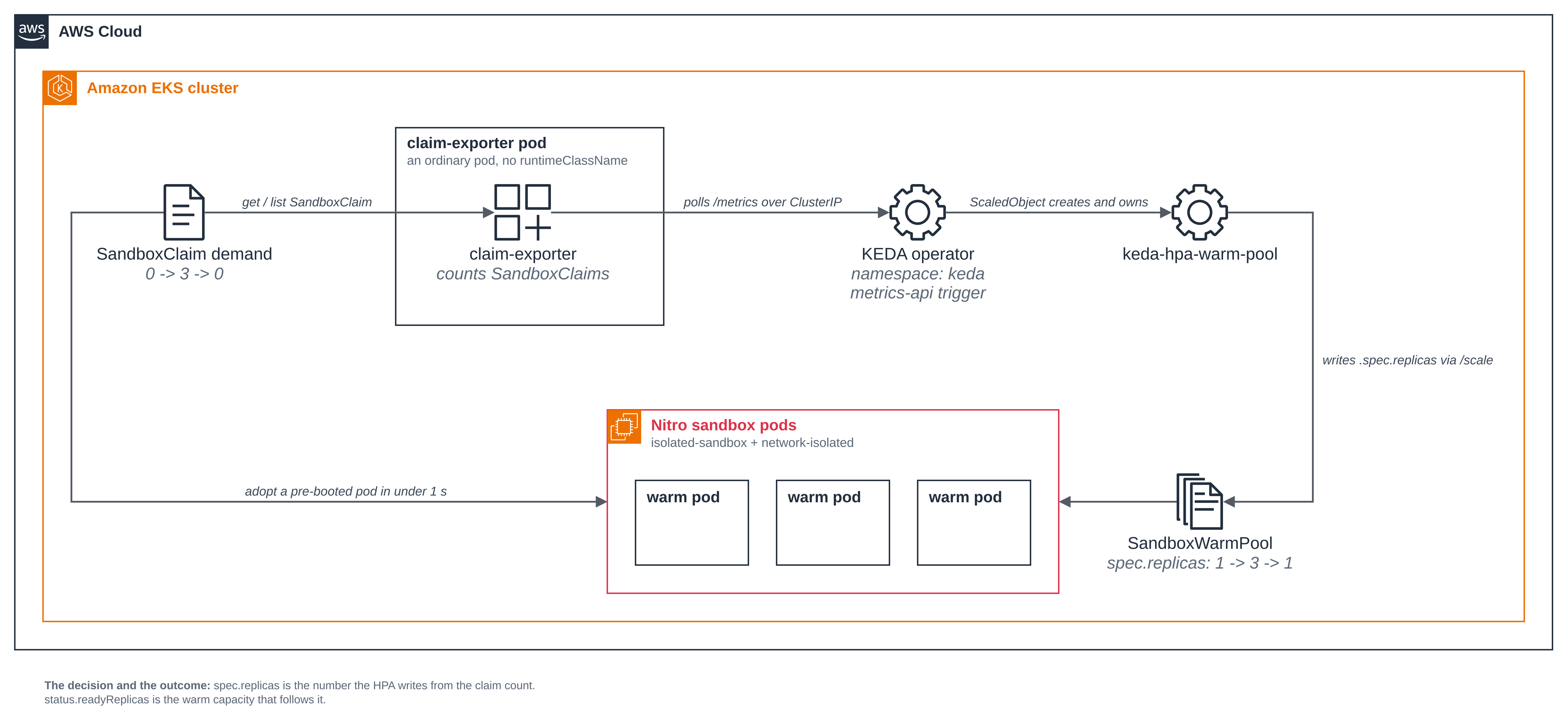
the number follow the demand. A small in-cluster exporter counts SandboxClaim objects, a
KEDA ScaledObject reads that count over HTTP, and the Horizontal Pod Autoscaler KEDA
creates writes the pool's spec.replicas.
- The pool follows demand both ways. Claim demand goes from 0 to 3 and back to 0, and
spec.replicasgoes1 -> 3 -> 1with it. Both directions matter: the scale-up is what keeps the sub-second claim path available under load, and the scale-down is the whole cost argument. - What moves is the decision, not the outcome. The page reads
spec.replicas, the number the HPA writes, separately fromstatus.readyReplicas, the capacity that happens to be ready. Only the first can tell autoscaling apart from a pool that had spare pods or one refilling itself after a claim. - The exporter stays an ordinary pod. It is first-party code the cluster operator
deployed, so it needs no sandbox, and keeping it out of one means it takes no sandbox
capacity from the pool it measures. Its Role lets it
getandlistSandboxClaimobjects in its own namespace and nothing else, and it is reached only over a ClusterIP Service. - The warm pods have no network. They boot with
sandbox.amazonaws.com/network-isolated: "true", so there is no egress to restrict and the blueprint ships no network policy.kubectl execstill works, which is how the page reads the claimed pod.
Figure 1: Warm pool autoscaling with KEDA. Claim demand reaches KEDA through the exporter's ClusterIP Service, and the Horizontal Pod Autoscaler KEDA creates writes the pool's spec.replicas, so warm capacity follows demand up and back down.
Versions
| Component | Pin |
|---|---|
| agent-sandbox controller (kubernetes-sigs/agent-sandbox) | v1.0.10, as in Warm pool |
| KEDA (kedacore/keda) | 2.21.0 |
| KEDA Helm chart (kedacore/charts) | 2.21.0 |
The chart version and the KEDA version are numbered separately, so they do not have to
match. For this release they do: installing chart 2.21.0 in Step 1 gave the operator image
ghcr.io/kedacore/keda:2.21.0, which the output there shows. Check the pairing with
helm search repo kedacore/keda --versions, which lists each chart version against its app
version, when you move the pin.
Nothing else is pinned beyond the images in the manifests
(public.ecr.aws/docker/library/busybox:1.36 for the warm pods and
public.ecr.aws/docker/library/python:3.12-slim for the exporter).
Files
| File | What it is |
|---|---|
deploy/warm-pool.yaml |
The blueprint's own SandboxTemplate and SandboxWarmPool. The pool's spec.replicas is a floor that setup applies once; from then on KEDA owns it. |
src/exporter.py |
The claim-demand exporter: counts this namespace's SandboxClaim objects and serves the count at /metrics. |
deploy/exporter.yaml |
The exporter's ServiceAccount, Role, RoleBinding, Deployment and ClusterIP Service. |
deploy/scaledobject.yaml |
The KEDA ScaledObject: scaleTargetRef the pool, a metrics-api trigger on the exporter, and the bounds. |
scripts/setup.sh |
Check the shared installs, create the namespace, and apply the pool, the exporter and the ScaledObject. |
scripts/demand.sh |
Drive demand 0 -> 3 -> 0 and read the pool's decision at each stage. |
scripts/control-no-autoscaler.sh |
The control: the same demand with the ScaledObject removed. |
scripts/cleanup.sh |
Delete everything the blueprint created, and leave KEDA alone. |
scripts/common.sh |
The names, the pinned context, the readings and the guards the scripts share. |
.env.example |
The local values the blueprint needs, with no secrets. |
The scripts read .env (copy it from .env.example). NAMESPACE defaults to
warm-pool-autoscaling-keda and reaches every object they apply, including the exporter
URL in the ScaledObject. Set KUBE_CONTEXT to the context of the cluster you ran Getting
started on, so a run never depends on the machine's current context. Set KEDA_NAMESPACE
if KEDA lives somewhere other than keda on your cluster.
Step 1: Install KEDA, once per cluster. KEDA is a shared install, like the agent-sandbox controller: it adds its own CRDs and controllers in its own namespace and changes nothing about workloads already on the cluster. Install it yourself at a pinned version, because another workload may come to depend on the version that is there:
helm repo add kedacore https://kedacore.github.io/charts
helm repo update kedacore
helm install keda kedacore/keda --namespace keda --create-namespace \
  --version 2.21.0 --wait
NAME: keda
LAST DEPLOYED: Sat Oct 24 20:20:16 2026
NAMESPACE: keda
STATUS: deployed
REVISION: 1
DESCRIPTION: Install complete
This block and the next one are from a separate run, on this cluster at the point where KEDA was not yet installed. The walkthrough further down this page reuses the install that is there rather than making one, so it cannot produce an install transcript of its own.
Abridged: the chart also prints a banner and a list of kubectl commands. Check the three
Deployments are up, and which version you got:
kubectl -n keda get deploy
kubectl -n keda get deploy keda-operator \
  -o jsonpath='keda-operator image: {.spec.template.spec.containers[0].image}{"\n"}'
NAME                              READY   UP-TO-DATE   AVAILABLE   AGE
keda-admission-webhooks           1/1     1            1           33s
keda-operator                     1/1     1            1           33s
keda-operator-metrics-apiserver   1/1     1            1           33s

keda-operator image: ghcr.io/kedacore/keda:2.21.0
If KEDA is already on your cluster, leave it exactly as it is: do not helm upgrade it, and
do not change its values or its namespace for this blueprint. setup.sh only reads it. When it
is absent, setup creates nothing and stops with the command above:
context: sandbox-demo (pinned)   namespace: warm-pool-autoscaling-keda
error: KEDA is not installed on this cluster (no scaledobjects.keda.sh CRD). This sample needs it, and it is a shared install, so install it yourself at the pinned version rather than having this script do it:
  helm repo add kedacore https://kedacore.github.io/charts
  helm repo update kedacore
  helm install keda kedacore/keda --namespace keda --create-namespace \
    --version 2.21.0 --wait
That block is from a separate run as well, taken before KEDA was installed: the check needs KEDA to be absent, and the walkthrough run cannot arrange that without removing a shared install, which a blueprint here never does. Every other output block on this page comes from one fresh run of the blueprint.
The context: line here and in the blocks below shows sandbox-demo, the shared default
cluster name from the home page. The separate run that produced the block above used a
different context name, changed here to the default; the walkthrough run below used a
context named sandbox-demo, so its blocks are unchanged.
Step 2: The pool, and why its spec.replicas is not a setting.
deploy/warm-pool.yaml is the blueprint's own SandboxTemplate and
SandboxWarmPool. The template is the warm pool blueprint's, with one difference: these pods
set no CPU or memory requests, because this blueprint is about how many warm pods the pool
holds rather than how big each one is. Here is the part that matters:
apiVersion: extensions.agents.x-k8s.io/v1beta1
kind: SandboxTemplate
metadata:
  name: warm-pool-agent
spec:
  podTemplate:
    metadata:
      annotations:
        sandbox.amazonaws.com/network-isolated: "true"   # no network besides loopback
        karpenter.sh/do-not-disrupt: "true"              # keep the node under an idle warm pod
    spec:
      runtimeClassName: isolated-sandbox
      containers:
        - name: agent
          image: public.ecr.aws/docker/library/busybox:1.36
          imagePullPolicy: IfNotPresent
          command: ["sleep", "infinity"]
---
apiVersion: extensions.agents.x-k8s.io/v1beta1
kind: SandboxWarmPool
metadata:
  name: warm-pool
spec:
  replicas: 1                       # a floor, applied once; KEDA owns it from here on
  sandboxTemplateRef:
    name: warm-pool-agent
replicas: 1 is applied once and then handed over. Read it as the floor the pool starts at,
not as the size of the pool at run time: from the moment the ScaledObject exists, the HPA
writes that field.
That works because the SandboxWarmPool CRD defines a /scale subresource, which is the
same thing that lets an HPA scale a Deployment. On the agent-sandbox v1.0.10 CRD its
specReplicasPath is .spec.replicas, its statusReplicasPath is .status.replicas and
its labelSelectorPath is .status.selector. Those three path names come from the CRD;
what the subresource itself answers is the document below. demand.sh reads it in stage 1/5
so you can see the field the HPA writes, and prints it indented under a heading; this is the
same document from the same run, with that indentation removed:
kubectl get --raw \
  /apis/extensions.agents.x-k8s.io/v1beta1/namespaces/warm-pool-autoscaling-keda/sandboxwarmpools/warm-pool/scale
{"kind":"Scale","apiVersion":"autoscaling/v1","metadata":{"name":"warm-pool","namespace":"warm-pool-autoscaling-keda","uid":"b2f5e632-01dd-4f09-b0db-1f8801ff4be7","resourceVersion":"6594484","creationTimestamp":"2026-11-08T01:42:44Z"},"spec":{"replicas":1},"status":{"replicas":1,"selector":"agents.x-k8s.io/warm-pool-sandbox=61035b05"}}
The pods pin their node with karpenter.sh/do-not-disrupt: "true". A warm pod sits Ready
and idle by design, and nothing would reschedule it if voluntary disruption removed the node
under it; the pool would boot a replacement, but the warm count would dip for reasons that
have nothing to do with KEDA. The pods go away on scale-down, so this does not hold a node
open after the pool shrinks.
Step 3: The demand signal. KEDA's
metrics-api scaler scales on a value it
fetches from an HTTP endpoint. KEDA ships no scaler that counts an arbitrary custom
resource, so the blueprint adds the smallest thing that turns "how many SandboxClaim objects
are there" into such a value. src/exporter.py lists the claims in its
own namespace that carry the blueprint's label and serves the count as JSON:
CLAIMS_URL = (
    "https://%s:%s/apis/extensions.agents.x-k8s.io/v1beta1"
    "/namespaces/%s/sandboxclaims?labelSelector=%s"
    % (API_HOST, API_PORT, NAMESPACE, urllib.parse.quote(SELECTOR))
)
That one list call is the only request the exporter makes to the cluster. On an API error it
serves the last count the API actually answered with rather than 0, so a transient blip
cannot look like demand falling away and make KEDA shrink the pool for no reason. That last
count starts at 0, so it protects a running exporter and not a restarting one: an exporter
whose pod restarts while the API is unreachable has no last good count and serves 0 until
its first successful read. minReplicaCount is the floor that case falls to.
What it can reach is the whole of its Role, which is namespaced:
apiVersion: rbac.authorization.k8s.io/v1
kind: Role
metadata:
  name: claim-exporter
rules:
  - apiGroups: ["extensions.agents.x-k8s.io"]
    resources: ["sandboxclaims"]
    verbs: ["get", "list"]
One rule, one resource, two read verbs, and that Role is everything the blueprint grants the
exporter. No watch, no create, no patch, no delete, and no ClusterRole: a Role
cannot grant anything outside the namespace it is created in, so the exporter cannot read
another namespace's claims even by accident. Ask the API server rather than taking the
manifest's word for it:
kubectl auth can-i --list \
  --as=system:serviceaccount:warm-pool-autoscaling-keda:claim-exporter \
  -n warm-pool-autoscaling-keda
The only line in the answer that this blueprint put there is
sandboxclaims.extensions.agents.x-k8s.io [get list]. The rest of the list is what every
authenticated subject on a Kubernetes cluster has, such as API discovery and self-subject
access reviews, which no manifest here grants.
--list only ever enumerates what is allowed, so it cannot show you a refusal: a permission
the ServiceAccount does not have is simply an absent row. To see a refusal, ask about one
verb at a time, which answers yes or no:
SA=system:serviceaccount:warm-pool-autoscaling-keda:claim-exporter
kubectl auth can-i list sandboxclaims --as=$SA -n warm-pool-autoscaling-keda   # yes
kubectl auth can-i delete sandboxclaims --as=$SA -n warm-pool-autoscaling-keda # no
kubectl auth can-i list sandboxclaims --as=$SA --all-namespaces                # no
kubectl auth can-i list secrets --as=$SA -n warm-pool-autoscaling-keda         # no
The pull request records that run in full: get and list on sandboxclaims in its own
namespace are the only two that answer yes.
The exporter runs as an ordinary pod, with no runtimeClassName, as a non-root user with a
read-only root file system and no capabilities.
Its ServiceAccount token is not mounted automatically. The Deployment sets
automountServiceAccountToken: false and mounts the token itself, at the path the exporter
reads, through a projected volume with expirationSeconds: 3600. On the run below that gave
the exporter a token valid for one hour, where a pod with the automatic mount and the same
ServiceAccount, on the same cluster, was given one valid for 24 hours. The kubelet replaces
the file before it expires, and the exporter reads it again on every request, so the shorter
lifetime needs nothing from the code. Its liveness probe only checks that the server accepts
connections on port 8080. It does not call /metrics, because /metrics calls the API, and
an API outage would otherwise restart the pod and lose the last good count it serves through
that outage.
Who can reach it is a ClusterIP Service on port 8080, so it is reachable from inside the
cluster and from nowhere else. The blueprint creates no Ingress, LoadBalancer or NodePort. The
response is a count of the blueprint's own claims and carries no credential and no claim
contents, so the endpoint is unauthenticated, like any other in-cluster /metrics
endpoint. On a cluster where you have turned network policy enforcement on, you can narrow
it further with an ingress policy that admits only KEDA's namespace; this blueprint does not,
because enforcement is a cluster-wide setting and turning it on is the reader's decision,
not a blueprint's.
Step 4: The ScaledObject. deploy/scaledobject.yaml points
KEDA at the pool and at the exporter. scaleTargetRef names the SandboxWarmPool itself,
not a Deployment, which KEDA supports for
any resource with a /scale subresource:
apiVersion: keda.sh/v1alpha1
kind: ScaledObject
metadata:
  name: warm-pool
spec:
  scaleTargetRef:
    apiVersion: extensions.agents.x-k8s.io/v1beta1
    kind: SandboxWarmPool
    name: warm-pool
  minReplicaCount: 1
  maxReplicaCount: 3
  advanced:
    horizontalPodAutoscalerConfig:
      behavior:
        scaleUp:
          stabilizationWindowSeconds: 0
        scaleDown:
          stabilizationWindowSeconds: 0
          policies:
            - type: Pods
              value: 3
              periodSeconds: 15
  triggers:
    - type: metrics-api
      metricType: Value
      metadata:
        url: "http://claim-exporter.warm-pool-autoscaling-keda.svc.cluster.local:8080/metrics"
        valueLocation: "active_claims"
        targetValue: "1"
| Field | What it does |
|---|---|
scaleTargetRef |
The SandboxWarmPool. KEDA creates an HPA for it and the HPA writes the pool's /scale subresource, exactly as it would for a Deployment. |
metricType: Value with targetValue: "1" |
The claim count is compared with the target directly, not divided across the pods as AverageValue would: the metric is a count for the whole pool, not a per-pod rate. What this blueprint's runs establish is the two ends — no claims hold the floor, and demand at the cap lands on the cap. They do not establish the mapping in between, and the natural guess for it, one more warm pod per claim, is probably not what the HPA does: its external-metric arithmetic scales the ratio by the number of ready replicas. deploy/scaledobject.yaml says more. Rely on the bounds, not on a per-claim rule. |
minReplicaCount: 1 |
The warm floor. At rest the pool still holds one pre-booted pod, so the first claim after a quiet spell is still adopted in under a second. |
maxReplicaCount: 3 |
The bound on warm capacity. However much demand the exporter reports, the pool never holds more than this. |
behavior.scaleDown.stabilizationWindowSeconds: 0 |
The HPA's default is 300 seconds, so with the default the pool would sit at its loaded size for five minutes after the last claim went and you could not see the scale-down at all. In production, set it to how long you are willing to pay to keep warm capacity nothing is asking for. |
behavior.scaleDown.policies |
One Pods policy for the whole range, so the pool comes back to the floor in one step. Without a policy the HPA applies its percentage-based default, which takes several periods. |
Size the bounds the way the warm pool blueprint says to size replicas: to your peak claim
rate, not your total session count. KEDA is what makes that size move with the rate you
actually see instead of being chosen once.
Step 5: Set it up. setup.sh checks the runtime class, the three agent-sandbox
extension CRDs and KEDA before it creates anything, so a missing prerequisite stops the run
with nothing left behind. It creates the namespace only when it is absent and labels it, so
the other scripts can tell the namespace is the blueprint's.
cp .env.example .env      # set KUBE_CONTEXT, and NAMESPACE if you want another name
./scripts/setup.sh
context: sandbox-demo (pinned)   namespace: warm-pool-autoscaling-keda
reusing the KEDA install in namespace keda as it is (ghcr.io/kedacore/keda:2.21.0); this sample was built against KEDA 2.21.0

== 1/5 namespace warm-pool-autoscaling-keda ==
namespace/warm-pool-autoscaling-keda created
namespace/warm-pool-autoscaling-keda labeled
created namespace warm-pool-autoscaling-keda, labelled app.kubernetes.io/managed-by=warm-pool-autoscaling-keda

== 2/5 apply the SandboxTemplate and the SandboxWarmPool ==
sandboxtemplate.extensions.agents.x-k8s.io/warm-pool-agent created
sandboxwarmpool.extensions.agents.x-k8s.io/warm-pool created

== 3/5 apply the claim-demand exporter ==
configmap/claim-exporter-src created
serviceaccount/claim-exporter created
role.rbac.authorization.k8s.io/claim-exporter created
rolebinding.rbac.authorization.k8s.io/claim-exporter created
deployment.apps/claim-exporter created
service/claim-exporter created
Waiting for deployment "claim-exporter" rollout to finish: 0 of 1 updated replicas are available...
deployment "claim-exporter" successfully rolled out
  exporter is serving: 2026-11-08T01:42:56Z active_claims=0 selector=app.kubernetes.io/part-of=warm-pool-autoscaling-keda

== 4/5 apply the ScaledObject and wait for the HPA KEDA creates ==
scaledobject.keda.sh/warm-pool created
  hpa/keda-hpa-warm-pool targets SandboxWarmPool/warm-pool

== 5/5 wait for the pool to settle warm at the floor ==
  readyReplicas=0/1
  readyReplicas=0/1
  readyReplicas=0/1
  readyReplicas=0/1
NAME        READY   DESIRED   AGE
warm-pool   1       1         51s
NAME        SCALETARGETKIND                                      SCALETARGETNAME   MIN   MAX   READY   ACTIVE   FALLBACK   PAUSED   TRIGGERS      AUTHENTICATIONS   AGE
warm-pool   extensions.agents.x-k8s.io/v1beta1.SandboxWarmPool   warm-pool         1     3     True    False    False      False    metrics-api                     37s

the pool is warm at the floor and KEDA owns its spec.replicas.
Drive demand up and back down:   ./scripts/demand.sh
Run the no-autoscaler control:   ./scripts/control-no-autoscaler.sh
Tear it down:                    ./scripts/cleanup.sh
The exporter is already serving active_claims=0, the HPA KEDA created targets
SandboxWarmPool/warm-pool, and the ScaledObject row shows the bounds, MIN 1 and
MAX 3. The pool is warm at the floor, 51 seconds after it was created. Stage 5/5 prints a
readyReplicas=0/1 line each time it polls a pool that is not warm yet, so a run that is
waiting shows what it is waiting for; this run printed four. The first sandboxed pod on a
cold cluster waits for Auto Mode to launch a sandbox-capable node, so a first run can take
minutes; on this run Auto Mode launched the node the warm pods ran on 19 seconds after the
pool was created.
Nothing in this blueprint asserts on the ScaledObject's ACTIVE column: it reports whether
KEDA's trigger currently sees demand, and with no claims yet it reads False here.
demand.sh reads the pool's own spec.replicas instead, which is the field the decision is
written to.
Step 6: Drive demand up and back down. demand.sh is the blueprint. It reads the pool at
each stage, drives demand from 0 to 3 claims and back to 0, and asserts on spec.replicas
every time.
./scripts/demand.sh
== 1/5 precondition: the HPA KEDA created targets the SandboxWarmPool ==
  HPA whose scaleTargetRef names warm-pool: keda-hpa-warm-pool
  PASS  an HPA targets sandboxwarmpool/warm-pool, so its replica count is driven rather than fixed
  scaleTargetRef.kind=SandboxWarmPool   ownerReferences[kind=ScaledObject].name=warm-pool
  PASS  the HPA's scaleTargetRef.kind is SandboxWarmPool: it scales the pool itself, not a Deployment
  PASS  the HPA is owned by scaledobject/warm-pool, so KEDA created it and KEDA owns the scaling
  ScaledObject bounds: minReplicaCount=1 maxReplicaCount=3   (load generator cap: 3 claims)

== 2/5 baseline: no demand, the pool holds the warm floor ==
  PASS  no demand claim of this sample's is left on the cluster, so stage 3/5 reads a claim this run created
  [reading] baseline   spec.replicas=1  status.readyReplicas=1  claims=0
  PASS  baseline: 0 claims and spec.replicas=1, the floor (minReplicaCount=1)

== 3/5 one claim adopts a pre-booted pod, and it is a sandbox ==
  PASS  claim demand-1 was created by this run (kubectl create, so an existing claim of that name would have failed here)
sandboxclaim.extensions.agents.x-k8s.io/demand-1 condition met
  claim demand-1 -> sandbox/warm-pool-bnsrk   launch-type=warm
  pod created   2026-11-08T01:42:44Z
  claim created 2026-11-08T01:45:23Z
  so the pod had already been booted and Ready for 159s when the claim was created
  kubectl wait for the claim to report Ready, once the claim existed: 0.967s (kubectl wait exit 0)
  (create and wait together, including both kubectl round trips: 2.527s)
  PASS  the claim adopted a pre-booted pod from the pool (sandbox label launch-type=warm), not a cold-created one
  PASS  the pod was created 159s before the claim existed, so it was adopted, not created for the claim
  PASS  the claim reported Ready 0.967s after it existed: under a second, where a cold start is about 5 to 6

== 4/5 drive demand UP to 3 claims ==
  claims now: 3
  PASS  the demand is 3 claims, so the metric KEDA reads should ask for 3 warm pods
  exporter is serving: 2026-11-08T01:46:06Z active_claims=3 selector=app.kubernetes.io/part-of=warm-pool-autoscaling-keda
  [reading] under load spec.replicas=3  status.readyReplicas=3  claims=3
  PASS  under load KEDA raised spec.replicas from 1 to 3: the scale-up decision
  PASS  spec.replicas reached maxReplicaCount=3, matching 3 claims at targetValue 1
  hpa/keda-hpa-warm-pool: keda-hpa-warm-pool   SandboxWarmPool/warm-pool   3/1   1     3     1     3m11s

== 5/5 drive demand DOWN to 0 claims ==
  exporter is serving: 2026-11-08T01:46:16Z active_claims=0 selector=app.kubernetes.io/part-of=warm-pool-autoscaling-keda
  [reading] drained    spec.replicas=1  status.readyReplicas=1  claims=0
  PASS  with the demand gone KEDA lowered spec.replicas from 3 to 1: the scale-down decision
  PASS  spec.replicas came all the way back to the floor minReplicaCount=1: no idle warm capacity held

spec.replicas: baseline=1 -> under load=3 -> drained=1
claim demand:  0 -> 3 -> 0

Now run the control, which applies the same demand with no autoscaler:
  ./scripts/control-no-autoscaler.sh

18/18 checks passed: KEDA moves the pool's spec.replicas up and back down with SandboxClaim demand
Abridged: three things from the same run are shown elsewhere rather than here, and nothing
else is left out. The opening context: line is as in Step 5; the /scale document stage
1/5 prints is in Step 2; and stage 3/5's sandbox readings and its four no-network checks are
in Step 7 and the next section.
Stage 1/5 is the first thing to read: the HPA KEDA created has
scaleTargetRef.kind: SandboxWarmPool, so it scales the pool itself rather than a
Deployment, and its ownerReferences name the ScaledObject, so KEDA created it and KEDA
owns the scaling. Then the trajectory is the result: spec.replicas went 1 -> 3 -> 1 as
the claims went 0 -> 3 -> 0, and the exporter's own log lines show the count KEDA read at
each end of it.
Why the page reads two fields and asserts on only one. On this run the under-load reading
was spec.replicas=3 and status.readyReplicas=3: the capacity had caught up with the
decision by the time the reading was taken. That agreement is not what shows KEDA made a
decision, which is exactly why the two fields are printed separately rather than one being
taken for the other.
readyReplicas cannot carry the claim on its own, for two reasons that have nothing to do
with timing. It lags, so a reading taken a few seconds earlier shows the old number and would
suggest nothing had happened. And when it does agree, it cannot say why: the pool
replenishes a pod a claim has taken, which brings readyReplicas back up to spec.replicas
without spec.replicas moving at all and needs no autoscaler. A pod pending or evicted moves
it the other way, equally without a scaling decision.
spec.replicas has neither problem. It is the field nothing but the HPA writes, it changes
at the moment the decision is made, and nothing the pool does to its own capacity touches it.
So every assertion in demand.sh is on spec.replicas, and readyReplicas is only ever
printed beside it — never asserted, and never allowed to stand in for it.
The HPA row says the same in its own terms: 3/1 is the metric against the target, three
claims against targetValue: 1, and SandboxWarmPool/warm-pool is what it is scaling.
Step 7: The claimed pod is a sandbox. The first claim adopted a pod the pool had created
159 seconds earlier, whose guest had been up for about two minutes, which is what makes it
sub-second: there was nothing to create. While
the claim still holds that pod, stage 3/5 of demand.sh reads the three signals that show
it ran in a sandbox of its own, and reads each one again from the exporter pod, which is an
ordinary pod on the same cluster. These are the commands it runs:
NS=warm-pool-autoscaling-keda     # or your NAMESPACE
POD=$(kubectl -n $NS get sandboxclaim demand-1 -o jsonpath='{.status.sandbox.name}')
kubectl -n $NS exec $POD -- uname -rv
kubectl -n $NS exec $POD -- cat /proc/uptime
kubectl -n $NS exec $POD -- ls /sys/block
kubectl -n $NS exec $POD -- cat /sys/class/dmi/id/product_name
To run them yourself you need a claim that is still held, and demand.sh deletes its claims
in stage 5/5, so create one first with kubectl -n $NS apply -f - from the claim in
scripts/common.sh, or read the block below, which is stage 3/5's own
output from the fresh run, with the exporter pod's answers under the claimed pod's:
  the claimed pod (warm-pool-bnsrk), in a sandbox:
    uname -rv                        -> 6.18.54 #1 SMP PREEMPT_DYNAMIC Thu Oct 22 17:38:11 UTC 2026
    cat /proc/uptime                 -> 126.76 123.80
    ls /sys/block                    -> dm-0 vda vdb vdc
    cat /sys/class/dmi/id/product_name -> c8a.enclave
  the exporter pod (claim-exporter-54cfbb9984-pbhqd), an ordinary pod:
    uname -rv                        -> 6.18.56 #2 SMP PREEMPT_DYNAMIC Fri Oct 30 22:32:37 UTC 2026
    cat /proc/uptime                 -> 14680.50 27278.87
    ls /sys/block                    -> dm-0 nvme0n1 nvme1n1 nvme2n1 zram0
    cat /sys/class/dmi/id/product_name -> c6a.large
The kernels differ: the guest runs 6.18.54, build #1 from 22 October, where the ordinary
pod reports its node's kernel, 6.18.56, build #2 from 30 October. An ordinary pod shares
its node's kernel; the sandboxed pod reports one of its own. On this run the exporter was on
a different node from the claimed pod, so the comparison is with an ordinary pod on the same
cluster rather than with the claimed pod's own node.
The uptime is 126 seconds, less than the 159 seconds since the pool created the pod, because
the guest boots only once the pod has a node; the ordinary pod reports its node's, about four
hours. The block devices are virtio vd* where the ordinary pod sees the instance's nvme*.
And the product name is c8a.enclave, the sandbox VM itself, where the ordinary pod reads the
EC2 instance it runs on, a c6a.large. The sandboxed pod never sees an EC2 instance type at
all: the only machine it can describe is its own guest.
No network to restrict
The warm pods boot with sandbox.amazonaws.com/network-isolated: "true", so there is no
egress to restrict and the blueprint ships no network policy. Only loopback has an address,
there is no default route, and a lookup fails. Stage 3/5 of demand.sh reads this from the
claimed pod too, and prints the command above each answer, so the block below is again its
output rather than something to run after the claims are gone:
kubectl -n $NS exec $POD -- ip -o addr show
kubectl -n $NS exec $POD -- ip route show default
kubectl -n $NS exec $POD -- ip -6 route show default
kubectl -n $NS exec $POD -- wget -T 5 -O /dev/null https://aws.amazon.com
  the claimed pod is network-isolated, so there is no network to restrict:
  PASS  kubectl exec into the claimed pod works, so the readings below are the pod's answers
  $ kubectl exec warm-pool-bnsrk -- ip -o addr show
    1: lo    inet 127.0.0.1/8 scope host lo\       valid_lft forever preferred_lft forever
    1: lo    inet6 ::1/128 scope host noprefixroute \       valid_lft forever preferred_lft forever
  PASS  the only interface with an address in the claimed pod is loopback, in either address family: there is no network interface to carry traffic
  $ kubectl exec warm-pool-bnsrk -- ip route show default         # prints nothing: no IPv4 default route
  $ kubectl exec warm-pool-bnsrk -- ip -6 route show default      # prints nothing: no IPv6 default route
  PASS  the claimed pod has no default route for IPv4 and none for IPv6, so nothing would know where to send a packet
  $ kubectl exec warm-pool-bnsrk -- wget -T 5 -O /dev/null https://aws.amazon.com
    wget: bad address 'aws.amazon.com'
    command terminated with exit code 1
  PASS  a request out of the claimed pod fails the way a pod with no network fails, rather than reaching anything
Both route commands print nothing. kubectl exec keeps working because it uses the guest's
internal control channel, not the network, which is how every reading above was taken.
Why there are four checks and not one. "The request failed" is not on its own evidence
of isolation, and the failure message is the weakest part of it: busybox prints
bad address for any lookup that does not resolve, which a pod that has a network but
cannot reach DNS would also print. So what the page asserts is the pod's network
configuration, and the request is only corroboration:
kubectl execworks. Every reading below it is taken throughexec, so a refusedexecmust not be able to read as a pod with no network.- Only loopback has an address. A pod with a network has a second interface in
ip -o addr show; every address line here is onlo. This is the check a DNS problem cannot satisfy. - There is no default route, in either family. Both
ip route show defaultandip -6 route show defaultmust come back empty, so there is nowhere for a packet to go even if something did resolve. - The request fails the way a no-network request fails. A reply of
403 Forbiddenwould mean the pod reached the internet; it is non-zero, and it fails this check.
Both address families, on purpose. ip -4 and an IPv4-only route check would say
nothing about IPv6, so a guest reachable only over v6 would satisfy them while the page
claimed it had no network at all. ip -o addr show lists every family, so loopback appears
twice, once as 127.0.0.1 and once as ::1, and the route reading asks for the v4 and the
v6 default separately.
The three ip readings come from the guest's own kernel rather than from whether a request
happened to work, which is what makes them stronger than the wget line; ip itself is the
container image's own binary, so this is the guest describing itself and not an attestation.
Each of the four checks was proved to reject as well as to accept, against the real script rather than a copy of it. The pull request lists every input, including the IPv6-only address and the IPv6-only default route, which the earlier IPv4-only version of these two checks accepted.
A pod that needs a network instead drops the annotation and ships an egress policy, as the network policy blueprint shows.
The exporter, being an ordinary pod, does have a network: it has to reach the Kubernetes API to count claims. It is reached only over a ClusterIP Service, as Step 3 says.
The control: the same demand, no autoscaler
spec.replicas moving is only evidence if something else could not have moved it.
control-no-autoscaler.sh removes the ScaledObject, confirms the HPA went with it, applies
the same three claims, and watches for at least as long as demand.sh gives the scale-up.
./scripts/control-no-autoscaler.sh
context: sandbox-demo (pinned)   namespace: warm-pool-autoscaling-keda

== 1/4 settle at the floor, then remove the ScaledObject ==
  [reading] baseline   spec.replicas=1  status.readyReplicas=1  claims=0
scaledobject.keda.sh "warm-pool" deleted from warm-pool-autoscaling-keda namespace
  HPA whose scaleTargetRef names warm-pool: <none>
  scaledobject/warm-pool: gone
  PASS  the ScaledObject and the HPA it owned are both gone: nothing is autoscaling the pool now

== 2/4 apply the same demand: 3 claims ==
  claims now: 3
  PASS  the same demand is present for the control: 3 claims, as in demand.sh
  exporter is serving: 2026-11-08T01:47:26Z active_claims=3 selector=app.kubernetes.io/part-of=warm-pool-autoscaling-keda
  PASS  the exporter served active_claims=3, so the demand signal KEDA would have read was there
  (the demand signal is there; with no ScaledObject, nothing reads it)

== 3/4 watch for the same window demand.sh gives the scale-up (300s) ==
  [reading] under load spec.replicas=1  status.readyReplicas=1  claims=3
  spec.replicas read 28 time(s) during the window, every one of them 1
  PASS  with no autoscaler, spec.replicas stayed flat at 1 under the same 3 claims

== 4/4 put the sample back: claims deleted, ScaledObject re-applied ==
  PASS  scaledobject/warm-pool is back and not terminating, so the sample is not left without its autoscaler
  waiting for KEDA to take the pool back
  HPA whose scaleTargetRef names warm-pool: keda-hpa-warm-pool
  PASS  KEDA created its HPA for warm-pool again, so the pool is back under autoscaling

control result: no ScaledObject, no movement. The up and down movement
./scripts/demand.sh asserts is therefore KEDA's, not spare capacity and not
the pool replenishing itself.

6/6 checks passed: the pool stays flat under the same demand when KEDA's ScaledObject is absent

restoring scaledobject/warm-pool
The last line is the script's exit handler, which deletes the claims and re-applies the
ScaledObject whatever happened, including on an interrupt. Step 4/4 has already done it on
this path, so the restore runs twice; only the handler announces itself, which is why the
line appears once, at the end.
Step 4/4 says "is back and not terminating" rather than "was re-applied" because it reads the object back instead of trusting the apply. An apply over an object that is still being deleted succeeds and then vanishes with it, so the apply's exit status alone would let the control report that it had restored the autoscaler while leaving the pool with none.
The two extra checks in step 2/4 matter: "nothing read the signal" means nothing unless the
signal was there. The control asserts that the same three claims exist and that the exporter
actually served active_claims=3, so the only difference between this run and the one above
is whether KEDA was reading it.
Side by side, that is the result:
spec.replicas at 0 claims |
at 3 claims | back at 0 claims | |
|---|---|---|---|
With the ScaledObject (demand.sh) |
1 | 3 | 1 |
With it removed (control-no-autoscaler.sh) |
1 | 1 | 1 |
Same pool, same template, same three claims, same exporter serving active_claims=3. The
only difference is whether KEDA was reading it. So the movement in the first row is KEDA's,
and not the pool having had spare capacity, not the pool refilling itself, and not anything
to do with the cluster adding nodes, which is a different axis and never writes
SandboxWarmPool.spec.replicas.
The control puts the ScaledObject back when it finishes, including on an interrupt, so it
cannot leave the blueprint without its autoscaler.
Good to know
- A claim's Ready condition cannot time the adoption. The
SandboxClaim's Ready condition carries thelastTransitionTimeof theSandboxit adopted, and that Sandbox became Ready when the pool booted it, which is before the claim existed. On these runs that put the condition tens of seconds earlier than the claim's owncreationTimestamp, so "Ready minus created" came out negative. Time the adoption the way Step 6 does instead: the pod'screationTimestampagainst the claim's shows the pod predates the claim, and a client-side measurement aroundkubectl waitbounds how long the claim took to report Ready. - That client-side measurement includes your round trip to the cluster. Run
demand.shfrom a machine far from the cluster's Region and the under-a-second check in stage 3/5 can fail on the network alone. On one run from a machine where a singlekubectl gettook about 1.5 seconds,kubectl waittook 1.972 seconds and that check failed; on the walkthrough above it took 0.967 seconds. Run it from close to the cluster, such as AWS CloudShell in the same Region. spec.replicasis not yours to set once KEDA owns it. Editing the pool'sspec.replicasby hand while theScaledObjectexists lasts until the HPA's next sync. ChangeminReplicaCountormaxReplicaCounton theScaledObjectinstead.- A short scale-down window is a demo setting.
stabilizationWindowSeconds: 0is there so you can watch the scale-down. In production it decides how quickly you give up warm capacity you have already paid to boot, so set it from what a re-boot costs you, not from what reads well. - The exporter is a single replica and is not on the claim path. If it stops, KEDA's trigger fails and the HPA holds the last replica count it wrote; claims keep being served from whatever the pool has. Nothing in the claim path goes through the exporter.
- A warm pod costs whatever it reserves, for as long as it is booted. These pods set no
requests, so each guest gets a small default size, but a real template sizes its pods for
the workload and a sandbox reserves its full memory request up front. A warm pool trades
idle pods for the latency win, and autoscaling trades a slower response to a burst for not
holding those pods when demand falls.
maxReplicaCountis the bound on how much of that trade you are willing to make. - Running setup again resets the pool to the floor.
setup.shre-appliesdeploy/warm-pool.yaml, which carriesreplicas: 1, over the field the HPA owns. KEDA writes it back on its next sync, about 15 seconds, so this is a brief dip rather than a change, but do not run setup in the middle of reading a trajectory. - The load this blueprint generates is capped.
MAX_CLAIMSinscripts/common.shis 3, at or belowmaxReplicaCount, so a run on a shared cluster cannot ask for more warm capacity than the pool's own bound.
Clean up
Set the variables again if you are in a new shell, then remove everything the blueprint
created. The order matters: the claims first because they hold warm pods, the ScaledObject
next so KEDA stops writing spec.replicas and removes its HPA, then the exporter, then the
pool before the template because the pool boots replacements.
cp .env.example .env    # if you have not already; set KUBE_CONTEXT and NAMESPACE
./scripts/cleanup.sh
context: sandbox-demo (pinned)   namespace: warm-pool-autoscaling-keda

== 1/6 delete the demand claims ==
  sandboxclaim/demand-1 not present
  sandboxclaim/demand-2 not present
  sandboxclaim/demand-3 not present

== 2/6 delete the ScaledObject so KEDA stops scaling and removes its HPA ==
scaledobject.keda.sh "warm-pool" deleted from warm-pool-autoscaling-keda namespace
  no HPA targets warm-pool any more

== 3/6 delete the claim-demand exporter ==
service "claim-exporter" deleted from warm-pool-autoscaling-keda namespace
deployment.apps "claim-exporter" deleted from warm-pool-autoscaling-keda namespace
configmap "claim-exporter-src" deleted from warm-pool-autoscaling-keda namespace
rolebinding.rbac.authorization.k8s.io "claim-exporter" deleted from warm-pool-autoscaling-keda namespace
role.rbac.authorization.k8s.io "claim-exporter" deleted from warm-pool-autoscaling-keda namespace
serviceaccount "claim-exporter" deleted from warm-pool-autoscaling-keda namespace

== 4/6 delete the warm pool so it stops booting replacements ==
sandboxwarmpool.extensions.agents.x-k8s.io "warm-pool" deleted from warm-pool-autoscaling-keda namespace
  waiting for the pool's sandboxes to terminate
    the pool's sandboxes are gone

== 5/6 delete the SandboxTemplate ==
sandboxtemplate.extensions.agents.x-k8s.io "warm-pool-agent" deleted from warm-pool-autoscaling-keda namespace

== 6/6 delete namespace warm-pool-autoscaling-keda ==
namespace "warm-pool-autoscaling-keda" deleted
  namespace warm-pool-autoscaling-keda deleted

KEDA in namespace keda is left installed: it is a shared install and
another workload may rely on it. The page says how to remove it, and what to check
first.

clean up complete: the claims, the ScaledObject and its HPA, the exporter, the warm pool, the template and the namespace are gone.
The claims are reported absent here because control-no-autoscaler.sh had already deleted
them when it put the blueprint back, so this run of the clean up had none to remove. The clean
up checks the namespace carries the blueprint's
label before it deletes anything inside it, deletes the claims by their exact names rather
than by a label selector, reads a failed lookup as a failure rather than as "gone", and
exits non-zero if it skipped something or could not confirm a delete, so an incomplete clean
up is never reported as done. It leaves the namespace in place when anything is
unconfirmed, rather than hiding what is left. The blueprint creates nothing outside the
cluster, so there is no AWS resource to remove.
What stays. Two shared installs, because another workload on the cluster may rely on either:
- KEDA. Remove it only if nothing else uses it. Check first, across the whole cluster, and only then uninstall:
kubectl get scaledobject,scaledjob,triggerauthentication -A
kubectl get clustertriggerauthentication
# all empty? then:
helm uninstall keda --namespace keda
kubectl delete namespace keda
Anything listed there is another workload's, so leave KEDA where it is. Helm does not
remove a chart's CRDs on uninstall, so keda.sh CRDs stay behind; remove them by hand only
when you are certain nothing on the cluster uses KEDA.
- The agent-sandbox controller, shared with the warm pool blueprint and the other
agent-sandbox blueprints. To remove it, follow the
warm pool clean up.
If this is the only blueprint you ran, follow the hello sandbox clean up to remove the namespace and the cluster.