OpenAI Managed Agents with the executor in a Nitro sandbox
Before you start, review the prerequisites and shared setup on the home page, and run the hello sandbox blueprint first so you have a cluster with the runtime classes. The commands below use files from this repository, so clone it if you have not already, and run them from this blueprint's folder:
git clone https://github.com/aws-samples/sample-eks-nitro-sandbox.git
cd sample-eks-nitro-sandbox/examples/managed-agents/openai-managed-agents
For this blueprint you also need Docker, Python 3 with
venv, and an OpenAI project with access to the
Agents API (beta) and
its self-hosted sandbox.
A session uses OpenAI API credit for model tokens; the tools run on your cluster's nodes.
The Agents API runs an
agent's loop for you: the model, the harness and the session stay on OpenAI's side. With a
self-hosted sandbox,
the other half, the agent's shell commands and file edits, runs on infrastructure you
control. OpenAI's own provider guides run the same executor,
codex exec-server,
on AWS Lambda MicroVMs and other hosts; this blueprint runs it in a Nitro sandbox on EKS. It
pairs with the Claude Managed Agents blueprint so you can
compare the two platforms side by side.
The executor runs code the model chose to run, so this blueprint gives each session its own Nitro sandbox:
- The harness runs at OpenAI; the tools run in your cluster. Sessions are created with
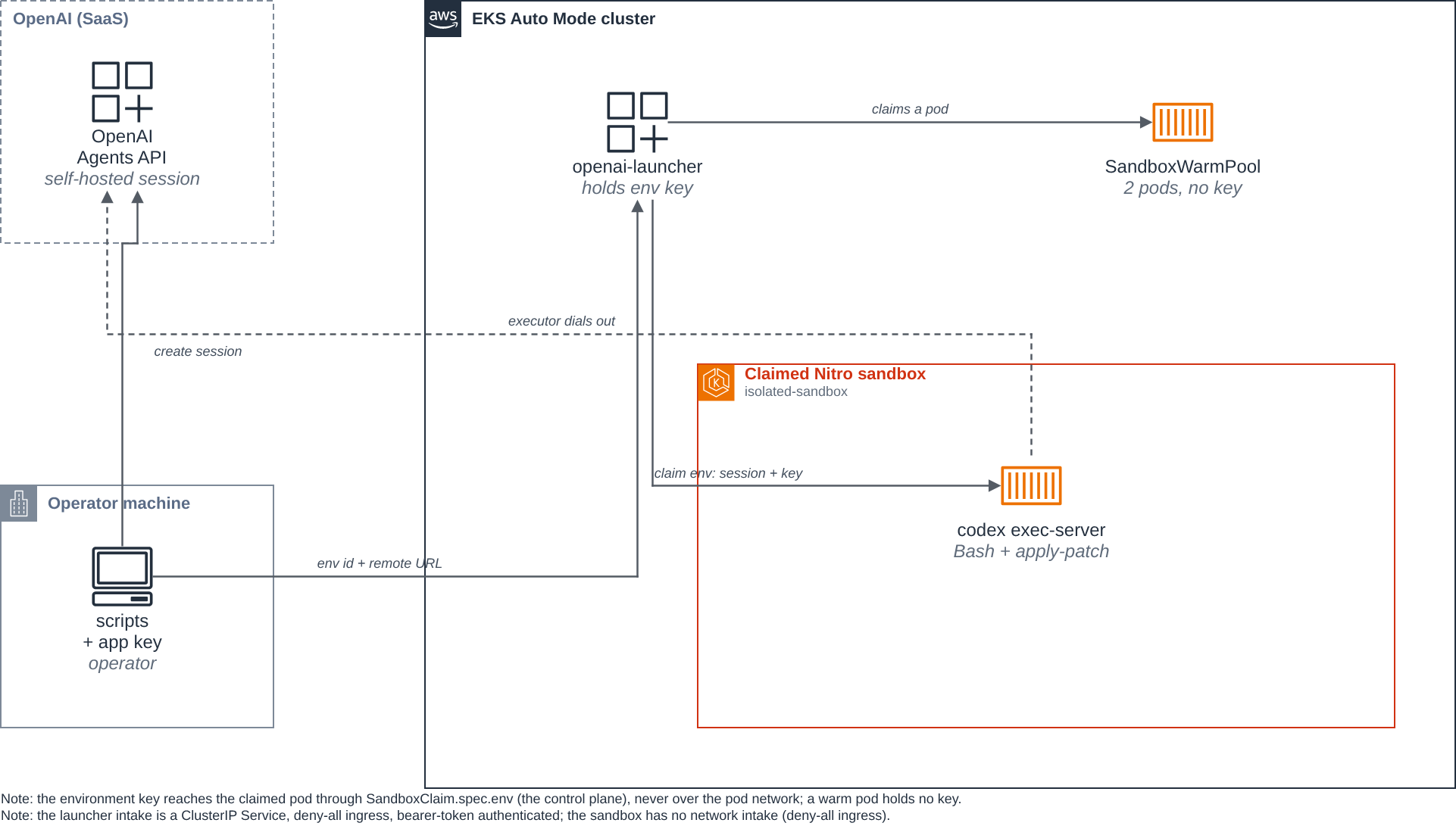
environment.type: self_hosted. The session'scodex exec-serverruns in its sandbox pod in Codex's forward mode: an executor on the pod's loopback runs the agent's built-in Bash and apply-patch tools, and a forwarder connects outbound to OpenAI and relays the session to it. - Each session gets its own pod. An ordinary launcher pod creates a
SandboxClaimon aSandboxWarmPool. The claim setsspec.env, so the controller starts a new pod for it (and labels its sandboxlaunch-type=cold) instead of handing it a warm one, and the warm pods stay unclaimed. The sandbox'sSandboxTemplatesetsruntimeClassName: isolated-sandbox, so the commands run on a kernel no other pod shares. A follow-up turn in the same session runs in the same pod and reads a file the first turn wrote. - Two keys, kept apart, and the key never crosses the pod network. The application key
creates sessions and reads them, and stays on the operator's machine. The sandbox gets only
the environment key, which
codex exec-serverreads asCODEX_API_KEY. The launcher puts the key (and the session) into theSandboxClaim's env, and the controller injects them into the pod it starts for that claim, so the key reaches the sandbox over the launcher's authenticated Kubernetes API connection, never over an in-cluster HTTP request, and never onto a warm pod. The sandbox refuses to start if it finds the application key. All of this is checked by variable name, without printing values. - The operator's intake is reachability-gated and authenticated. The launcher's intake
Service is
ClusterIP, a deny-by-default ingressApplicationNetworkPolicyadmits no in-cluster pod, and every request carries a bearer token the launcher verifies. A NetworkPolicy is reachability; the token is authentication. - The sandbox reaches only what the executor needs. An
ApplicationNetworkPolicydenies all ingress and allows egress to CoreDNS,api.openai.comandcodex-cloud-environments.chatgpt.com, the two hosts OpenAI lists. The internet, AWS APIs and other pods are refused.
Figure 1: OpenAI runs the model and session; the operator creates the session and hands the launcher its environment id and remote URL over an authenticated, port-forwarded ClusterIP Service. The launcher claims a Nitro sandbox and gives it the session and the environment key through the SandboxClaim env; the executor's forwarder dials out to OpenAI, and its egress policy allows only the two OpenAI hosts.
This folder was built against these releases:
| Component | Version |
|---|---|
OpenAI Python SDK (openai) |
3.31.0 |
Codex CLI (@openai/codex, provides codex exec-server) |
0.163.0-alpha.11 |
agent-sandbox Python client (k8s-agent-sandbox) |
1.0.10 |
| agent-sandbox controller (kubernetes-sigs/agent-sandbox) | v1.0.10 |
The Agents API is beta (client.beta.agents), so the session, event and environment calls
were checked against the pinned SDK, not only the version string. The Codex CLI is pinned to
an exact alpha build: as of 2026-10-15 the npm alpha tag is 0.163.0-alpha.11 and the
latest tag is 0.162.1, so exec-server has not reached the stable latest channel.
Re-check the channel before the next release.
The files:
| File | What it is |
|---|---|
Dockerfile, pyproject.toml |
The openai-sandbox-executor image: one image for the launcher and the sandbox, with codex exec-server installed |
src/launcher/ |
launch.py (the authenticated intake that claims a sandbox per session), serve.py (run one session's executor and its forwarder; no network intake), sandbox.py (claim a sandbox and deliver the session through the claim env), guard.py (refuse any key a role must not hold) |
deploy/sandbox-template.yaml |
The SandboxTemplate that runs the executor, and a SandboxWarmPool of two |
deploy/launcher.yaml |
The launcher Deployment and its ClusterIP Service intake |
deploy/launcher-ingress.yaml |
A deny-by-default ingress policy so no in-cluster pod may reach the launcher |
deploy/egress-policy.yaml |
The sandbox network policy: deny all ingress; DNS and the two OpenAI hosts out |
deploy/rbac.yaml |
The identities, and what the launcher may do: manage SandboxClaims and read Sandboxes |
scripts/setup_agent.py, submit.py, cleanup.py |
Run on your machine with the application key: create the agent, start a session, clean up sessions and claims |
scripts/check-egress.py |
The egress check (the two allowed hosts and two refused), piped into a sandbox from your machine |
.env.example |
The values the blueprint needs; copy it to .env, which git ignores |
How the hand-off works
The default in issue #9 is application-managed provisioning, and this blueprint uses it:
- The operator's
submit.pycreates the session withenvironment.type: self_hosted. OpenAI returns the session's environment id and its remote URL. submit.pyopens the session's event stream, then POSTs the environment id and remote URL to the launcher in the cluster, over akubectl port-forwardto a ClusterIP Service, with a bearer token the launcher checks. The blueprint creates no Ingress, LoadBalancer or NodePort.- The launcher claims a sandbox from the
SandboxWarmPoolwith aSandboxClaim, and sets the session id, environment id, remote URL and the environment key the launcher holds in that claim'sspec.env. The controller cold-starts the claim's pod with those injected. The key travels only over the launcher's authenticated Kubernetes API connection and the controller, never over the pod network. serve.pyin the claimed pod reads the session from its own environment and startscodex exec-serveras two processes, the forward mode Codex documents. Both inherit the environment key, already present asCODEX_API_KEY:
codex exec-server --listen ws://127.0.0.1:18081
codex exec-server forward --remote <remote_url> --environment-id <environment_id> \
  --connect ws://127.0.0.1:18081
The first, the executor, listens on the pod's loopback only and runs the agent's tool
calls in /workspace. The second, the forwarder, dials out, registers for the
environment, and passes the session's messages to the executor unchanged. The pod reports
Ready only once the executor is listening. If either process exits, serve.py stops the
other and exits non-zero. Why two processes: with the pinned Codex build, the single
command codex exec-server --remote <remote_url> --environment-id <environment_id>
connected in our runs but left the agent with no working tool, and logged nothing, while
forward mode ran the tools. That is what we observed, not a documented cause.
5. submit.py sends the prompt only after the open stream reports
agent.session.environment.connected, the order OpenAI's
self-hosted sandbox guide
gives, and keeps streaming the turn. If the environment does not connect within
--connect-timeout seconds (300 by default), or the stream reports
agent.session.environment.failed, submit.py exits non-zero and sends no prompt.
How the key reaches the sandbox, and why not over HTTP. OpenAI documents no credential
narrower than the environment key for a self-hosted session, so the sandbox must hold that
key to run the executor. Rather than send it to the sandbox over an in-cluster HTTP request
(which a same-namespace pod could reach, and which a label-based NetworkPolicy does not
authenticate), the launcher puts it in the SandboxClaim's env. agent-sandbox 1.0.10 writes
that into SandboxClaim.spec.env, and setting it forces a cold start from the warm-pool
template, so the controller injects the key into a pod created specifically for this session.
The key never crosses the pod network, and a warm pod never holds it. Setting
SandboxClaim.spec.env makes the controller start a new pod for the claim instead of handing
it a warm one, and label the claim's sandbox launch-type=cold; the warm pods stay unclaimed.
The new pod can land on a new node: in the run on this page, EKS Auto Mode added a node for
it, and it took 48 s from the claim to the container start, including an 11.2 s image pull.
Step 8 shows the claim's events, and step 10 the pods after both turns. This
mechanism is native to the agent-sandbox stack; the blueprint invents no transport or auth of
its own for the key.
Why this and not a poller like the Claude blueprint. The Claude blueprint polls an environment
work queue. The OpenAI self-hosted executor instead dials out to a session's remote URL, and
the session must be created before compute starts for it
(application-managed provisioning).
A key limited to api.agents.read that could find sessions awaiting an
environment_connection would allow a polling launcher, closer to the Claude blueprint. The
pinned SDK (3.31.0) exposes client.beta.agents.sessions.create, retrieve, stream and
event streaming, but no "list sessions awaiting an environment connection" call, so this
blueprint uses the issue's default, operator-driven provisioning. Webhook-managed provisioning
is out of scope: it needs a public HTTPS endpoint, and blueprints here create no Ingress,
LoadBalancer or NodePort.
Step 1: Install agent-sandbox and turn on network policy. Install the controller with its
extensions (SandboxTemplate, SandboxWarmPool, SandboxClaim). If you ran the warm pool
blueprint, this upgrades it in place:
kubectl apply -f https://github.com/kubernetes-sigs/agent-sandbox/releases/download/v1.0.10/sandbox-with-extensions.yaml
kubectl -n agent-sandbox-system rollout status deploy/agent-sandbox-controller
EKS Auto Mode accepts network policies without enforcing them until the Network Policy Controller is enabled, once per cluster. If you have not run the coding agent blueprint:
kubectl apply -f ../../getting-started/coding-agent/enable-network-policy.yaml
Step 2: Create the agent. On your machine, with your application key in .env:
python3 -m venv .venv && .venv/bin/pip install openai==3.31.0
cp .env.example .env     # fill in OPENAI_API_KEY and OPENAI_EXECUTOR_API_KEY
set -a; . ./.env; set +a
.venv/bin/python scripts/setup_agent.py
With AGENT_MODEL set in .env (see "Pick a model id" below), setup_agent.py creates the
agent with that model and prints the new agent's id and model. If AGENT_ID is already set, it
keeps that agent and creates none. The run captured for this page used gpt-6-luna, and its
.env already held the id of an agent created for this blueprint, so it kept it:
AGENT_ID is set; keeping agent agent_...

Add this to .env:
  AGENT_ID=agent_...
If you leave AGENT_MODEL unset, setup_agent.py prints a [note] that it is falling back to
a placeholder id and continues; set a real id to avoid that. Put AGENT_ID in .env and load
the file again with set -a; . ./.env; set +a. The agent is created without hosted tools: the
executor provides the Bash and apply-patch tools. The self-hosted environment is created per
session by submit.py, not here, because a self-hosted environment is the live connection to
one running executor.
Pick a model id. Set AGENT_MODEL in .env to a model id your project can use. The run
on this page used gpt-6-luna; that is the id this blueprint was exercised with, not a
guaranteed-current default, so confirm a model id for your own project against the official
model list before you rely on it. It must be a
public OpenAI Agents API model id, not an internal or runtime identifier. If AGENT_MODEL is
unset, setup_agent.py falls back to a clearly-labeled placeholder and tells you to set a real
one. Model ids change; re-check before each release.
The two keys, and where each is created. This blueprint uses two OpenAI credentials of different classes, created on different dashboard surfaces:
- The application key (
OPENAI_API_KEY) creates the agent, creates and reads sessions, and deletes them. Create it on the ordinary API keys page. It stays on your machine; no pod holds it. - The environment key (
OPENAI_EXECUTOR_API_KEY, read in the sandbox asCODEX_API_KEY) letscodex exec-serverconnect its self-hosted environment. Create it on the project's Agents tab, not the general API keys page, and set every other permission on it to None. The connect capability (api.agents.environments.connect) is intrinsic to a key minted there; it is not a permission you toggle on an ordinary project API key, so an ordinary "all permissions" project key, however broad, lacks it and the executor's connect call fails with403 missing required scope api.agents.environments.connect. OpenAI's self-hosted sandbox guide documents this creation path in its Authentication section. Both keys must belong to the same owner, organization and project.
What the environment key can reach. OpenAI documents no credential narrower than the environment key for a self-hosted session, and notes that the agent-generated code the executor runs can read it. So a compromised session holds the environment key; the network policy and a dedicated project are what bound that, not a narrower credential. Give each trust boundary its own OpenAI project, as OpenAI advises. If a session-scoped credential becomes available, hold that in the sandbox instead, as the Claude blueprint does with its per-session token.
Step 3: Build and push the image.
export ACCOUNT_ID=$(aws sts get-caller-identity --query Account --output text)
export REGISTRY=$ACCOUNT_ID.dkr.ecr.$AWS_REGION.amazonaws.com
aws ecr create-repository --repository-name openai-sandbox-executor --region $AWS_REGION
aws ecr get-login-password --region $AWS_REGION \
  | docker login --username AWS --password-stdin $REGISTRY
docker build --platform linux/amd64 -t $REGISTRY/openai-sandbox-executor:latest .
docker push $REGISTRY/openai-sandbox-executor:latest
docker logout $REGISTRY
Step 4: Give the cluster the environment key and the intake token. The launcher needs the
environment key (it gives it to each claimed sandbox through the claim env) and the bearer
token it checks on every intake request. Both are read from .env, so no value appears on a
command line. Generate a token first if you have not:
grep -q '^LAUNCHER_AUTH_TOKEN=.\+' .env || \
  echo "LAUNCHER_AUTH_TOKEN=$(python3 -c 'import secrets; print(secrets.token_urlsafe(32))')" >> .env
set -a; . ./.env; set +a

kubectl create secret generic openai-env-key \
  --from-env-file=<(grep '^OPENAI_EXECUTOR_API_KEY=' .env)
kubectl create secret generic launcher-auth \
  --from-env-file=<(grep '^LAUNCHER_AUTH_TOKEN=' .env)
Step 5: Apply the network policies. egress-policy.yaml is an
ApplicationNetworkPolicy that selects the sandbox pods: it denies all ingress (the launcher
never connects to a sandbox; the session arrives through the claim env) and lets out DNS and
HTTPS to the two OpenAI hosts. launcher-ingress.yaml denies
all ingress to the launcher so no in-cluster pod can reach it. Here is the sandbox policy in
full, without its header comment; How the network policy works
explains each rule:
apiVersion: networking.k8s.aws/v1alpha1
kind: ApplicationNetworkPolicy
metadata:
  name: openai-sandbox-executor-egress
spec:
  podSelector:
    matchLabels:
      app: openai-sandbox-executor
  policyTypes:
    - Ingress
    - Egress
  ingress: []        # deny all ingress; the sandbox has no network intake
  egress:
    - to:
        - ipBlock: { cidr: 0.0.0.0/0 }
      ports:
        - { protocol: UDP, port: 53 }
        - { protocol: TCP, port: 53 }
    - to:
        - domainNames:
            - api.openai.com
            - codex-cloud-environments.chatgpt.com
      ports:
        - { protocol: TCP, port: 443 }
Apply both policies, and wait for the sandbox policy's PolicyEndpoint:
kubectl apply -f deploy/egress-policy.yaml
kubectl apply -f deploy/launcher-ingress.yaml
until kubectl get policyendpoints -o name | grep -q '^policyendpoint.networking.k8s.aws/openai-sandbox-executor-egress-'; do sleep 2; done
Step 6: Deploy the sandbox and the launcher. Here is the part of
sandbox-template.yaml that matters. The pool keeps two of
these booted:
apiVersion: extensions.agents.x-k8s.io/v1beta1
kind: SandboxTemplate
metadata:
  name: openai-sandbox-executor
spec:
  envVarsInjectionPolicy: Allowed      # let a claim ADD the session and key; see below
  networkPolicyManagement: Unmanaged   # egress-policy.yaml is the policy for these pods
  podTemplate:
    metadata:
      labels:
        app: openai-sandbox-executor
    spec:
      runtimeClassName: isolated-sandbox
      automountServiceAccountToken: false
      restartPolicy: Never              # one session, then the pod completes
      containers:
        - name: executor
          image: <ACCOUNT_ID>.dkr.ecr.<AWS_REGION>.amazonaws.com/openai-sandbox-executor:latest
          args: ["serve"]
          # No env in the template: a warm pod holds no key. A claimed pod gets
          # its session and CODEX_API_KEY from the SandboxClaim env the launcher
          # sets, injected by the controller; it refuses to start on the app key.
          ports:
            - { name: ready, containerPort: 8080 }
          readinessProbe:                # claimable only once serve.py opens this
            tcpSocket: { port: ready }
            periodSeconds: 1
          securityContext:
            allowPrivilegeEscalation: false
            readOnlyRootFilesystem: true
            capabilities: { drop: ["ALL"] }
          resources:
            requests: { cpu: "1", memory: 2Gi }
            limits:   { cpu: "1", memory: 2Gi }
envVarsInjectionPolicy: Allowed is what makes the claim-env key delivery work, and it is
required. The whole design hands the launcher's SandboxClaim.spec.env (the session and the
environment key) to the pod the controller cold-starts, but the controller rejects that
injection unless the template opts in: envVarsInjectionPolicy defaults to Disallowed, and
a claim that tries to add env vars to a template that does not allow it fails with the terminal
reason EnvVarsInjectionRejected. Allowed lets a claim add variables the template does not
set (this template sets none), which is exactly this design, so a warm pod holds no key and
only a claimed pod gets CODEX_API_KEY and the session. The field name belongs to the
agent-sandbox SandboxTemplate CRD; confirm it against the controller version you install.
The readinessProbe is a bare TCP connect on the readiness port, so the claim reports Ready
once serve.py opens that port, on a warm pod and on a claimed pod alike. The pod runs as a
non-root user with its own empty /workspace, and has no ServiceAccount token, so a command
the model runs cannot reach the Kubernetes API. Apply the RBAC, the template and pool, and the
launcher:
kubectl apply -f deploy/rbac.yaml
sed -e "s|<ACCOUNT_ID>|$ACCOUNT_ID|" -e "s|<AWS_REGION>|$AWS_REGION|" deploy/sandbox-template.yaml | kubectl apply -f -
sed -e "s|<ACCOUNT_ID>|$ACCOUNT_ID|" -e "s|<AWS_REGION>|$AWS_REGION|" deploy/launcher.yaml | kubectl apply -f -
kubectl wait sandboxwarmpool/openai-sandbox-executor --for=jsonpath='{.status.readyReplicas}'=2 --timeout=600s
kubectl rollout status deploy/openai-launcher
Step 7: Look inside a warm sandbox. Check its runtime class, the kernel and disks it sees, and which OpenAI credentials it holds. The last command prints variable names only, never values:
POD=$(kubectl get pods -l app=openai-sandbox-executor --field-selector=status.phase=Running -o jsonpath='{.items[0].metadata.name}')
kubectl get pod $POD -o jsonpath='{.spec.runtimeClassName}{"\n"}'
kubectl exec $POD -- sh -c 'uname -rv; cut -d" " -f1 /proc/uptime; ls /sys/block | tr "\n" " "; echo'
kubectl exec $POD -- sh -c 'env | cut -d= -f1 | grep -E "^(OPENAI_|CODEX_)" | sort'
isolated-sandbox
6.18.54 #1 SMP PREEMPT_DYNAMIC Thu Oct 22 17:38:11 UTC 2026
52.63
dm-0 vda vdb vdc
CODEX_HOME
CODEX_PATH
The sandbox runs its own kernel. It booted with the pod, after the pod was scheduled onto its
node, so its uptime, about 53 seconds here, is shorter than the pod's age. In the run on this
page the clock was read right after the uptime, and then the pod's creation time, its
container's start time and its node (the node's name is replaced with <NODE>):
date -u +%FT%TZ
kubectl get pod $POD -o jsonpath='{.metadata.creationTimestamp} {.status.containerStatuses[0].state.running.startedAt} {.spec.nodeName}{"\n"}'
2026-11-08T14:53:43Z
2026-11-08T14:52:27Z 2026-11-08T14:53:30Z <NODE>
The pod was about 76 seconds old when its uptime read 52.63 seconds. The sandbox also sees
virtio disks (vda, vdb, vdc). On the
same node, an ordinary pod reports the node's kernel build, a #2 SMP ... string with a
different date, and the instance's nvme disks; the version string may match, but the build
and the boot do not. A warm sandbox holds no credential: the two CODEX_* variables it does
print are filesystem paths set in the image (CODEX_HOME=/workspace/.codex,
CODEX_PATH=/usr/local/bin/codex), not secrets. There is no CODEX_API_KEY and no OPENAI_*
variable: the environment key is set only on the pod the controller cold-starts for a claimed
session, never on a warm pod.
Step 8: Run a session. In one terminal, port-forward the launcher's ClusterIP Service:
kubectl port-forward svc/openai-launcher 8080:8080
In another, start a session from your machine. submit.py creates the self-hosted session,
opens its event stream, hands the launcher its environment id and remote URL, and waits for
the executor to connect. Only then does it send the prompt, and it streams the agent's
output:
set -a; . ./.env; set +a
.venv/bin/python scripts/submit.py "Run uname -rv and ls /sys/block with your Bash tool, write their combined output to report.txt, then read report.txt back to me."
submit.py asks for a session budget of $1.00 (--budget-cents changes it; 0 asks for
none). A project that does not accept a session budget refuses it, either as
Session budget configuration is not enabled or as unknown_parameter on spend_control.
submit.py then creates the session without a budget and prints a [note] that the session
has no budget ceiling. Any other error from the API stops it.
Abridged; your text will differ:
[note] this project does not accept a session budget (spend_control), so this session has no budget ceiling. Pass --budget-cents 0 to skip asking for one.
created session sess_...
environment ccarenv_...
launcher claimed sandbox sandbox-claim-5386f568 for sess_...
[environment connected]

agent output:

I’ll run both commands, capture their combined output in `report.txt`, then read the file back to you.`report.txt` contains:

6.18.54 #1 SMP PREEMPT_DYNAMIC Thu Oct 22 17:38:11 UTC 2026
dm-0
vda
vdb
vdc

final status: idle
The commands ran in a sandbox: the guest's kernel build and its virtio disks. In the cluster,
the launcher's log names the SandboxClaim it created and the
sandbox that claim adopted, and that sandbox's log shows serve.py starting the executor and
then the forwarder:
kubectl logs deploy/openai-launcher | grep -E 'session=|-> sandbox='
kubectl logs <SANDBOX>     # the sandbox named in the launcher's log; the pod has the same name
2026-11-08 14:55:14,159 INFO launcher.sandbox session=sess_... -> sandbox=sandbox-claim-5386f568 (key delivered via claim env)

2026-11-08 14:55:12,515 INFO launcher.serve serving session sess_... in /workspace
2026-11-08 14:55:12,515 INFO launcher.serve session sess_...: starting the executor, codex exec-server --listen ws://127.0.0.1:18081
ws://127.0.0.1:18081
2026-11-08 14:55:12,926 INFO launcher.serve session sess_...: executor listening; starting the forwarder for environment ccarenv_...
2026-11-08 14:55:12,930 INFO launcher.serve readiness port :8080 open while serving session sess_...
The bare ws://127.0.0.1:18081 line is the executor's own output when it starts listening.
The readiness port opens only after that, and the claim reported Ready a second later. At their
default log level neither Codex process logged anything more, through both this turn and the
follow-up in step 10.
The claim's events show its cold start. This listing was taken shortly after the turn; only the
lines for the claim's own sandbox and pod are kept, and the account id is replaced with
<ACCOUNT_ID>:
kubectl get events --sort-by=.lastTimestamp
LAST SEEN   TYPE      REASON                 OBJECT                                  MESSAGE
85s         Normal    SandboxProvisioned     sandboxclaim/sandbox-claim-5386f568     Created Sandbox "sandbox-claim-5386f568"
85s         Normal    SandboxPodCreated      sandbox/sandbox-claim-5386f568          Created Pod "sandbox-claim-5386f568"
85s         Warning   FailedScheduling       pod/sandbox-claim-5386f568              0/3 nodes are available: 1 Insufficient memory, 1 node(s) didn't match Pod's node affinity/selector, 1 node(s) had untolerated taint(s). no new claims to deallocate, preemption: 0/3 nodes are available: 1 No preemption victims found for incoming pod, 2 Preemption is not helpful for scheduling.
84s         Normal    Nominated              pod/sandbox-claim-5386f568              Pod should schedule on: nodeclaim/general-purpose-gvptt
50s         Normal    Pulled                 pod/sandbox-claim-5386f568              Successfully pulled image "<ACCOUNT_ID>.dkr.ecr.us-east-1.amazonaws.com/openai-sandbox-executor:latest" in 11.229s (11.23s including waiting). Image size: 338021174 bytes.
37s         Normal    Started                pod/sandbox-claim-5386f568              Container started
The controller created a new sandbox and pod for the claim 85 s before this listing, rather than
hand it a warm one. No existing node was eligible for the pod (one had insufficient memory,
one did not match its node selector, one had a taint it does not tolerate), so EKS Auto Mode
added one (nodeclaim/general-purpose-gvptt). The image pull took 11.2 s, and the container started
37 s before the listing: 48 s from the claim to the container start.
Step 9: Prove the key separation. The environment key reaches a claimed pod through the
control plane, so a claimed pod does hold CODEX_API_KEY in its env, by design. What stays
true is that a warm pod holds no key, the application key is nowhere in the cluster,
and the sandbox refuses to run with the application key. Check a warm pod and a claimed pod:
# A warm pod (no session): holds no credential, only the image's CODEX_* paths.
WARM=$(kubectl get pods -l app=openai-sandbox-executor --field-selector=status.phase=Running -o jsonpath='{.items[0].metadata.name}')
kubectl exec $WARM -- sh -c 'env | cut -d= -f1 | grep -E "^(OPENAI_|CODEX_)" | sort'
CODEX_HOME
CODEX_PATH
A warm pod prints only CODEX_HOME and CODEX_PATH, the filesystem paths the image sets; it
holds no CODEX_API_KEY and no OPENAI_* variable. A claimed pod (the one serving your
session, named in the launcher's log) holds
CODEX_API_KEY and the session ids, delivered in the claim env, and never the application
key. The command prints variable names only, never values:
kubectl exec <SANDBOX> -- sh -c 'env | cut -d= -f1 | grep -E "^(OPENAI_|CODEX_)" | sort'
CODEX_API_KEY
CODEX_HOME
CODEX_PATH
OPENAI_ENVIRONMENT_ID
OPENAI_REMOTE_URL
OPENAI_SESSION_ID
A claimed pod adds CODEX_API_KEY and the three OPENAI_* session variables to the same two
CODEX_* paths a warm pod has; the key and session arrive through the claim env, never the
application key.
The sandbox also refuses to start if the application key is placed in its own environment:
serve.py's guard rejects OPENAI_API_KEY (and any foreign OpenAI/Codex credential) in any
pod, and refuses a claimed pod whose session env is incomplete. The application key never
reaches the launcher or the sandbox; the launcher holds the environment key, a claimed pod
holds it for its one session, and a warm pod holds neither.
Step 10: A follow-up turn in the same pod. Send a second turn to the same session. It runs
in the same claimed pod, so the file the first turn wrote is still there. submit.py opens the
event stream and reads the environment's status first: when the environment is still
connected it sends the prompt at once, and otherwise it waits for the connection as in step 8:
.venv/bin/python scripts/submit.py --session-id sess_... "Read report.txt from your working directory and tell me its first line."
follow-up turn in session sess_... (same claimed pod)
[environment already connected]

agent output:

I’ll read the file from `/workspace` and report its first line.The first line is: `6.18.54 #1 SMP PREEMPT_DYNAMIC Thu Oct 22 17:38:11 UTC 2026`
The sandbox pods after the follow-up (the launcher's line is left out, and the node names are
replaced with <NODE>):
kubectl get pods -o wide
NAME                               READY   STATUS    RESTARTS   AGE     IP                NODE                  NOMINATED NODE   READINESS GATES
openai-sandbox-executor-89w7w      1/1     Running   0          4m51s   192.168.95.129    <NODE>   <none>           <none>
openai-sandbox-executor-bh26d      1/1     Running   0          4m51s   192.168.95.128    <NODE>   <none>           <none>
sandbox-claim-5386f568             1/1     Running   0          2m53s   192.168.101.176   <NODE>   <none>           <none>
sandbox-claim-5386f568, the pod named in step 8's launcher log, is still the only claimed pod,
running with no restarts, and the two warm pods are still there, unclaimed. So the follow-up
turn read the file the first turn wrote from that pod's /workspace: the same claimed pod
served both turns.
Step 11: Check the egress policy. Run the egress check (the two allowed hosts and two refused) in a running sandbox. The two OpenAI hosts connect; the other two do not:
POD=$(kubectl get pods -l app=openai-sandbox-executor --field-selector=status.phase=Running -o jsonpath='{.items[0].metadata.name}')
kubectl exec $POD -- python -c "
import socket
for host in ('api.openai.com', 'codex-cloud-environments.chatgpt.com', 'example.com', 'sts.us-west-2.amazonaws.com'):
    try:
        socket.create_connection((host, 443), timeout=5).close(); print(host, 'connected')
    except OSError as e:
        print(host, type(e).__name__, e)"
api.openai.com connected
codex-cloud-environments.chatgpt.com connected
example.com OSError [Errno 101] Network is unreachable
sts.us-west-2.amazonaws.com TimeoutError timed out
The two refused hosts report different errors, but they are blocked the same way. How the network policy works, below, explains the policy, where it is enforced, and why the messages differ.
How the network policy works
The policy from step 5 is an EKS Auto Mode ApplicationNetworkPolicy: a Kubernetes
NetworkPolicy that also accepts hostnames (domainNames) in an egress rule. Each part of
its YAML does one job:
| In the YAML | What it does |
|---|---|
podSelector, app: openai-sandbox-executor |
Selects the sandbox pods. The launcher is not selected. |
policyTypes, Ingress and Egress |
Makes the selected pods default-deny in both directions, so only the rules below are allowed. |
ingress, empty |
No pod may connect to a sandbox. The launcher delivers the session through the claim env, not the network, so a sandbox needs no inbound rule. |
egress, to 0.0.0.0/0 on UDP and TCP 53 |
Lets the sandbox look up names, with DNS allowed to any address. |
egress, to the two domainNames on TCP 443 |
Lets the executor's forwarder register at api.openai.com and exchange commands and results with codex-cloud-environments.chatgpt.com. |
Anything that matches no rule is refused: the public internet, AWS service endpoints such as
STS, and other pods. (Kubernetes always allows traffic to and from a pod's own node, which is
not a path to the internet.) A second policy,
launcher-ingress.yaml, does the same deny-by-default for the
launcher: its ingress is empty, so no in-cluster pod may reach the launcher Service. The
operator's kubectl port-forward still works because it is a kubelet-local stream, not
pod-to-pod traffic.
Figure 2: The network policy around one sandbox pod. The policy denies all ingress and allows egress to CoreDNS and the two OpenAI hosts; the public internet, AWS APIs and other pods are refused. The session and the environment key arrive through the SandboxClaim env, not the network. The policy is enforced on the node, outside the sandbox.
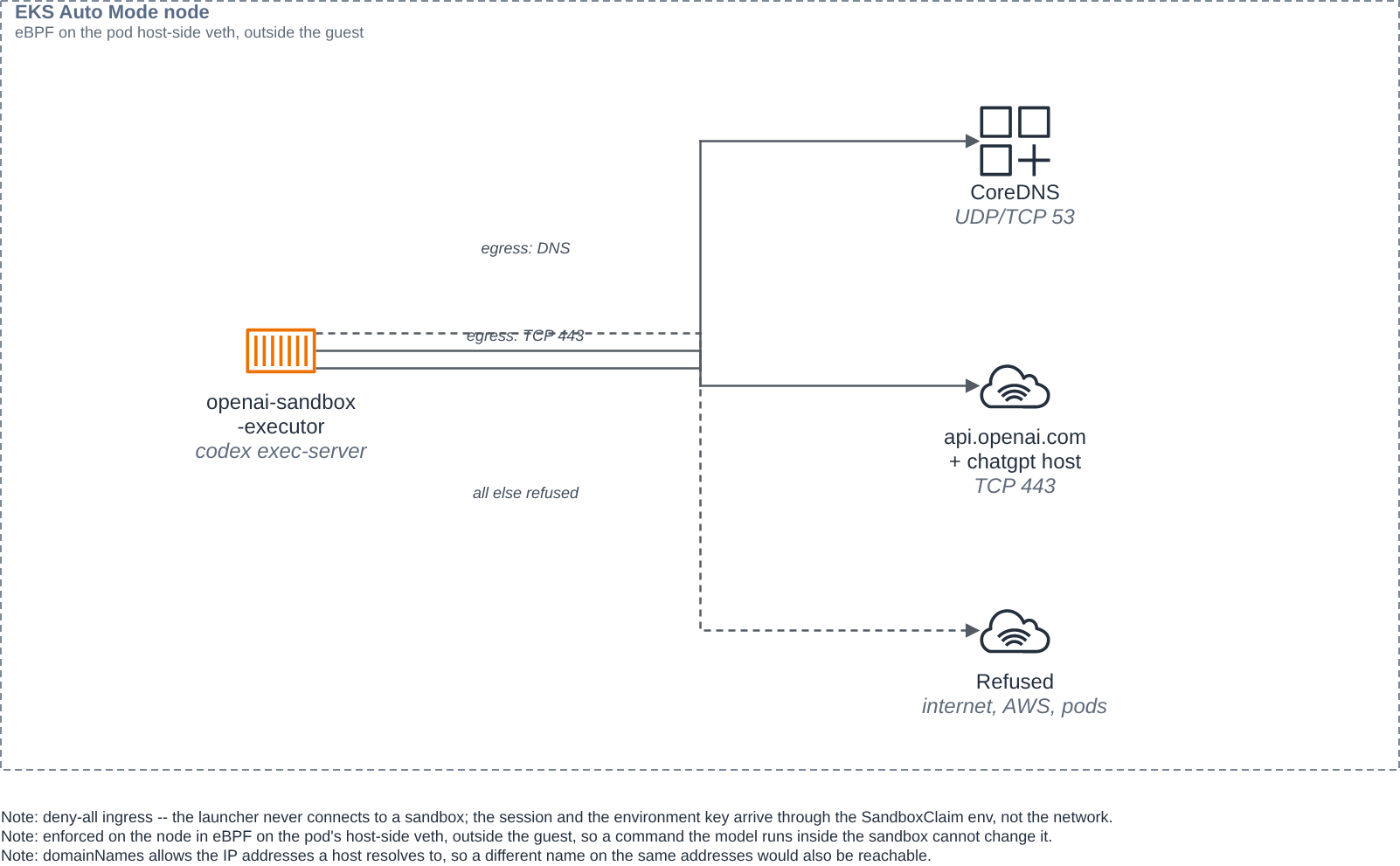
Where it is enforced. On EKS Auto Mode, a network policy agent on each node turns the policy into eBPF programs attached to the pod's host-side virtual interface, on the node, outside the sandbox's guest. AWS's documentation describes it this way: "The eBPF probes attached to the Pod veth interface will then filter egress traffic ... based on the rules in place. This ensures pods can only send cluster-external traffic to the IPs of allow listed domains." (EKS network policy documentation.) Because the filtering lives on the node rather than in the guest, a command the model runs inside the sandbox, even as root, cannot change it.
Why the two refused hosts fail differently. Both hosts are refused the same way: their
IPv4 addresses are not in the allow list, so an IPv4 connection attempt gets no reply and
runs to the timeout. The messages differ only because of the hosts' DNS records. example.com
also publishes IPv6 (AAAA) addresses, and the sandbox has no route to global IPv6 addresses,
so an IPv6 attempt fails immediately with "Network is unreachable". sts.us-west-2.amazonaws.com
publishes only IPv4, so its single attempt times out. The IPv4 block is identical for both.
No credential crosses the pod network. The sandbox has no network intake: the session and
the environment key arrive in the pod's env from the SandboxClaim, set by the launcher over
its authenticated Kubernetes API connection. The launcher's own intake, which the operator
reaches by port-forward, is guarded two ways: a deny-by-default ingress policy admits no
in-cluster pod, and the launcher checks a bearer token on every request. The blueprint publishes
no Ingress and no host port anywhere.
Clean up
Sessions and their pods have independent lifecycles, so a full clean-up has two parts, and neither does the other's work.
Clean up sessions and their claims. On your machine, with the launcher port-forward still
running (cleanup.py asks the launcher to delete the claim), clean up the sessions this
blueprint created. For each session cleanup.py rechecks the session's state, deletes its
SandboxClaim (which stops the pod), then deletes the API session:
set -a; . ./.env; set +a
.venv/bin/python scripts/cleanup.py sess_... sess_...
cleanup.py rechecks each session's state immediately before releasing its claim, following
OpenAI's
lifecycle guidance
that a pod is never released on agent.session.idle alone and the session is rechecked before
the claim is deleted. The launcher is the only component with the RBAC to delete claims; the
recheck runs on your machine, where the application key lives, and the claim delete follows it
at once. Pass --keep-claim to delete only the API session and leave the pod running (for
example, to let a follow-up turn keep using it). Deleting a claim does not delete the session;
deleting a session does not stop the pod. That is why both parts exist.
Remove the remaining Kubernetes objects. Set AWS_REGION and REGISTRY again in a new
shell:
export AWS_REGION=<AWS_REGION>
export REGISTRY=$(aws sts get-caller-identity --query Account --output text).dkr.ecr.$AWS_REGION.amazonaws.com

kubectl delete -f deploy/launcher.yaml -f deploy/launcher-ingress.yaml --ignore-not-found
kubectl delete -f deploy/sandbox-template.yaml --ignore-not-found
kubectl delete sandboxclaims -l openai.com/session-id --ignore-not-found
kubectl delete -f deploy/egress-policy.yaml -f deploy/rbac.yaml --ignore-not-found
kubectl delete secret openai-env-key launcher-auth --ignore-not-found
aws ecr delete-repository --repository-name openai-sandbox-executor --region $AWS_REGION --force
docker image rm $REGISTRY/openai-sandbox-executor:latest
rm -rf .venv
Keep .env if you will run the blueprint again. Otherwise delete it, and in the OpenAI console
revoke the environment key and archive the agent (client.beta.agents.delete). agent-sandbox
stays installed for other blueprints; to remove it, delete the release you installed in step 1:
kubectl delete -f https://github.com/kubernetes-sigs/agent-sandbox/releases/download/v1.0.10/sandbox-with-extensions.yaml
Keep a session's workspace while it is idle
This blueprint's sandbox uses an emptyDir for /workspace, so a session's files live for the
life of its claimed pod. OpenAI's lifecycle guide notes that
replacement compute does not restore files,
and its Lambda MicroVM guide suspends and resumes between turns to keep memory and disk. To
keep a workspace across a suspend and resume, give the SandboxTemplate a volumeClaimTemplate
for /workspace and set the sandbox's operatingMode so the controller suspends the pod
between turns and resumes it on the next one. That is an extension of this blueprint, not its
default path; the default keeps the simpler per-pod emptyDir.
Good to know
- The environment key is the sandbox's one credential, and the model's code can read it. There is no narrower per-session credential today. Use one OpenAI project per trust boundary, and the network policy to bound where a leaked key could be used.
- A session outlives its pod. The launcher keeps the claimed pod for the life of the claim; a later turn after the pod is gone gets a new pod, and earlier files are gone unless you use the persistent workspace above. Deleting the session is a separate, operator-side step.
- Size requests honestly. Each sandbox reserves its full memory request. Size the pool's
replicasto how many sessions start at once, not to your total session count. - Account neutrality. Tracked files carry no account id, key, cluster or host name. Local
values come from
.env, which git ignores;.env.exampleholds placeholders only.