A coding agent that fixes issues and opens pull requests
Before you start, review the prerequisites and shared setup on the home page, and run the hello sandbox blueprint first so you have a cluster with the runtime classes. The commands below use files from this repository, so clone it if you have not already, and run them from this blueprint's folder:
git clone https://github.com/aws-samples/sample-eks-nitro-sandbox.git
cd sample-eks-nitro-sandbox/examples/getting-started/coding-agent
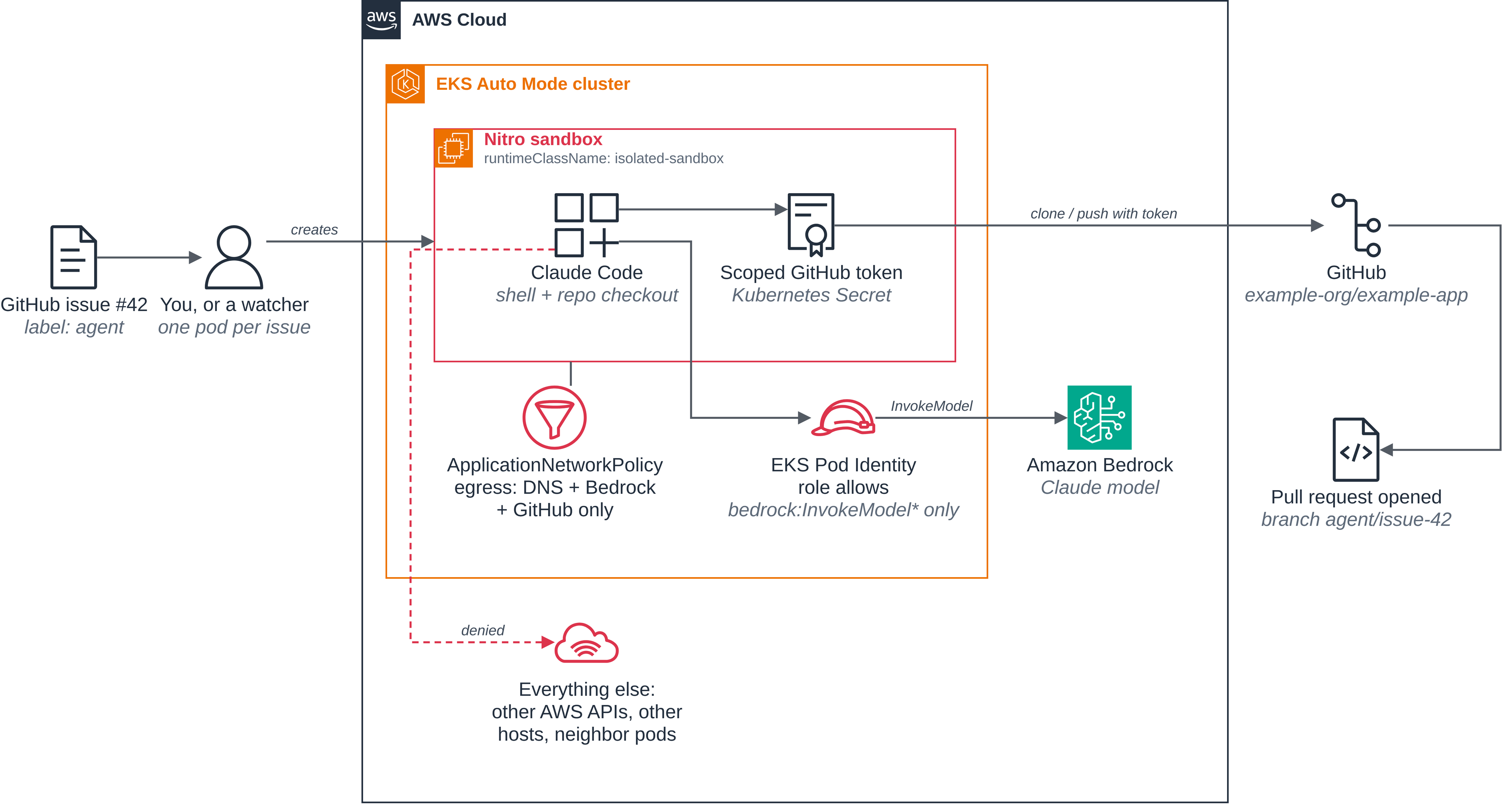
A coding agent runs arbitrary code and talks to the internet, which is exactly the combination a prompt injection turns into an exfiltration. In this example the whole agent runs inside one isolated sandbox, and everything it can touch is spelled out next to the pod spec:
- The model comes from Amazon Bedrock, authenticated with EKS Pod Identity. The pod's
ServiceAccount is associated with an IAM role that allows
bedrock:InvokeModel*and nothing else. No long-lived API key. - The repository comes from GitHub, authenticated with a short-lived token in a
Kubernetes Secret. The token is scoped to one repository and mounted as a file, so
that repository is the only one the agent can push to or read privately. (The policy
allows
github.comas a whole, so public repositories stay readable.) - The task comes from an issue. The pod gets the issue number as its input. (The post
describes a watcher that starts one pod per issue labeled
agent; here you start the pod yourself.) - Everything else is off. An
ApplicationNetworkPolicydenies all ingress, and allows egress only to DNS on any address for name lookups, to the Pod Identity credential address, and to HTTPS on the Bedrock and GitHub hostnames. Other AWS APIs, other internet hosts and other pods are refused. (The policy allows the addresses those names resolve to, so another name served from the same addresses would also be reachable.) The VM is sized from the pod's requests (inside it,nprocreports 2 and memory is about 4 GiB), so the hypervisor bounds the CPU and memory it can use.
Figure 2: The coding agent and everything it is allowed to reach. Besides DNS lookups, two paths leave the VM: Amazon Bedrock through Pod Identity and GitHub through a scoped token. Everything else is denied.
The files:
| File | What it is |
|---|---|
Dockerfile, entrypoint.sh |
The coding-agent image: a stock Node base with Claude Code, git, the GitHub CLI and pytest |
iam/ |
The Pod Identity trust policy and the Bedrock-only permissions policy |
service-account.yaml |
The coding-agent ServiceAccount the role is associated with |
egress-policy.yaml |
The egress network policy: DNS, Pod Identity, Bedrock, github.com and api.github.com only |
fix-issue.yaml |
The agent pod from the post |
sample-app/ |
A small Python app with a known bug, for the agent to fix |
Step 1: Turn on network policy enforcement. EKS Auto Mode accepts network policies without enforcing them until the Network Policy Controller is enabled, once per cluster. This affects the whole cluster; pods that no policy selects are unaffected.
kubectl apply -f enable-network-policy.yaml
Step 2: Build and push the image.
export ACCOUNT_ID=$(aws sts get-caller-identity --query Account --output text)
export REGISTRY=$ACCOUNT_ID.dkr.ecr.$AWS_REGION.amazonaws.com
aws ecr create-repository --repository-name coding-agent --region $AWS_REGION
aws ecr get-login-password --region $AWS_REGION \
  | docker login --username AWS --password-stdin $REGISTRY
docker build --platform linux/amd64 -t $REGISTRY/coding-agent:v1 .
docker push $REGISTRY/coding-agent:v1
docker logout $REGISTRY
The Dockerfile uses COPY --chmod, which needs BuildKit: Docker Desktop has it, and with
Colima install the docker-buildx plugin. On an Apple silicon Mac, build the amd64 image
with Rosetta emulation (for Colima, colima start --vm-type vz --vz-rosetta); under QEMU
emulation, installing python3-pytest fails with a BrokenPipeError in py3compile.
The pod sets imagePullPolicy: IfNotPresent for the fixed :v1 tag, so a node that already pulled :v1 keeps using its cached copy; when you rebuild the image, push it under a new tag (for example :v2) and update the tag in fix-issue.yaml.
Step 3: Give the ServiceAccount Bedrock access with Pod Identity. The role trusts EKS Pod Identity and may only invoke models:
aws iam create-role --role-name coding-agent-bedrock \
  --assume-role-policy-document file://iam/pod-identity-trust.json
aws iam put-role-policy --role-name coding-agent-bedrock --policy-name bedrock-invoke \
  --policy-document file://iam/bedrock-invoke-policy.json
kubectl apply -f service-account.yaml
aws eks create-pod-identity-association --cluster-name $CLUSTER_NAME --region $AWS_REGION \
  --namespace $NAMESPACE --service-account coding-agent \
  --role-arn arn:aws:iam::${ACCOUNT_ID}:role/coding-agent-bedrock
Step 4: Create the repository, the issue and the token. Push the blueprint app to a new repository of your own and open the issue the agent will fix:
export GITHUB_OWNER=your-github-user   # replace with your GitHub user or organization
export GITHUB_REPO=example-app
cp -r sample-app /tmp/example-app
git -C /tmp/example-app init -b main
git -C /tmp/example-app add -A
git -C /tmp/example-app commit -m "Initial import"
gh repo create $GITHUB_OWNER/$GITHUB_REPO --private --source /tmp/example-app --push
gh label create agent --repo $GITHUB_OWNER/$GITHUB_REPO
gh issue create --repo $GITHUB_OWNER/$GITHUB_REPO --label agent \
  --title "date parser drops timezone on ISO-8601 input" \
  --body 'parse_iso8601("2026-10-05T15:30:00+02:00") returns a naive datetime. The +02:00 offset is lost, so .utcoffset() is None. Inputs ending in Z lose their UTC marker the same way.'
export ISSUE_NUMBER=1   # the number gh just printed
Then create a fine-grained personal access token with a short expiry, Only select repositories set to this one repository, and these repository permissions: Contents read and write, Pull requests read and write, Issues read. Store it as the Secret the pod mounts, without putting it on a command line:
read -rs GITHUB_TOKEN   # paste the token, then press Enter
printf %s "$GITHUB_TOKEN" \
  | kubectl create secret generic coding-agent-git-token --from-file=token=/dev/stdin
unset GITHUB_TOKEN
Step 5: Apply the network policy. egress-policy.yaml
selects pods labeled app: coding-agent. Listing both Ingress and Egress under
policyTypes denies the pod all traffic in both directions except what the rules allow:
no ingress at all, and egress only to DNS on any address, to the Pod Identity credential address,
and to HTTPS on three hostnames. Here it is without its header comment:
apiVersion: networking.k8s.aws/v1alpha1
kind: ApplicationNetworkPolicy
metadata:
  name: coding-agent-egress
spec:
  podSelector:
    matchLabels:
      app: coding-agent
  policyTypes:
    - Ingress
    - Egress
  egress:
    - to:
        - ipBlock: { cidr: 0.0.0.0/0 }
      ports:
        - { protocol: UDP, port: 53 }
        - { protocol: TCP, port: 53 }
    - to:
        - ipBlock: { cidr: 169.254.170.23/32 }   # EKS Pod Identity credentials
      ports:
        - { protocol: TCP, port: 80 }
    - to:
        - domainNames:
            - bedrock-runtime.us-west-2.amazonaws.com   # the model
            - github.com                                # git clone and push
            - api.github.com                            # read the issue, open the PR
      ports:
        - { protocol: TCP, port: 443 }
The Pod Identity rule is what lets the agent get its Bedrock credentials. The sandbox
passes credential requests to 169.254.170.23 on to the Pod Identity Agent on the node,
and the policy applies to them: without the rule they time out, from a sandboxed pod as
from an ordinary one.
A standard Kubernetes NetworkPolicy can only allow addresses; the Auto Mode
ApplicationNetworkPolicy accepts the same fields plus domainNames. DNS (port 53) is
allowed to any address rather than pinned to one CoreDNS Service IP: on EKS Auto Mode
CoreDNS runs locally on each instance rather than behind a single ClusterIP, so a rule
pinned to one looked-up address would not reliably reach the resolver a pod actually
uses. The rule still opens only port 53; everything else stays denied.
kubectl apply -f egress-policy.yaml
until kubectl get policyendpoints -o name | grep -q '^policyendpoint.networking.k8s.aws/coding-agent-egress-'; do sleep 2; done
kubectl get applicationnetworkpolicies,policyendpoints
Wait for the PolicyEndpoint named after coding-agent-egress before you start the
agent: it shows the controller has picked the policy up and handed it to the nodes. If
the loop keeps waiting with no error printed, the controller from step 1 is not
running; if kubectl prints an error each time, fix that first (press Ctrl-C to stop).
The image's entrypoint also checks for itself before it does anything: an allowed host
(https://api.github.com) must answer, and a host the policy does not list
(https://example.com) must resolve but never connect. Otherwise it waits about a
minute and then refuses to start the agent.
Step 6: Run the agent. Here is the pod, trimmed to the parts that matter. The prompt
is the container's argument; Kubernetes fills in $(ISSUE_NUMBER) from the pod's
environment.
apiVersion: v1
kind: Pod
metadata:
  name: fix-issue-<ISSUE_NUMBER>
  labels: { app: coding-agent }
spec:
  runtimeClassName: isolated-sandbox
  serviceAccountName: coding-agent          # Pod Identity -> bedrock:InvokeModel*
  automountServiceAccountToken: false       # Pod Identity injects its own token; the default SA token is unused
  restartPolicy: Never
  securityContext:
    runAsNonRoot: true
    runAsUser: 1000                         # the image's "node" user, which owns /workspace (Dockerfile:45,47)
    runAsGroup: 1000
    fsGroup: 1000                           # the emptyDir mounts below are group-owned by this gid
    seccompProfile: { type: RuntimeDefault }
  containers:
    - name: claude
      image: <ACCOUNT_ID>.dkr.ecr.us-west-2.amazonaws.com/coding-agent:v1
      imagePullPolicy: IfNotPresent
      securityContext:
        allowPrivilegeEscalation: false
        readOnlyRootFilesystem: true
        capabilities: { drop: [ALL] }
      env:
        - { name: CLAUDE_CODE_USE_BEDROCK, value: "1" }
        - { name: AWS_REGION,              value: us-west-2 }
        - { name: ANTHROPIC_MODEL,         value: "us.anthropic.claude-sonnet-5-5" }
        - { name: REPO_URL,                value: https://github.com/<GITHUB_OWNER>/<GITHUB_REPO> }
        - { name: ISSUE_NUMBER,            value: "<ISSUE_NUMBER>" }
      volumeMounts:
        - { name: git-token, mountPath: /var/run/secrets/git, readOnly: true }
        - { name: home,      mountPath: /home/node }   # ~/.claude, ~/.gitconfig, ~/.config/gh, caches
        - { name: workspace, mountPath: /workspace }   # the git clone and the agent's edits
        - { name: tmp,       mountPath: /tmp }          # git and curl scratch
      command: ["/entrypoint.sh"]
      args:
        - |
          Read GitHub issue #$(ISSUE_NUMBER) in this repository. Reproduce the bug
          with a failing test, fix it with the smallest change that makes the
          test pass, run the full test suite, then commit on a branch named
          agent/issue-$(ISSUE_NUMBER) and open a pull request that references
          the issue and explains the root cause.
      resources:
        requests: { cpu: "2", memory: 4Gi }
        limits:   { cpu: "2", memory: 4Gi }
  volumes:
    - name: home
      emptyDir: {}
    - name: workspace
      emptyDir: {}
    - name: tmp
      emptyDir: {}
    - name: git-token
      secret: { secretName: coding-agent-git-token }
Beyond the Nitro VM boundary, the pod is hardened in depth. It runs as the image's
non-root node user (runAsNonRoot, UID/GID 1000), drops every Linux capability, forbids
privilege escalation, and takes the RuntimeDefault seccomp profile. Its root filesystem
is read-only (readOnlyRootFilesystem): the three emptyDir mounts give the agent the
only writable paths it needs, its home (~/.claude, the git and GitHub CLI config, caches),
the /workspace clone, and /tmp scratch, each discarded when the pod exits. The default
ServiceAccount token is not mounted (automountServiceAccountToken: false); the pod reaches
Bedrock through the separate token EKS Pod Identity projects for it, not that one.
The entrypoint first checks that the network policy is
in effect, then clones the repository with the mounted token, runs
claude -p "$1" --allowedTools "Bash,Edit,Read,Write" non-interactively, and finally
pushes the branch and opens the pull request if the agent has not. Fill in the
placeholders, start it, and follow its log:
sed -e "s|<ACCOUNT_ID>|$ACCOUNT_ID|" -e "s|<GITHUB_OWNER>|$GITHUB_OWNER|" \
    -e "s|<GITHUB_REPO>|$GITHUB_REPO|" -e "s|<ISSUE_NUMBER>|$ISSUE_NUMBER|g" \
    fix-issue.yaml | kubectl apply -f -
until kubectl get pod fix-issue-$ISSUE_NUMBER -o jsonpath='{.status.phase}' | grep -Eq '^(Running|Succeeded|Failed)$'; do sleep 2; done
kubectl logs -f fix-issue-$ISSUE_NUMBER
The loop waits until the container has started (while the pod waits for a node or pulls
the image); if it keeps waiting, kubectl describe pod fix-issue-$ISSUE_NUMBER shows why.
The log starts with the entrypoint's own lines, then Claude Code's summary of what it
did, and ends with the pull request. This is the whole log of one run, with the run's
repository shown as <GITHUB_OWNER>/<GITHUB_REPO>; your summary text and numbers will
differ:
Network policy is in effect: https://example.com is dropped, https://api.github.com answers
Cloning <GITHUB_OWNER>/<GITHUB_REPO> ...
Reading issue #1: "date parser drops timezone on ISO-8601 input"
Running Claude Code ...
I opened PR #2 for issue #1: https://github.com/<GITHUB_OWNER>/<GITHUB_REPO>/pull/2. The full suite passes (4 tests), and it's on branch `agent/issue-1`.

- **Root cause:** `parse_iso8601` cut the input to `value[:19]` and parsed it with `strptime`. That threw away the `+02:00` offset or `Z` suffix, so the result was always a naive datetime.
- **Reproduction:** I added two tests, one for an explicit offset and one for `Z`. Both failed before the fix.
- **Fix:** One line in `src/dates.py`. It now calls `datetime.fromisoformat(value)`.
- **Python version:** `Z` is only accepted on Python 3.11 and later. This environment runs 3.11.2. If the app must support older versions, it would need to turn `Z` into `+00:00` first.

I noted the version limit in the PR description too.
Pushed agent/issue-1 ... pull request already open: https://github.com/<GITHUB_OWNER>/<GITHUB_REPO>/pull/2
The last line says pull request already open when a pull request for the branch is
already open (normally the one the agent opened, as the prompt asks), and opened pull
request when the entrypoint opened it.
On the blueprint app the agent typically adds tests for the +02:00 offset and the Z
suffix, changes parse_iso8601 to use datetime.fromisoformat, and reports all tests
passing.
From Claude Code's point of view nothing is unusual: it has a shell, a repository and a model. From the platform team's point of view, the shell runs on a kernel no other tenant shares, model access is an IAM role, git access is one scoped token, and when the pod exits the VM is gone.
To see the network policy from inside the pod, run this in a second terminal while the agent is still working. Hosts the policy does not list time out:
kubectl exec fix-issue-$ISSUE_NUMBER -- curl -sS -m 10 -o /dev/null https://example.com
curl: (28) Connection timed out after 10001 milliseconds
command terminated with exit code 28
Clean up
The commands use the variables from the walkthrough. In a new shell, set them again first, with the values you used:
export CLUSTER_NAME=sandbox-demo AWS_REGION=us-west-2 NAMESPACE=nitro-sandboxes-demo
export GITHUB_OWNER=your-github-user GITHUB_REPO=example-app
export REGISTRY=$(aws sts get-caller-identity --query Account --output text).dkr.ecr.$AWS_REGION.amazonaws.com
Remove the AWS resources, the local image, and the agent pod from this blueprint:
kubectl delete pod fix-issue-$ISSUE_NUMBER --ignore-not-found
for id in $(aws eks list-pod-identity-associations --cluster-name $CLUSTER_NAME \
              --region $AWS_REGION --namespace $NAMESPACE --service-account coding-agent \
              --query 'associations[].associationId' --output text); do
  aws eks delete-pod-identity-association --cluster-name $CLUSTER_NAME \
    --region $AWS_REGION --association-id $id
done
aws iam delete-role-policy --role-name coding-agent-bedrock --policy-name bedrock-invoke
aws iam delete-role --role-name coding-agent-bedrock
aws ecr delete-repository --repository-name coding-agent --region $AWS_REGION --force
docker image rm $REGISTRY/coding-agent:v1
On GitHub, revoke the token, and delete the example repository when you no longer need it
(gh repo delete needs the delete_repo scope: gh auth refresh -s delete_repo):
gh repo delete $GITHUB_OWNER/$GITHUB_REPO --yes
rm -rf /tmp/example-app
The network policy enforcement you turned on in step 1 is cluster-wide. Deleting the
cluster removes it; on a cluster you keep, leave it or delete the amazon-vpc-cni
ConfigMap in kube-system if nothing else relies on it.