VS Code in the browser, in a sandbox
Before you start, review the prerequisites and shared setup
on the home page, and run the hello sandbox
blueprint first so you have a cluster with the runtime classes. This blueprint uses the
agent-sandbox Sandbox API, installed in
warm pool step 1, and it reads the sandbox
signals the hello sandbox page introduces.
The commands below use files from this repository, so clone it if you have not already, and
run them from this blueprint's folder:
git clone https://github.com/aws-samples/sample-eks-nitro-sandbox.git
cd sample-eks-nitro-sandbox/examples/agent-sandbox/ide
For this blueprint you also need Node.js on your own machine,
for the npx that runs code-server's own password hasher (the run below used Node.js 22 and
argon2-cli 0.25.1), curl, and a browser. A run costs you the editor's sandboxed pod
while it is up, and its 10Gi Amazon EBS volume for as long as the blueprint exists. There is no
model or API cost.
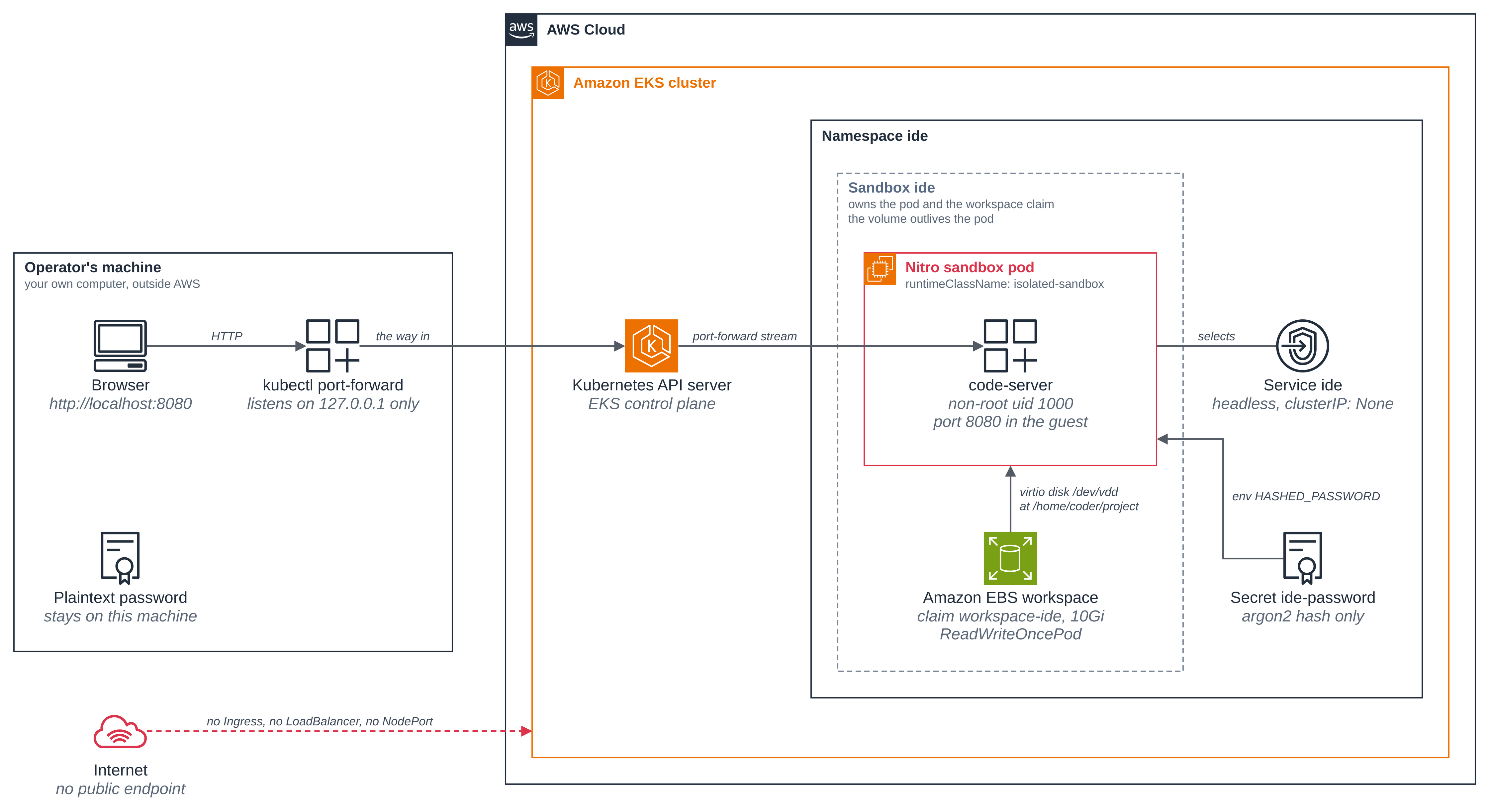
A browser IDE is the demo people feel: a full VS Code workbench, with a terminal, on a project folder that is still there tomorrow. It is also an honest test of a sandbox, because an editor is a long-lived, stateful, network-using workload rather than a pod that prints a line and sleeps. This blueprint runs code-server in a Nitro sandbox, as a non-root user, with its project folder on an EBS volume, and gives it exactly one way in.
The workload is a single agent-sandbox Sandbox
whose pod runs in a Nitro sandbox, with the workspace from volumeClaimTemplates. The
editor is never published: there is no Ingress, no LoadBalancer and no NodePort anywhere in
this folder, all ingress to the pod is denied by network policy, and you reach it with
kubectl port-forward on your own machine.
- A full IDE in the browser, backed by a sandbox. code-server serves the VS Code workbench from inside the guest. Its pod shows the sandbox signals: its own kernel build, a boot that matches the pod's age, virtio disks and the VM's own product name, each beside what an ordinary pod on the same node shows.
- A workspace that outlives the pod. The project folder is a separate EBS volume on its
own virtio disk, writable by the non-root user because of
fsGroupand with no init container. Write a file, delete the pod, and the file is still there on the new one. - Non-root, and no privileged container. code-server runs as uid 1000 with
runAsNonRoot: true, every capability dropped, no privilege escalation and no ServiceAccount token. - The password is an argon2 hash from a Secret. You generate the password on your own machine; only its hash is ever sent to the cluster, read from a file so neither the password nor the hash is on a command line. A wrong password is refused and the right one opens the workbench.
- Reachable from your own machine only.
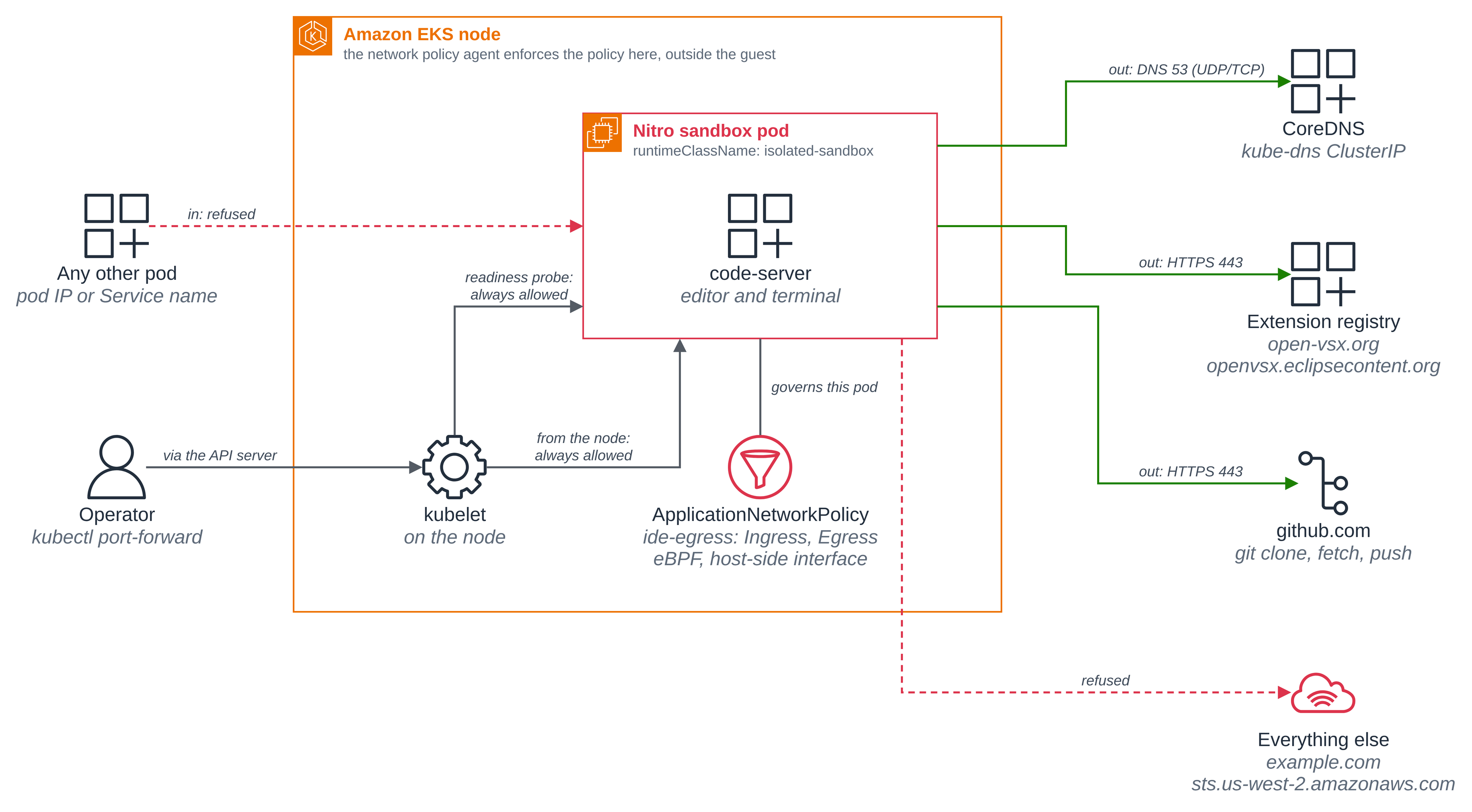
kubectl port-forwardlistens on127.0.0.1on the machine you run it from, and no pod on the pod network can reach the editor: the policy refuses every connection to it. The port-forward stream itself arrives from the pod's own node, which Kubernetes always allows, and the page shows that in the editor's own log.
Figure 1: VS Code in the browser, in a sandbox. The way in is a kubectl port-forward tunnel from the operator's own machine, and nothing publishes the editor's port; the editor's password reaches the pod as an argon2 hash in a Kubernetes Secret, and its project folder is an Amazon EBS volume owned by the Sandbox rather than the pod.
Quick start
On a cluster that has finished Getting started, with agent-sandbox installed (Step 1) and network policy enforcement on (Step 2):
cp .env.example .env              # set KUBE_CONTEXT, and NAMESPACE if you like
./scripts/new-password.sh         # the password and its argon2 hash, on your own machine
./scripts/setup.sh                # the Secret, the egress policy and the Sandbox
./scripts/port-forward.sh         # then open http://localhost:8080 and log in
cat ../../../tmp/ide/password     # the password the login page asks for
./scripts/cleanup.sh              # deletes the workspace and its EBS volume
The rest of this page is that run, step by step, with what to look for. The context: line
in the blocks below reads sandbox-demo, the shared default cluster name from the home page;
the run that produced this output used a different context name, changed here to the
default. Nothing else in the output blocks was edited.
Versions
This folder was built against these releases:
| Component | Pin |
|---|---|
| agent-sandbox controller (kubernetes-sigs/agent-sandbox) | v1.0.10, as in Warm pool |
| code-server (coder/code-server) | 4.143.1, as ghcr.io/coder/code-server:4.143.1 |
argon2-cli, the hasher code-server's FAQ names |
0.25.1, pinned in scripts/new-password.sh as npx argon2-cli@0.25.1 |
Files
| File | What it is |
|---|---|
deploy/sandbox.yaml |
The Sandbox: code-server as a non-root user, the EBS volumeClaimTemplates workspace, and the password hash from the Secret. |
deploy/egress-policy.yaml |
The ApplicationNetworkPolicy: all ingress denied, egress to DNS and three names. |
deploy/storage-class.yaml |
The blueprint's own EBS StorageClass, created by setup only when the cluster has no default class that fits. |
deploy/pod-ordinary.yaml |
An ordinary pod, for the side by side in Step 6. |
scripts/new-password.sh |
Generate the editor's password and its argon2 hash, on your own machine. |
scripts/setup.sh |
Check the prerequisites, create the namespace, the Secret, the policy and the Sandbox, and wait until the editor is serving. |
scripts/port-forward.sh |
Open the editor on your own machine, and nowhere else. |
scripts/compare.sh |
Read the sandbox signals from the editor's pod and from an ordinary pod on the same node. |
scripts/cleanup.sh |
Delete the Sandbox, its PVC, the EBS volume, the Secret, the policy and the namespace, and the blueprint's own StorageClass if setup made one. |
.env.example |
The local values the blueprint needs, with no secrets. |
The scripts read .env (copy it from .env.example). NAMESPACE defaults to ide; leave
STORAGE_CLASS unset to let setup choose the class (Step 3), or set it to force a specific
one. Set KUBE_CONTEXT to the context of the cluster you ran Getting started on, so a run
never depends on the machine's current context.
Step 1: Install agent-sandbox, if you have not already from the warm pool blueprint. This folder was built against v1.0.10:
kubectl apply -f https://github.com/kubernetes-sigs/agent-sandbox/releases/download/v1.0.10/sandbox-with-extensions.yaml
kubectl -n agent-sandbox-system rollout status deploy/agent-sandbox-controller
Step 2: Turn network policy enforcement on, once per cluster. EKS Auto Mode accepts
network policies without enforcing them until the amazon-vpc-cni ConfigMap in
kube-system says so. That is a cluster-wide setting every workload on the cluster shares,
so this blueprint's scripts never change it: setup.sh checks it, and stops with this command
when it is off.
kubectl -n kube-system patch configmap amazon-vpc-cni --type merge \
  -p '{"data":{"enable-network-policy-controller":"true"}}'
Step 3: The EBS StorageClass, chosen for you. The workspace needs an EBS
StorageClass, and EKS Auto Mode does not create one (Amazon EKS User Guide, Create a
storage class). setup.sh chooses which class the claim names, so there is nothing to run
here:
- Your cluster's default class, when it fits. "Fits" means
provisioner: ebs.csi.eks.amazonaws.com,type: gp3(or unset, which is gp3),encrypted: "true"andreclaimPolicy: Delete. When exactly one default class fits, setup uses it and creates nothing. The reclaim policy is in the list because the clean up deletes the claim, waits for itsPersistentVolumeto be deleted and reports the EBS volume gone, which is only true forDelete; aRetainclass is refused with a message rather than leaving a volume billing. - Otherwise, the blueprint's own class.
deploy/storage-class.yamlis a non-default class namedide-gp3, marked as the blueprint's. Setup creates it withkubectl createonly when it is absent, and the clean up removes it.
Setup never changes a class that already exists and never kubectl applys one: a
StorageClass is chosen, never changed. (On a cluster whose class was created with
kubectl apply, applying a manifest without the default annotation would strip it from the
live class and change how every other claim on the cluster is provisioned.) To force a
specific class, set STORAGE_CLASS in .env to its name; setup then checks that class uses
the EBS CSI provisioner and reclaims its volumes on delete, and nothing else. The run below
used the cluster default auto-ebs-sc, so it created no class.
Step 4: Generate the password, on your own machine. code-server prefers a
hashed-password over a plaintext password and reads the hash from $HASHED_PASSWORD
(code-server FAQ, "Can I store my password
hashed?"). scripts/new-password.sh writes a random password to
tmp/ide/password under this repository, with mode 600, and pipes it on standard input to
code-server's own hasher; only the hash goes in tmp/ide/hashed-password. The repository's
tmp/ is git-ignored, so neither file can be committed by accident, and the plaintext is
never passed on a command line. Both files are written through mktemp, and neither is
moved into place until the password and its hash are both in hand, so they are never
world-readable and they never fall out of step: a run that fails at the hashing leaves the
password you already had, and its hash, exactly as they were. That matters because the
editor already on the cluster still accepts the old password, so a half-finished run that
replaced only the password file would destroy the one thing that opens it. Running the
script again keeps a password that is already there and keeps its hash with it, rather than
re-hashing: argon2 salts every hash afresh, so a second hash of the same password is a
different string, and the cluster would be holding the first one. It does not re-check that
the hash it keeps is a hash of that password, because the hasher has no verify mode, so if
you edit either file by hand, delete both and run the script again. The script creates
tmp/ide with mode 700 when it is absent, and leaves the mode alone when it is not, so if
you point LOCAL_DIR at a directory of your own, its mode stays yours. Use
./scripts/new-password.sh --stdin to supply a password of your own instead.
./scripts/new-password.sh
generated a random password in tmp/ide/password

hash (this is what the Kubernetes Secret will hold):
  $argon2i$v=19$m=4096,t=3,p=1$SCgHmgkra0a0tQVs0PA24Q$1i+/R7QykHGO7dzzogs6E7sbunX5Kn3TGnyV5uu1S6M

Read the password when you need to type it:   cat tmp/ide/password
Next:                                         ./scripts/setup.sh
The hash is what the cluster holds; the password itself stays in tmp/ide/password, which is
the only place it exists. The first run on a machine also prints npm's own deprecation
warnings while it fetches argon2-cli; this run had it cached, so there are none.
Step 5: Create the Secret, the policy and the Sandbox.
scripts/setup.sh creates the Secret from the hash file, applies the
egress policy and waits for its PolicyEndpoint, then applies the Sandbox and waits for
the editor to serve. The Secret is created from the file, so the hash is not on a command
line either:
kubectl create secret generic ide-password --from-file=hashed-password=tmp/ide/hashed-password
Here is the part of deploy/sandbox.yaml that matters, with its
comments removed and the values setup renders in already filled:
apiVersion: agents.x-k8s.io/v1beta1
kind: Sandbox
metadata:
  name: ide
spec:
  service: true                      # a headless ClusterIP Service; nothing is published
  podTemplate:
    metadata:
      labels:
        app: ide                     # the egress policy selects the pod by this label
      annotations:
        karpenter.sh/do-not-disrupt: "true"   # pin the node while the single-attach volume is mounted
    spec:
      runtimeClassName: isolated-sandbox      # the one line that puts the pod in a sandbox
      automountServiceAccountToken: false
      securityContext:
        runAsNonRoot: true
        runAsUser: 1000
        runAsGroup: 1000
        fsGroup: 1000                # makes the fresh EBS volume group-writable on mount
        seccompProfile:
          type: RuntimeDefault
      containers:
        - name: code-server
          image: ghcr.io/coder/code-server:4.143.1
          imagePullPolicy: IfNotPresent
          command: ["/usr/bin/entrypoint.sh"]
          args:
            - --bind-addr=0.0.0.0:8080
            - --disable-telemetry
            - --disable-update-check
            - /home/coder/project
          env:
            - name: HASHED_PASSWORD   # code-server reads the argon2 hash from here
              valueFrom:
                secretKeyRef:
                  name: ide-password
                  key: hashed-password
          ports:
            - name: http
              containerPort: 8080
          readinessProbe:             # so Ready means serving, not just started
            httpGet:
              path: /healthz
              port: http
            periodSeconds: 5
            failureThreshold: 60
          volumeMounts:
            - name: workspace
              mountPath: /home/coder/project
          resources:
            requests:                 # the guest is sized from the requests
              memory: 2Gi
          securityContext:
            allowPrivilegeEscalation: false
            capabilities:
              drop: ["ALL"]
  volumeClaimTemplates:               # immutable after the Sandbox is created
    - metadata:
        name: workspace
      spec:
        accessModes:
          - ReadWriteOncePod
        storageClassName: auto-ebs-sc # the class setup chose, rendered in at apply time
        resources:
          requests:
            storage: 10Gi
./scripts/setup.sh
context: sandbox-demo (pinned)   namespace: ide
network policy enforcement is on (amazon-vpc-cni enable-network-policy-controller=true)
note: no default StorageClass fits (ebs.csi.eks.amazonaws.com, gp3, encrypted, reclaimPolicy Delete). Using the sample's own class ide-gp3.
creating storageclass/ide-gp3 from deploy/storage-class.yaml
storageclass.storage.k8s.io/ide-gp3 created

== 1/5 namespace ide ==
namespace/ide created
namespace/ide labeled
created namespace ide, labelled app.kubernetes.io/managed-by=ide

== 2/5 secret/ide-password from tmp/ide/hashed-password ==
secret/ide-password created
  created secret/ide-password from the hash file; the plaintext stayed on this machine

== 3/5 egress policy ide-egress (all ingress denied) ==
applicationnetworkpolicy.networking.k8s.aws/ide-egress created
  waiting for the PolicyEndpoint named after ide-egress
NAME                                                     AGE
applicationnetworkpolicy.networking.k8s.aws/ide-egress   2s

NAME                                                 AGE
policyendpoint.networking.k8s.aws/ide-egress-8xb94   2s

== 4/5 apply sandbox/ide ==
sandbox.agents.x-k8s.io/ide created

== 5/5 wait for the guest to boot, mount the workspace and serve the IDE ==
sandbox.agents.x-k8s.io/ide condition met
NAME            STATUS   VOLUME                                     CAPACITY   ACCESS MODES   STORAGECLASS   VOLUMEATTRIBUTESCLASS   AGE
workspace-ide   Bound    pvc-d4c5e2fe-4c53-4224-90f3-d3b0f4f5732b   10Gi       RWOP           ide-gp3        <unset>                 32s
NAME   TYPE        CLUSTER-IP   EXTERNAL-IP   PORT(S)    AGE   SELECTOR
ide    ClusterIP   None         <none>        8080/TCP   33s   agents.x-k8s.io/sandbox-name-hash=72cfaf5f

sandbox/ide is Ready: code-server is serving on :8080 inside the guest,
with its workspace on EBS at /home/coder/project.
Open it:          ./scripts/port-forward.sh     # then http://localhost:8080
Your password:    cat tmp/ide/password
Shell in:         kubectl -n ide exec -it ide -- bash
Tear it down:     ./scripts/cleanup.sh          (deletes the PVC and its EBS volume)
The PolicyEndpoint is the signal that the controller has handed the policy to the nodes:
setup waits for it before it creates the editor, so the first thing the editor can do is
already under the policy. The claim is Bound with access mode RWOP
(ReadWriteOncePod) on the chosen class. The Service is ClusterIP with cluster IP None,
a headless Service: it gives the editor a name inside the cluster and publishes nothing
outside it.
The editor was Ready 32 seconds after the Sandbox was created on this run, because the
cluster already had a sandbox-capable node. On a cold cluster the first sandboxed pod waits
for Auto Mode to launch one.
What the cluster holds, including the one thing the Secret has in it:
kubectl -n ide get networkpolicy
kubectl -n ide get svc -o jsonpath='{range .items[*]}{.metadata.name}{"  type="}{.spec.type}{"  clusterIP="}{.spec.clusterIP}{"  nodePorts=["}{.spec.ports[*].nodePort}{"]"}{"\n"}{end}'
kubectl -n ide get ingress
kubectl -n ide describe secret ide-password
kubectl -n ide get secret ide-password -o jsonpath='{.data.hashed-password}' | base64 -d
No resources found in ide namespace.
ide  type=ClusterIP  clusterIP=None  nodePorts=[]
No resources found in ide namespace.
Name:         ide-password
Namespace:    ide
Labels:       <none>
Annotations:  <none>

Type:  Opaque

Data
====
hashed-password:  95 bytes
$argon2i$v=19$m=4096,t=3,p=1$SCgHmgkra0a0tQVs0PA24Q$1i+/R7QykHGO7dzzogs6E7sbunX5Kn3TGnyV5uu1S6M
There is no Ingress and no NodePort, the one Service is a headless ClusterIP, and the
Secret holds exactly one key: the same 95-byte argon2 hash Step 4 printed. The Sandbox
API creates no NetworkPolicy of its own, so the policy in Step 5 is the only one that
selects this pod; a SandboxTemplate, which does create one by default, would need
networkPolicyManagement: Unmanaged.
The pod's own security settings, read from the live pod rather than the manifest:
kubectl -n ide get pod ide -o jsonpath='runtimeClassName={.spec.runtimeClassName}{"\n"}runAsNonRoot={.spec.securityContext.runAsNonRoot}{"\n"}runAsUser={.spec.securityContext.runAsUser}{"\n"}runAsGroup={.spec.securityContext.runAsGroup}{"\n"}fsGroup={.spec.securityContext.fsGroup}{"\n"}seccompProfile={.spec.securityContext.seccompProfile.type}{"\n"}privileged={.spec.containers[*].securityContext.privileged}{"\n"}allowPrivilegeEscalation={.spec.containers[*].securityContext.allowPrivilegeEscalation}{"\n"}capabilitiesDropped={.spec.containers[*].securityContext.capabilities.drop[*]}{"\n"}automountServiceAccountToken={.spec.automountServiceAccountToken}{"\n"}node={.spec.nodeName}{"\n"}podIP={.status.podIP}{"\n"}'
kubectl -n ide describe pod ide | grep -A1 'Environment:'
runtimeClassName=isolated-sandbox
runAsNonRoot=true
runAsUser=1000
runAsGroup=1000
fsGroup=1000
seccompProfile=RuntimeDefault
privileged=
allowPrivilegeEscalation=false
capabilitiesDropped=ALL
automountServiceAccountToken=false
node=i-0d368526d0cc359b4
podIP=192.168.124.22

    Environment:
      HASHED_PASSWORD:  <set to the key 'hashed-password' in secret 'ide-password'>  Optional: false
privileged= is empty because nothing asked for it. The environment line is the whole
point of reading it here: the pod spec carries a reference to the Secret's key, not the
hash, and nothing in it carries the password. Keep the node and the pod address: the network
policy section uses both.
Step 6: Prove the editor's pod ran in a sandbox.
scripts/compare.sh reads the signals from the editor's pod and from
an ordinary pod it creates on the same node, then deletes that pod by its exact name.
./scripts/compare.sh
context: sandbox-demo (pinned)   namespace: ide

== an ordinary pod on the same node (i-0d368526d0cc359b4) ==
pod/ide-ordinary created
pod/ide-ordinary condition met

== uname -rv ==
--- sandboxed pod/ide ---
  6.18.54 #1 SMP PREEMPT_DYNAMIC Thu Oct 22 17:38:11 UTC 2026
--- ordinary pod/ide-ordinary ---
  6.18.56 #2 SMP PREEMPT_DYNAMIC Fri Oct 30 22:32:37 UTC 2026

== cat /proc/uptime ==
--- sandboxed pod/ide ---
  37.16 35.14
--- ordinary pod/ide-ordinary ---
  22827.43 44422.95

== ls /sys/block ==
--- sandboxed pod/ide ---
  dm-0
  vda
  vdb
  vdc
  vdd
--- ordinary pod/ide-ordinary ---
  dm-0
  loop0
  loop1
  loop2
  loop3
  loop4
  loop5
  loop6
  loop7
  nvme0n1
  nvme1n1
  nvme2n1
  zram0

== cat /sys/class/dmi/id/product_name ==
--- sandboxed pod/ide ---
  r8a.enclave
--- ordinary pod/ide-ordinary ---
  r8a.large

== when each pod started, to compare with its uptime ==
NAME           CREATED                RUNTIMECLASS
ide            2026-11-07T04:23:05Z   isolated-sandbox
ide-ordinary   2026-11-07T04:23:49Z   <none>

== where the workspace comes from, inside the guest ==
  Filesystem      Size  Used Avail Use% Mounted on
  /dev/vdd        9.8G   24K  9.8G   1% /home/coder/project
  overlay         9.9G  175M  9.8G   2% /
  /dev/vdd ext4

done; deleting pod/ide-ordinary by name
pod "ide-ordinary" deleted from ide namespace
Four signals, each with what the ordinary pod on the same node shows instead:
- Its own kernel. The version string is the same,
6.18.54, but the build is not:#1built at 17:38 on 22 October in the guest against#2built at 22:32 on 30 October on the node.uname -ralone is not evidence; the build is. - Its own boot. The editor's pod reports 37 seconds of uptime, which matches its own age (created at 04:23:05, read about 44 seconds later), because the VM booted with the pod. The ordinary pod reports 22827 seconds, the node's uptime, although it had itself been created seconds earlier: it is reading a clock that started before it existed.
- Virtio disks. The guest sees
vdatovddand nothing else. The ordinary pod sees the instance'snvme*devices, plus the node'sloop*andzram0. - The VM's own product name.
r8a.enclavein the guest, where the ordinary pod reads the EC2 instance type,r8a.large.
Together they show the editor's containers ran in a VM of their own. /home/coder/project
is /dev/vdd, one of those virtio disks, formatted ext4 and separate from the guest's own
root filesystem, which is overlay.
Step 7: Open the editor, and log in. In one shell,
scripts/port-forward.sh opens the tunnel. Then open
http://localhost:8080 in a browser on the same machine, and paste the password from
tmp/ide/password into the login page. The curl calls below are what the browser does,
run in a second shell, so the page can show the result: /healthz is code-server's own
heartbeat endpoint, GET / redirects an unauthenticated request to the login page, a wrong
password comes back refused, and the right one returns a session that renders the workbench.
The password is read from its file with curl --data-urlencode, so it is not on a command
line here either.
./scripts/port-forward.sh # in one shell
context: sandbox-demo (pinned)   namespace: ide

Open http://localhost:8080 in your browser on this machine.
The password is in tmp/ide/password (cat it when the login page asks).
Press Ctrl-C to close the tunnel.

Forwarding from 127.0.0.1:8080 -> 8080
Handling connection for 8080
Abridged: the tunnel keeps running and logs a line per connection until you press Ctrl-C.
Forwarding from 127.0.0.1:8080 is the claim about reach: the tunnel is offered on the
loopback address of the machine running kubectl, and nowhere else.
# in a second shell, from this sample's folder
curl -s http://localhost:8080/healthz
curl -s -o /dev/null -w "%{http_code} -> %{redirect_url}\n" http://localhost:8080/
curl -s -X POST -d "password=not-the-password" http://localhost:8080/login | grep -o 'class="error">[^<]*'
curl -s -i -c ../../../tmp/ide/session -X POST \
  --data-urlencode "password@../../../tmp/ide/password" http://localhost:8080/login \
  | grep -iE '^(HTTP/|location:|set-cookie:)'
curl -s -o /dev/null -w "%{http_code}\n" -b ../../../tmp/ide/session \
  "http://localhost:8080/?folder=/home/coder/project"
curl -s -b ../../../tmp/ide/session "http://localhost:8080/?folder=/home/coder/project" | grep -c didStartRenderer
{"status":"expired","lastHeartbeat":0}
302 -> http://localhost:8080/login
class="error">Incorrect password
HTTP/1.1 302 Found
Set-Cookie: code-server-session=<session>; Path=/; SameSite=Lax
Location: ./
200
1
/healthz answers with code-server's own heartbeat JSON, which reports "status":"expired"
until a browser session sends a heartbeat, so a freshly started editor with nobody connected
is legitimately expired. GET / is a 302 to the login page. The wrong password comes
back as the login page with Incorrect password in it. The right one returns 302 Found
with a session cookie, and that session renders the workbench with 200 and one occurrence
of the workbench's bootstrap marker didStartRenderer in the HTML. The session cookie's
value is replaced with <session> in the block above; everything else is as the run printed
it.
Where the password is not:
kubectl -n ide get pod ide -o yaml | grep -c -F -f ../../../tmp/ide/password
kubectl -n ide logs ide | grep -c -F -f ../../../tmp/ide/password
kubectl -n ide logs ide | grep -E 'Authentication|Using password'
kubectl -n ide logs ide | grep -i 'failed login'
0
0
[2026-11-07T04:25:52.507Z] info    - Authentication is enabled
[2026-11-07T04:25:52.507Z] info      - Using password from $HASHED_PASSWORD
Failed login attempt {"remoteAddress":"192.168.124.22","userAgent":"curl/8.21.0","timestamp":1793928474}
The plaintext appears zero times in the pod spec and zero times in the log, and grep -F -f
takes the pattern from the password file, so the search itself does not put it on a command
line either. code-server says which source it used, $HASHED_PASSWORD. The refused attempt
is logged with the caller's address and user agent, and no password. That address is worth a
second look, and "How the network policy works" comes back
to it: it is not the pod's address, it is the node's.
Step 8: The workspace is its own EBS volume, and it outlives the pod. The claim comes
from the Sandbox, not from the pod, so deleting the pod does not touch it. Write a file in
the workspace, delete the pod, let the controller bring a new one back, and read the file
again.
First, who the editor is and what it may write, and the command line it is running with:
kubectl -n ide exec ide -- sh -c 'id; ls -ld /home/coder/project'
kubectl -n ide exec ide -- sh -c "tr '\0' ' ' < /proc/1/cmdline; echo"
uid=1000(coder) gid=1000(coder) groups=1000(coder),100(users)
drwxrwsr-x. 3 root coder 4096 Nov  7 04:23 /home/coder/project
dumb-init /usr/bin/code-server --bind-addr=0.0.0.0:8080 --disable-telemetry --disable-update-check /home/coder/project
The editor runs as uid=1000(coder) and the workspace is drwxrwsr-x root coder: the
kubelet applied fsGroup: 1000 as the volume's group owner and made it group-writable, with
the setgid bit so new files keep the group. That is what lets a non-root process write a
freshly provisioned EBS volume with no init container and no privileged container. The
command line holds the flags and the folder, and no password and no hash.
Then write a file, record the pod and the volume, and delete the pod:
kubectl -n ide exec ide -- sh -c 'printf "hello from the sandbox IDE\n" > /home/coder/project/notes.md; ls -l /home/coder/project/notes.md'
kubectl -n ide get pod ide -o jsonpath='podUID={.metadata.uid}{"\n"}started={.status.startTime}{"\n"}'
kubectl -n ide get pvc workspace-ide -o jsonpath='phase={.status.phase}{"\n"}pv={.spec.volumeName}{"\n"}'
kubectl -n ide get pv "$(kubectl -n ide get pvc workspace-ide -o jsonpath='{.spec.volumeName}')" \
  -o jsonpath='csiDriver={.spec.csi.driver}{"\n"}volumeHandle={.spec.csi.volumeHandle}{"\n"}reclaimPolicy={.spec.persistentVolumeReclaimPolicy}{"\n"}'
kubectl -n ide get pvc workspace-ide -o jsonpath='ownerReferences={.metadata.ownerReferences}{"\n"}'
kubectl -n ide delete pod ide
kubectl -n ide wait --for=condition=Ready sandbox/ide --timeout=15m
-rw-r--r-- 1 coder coder 27 Oct 25 14:11 /home/coder/project/notes.md
podUID=52982790-ebaf-4c37-b630-4434b59db7fb
started=2026-10-25T14:09:03Z
phase=Bound
pv=pvc-28ec2c6c-6f46-4aa9-9b62-fc976eec7af3
csiDriver=ebs.csi.eks.amazonaws.com
volumeHandle=vol-041fc85bbdcec6a41
reclaimPolicy=Delete
ownerReferences=[{"apiVersion":"agents.x-k8s.io/v1beta1","blockOwnerDeletion":true,"controller":true,"kind":"Sandbox","name":"ide","uid":"bd22e9c9-14aa-4937-bcc7-2fd3f1d482f0"}]
pod "ide" deleted from ide namespace
sandbox.agents.x-k8s.io/ide condition met
The claim is Bound to a real EBS volume through the Auto Mode CSI driver, with
reclaimPolicy: Delete, and its ownerReference is the Sandbox: not the pod. That is why
deleting the pod does not take the volume with it.
Now read the same things again on the pod the controller brought back:
kubectl -n ide get pod ide -o jsonpath='podUID={.metadata.uid}{"\n"}started={.status.startTime}{"\n"}'
kubectl -n ide get pvc workspace-ide -o jsonpath='phase={.status.phase}{"\n"}pv={.spec.volumeName}{"\n"}'
kubectl -n ide exec ide -- sh -c 'cat /home/coder/project/notes.md; ls -l /home/coder/project; df -h /home/coder/project / | cat'
kubectl -n ide exec ide -- sh -c 'cat /proc/uptime'
kubectl -n ide exec ide -- sh -c 'df -h --output=source,target /home/coder/project /home/coder/.local/share/code-server /home/coder/.config/code-server'
podUID=4f276fb8-0a77-4d71-84e9-9840f0a92a3d
started=2026-10-25T14:11:25Z
phase=Bound
pv=pvc-28ec2c6c-6f46-4aa9-9b62-fc976eec7af3
hello from the sandbox IDE
total 20
drwxrws---. 2 root  coder 16384 Oct 25 14:09 lost+found
-rw-rw-r--. 1 coder coder    27 Oct 25 14:11 notes.md
Filesystem      Size  Used Avail Use% Mounted on
/dev/vdd        9.8G   28K  9.8G   1% /home/coder/project
overlay         9.9G  176M  9.8G   2% /
7.06 4.23
Filesystem     Mounted on
/dev/vdd       /home/coder/project
overlay        /
overlay        /
The pod UID changed (52982790... to 4f276fb8...), so this is a new pod on a new guest,
and its uptime is its own 7 seconds rather than the old pod's. The claim is still Bound to
the same PV (pvc-28ec2c6c...), which is the same EBS volume (vol-041fc85b...), and
notes.md is still in it with the same size and timestamp.
The last three lines are the limit of what persists. Only /home/coder/project is on the
volume (/dev/vdd); the editor's own state, under /home/coder/.local/share/code-server
and /home/coder/.config/code-server, is on the guest's root filesystem, which df reports
as overlay mounted on /. Installed extensions and editor settings live there, so they go
with the pod. Point --extensions-dir and --user-data-dir inside the workspace if you want
those to persist too.
How the network policy works
The editor's pod has a network, so it ships an egress policy, and the policy is also what
makes "no public endpoint" more than a statement about Service types: it denies every
connection to the pod from the pod network. Here is
deploy/egress-policy.yaml in full, without its header
comment. setup.sh fills __NAMESPACE__ in at apply time from NAMESPACE:
apiVersion: networking.k8s.aws/v1alpha1
kind: ApplicationNetworkPolicy
metadata:
  name: ide-egress
  namespace: __NAMESPACE__
spec:
  podSelector:
    matchLabels:
      app: ide
  policyTypes:
    - Ingress
    - Egress
  # No ingress rules under policyTypes: Ingress means every connection to the
  # editor from the pod network is refused, including from other pods on the
  # cluster. kubectl port-forward still works.
  egress:
    - to:
        - ipBlock: { cidr: 0.0.0.0/0 }
      ports:
        - { protocol: UDP, port: 53 }
        - { protocol: TCP, port: 53 }
    - to:
        - domainNames:
            # The extension registry code-server searches needs two names: the
            # gallery answers the search on open-vsx.org and then redirects the
            # download of the extension itself to its asset host. With only the
            # first name, a search succeeds and every install times out.
            - open-vsx.org
            - openvsx.eclipsecontent.org
            # git clone, fetch and push over HTTPS from the editor's terminal.
            - github.com
      ports:
        - { protocol: TCP, port: 443 }
| In the YAML | What it does |
|---|---|
podSelector, app: ide |
Selects the editor's pod, which carries that label from the Sandbox's pod template. |
policyTypes, Ingress and Egress |
Makes the pod default-deny in both directions: nothing is allowed except the rules below. |
no ingress rules |
No pod on the pod network may connect to the editor, not even one in the same namespace. It does not, and cannot, deny the pod's own node: see "Where it is enforced". |
egress, to 0.0.0.0/0 on UDP and TCP 53 |
Lets the editor look up names, on any destination address so the rule needs no cluster-specific DNS address filled in. Without it nothing resolves, so the allowed names below would be unreachable too. |
egress, to domainNames: open-vsx.org and openvsx.eclipsecontent.org on TCP 443 |
The extension registry. The gallery answers a search on the first name and redirects the download of the extension to the second, so an install needs both. |
egress, to domainNames: github.com on TCP 443 |
git clone, fetch and push over HTTPS from the editor's terminal. |
An EKS Auto Mode ApplicationNetworkPolicy is a NetworkPolicy that also accepts
hostnames (domainNames) in an egress rule. The policy has no Pod Identity rule because
this blueprint gives the editor no Pod Identity association and no AWS role: an editor that
needed one would also need egress to 169.254.170.23 on TCP 80.
Figure 2: How the editor's network policy works. All ingress from the pod network is refused, while kubectl port-forward and the kubelet's readiness probe still reach the pod; egress is allowed to CoreDNS, the extension registry's two names and the git host, and refused everywhere else.
Where it is enforced. On the node, outside the guest. The node's network policy agent
attaches eBPF programs to the pod's host-side interface, which the guest has no access to, so
nothing run inside the editor's terminal can change the policy, whatever UID it runs as. In
this blueprint that UID is 1000: the pod sets runAsUser: 1000, which fixes the identity the
container starts with, and runAsNonRoot: true, which has the kubelet refuse to start the
container at all if the image would resolve to root. Step 5 reads those fields back off the
live pod and Step 8 prints uid=1000(coder) from inside it.
Changing the policy is a separate matter from reaching a host it already allows: see "Its
limits" below for what this policy does and does not stop.
Why kubectl port-forward still works with all ingress denied. Kubernetes always allows
traffic between a pod and its own node, and the port-forward stream arrives from the node.
The editor's own log shows it. The refused login attempt in Step 7 was logged with
"remoteAddress":"192.168.178.104", which is not the editor's pod address
(192.168.176.240, from Step 5). It is the InternalIP of the node that pod was on:
kubectl get node i-0b1322681d4622d8f -o jsonpath='{.status.addresses[?(@.type=="InternalIP")].address}{"\n"}'
192.168.178.104
The source address is the node's, so the request reached the editor from the node rather
than from inside the guest, and it was addressed to the pod. The kubelet runs on that node
too, so its readiness probe on /healthz is node-to-pod traffic of the same kind. Two things follow, and the blueprint depends on both:
the container binds 0.0.0.0:8080 rather than the guest's loopback, because the stream comes
to the pod's address; and the policy cannot deny the node, so anything that sends from the
node's own address, such as a hostNetwork pod scheduled on that node, can still reach the
editor's port. What the policy does deny is every pod on the pod network, which is what the
probe below shows.
Enforcement is a cluster setting, and the policy has to reach the nodes. EKS Auto Mode
accepts a policy without enforcing it until the amazon-vpc-cni ConfigMap turns the
controller on, which is Step 2 and a change the reader makes once per cluster; setup.sh
checks it and stops rather than making it. After applying the policy, setup waits for the
PolicyEndpoint named after it, which is how it knows the controller has handed the policy
to the nodes, and only then creates the editor, so the policy is on the nodes before the pod
it governs exists. That is the ordering this blueprint can control; whether the very first
packet a brand new pod sends is already filtered depends on the CNI's enforcing mode, which
is a cluster-wide setting this blueprint does not change. This blueprint's workload is a bare
Sandbox, which creates no NetworkPolicy of its own; a SandboxTemplate does create one
by default, and a template shipping its own policy needs
networkPolicyManagement: Unmanaged so the controller's policy does not add itself to
yours.
Its limits. A domainNames rule allows the addresses those names resolve to, so another
name served from the same addresses is reachable too. The rule is a list of hosts, not a
guarantee about content. And a pod can always reach its own node, in both directions.
Both directions, on the live cluster. These reads come after Step 8, which replaced the
pod, so the address below is the new pod's (192.168.176.243) rather than the one Step 5
read for the first pod (192.168.176.240). The node, and so the node address in the log
above, is the same. One allowed connection that connects, one refused that does not, and the
two things a developer actually does with the allowed hosts:
kubectl -n ide get applicationnetworkpolicy ide-egress -o jsonpath='policyTypes={.spec.policyTypes}{"\n"}ingressRules={.spec.ingress}{"\n"}allowedNames={.spec.egress[1].to[0].domainNames}{"\n"}'
kubectl -n ide exec ide -- sh -c 'hostname -i; awk "\$2==\"00000000\"{print \"default route via device\", \$1}" /proc/net/route'
kubectl -n ide exec ide -- sh -c 'getent hosts open-vsx.org | head -2; getent hosts example.com | head -2'
kubectl -n ide exec ide -- sh -c 'for h in open-vsx.org openvsx.eclipsecontent.org github.com; do curl -sS -o /dev/null -m 20 -w "$h: HTTP %{http_code}\n" "https://$h/"; done'
kubectl -n ide exec ide -- sh -c 'curl -sS -o /dev/null -m 15 -w "example.com: HTTP %{http_code}\n" https://example.com/'
kubectl -n ide exec ide -- sh -c 'curl -sS -o /dev/null -m 15 -w "sts.us-west-2.amazonaws.com: HTTP %{http_code}\n" https://sts.us-west-2.amazonaws.com/'
policyTypes=["Ingress","Egress"]
ingressRules=
allowedNames=["open-vsx.org","openvsx.eclipsecontent.org","github.com"]
192.168.176.243
default route via device eth0
2a04:4e42:200::498 open-vsx.org
2a04:4e42:400::498 open-vsx.org
2606:4700:10::6814:179a example.com
2606:4700:10::ac42:93f3 example.com
open-vsx.org: HTTP 200
openvsx.eclipsecontent.org: HTTP 403
github.com: HTTP 200
example.com: HTTP 000
curl: (28) Connection timed out after 15000 milliseconds
command terminated with exit code 28
curl: (28) Connection timed out after 15002 milliseconds
sts.us-west-2.amazonaws.com: HTTP 000
command terminated with exit code 28
ingressRules= is empty: the policy lists Ingress in policyTypes and gives no ingress
rule, which is default-deny. The guest has a network of its own, an eth0 with a VPC
address and a default route, so there is something to restrict. DNS resolves for both the
allowed and the refused names, because the lookup goes to CoreDNS, which the policy allows:
the refusal happens on the connection, not on the name. The three allowed names connect, and
the asset host answers 403 to a bare GET / because it serves files rather than an index
page. example.com and the AWS STS endpoint time out, which is what a refused connection
looks like here; a blocked host can also fail at once with "Network is unreachable" when it
publishes IPv6 addresses.
The reason those hosts are allowed at all, done from the editor's own terminal:
kubectl -n ide exec ide -- sh -c 'code-server --install-extension ms-python.python'
kubectl -n ide exec ide -- bash -lc 'cd /home/coder/project && git clone --depth 1 https://github.com/kubernetes-sigs/agent-sandbox.git'
Installing extensions...
Installing extension 'ms-python.python'...
Extension 'ms-python.vscode-python-envs' v1.40.0 was successfully installed.
Extension 'ms-python.debugpy' v2026.6.0 was successfully installed.
Extension 'ms-python.python' v2026.4.0 was successfully installed.
Cloning into 'agent-sandbox'...
Abridged: code-server --install-extension also prints a Node.js deprecation warning, left
out here. The install is the proof that the asset host is reachable, because the extension
itself is downloaded from it; with only open-vsx.org allowed, the search succeeds and the
install times out.
And from the other side, a pod on the cluster trying to reach the editor:
IP=$(kubectl -n ide get pod ide -o jsonpath='{.status.podIP}')
kubectl -n ide run ide-ingress-probe --image=public.ecr.aws/docker/library/busybox:1.37 --restart=Never --command -- \
  sh -c "echo '--- to the pod IP ---'; wget -T 10 -O - http://$IP:8080/healthz 2>&1 | head -3;
         echo '--- to the Service name ---'; wget -T 10 -O - http://ide.ide.svc.cluster.local:8080/healthz 2>&1 | head -3"
kubectl -n ide logs ide-ingress-probe
kubectl -n ide delete pod ide-ingress-probe
pod/ide-ingress-probe created
--- to the pod IP ---
Connecting to 192.168.176.243:8080 (192.168.176.243:8080)
wget: download timed out
--- to the Service name ---
Connecting to ide.ide.svc.cluster.local:8080 (192.168.176.243:8080)
wget: download timed out
pod "ide-ingress-probe" deleted from ide namespace
Both attempts time out: by the pod's address and by the Service's name, which resolves to the same address. The editor is serving the whole time, through the port-forward on the operator's own machine. The probe pod is created in the blueprint's own namespace and deleted by its exact name.
Good to know
- The editor is reachable from the machine running
kubectl, and from the pod's own node. There is no Ingress, no LoadBalancer and no NodePort in this folder; the one Service is a headlessClusterIP; and the network policy refuses every connection to the pod from the pod network. The path a reader uses is thekubectl port-forwardtunnel, which listens on127.0.0.1on your own machine and needs your cluster credentials. The honest exception is the node: Kubernetes always allows traffic between a pod and its own node, which is how the port-forward stream and the readiness probe arrive, and it is why ahostNetworkpod on that node could reach the editor's port too. On a cluster where that matters, keephostNetworkpods off it with admission policy, which is a cluster-wide control and so outside this blueprint. - The hash in the Secret is a credential, not only a verifier. code-server's session
cookie is the hash itself:
isCookieValidinsrc/node/util.tsat 4.143.1 compares the cookie to the configured argon2 hash. So whoever can read the Secret can set that cookie and skip the login page. Keep access to the namespace and the Secret as tight as you would for the password, and do not publish your own hash. The hash on this page is from a throwaway run whose Secret the clean up deleted. - Deleting the pod keeps the workspace; deleting the
Sandboxdoes not. The claim carries theSandboxas itsownerReference, so deleting theSandboxdeletesworkspace-ideand the EBS volume behind it, with everything in the project folder. To park a workspace without paying for the guest, suspend theSandboxinstead of deleting it, as pause and resume does. volumeClaimTemplatesis immutable after theSandboxis created. Changing the size, class or access mode means deleting and recreating theSandbox, which deletes the workspace.setup.shreads all three fields off an existingSandbox, says which ones differ from what this run would apply, and tells you to run the clean up and set up again, rather than letting the apply fail with a message that does not mention the workspace it is about to cost. The class is the one that changes by itself: a fitting default class appearing on the cluster, or a differentSTORAGE_CLASSin.env, is enough. Growing the volume has a limit of its own: expanding an EBS volume while the pod is running is not supported, and the pod keeps seeing the original capacity until the volume is attached to a sandbox again (Amazon EKS User Guide, Isolated and confidential pods limitations). The blueprint's own class does not setallowVolumeExpansion, so on that class there is no expansion to attempt.- The workspace claim is
ReadWriteOncePod, and for a sandbox that is not a preference. An EBS volume reaches a sandboxed pod as a raw block device attached to its sandbox, and a block device can be attached to only one sandbox at a time; mounting it from two would corrupt the filesystem. PlainReadWriteOncewould not prevent that, because it grants access per node rather than per pod, so two pods on one node could be scheduled against the same volume.ReadWriteOncePodis the access mode to use for EBS with a sandbox, and it makes the single-pod requirement explicit (Amazon EKS User Guide, Isolated and confidential pods limitations). The single-attach volume is also why the pod template setskarpenter.sh/do-not-disrupt: "true": the node is not consolidated with the volume still attached, which could stall the detach. - Ready means serving, because of the
readinessProbe. Without one, aSandboxreports Ready as soon as its pod starts, and for an IDE that is well before the workbench answers. The probe on/healthzis what makeskubectl wait --for=condition=Readymean something for this workload. - The pod sets a memory request and no limits. It asks for 2Gi, because the guest is sized from the requests and the small default guest is not enough for code-server's Node.js server and the workbench's extension host. Most blueprints on this site set none at all; this one says what it sets and why.
- The
fixuidwarning at the top ofkubectl logs ideis expected. The image ships afixuidhelper that can remap the container user at start-up, and it needs privileges this pod does not give it: the warning it prints lists the conditions, one of which is thatNoNewPrivilegesbe off, andallowPrivilegeEscalation: falseturns it on. It then does nothing, which is right here, because the pod already runs as uid 1000 withfsGroup: 1000and there is nothing to remap. - A build-at-boot variant would need root and a privileged container. code-server can
also be built at start-up from a
devcontainer.json, by a tool that extracts image layers onto its own root filesystem and bind-mounts it as it goes. That needs to run as root withprivileged: true, andrunAsNonRoot: truefails it at admission. This blueprint uses a prebuilt image and needs neither. A sandbox is a reasonable place to run such a variant if you need one, because root in the guest is root of a throwaway VM rather than of the node, but it is a different trade from the one on this page.
Clean up
Set the variables again if you are in a new shell, then remove everything the blueprint
created: the Sandbox, its PVC, the EBS volume behind it, the password Secret, the egress
policy, the namespace, and the blueprint's own StorageClass if setup made one.
cp .env.example .env    # if you have not already; set KUBE_CONTEXT and NAMESPACE
./scripts/cleanup.sh
context: sandbox-demo (pinned)   namespace: ide

== 1/6 delete the ordinary comparison pod, if Step 6 left one ==
  pod/ide-ordinary not present

== 2/6 delete sandbox/ide (and, by ownerReference, pvc/workspace-ide + its EBS volume, and its Service) ==
sandbox.agents.x-k8s.io "ide" deleted from ide namespace

== 3/6 confirm the workspace PVC and its EBS volume are gone ==
persistentvolumeclaim "workspace-ide" deleted from ide namespace
persistentvolume/pvc-28ec2c6c-6f46-4aa9-9b62-fc976eec7af3 condition met
  pv pvc-28ec2c6c-6f46-4aa9-9b62-fc976eec7af3: gone

== 4/6 delete secret/ide-password and the egress policy ide-egress ==
secret "ide-password" deleted from ide namespace
applicationnetworkpolicy.networking.k8s.aws "ide-egress" deleted from ide namespace

== 5/6 delete namespace ide ==
namespace "ide" deleted
  namespace ide deleted

== 6/6 delete the sample's own StorageClass, if the sample made it ==
  storageclass/ide-gp3 not present (setup used the cluster default, or it was already removed)

clean up complete: the Sandbox, its PVC, the EBS volume, the Secret, the egress policy and the namespace are gone; the sample's own StorageClass is removed if it made one, and the cluster default is untouched.
The password and its hash are still in tmp/ide; delete them yourself when you are done.
This run used the cluster default class, so there was no blueprint StorageClass to remove
(step 6/6). On a run that used the blueprint's own class, that step reads
storageclass/ide-gp3 deleted.
The clean up checks the namespace carries the blueprint's label before it deletes anything
inside it, confirms each delete with a lookup that reads a failed read as a failure rather
than "gone", and exits non-zero if it skipped something or could not confirm the EBS volume
is gone, so an incomplete clean up is never reported as done. It removes the blueprint's own
StorageClass only when that class carries the blueprint's mark, and never touches the cluster
default. Delete tmp/ide/password and tmp/ide/hashed-password yourself when you are done
with them.
It leaves two things in place. The agent-sandbox controller is shared with the warm pool blueprint and the other agent-sandbox blueprints; to remove it, follow the warm pool clean up. Network policy enforcement from Step 2 is a cluster-wide setting other workloads may now depend on, so turn it off only if you know nothing else on the cluster needs it.
If this is the only blueprint you ran, follow the hello sandbox clean up to remove the cluster.