Temporal workflows that create, drive, suspend, resume and remove sandboxes
Before you start, review the prerequisites and shared setup
on the home page, and run the hello sandbox
blueprint first so you have a cluster with the runtime classes. This blueprint uses the
agent-sandbox Sandbox API, installed in
warm pool step 1, and the operatingMode
suspend and resume that pause and resume
establishes by hand. The commands below use files from this repository, so clone it if you
have not already, and run them from this blueprint's folder:
git clone https://github.com/aws-samples/sample-eks-nitro-sandbox.git
cd sample-eks-nitro-sandbox/examples/integrations/temporal
It also needs a Temporal server, which is a shared install: step 2 has you install one
in the cluster if there is not one already, and nothing in this blueprint's scripts installs,
upgrades or reconfigures it. On your own machine you need kubectl, the AWS CLI, helm
(3.x or later; these runs used 4.2.4), docker for the one image this blueprint builds (these
runs used 25.0.18) and openssl to generate the datastore password. Beyond the cluster, a
run costs you the Temporal server's few ordinary pods and its 20Gi PostgreSQL volume for as
long as you keep it, one ECR repository for the Worker image, and one 10Gi EBS volume for
the sandbox's workspace, which exists only between the provision and the delete and stays
billed while the sandbox is suspended. The workflow's step is local compute, so there are
no model tokens and no external API credit. The sandbox sets no CPU or memory requests, so
its guest gets a small default size.
Overview
A sandbox has a life: something creates it, drives work through it, parks it when the session goes idle, brings it back, and removes it. Writing that as a script is easy until the script's own process dies in the middle, and then you have a sandbox and an EBS volume with nobody left who knows what they were for.
This blueprint makes a durable workflow engine the thing that holds the lifecycle.
Temporal runs a self-hosted server in the cluster; one workflow
drives one agent-sandbox Sandbox
through five activities, each a single Kubernetes operation; and the state of that
workflow lives in the server's history rather than in any process. It follows Temporal's
Sandbox Orchestration Harness,
which frames the pluggable compute provider as the layer every team rebuilds, and makes a
Nitro sandbox one more provider behind it.
- Temporal drives the whole lifecycle, and the record is the server's. One workflow
runs create, a step, suspend, resume and delete against one sandbox. Steps 6 to 9 show
the
kubectlreading at each stage next to what the workflow reported, and step 10 shows the activity timeline out of Temporal's durable history. - The step runs in a sandbox. The orchestrator does not. The Temporal server, its
PostgreSQL and the Worker are ordinary pods, because they are the trusted control plane.
The sandbox the workflow provisions is the one thing on
runtimeClassName: isolated-sandbox, and step 11 shows its own kernel build, its own boot and its virtio disks against an ordinary pod on the same node. - Suspend keeps the workspace; resume brings it back on a new guest. Step 8 shows the
pod gone and the claim still
Boundwhile theSandboxreportsSandboxSuspended, and step 9 shows a new pod UID with the file the step wrote still on the volume. - A failed activity is retried, and the attempt count is in the history. The blueprint makes the step fail on its first attempt on purpose, so step 10 can show it.
- The run survives its Worker being deleted mid-flight. Step 12 deletes the Worker pod while the sandbox is suspended. Kubernetes starts another, it replays the history, and the same run completes: the result names a different Worker pod after the resume from the one it started on.
- The Worker holds only what the activities need. Its
Roleis namespace-scoped: manageSandboxobjects, read their pods, and open an exec stream to them. It has nothing cluster-wide, no AWS permissions and no model or API key. Step 13 shows the wholeRole, and step 7 accounts for the one credential it does hold, the Kubernetes ServiceAccount token thatRolebounds.
Figure 1: What runs in a sandbox and what does not. The Temporal server, its datastore, the Web UI and the Worker are all ordinary pods; the one thing in a Nitro sandbox is the Sandbox the workflow drives, and the Worker reaches it only through the Kubernetes API.
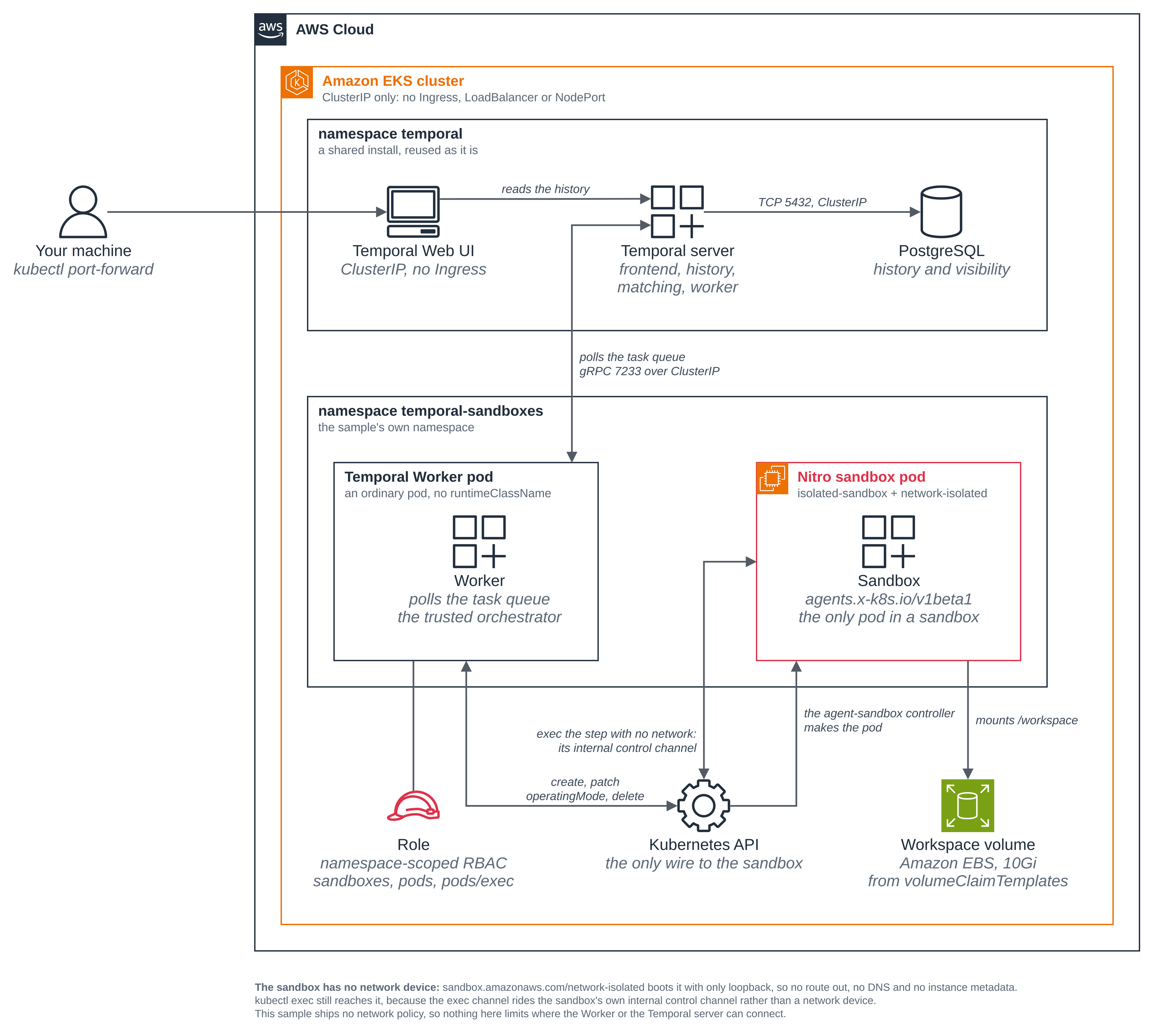
What this blueprint does not limit
The sandbox the workflow creates boots with
sandbox.amazonaws.com/network-isolated: "true", so it has no network interface at all,
which step 7 shows from inside the guest. That is a property of the sandbox the blueprint asks
for, not a claim about a policy.
Everything else here has whatever reach any pod on your cluster has. The Worker reaches the Kubernetes API and the Temporal frontend, and nothing in this blueprint stops it reaching anything else; the Temporal server and its PostgreSQL are likewise unrestricted on the wire, and are kept off the public internet only by being ClusterIP Services with no Ingress. This blueprint ships no network policy. To restrict where a pod can connect, see the network policy blueprint.
The blueprint creates no EKS Pod Identity association and no IAM role: nothing it runs in the cluster calls an AWS API. The AWS CLI is used only on your own machine, to create the ECR repository for the Worker image and to push it.
Prerequisites on the cluster
Both are shared installs. The scripts read them, reuse them exactly as they stand, and stop with the command when one is missing or is set up differently from what this blueprint needs.
| Prerequisite | What it is | Where |
|---|---|---|
| agent-sandbox v1.0.10 | The Sandbox CRD and the controller that reconciles it. The workflow's five verbs are all operations on Sandbox objects. |
Step 1, and warm pool step 1 |
| A Temporal server | The durable workflow engine, with a PostgreSQL datastore, an admin tools pod and the Web UI. | Step 2 |
Versions
| Component | Pin |
|---|---|
| agent-sandbox controller (kubernetes-sigs/agent-sandbox) | v1.0.10, as in warm pool |
Temporal Helm chart (temporalio/helm-charts, chart temporal) |
1.7.0 |
| Temporal Server image | 1.32.0, the chart's appVersion, left as the chart sets it |
| Temporal Web UI image | 2.54.1, left as the chart sets it |
Temporal Python SDK (temporalio) |
1.34.0, in worker/requirements.txt |
Kubernetes Python client (kubernetes) |
37.0.1, in worker/requirements.txt |
| PostgreSQL datastore image | postgres:17-alpine (PostgreSQL 17.11), pinned by digest in deploy/temporal/postgresql.yaml |
The Worker image is python:3.13-slim plus those two libraries, and the sandbox runs
busybox:1.36; both come from public.ecr.aws/docker/library. Two pairings are worth
re-checking rather than copying when you move the pins:
- The chart against the server image. Chart 1.7.0 carries
appVersion1.32.0 and the values file leaves the image alone, so they match by construction. Chart 1.7.0 also removed every datastore and add-on subchart, which is whydeploy/temporal/values.yamlhas nothing to turn off and why it fails the render outright if you still setcassandra,postgresql,prometheus,grafana,elasticsearchormysqlat the top level. Older guidance that has you setserver.configMapsToMount: "sprig"andserver.setConfigFilePath: truefor a 1.30 or later server image does not apply: neither key exists in this chart. - The SDK calls, not only the version strings. The workflow, activity and client calls
are written against
temporalio1.34.0, and the exec stream against thekubernetesclient 37.0.1. Both have moved APIs before.
numHistoryShards cannot be changed after the first install. The values file pins it at
the chart's default, 512; do not change it on a datastore that already holds history.
Files
| File | What it is |
|---|---|
worker/harness/provider.py |
The five lifecycle verbs, each one Kubernetes operation against the Sandbox API. No Temporal import. |
worker/harness/activities.py |
One thin retryable activity per verb. |
worker/harness/workflow.py |
The durable workflow that brackets the lifecycle, with the delete in a finally. |
worker/harness/worker.py |
The Worker process: hosts the workflow and the activities. |
worker/harness/start.py |
Starts a run, and reads a run's status, result or timeline. |
worker/harness/preflight.py |
Reads the Temporal server and changes nothing. Setup runs it before it deploys the Worker. |
worker/harness/config.py |
The Worker's settings, all from its environment. No secrets. |
worker/sandbox.yaml |
The Sandbox the provider renders and creates. |
worker/Dockerfile |
The Worker image. |
worker/requirements.txt |
The two pinned Python libraries. |
deploy/worker.yaml |
The Worker Deployment: an ordinary pod, on purpose. |
deploy/rbac.yaml |
The Worker's ServiceAccount, namespace-scoped Role and RoleBinding. |
deploy/ordinary-pod.yaml |
The control for step 11: the same container with runtimeClassName left out. |
deploy/storage-class.yaml |
The blueprint's own EBS StorageClass, created by setup only when no default class fits. |
deploy/temporal/postgresql.yaml |
The Temporal server's datastore, for step 2. |
deploy/temporal/values.yaml |
The Temporal Helm values, for step 2. |
scripts/setup.sh |
Check the prerequisites, build and push the Worker image, create the namespace, read the Temporal server, deploy the Worker. |
scripts/run-workflow.sh |
Start a run, or read its status, result or timeline. |
scripts/compare-sandbox.sh |
Create one ordinary pod on the same node, read the same signals, delete it by name. |
scripts/cleanup.sh |
Remove everything the blueprint created, and only that. |
scripts/common.sh |
The shared settings and the guards. Sourced, not run. |
.env.example |
The local values the blueprint needs. There are no secrets in it. |
The scripts read .env (copy it from .env.example), and a value already set in your
environment wins over the file. NAMESPACE defaults to temporal-sandboxes, and every
manifest is rendered with it at apply time, so changing it reaches every object. Set
KUBE_CONTEXT to the context of the cluster you ran Getting started on, so a run never
depends on your machine's current context: on a shared cluster another session can change
it. TEMPORAL_K8S_NAMESPACE and TEMPORAL_RELEASE say where your Temporal server is and
what Helm release name it was installed under, which its Service names are derived from.
The context: line at the top of each script's output shows sandbox-demo, the shared
default cluster name from the home page; the run that produced the output on this page used
a different context name, changed here to the default. Node names, the AWS account id and
the pod UIDs are from the run.
Step 1: Install agent-sandbox
If you have not already, from the warm pool blueprint. This folder was built against v1.0.10:
kubectl apply -f https://github.com/kubernetes-sigs/agent-sandbox/releases/download/v1.0.10/sandbox-with-extensions.yaml
kubectl -n agent-sandbox-system rollout status deploy/agent-sandbox-controller
Nothing in this blueprint installs, upgrades or reconfigures it. It was already installed at
v1.0.10 on the cluster these runs used, and was reused exactly as it stood;
scripts/setup.sh reads the CRD and the controller's Available condition and stops with
the command above when either is missing.
Step 2: Install a Temporal server, if your cluster has none
A Temporal server is a shared install, and another workload on your cluster may already depend on the version and the settings it has. So this is a step you run, not something the blueprint's scripts do. Check first:
kubectl get svc -n temporal
helm list --namespace temporal
If one is there, skip to step 3 and set TEMPORAL_K8S_NAMESPACE and TEMPORAL_RELEASE in
.env to match it. If there is none, install one. The chart installs only the server
roles and bundles no database, so this supplies the lightest viable one: a single
in-cluster PostgreSQL serving both the default store and the visibility store, with SQL
visibility and no Elasticsearch, and one replica of each server role.
The datastore password is generated into the Secret both PostgreSQL and the Temporal server read, from standard input, so it never appears on a command line or in a file in this repository:
kubectl create namespace temporal
openssl rand -base64 24 | tr -d '\n' \
  | kubectl -n temporal create secret generic temporal-postgresql --from-file=password=/dev/stdin
kubectl get storageclass temporal-postgresql-gp3 || kubectl create -f deploy/temporal/storage-class.yaml
kubectl -n temporal apply -f deploy/temporal/postgresql.yaml
kubectl -n temporal rollout status statefulset/temporal-postgresql
PostgreSQL has to be running before helm install, because the chart's schema job is a
pre-install hook. Then install the chart with this blueprint's values:
helm repo add temporal https://go.temporal.io/helm-charts && helm repo update temporal
helm install temporal temporal/temporal --version 1.7.0 \
  --namespace temporal -f deploy/temporal/values.yaml --timeout 15m --wait
NAME: temporal
LAST DEPLOYED: Sat Nov  7 04:56:30 2026
NAMESPACE: temporal
STATUS: deployed
REVISION: 1
DESCRIPTION: Install complete
kubectl -n temporal get pods
NAME                                  READY   STATUS    RESTARTS      AGE
temporal-admintools-9f5f5bbc9-c44mz   1/1     Running   0             22m
temporal-frontend-6f9745c6fc-b8sx5    1/1     Running   3 (21m ago)   22m
temporal-history-5b6d8cd755-99lqf     1/1     Running   3 (21m ago)   22m
temporal-matching-85cb854c94-tmksk    1/1     Running   3 (21m ago)   22m
temporal-postgresql-0                 1/1     Running   0             22m
temporal-web-55d5754cc9-wpztn         1/1     Running   0             22m
temporal-worker-764bc4697f-7scph      1/1     Running   3 (21m ago)   22m
The two restarts are the matching and worker roles waiting for the frontend to come up on the first install, which they do by exiting and being restarted.
These two blocks and the port-forward one below come from a separate run, the one that installed the server, rather than from the walkthrough below. The walkthrough cannot produce them: it is required to reuse an install that is already there.
The values file is worth reading before you run it, because three of its settings are the ones that decide what you get. Here are the parts that matter:
server:
  replicaCount: 1
  config:
    persistence:
      defaultStore: default
      visibilityStore: visibility
      numHistoryShards: 512
      datastores:
        default:
          sql:
            pluginName: postgres12
            databaseName: temporal
            connectAddr: "temporal-postgresql:5432"
            user: temporal
            existingSecret: temporal-postgresql     # the password, never in this file
            secretKey: password
            manageSchema: true                      # the chart's schema Job sets it up
        visibility:
          sql:
            databaseName: temporal_visibility       # SQL visibility, no Elasticsearch
            # ... the same connection and the same Secret
    namespaces:
      create: true
      namespace:
        - name: nitro-sandbox                       # the Temporal namespace runs land in
          retention: 3d
  frontend:
    service:
      type: ClusterIP                               # no Ingress, no LoadBalancer
web:
  enabled: true
  service:
    type: ClusterIP
manageSchema: true is the one that is easy to miss: without it the chart's schema Job
does nothing and the server starts against an empty database. namespaces.create is what
registers the Temporal namespace the runs land in; the blueprint's scripts never create it,
because this server is shared, so setup.sh checks for it and stops with the command when
it is absent.
Everything is a ClusterIP Service. Reach the Web UI with a port-forward, which is also how you watch a run:
kubectl -n temporal port-forward svc/temporal-web 8080:8080
Forwarding from 127.0.0.1:8080 -> 8080
Forwarding from [::1]:8080 -> 8080
Then open http://127.0.0.1:8080 and pick the nitro-sandbox namespace. Temporal's own
self-hosted guidance is to keep
the server off the public internet, like a database, which is what ClusterIP and the
port-forward do here. This is the Workflows list it shows:
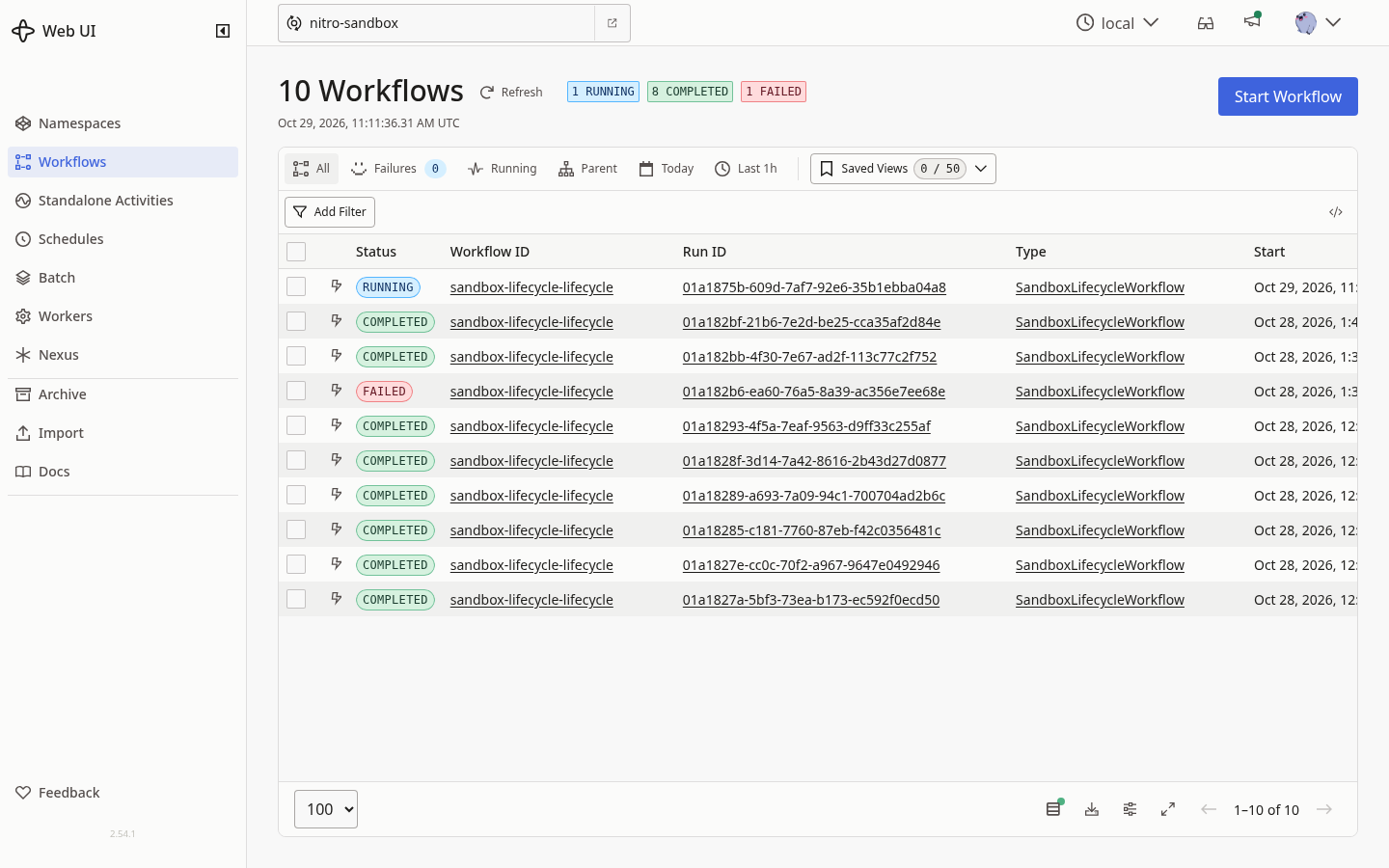
The Workflows list for the nitro-sandbox namespace, reached through the port-forward
above. This capture is from a separate run of this blueprint on the same cluster, after the
walkthrough below, so it could show a mix of statuses rather than only the one completed
run the rest of this page follows; the RUNNING and FAILED entries are other runs of the
same workflow, started the same way.
Step 3: Build the Worker and deploy it
scripts/setup.sh checks the two shared installs, chooses the StorageClass the
workflow's workspace claim will name, builds and pushes the Worker image, creates the
blueprint's namespace, reads the Temporal server from a one-shot pod, and applies the Worker
with its RBAC. It creates no Sandbox: the workflow does that.
cp .env.example .env    # set KUBE_CONTEXT, and NAMESPACE if you want another name
./scripts/setup.sh
context: sandbox-demo (pinned)   namespace: temporal-sandboxes   region: us-east-1

== 1/6 prerequisites, reused as they are ==
reusing the agent-sandbox install as it is (registry.k8s.io/agent-sandbox/agent-sandbox-controller:v1.0.10); this sample was built against v1.0.10
reusing the Temporal server in namespace temporal as it is (temporalio/server:1.32.0); this sample was built against chart 1.7.0
note: no default StorageClass fits (ebs.csi.eks.amazonaws.com, gp3, encrypted). Using the sample's own class temporal-sandboxes-gp3.
creating storageclass/temporal-sandboxes-gp3 from deploy/storage-class.yaml
storageclass.storage.k8s.io/temporal-sandboxes-gp3 created

== 2/6 ECR repository temporal-sandbox-worker ==
created ECR repository temporal-sandbox-worker, tagged ManagedBy=temporal

== 3/6 build and push the Worker image ==
  <ACCOUNT_ID>.dkr.ecr.us-east-1.amazonaws.com/temporal-sandbox-worker:6432374d803f
[the docker build and push output, abridged]

== 4/6 namespace temporal-sandboxes ==
namespace/temporal-sandboxes created
namespace/temporal-sandboxes labeled
created namespace temporal-sandboxes, labelled app.kubernetes.io/managed-by=temporal

== 5/6 the Temporal server, read from a one-shot pod ==
temporal address    temporal-frontend.temporal.svc:7233
temporal namespace  nitro-sandbox
task queue          nitro-sandbox-lifecycle
server version      1.32.0
namespace state     NAMESPACE_STATE_REGISTERED
namespace retention 3 days, 0:00:00

the Temporal server at temporal-frontend.temporal.svc:7233 is reachable and has the namespace 'nitro-sandbox'; nothing was changed on it

== 6/6 the Worker, its ServiceAccount and its Role ==
serviceaccount/temporal-sandbox-worker created
role.rbac.authorization.k8s.io/temporal-sandbox-worker created
rolebinding.rbac.authorization.k8s.io/temporal-sandbox-worker created
deployment.apps/temporal-sandbox-worker created
Waiting for deployment "temporal-sandbox-worker" rollout to finish: 0 of 1 updated replicas are available...
deployment "temporal-sandbox-worker" successfully rolled out

the Worker is polling task queue nitro-sandbox-lifecycle on temporal-frontend.temporal.svc:7233, namespace nitro-sandbox
it will drive sandbox/lifecycle in namespace temporal-sandboxes, workspace on storageclass temporal-sandboxes-gp3

Start a run:        ./scripts/run-workflow.sh --wait
Watch it:           kubectl -n temporal port-forward svc/temporal-web 8080:8080
Tear it down:       ./scripts/cleanup.sh
The docker build and push are abridged above; the account id is a placeholder. The order
matters. Every prerequisite is read before anything is created, so a missing one
stops the run with no leftovers. The namespace is created only when it is absent and is
labelled app.kubernetes.io/managed-by=temporal, because applying over an existing
namespace counts as reusing it, which would put the blueprint's mark on a namespace another
workload owns. The image tag is the SHA-256 of every file under worker/, so a change to
any of them produces a new tag and the push cannot serve a stale image; setup checks that
every COPY in the Dockerfile reads from worker/, because a COPY from outside that
folder would leave the tag unchanged while the image content moved.
The one-shot preflight pod in step 5/6 of that output is how the Temporal server itself is
read. Whether the Temporal namespace exists is a question for the server, not for
Kubernetes, and the answer decides whether this blueprint can run at all. It reads three
things and writes none of them. When the Temporal namespace is missing it exits 2 and setup
stops rather than adding a namespace to somebody else's server. That refusal, from a
separate run with TEMPORAL_NAMESPACE pointed at a namespace the server does not have:
== 5/6 the Temporal server, read from a one-shot pod ==
temporal address    temporal-frontend.temporal.svc:7233
temporal namespace  no-such-namespace
task queue          nitro-sandbox-lifecycle
server version      1.32.0
error: the Temporal namespace 'no-such-namespace' does not exist on this server. This sample does not create it, because the Temporal server is a shared install. Create it with the chart's namespace setting, or with the admin tools:
    kubectl -n <temporal namespace> exec deploy/temporal-admintools -- \
      temporal operator namespace create --namespace no-such-namespace --retention 3d
pod temporal-sandboxes/temporal-preflight terminated (Error)
error: the Temporal server in namespace temporal does not have the Temporal namespace 'no-such-namespace' this sample uses. A Temporal server is a shared install, so this script stops rather than add to it: create the namespace with the command the preflight printed, or set TEMPORAL_NAMESPACE in .env to one the server already has.
Notice what it does not do: it prints the command to create the namespace rather than running it. Adding a tenant to a server other workloads use is the reader's decision, not a script's.
The preflight pod is deleted by its exact name when it finishes, never by a label selector.
Step 4: The provider, five verbs and one Kubernetes operation each
worker/harness/provider.py is a plain class with no Temporal
import, which is what makes it the swappable part: another compute provider would implement
the same five methods and the workflow would not change.
| Harness verb | What it is against the Sandbox API |
|---|---|
| Provision on demand | Create a Sandbox (agents.x-k8s.io/v1beta1) from worker/sandbox.yaml, wait for its Ready condition, return the pod's name, UID and node. |
| Drive execution | Run the step in the sandbox pod over the Kubernetes exec channel, and return stdout, stderr and the exit code. |
| Persist across a pause | operatingMode: Suspended, then wait until the pod is really gone. |
| Resume | operatingMode: Running, then wait for Ready and read the new pod's UID. |
| Clean up | Delete the Sandbox; the pod and the workspace volume go with it, because the claim carries the Sandbox as its ownerReference. |
The Sandbox the provider creates is one object. Here is the part of
worker/sandbox.yaml that matters:
apiVersion: agents.x-k8s.io/v1beta1
kind: Sandbox
metadata:
  name: __NAME__
spec:
  operatingMode: Running          # Running | Suspended, the one field suspend and resume patch
  podTemplate:
    metadata:
      annotations:
        sandbox.amazonaws.com/network-isolated: "true"   # no network besides loopback
        karpenter.sh/do-not-disrupt: "true"              # pin the node while the single-attach volume is mounted
    spec:
      runtimeClassName: isolated-sandbox                 # the only line that makes it a sandbox
      containers:
        - name: workspace
          image: public.ecr.aws/docker/library/busybox:1.36
          command: ["sh", "-c", "mkdir -p /workspace && exec sleep infinity"]
          volumeMounts:
            - name: workspace
              mountPath: /workspace
  volumeClaimTemplates:
    - metadata:
        name: workspace
      spec:
        accessModes: [ReadWriteOncePod]
        storageClassName: __STORAGE_CLASS__              # the class setup chose
        resources:
          requests:
            storage: 10Gi
The two placeholders are filled in by the provider, which refuses to create the object if either is still in the text, so the manifest is never applied as it stands.
Two things in the provider are worth more than the five methods, because they are what makes it safe to put an orchestrator behind them.
Every wait is bounded, and a read that did not answer is never read as an answer. The wait loop polls, treats a failed read as "keep waiting" rather than as satisfied, and when the deadline passes reports which of the two happened:
        if time.monotonic() >= deadline:
            break
        ...
    if last_undetermined is not None:
        raise Undetermined(
            f"gave up after {timeout_seconds:.0f}s waiting for sandbox/{name} to be "
            f"{what}, and the last read did not answer, so its state could not be "
            f"determined: {last_undetermined}"
        )
    raise ProviderError(
        f"sandbox/{name} was not {what} within {timeout_seconds:.0f}s. "
        f"{self.describe_state(name)}"
    )
describe_state puts the Sandbox's conditions and the pod's container state into the
failure, so a sandbox that never starts fails the activity with what the cluster said
instead of the orchestrator waiting on it forever.
A step whose result could not be read is not a step that passed. The exit code comes off the exec stream's error channel, and every way that channel can fail to answer raises:
    if not channel:
        raise Undetermined(
            f"the exec stream to pod/{pod} closed without a status, so the step's "
            "exit code could not be determined"
        )
The same rule runs through the rest: a 404 on a read means "absent", which is a definite
answer, and every other API failure raises Undetermined. A denied permission or a
manifest the API server rejects raises PermanentProviderError instead, which the activity
marks non-retryable, so it fails the run with the reason rather than retrying something
that will never succeed.
A third guard, which is about the name rather than the read. An activity is
at-least-once, so a create whose answer was lost is retried and comes back
409 AlreadyExists. The obvious thing to do with that is adopt the object and carry on, and
it is not safe: an interrupted earlier run leaves a same-named Sandbox too, and
volumeClaimTemplates is immutable, so one made from a different manifest cannot be brought
into line with this one. Adopting it would have the run drive a workspace on a class it did
not choose. So the provider looks before it adopts:
        if labels.get(mark_key) != want_labels.get(mark_key):
            raise PermanentProviderError(
                f"sandbox/{name} already exists but carries {mark_key}="
                f"{labels.get(mark_key) or '<none>'}, not {want_labels.get(mark_key)}; "
                "it is not this sample's, so this run will not drive it"
            )
and then compares the storage class and access modes of the live workspace with the ones it rendered, refusing with the command to run when they differ. A read that does not answer refuses too, because adopting an object whose state could not be determined is exactly what the check is there to prevent.
Step 5: The workflow
worker/harness/workflow.py is deterministic and holds no
Kubernetes client. Every side effect is an activity, each with the same retry policy and a
heartbeat, and the delete is in a finally so a run that fails part way does not leave a
sandbox and its volume behind. Here is the shape of it, trimmed:
LIFECYCLE_RETRY = RetryPolicy(
    initial_interval=timedelta(seconds=2),
    backoff_coefficient=2.0,
    maximum_interval=timedelta(seconds=30),
    maximum_attempts=4,
)

@workflow.defn(name="SandboxLifecycleWorkflow")
class SandboxLifecycleWorkflow:
    @workflow.run
    async def run(self, request: LifecycleRequest) -> LifecycleResult:
        try:
            state = await workflow.execute_activity(provision_sandbox, ...)
            signals = await workflow.execute_activity(read_sandbox_signals, ...)
            write = await workflow.execute_activity(run_step, ...)       # fails once on purpose
            suspended = await workflow.execute_activity(suspend_sandbox, ...)
            await workflow.sleep(timedelta(seconds=request.suspended_seconds))
            resumed = await workflow.execute_activity(resume_sandbox, ...)
            read_back = await workflow.execute_activity(run_step, ...)   # the file is still there
        finally:
            if may_exist:
                result.deleted = await asyncio.shield(
                    workflow.execute_activity(delete_sandbox, ...)
                )
        return result
maximum_attempts=4 is the part that keeps a failure that is not going to clear from
looking like work in progress forever. asyncio.shield is what lets the delete run after a
cancellation: without it the await in the finally is cancelled too, and the sandbox
survives the run. workflow.sleep is a server-side timer, which is why nothing of the
workflow needs to be in any process while the sandbox is parked.
may_exist is set before the provision activity runs, not after it returns, and that
is the whole of whether a failed run leaks an EBS volume. The provision activity creates
the Sandbox and then waits for it to be Ready, so those are two things that can fail
separately: if the create succeeds and the readiness wait times out, the object exists and
the activity failed. A flag set on success would be false there, the finally would skip
the delete, and the Sandbox and its billed volume would be left behind by exactly the
failure the blueprint warns about in "Good to know". Set before the call, the delete is always
attempted, and attempting it when nothing was created costs nothing because the delete verb
reads a 404 as "already gone".
The finally is the workflow's own backstop, not the only one.
scripts/cleanup.sh deletes a leftover Sandbox by its exact name,
which is what covers a run that was terminated rather than cancelled, or a Worker that was
deleted and never replaced. Those are the two cases the finally cannot reach, because
neither runs any more workflow code.
Step 6: Start a run
./scripts/run-workflow.sh --suspended-seconds 150
context: sandbox-demo (pinned)   namespace: temporal-sandboxes   region: us-east-1

== start the workflow ==
started workflow id sandbox-lifecycle-lifecycle, run id 01a1b482-0c63-7aab-9ec9-d2eed0fd697c
task queue          nitro-sandbox-lifecycle
sandbox             lifecycle in the Worker's own namespace
suspended for       150s
The Temporal client runs inside the Worker pod, which already has the SDK and already
reaches the frontend over ClusterIP, so nothing here opens a port. --wait waits for the
run and prints its result; without it the command returns as soon as the run has started,
which is what you want when you are about to read the cluster or delete the Worker pod.
The workflow id is fixed per sandbox name, so the server refuses a second start while a run
is open and two runs can never drive the same Sandbox at once.
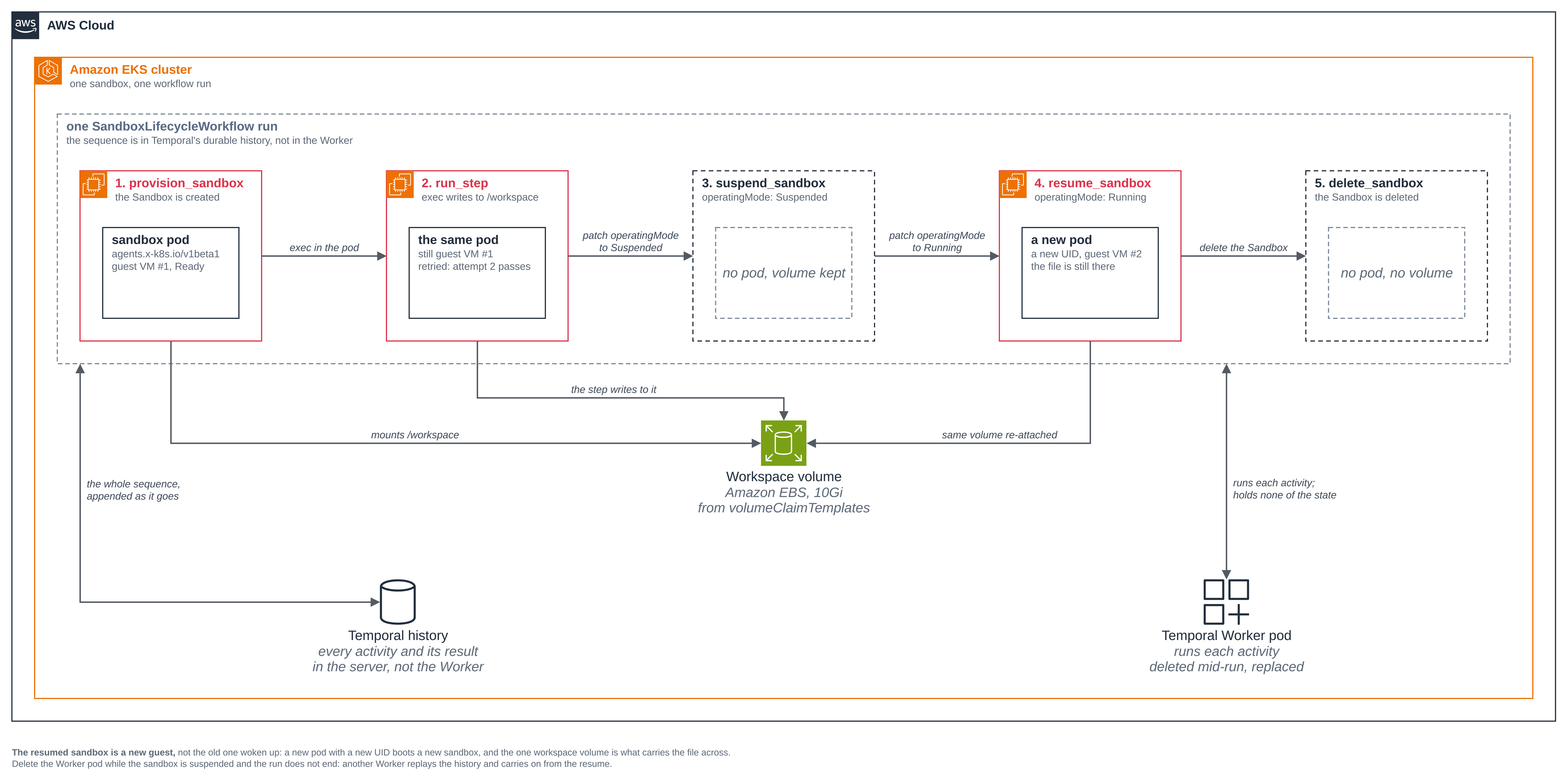
Figure 2: One workflow run across the sandbox's whole life. The five activities run left to right; notice that the workspace volume below them outlives each pod, and that the resume brings up a new pod with a new UID on a new guest, not the suspended one woken up.
Step 7: What the cluster reports while the run drives the sandbox
kubectl --context "$KUBE_CONTEXT" -n temporal-sandboxes get sandbox,pod
kubectl --context "$KUBE_CONTEXT" -n temporal-sandboxes get pvc
kubectl --context "$KUBE_CONTEXT" -n temporal-sandboxes get pod lifecycle \
  -o custom-columns='NAME:.metadata.name,UID:.metadata.uid,RUNTIMECLASS:.spec.runtimeClassName,NODE:.spec.nodeName,START:.status.startTime'
NAME                                READY   REASON             AGE
sandbox.agents.x-k8s.io/lifecycle   False   SandboxSuspended   42s

NAME                                           READY   STATUS        RESTARTS   AGE
pod/lifecycle                                  1/1     Terminating   0          42s
pod/temporal-sandbox-worker-766b45b67f-k4kjb   1/1     Running       0          48s

NAME                  STATUS   VOLUME                                     CAPACITY   ACCESS MODES   STORAGECLASS             VOLUMEATTRIBUTESCLASS   AGE
workspace-lifecycle   Bound    pvc-b6d42b2e-29e7-4239-a007-e47a98a2ada1   10Gi       RWOP           temporal-sandboxes-gp3   <unset>                 43s

NAME        UID                                    RUNTIMECLASS       NODE                  START
lifecycle   f164f8c8-484f-471d-876b-3b5d43f6a77d   isolated-sandbox   <NODE>   2026-11-07T05:36:48Z
The run moves quickly. These reads ran 42 seconds after the pod started, and by then the step
had already passed and the suspend had begun, so the Sandbox reads SandboxSuspended and
its pod Terminating. Run them straight after the start command to catch the Sandbox
Ready and the pod Running. Either way the pod is on isolated-sandbox, and the workspace
claim is Bound with access mode RWOP (ReadWriteOncePod) on the class setup chose. The
Worker pod beside it has no runtime class at all, which step 11's control reading shows.
Keep that pod UID, f164f8c8, for step 9.
It is network-isolated, so it has no network to restrict, and no network policy could give
it one. Only loopback has an address and there is no default route, which the run reads from
inside the guest and returns in its result as signals_before_suspend:
1: lo inet 127.0.0.1/8 scope host lo\ valid_lft forever preferred_lft forever
That is the whole of ip -4 -o addr show, and ip route show default after it printed
nothing: there is no default route. kubectl exec still works, which is what the Worker
drives the step over, because it rides the sandbox's own internal control channel rather
than a network device.
Neither the sandbox nor the Worker holds a credential, which is checkable by variable name without printing a value:
kubectl --context "$KUBE_CONTEXT" -n temporal-sandboxes exec lifecycle -- sh -c 'env | cut -d= -f1 | sort'
kubectl --context "$KUBE_CONTEXT" -n temporal-sandboxes exec deploy/temporal-sandbox-worker -- sh -c 'env | cut -d= -f1 | sort'
HOME
HOSTNAME
KUBERNETES_PORT
KUBERNETES_PORT_443_TCP
KUBERNETES_PORT_443_TCP_ADDR
KUBERNETES_PORT_443_TCP_PORT
KUBERNETES_PORT_443_TCP_PROTO
KUBERNETES_SERVICE_HOST
KUBERNETES_SERVICE_PORT
KUBERNETES_SERVICE_PORT_HTTPS
PATH
PWD
SHLVL

FAIL_FIRST_STEP_ATTEMPT
GPG_KEY
HOME
HOSTNAME
KUBERNETES_PORT
KUBERNETES_PORT_443_TCP
KUBERNETES_PORT_443_TCP_ADDR
KUBERNETES_PORT_443_TCP_PORT
KUBERNETES_PORT_443_TCP_PROTO
KUBERNETES_SERVICE_HOST
KUBERNETES_SERVICE_PORT
KUBERNETES_SERVICE_PORT_HTTPS
LANG
PATH
POD_NAME
PWD
PYTHONDONTWRITEBYTECODE
PYTHONPATH
PYTHONUNBUFFERED
PYTHON_SHA256
PYTHON_VERSION
SANDBOX_MANIFEST
SANDBOX_NAME
SANDBOX_NAMESPACE
SANDBOX_STORAGE_CLASS
SUSPENDED_SECONDS
TEMPORAL_ADDRESS
TEMPORAL_NAMESPACE
TEMPORAL_TASK_QUEUE
The sandbox's list is the first block: nothing but HOME, PATH, the shell's own
variables and the KUBERNETES_* service addresses the kubelet injects into every pod.
There is no API key, no model id and no Temporal credential, and no Secret is mounted into
it. The Worker's list is the second, and every name in it that is not Python's own or the
kubelet's is a plain setting: an address, two names and two flags. GPG_KEY comes from the
python base image and is the public key that image verified its own tarball with.
Be precise about what that does and does not show, because a variable name is not the only way a pod holds a credential. It shows there is no model or API key, no AWS credential and no Temporal credential in either pod. It says nothing about a token the kubelet mounts as a file rather than setting as a variable, and there is one of those to account for:
- The Worker holds a Kubernetes ServiceAccount token, projected into it at
/var/run/secrets/kubernetes.io/serviceaccount. That is not an oversight: it is how the Worker authenticates to the Kubernetes API, and it is the thing theRolein step 13 bounds. A credential the Worker must have is a credential worth scoping, which is the point of that step. - The sandbox holds none, because its pod template turns the projection off:
    spec:
      runtimeClassName: isolated-sandbox
      automountServiceAccountToken: false
Without that line the kubelet projects a token into the sandbox too. Its ServiceAccount
is default and nothing binds any role to it, so the token would authorize almost
nothing, but the step's pod is where agent-generated code would run and it has no
business holding a credential for the API that manages it. The sandbox pod's volumes
below show the projection is absent.
The self-hosted Temporal server this blueprint uses has no authentication of its own, which is why there is no Temporal credential to hold, and why step 2 keeps it on ClusterIP and reaches it only with a port-forward. The PostgreSQL password is in a Secret that only the Temporal server's own pods read; nothing in this blueprint's namespace has it.
kubectl --context "$KUBE_CONTEXT" -n temporal-sandboxes get pod lifecycle \
  -o jsonpath='{range .spec.volumes[*]}{.name}{"\n"}{end}'
kubectl --context "$KUBE_CONTEXT" -n temporal-sandboxes get pod \
  -l app.kubernetes.io/name=temporal-sandbox-worker \
  -o jsonpath='{range .items[0].spec.volumes[*]}{.name}{"\n"}{end}'
workspace

kube-api-access-rbljc
The sandbox pod has one volume, its workspace. The Worker has one too, and it is the
projected ServiceAccount token: kube-api-access-ndpvn. That one line in the pod template
is the difference, and this is the reading that shows it took effect rather than only that
it was asked for.
These two readings were taken during the step 12 run, which is the one that still had a sandbox up when the Worker was about to be deleted.
Step 8: Suspended, with the workspace kept
The suspend activity patches one field and waits until the pod is really gone.
kubectl --context "$KUBE_CONTEXT" -n temporal-sandboxes get sandbox lifecycle
kubectl --context "$KUBE_CONTEXT" -n temporal-sandboxes get pod lifecycle
kubectl --context "$KUBE_CONTEXT" -n temporal-sandboxes get pvc workspace-lifecycle
NAME        READY   REASON             AGE
lifecycle   False   SandboxSuspended   69s

NAME        READY   STATUS   RESTARTS   AGE
lifecycle   0/1     Error    0          70s

NAME                  STATUS   VOLUME                                     CAPACITY   ACCESS MODES   STORAGECLASS             VOLUMEATTRIBUTESCLASS   AGE
workspace-lifecycle   Bound    pvc-b6d42b2e-29e7-4239-a007-e47a98a2ada1   10Gi       RWOP           temporal-sandboxes-gp3   <unset>                 70s
The pod is NotFound, so you stop paying for the guest. The claim is still Bound on the
same volume, so the workspace was not reclaimed: it stays provisioned and billed so it can
come back, which is the trade. The Sandbox says why it is not Ready,
SandboxSuspended, so a caller can tell "parked on purpose" from "broken".
The activity does not report a suspend it cannot see. The Suspended condition alone is
not enough, because a pod that is still terminating is still holding the guest and the
volume, so it reads the pod too, and a pod it could not read is not a pod it reports as
deleted:
        if self._condition(obj, "Suspended") != "True":
            return False
        # The condition is not the whole answer: the pod must be gone, because a
        # pod still terminating is still holding the guest and the volume.
        return self._get_pod(name) is None
Step 9: The result: a new guest, the same volume, the file intact
./scripts/run-workflow.sh --result
context: sandbox-demo (pinned)   namespace: temporal-sandboxes   region: us-east-1

== start the workflow ==

  created sandbox/lifecycle: pod lifecycle uid f164f8c8-484f-471d-876b-3b5d43f6a77d on node <NODE>
  ran the write step in sandbox/lifecycle on attempt 2: step ran on kernel 6.18.54, boot 7s old
  sandbox/lifecycle is suspended; its pod is gone and its workspace volume is kept
  waiting 150s with sandbox/lifecycle suspended; no pod and no Worker state are needed to hold this
  resumed sandbox/lifecycle: pod lifecycle uid be900948-8171-4ed7-932d-e081df798c2a on node <NODE>
  read /workspace/notes.log back from the resumed sandbox/lifecycle
  sandbox/lifecycle deleted

{
  "deleted": "sandbox/lifecycle deleted",
  "notes_after_resume": "step ran on kernel 6.18.54, boot 7s old",
  "pod_uid_after_resume": "be900948-8171-4ed7-932d-e081df798c2a",
  "pod_uid_before_suspend": "f164f8c8-484f-471d-876b-3b5d43f6a77d",
  "sandbox_name": "lifecycle",
  "signals_after_resume": "pod startTime 2026-11-07T05:40:05Z\nread at 2026-11-07T05:40:21Z\n6.18.54 #1 SMP PREEMPT_DYNAMIC Thu Oct 22 17:38:11 UTC 2026\n5.35 3.06\ndm-0\nvda\nvdb\nvdc\nvdd\nc8a.enclave\n1: lo    inet 127.0.0.1/8 scope host lo\\       valid_lft forever preferred_lft forever",
  "signals_before_suspend": "pod startTime 2026-11-07T05:36:48Z\nread at 2026-11-07T05:37:00Z\n6.18.54 #1 SMP PREEMPT_DYNAMIC Thu Oct 22 17:38:11 UTC 2026\n5.28 2.52\ndm-0\nvda\nvdb\nvdc\nvdd\nc8a.enclave\n1: lo    inet 127.0.0.1/8 scope host lo\\       valid_lft forever preferred_lft forever",
  "timeline": [
    "created sandbox/lifecycle: pod lifecycle uid f164f8c8-484f-471d-876b-3b5d43f6a77d on node <NODE>",
    "ran the write step in sandbox/lifecycle on attempt 2: step ran on kernel 6.18.54, boot 7s old",
    "sandbox/lifecycle is suspended; its pod is gone and its workspace volume is kept",
    "waiting 150s with sandbox/lifecycle suspended; no pod and no Worker state are needed to hold this",
    "resumed sandbox/lifecycle: pod lifecycle uid be900948-8171-4ed7-932d-e081df798c2a on node <NODE>",
    "read /workspace/notes.log back from the resumed sandbox/lifecycle",
    "sandbox/lifecycle deleted"
  ],
  "worker_after_resume": "temporal-sandbox-worker-766b45b67f-k4kjb",
  "worker_at_start": "temporal-sandbox-worker-766b45b67f-k4kjb",
  "write_step_attempts": 2
}
Read four things in that result.
pod_uid_before_suspendandpod_uid_after_resumeare different,f164f8c8andbe900948, so the resume brought up a new pod rather than restarting the old one. The first of those is the UID step 7 read off the running pod.notes_after_resumeholds the line the step wrote before the suspend, read back off the workspace after it. Disk state survived; process memory did not. Note what it says:boot 7s oldis the age of the first guest, written into the file by the step that ran on it, and it is still that text after the resume.write_step_attemptsis 2, because the step failed on its first attempt on purpose and Temporal ran it again.worker_at_startandworker_after_resumeare the same pod here, because nothing interrupted this run. Step 12 is the one where they differ.
The delete is the last activity, so by the time the result comes back the Sandbox is gone
("deleted": "sandbox/lifecycle deleted"). Its pod and claim follow it, because the claim
carries the Sandbox as its ownerReference, and the clean up at the end of this page
confirms the volume behind that claim is gone.
Step 10: The activity timeline, out of the durable history
The Web UI's Workflow page lists the run and the ordered activities that drove the sandbox:
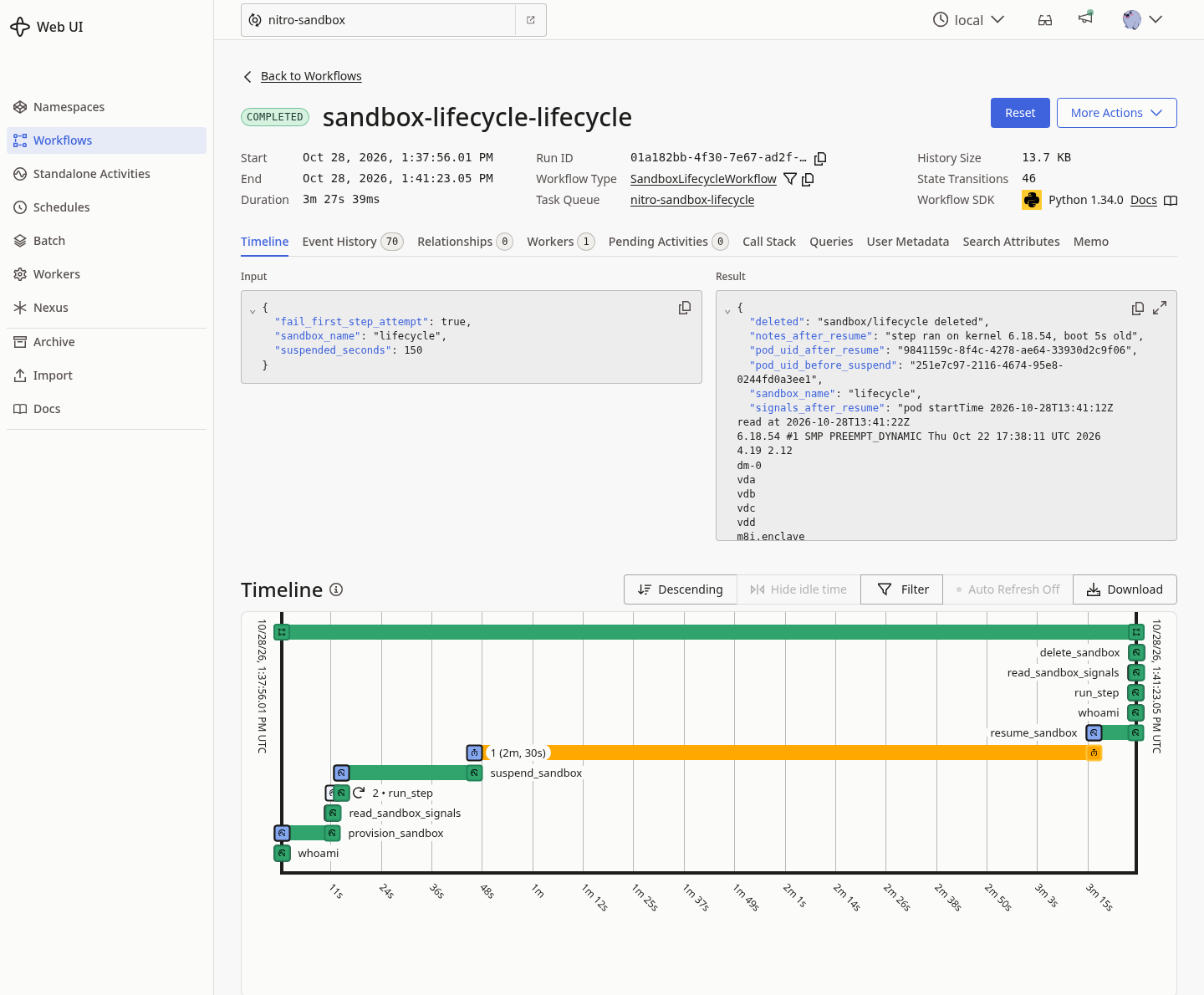
The Timeline tab for an earlier run of this blueprint (Run ID
01a182bb-4f30-7e67-ad2f-113c77c2f752), so its run id and timestamps differ from the text
history below; the activities and their order are the same. The retried
run_step shows as "2" on its bar, and the gap between suspend_sandbox and
resume_sandbox is the server-side timer this step's notes explain below.
The same timeline reads out of the server's history as text:
./scripts/run-workflow.sh --history
event  time                  type                               detail
    1  2026-11-07T05:36:24Z  WORKFLOW_EXECUTION_STARTED         nitro-sandbox-lifecycle
    3  2026-11-07T05:36:24Z  WORKFLOW_TASK_STARTED              1@temporal-sandbox-worker-766b45b67f-k4kjb
    5  2026-11-07T05:36:24Z  ACTIVITY_TASK_SCHEDULED            whoami
    6  2026-11-07T05:36:24Z  ACTIVITY_TASK_STARTED              whoami attempt 1 on 1@temporal-sandbox-worker-766b45b67f-k4kjb
    7  2026-11-07T05:36:24Z  ACTIVITY_TASK_COMPLETED            whoami
    9  2026-11-07T05:36:24Z  WORKFLOW_TASK_STARTED              1@temporal-sandbox-worker-766b45b67f-k4kjb
   11  2026-11-07T05:36:24Z  ACTIVITY_TASK_SCHEDULED            provision_sandbox
   12  2026-11-07T05:36:24Z  ACTIVITY_TASK_STARTED              provision_sandbox attempt 1 on 1@temporal-sandbox-worker-766b45b67f-k4kjb
   13  2026-11-07T05:37:00Z  ACTIVITY_TASK_COMPLETED            provision_sandbox
   15  2026-11-07T05:37:00Z  WORKFLOW_TASK_STARTED              1@temporal-sandbox-worker-766b45b67f-k4kjb
   17  2026-11-07T05:37:00Z  ACTIVITY_TASK_SCHEDULED            read_sandbox_signals
   18  2026-11-07T05:37:00Z  ACTIVITY_TASK_STARTED              read_sandbox_signals attempt 1 on 1@temporal-sandbox-worker-766b45b67f-k4kjb
   19  2026-11-07T05:37:00Z  ACTIVITY_TASK_COMPLETED            read_sandbox_signals
   21  2026-11-07T05:37:00Z  WORKFLOW_TASK_STARTED              1@temporal-sandbox-worker-766b45b67f-k4kjb
   23  2026-11-07T05:37:00Z  ACTIVITY_TASK_SCHEDULED            run_step
   24  2026-11-07T05:37:02Z  ACTIVITY_TASK_STARTED              run_step attempt 2 on 1@temporal-sandbox-worker-766b45b67f-k4kjb
   25  2026-11-07T05:37:03Z  ACTIVITY_TASK_COMPLETED            run_step
   27  2026-11-07T05:37:03Z  WORKFLOW_TASK_STARTED              1@temporal-sandbox-worker-766b45b67f-k4kjb
   29  2026-11-07T05:37:03Z  ACTIVITY_TASK_SCHEDULED            suspend_sandbox
   30  2026-11-07T05:37:03Z  ACTIVITY_TASK_STARTED              suspend_sandbox attempt 1 on 1@temporal-sandbox-worker-766b45b67f-k4kjb
   31  2026-11-07T05:37:35Z  ACTIVITY_TASK_COMPLETED            suspend_sandbox
   33  2026-11-07T05:37:35Z  WORKFLOW_TASK_STARTED              1@temporal-sandbox-worker-766b45b67f-k4kjb
   35  2026-11-07T05:37:35Z  TIMER_STARTED                      0:02:30 server-side timer
   36  2026-11-07T05:40:05Z  TIMER_FIRED
   38  2026-11-07T05:40:05Z  WORKFLOW_TASK_STARTED              1@temporal-sandbox-worker-766b45b67f-k4kjb
   40  2026-11-07T05:40:05Z  ACTIVITY_TASK_SCHEDULED            resume_sandbox
   41  2026-11-07T05:40:05Z  ACTIVITY_TASK_STARTED              resume_sandbox attempt 1 on 1@temporal-sandbox-worker-766b45b67f-k4kjb
   42  2026-11-07T05:40:21Z  ACTIVITY_TASK_COMPLETED            resume_sandbox
   44  2026-11-07T05:40:21Z  WORKFLOW_TASK_STARTED              1@temporal-sandbox-worker-766b45b67f-k4kjb
   46  2026-11-07T05:40:21Z  ACTIVITY_TASK_SCHEDULED            whoami
   47  2026-11-07T05:40:21Z  ACTIVITY_TASK_STARTED              whoami attempt 1 on 1@temporal-sandbox-worker-766b45b67f-k4kjb
   48  2026-11-07T05:40:21Z  ACTIVITY_TASK_COMPLETED            whoami
   50  2026-11-07T05:40:21Z  WORKFLOW_TASK_STARTED              1@temporal-sandbox-worker-766b45b67f-k4kjb
   52  2026-11-07T05:40:21Z  ACTIVITY_TASK_SCHEDULED            run_step
   53  2026-11-07T05:40:21Z  ACTIVITY_TASK_STARTED              run_step attempt 1 on 1@temporal-sandbox-worker-766b45b67f-k4kjb
   54  2026-11-07T05:40:21Z  ACTIVITY_TASK_COMPLETED            run_step
   56  2026-11-07T05:40:21Z  WORKFLOW_TASK_STARTED              1@temporal-sandbox-worker-766b45b67f-k4kjb
   58  2026-11-07T05:40:21Z  ACTIVITY_TASK_SCHEDULED            read_sandbox_signals
   59  2026-11-07T05:40:21Z  ACTIVITY_TASK_STARTED              read_sandbox_signals attempt 1 on 1@temporal-sandbox-worker-766b45b67f-k4kjb
   60  2026-11-07T05:40:21Z  ACTIVITY_TASK_COMPLETED            read_sandbox_signals
   62  2026-11-07T05:40:21Z  WORKFLOW_TASK_STARTED              1@temporal-sandbox-worker-766b45b67f-k4kjb
   64  2026-11-07T05:40:21Z  ACTIVITY_TASK_SCHEDULED            delete_sandbox
   65  2026-11-07T05:40:21Z  ACTIVITY_TASK_STARTED              delete_sandbox attempt 1 on 1@temporal-sandbox-worker-766b45b67f-k4kjb
   66  2026-11-07T05:40:21Z  ACTIVITY_TASK_COMPLETED            delete_sandbox
   68  2026-11-07T05:40:21Z  WORKFLOW_TASK_STARTED              1@temporal-sandbox-worker-766b45b67f-k4kjb
   70  2026-11-07T05:40:21Z  WORKFLOW_EXECUTION_COMPLETED
The workflow-task events are kept and the rest of the bookkeeping is filtered out, which is why the event ids skip. This is the record, and it is the server's: the Worker holds none of it. Three things in it are the point of putting Temporal here at all.
run_step attempt 2at event 24. The first attempt failed and Temporal scheduled another; the retry policy is what turned a failure into a second attempt instead of a failed run. The two-second gap between event 23 scheduling it and event 24 starting it is the retry policy'sinitial_interval. Note that the secondrun_step, the read-back at event 53, isattempt 1: only the one the blueprint asks to fail does.TIMER_STARTED 0:02:30 server-side timerat event 35. The wait while the sandbox is suspended is the server's timer, not a sleeping process. Nothing of this workflow is in any process between events 35 and 36.- The identity on each
ACTIVITY_TASK_STARTED. It names the Worker pod that ran that activity. Here it is the same pod throughout, because nothing interrupted this run; step 12 is where it changes.
To watch a run in the UI instead, port-forward it as in step 2 and open the
nitro-sandbox namespace.
Step 11: The pod's own kernel, boot and disks
The run reads four signals from inside the sandbox and returns them in its result. The
control is deploy/ordinary-pod.yaml, the same container with
the single line runtimeClassName: isolated-sandbox left out, pinned to the same node:
./scripts/compare-sandbox.sh --node <the node the run reported>
context: sandbox-demo (pinned)   namespace: temporal-sandboxes   region: us-east-1

== create pod/ordinary-pod on node <NODE> ==
pod/ordinary-pod created
pod/ordinary-pod condition met

== the same four readings, from an ordinary pod on node <NODE> ==
read at 2026-11-07T05:41:31Z
6.18.56 #2 SMP PREEMPT_DYNAMIC Fri Oct 30 22:32:37 UTC 2026
114.26 207.58
dm-0
loop0
loop1
loop2
loop3
loop4
loop5
loop6
loop7
nvme0n1
nvme1n1
nvme3n1
zram0
c8a.large
NAME           RUNTIMECLASS   NODE                  START
ordinary-pod   <none>         <NODE>   2026-11-07T05:41:29Z

== delete pod/ordinary-pod by name ==
pod "ordinary-pod" deleted from temporal-sandboxes namespace

pod/ordinary-pod is gone. Compare these readings with the signals the run returned.
Pass the node the resumed pod reported. On EKS Auto Mode the node the run first created the
sandbox on can be gone by the time you read the result, as it was in this run, and
compare-sandbox.sh refuses a node that is not on the cluster. So the sandbox column below
is signals_after_resume from the result in step 9, the reading from the pod on that same
node, split out; the ordinary column is the block above.
| Reading | The sandbox the workflow drove | Ordinary pod on the same node |
|---|---|---|
uname -rv |
6.18.54 #1 SMP PREEMPT_DYNAMIC Thu Oct 22 17:38:11 UTC 2026 |
6.18.56 #2 SMP PREEMPT_DYNAMIC Fri Oct 30 22:32:37 UTC 2026 |
cat /proc/uptime |
5.35 3.06 |
114.26 207.58 |
ls /sys/block |
dm-0 vda vdb vdc vdd |
dm-0 loop0 ... loop7 nvme0n1 nvme1n1 nvme3n1 zram0 |
cat /sys/class/dmi/id/product_name |
c8a.enclave |
c8a.large |
pod startTime, and when the reading was taken |
started 05:40:05Z, read at 05:40:21Z |
started 05:41:29Z, read at 05:41:31Z |
.spec.runtimeClassName |
isolated-sandbox |
<none> |
The kernel differs in version and build: the guest runs 6.18.54 #1, built on
October 22, and the node runs 6.18.56 #2, built on October 30.
The boot is the clearest of the four, and the last row is what makes it readable. The
ordinary pod was two seconds old when it was read and reported 114.26 seconds of uptime:
that is its node's, which had joined the cluster about two minutes earlier, because the pod
shares the node's kernel. The sandboxed pod was 16 seconds old and reported 5.35: that is
its own guest's, because the guest booted as part of starting the pod. It is less than the
pod's own age because the pod's startTime is when the kubelet began and the sandbox is
created and boots its kernel after that.
The block devices are virtio vd* in the guest, where the ordinary pod sees the
instance's nvme* devices along with the node's loop* and zram0. And the product
name reads the VM in the sandbox, c8a.enclave, where the ordinary pod reads the EC2
instance type, c8a.large.
The runtime class on the pod shows what was asked for rather than what ran, which is why the readings above come first; it is in the table as the last row for completeness.
Step 12: Delete the Worker pod mid-run
This is the one the whole blueprint is for. Start a run, and while the sandbox is suspended, delete the Worker pod by its exact name.
./scripts/run-workflow.sh --suspended-seconds 240
# while the sandbox is suspended, read the Worker's pod name and delete it:
kubectl --context "$KUBE_CONTEXT" -n temporal-sandboxes get pods
kubectl --context "$KUBE_CONTEXT" -n temporal-sandboxes delete pod <the Worker pod>
kubectl --context "$KUBE_CONTEXT" -n temporal-sandboxes get pods
started workflow id sandbox-lifecycle-lifecycle, run id 01a1b485-d3ac-7620-a227-74c3dd7dfe6a
task queue          nitro-sandbox-lifecycle
sandbox             lifecycle in the Worker's own namespace
suspended for       240s

NAME                                       READY   STATUS        RESTARTS   AGE
lifecycle                                  1/1     Terminating   0          2m34s
temporal-sandbox-worker-766b45b67f-k4kjb   1/1     Running       0          7m8s

pod "temporal-sandbox-worker-766b45b67f-k4kjb" deleted from temporal-sandboxes namespace

NAME                                       READY   STATUS    RESTARTS   AGE
temporal-sandbox-worker-766b45b67f-knr5k   1/1     Running   0          18s
Delete it by its exact name, as above, never with a label selector: on a shared cluster a selector meant for one pod has taken another workload's with it.
In this run the delete landed a little earlier than the timer: the Sandbox already read
SandboxSuspended, but its pod was still Terminating and the suspend_sandbox activity
was still waiting for it to go. Kubernetes starts another Worker, -knr5k, it replays the
run from the history, and the same run completes:
./scripts/run-workflow.sh --result
  created sandbox/lifecycle: pod lifecycle uid 97fc1c26-b3d6-4602-90c6-98ddd7c5d298 on node <NODE>
  ran the write step in sandbox/lifecycle on attempt 2: step ran on kernel 6.18.54, boot 6s old
  sandbox/lifecycle is suspended; its pod is gone and its workspace volume is kept
  waiting 240s with sandbox/lifecycle suspended; no pod and no Worker state are needed to hold this
  resumed sandbox/lifecycle: pod lifecycle uid bc893fb9-81a9-473e-a234-8a723ceb8085 on node <NODE>
  read /workspace/notes.log back from the resumed sandbox/lifecycle
  sandbox/lifecycle deleted

  "notes_after_resume": "step ran on kernel 6.18.54, boot 6s old",
  "worker_after_resume": "temporal-sandbox-worker-766b45b67f-knr5k",
  "worker_at_start": "temporal-sandbox-worker-766b45b67f-k4kjb",
  "write_step_attempts": 2
Abridged: the result holds the same fields as step 9, and the four that matter here are
kept. worker_at_start is the pod that was deleted, -k4kjb, and worker_after_resume is
the one Kubernetes replaced it with, -knr5k. The run that those two came from is one run,
with one run id: the same workflow completed across two Worker pods.
The history is where it is clearest. The identity column changes at exactly the activity the deleted Worker was running, and every event before it names the Worker that is now gone:
./scripts/run-workflow.sh --history
    1  2026-11-07T05:40:31Z  WORKFLOW_EXECUTION_STARTED         nitro-sandbox-lifecycle
    3  2026-11-07T05:40:31Z  WORKFLOW_TASK_STARTED              1@temporal-sandbox-worker-766b45b67f-k4kjb
    6  2026-11-07T05:40:31Z  ACTIVITY_TASK_STARTED              whoami attempt 1 on 1@temporal-sandbox-worker-766b45b67f-k4kjb
    9  2026-11-07T05:40:31Z  WORKFLOW_TASK_STARTED              1@temporal-sandbox-worker-766b45b67f-k4kjb
   12  2026-11-07T05:40:31Z  ACTIVITY_TASK_STARTED              provision_sandbox attempt 1 on 1@temporal-sandbox-worker-766b45b67f-k4kjb
   15  2026-11-07T05:43:12Z  WORKFLOW_TASK_STARTED              1@temporal-sandbox-worker-766b45b67f-k4kjb
   18  2026-11-07T05:43:12Z  ACTIVITY_TASK_STARTED              read_sandbox_signals attempt 1 on 1@temporal-sandbox-worker-766b45b67f-k4kjb
   21  2026-11-07T05:43:12Z  WORKFLOW_TASK_STARTED              1@temporal-sandbox-worker-766b45b67f-k4kjb
   24  2026-11-07T05:43:14Z  ACTIVITY_TASK_STARTED              run_step attempt 2 on 1@temporal-sandbox-worker-766b45b67f-k4kjb
   27  2026-11-07T05:43:15Z  WORKFLOW_TASK_STARTED              1@temporal-sandbox-worker-766b45b67f-k4kjb
   30  2026-11-07T05:43:32Z  ACTIVITY_TASK_STARTED              suspend_sandbox attempt 2 on 1@temporal-sandbox-worker-766b45b67f-knr5k
   33  2026-11-07T05:43:46Z  WORKFLOW_TASK_STARTED              1@temporal-sandbox-worker-766b45b67f-knr5k
   35  2026-11-07T05:43:46Z  TIMER_STARTED                      0:04:00 server-side timer
   36  2026-11-07T05:47:46Z  TIMER_FIRED
   38  2026-11-07T05:47:46Z  WORKFLOW_TASK_STARTED              1@temporal-sandbox-worker-766b45b67f-knr5k
   41  2026-11-07T05:47:46Z  ACTIVITY_TASK_STARTED              resume_sandbox attempt 1 on 1@temporal-sandbox-worker-766b45b67f-knr5k
   44  2026-11-07T05:47:58Z  WORKFLOW_TASK_STARTED              1@temporal-sandbox-worker-766b45b67f-knr5k
   47  2026-11-07T05:47:58Z  ACTIVITY_TASK_STARTED              whoami attempt 1 on 1@temporal-sandbox-worker-766b45b67f-knr5k
   50  2026-11-07T05:47:58Z  WORKFLOW_TASK_STARTED              1@temporal-sandbox-worker-766b45b67f-knr5k
   53  2026-11-07T05:47:58Z  ACTIVITY_TASK_STARTED              run_step attempt 1 on 1@temporal-sandbox-worker-766b45b67f-knr5k
   56  2026-11-07T05:47:59Z  WORKFLOW_TASK_STARTED              1@temporal-sandbox-worker-766b45b67f-knr5k
   59  2026-11-07T05:47:59Z  ACTIVITY_TASK_STARTED              read_sandbox_signals attempt 1 on 1@temporal-sandbox-worker-766b45b67f-knr5k
   62  2026-11-07T05:47:59Z  WORKFLOW_TASK_STARTED              1@temporal-sandbox-worker-766b45b67f-knr5k
   65  2026-11-07T05:47:59Z  ACTIVITY_TASK_STARTED              delete_sandbox attempt 1 on 1@temporal-sandbox-worker-766b45b67f-knr5k
   68  2026-11-07T05:47:59Z  WORKFLOW_TASK_STARTED              1@temporal-sandbox-worker-766b45b67f-knr5k
   70  2026-11-07T05:47:59Z  WORKFLOW_EXECUTION_COMPLETED
Abridged to the started events and the timer; the full output has every scheduled and
completed event too. Events 3 to 27 ran on -k4kjb. The Worker pod was deleted while
suspend_sandbox was running on it, so that activity's first attempt never reported back;
Temporal ran it again, and event 30 is suspend_sandbox attempt 2 on -knr5k. From there
the same workflow starts the timer, resumes the sandbox, reads the file back and deletes the
sandbox, all on -knr5k. Only the interrupted activity ran twice, and nothing was lost,
because the only state the workflow had was in these events. In an earlier run of
this blueprint the Worker was deleted after the timer had started, and there the change fell
at the timer, with no activity retried.
What this does and does not show. It shows a Worker pod that goes away during a run
being replaced, and the run finishing. It does not show a run surviving a Worker that is
never replaced: the Deployment is what brings one back, and with no Worker polling the
task queue the run simply waits. Nor does it show a terminated workflow being tidied up:
see "Good to know".
Step 13: What the Worker is allowed to do
The Worker is the trusted orchestrator, so it is the one component here with Kubernetes
permissions at all. It authenticates with the ServiceAccount token step 7 accounts for, and
this Role in the blueprint's own namespace is what bounds that token. Every verb in it is one
the provider's code calls, and the comments say which call wants it. The whole rule set,
from deploy/rbac.yaml:
apiVersion: rbac.authorization.k8s.io/v1
kind: Role
metadata:
  name: temporal-sandbox-worker
  namespace: __NAMESPACE__
rules:
  # Sandbox objects are in the core agents.x-k8s.io group, not extensions.
  # create and delete bracket the lifecycle; patch is how suspend and resume set
  # operatingMode; get is every wait and every reading. No list and no watch:
  # the provider only ever reads the one Sandbox it was given the name of, so
  # granting them would be granting a read of every Sandbox in the namespace for
  # nothing.
  - apiGroups: ["agents.x-k8s.io"]
    resources: ["sandboxes"]
    verbs: ["get", "create", "patch", "delete"]
  # The backing pod, read for its UID, its node and its start time, and to
  # confirm it is really gone after a suspend. get only: no list or watch for
  # the same reason as above, and no create, patch or delete because the
  # controller owns the pods and the Worker never makes one itself.
  - apiGroups: [""]
    resources: ["pods"]
    verbs: ["get"]
  # The exec channel the step runs over. BOTH verbs are needed, and that was
  # measured rather than assumed: with only get, the websocket handshake comes
  # back "403 Forbidden ... pods \"lifecycle\" is forbidden"; with only create,
  # the same. Only get and create together open the stream. So do not trim
  # either one on the reasoning that the client opens the stream with a GET.
  - apiGroups: [""]
    resources: ["pods/exec"]
    verbs: ["get", "create"]
There is no ClusterRole and no ClusterRoleBinding anywhere in this blueprint. The
namespace the Worker acts in is taken from the pod itself rather than written into its
configuration, so it cannot be pointed at a namespace its Role does not cover:
            - name: SANDBOX_NAMESPACE
              valueFrom:
                fieldRef:
                  fieldPath: metadata.namespace
Four verbs on one resource, one on another, two on a subresource. list and watch are
not there, and leaving them out is the part worth copying: the provider only ever reads
the one Sandbox whose name it was given, so granting them would have handed the Worker a
read of every Sandbox in the namespace for nothing. The run on this page works without
them, which is what shows get is enough.
pods/exec is the one to leave alone, and the reason is worth knowing before you trim
it. It looks like it should need only one verb: the Kubernetes Python client opens the
stream with a GET that upgrades to a websocket, not with the POST that kubectl exec uses.
It needs both. With only get, the handshake comes back
403 Forbidden ... pods "lifecycle" is forbidden; with only create, the same; with the
two together the stream opens. So a Role trimmed by reading the client code rather than by
trying it refuses every step the workflow runs.
The Worker holds no AWS credential and no model or API key, and the self-hosted Temporal server this blueprint uses has no authentication of its own, which is exactly why the page keeps it on ClusterIP and reaches it only with a port-forward.
Optional: Temporal Cloud instead of a self-hosted server
Temporal Cloud is Temporal's managed service,
and the workflow, the activities and the provider in this folder are identical on it. What
changes is the three lines that say where the server is and how to authenticate to it: the
Worker connects to a Cloud namespace endpoint with an API key or mTLS instead of to
temporal-frontend.temporal.svc:7233, and you use Cloud's hosted Web UI instead of the
port-forward in step 2. An API key would be a Secret the Worker reads, which this blueprint's
Worker has none of.
This blueprint self-hosts so that it runs on nothing beyond the Getting started cluster: no account, no external endpoint and no key. Moving it to Cloud is left as an exercise.
Good to know
- Suspend preserves data; delete does not. The claim carries the
Sandboxas itsownerReference, so the delete activity takes thePersistentVolumeClaimand the EBS volume behind it with theSandbox. Only suspend keeps the workspace, and the volume stays billed while it is suspended. volumeClaimTemplatesis immutable after theSandboxis created. Changing the size, class or access mode means deleting and recreating theSandbox, which deletes the workspace. Because the workflow creates the object from the manifest in its own image, a change toworker/sandbox.yamlproduces a new image tag and takes effect on the next run, not on aSandboxthat already exists.- An
execunder a retry policy is at-least-once. The step this blueprint runs appends a line to a file, so a retry after an exec that succeeded and lost its answer would append twice. That is harmless here and is why the deliberate failure is raised before the exec rather than after it. A production harness would make the step idempotent, or record a token in the sandbox that the step checks. - The workflow handles a Worker that dies and one that is cancelled. It does not handle
being terminated. Step 12 shows the first. A cancelled run still reaches the delete,
because the
finallyis shielded, and so does a run whose activity fails permanently. A workflow that is terminated rather than cancelled runs no more code at all, so itsSandboxis left; so is one whose Worker is deleted and never replaced. Both are whatscripts/cleanup.shdeletes by exact name. - One run at a time, per sandbox name. The workflow id is
sandbox-lifecycle-<SANDBOX_NAME>, and Temporal refuses a start while a run with that id is open. To drive several sandboxes at once, give each its ownSANDBOX_NAME, which reaches the workflow id, theSandboxand the clean up together. - The single-attach volume pins the node. The pod template sets
karpenter.sh/do-not-disrupt: "true"so the node is not consolidated with the volume still attached, which could stall the detach. The controller re-creates the pod on resume, so this does not prevent the suspend and resume cycle. - The Temporal server's history is what you are keeping. Its PostgreSQL holds every run, which is the record this blueprint is about, so the clean up keeps the server by default and the commands to remove it are in the clean up's own output.
Clean up
Set the variables again if you are in a new shell, then remove everything the blueprint
created: the Worker and its RBAC, any Sandbox a run left behind with its workspace
volume, the namespace, the blueprint's own StorageClass if setup made one, and the ECR
repository.
cp .env.example .env    # if you have not already; set KUBE_CONTEXT and NAMESPACE
./scripts/cleanup.sh
context: sandbox-demo (pinned)   namespace: temporal-sandboxes   region: us-east-1
namespace temporal-sandboxes carries app.kubernetes.io/managed-by=temporal; everything in it is the sample's

== 1/6 delete the Worker, so nothing creates another Sandbox ==
deployment.apps "temporal-sandbox-worker" deleted from temporal-sandboxes namespace

== 2/6 delete any Sandbox a run left behind (and, by ownerReference, its workspace volume) ==
  sandbox/lifecycle: not present (a completed run deletes its own)

== 3/6 delete the Worker's ServiceAccount, Role and RoleBinding ==
rolebinding.rbac.authorization.k8s.io "temporal-sandbox-worker" deleted from temporal-sandboxes namespace
role.rbac.authorization.k8s.io "temporal-sandbox-worker" deleted from temporal-sandboxes namespace
serviceaccount "temporal-sandbox-worker" deleted from temporal-sandboxes namespace

== 4/6 delete namespace temporal-sandboxes ==
namespace "temporal-sandboxes" deleted
  namespace temporal-sandboxes: gone

== 5/6 delete the sample's own StorageClass, if setup made one ==
storageclass.storage.k8s.io "temporal-sandboxes-gp3" deleted
  storageclass/temporal-sandboxes-gp3 deleted

== 6/6 delete the ECR repository temporal-sandbox-worker ==
  ECR repository temporal-sandbox-worker is gone

clean up complete: the Worker, its RBAC, any leftover Sandbox with its workspace
volume, the namespace, the sample's own StorageClass if it made one, and the ECR
repository are all gone.

What stays, and how to remove it:
  the Temporal server in namespace temporal, a shared install. Its PostgreSQL
  holds the durable history of every run, which is the record this sample is
  about, so it is kept by default. To remove it, and lose that history:
    helm uninstall temporal --namespace temporal
    kubectl -n temporal delete statefulset/temporal-postgresql service/temporal-postgresql \
      configmap/temporal-postgresql-initdb secret/temporal-postgresql
    kubectl -n temporal delete pvc/data-temporal-postgresql-0
    kubectl delete namespace temporal
  Check nothing else on your cluster uses it first:
    helm list --namespace temporal

  the Temporal namespace 'nitro-sandbox' on that server, which goes with it.

  the agent-sandbox controller, shared with the warm pool and the other
  agent-sandbox samples. To remove it, follow the warm pool clean up.
Step 2/6 says not present because the last run completed, and a completed run's finally
block has already deleted its own Sandbox. On a run that was terminated, or whose Worker
went away and was not replaced, that step is where the leftover is deleted by its exact
name and its EBS volume confirmed gone. Step 5/6 deletes storageclass/temporal-sandboxes-gp3
because this cluster had no fitting default class and setup made its own; on a cluster whose
default fits, setup creates none and that step says not present.
The clean up checks that the namespace carries the blueprint's label before it deletes
anything inside it, deletes the Worker first so nothing creates another Sandbox while it
works, removes the helper pod by its exact name rather than by a label selector, reads a
failed lookup as "could not determine" rather than as "gone", and exits non-zero if it
skipped something or could not confirm a delete. So an incomplete clean up is never
reported as done.
What stays. The agent-sandbox controller, shared with the warm pool and the other
agent-sandbox blueprints: to remove it, follow the
warm pool clean up. The Temporal
server, because its PostgreSQL holds the durable history of every run. Check that nothing
else on your cluster uses it (helm list --namespace temporal) before you remove it, and
then the commands in the clean up's own output above do it, along with the Temporal
namespace on it.
If this is the only blueprint you ran, follow the hello sandbox clean up to remove the namespace and the cluster.