Give procurement tools separate permissions with Strands Box
Run one procurement analyst inside AWS Nitro Sandbox on Amazon EKS. Give its reader, evaluator, and writer tools separate Box permissions. Start with the shared prerequisites, then complete hello sandbox and coding agent.
git clone https://github.com/aws-samples/sample-eks-nitro-sandbox.git
cd sample-eks-nitro-sandbox/examples/subagent-security/strands-box
The operator needs these tools. The versions below come from the walkthrough.
| Tool | Version used | Install |
|---|---|---|
| AWS CLI | 2.38.0 |
AWS CLI installation |
| kubectl | 1.36.0 |
kubectl installation |
| Docker | 25.0.14 |
Docker installation |
| Docker Buildx | 0.12.2 |
Buildx installation |
| Bash | 5.2.15 |
Bash downloads |
| jq | 1.8.1 |
jq downloads |
| Python | 3.9.25 |
Python downloads |
The cluster needs Linux ARM64 capacity, the isolated-sandbox runtime, working EKS Pod Identity, and access to the configured Bedrock model.
Admission must permit the privileged guest configuration below.
A run uses Bedrock tokens, S3 objects, ECR images, and pod compute until cleanup.
Why ARM64. Box publishes Linux builds for ARM64 only (v0.2.1 release), so both images are linux/arm64 and both pods select ARM64 nodes.
That has two consequences:
- The cluster needs a node pool that offers AWS Graviton instance types. The EKS Auto Mode
general-purposenode pool offers onlyamd64. Changing node pools affects every workload on the cluster, so this blueprint leaves it to you. To add one, follow Create a node pool for EKS Auto Mode withkubernetes.io/archset toarm64. Keep labels under thekubernetes.iodomain out of the pool's template: a pool whose template carried one launched no nodes and reported no error. - The machine that runs
setup.shmust buildlinux/arm64images. An ARM64 host does this natively. On an x86_64 host, enable arm64 emulation for Docker Buildx as Multi-platform builds describes. Setup checks this before it creates anything. On an x86_64 host without emulation, it stops with:
ERROR: the Docker builder cannot build linux/arm64 images (it reports: linux/amd64, linux/amd64/v2, linux/amd64/v3, linux/amd64/v4, linux/386). Run setup on an ARM64 host, or enable arm64 emulation for Docker Buildx: https://docs.docker.com/build/building/multi-platform/
Overview
The analyst compares three fictional supplier proposals and recommends one supplier. It must not change supplier records or place an order. The shared case supplies the proposals, comparison rules, worker code, and model call.
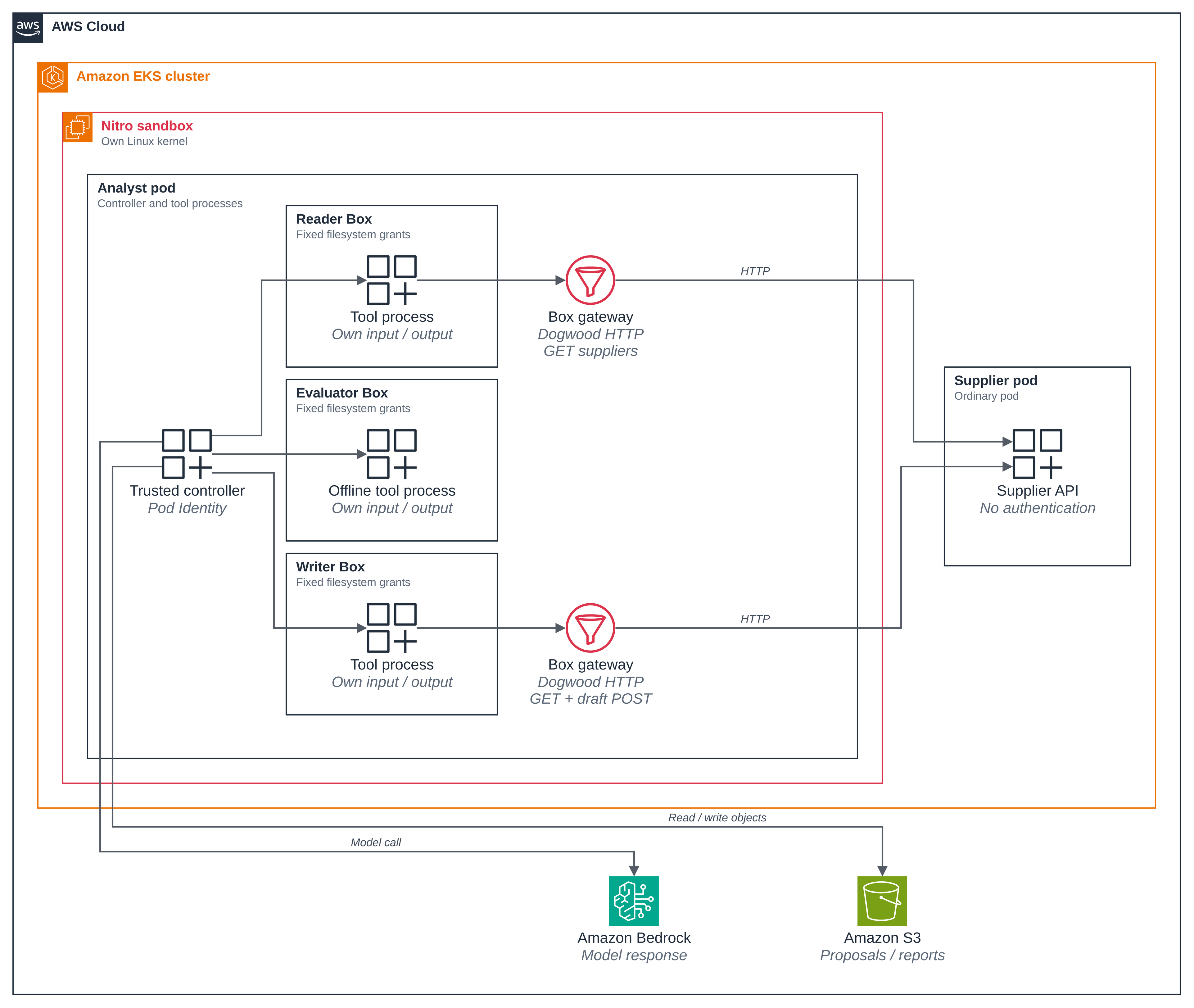
The trusted controller stages each role's input and starts a separate Box for that role. The reader fetches availability. The evaluator compares the proposals without external connections. The writer submits a recommendation draft. A Strands Agents model call explains the comparison before the controller saves the report.
- Nitro separates the pod from its node. The pod runs with its own guest kernel.
- Box restricts each role process. Native filesystem grants limit file access. Dogwood policies check destinations, HTTP methods, paths, and prior responses.
- The controller owns AWS access. EKS Pod Identity supplies its temporary credentials for Bedrock and S3. The role processes receive no AWS credentials.
The three roles are tool processes inside one pod. They are not separate model sessions. The trusted controller and its model call remain outside the role Boxes. Each online role reaches the supplier through its own Box gateway. The supplier runs as an ordinary pod behind a ClusterIP Service.
The supplier is a synthetic HTTP fixture with no authentication, private certificate, or purchasing integration. It accepts synthetic mutations so the example can distinguish a Box refusal from a supplier refusal. This example does not demonstrate supplier credential injection or private TLS trust. To restrict the whole pod's connections, see the network policy blueprint.
Figure 1: One Nitro sandbox contains the controller and three separate role Boxes. Box gateways check HTTP requests before they reach the ordinary supplier pod.
Versions and files
The Dockerfile downloads the released Linux ARM64 package and verifies its SHA-256 hash. It installs the shared Python dependency lock with hashes and pins the Python image by digest. versions.json records the archive name, hash, source revision, and Python base-image digest.
| Component | Pin |
|---|---|
| Box release | v0.2.1, box-v0.2.1-linux-arm64.tar.gz |
| Box source revision | e39544d49188b82933264b83159c7ccc278ced5a |
| Platform | linux/arm64 |
| Python base image | 3.13-slim-bookworm, digest in versions.json |
| Strands Agents, boto3, Pydantic | 1.62.0, 1.43.118, 2.14.1. Complete shared lock |
The final analyst and supplier images differ from the Python base image. Their tested digests identify the complete images used in the walkthrough.
| Final image | Tested SHA-256 digest |
|---|---|
| Analyst | d0911ebe5a1fbc9b4a671bdb66fdecb6dd8d31574533beec4de5caad5aa4e211 |
| Supplier API | d9e1b9b0dc173a43c0e383d40c148018190b2cb6813b78e775474f5106013b09 |
| File | Purpose |
|---|---|
| .env.example | Selects the existing cluster, Region, context, namespace, and model |
| controller.py | Stages role inputs, makes AWS calls, and validates results |
| box_roles.py | Creates fixed role configurations and launches Box |
| worker_adapter.py | Runs the unchanged shared worker through Box |
| HTTP supplier and supplier image | Serve the shared synthetic fixture without credentials |
| Reader, evaluator, and writer policies | Define role permissions and the writer's response limit |
| Nitro pod and supplier pod | Run the analyst in Nitro and the supplier as an ordinary pod |
| Setup, run, and cleanup | Create owned resources, run the workflow, and remove those resources |
| Architecture source | Editable source for Figure 1 |
Run the example
Step 1: Select the cluster and prepare the resources.
Copy the environment template. Set CLUSTER_NAME, AWS_REGION, and KUBE_CONTEXT in .env.
Keep DEPLOYMENT_MODE=nitro. Select a Bedrock model that the account can invoke.
cp .env.example .env
# Fill in the cluster, Region, context, and model in .env.
./scripts/setup.sh
Abridged output. <NAMESPACE>, <BUCKET>, <ROLE_NAME>, and <ASSOCIATION_ID> replace the walkthrough's resource names and identifier.
namespace/<NAMESPACE> created
serviceaccount/analyst created
service/supplier-api created
service/supplier-api-alias created
deployment.apps/supplier-api created
  created the bucket <BUCKET>
  seeded the case, 3 proposals and one other case's object
  created the IAM role <ROLE_NAME>
  created the Pod Identity association <ASSOCIATION_ID>
pod/analyst created
pod/analyst condition met
==> ready: run ./scripts/run.sh
Setup creates the blueprint's namespace, images, supplier service, S3 bucket, IAM role, and Pod Identity association. It saves the selected target for subsequent run and cleanup commands. It preserves shared controllers and cluster settings.
Setup derives an ownership identifier from the AWS account, Region, cluster endpoint, and namespace. Default bucket, role, and image repository names include this identifier. Resource tags and the namespace label must match it before reuse or cleanup.
Each checkout stores one target in tmp/strands-box/state.env.
Clean that deployment before changing the target in .env.
Setup, run, and cleanup all read .env, so a setting such as AWS_PROFILE=<PROFILE> there applies to every script.
They read it as NAME=value lines, without running it, and accept only the names in .env.example; any other name stops the script.
Run and cleanup still take the cluster, Region, namespace, and account from the setup record, and stop if the active AWS account differs from it.
The analyst pod selects Nitro with this configuration excerpt:
spec:
  runtimeClassName: isolated-sandbox
  nodeSelector:
    kubernetes.io/arch: arm64
  serviceAccountName: analyst
  automountServiceAccountToken: false
An init container runs as privileged root and sets user.max_user_namespaces to 1024 inside the guest.
The application container is also privileged and runs as UID 1000.
A non-root UID does not remove its container privileges. This configuration does not establish the minimum required capabilities.
The blueprint requests one CPU and 1 GiB of memory for the controller and Box processes. These requests size this workload. They are not AWS Nitro platform minimums.
Step 2: Inspect the role permissions.
Each role receives its own configuration, policy, input directory, output directory, and Box history. The controller keeps policy files, Box state, and AWS credential files outside every role's writable directories. It passes results between roles only after it validates their structure and business meaning.
| Role | Permitted work | Refused work |
|---|---|---|
| Reader | Read its input, write its output, fetch this case's supplier list | Submit drafts, change supplier records, place orders, read another case, modify policy |
| Evaluator | Read its input, write its output, compare proposals | Make external connections or access another role's files |
| Writer | Read its input, write its output, fetch availability, submit this case's draft | Change supplier records, place orders, read another case, modify policy |
Python accesses files with the [agent.filesystem] grants in the rendered box.toml.
They do not produce a separate Dogwood fs:* decision for each operation.
Dogwood separately checks mediated HTTP requests against the destination, port, method, and path.
This excerpt from writer.dw permits a recommendation draft:
@id("supplier_draft")
permit(principal == Box::Agent::"self", action == Box::Action::"http:request", resource)
when {
    context.input.host == "__HOST__" && context.input.port == __PORT__ &&
    context.input.method == "POST" && context.input.path == "/cases/rfp-001/recommendations"
};
The controller substitutes the configured supplier hostname and port.
A separate net:connect rule permits that same destination.
The alternate Service name reaches the same supplier, but the role policy does not permit that name.
Step 3: Run the workflow.
./scripts/run.sh
Abridged output:
PASS reader: own_input_read
PASS reader: own_output_write
PASS reader: sibling_input_read refused
PASS reader: policy_write refused
PASS reader: reader-get returns 200
PASS reader: reader-post returns 403
PASS writer: writer-draft-1 returns 201
PASS writer: writer-draft-2 returns 201
PASS writer: writer-draft-3 returns 201
PASS writer: writer-draft-4 returns 403
PASS fresh-writer: fresh-writer-draft returns 201
Allowed role requests must reach the supplier exactly once. Refused requests must not appear in its request log. The controller sends matching requests outside Box to confirm the supplier accepts those methods and paths. A missing decision record or an unexpected supplier arrival fails the run.
The writer submits three drafts sequentially in one Box history. Each completed draft must return HTTP 201.
The fourth matching request meets the draft_response_budget rule and Box refuses it.
A fresh Box state directory permits another draft.
The temporal rule counts completed responses for the exact supplier host, port, method, and path within ten minutes.
It includes error responses. The example checks HTTP 201 separately from the response count.
A process restart does not mean a new state directory.
The example does not establish concurrent quotas, fleet budgets, or behavior after the window expires.
Step 4: Compare the guest with an ordinary pod.
The run records the analyst's runtime class, kernel build, boot identifier, uptime, and block devices. It starts an ordinary comparison pod on the same node and records the same observations.
Set <RUN_ID> to the identifier printed by run.sh.
RUN_DIR="../../../tmp/strands-box/runs/<RUN_ID>"
jq '{
  kernel_builds_differ,
  boot_ids_differ,
  guest_virtio_disks,
  ordinary_virtio_disks: [.ordinary_control_kernel.block_devices[] | select(.virtio) | .name],
  analyst_kernel: (.analyst_kernel | {kernel_release, kernel_version, boot_id, uptime_seconds}),
  ordinary_control_kernel: (.ordinary_control_kernel | {kernel_release, kernel_version, boot_id, uptime_seconds})
}' "$RUN_DIR/kernel-comparison.json"
The boot identifiers below use placeholders. Other values come directly from the walkthrough.
{
  "kernel_builds_differ": true,
  "boot_ids_differ": true,
  "guest_virtio_disks": [
    "vda",
    "vdb",
    "vdc"
  ],
  "ordinary_virtio_disks": [],
  "analyst_kernel": {
    "kernel_release": "6.18.54",
    "kernel_version": "#1 SMP Thu Oct 22 17:48:46 UTC 2026",
    "boot_id": "<GUEST_BOOT_ID>",
    "uptime_seconds": 63.22
  },
  "ordinary_control_kernel": {
    "kernel_release": "6.18.56",
    "kernel_version": "#2 SMP Fri Oct 30 22:32:43 UTC 2026",
    "boot_id": "<NODE_BOOT_ID>",
    "uptime_seconds": 81.83
  }
}
The comparison accepts the observed Peripheral Component Interconnect (PCI) device paths for virtio disks. Other device layouts need separate validation.
Compare the kernel builds, boot identifiers, uptimes, and virtio disks together. A runtime class name or kernel version alone does not establish a separate guest. These observations do not demonstrate escape resistance or attestation.
Step 5: Read the recommendation and AWS permissions.
The run prints the recommendation and evidence paths under the repository's tmp/strands-box/runs/ directory.
The model must select the supplier from the deterministic comparison and cite every proposal.
The controller saves the report only after both gates pass.
Abridged workflow output:
PASS model choice matches verified comparison
PASS model cites all shared proposal sources
PASS S3 round trip: recommendation.md
PASS S3 round trip: comparison.json
Read the saved recommendation:
cat "$RUN_DIR/recommendation.md"
Abridged output. The model's explanation can differ between runs.
# Procurement recommendation

**Case:** rfp-001, equipping a new customer service office with 100 workstations

**Recommended supplier:** Northstar Office Systems (`northstar`)
The controller's IAM policy permits proposal reads, report reads and writes, and the configured Bedrock model.
The policy below omits the source file's explanatory _comment field:
{
  "Version": "2012-10-17",
  "Statement": [
    {
      "Sid": "ReadTheProposalsAndTheReports",
      "Effect": "Allow",
      "Action": ["s3:GetObject"],
      "Resource": [
        "arn:aws:s3:::<BUCKET>/proposals/rfp-001/*",
        "arn:aws:s3:::<BUCKET>/reports/rfp-001/*"
      ]
    },
    {
      "Sid": "WriteTheReportsOnly",
      "Effect": "Allow",
      "Action": ["s3:PutObject"],
      "Resource": "arn:aws:s3:::<BUCKET>/reports/rfp-001/*"
    },
    {
      "Sid": "InvokeTheConfiguredModel",
      "Effect": "Allow",
      "Action": ["bedrock:InvokeModel", "bedrock:InvokeModelWithResponseStream"],
      "Resource": "<MODEL_RESOURCES>"
    }
  ]
}
Setup fills the bucket name and expands the model resources from the configured inference profile. It includes the default Bedrock project resource for the selected account and Region. The role denies proposal overwrites, proposal deletion, and reads from another case. The Box tool processes cannot read the Pod Identity token file or connect directly to its credential endpoint.
Optional: use an ordinary EKS pod
Use a separate blueprint namespace and resource names for this variant.
Set DEPLOYMENT_MODE=eks before setup.
The ordinary pod uses hostUsers: false, seccompProfile: Unconfined, and procMount: Unmasked.
Its container runs as UID 1000, drops all capabilities, and disables privilege escalation.
This path needs nodes with pod user namespaces and admission that permits those settings.
It does not provide the Nitro guest boundary.
Optional: run locally without AWS
On a Linux ARM64 Docker host, run:
./scripts/run-local.sh
The script starts a privileged container as UID 1000, with Docker networking disabled.
The synthetic HTTP supplier runs inside that container.
This mode uses the same Box policies and procurement rules, but skips Bedrock, S3, and Pod Identity.
It saves local results under the repository's tmp/ directory and removes its container.
Good to know
- Box confines the role processes. The trusted controller and its model calls remain outside those role boundaries.
- The controller retains the network access that the cluster and VPC permit. This blueprint adds no pod network policy.
- The supplier fixture contains fictional data and has no authentication. Do not use it for real supplier data or credentials.
- Supplier credential injection, private TLS trust, and native Box AWS credential discovery are outside this example.
- The privileged Nitro guest configuration is not a production hardening baseline.
- Each run creates a new Box history. Preserve the state directory if your application needs history across process restarts.
- The example does not demonstrate MCP permissions, automatic child-agent policy selection, confidential mode, or fleet policy management.
Clean up
Run cleanup from this blueprint directory. It reads the saved target and verifies resource ownership.
./scripts/clean.sh --delete-aws
Abridged output. Resource names use the setup placeholders.
<ANALYST_REPOSITORY> and <SUPPLIER_REPOSITORY> replace the two image repository names.
pod "analyst" deleted from <NAMESPACE> namespace
pod "ordinary-control" deleted from <NAMESPACE> namespace
deployment.apps "supplier-api" deleted from <NAMESPACE> namespace
namespace "<NAMESPACE>" deleted
  the association is absent
  removed bucket <BUCKET>
  removed role <ROLE_NAME>
  removed ECR repository <ANALYST_REPOSITORY>
  removed ECR repository <SUPPLIER_REPOSITORY>
Cleanup complete. Shared controllers and cluster settings remain unchanged.
This removes the blueprint's pods, namespace, Pod Identity association, bucket, IAM role, and image repositories.
Without --delete-aws, cleanup preserves the bucket, role, and image repositories.
Local records remain under tmp/strands-box/. The existing cluster and shared installations remain.
Cleanup checks the saved AWS account, cluster endpoint, and ownership identifier before deletion.
It returns an error for unknown ownership or failed lookups.
Setup records bucket creation before tagging.
If tagging fails, it tries to delete only the newly created empty bucket.
If that deletion fails, it keeps the creation receipt in state.env.
Normal cleanup leaves an untagged bucket unchanged.
Verify ownership before manually recovering that bucket.
See hello sandbox cleanup for the cluster and shared resources.