A privileged Docker build in a sandbox
Before you start, review the prerequisites and shared setup on the home page, and run the hello sandbox blueprint first so you have an EKS Auto Mode cluster with the runtime classes. This blueprint also uses two things the coding agent blueprint introduces: network policy enforcement, which is turned on once per cluster, and a role reached through EKS Pod Identity. The commands below use files from this repository, so clone it if you have not already, and run them from this blueprint's folder:
git clone https://github.com/aws-samples/sample-eks-nitro-sandbox.git
cd sample-eks-nitro-sandbox/examples/ci-cd/docker-builds
The walkthrough needs only kubectl. The optional Amazon ECR push also needs the AWS CLI and
jq, both of which the home page lists. What a run costs beyond the cluster: one 10 GiB gp3
EBS volume for the layer cache, billed while it exists, and the base images the build pulls
over the network, which may traverse a NAT gateway. With the optional push, an Amazon ECR
repository stores the pushed image and is billed for what it holds. The clean up removes all
of it.
Building container images in a pod has always been the awkward case. A build daemon wants to
mount filesystems, chroot, manage cgroups, unpack layers and run nested containers, so the
usual answer is Docker-in-Docker with privileged: true, or the node's container socket
mounted in. On a shared node either one hands the build, which is often running code from a
pull request, what amounts to root on the machine every other pod is using.
A Nitro sandbox changes the trade. The pod gets a sandbox of its own, a lightweight VM with
its own kernel, and its containers run in it, on a kernel that belongs to that pod alone, so
privileged: true reaches only the pod's own guest. The build tooling gets everything it
needs, stock and unmodified, and the node, its kubelet, the other pods and the node's IAM role
stay out of reach. The Amazon EKS User Guide states the support plainly: privileged pods are
supported, and "the privilege applies within the sandbox" (Developing with sandboxes,
Privileged pods).
- One privileged Docker daemon per build, confined to its own guest. The pod runs
dockerdwithprivileged: trueand builds and runs a multi-stage image. The daemon is not rootless and keeps every capability; its root file system is read-only, so it writes only to the volumes the pod gives it. - Root in the pod reaches the sandbox's kernel, not the node's. A sysctl written as root inside the pod changes the guest's kernel and leaves the node's value alone, the pod's disks are virtio where the node's are NVMe, and the process table holds only the sandbox's own processes.
- The same build, unattended, as a Job. A
Jobbuilds the image and runs it with noexecat all, which is the CI shape. - A layer cache that outlives the Job. The Job mounts an EBS volume at the daemon's data directory, so a re-run reuses the layers the previous run wrote. On the run below the cold build took 33 seconds and the warm one took 1 second, with every step cached.
- Only the registry the build needs is reachable. An egress policy allows DNS and the image registry, and nothing else: a request to any other host is refused, from the pod and from the containers the build runs.
- An optional push with no stored secret. A role scoped to one Amazon ECR repository,
reached through EKS Pod Identity, lets the build push the image. The token reaches
docker loginon standard input and is never printed.
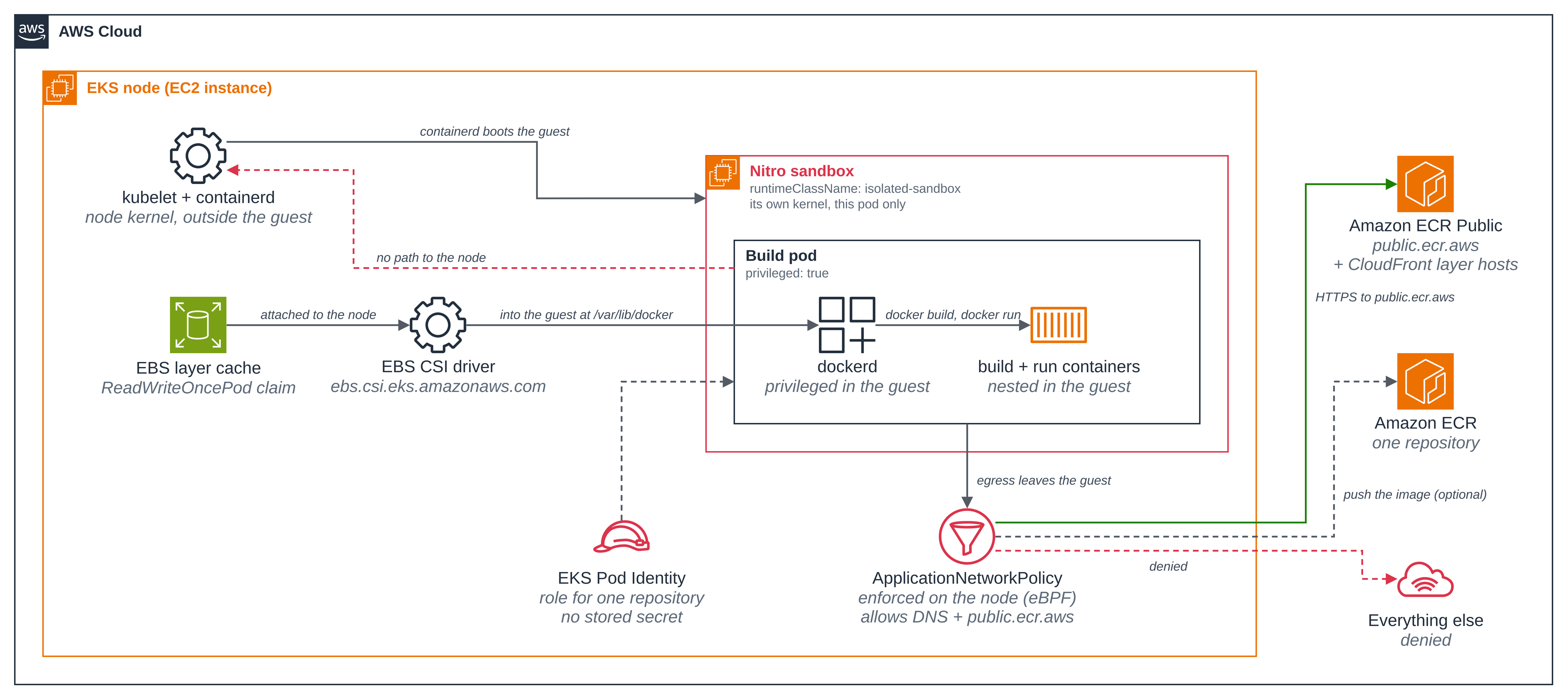
Figure 1: A privileged Docker daemon confined to one Nitro sandbox. Notice what stays on the node: the kubelet, containerd, the CSI attachment and the network policy enforcement point. The daemon reaches none of it.
This folder was built against these releases:
| Component | Version |
|---|---|
Docker Engine, as the build daemon (public.ecr.aws/docker/library/docker, dind variant) |
29.9.2-dind |
BuildKit, for the optional variant (moby/buildkit) |
v0.34.1 |
AWS CLI image, for the optional push (public.ecr.aws/aws-cli/aws-cli) |
2.38.5 |
The build's base images (golang and alpine, from public.ecr.aws) |
golang:1.27.2-alpine3.24, alpine:3.24.3 |
busybox, for the comparison pod and the nested probe (public.ecr.aws/docker/library/busybox) |
1.37 |
EKS Auto Mode EBS CSI driver (ebs.csi.eks.amazonaws.com) |
built into EKS Auto Mode; not separately installed |
The files:
| File | What it is |
|---|---|
deploy/namespace.yaml |
The namespace and the docker-builds-builder ServiceAccount the build pods run as. |
deploy/hello-docker.yaml |
The interactive build pod: one privileged dockerd in a sandbox, on a read-only root file system with its data directory and other writable paths on emptyDir volumes. |
deploy/build-job.yaml |
The Docker-in-Docker build Job, with the EBS layer cache and the optional push. |
deploy/build-configmap.yaml |
The build the Job runs: the build context, docker build, docker run, and the optional push. |
deploy/cache-pvc.yaml |
The ReadWriteOncePod EBS claim each builder mounts at its data directory. |
deploy/egress-policy.yaml |
The egress policy for every build pod in the blueprint. |
deploy/egress-push-rules.yaml |
The two rules added to that policy when the optional push is set up. |
deploy/pod-ordinary.yaml |
An ordinary pod on the same node, for the comparisons in Step 4 and Step 5. |
deploy/buildkit-job.yaml |
Optional: the same build with a standalone BuildKit daemon. |
deploy/buildkit-configmap.yaml |
The build that Job runs, exporting an OCI image to the cache volume. |
iam/pod-identity-trust.json |
The push role's trust policy, conditioned on this cluster, namespace and ServiceAccount. |
iam/ecr-push-policy.json |
The push role's permission policy, naming one repository ARN. |
scripts/setup.sh |
Chooses the StorageClass, creates the namespace, the policy, the cache claim and the interactive pod. |
scripts/run-build-job.sh |
Runs the Docker-in-Docker Job and waits for it, with --push for the optional push. |
scripts/run-buildkit-job.sh |
Optional: runs the BuildKit Job and waits for it. |
scripts/ecr-setup.sh |
Optional: creates the ECR repository, the scoped role and the Pod Identity association. |
scripts/clean.sh |
Removes everything the blueprint created, and only that. |
The walkthrough uses the shared Region default from the home page and a namespace of its own, so the blueprint's objects are easy to find and remove on a shared cluster. Set them in your shell:
export AWS_REGION=us-west-2
export NAMESPACE=docker-builds-sample
Step 1: Turn on network policy enforcement, once per cluster. EKS Auto Mode accepts
network policies but does not enforce them until the amazon-vpc-cni ConfigMap says so. This
is a cluster-wide setting, so it is yours to make, not the blueprint's:
scripts/setup.sh only checks it and stops with this command when it is
off.
kubectl apply -f ../../getting-started/coding-agent/enable-network-policy.yaml
kubectl get configmap -n kube-system amazon-vpc-cni -o jsonpath='{.data.enable-network-policy-controller}{"\n"}'
true
The cluster this run used already had enforcement on from an earlier run of this step, so the
apply reported the ConfigMap unchanged and the block above is the check reading true; on a
cluster where it is off, the apply is what turns it on. Enforcement affects the whole cluster, and pods that no policy selects are unaffected.
Step 2: Start the build pod. scripts/setup.sh chooses the
StorageClass for the layer cache, creates the namespace when it is absent and labels it as
this blueprint's, applies the egress policy and waits for its PolicyEndpoint, creates the EBS
claim and the build scripts, and starts the interactive pod. The whole opt-in is one line in
deploy/hello-docker.yaml:
spec:
  runtimeClassName: isolated-sandbox          # the one-line opt-in
  serviceAccountName: docker-builds-builder
  automountServiceAccountToken: false
  containers:
    - name: dind
      image: public.ecr.aws/docker/library/docker:29.9.2-dind
      securityContext:
        privileged: true                      # reaches only this pod's own guest
        readOnlyRootFilesystem: true          # writes go only to the volumes below
      args: ["dockerd", "--host=unix:///var/run/docker.sock"]
      readinessProbe:
        exec:
          command: ["docker", "info"]
      livenessProbe:                          # held off by a startupProbe on the same command
        exec:
          command: ["docker", "info"]
      volumeMounts:
        - { name: docker-storage, mountPath: /var/lib/docker }
        - { name: run, mountPath: /run }
        - { name: docker-config, mountPath: /root/.docker }
        - { name: build, mountPath: /build }
Three details in that block matter. args names dockerd and its one --host, because the
image's own entrypoint would otherwise add --host=tcp://0.0.0.0:2375 (or 2376 with TLS) and
put a root-equivalent daemon on the pod network; naming the socket keeps the daemon reachable
only from inside the pod, and keeps the entrypoint's own setup. The probes are all
docker info: the pod is Ready only when the daemon answers, and a daemon that stops
answering is restarted, with a startup probe giving a cold start up to 150 seconds, close
to the 155 the readiness probe allows, before the liveness probe counts.
And the root file system is read-only. A privileged container keeps every capability and runs
with no seccomp filter, so there is nothing to drop there, but it can still be kept from
writing to its own image: the daemon's data goes to /var/lib/docker, its socket and
containerd's state to /run (/var/run links to it), the docker CLI's state to
/root/.docker, and the Dockerfile Step 3 writes to /build, each an emptyDir. The image's
dind wrapper mounts its own tmpfs on /tmp.
The pod asks for 1 CPU and 2 GiB, with limits to match. A sandbox is sized when it boots and cannot be resized in place (Amazon EKS User Guide, Isolated and confidential pods limitations, In-place resource resize), so a multi-minute build asks for what it needs up front; with no requests at all the guest gets the small default size, which is not enough to pull base images and compile.
./scripts/setup.sh
kube context: <KUBE_CONTEXT>
Step 1/5: choose the StorageClass for the layer cache
  STORAGE_CLASS names 'nitro-sandbox-ebs' (provisioner 'ebs.csi.eks.amazonaws.com'). Using it.
Step 2/5: the namespace and the build ServiceAccount
namespace/docker-builds-sample created
  created namespace 'docker-builds-sample', labelled app.kubernetes.io/part-of=docker-builds.
serviceaccount/docker-builds-builder created
Step 3/5: the egress policy
applicationnetworkpolicy.networking.k8s.aws/docker-builds-egress created
  waiting for the egress PolicyEndpoint...
NAME                   AGE
docker-builds-egress   3s
Step 4/5: the EBS layer cache claim and the build scripts
persistentvolumeclaim/docker-build-cache created
configmap/docker-build-script created
configmap/buildkit-build-script created
Step 5/5: the interactive build pod
pod/hello-docker created
pod/hello-docker condition met

hello-docker is Ready: a privileged Docker daemon is running in its own sandbox.
NAME           READY   STATUS    RESTARTS   AGE   IP                NODE                  NOMINATED NODE   READINESS GATES
hello-docker   1/1     Running   0          19s   <POD_IP>   i-<NODE>   <none>           <none>

Build by hand:    kubectl exec -it hello-docker -n docker-builds-sample -- sh
Run the CI build: NAMESPACE=docker-builds-sample ./scripts/run-build-job.sh
Tear down:        NAMESPACE=docker-builds-sample ./scripts/clean.sh
On this run STORAGE_CLASS named the StorageClass, nitro-sandbox-ebs, and setup used it
after checking its provisioner. With STORAGE_CLASS unset, setup uses the cluster's default
StorageClass when it fits. This blueprint never creates or changes a StorageClass, since that is a
cluster-wide object; when no default fits, setup stops and tells you to name one with
STORAGE_CLASS. The pod was Ready within 19 seconds of being created, most of that the Nitro
sandbox being created and its guest booting.
Step 3: Build and run an image by hand. Exec in and use the daemon as you would any Docker host. Nothing here knows it is in a sandbox.
kubectl exec hello-docker -n "$NAMESPACE" -- sh -c '
  mkdir -p /build && cd /build
  cat > Dockerfile <<EOF
FROM public.ecr.aws/docker/library/alpine:3.24.3
RUN echo "hello from an image built inside a Nitro sandbox" > /hello.txt
CMD ["cat", "/hello.txt"]
EOF
  docker build -t hello:v1 .
'
kubectl exec hello-docker -n "$NAMESPACE" -- docker run --rm hello:v1
#1 [internal] load build definition from Dockerfile
#1 transferring dockerfile: 237B done
#1 DONE 0.0s

#2 [internal] load metadata for public.ecr.aws/docker/library/alpine:3.24.3
#2 DONE 0.5s

#4 [1/2] FROM public.ecr.aws/docker/library/alpine:3.24.3@sha256:be2656061b536c1883c4034790e21d0a09c5aaaf51968b89368a3c0371ea2c9a
#4 resolve public.ecr.aws/docker/library/alpine:3.24.3@sha256:be2656061b536c1883c4034790e21d0a09c5aaaf51968b89368a3c0371ea2c9a 0.0s done
#4 sha256:7b229517ed222597277036d94892173207d01a731ab3a88eeb1de2e963a2c788 3.85MB / 3.85MB 0.1s done
#4 DONE 0.1s

#4 [1/2] FROM public.ecr.aws/docker/library/alpine:3.24.3@sha256:be2656061b536c1883c4034790e21d0a09c5aaaf51968b89368a3c0371ea2c9a
#4 extracting sha256:7b229517ed222597277036d94892173207d01a731ab3a88eeb1de2e963a2c788
#4 extracting sha256:7b229517ed222597277036d94892173207d01a731ab3a88eeb1de2e963a2c788 0.2s done
#4 DONE 0.3s

#5 [2/2] RUN echo "hello from an image built inside a Nitro sandbox" > /hello.txt
#5 DONE 0.3s

#6 exporting to image
#6 exporting layers 0.0s done
#6 exporting manifest sha256:198e20d2676c884a5b62de4e053126ed82e498f87204c9c02e1e51b26c12406e done
#6 exporting config sha256:87f4d280d5c29ddfb9c4af66536c5a5e51e87e941e08bb0bcd09b78834009333 done
#6 exporting manifest list sha256:5c95995fdcba4cadb6ec71330510837538420adc73659c348611c9eaafd855e3 done
#6 naming to docker.io/library/hello:v1 done
#6 unpacking to docker.io/library/hello:v1
#6 unpacking to docker.io/library/hello:v1 0.2s done
#6 DONE 0.3s
hello from an image built inside a Nitro sandbox
Abridged: the #0 builder line, the .dockerignore step and the attestation manifest line are
left out. The daemon pulled the base
image, built the layer and ran the result, all inside the pod. Read the daemon back and look
at what the pod is running:
kubectl exec hello-docker -n "$NAMESPACE" -- docker info --format 'server {{.ServerVersion}}, storage driver {{.Driver}}, {{.NCPU}} CPU, {{.MemTotal}} bytes'
kubectl exec hello-docker -n "$NAMESPACE" -- ps -ef
server 29.9.2, storage driver overlayfs, 1 CPU, 2255425536 bytes
PID   USER     TIME  COMMAND
    1 root      0:00 docker-init -- dockerd --host=unix:///var/run/docker.sock
  126 root      0:00 dockerd --host=unix:///var/run/docker.sock
  610 root      0:00 ps -ef
The process list is the whole of it: the daemon, its init process, and the command you ran.
The daemon's command line carries only the Unix socket, so nothing on the network can reach
it. The storage driver it chose on this run was overlayfs, which is what this version of
Docker picked on the guest's kernel rather than anything the documentation fixes.
Step 4: Prove the pod ran in a sandbox. Put an ordinary pod on the same node and ask both
the same questions. deploy/pod-ordinary.yaml has no runtime class
and no privileges, and it is placed by nodeName on whichever node the build pod landed on.
NODE=$(kubectl get pod hello-docker -n "$NAMESPACE" -o jsonpath='{.spec.nodeName}')
sed -e "s|<NAMESPACE>|$NAMESPACE|g" -e "s|<NODE_NAME>|$NODE|g" deploy/pod-ordinary.yaml | kubectl apply -f -
kubectl wait --for=condition=Ready pod/ordinary-pod -n "$NAMESPACE" --timeout=5m
for p in hello-docker ordinary-pod; do
  echo "--- $p ---"
  kubectl exec "$p" -n "$NAMESPACE" -- uname -rv
  kubectl exec "$p" -n "$NAMESPACE" -- cat /proc/uptime
  kubectl exec "$p" -n "$NAMESPACE" -- sh -c 'ls /sys/block'
  kubectl exec "$p" -n "$NAMESPACE" -- cat /sys/class/dmi/id/product_name
  kubectl exec "$p" -n "$NAMESPACE" -- ps -ef
done
kubectl get pod hello-docker ordinary-pod -n "$NAMESPACE"
--- hello-docker ---
6.18.54 #1 SMP PREEMPT_DYNAMIC Thu Oct 22 17:38:11 UTC 2026
32.26 22.81
dm-0
vda
vdb
vdc
m5a.enclave
PID   USER     TIME  COMMAND
    1 root      0:00 docker-init -- dockerd --host=unix:///var/run/docker.sock
  126 root      0:00 dockerd --host=unix:///var/run/docker.sock
  766 root      0:00 ps -ef
--- ordinary-pod ---
6.18.56 #2 SMP PREEMPT_DYNAMIC Fri Oct 30 22:32:37 UTC 2026
3558.78 13718.03
dm-0
loop0
loop1
loop2
loop3
loop4
loop5
loop6
loop7
nvme0n1
nvme1n1
zram0
m5a.xlarge
PID   USER     TIME  COMMAND
    1 1000      0:00 sleep 3600
   31 1000      0:00 ps -ef
NAME           READY   STATUS    RESTARTS   AGE
hello-docker   1/1     Running   0          52s
ordinary-pod   1/1     Running   0          22s
Four readings, one per question:
- Its own kernel. The version differs,
6.18.54in the sandbox and6.18.56on the node, and so does the build: the sandbox is on build#1, stampedThu Oct 22 17:38:11, the node on build#2, stampedFri Oct 30 22:32:37. - Its own boot. The sandbox reports 32 seconds of uptime: this guest's own boot, about 20 seconds after the pod was created, which the 52-second pod age in the last block bears out. The ordinary pod reports 3558 seconds, which is the node's boot and not its own: that pod was 22 seconds old.
- Virtio disks. The sandbox has
vda,vdbandvdc; the node hasnvme0n1,nvme1n1, the loop devices Bottlerocket uses andzram0. The build daemon unpacks every layer onto disks that are passed into the guest. - Its own machine, and only its own processes.
m5a.enclaveis the sandbox,m5a.xlargethe EC2 instance it was carved from. The process table in the privileged pod holds the daemon, its init process and the command just run: no kubelet, no node containerd, and nothing from any other pod on that node. Read that one honestly: a container's PID namespace hides the node's processes from an ordinary pod too. What the three readings above add is that there is no node kernel behind this one to reach, which is what Step 5 puts to the test.
Step 5: Root in the privileged pod reaches the sandbox's kernel, not the node's. The clearest reading of the boundary is a kernel setting. Write one as root in the privileged pod, then read the same setting on the node through the ordinary pod, which shares the node's kernel.
kubectl exec hello-docker -n "$NAMESPACE" -- cat /proc/sys/vm/swappiness
kubectl exec ordinary-pod -n "$NAMESPACE" -- cat /proc/sys/vm/swappiness
kubectl exec hello-docker -n "$NAMESPACE" -- sh -c 'echo 7 > /proc/sys/vm/swappiness; cat /proc/sys/vm/swappiness'
kubectl exec ordinary-pod -n "$NAMESPACE" -- cat /proc/sys/vm/swappiness
kubectl exec hello-docker -n "$NAMESPACE" -- sh -c 'ls /dev/nvme* 2>&1; echo "exit=$?"'
kubectl exec hello-docker -n "$NAMESPACE" -- sh -c 'wget -q -T 5 -O - http://169.254.170.23/v1/credentials; echo "exit=$?"'
60
120
7
120
ls: /dev/nvme*: No such file or directory
exit=1
exit=1
wget: download timed out
Read it in order. vm.swappiness was 60 in the sandbox and 120 on the node: two kernels, each
with the value its own operating system set, which is the first thing the comparison shows.
Root in the privileged pod wrote 7, and the sandbox now reports 7 while the node still reports
120, so the write landed on the guest's kernel, which is the pod's alone. A privileged
container's /proc/sys is the real, writable /proc of the kernel it runs on, and
vm.swappiness is not namespaced, so that write went somewhere: on a node without a sandbox it
would have gone to the kernel every other pod on that node is using. The same pod cannot even
name the node's disks, because they are not passed into the guest.
The fourth reading is a different kind. The Pod Identity credential address times out because
this walkthrough has set up no association and the policy has no rule for it, and that would
be just as true of an ordinary pod: a request to 169.254.170.23 is passed to the agent on the
node and the egress policy applies to it either way. It is here to show that the privileged
build has no AWS credential to find by default, not to show the boundary. That the node's own
IAM role is out of reach is the instance metadata service's doing: inside a sandbox its iam/
paths return 404 (Amazon EKS User Guide, Isolated and confidential pods limitations, Instance
metadata (IMDS)).
This is the trade the blueprint is about, stated plainly: inside the sandbox the daemon has everything, and the guest is where "everything" ends. A build that runs code from a pull request can do as it likes to the guest and its own layer cache, and the node, its kubelet, the other pods and the node's IAM role are all somewhere it cannot reach.
Step 6: Run the same build as a Job. This is the CI shape: no exec, one Job that starts
the daemon, builds, runs the result and ends. scripts/run-build-job.sh
renders deploy/build-job.yaml, deletes any earlier Job of this
blueprint first (a Job's pod template is immutable), applies it and waits for either terminal
condition. The container starts the daemon and hands over to the build script:
          command: ["/bin/sh", "-c"]
          args:
            - |
              dockerd --host=unix:///var/run/docker.sock >/tmp/dockerd.log 2>&1 &
              exec /bin/sh /scripts/build.sh
          volumeMounts:
            - name: cache
              mountPath: /var/lib/docker   # the EBS layer cache, kept across Job runs
The build itself, from deploy/build-configmap.yaml, is an
ordinary multi-stage Dockerfile: compile a small Go program, then copy the binary onto a small
base. Its module file has no requirements, so the compile needs no module host and the egress
policy stays as small as it is.
FROM public.ecr.aws/docker/library/golang:1.27.2-alpine3.24 AS build
WORKDIR /src
COPY go.mod main.go ./
RUN CGO_ENABLED=0 go build -o /hello main.go
FROM public.ecr.aws/docker/library/alpine:3.24.3
COPY --from=build /hello /hello
ENTRYPOINT ["/hello"]
./scripts/run-build-job.sh
Building and running the image with no registry (pass --push to also push to Amazon ECR).
job.batch/docker-build created
Waiting for the build to finish (a cold build pulls base images and compiles; a warm one is much faster).

>>> waiting for the Docker daemon on its local socket
>>> daemon 29.9.2, storage driver overlayfs, 1 CPU
>>> writing the build context
>>> docker build hello-nitro:v1   (layers and build cache on the EBS volume at /var/lib/docker)
#2 [internal] load metadata for public.ecr.aws/docker/library/golang:1.27.2-alpine3.24
#3 [internal] load metadata for public.ecr.aws/docker/library/alpine:3.24.3
#10 [build 4/4] RUN CGO_ENABLED=0 go build -o /hello main.go
#10 DONE 18.6s
#12 exporting to image
#12 naming to docker.io/library/hello-nitro:v1 done
#12 DONE 0.6s
>>> build finished in 33s
>>> docker run hello-nitro:v1   (the image this build produced, run in this sandbox)
hello from a docker build inside a Nitro sandbox (linux/amd64, container 52fbae0bbcd4)
>>> what a nested container sees: the sandbox's own kernel and virtio disks
6.18.54 #1 SMP PREEMPT_DYNAMIC Thu Oct 22 17:38:11 UTC 2026
uptime: 42.05s
block devices:
dm-0
vda
vdb
vdc
vdd
>>> ECR_REGISTRY is unset: built and ran the image without a registry
>>> DONE

Run it again for a warm cache: NAMESPACE=docker-builds-sample ./scripts/run-build-job.sh
Abridged: the build graph's per-step lines are cut down to the ones worth reading, and the
busybox pull before the last block is left out. The Job built the image and ran it with no
exec at any point. The container the build produced printed its own line, and the container
the Job ran afterwards reports the same guest: the kernel stamped 22 October, an uptime of 42
seconds that is this pod's own, and virtio disks, now with a fourth one, vdd, which is the
EBS layer cache.
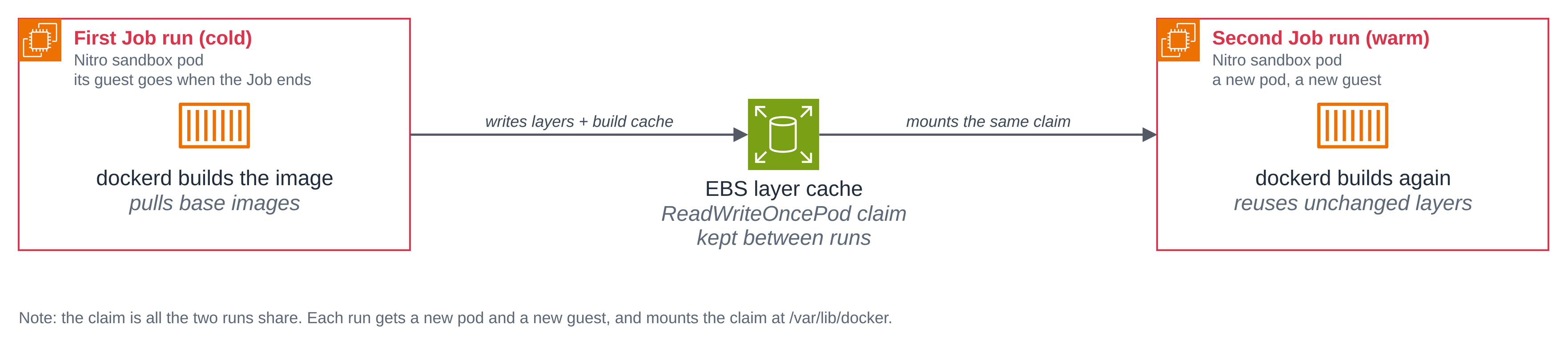
Step 7: Re-run it, and reuse the EBS layer cache. The claim is not deleted between runs, so the second Job mounts the same volume, finds the layers the first run wrote, and skips the work.
Figure 2: The layer cache across two Job runs. Each run gets a new pod and a new guest; the claim is the only thing the cold run leaves for the warm one.
./scripts/run-build-job.sh
Building and running the image with no registry (pass --push to also push to Amazon ECR).
Deleting the previous docker-build Job so this run starts clean (its pod template is immutable).
job.batch "docker-build" deleted from docker-builds-sample namespace
job.batch/docker-build created
Waiting for the build to finish (a cold build pulls base images and compiles; a warm one is much faster).

>>> docker build hello-nitro:v1   (layers and build cache on the EBS volume at /var/lib/docker)
#8 [build 3/4] COPY go.mod main.go ./
#8 CACHED

#9 [build 4/4] RUN CGO_ENABLED=0 go build -o /hello main.go
#9 CACHED

#10 [build 2/4] WORKDIR /src
#10 CACHED

#11 [stage-1 2/2] COPY --from=build /hello /hello
#11 CACHED

#12 exporting to image
#12 naming to docker.io/library/hello-nitro:v1 done
#12 DONE 0.1s
>>> build finished in 1s
>>> docker run hello-nitro:v1   (the image this build produced, run in this sandbox)
hello from a docker build inside a Nitro sandbox (linux/amd64, container 4ed7b2c8d04e)
Abridged, and the two blocks are the two runs of the same Job, one after the other: a cold
build of 33 seconds and a warm one of 1 second, with every step CACHED and no base image
pulled. Nothing of the first run's guest survived; what survived is the EBS
volume, which the second pod mounted at /var/lib/docker and found the layers and the build
cache in. On a blueprint this small the saving is 32 seconds, and it is the mechanism that
matters: on a real pipeline, with several images and dependency layers, this is the difference
between a build that pulls and compiles everything each time and one that does not.
A detail worth knowing before you run two builds at once: the claim is ReadWriteOncePod, so
one build pod holds the cache at a time, and a second one stays Pending until the first
releases it. That is the constraint an EBS volume has in a sandbox, where a block device
attaches to one guest at a time (Amazon EKS User Guide, Storage, Access mode). For parallel
builds, give each one its own claim.
How the network policy works
deploy/egress-policy.yaml is the whole policy for every build
pod in the blueprint, with the file's longer comments trimmed here. setup.sh renders
<NAMESPACE>, and leaves <ECR_PUSH_RULES> empty unless the optional push has been set up for
this namespace. DNS (port 53) is allowed to any IP address, which avoids the need to look up
and substitute the cluster's CoreDNS address:
apiVersion: networking.k8s.aws/v1alpha1
kind: ApplicationNetworkPolicy
metadata:
  name: docker-builds-egress
  namespace: <NAMESPACE>
  labels:
    app.kubernetes.io/part-of: docker-builds
spec:
  podSelector:
    matchLabels:
      app.kubernetes.io/part-of: docker-builds
  policyTypes:
    - Ingress
    - Egress
  ingress: []        # deny all ingress; exec, logs and cp do not use the pod network
  egress:
    # DNS on port 53 to any IP, so the pods can resolve names.
    - to:
        - ipBlock: { cidr: 0.0.0.0/0 }
      ports:
        - { protocol: UDP, port: 53 }
        - { protocol: TCP, port: 53 }
    # The registry the build's base images come from.
    - to:
        - domainNames:
            - public.ecr.aws
            - "*.cloudfront.net"
      ports:
        - { protocol: TCP, port: 443 }
<ECR_PUSH_RULES>
| Part | What it does |
|---|---|
podSelector |
Selects every pod in the blueprint, interactive pod and both Jobs, by the label each one carries. |
policyTypes |
Both directions, so anything not allowed below is denied. |
ingress: [] |
No pod may open a connection to a build pod. kubectl exec, logs and cp keep working: they use the sandbox's control channel, not the pod network. |
| DNS rule | Any IP address (0.0.0.0/0), on UDP and TCP 53, as the paragraph above says. |
| Registry rule | public.ecr.aws for the API and the manifests, and *.cloudfront.net for the layer downloads it redirects to. |
<ECR_PUSH_RULES> |
Nothing by default. scripts/ecr-setup.sh fills it with the Pod Identity credential address and this account's two Amazon ECR endpoints when the optional push is set up. |
It is enforced on the node, by eBPF programs the network policy agent attaches to the pod's host-side interface, outside the guest. So a command inside the sandbox cannot change it, even from the privileged container, and the containers the build daemon runs are covered by it too: their traffic leaves through the same pod interface. Try it both ways, from the pod and from a container the build daemon runs:
kubectl exec hello-docker -n "$NAMESPACE" -- sh -c \
  'wget -q -O /dev/null "https://public.ecr.aws/token/?scope=repository:docker/library/alpine:pull&service=public.ecr.aws"; echo "exit=$?"'
kubectl exec hello-docker -n "$NAMESPACE" -- sh -c 'wget -T 10 -O /dev/null https://example.com; echo "exit=$?"'
kubectl exec hello-docker -n "$NAMESPACE" -- docker run --rm public.ecr.aws/docker/library/busybox:1.37 \
  sh -c 'wget -T 10 -O /dev/null https://example.com; echo "exit=$?"'
exit=0
Connecting to example.com (172.66.147.243:443)
wget: download timed out
exit=1
Unable to find image 'public.ecr.aws/docker/library/busybox:1.37' locally
1.37: Pulling from docker/library/busybox
68fe9bff2ad4: Pulling fs layer
68fe9bff2ad4: Download complete
9177639ff916: Download complete
68fe9bff2ad4: Pull complete
Digest: sha256:a7dbc319b1438115a207e11930dc4bb3e643dcb3ec0bdd694bb36cd8fad289ec
Status: Downloaded newer image for public.ecr.aws/docker/library/busybox:1.37
Connecting to example.com (104.20.23.154:443)
wget: download timed out
exit=1
The registry the policy names answers. The host it does not name resolves, because DNS is allowed, and then the connection goes nowhere: the policy drops it. The third command is the one that makes the point for a build, because it runs in a container the privileged daemon started, with its own network inside the guest, and it is refused in exactly the same way.
Two limits worth knowing. A domainNames rule allows the addresses those names resolve to, so
another name served from the same addresses is reachable too, and *.cloudfront.net is wide:
it covers any CloudFront distribution, which is what pulling from Amazon ECR Public needs,
because the host each layer download is redirected to changes between requests. And a pod can
always reach its own node, which Kubernetes never blocks.
Optional: push the image to Amazon ECR, with no stored secret
A build that only runs its image is a demonstration; a CI build publishes it. This step gives the build pod a credential to push with, and nothing else, through EKS Pod Identity: no registry password in a Secret, no long-lived key, and nothing on a command line.
Copy .env.example to .env and fill in your cluster and Region, then run
scripts/ecr-setup.sh. It creates the ECR repository, the role and
the Pod Identity association, and adds the two rules the push needs to the egress policy. It
adopts a repository or a role that already carries ManagedBy=docker-builds, and stops rather
than touching one that does not.
cp .env.example .env    # then edit CLUSTER_NAME and AWS_REGION
./scripts/ecr-setup.sh
Account <ACCOUNT_ID>, Region us-west-2, cluster <CLUSTER_NAME>.
Step 1/4: the ECR repository nitro-sample-docker-builds
  created nitro-sample-docker-builds.
Step 2/4: the push role nitro-sample-docker-builds-push, scoped to that one repository
  created nitro-sample-docker-builds-push.
  the role's one policy:
    {
        "Version": "2012-10-17",
        "Statement": [
            {
                "Sid": "EcrAuthToken",
                "Effect": "Allow",
                "Action": "ecr:GetAuthorizationToken",
                "Resource": "*"
            },
            {
                "Sid": "EcrPushOneRepository",
                "Effect": "Allow",
                "Action": [
                    "ecr:BatchCheckLayerAvailability",
                    "ecr:InitiateLayerUpload",
                    "ecr:UploadLayerPart",
                    "ecr:CompleteLayerUpload",
                    "ecr:PutImage",
                    "ecr:BatchGetImage"
                ],
                "Resource": "arn:aws:ecr:us-west-2:<ACCOUNT_ID>:repository/nitro-sample-docker-builds"
            }
        ]
    }
Step 3/4: the EKS Pod Identity association for docker-builds-sample/docker-builds-builder
  created association <ASSOCIATION_ID>.
Step 4/4: add the push rules to the egress policy
applicationnetworkpolicy.networking.k8s.aws/docker-builds-egress configured

The push is ready: <ACCOUNT_ID>.dkr.ecr.us-west-2.amazonaws.com/nitro-sample-docker-builds
Run the build with the push: NAMESPACE=docker-builds-sample ./scripts/run-build-job.sh --push
The last step added deploy/egress-push-rules.yaml to the
egress policy: the Pod Identity credential address on TCP 80, and this account's two Amazon
ECR endpoints on 443. Read the policy's rules back, one per line:
kubectl get applicationnetworkpolicy docker-builds-egress -n "$NAMESPACE" \
  -o jsonpath='{range .spec.egress[*]}{.to}{" on "}{.ports}{"\n"}{end}'
[{"ipBlock":{"cidr":"0.0.0.0/0"}}] on [{"port":53,"protocol":"UDP"},{"port":53,"protocol":"TCP"}]
[{"domainNames":["public.ecr.aws","*.cloudfront.net"]}] on [{"port":443,"protocol":"TCP"}]
[{"ipBlock":{"cidr":"169.254.170.23/32"}}] on [{"port":80,"protocol":"TCP"}]
[{"domainNames":["api.ecr.us-west-2.amazonaws.com","<ACCOUNT_ID>.dkr.ecr.us-west-2.amazonaws.com"]}] on [{"port":443,"protocol":"TCP"}]
Four rules, and nothing else is reachable. Two of them exist only because the push does: a build pod set up without it has no route to a credential at all, which is the timeout in Step 5.
That policy, iam/ecr-push-policy.json, is the whole of what the
build can do in AWS. Six actions on one repository ARN: four that upload the layers and put
the manifest, and two the push reads as it goes (which layers are already there, and which
manifests). It cannot create a repository, cannot touch another one, cannot delete an image,
and can do nothing outside Amazon ECR. ecr:GetAuthorizationToken is the one action on *, because the token is issued
for the registry rather than a repository, and on its own it grants no access to any
repository. The role's trust policy,
iam/pod-identity-trust.json, is as narrow: only
pods.eks.amazonaws.com may assume it, only acting for this account, and only for this
cluster, this namespace and this ServiceAccount.
      "Condition": {
        "StringEquals": {
          "aws:SourceAccount": "<ACCOUNT_ID>",
          "aws:RequestTag/eks-cluster-name": "<CLUSTER_NAME>",
          "aws:RequestTag/kubernetes-namespace": "<NAMESPACE>",
          "aws:RequestTag/kubernetes-service-account": "docker-builds-builder"
        }
      }
aws:SourceAccount is the one that stops a cluster in someone else's account, with the same
cluster name, namespace and ServiceAccount, from satisfying the other three conditions.
Run the build again with --push. The script adds one init container to the Job, which is
where the token comes from: the AWS CLI reads the credential Pod Identity vends to the
ServiceAccount, writes the token to a file in the pod's own guest under umask 077, and the
build container reads it on standard input.
      initContainers:
        - name: ecr-token
          image: public.ecr.aws/aws-cli/aws-cli:2.38.5
          command: ["/bin/sh", "-c"]
          args:
            - |
              set -e
              umask 077
              aws ecr get-login-password --region "$AWS_REGION" > /ecr/token
              [ -s /ecr/token ]
              echo "wrote an Amazon ECR authorization token for $ECR_REGISTRY"
          env:
            - { name: AWS_REGION,   value: "<AWS_REGION>" }
            - { name: ECR_REGISTRY, value: "<ECR_REGISTRY>" }
          volumeMounts:
            - name: ecr-token
              mountPath: /ecr
set -e and the [ -s /ecr/token ] line are there because the redirection truncates the file
before the command runs: without them a failed call would leave an empty token, exit 0 and
still print the success line. The script fills <AWS_REGION> and <ECR_REGISTRY> from what
ecr-setup.sh recorded.
./scripts/run-build-job.sh --push
Pushing to <ACCOUNT_ID>.dkr.ecr.us-west-2.amazonaws.com/nitro-sample-docker-builds when the build succeeds.
Deleting the previous docker-build Job so this run starts clean (its pod template is immutable).
job.batch "docker-build" deleted from docker-builds-sample namespace
job.batch/docker-build created
Waiting for the build to finish (a cold build pulls base images and compiles; a warm one is much faster).

Defaulted container "dind" out of: dind, ecr-token (init)
>>> build finished in 1s
>>> docker run hello-nitro:v1   (the image this build produced, run in this sandbox)
hello from a docker build inside a Nitro sandbox (linux/amd64, container 4eaf25b11210)
>>> pushing to <ACCOUNT_ID>.dkr.ecr.us-west-2.amazonaws.com/nitro-sample-docker-builds
Login Succeeded
The push refers to repository [<ACCOUNT_ID>.dkr.ecr.us-west-2.amazonaws.com/nitro-sample-docker-builds]
cf403d70a610: Waiting
44136fa355b3: Waiting
dfad60d6ce82: Waiting
7b229517ed22: Waiting
44136fa355b3: Pushed
dfad60d6ce82: Pushed
7b229517ed22: Pushed
cf403d70a610: Pushed
v1: digest: sha256:5ecf21ba0a9849ebefe4d91fccd5f76b97724d113aeae7b87f77844f333b6dcc size: 855
>>> pushed <ACCOUNT_ID>.dkr.ecr.us-west-2.amazonaws.com/nitro-sample-docker-builds:v1
>>> DONE

Run it again for a warm cache: NAMESPACE=docker-builds-sample ./scripts/run-build-job.sh --push
Abridged: the daemon start, the build graph, every step CACHED as in the run above, and the
nested probe are left out, and so is docker login's warning about its config file. The probe
read the same kernel as the run above, with one more disk, vde. The build itself was warm,
because this run reused the same layer cache.
Read the image back from Amazon ECR, and read what the init container logged:
kubectl logs job/docker-build -n "$NAMESPACE" -c ecr-token
aws ecr describe-images --repository-name nitro-sample-docker-builds --region "$AWS_REGION" \
  --image-ids imageTag=v1 \
  --query 'imageDetails[0].{Tags:imageTags,Digest:imageDigest,Pushed:imagePushedAt,SizeBytes:imageSizeInBytes}' \
  --output table
wrote an Amazon ECR authorization token for <ACCOUNT_ID>.dkr.ecr.us-west-2.amazonaws.com
------------------------------------------------------------------------------------------
|                                     DescribeImages                                     |
+-----------+----------------------------------------------------------------------------+
|  Digest   |  sha256:5ecf21ba0a9849ebefe4d91fccd5f76b97724d113aeae7b87f77844f333b6dcc   |
|  Pushed   |  2026-11-07T08:08:08.438000+00:00                                          |
|  SizeBytes|  5306436                                                                   |
+-----------+----------------------------------------------------------------------------+
||                                         Tags                                         ||
|+--------------------------------------------------------------------------------------+|
||  v1                                                                                  ||
|+--------------------------------------------------------------------------------------+|
The tag the build pushed is in the repository, with the digest the Job's log printed. The
init container's whole log is one line: it says which registry it fetched a token for and
nothing about the token. The token itself went to a file, then to docker login on standard
input, which is what the Amazon ECR documentation's --password-stdin is for. An ECR token is
good for hours and a completed Job's pod stays until the next run, so the build removes the
token file as soon as the daemon has read it and runs docker logout after the push, which
takes the daemon's own copy out of the pod's Docker config. Both also run from a trap on
exit set before the build starts, so a build that fails at any step leaves neither behind.
Inside a sandbox the instance metadata service holds no role: its iam/ paths return 404
(Amazon EKS User Guide, Isolated and confidential pods limitations, Instance metadata
(IMDS)), so a build pod with no Pod Identity association has nothing to push with, as Step 5
showed. That is why this is the credential path: it is granted to one ServiceAccount, for one
repository, and it is the only one there is.
Optional: the same build with BuildKit
BuildKit is a builder rather than a container runtime, and
it runs in a sandbox on the same terms: buildkitd privileged, confined to the pod's own
guest, on a read-only root file system, its cache on an EBS claim at /var/lib/buildkit and
its socket, temporary mounts, buildctl state and build context on emptyDir volumes. Because it does not run images, this
Job builds the same Dockerfile and exports it as an OCI image onto the cache volume.
scripts/run-buildkit-job.sh creates the second claim, through
the same StorageClass the first one used, and runs the Job.
./scripts/run-buildkit-job.sh
persistentvolumeclaim/buildkit-cache created
job.batch/buildkit-build created
Waiting for the BuildKit build to finish.

>>> starting buildkitd (its state and cache on the EBS volume)
ID              PLATFORMS
xgios2ok2zkaiie3uifsowv7f   linux/amd64,linux/amd64/v2,linux/amd64/v3,linux/386
>>> writing the build context
>>> buildctl build -> OCI image at /var/lib/buildkit/hello-nitro.oci.tar
#10 [build 4/4] RUN CGO_ENABLED=0 go build -o /hello main.go
#10 DONE 17.9s
#12 exporting to oci image format
#12 sending tarball 0.1s done
#12 DONE 0.4s
>>> build finished in 33s
-rw-rw-rw-    1 root     root       5314048 Nov  7 08:09 /var/lib/buildkit/hello-nitro.oci.tar
>>> exported digest=sha256:ccef5e79d050398d01bd57d3a20dc887a7a36c9a94bce50f3e423e26688b01df
>>> the sandbox this build ran in: its own kernel, boot and virtio disks
6.18.54 #1 SMP PREEMPT_DYNAMIC Thu Oct 22 17:38:11 UTC 2026
uptime: 40.03s
block devices:
dm-0
vda
vdb
vdc
vdd
>>> DONE
Abridged in the same way as the Job above. The export is a 5.3 MB OCI archive on the EBS
volume, and the digest comes from buildctl's metadata file, which is written after the export
succeeds rather than from a hopeful log line. The guest is the same story again: its own
kernel, an uptime that is this pod's, virtio disks.
To run what BuildKit built, push it to a registry instead, which is --output
type=image,name=...,push=true and the Amazon ECR credential
helper in place of docker login.
This blueprint keeps the registry path on the Docker-in-Docker Job, where docker push and the
token on standard input are the shape most pipelines already use.
Good to know
- Privileged still means privileged, inside the sandbox. The Amazon EKS User Guide puts it this way: the pod "has full capabilities and unrestricted access to the sandbox kernel" (Developing with sandboxes, Privileged pods). A build that runs code from a pull request can do whatever it likes to that guest and to the layer cache mounted in it. What the sandbox bounds is how far that reaches: one pod, one guest, one volume.
- Do not give the daemon a TCP listener. The
docker:dindimage's entrypoint adds--host=tcp://0.0.0.0:2375when TLS is off, and a daemon on a port is root-equivalent control of the build for anything that can reach the pod. This blueprint namesdockerdand its Unix socket inargsinstead, so there is no listener to reach, and the policy denies all ingress as well. - The sandbox is sized from the requests, when it boots. In-place resize is not supported for these runtime classes (Amazon EKS User Guide, Isolated and confidential pods limitations, In-place resource resize), so a build that needs more CPU or memory needs a new pod. The requests here, 1 CPU and 2 GiB, are what this build wants; size yours for your own.
- Each distinct image in the pod costs a little memory. Every unique container image attaches one more device to the sandbox and reserves 16 MiB of the runtime class overhead (same page, Memory overhead grows with unique container images). The push path adds one image, the init container's, for that reason among others; the default path has one image only.
- The storage driver is what the daemon chose, not a documented guarantee. On this run
docker inforeportedoverlayfson the guest's kernel. The Amazon EKS User Guide does not state which driver a daemon inside a sandbox uses, so read it off your own run rather than relying on it. - One build at a time per cache claim.
ReadWriteOncePodis what an EBS volume in a sandbox needs. Parallel builds need a claim each, or no cache. - The build pods pin their node. Both Jobs and the interactive pod set
karpenter.sh/do-not-disrupt: "true", so consolidation cannot take the node away mid-build and leave a single-attach volume behind. It also keeps that node up while the pod exists, which is what you want during a build and not after it: the clean up releases it. - A Job's pod template is immutable. That is why a re-run deletes the Job and applies it again, and why the registry is rendered into the manifest rather than patched afterwards.
- Read the Job's log while it runs.
kubectl logs -f job/docker-buildis the reliable shape; a log read after the Job completes can race the collection of its pod. - The guest holds no AWS credential by default. The instance metadata service in a sandbox
returns 404 for its
iam/paths (Amazon EKS User Guide, Isolated and confidential pods limitations, Instance metadata (IMDS)), so there is nothing for a build to pick up. Give it a credential deliberately, scoped, through EKS Pod Identity, or not at all.
Clean up
The clean up needs the namespace from the walkthrough. In a new shell, set it again first, with the value you used:
export NAMESPACE=docker-builds-sample
scripts/clean.sh deletes the Jobs, the pods, the build scripts, the
egress policy, each EBS layer cache claim and the namespace, then confirms with EC2 that each
cache volume is gone. When .docker-builds.state records the optional push, it also removes
the Pod Identity association, the IAM role with its policy, and the ECR repository with the
image in it. It touches only a namespace labelled app.kubernetes.io/part-of=docker-builds and
only AWS resources tagged ManagedBy=docker-builds, and anything it skips or cannot confirm is
listed at the end and makes it exit non-zero.
It needs no AWS_REGION: it reads the Region to look each cache volume up in from the
cluster's own nodes, which provisioned them, and the Region of the push's resources from the
state file that recorded them. So it needs to be able to read nodes; it confirms each cache
volume only with credentials for the cluster's own account, and it removes the push's resources
only with credentials for the account the state file names.
./scripts/clean.sh
Namespace 'docker-builds-sample' is this sample's (labelled app.kubernetes.io/part-of=docker-builds).
Deleting the Jobs and the pods...
job.batch "docker-build" deleted from docker-builds-sample namespace
job.batch "buildkit-build" deleted from docker-builds-sample namespace
pod "hello-docker" deleted from docker-builds-sample namespace
pod "ordinary-pod" deleted from docker-builds-sample namespace
Deleting the build scripts and the egress policy...
configmap "docker-build-script" deleted from docker-builds-sample namespace
configmap "buildkit-build-script" deleted from docker-builds-sample namespace
applicationnetworkpolicy.networking.k8s.aws "docker-builds-egress" deleted from docker-builds-sample namespace
Deleting the EBS layer cache claims (this deletes their volumes)...
persistentvolumeclaim "docker-build-cache" deleted from docker-builds-sample namespace
persistentvolumeclaim "buildkit-cache" deleted from docker-builds-sample namespace
Deleting the namespace...
namespace "docker-builds-sample" deleted
Confirming the EBS volumes are gone (up to 180s for the CSI driver)...
  docker-build-cache: volume vol-0f594f16a07087d5b is gone.
  buildkit-cache: volume vol-064579ad41c5df6cc is gone.
Removing the Amazon ECR push resources recorded in .docker-builds.state...
  deleted Pod Identity association <ASSOCIATION_ID>.
  deleted IAM role nitro-sample-docker-builds-push and its policy.
  deleted ECR repository nitro-sample-docker-builds and the image in it.

Clean up complete: the namespace and everything in it are gone, each EBS layer cache
volume is confirmed deleted, and the push's role, association and repository are removed
when the sample created them. Network policy enforcement is a cluster-wide setting this
sample never changed; it stays on.
Both cache volumes are read back from EC2 by their volume IDs, not assumed gone when the claim disappears, because the PersistentVolume outlives the claim until the CSI driver has deleted the volume: that is the cheapest proof it stopped billing.
What stays: network policy enforcement, which is a cluster-wide setting this blueprint only ever read, and the cluster's StorageClass, which it chose and never changed. If this is the last blueprint you ran, follow the hello sandbox clean up to remove the cluster.