Network policy on a sandboxed pod
Before you start, review the prerequisites and shared setup on the home page, and run the hello sandbox blueprint first so you have a cluster with the runtime classes. The commands below use files from this repository, so clone it if you have not already, and run them from this blueprint's folder:
git clone https://github.com/aws-samples/sample-eks-nitro-sandbox.git
cd sample-eks-nitro-sandbox/examples/isolation/network-policy
Before a platform team trusts a sandbox with untrusted code, it asks one question: does the
egress control it already uses, a plain Kubernetes
NetworkPolicy,
still get enforced when the workload runs in a Nitro sandbox? A sandboxed pod's containers
run in a lightweight VM of their own, which is what makes the question worth asking.
This blueprint answers it by running the same egress client twice, side by side, differing only
in runtimeClassName: isolated-sandbox versus an ordinary pod, under one namespace-scoped
egress NetworkPolicy that selects both. After the policy, both clients keep reaching the
server it allows and both are refused the server it denies: the policy holds on the sandboxed
pod's path exactly as it does on the ordinary pod's. The ordinary pod is the control, so the
result cannot be read any other way.
EKS Auto Mode supports two kinds of network policy, and a sandboxed pod uses both exactly as an
ordinary pod does: the standard Kubernetes NetworkPolicy that filters egress by IP, pod and
namespace (the main walkthrough), and the Auto Mode ApplicationNetworkPolicy that adds egress
by hostname with domainNames (the optional variant). This page
shows a sandboxed and an ordinary pod leveraging each of the two, on Auto Mode.
- The same NetworkPolicy, enforced on the sandboxed path and the ordinary path alike. Two
clients, identical in every field a policy could select on and differing only in
runtimeClassName, both lose exactly the one egress the policy denies and both keep the one it allows. - The ordinary pod is the control that makes the result mean something. Before the policy, both clients reach both servers, so the connection that will be denied is genuinely open to begin with. The page shows that opening state, then the after state, for both clients in one run.
- Enforced on the node, outside the guest. The node's network policy agent attaches the enforcement to the pod's host-side interface, not to anything inside the guest, so a command run inside the sandbox is subject to the policy and cannot reach the denied server.
- It opts in with one line.
runtimeClassName: isolated-sandboxis the only spec field that differs between the two clients.
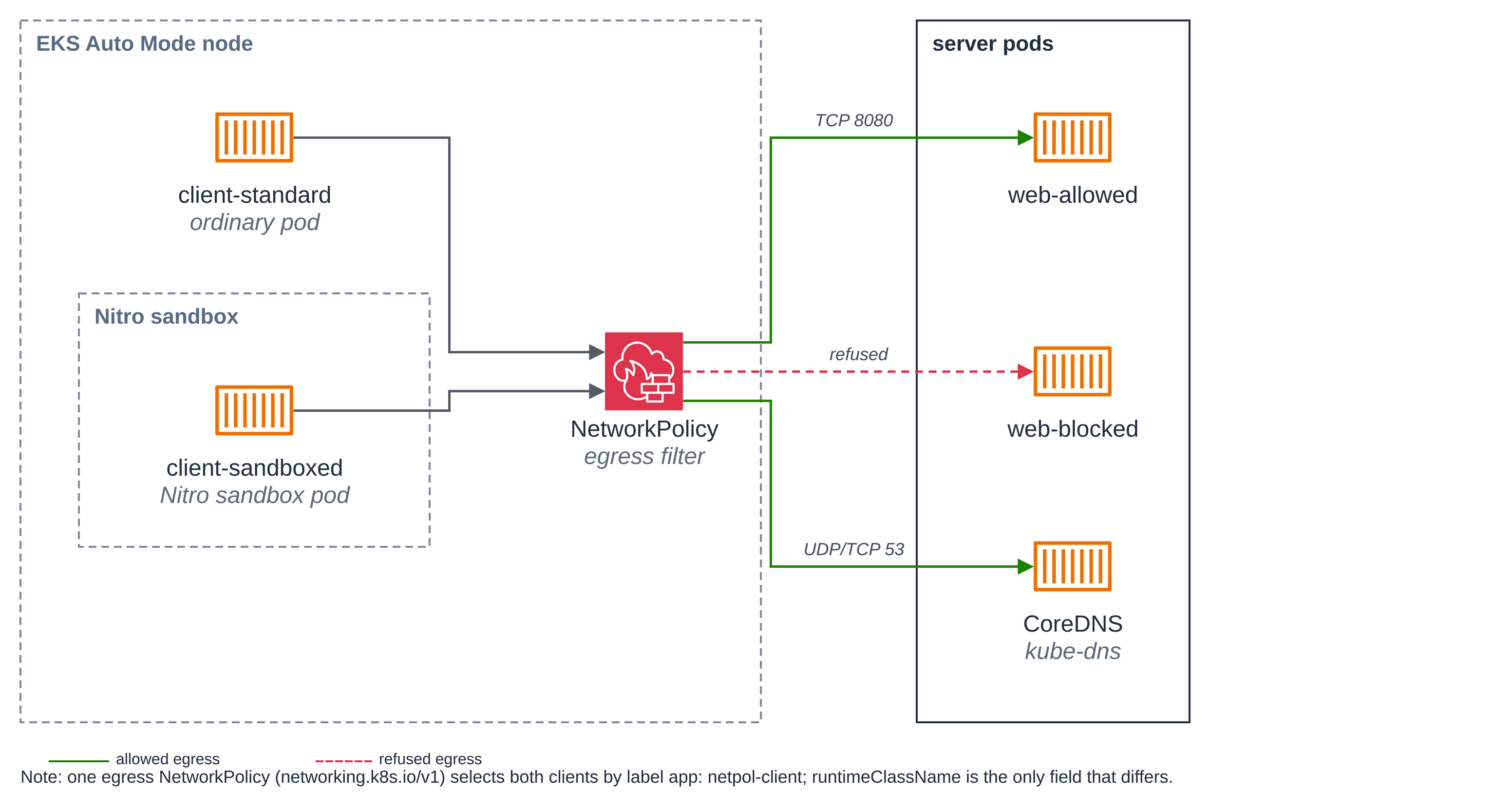
Figure 1: The same egress NetworkPolicy on two clients. client-sandboxed runs in a Nitro
sandbox, a lightweight VM with its own kernel; client-standard is an ordinary pod. The policy, enforced
on the node outside the guest, allows each client to CoreDNS and to web-allowed, and refuses
web-blocked on both paths alike.
The files:
| File | What it is |
|---|---|
deploy/web-allowed.yaml, deploy/web-blocked.yaml |
The two ordinary server pods and their ClusterIP Services, reached by pod IP on port 8080 |
deploy/client-standard.yaml |
The ordinary client: the control |
deploy/client-sandboxed.yaml |
The sandboxed client: identical but for runtimeClassName: isolated-sandbox |
deploy/egress-policy.yaml |
The egress NetworkPolicy that selects both clients |
scripts/run-comparison.sh |
Deploys everything, runs the before/after comparison on both clients, prints a verdict |
scripts/show-sandbox.sh |
Shows the sandboxed client running in a sandbox, next to the ordinary client |
deploy/app-egress-policy.yaml, deploy/client-standard-dns.yaml, deploy/client-sandboxed-dns.yaml, scripts/run-dns-comparison.sh |
Optional variant: egress by hostname with an ApplicationNetworkPolicy |
You can run the whole walkthrough with scripts/run-comparison.sh,
which does steps 1 through 5 and prints a verdict. The steps below are what it does, so you can
follow each one and read its output.
Versions
Nothing is pinned beyond the images in the manifests: the clients and the servers use stock
images, pinned by tag, and the blueprint installs no controller, SDK, client library or chart of
its own. Network policy enforcement is a cluster feature turned on with the amazon-vpc-cni
ConfigMap (step 1), and the ApplicationNetworkPolicy API in the optional variant is installed
by EKS Auto Mode.
| Component | Pin | Latest (2026-10-16) |
|---|---|---|
Client image (alpine) |
public.ecr.aws/docker/library/alpine:3.20 |
3.20 |
Server image (python) |
public.ecr.aws/docker/library/python:3.12-alpine |
3.12-alpine |
Step 1: Turn on network policy enforcement. EKS Auto Mode accepts network policies without
enforcing them until the Network Policy Controller is enabled, once per cluster, through the
amazon-vpc-cni ConfigMap in kube-system. This affects the whole cluster; pods that no policy
selects are unaffected. If you have run the coding agent
blueprint this is already on; otherwise:
kubectl get configmap -n kube-system amazon-vpc-cni \
  -o jsonpath='{.data.enable-network-policy-controller}{"\n"}'
If that prints true, enforcement is on. If it prints nothing, turn it on, once per cluster
(EKS network policy documentation):
kubectl patch configmap -n kube-system amazon-vpc-cni --type merge \
  -p '{"data":{"enable-network-policy-controller":"true"}}'
The comparison script checks this setting and points you here if it is off, rather than changing this shared setting for you.
Step 2: Deploy the two servers and the two clients. The servers are ordinary pods, each a
stock HTTP server reached by its pod IP on a ClusterIP port. The two clients are identical but
for one line: client-sandboxed sets runtimeClassName: isolated-sandbox, client-standard
does not.
kubectl apply -f deploy/web-allowed.yaml
kubectl apply -f deploy/web-blocked.yaml
kubectl apply -f deploy/client-standard.yaml
kubectl apply -f deploy/client-sandboxed.yaml
for p in web-allowed web-blocked client-standard client-sandboxed; do
  kubectl wait pod/$p --for=condition=Ready --timeout=300s
done
Here are the two client specs side by side. Every field a policy could select on is the same; the highlighted line is the only difference.
# client-standard.yaml                      # client-sandboxed.yaml
apiVersion: v1                              apiVersion: v1
kind: Pod                                   kind: Pod
metadata:                                   metadata:
  name: client-standard                       name: client-sandboxed
  labels:                                     labels:
    app: netpol-client                          app: netpol-client
spec:                                       spec:
                                              runtimeClassName: isolated-sandbox   # <-- only this
  automountServiceAccountToken: false         automountServiceAccountToken: false
  securityContext: { ... }                    securityContext: { ... }
  containers:                                 containers:
    - name: client                              - name: client
      image: .../alpine:3.20                      image: .../alpine:3.20
      command: ["sh","-c", ...]                   command: ["sh","-c", ...]
      securityContext: { ... }                    securityContext: { ... }
The pod-level and container-level securityContext: { ... } entries are identical on both
sides: runAsNonRoot: true with runAsUser: 10001 and runAsGroup: 10001 and the
RuntimeDefault seccomp profile on the pod, and all capabilities dropped, no privilege
escalation and a read-only root filesystem on the container. automountServiceAccountToken:
false, shown in full above, keeps the API token out of both. So the clients run as UID 10001,
not as root, and the hardening is identical on both sides — the only spec field that still
differs between them is runtimeClassName. The two servers are hardened the same way.
The first sandboxed pod on a new cluster waits for Auto Mode to launch a sandbox-capable node; after that a new one is Ready in about 5 to 6 seconds.
Step 3: Before the policy, each client reaches both servers. Read the two servers' pod IPs, then make each client fetch each server. With no policy yet, all four succeed, so the connection that the policy will deny is genuinely open to begin with:
ALLOWED_IP=$(kubectl get pod web-allowed -o jsonpath='{.status.podIP}')
BLOCKED_IP=$(kubectl get pod web-blocked -o jsonpath='{.status.podIP}')
for c in client-standard client-sandboxed; do
  for s in "web-allowed:$ALLOWED_IP" "web-blocked:$BLOCKED_IP"; do
    name=${s%%:*}; ip=${s##*:}
    echo -n "$c -> $name ($ip): "
    kubectl exec $c -- wget -q -T 8 -O /dev/null "http://$ip:8080/" && echo reached || echo FAILED
  done
done
client-standard -> web-allowed (192.168.121.112): reached
client-standard -> web-blocked (192.168.121.114): reached
client-sandboxed -> web-allowed (192.168.121.112): reached
client-sandboxed -> web-blocked (192.168.121.114): reached
Step 4: Apply the policy and wait for its PolicyEndpoint.
egress-policy.yaml is a standard networking.k8s.io/v1
NetworkPolicy — the kind platform teams already use, with no sandbox-specific fields. It
selects both clients (app: netpol-client), allows egress to web-allowed on 8080 and to DNS
on port 53 to any IP address, and lists Egress in policyTypes, which makes everything else
the default-deny for the selected pods.
DNS is allowed to any address (ipBlock: { cidr: 0.0.0.0/0 }) rather than pinned to the
cluster's own DNS address, which needs no lookup and no permission beyond applying the policy
itself (#104). The rule stays narrow: it opens only port 53, and everything else the selected
pods try stays denied.
apiVersion: networking.k8s.io/v1
kind: NetworkPolicy
metadata:
  name: netpol-client-egress
spec:
  podSelector:
    matchLabels:
      app: netpol-client          # selects BOTH clients
  policyTypes:
    - Egress
  egress:
    - to:                         # allow: the web-allowed server, by pod label, on its port
        - podSelector:
            matchLabels:
              app: web-allowed
      ports:
        - { protocol: TCP, port: 8080 }
    - to:                         # allow: DNS on port 53 to any IP, so lookups keep working
        - ipBlock: { cidr: 0.0.0.0/0 }
      ports:
        - { protocol: UDP, port: 53 }
        - { protocol: TCP, port: 53 }
Egress to web-blocked matches no allow rule, so it is refused. Apply the policy and wait for
its PolicyEndpoint before you judge enforcement: it shows the controller has picked the policy
up and handed it to the nodes, and the datapath is programmed a few seconds after the policy
lands. The wait loop below is bounded so it cannot hang: if no PolicyEndpoint appears within
about two minutes, it stops and tells you the controller has not programmed the policy (check the
amazon-vpc-cni enforcement setting from step 1 and the network-policy-agent pods).
kubectl apply -f deploy/egress-policy.yaml
for i in $(seq 1 60); do
  kubectl get policyendpoints -o name 2>/dev/null \
    | grep -q '^policyendpoint.networking.k8s.aws/netpol-client-egress-' && break
  [ "$i" = 60 ] && { echo "no PolicyEndpoint after ~2m -- is enforcement on? (step 1)"; break; }
  sleep 2
done
kubectl get networkpolicies,policyendpoints
networkpolicy.networking.k8s.io/netpol-client-egress created
NAME                                                   POD-SELECTOR        AGE
networkpolicy.networking.k8s.io/netpol-client-egress   app=netpol-client   2s

NAME                                                           AGE
policyendpoint.networking.k8s.aws/netpol-client-egress-rh6gc   2s
Step 5: After the policy, each client keeps web-allowed and loses web-blocked. Run the
same four requests again. A refused egress shows up as a connection that never completes: the
wget -T 8 times out after 8 seconds. An allowed one returns at once.
for c in client-standard client-sandboxed; do
  for name_ip in "web-allowed:$ALLOWED_IP" "web-blocked:$BLOCKED_IP"; do
    name=${name_ip%%:*}; ip=${name_ip##*:}
    echo -n "$c -> $name: "
    kubectl exec $c -- wget -q -T 8 -O /dev/null "http://$ip:8080/" && echo reached || echo "timed out (refused)"
  done
done
client-standard -> web-allowed: reached
client-standard -> web-blocked: wget: download timed out
command terminated with exit code 1
timed out (refused)
client-sandboxed -> web-allowed: reached
client-sandboxed -> web-blocked: wget: download timed out
command terminated with exit code 1
timed out (refused)
Both clients lost exactly the one egress the policy denies and both kept the one it allows. The sandboxed path behaved exactly as the ordinary path.
From inside the sandbox. The enforcement lives on the node, outside the guest, so a command
run inside the sandbox cannot bypass it. Exec into the sandboxed client and make the same request
to web-blocked. The run below shows that for a command issued inside the guest after the pod
is running, as UID 10001 (step 2). That it holds for any UID in the guest, root included, is the
architectural point above — the filter is on the host side of the interface, which processes
inside the guest cannot reconfigure or bypass — not something this blueprint runs:
kubectl exec client-sandboxed -- wget -q -T 8 -O /dev/null "http://$BLOCKED_IP:8080/" \
  && echo reached || echo "timed out (refused)"
wget: download timed out
command terminated with exit code 1
timed out (refused)
Reading the result
The ordinary client is what makes this a result rather than a coincidence. It issues the same request on the node's normal path, so the two readings are directly comparable. In the run above:
- Before the policy, both clients reached
web-blocked. The connection the policy denies was genuinely open to begin with, on both paths, so the refusal after the policy is the policy's doing and not some unrelated outage. - After the policy, both clients were refused
web-blockedand both keptweb-allowed. The sandboxed path behaved identically to the ordinary control path.
Together those two facts show the standard NetworkPolicy is enforced on the Nitro sandbox pod
exactly as it is on an ordinary pod. The ordinary control also rules out the one reading that
would say nothing about the sandbox: if the ordinary client had still reached web-blocked after
the policy, enforcement would simply be off for the cluster (step 1). It was on, and the ordinary
client was refused, so the sandboxed client's refusal is a real enforcement result.
What a refused egress looks like here. A refused egress to a pod IP is a connection that gets
no reply and runs to the wget -T 8 timeout — the timed out (refused) lines above. That is the
shape this blueprint produces on a live cluster, so a timeout against web-blocked is the policy
working, not a broken cluster.
The sandboxed client is really in a sandbox
The evidence is the pod's own view: the sandboxed client runs its own kernel build, its uptime
matches the pod's age because the VM booted with the pod, and it sees virtio disks (the last
two are also on the Hello sandbox page). Run
scripts/show-sandbox.sh, or by hand (the echo prints the heading
each block shows below):
for p in client-sandboxed client-standard; do
  echo "# $p"
  kubectl exec $p -- sh -c 'uname -rv; cut -d" " -f1 /proc/uptime; ls /sys/block | tr "\n" " "; echo'
done
# client-sandboxed
6.18.51 #1 SMP PREEMPT_DYNAMIC Thu Oct  1 23:28:07 UTC 2026
135.25
dm-0 vda vdb vdc
# client-standard
6.18.51 #2 SMP PREEMPT_DYNAMIC Wed Oct  7 22:33:11 UTC 2026
441.12
dm-0 nvme0n1 nvme1n1 zram0
The run printed a space at the end of each disk list; the block trims it.
The sandboxed client's uptime (about 135 seconds) matches its pod's age, and it sees virtio disks
(vda, vdb, vdc); the ordinary client reports the node's uptime (441 seconds, about 7
minutes) and its nvme devices. The kernel version string is the same for both, 6.18.51; the build
(#1 versus #2, and the date) and the boot are not.
Optional: egress by hostname
A standard NetworkPolicy can only allow addresses — pods, namespaces, CIDRs. The EKS Auto Mode
ApplicationNetworkPolicy accepts the same fields plus domainNames in an egress rule, so you
can allow an endpoint by name. This variant reuses that pattern from
Getting started > Coding agent and shows the same
side-by-side result for name-based egress: a second identical client pair
(app: netpol-client-dns) whose policy allows one AWS endpoint by name and refuses another.
app-egress-policy.yaml allows DNS on port 53 to any IP and
sts.<AWS_REGION>.amazonaws.com, and nothing else, so kms.<AWS_REGION>.amazonaws.com is
refused. Run it with scripts/run-dns-comparison.sh (set
AWS_REGION first; it is the only value the script fills in, so no account value is written
into a tracked file):
export AWS_REGION=us-west-2
scripts/run-dns-comparison.sh
Like the main script, it proves the open control state first (both clients reach both endpoints
before the policy), then applies the policy and re-reads, then prints a verdict. Abridged: the
block starts at === BEFORE the policy; before it the script deletes the pair left from an
earlier run and deploys the second client pair. The run printed a space at the end of each
client line; the block trims it.
=== BEFORE the policy: each client reaches both endpoints (the open control state) ===
client-standard-dns    allowed(sts.us-west-2.amazonaws.com)=reached   blocked(kms.us-west-2.amazonaws.com)=reached
client-sandboxed-dns   allowed(sts.us-west-2.amazonaws.com)=reached   blocked(kms.us-west-2.amazonaws.com)=reached

=== Apply the ApplicationNetworkPolicy (allows sts.us-west-2.amazonaws.com by name) ===
applicationnetworkpolicy.networking.k8s.aws/netpol-client-dns-egress created
Waiting for the netpol-client-dns-egress PolicyEndpoint ...
netpol-client-dns-egress-59p7v   2s

=== AFTER the policy: sts.us-west-2.amazonaws.com allowed, kms.us-west-2.amazonaws.com refused ===
client-standard-dns    allowed(sts.us-west-2.amazonaws.com)=reached   blocked(kms.us-west-2.amazonaws.com)=refused
client-sandboxed-dns   allowed(sts.us-west-2.amazonaws.com)=reached   blocked(kms.us-west-2.amazonaws.com)=refused

=== Verdict ===
RESULT: name-based egress is enforced on the sandboxed path exactly as on the
ordinary path -- both keep sts.us-west-2.amazonaws.com and are refused kms.us-west-2.amazonaws.com.
Before the policy both clients reach both endpoints; after it, the allowed name connects and the other is refused, on the ordinary and the sandboxed path alike — name-based egress is enforced on the sandboxed pod exactly as address-based egress is.
Egress by hostname on standard EKS
DNS/FQDN egress rules (domainNames) are a feature of EKS Auto Mode: the AWS documentation
states that
DNS-based ApplicationNetworkPolicy rules apply only to workloads on Auto Mode-launched EC2
instances.
The standard Kubernetes NetworkPolicy from the main walkthrough (egress by IP, pod and
namespace) works on both Auto Mode and standard EKS; hostname-based egress is available today
on Auto Mode and is a future feature on standard EKS. If you need an allow-by-hostname rule on
standard EKS now, implement it with one of these patterns instead, each of which filters egress
by name outside the NetworkPolicy API:
- a sidecar egress proxy, such as an Istio sidecar with a
ServiceEntryand egress gateway, which resolves and allows traffic by hostname at the proxy; - a per-process egress wrapper around the workload's tools (the approach the subagent-security blueprints use), which confines what hosts each process may reach;
- a CNI with built-in FQDN policy, such as Cilium's
toFQDNsegress rules.
This blueprint does not deploy those; the note is a pointer for implementing hostname-based egress
on standard EKS, where domainNames is not yet available.
Clean up
Remove the pods and the policy this blueprint created. These scripts and commands do not touch the cluster-wide enforcement setting from step 1; if you turned it on, it stays on until you remove it (see the note below).
scripts/run-comparison.sh --cleanup
scripts/run-dns-comparison.sh --cleanup   # only if you ran the optional variant
Or by hand:
kubectl delete -f deploy/egress-policy.yaml --ignore-not-found
kubectl delete -f deploy/client-standard.yaml -f deploy/client-sandboxed.yaml --ignore-not-found
kubectl delete -f deploy/web-allowed.yaml -f deploy/web-blocked.yaml --ignore-not-found
The network policy enforcement is cluster-wide, and if you enabled it in step 1 this blueprint does
not turn it back off. Deleting the cluster removes it. On a cluster you keep, leave it on (it only
enforces policies that select a pod), or, if nothing else relies on it, turn it off by setting the
amazon-vpc-cni ConfigMap's enable-network-policy-controller back to "false" (or removing the
key). If it was already on before you started, leave it.