OpenShell on Amazon EKS
NVIDIA OpenShell is an open-source runtime for
fleets of autonomous AI agents: you declare in a policy what each agent may touch — which
files, which processes and which network destinations — and OpenShell enforces it on the
kernel, adding real credentials only to requests bound for approved endpoints so the agent
never sees them. This blueprint installs OpenShell on Amazon EKS as one release of its own Helm chart,
with every OpenShell sandbox's workload pod — the one place untrusted agent code runs
— in a Nitro sandbox (runtimeClassName: isolated-sandbox). The supervisor pod beside
it, which holds the policy engine, the gateway session and the real credentials, stays an
ordinary pod: it is the trusted control side that evaluates policy and opens the approved
upstream connections.
This is the OpenShell platform install, not an agent confined by OpenShell. Subagent security > openshell is a different blueprint: one procurement analyst confined by OpenShell inside its own Nitro sandbox, with a hand-built gateway just big enough to drive that one sandbox. This page is about OpenShell itself — its gateway Helm chart, its Kubernetes compute driver, and the two-pod-per-sandbox shape it creates — mapped onto Nitro sandboxes.
Before you start, review the prerequisites and shared setup on the home page, and run these blueprints first, which this one builds on and does not re-explain:
- Getting started > Warm pool: installs the
agent-sandbox controller v1.0.10, whose
SandboxAPI (agents.x-k8s.io) OpenShell's Kubernetes driver drives. - Getting started > Coding agent: turns on network policy enforcement once per cluster, which OpenShell's own setup guide requires.
The commands below use files from this repository, so clone it if you have not already, and run them from this blueprint's folder:
git clone https://github.com/aws-samples/sample-eks-nitro-sandbox.git
cd sample-eks-nitro-sandbox/examples/openshell/kubernetes
For this blueprint you also need helm,
kubectl, jq, curl, openssl,
python3 and a cluster whose Kubernetes version serves MutatingAdmissionPolicy (stable
and enabled by default from Kubernetes 1.36). A run costs the gateway pod and, while a sandbox exists, its workload pod, its supervisor pod and its
EBS workspace volume. No Ingress, no LoadBalancer and no NAT gateway of its own, so there
is no cost beyond the cluster besides that small standing footprint.
Every output block on this page is from one real, fresh run of ./scripts/setup.sh
followed by ./scripts/demo.sh. Values from the account and cluster it ran on are replaced
by placeholders because this repository is public: <ACCOUNT_ID> and <NODE_NAME>. The
Region is the one the run used, us-east-1, where the home page's shared default is
us-west-2; yours shows your own. Pod names, kernel
timestamps, the demo credential's resolved placeholder and its SHA-256 digest are exactly
as the run printed them. The one value this page never shows, not even as a fake, is the
demo credential's own real value: scripts/demo.sh never prints it either, inside the
sandbox or out of it, comparing digests instead -- see "The agent's credential" below.
Overview
Figure 1: The OpenShell platform install on Amazon EKS: one release, with the gateway and its sandboxes in one namespace and the credential in its own. Notice the workload pod's only way out is the boundary channel from the supervisor, and that no line connects it to the credential namespace; a direct attempt to the echo API is refused by the NetworkPolicy.
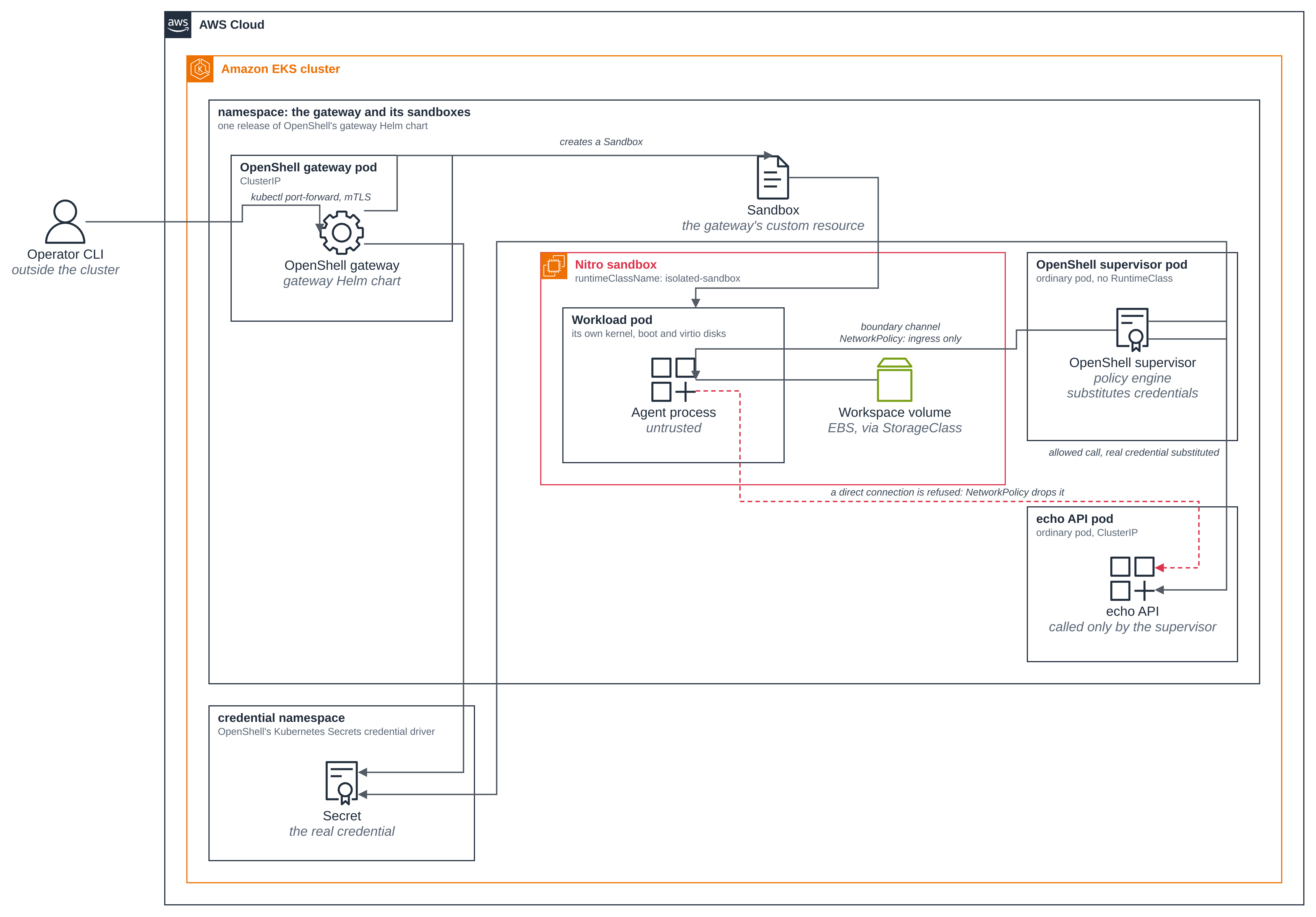
- OpenShell installed as one release of its own Helm chart. The gateway chart
(
oci://ghcr.io/nvidia/openshell/helm-chart) installs the control plane and, with its defaults, the namespace-scoped sandbox prerequisites — the sandboxServiceAccount, itsRoleandRoleBinding, and aNetworkPolicy— in the same namespace, where the gateway then creates every sandbox. The page shows the release, the gateway pod Ready, andserver.defaultRuntimeClassName: isolated-sandboxin the gateway's values, the one line that puts every OpenShell sandbox's workload pod in a Nitro sandbox. - Each sandbox is a Nitro workload pod plus an ordinary supervisor pod. Creating one
OpenShell sandbox produces a
Sandboxresource, a workload pod and a supervisor pod. The page shows the workload pod'sruntimeClassName: isolated-sandboxand its own kernel build, boot and virtio disks, next to what an ordinary pod on the same node shows instead; and the supervisor pod with no runtime class at all, running as an ordinary pod. - The agent gets a credential placeholder, never the real value. A demo credential is
stored as a Kubernetes
Secretthrough OpenShell's Kubernetes Secrets credential driver, in a dedicated credential namespace the gateway reads. The workload pod receives only a placeholder: the page shows the agent's own environment holding the placeholder form, shows the credentialSecretby name only, and shows that it is not mounted in the workload pod. The supervisor re-originates the request with the real value. - Three layers each refuse something. OpenShell's own policy refuses a file read
outside the agent's filesystem policy and refuses a connection to a network destination
the policy does not list. The Nitro boundary keeps the node's own processes and
filesystem out of the guest, and keeps the supervisor's real credential absent from it
too. The Kubernetes
NetworkPolicyOpenShell's driver creates for the sandbox denies a direct, workload-initiated connection outright, so a connection from the workload pod's own network namespace that does not go through OpenShell at all — this page makes one with an ephemeral debug container — is still dropped on the node. - The gateway is reached only with
kubectl port-forward. The gateway Service is ClusterIP. The page reaches it that way, with the mTLS client bundle the chart generates, and uses the OpenShell CLI'ssandbox execto run commands inside a sandbox. It creates no Ingress, LoadBalancer or NodePort.
What runs in a sandbox, and what does not
| Component | Runtime | Why |
|---|---|---|
| The OpenShell gateway (control plane, on its bundled SQLite) | ordinary pod | The trusted control plane that creates and manages sandboxes. OpenShell's setup guide runs it as an in-cluster service reached by kubectl port-forward. |
| The per-sandbox supervisor pod | ordinary pod | OpenShell's own trust boundary: it holds the gateway session, the policy engine and the real credentials, evaluates policy and opens approved upstream connections. Sandboxing it would defeat its job. |
| The per-sandbox workload pod | runtimeClassName: isolated-sandbox |
Where the agent — the place untrusted code executes — runs. This is the one thing that needs hardware-level isolation, and its containers run in a lightweight VM with a kernel of their own. |
Versions
Pinned to releases, not commits, and confirmed against the published artifacts when this
blueprint was built (see versions.json for the exact values):
scripts/setup.sh verifies the chart against its pinned SHA-256 before installing it,
and pins the gateway, supervisor and sandbox-runtime images by digest in the
rendered values, so what actually runs is not left to each image's tag.
| Component | Pin |
|---|---|
| agent-sandbox controller (kubernetes-sigs/agent-sandbox) | v1.0.10, as in Getting started > Warm pool |
OpenShell gateway chart (oci://ghcr.io/nvidia/openshell/helm-chart) |
0.1.6 |
| OpenShell gateway, supervisor and sandbox-runtime images | the chart's appVersion, 0.1.6 |
| OpenShell CLI (releases) | v0.1.6 |
| Default workload image | nvcr.io/nvidia/base/ubuntu:24.04, the chart's own built-in default — this blueprint builds no image of its own |
What OpenShell needs from the cluster, and how this EKS cluster meets it
| OpenShell needs | On this cluster |
|---|---|
| Kubernetes 1.29 or later, with RBAC | Met by every EKS version the Getting started cluster can run. |
A CNI that enforces ingress and egress NetworkPolicy where sandboxes run |
Off until the network policy controller is enabled, once per cluster — see Getting started > Coding agent. scripts/setup.sh checks enable-network-policy-controller on the amazon-vpc-cni ConfigMap and refuses to go on if it is not "true". |
| The agent-sandbox controller and CRDs, installed before the chart | Installed by Getting started > Warm pool. The OpenShell chart does not install or upgrade it. |
A StorageClass for each sandbox's workspace PVC (server.workspaceStorageClass) |
Block-backed storage, not a network filesystem. scripts/setup.sh chooses the class and never changes one: the cluster's default class when exactly one fits (ebs.csi.eks.amazonaws.com, gp3, encrypted, reclaimPolicy: Delete), otherwise this blueprint's own class, openshell-kubernetes-gp3 from deploy/storage-class.yaml, created only when absent, not a default class, and marked as this blueprint's. WORKSPACE_STORAGE_CLASS in .env names a class instead. The cluster this page ran on has no default class that fits, so setup created its own. The chosen class is named explicitly in the gateway's values. |
| Block-backed storage for the gateway's SQLite database | The same class, via the gateway's own PVC (server.dataStorageClass). |
| One gateway replica, or an external PostgreSQL for more | One replica (a StatefulSet). This blueprint needs no database service. |
| A kernel that allows Landlock and an unprivileged, nested seccomp user-notification filter | In a Nitro sandbox, OpenShell's own probe for both runs against the guest's kernel, not the node's, and this page shows it passing: the workload pod reaches Ready and runs commands under the sandbox's own policy. |
Two optional OpenShell features stay off: server.enableUserNamespaces (a Nitro sandbox
does not support hostUsers: false, so this is the chart default left as it is, not
turned on), and the Gateway API ingress path, which would expose the gateway.
One release, one namespace
The gateway and its sandboxes run in one namespace, openshell-kubernetes: that is the
chart's default, server.sandboxNamespace left empty. The provider credential is the
exception, in its own openshell-kubernetes-credentials namespace through the Kubernetes
Secrets credential driver, so the workload pod's ServiceAccount has no RBAC path to it.
Because the gateway's own client-tls certificate Secret sits in the namespace the
workload pods run in, scripts/setup.sh checks that neither the sandbox ServiceAccount
nor the namespace's default one can read Secrets, create pods, exec into pods or add
ephemeral containers there, and stops if either can; scripts/demo.sh then checks that the
workload pod really runs as that sandbox ServiceAccount. The chart
also supports a split install — the gateway with workspaceResources.enabled=false and
its openshell-workspace chart in each pre-provisioned sandbox namespace — for one
gateway serving several namespaces; this blueprint does not use it.
Adapting the workload pod to a Nitro sandbox
OpenShell's Kubernetes driver generates the workload pod with one detail that needs
adjusting to start inside a Nitro sandbox guest. OpenShell mounts the workspace PVC at two
paths in one pod, /mnt/openshell-workspace in the seeding init container and /sandbox
in the agent container, and a sandbox pod accepts a PVC mounted at one path only: the
runtime refuses the second container with Mounting the same PVC at different paths across
containers in one sandbox pod is not supported. The fix gives the seeding container an
emptyDir at its path instead, so the workspace volume is mounted once, at /sandbox.
Files an image keeps under /sandbox are then not copied into the workspace.
The other two points from that list needed no fix. OpenShell's in-pod runtime, which an init container copies onto a pod volume, starts unchanged as the workload container's entrypoint in the guest, and init containers with no CPU or memory requests were admitted in the sandboxed pod unchanged.
That one adjustment is the whole of
deploy/nitro-adapter.yaml, a MutatingAdmissionPolicy
scoped to namespaces carrying this blueprint's own managed-by label and to pods OpenShell
itself labels openshell.ai/boundary-role: workload — so it reaches no pod outside this
blueprint, including another OpenShell gateway's. It changes nothing about the runtime's
command arguments, its user, its capabilities, its seccomp profile or its policy: the page
reads all of those from the running process, so an adapter that changed them would be
changing the thing the blueprint measures.
The workload pod asks for 1Gi of memory
One more setting fits the workload pod to a Nitro sandbox, and it is in scripts/demo.sh
rather than the adapter: the sandbox is created with openshell sandbox create --memory 1Gi,
and on this page's run the agent container's memory request and limit were both 1Gi.
scripts/demo.sh stops unless both are, and prints them in the "two pods" output below.
A Nitro sandbox's memory is allocated from the pod's request when its VM boots, and
cannot change while the pod runs (Amazon EKS User Guide, Isolated and confidential pods
limitations). With no request the guest gets a small default size, about 130 MiB on the
hello sandbox page. That runs the agent,
but not also the ephemeral debug container that layer 3 below adds to the same pod: in two
runs without the request, on c8a.large nodes, the guest ran out of memory as that
container started, the agent container was OOMKilled, the debug container never started
(StartError) and the pod failed. With 1Gi, on the same nodes, it runs and shows the
refusal. 1Gi is what this page's run used, not a documented minimum.
Files
| File | What it is |
|---|---|
versions.json |
Every pin: the chart's version and SHA-256, the three image digests, the CLI's version and SHA-256 |
deploy/gateway-values.yaml |
The gateway chart's Helm values |
deploy/nitro-adapter.yaml |
The MutatingAdmissionPolicy that fits OpenShell's generated workload pod to a Nitro sandbox guest |
deploy/storage-class.yaml |
This blueprint's own EBS StorageClass, created only when the cluster has no default class that fits |
policy/sandbox-policy.json |
The OpenShell sandbox policy: filesystem, process and the one network rule |
policy/demo-profile.json |
The endpointless provider profile the demo credential binds through |
scripts/setup.sh |
Chooses the StorageClass, installs the Helm chart, the admission adapter, the RuntimeClass label and the demo echo API |
scripts/demo.sh |
Creates one fresh sandbox with a 1Gi memory request and shows every claim this page makes, with real output |
scripts/clean.sh |
Removes everything this blueprint created |
Quick start
Step 1: Confirm network policy enforcement is on. scripts/setup.sh checks this and
refuses to go on if it is not; the command to turn it on, once per cluster, is in Getting
started > Coding agent:
kubectl get configmap -n kube-system amazon-vpc-cni -o jsonpath='{.data.enable-network-policy-controller}'
Step 2: Install the gateway chart and the admission adapter, and start the demo echo API.
cp .env.example .env    # optional; defaults match this page
./scripts/setup.sh
This block is from a real run, abridged: helm's own multi-line NAME:/LAST DEPLOYED:/
NAMESPACE:/REVISION:/DESCRIPTION:/TEST SUITE: summary after the install is
trimmed to its STATUS: line, and the run record path and the closing Next: hint at the
end are omitted; every line shown is printed verbatim by the run, in order. On this run no
default StorageClass fitted, so step 3 created this blueprint's own.
==> checking tools and the cluster (1/9)
  agent-sandbox: reusing the install already on this cluster
  network policy enforcement: on

==> the namespace the gateway and its sandboxes run in (2/9)
namespace/openshell-kubernetes created
namespace/openshell-kubernetes labeled
  created the namespace openshell-kubernetes

==> choosing the StorageClass for workspace PVCs (3/9)
note: no default StorageClass fits (ebs.csi.eks.amazonaws.com, gp3, encrypted, reclaimPolicy Delete). Using the sample's own class openshell-kubernetes-gp3.
creating storageclass/openshell-kubernetes-gp3 from deploy/storage-class.yaml
storageclass.storage.k8s.io/openshell-kubernetes-gp3 created

==> the isolated-sandbox RuntimeClass's OpenShell approval label (4/9)
  runtime class: isolated-sandbox already carries openshell.ai/sandbox-attachable=true

==> the admission adapter that fits OpenShell's workload pod to a Nitro sandbox (5/9)
mutatingadmissionpolicy.admissionregistration.k8s.io/openshell-kubernetes-nitro-adapter created
mutatingadmissionpolicybinding.admissionregistration.k8s.io/openshell-kubernetes-nitro-adapter created
  applied openshell-kubernetes-nitro-adapter, scoped to namespaces labelled managed-by=openshell-kubernetes

==> the pinned OpenShell CLI and gateway chart (v0.1.6) (6/9)
  downloaded and verified the CLI: openshell 0.1.6
  verified the gateway chart against its pinned checksum

==> the OpenShell gateway (7/9)
  pinned the gateway, supervisor and sandbox-runtime images by digest
  rendered chart: all Services are ClusterIP, and no Ingress, Gateway or Route
Release "openshell" does not exist. Installing it now.
STATUS: deployed
Waiting for 1 pods to be ready...
partitioned roll out complete: 1 new pods have been updated...

==> who can read Secrets in the namespace the workload pods run in (8/9)
  confirmed: neither openshell-sandbox nor the namespace's default ServiceAccount can read Secrets, create pods, exec into pods or add ephemeral containers in openshell-kubernetes
  labelled the credential namespace openshell-kubernetes-credentials as this sample's

==> the demo echo API this sample's policy and provider point at (9/9)
pod/echo-api created
pod/echo-api condition met
service/echo-api created
  echo-api Ready, reachable in-cluster at echo-api.openshell-kubernetes.svc.cluster.local:80

==> ready
  namespace:            openshell-kubernetes (the gateway and its sandboxes)
  credential namespace: openshell-kubernetes-credentials
  release:              openshell (OpenShell v0.1.6)
The gateway's values, as scripts/setup.sh rendered them from
deploy/gateway-values.yaml on this run (abridged to the
lines this page is about), set the one line that matters most on this page,
defaultRuntimeClassName, and name the StorageClass setup chose:
server:
  credentialDrivers:
    kubernetesSecrets:
      createNamespace: true
      enabled: true
      namespace: openshell-kubernetes-credentials
  dataStorageClass: openshell-kubernetes-gp3
  defaultRuntimeClassName: isolated-sandbox
  workspaceStorageClass: openshell-kubernetes-gp3
The Helm release, and the pods in its namespace while the sandbox from Step 3 was running
(captured right after demo.sh, so the sandbox's two pods are there beside the gateway):
$ helm list -n openshell-kubernetes
NAME        NAMESPACE               REVISION    UPDATED                                 STATUS      CHART               APP VERSION
openshell   openshell-kubernetes    1           2026-11-07 17:56:16.283566625 +0000 UTC deployed    helm-chart-0.1.6    0.1.6

$ kubectl get pods -n openshell-kubernetes
NAME                                                 READY   STATUS        RESTARTS   AGE
default--demo-1794074233                             1/1     Running       0          89s
echo-api                                             1/1     Running       0          106s
node-probe                                           1/1     Terminating   0          29s
openshell-0                                          1/1     Running       0          2m11s
os-supervisor-a6433f6b-4ba3-44c0-9160-adea57c85a7d   1/1     Running       0          89s
Step 3: Reach the gateway with kubectl port-forward, and create one sandbox. In a
separate terminal:
kubectl -n openshell-kubernetes port-forward svc/openshell 8080:8080
Then:
./scripts/demo.sh
The sections below are that one run's own output. Its port-forward added
--address 127.0.0.1, which keeps the listener on the IPv4 loopback address that kubectl's
default, localhost, already includes.
The CLI, registered over the port-forward with the generated mTLS bundle
==> the mTLS client bundle and the CLI
✓ Gateway 'k8s' added and set as active
  Endpoint: https://127.0.0.1:8080
  Type: local
✓ TLS certificates present
Server Status

  Gateway: k8s
  Server: https://127.0.0.1:8080
  Status: Connected
  Authentication: Authenticated (mTLS transport)
  Version: 0.1.6
Each sandbox is a Nitro workload pod and an ordinary supervisor pod
==> the two pods of this one sandbox
pod/os-supervisor-a6433f6b-4ba3-44c0-9160-adea57c85a7d condition met
  workload pod:   default--demo-1794074233
    runtimeClassName: isolated-sandbox
    agent container memory request: 1Gi
    agent container memory limit:   1Gi
  supervisor pod: os-supervisor-a6433f6b-4ba3-44c0-9160-adea57c85a7d
    runtimeClassName:
    (empty means no RuntimeClass: an ordinary pod)
  workspace PVC: Bound on openshell-kubernetes-gp3
The agent container's 1Gi memory request and limit come from the --memory 1Gi that
scripts/demo.sh passes, for the reason in "The workload pod asks for 1Gi of memory" above;
the script checks both before it prints them. The workspace claim is bound on the class
setup chose.
The workload pod's own kernel, boot and virtio disks, next to the same node's own view from an ordinary pod:
==> the workload pod's own kernel, boot and virtio disks
  guest /proc/version:
Linux version 6.18.54 (builder@buildkitsandbox) (x86_64-bottlerocket-linux-gnu-gcc (Buildroot 2025.05.1) 13.4.0, GNU ld (GNU Binutils) 2.44) #1 SMP PREEMPT_DYNAMIC Thu Oct 22 17:38:11 UTC 2026
  guest /sys/class/dmi/id/product_name and disks:
product_name: c8a.enclave
disks: dm-0 vda vdb vdc vdd vde
  the same node's own view, from an ordinary pod on <NODE_NAME>:
product_name: c8a.large
disks: dm-0 loop0 loop1 loop2 loop3 loop4 loop5 loop6 loop7 nvme0n1 nvme1n1 nvme2n1 zram0
Linux version 6.18.56 (builder@buildkitsandbox) (x86_64-bottlerocket-linux-gnu-gcc (Buildroot 2025.05.1) 13.4.0, GNU ld (GNU Binutils) 2.44) #2 SMP PREEMPT_DYNAMIC Fri Oct 30 22:32:37 UTC 2026
Both kernels come from the same Bottlerocket toolchain, but they are different builds:
the guest reports 6.18.54, build #1 of Oct 22 at 17:38:11, and the node 6.18.56,
build #2 of Oct 30 at 22:32:37, because the guest boots its own kernel, not the node's.
The product name and the disk list say the same thing a different way: the guest is a
c8a.enclave VM with virtio disks (vda, vdb, ...), where the ordinary pod on the very
same node reports the node's own c8a.large instance and its nvme devices.
The agent's credential: a placeholder, never the real value
The demo credential is stored once, through OpenShell's Kubernetes Secrets credential
driver, as a Secret in its own namespace — shown here by name only:
  the credential Secret, by name only -- never its value:
openshell-cred-922590281697056a62dec8264984ccf2bf7db64b   Opaque
The agent's own environment holds a placeholder, never the value:
==> the agent's credential: a placeholder, never the real value
  the agent's own environment:
DEMO_API_KEY=openshell:resolve:env:v16945336013537783964_DEMO_API_KEY
A request to the one endpoint this sandbox's policy allows — an in-cluster HTTP echo service that this blueprint starts so there is something to send the credential to and get it back for inspection — shows the real value reached the backend, substituted by the supervisor, outside the sandbox. Echoing the header back is this demo backend's own doing, not something every approved endpoint does or needs to: a real deployment's own backend need never reflect a credential back at all, and most do not. Because this one does, the bytes do pass back through the sandbox on their way to being checked — what this page holds to is that they are never printed anywhere, inside the sandbox or out of it, and never leave the sandbox in that form either: the SHA-256 digest of the response's own credential header is computed by a command run inside the sandbox, and only the digest, never the header itself, leaves it; this run's own record of the digest it stored in the Secret, from when the provider was created, is what it is compared against:
  the digest of the value the backend received (substituted by the supervisor, outside the sandbox), computed INSIDE the sandbox so the real value is never printed anywhere, including by this script:
  resolved credential digest: fae900a9cba055945fbf269e9489336d274c125d41621e61c59f13941f174f4c
  matches the digest of the credential this run stored in the Secret: true
And the workload pod mounts no Secret for it at all:
  no Secret for the real credential is mounted in the workload pod:
os-sandbox-a6433f6b-4ba3-44c0-9160-adea57c85a7d-f38dbc058854
(That one Secret is OpenShell's own per-sandbox bootstrap material, not a provider credential, and the directory it was staged into is already empty by the time the agent runs.)
Three layers each refuse something
Layer 1 — OpenShell's own policy. A file outside the sandbox's filesystem policy, and a
network destination outside its one allowed endpoint, are both refused inside the guest,
by the policy the gateway gave this sandbox. The refused file is world-readable
(/var/lib/dpkg/status, mode 644), so the refusal below is the policy, not a Unix
permission a root-owned, non-readable file would have produced on its own:
==> layer 1: OpenShell's policy refuses a file outside it and a destination outside it
  a file the policy does not list (world-readable, so this is the policy and not a Unix permission):
644 /var/lib/dpkg/status
cat: /var/lib/dpkg/status: Permission denied
cat exit=1
  control -- a file the policy does list:
default--demo-1794074233
  a destination the policy does not list:
bash: connect: Permission denied
bash: line 1: /dev/tcp/kubernetes.default.svc.cluster.local/443: Permission denied
stat succeeds and reports the file's own mode, 644: any process could read it. cat
on the very same path, moments later and at the very same uid, is refused, with exit 1 —
which is what puts the refusal on OpenShell's policy rather than on a file mode a
root-owned, non-readable file would have produced on its own.
Layer 2 — the Nitro boundary. Only the sandbox's own processes are visible in the guest, and the guest's own environment is checked, not eyeballed, for anything beyond the one placeholder:
==> layer 2: the Nitro boundary -- the node is invisible, and the credential is absent
  processes visible in the guest (its own, only):
USER         PID %CPU %MEM    VSZ   RSS TTY      STAT START   TIME COMMAND
ubuntu         1  0.3  0.9 111320 11384 ?        Ssl  17:57   0:00 /.openshell/runtime/openshell-sandbox --bootstrap /.openshell/state/bootstrap/boundary.json
ubuntu        56  0.0  0.1   2708  1424 ?        S    17:57   0:00 sleep 3600
ubuntu        91  0.0  0.3   7904  3916 ?        R    17:58   0:00 ps aux
  the guest's environment, checked rather than eyeballed:
DEMO_API_KEY=openshell:resolve:env:v16945336013537783964_DEMO_API_KEY
  no other credential-shaped variable
ps aux showing only the sandbox's own processes is true of any pod with its own PID
namespace, sandboxed or not, so it is shown for completeness rather than as Nitro-specific
evidence; the kernel build number and the DMI/disk comparison above are what actually
distinguish the Nitro boundary from an ordinary container. The environment check greps
for every credential-shaped variable name other than the placeholder itself, so a real
secret accidentally present alongside it would be caught, not hidden behind a check that
the placeholder's own name would always satisfy.
Layer 3 — the Kubernetes NetworkPolicy. Because OpenShell's Kubernetes driver creates
Sandbox resources directly rather than through a SandboxTemplate, agent-sandbox's own
controller applies no managed NetworkPolicy of its own to these pods (networkPolicyManagement
is a SandboxTemplate-only field in the v1.0.10 API reference).
The page lists every NetworkPolicy in the namespace and checks which select the
workload pod's own labels, rather than assuming there is exactly one: there are two, both
OpenShell's own, and only together do they say what the workload pod may actually reach.
==> layer 3: the Kubernetes NetworkPolicy drops a direct, workload-initiated connection
  every NetworkPolicy in the sandbox namespace, and which select the workload pod's labels:
NAME                                              POD-SELECTOR                                                      AGE
openshell-sandbox-ssh                             openshell.ai/managed-by=openshell                                 111s
openshell-sandbox-supervisors                     openshell.ai/boundary-role=supervisor                             67s
openshell-sandbox-workloads                       openshell.ai/boundary-role=workload                               67s
os-control-a6433f6b-4ba3-44c0-9160-adea57c85a7d   openshell.ai/boundary-pair=a6433f6b-4ba3-44c0-9160-adea57c85a7d   67s
  workload pod labels: {"agents.x-k8s.io/sandbox-name-hash":"f3794e82","openshell.ai/boundary-pair":"a6433f6b-4ba3-44c0-9160-adea57c85a7d","openshell.ai/boundary-role":"workload","topology.kubernetes.io/region":"us-east-1","topology.kubernetes.io/zone":"us-east-1b"}
  the two NetworkPolicies selecting the workload pod (boundary-pair=a6433f6b-4ba3-44c0-9160-adea57c85a7d):
apiVersion: networking.k8s.io/v1
kind: NetworkPolicy
metadata:
  labels:
    openshell.ai/component: sandbox-workload-fence
    openshell.ai/managed-by: openshell
  name: openshell-sandbox-workloads
  namespace: openshell-kubernetes
spec:
  ingress:
  - from:
    - podSelector:
        matchLabels:
          openshell.ai/boundary-role: supervisor
    ports:
    - port: 5500
      protocol: TCP
  podSelector:
    matchLabels:
      openshell.ai/boundary-role: workload
  policyTypes:
  - Ingress
  - Egress
apiVersion: networking.k8s.io/v1
kind: NetworkPolicy
metadata:
  labels:
    openshell.ai/component: sandbox-control-egress
    openshell.ai/managed-by: openshell
    openshell.ai/sandbox-id: a6433f6b-4ba3-44c0-9160-adea57c85a7d
  name: os-control-a6433f6b-4ba3-44c0-9160-adea57c85a7d
  namespace: openshell-kubernetes
spec:
  egress:
  - ports:
    - port: 5500
      protocol: TCP
    to:
    - podSelector:
        matchLabels:
          openshell.ai/boundary-pair: a6433f6b-4ba3-44c0-9160-adea57c85a7d
          openshell.ai/boundary-role: supervisor
  ingress:
  - from:
    - podSelector:
        matchLabels:
          openshell.ai/boundary-pair: a6433f6b-4ba3-44c0-9160-adea57c85a7d
          openshell.ai/boundary-role: workload
    ports:
    - port: 5500
      protocol: TCP
  podSelector:
    matchLabels:
      openshell.ai/boundary-pair: a6433f6b-4ba3-44c0-9160-adea57c85a7d
  policyTypes:
  - Ingress
  - Egress
Kubernetes NetworkPolicy objects selecting the same pod are additive, so what actually
governs the workload pod is the union of both. openshell-sandbox-workloads names
Egress as a policyType but carries no egress rule at all, which alone would deny
every egress connection; os-control-<boundary-pair>, generated fresh for this one
sandbox, adds back exactly one: to its own paired supervisor, on port 5500. Combined, the
workload pod may egress to its own supervisor's boundary port and nowhere else -- that
one port, in that one direction, is the whole of the boundary channel out of the
sandbox. openshell-sandbox-workloads's own ingress rule is the wider of the two: it
admits port 5500 from any pod labelled boundary-role: supervisor in the namespace,
not only this sandbox's own, so it is shared cluster-wide infrastructure rather than
something generated per sandbox; os-control-<boundary-pair> narrows that back down to
the paired supervisor specifically for this one sandbox's own ingress rule. Either way,
nothing besides that one port, to or from a supervisor, is open for the workload pod.
To show the echo API's own refusal is attributable to these NetworkPolicy objects
alone, and not to OpenShell's own in-pod interception, this page makes the connection
attempt from somewhere OpenShell's own interception cannot reach: an ephemeral debug
container (kubectl debug ... --target=agent), added to the running pod as its own,
separate OCI container, sharing only the pod's network namespace with the agent's
container. OpenShell's filesystem and process confinement is a seccomp filter and a
Landlock ruleset installed on the agent's own process tree; both are inherited only
through that process's own fork/exec lineage, which an independently started sibling
container is never part of, so this container runs under neither. What it does share is
the network namespace, which is exactly what a Kubernetes NetworkPolicy enforces on —
so a connection attempt from here tests the NetworkPolicy alone, with OpenShell's own
interception structurally unable to apply to it, not merely assumed absent. Bypassing
OpenShell entirely does not bypass the NetworkPolicy:
  a connection from the workload pod's own network namespace, outside OpenShell's control (an ephemeral debug container sharing it), to the policy-approved backend by IP -- bypassing OpenShell entirely does not bypass the NetworkPolicy:
Connecting to 10.100.133.181 (10.100.133.181:80)
wget: download timed out
EXIT=1
scripts/demo.sh asserts this rather than only printing it: it stops with an error unless
the debug container actually ran its command and printed both wget: download timed out
and EXIT=1. A debug container that never started counts as terminated too, with an empty
log, and before this check a run whose debug container never started still finished with
exit 0, printing nothing where the refusal should be. The debug container
runs inside the workload pod's sandbox VM and shares its memory, which is why that pod asks
for 1Gi (see "The workload pod asks for 1Gi of memory" above).
The same technique, run instead against the supervisor pod — whose own NetworkPolicy
(openshell-sandbox-supervisors, listed above) allows unrestricted egress — reaches the
same backend immediately, with the same tool, confirming the refusal above is specific to
the workload pod's own NetworkPolicy set and not a cluster-wide outage or routing
problem:
  control -- the same technique against the supervisor pod, which carries no such restriction:
Connecting to 10.100.133.181 (10.100.133.181:80)
writing to stdout
-                    100% |********************************|   147  0:00:00 ETA
written to stdout
{
  "headers": {
    "Connection": [
      "close"
    ],
    "Host": [
      "10.100.133.181"
    ],
    "User-Agent": [
      "Wget"
    ]
  }
}
EXIT=0
scripts/demo.sh checks the control as well, and stops unless it printed EXIT=0: the
refusal above is only attributable to the workload pod's NetworkPolicy when the same
request from the supervisor pod succeeds.
Good to know
- The demo credential and its backend are this blueprint's own, not OpenShell's. The
echo API this blueprint starts (
docker.io/mccutchen/go-httpbin) exists only so there is an in-cluster destination to send the one credential to and show it substituted. A real deployment names a real provider profile and a real backend instead. - The gateway's development auth mode is for this page, not for a shared environment.
server.auth.allowUnauthenticatedUsers: truemeans transport mTLS and access to the client TLSSecretare the whole of this gateway's access control. This blueprint's subject is the platform install, not identity; a real deployment configures OpenShell's own OIDC or trusted-access-proxy authentication, as its access control guide describes. - The
isolated-sandboxRuntimeClass's approval label is shared. OpenShell's resource admission refuses an unlabeled RuntimeClass, so the label (openshell.ai/sandbox-attachable=true) has to be there before any sandbox can use it. Other OpenShell gateways and other blueprints on a shared cluster rely on the same label, soscripts/setup.shadds it only when it is missing andscripts/clean.shleaves it in place, printing the command that removes it. - OpenShell's own driver manages the per-sandbox
NetworkPolicyandService; this blueprint adds none of its own. TheNetworkPolicyobjects shown above, and the boundaryServicethe supervisor and the workload use to reach each other, come entirely from OpenShell's chart and Kubernetes driver. What this blueprint itself adds is the admission adapter (aMutatingAdmissionPolicy, which is cluster-scoped, limited by its ownnamespaceSelectorto namespaces labelledmanaged-by=openshell-kubernetes) and the demo echo API's pod and Service. - The gateway's
client-tlsSecret sits in the namespace the workload pods run in. WithallowUnauthenticatedUsers: true(the point above), that certificate is full administrative access to the gateway, and one release puts the gateway and its sandboxes in one namespace.scripts/setup.shdoes not just assert this is safe: it checks, every run, that neither the sandboxServiceAccountnor the namespace's owndefaultServiceAccountcanget,listorwatchSecrets there, or reach one another way:createpods (which could mount it),create pods/exec, orpatchorupdatepods/ephemeralcontainers(kubectl auth can-i ... --as=system:serviceaccount:<namespace>:<sa>, read as literallyyesorno, never just a command's exit code, whichcan-ialso returns non-zero for on a failure that is not "no" either). It refuses to continue if any of them can, or if any answer is neither yes nor no, andscripts/demo.shconfirms the workload pod'sspec.serviceAccountNameis the account that was checked. That check covers those two ServiceAccounts' RBAC only; it is not a general guarantee that nothing in the namespace can reach the Secret. A deployment that wants the workloads in a namespace without it uses the chart's split install instead (see "One release, one namespace" above).
Clean up
./scripts/clean.sh
==> the sandbox(es) this run created
sandbox.agents.x-k8s.io "default--demo-1794074233" deleted from openshell-kubernetes namespace
pod "node-probe" deleted from openshell-kubernetes namespace
pod "echo-api" deleted from openshell-kubernetes namespace
service "echo-api" deleted from openshell-kubernetes namespace

==> the Helm release
  These resources were kept due to the resource policy:
  [Namespace] openshell-kubernetes-credentials

  release "openshell" uninstalled

==> the admission adapter
mutatingadmissionpolicybinding.admissionregistration.k8s.io "openshell-kubernetes-nitro-adapter" deleted
mutatingadmissionpolicy.admissionregistration.k8s.io "openshell-kubernetes-nitro-adapter" deleted

==> the namespaces
  deleting openshell-kubernetes-credentials
namespace "openshell-kubernetes-credentials" deleted
  deleting openshell-kubernetes
namespace "openshell-kubernetes" deleted

==> the sample's own StorageClass, if the sample made it
storageclass.storage.k8s.io "openshell-kubernetes-gp3" deleted
  storageclass/openshell-kubernetes-gp3 deleted

==> left in place on purpose
  The isolated-sandbox RuntimeClass and its openshell.ai/sandbox-attachable=true label:
  other OpenShell gateways and other samples on this cluster share it. To remove the
  label (only do this if nothing else on the cluster needs it):

    kubectl label runtimeclass isolated-sandbox openshell.ai/sandbox-attachable-

  This run's local scratch files under tmp/openshell-kubernetes/ (the downloaded CLI and
  charts, and the CLI's own client certificate for this gateway): gitignored, and not a
  cluster resource, so this script leaves them for the next run to reuse. Delete
  tmp/openshell-kubernetes/ yourself if you want them gone too.
Each namespace delete is followed by this script actually waiting for it to finish terminating (up to 5 minutes) before moving on, rather than reporting "deleting" and exiting while the delete is still in progress.
This removes the Helm release and its namespaces, including the credential namespace,
the generated provider-credential Secrets and the workspace PVC; the admission adapter;
the demo echo API; and this blueprint's own StorageClass, openshell-kubernetes-gp3, only
when it carries this blueprint's mark (on this run setup had created it). A default class
setup chose instead is never deleted. It leaves the shared
isolated-sandbox RuntimeClass's approval label in place, and this blueprint's own local
scratch files under tmp/, printing what it left and why.
References
- OpenShell
- OpenShell Kubernetes setup guide
- OpenShell policy schema reference
- OpenShell provider profiles
- agent-sandbox
- Subagent security > openshell: one analyst confined by OpenShell, with its own worked example of the same Nitro-sandbox adjustment