Pause and resume a sandbox
Before you start, review the prerequisites and shared setup
on the home page, and run the hello sandbox
blueprint first so you have a cluster with the runtime classes. This blueprint uses the
agent-sandbox Sandbox API, installed in warm pool
step 1. The commands below use files from this repository, so clone it if you have not
already, and run them from this blueprint's folder:
git clone https://github.com/aws-samples/sample-eks-nitro-sandbox.git
cd sample-eks-nitro-sandbox/examples/agent-sandbox/pause-resume
An idle agent session costs you no compute if you can throw away its compute and keep its
disk, then bring the session back later with its workspace intact. That is what suspend and
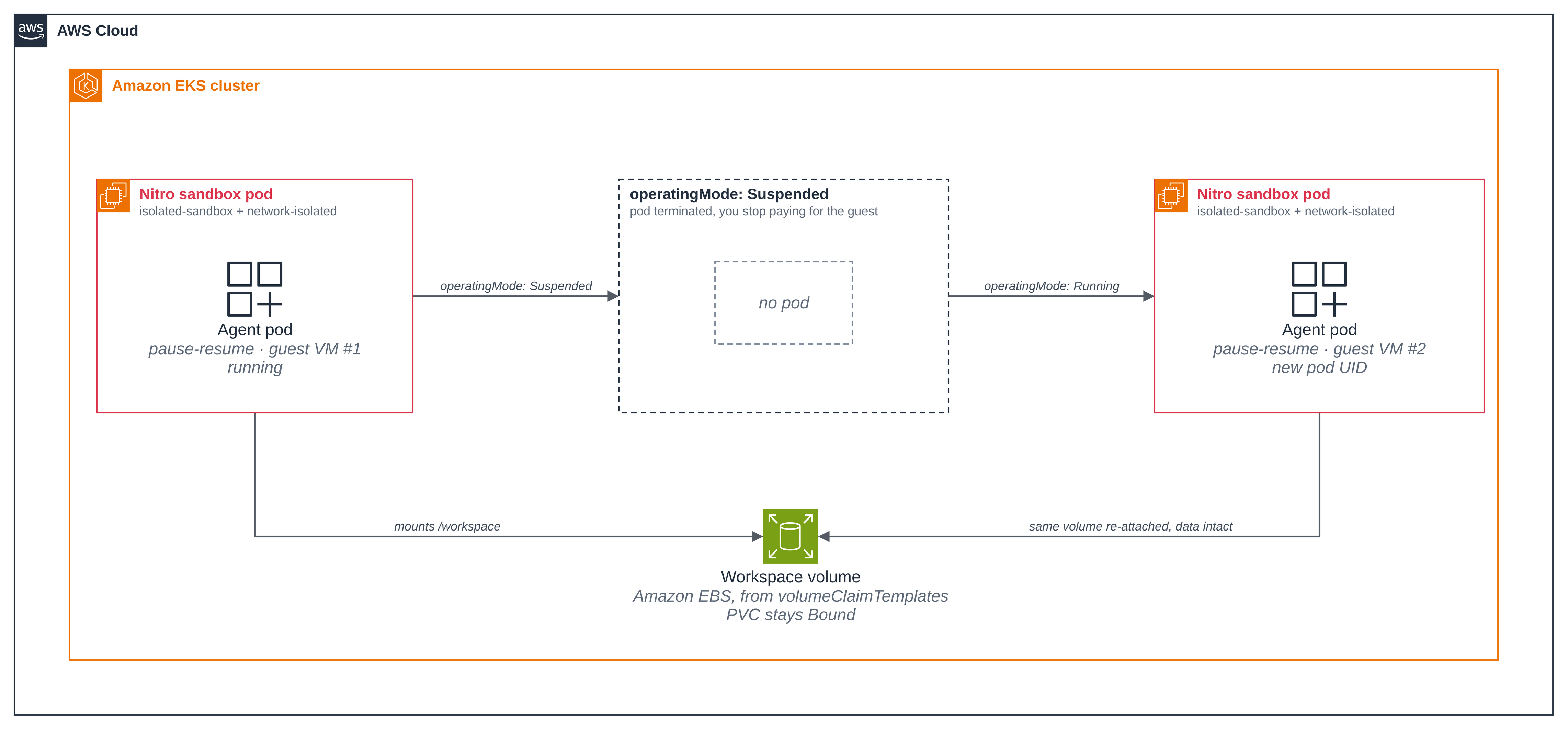
resume do for a sandbox: operatingMode: Suspended terminates the pod and its guest, so you
stop paying for the compute, while the controller keeps the Sandbox and its EBS volume;
operatingMode: Running brings up a new pod on the same volume. The file you wrote before
the suspend is still there, with a new line appended on the new boot, so disk state survived
even though process memory did not.
The workload is a single agent-sandbox Sandbox
whose pod runs in a Nitro sandbox, with an Amazon EBS workspace from volumeClaimTemplates.
It boots network-isolated, so it has no network besides loopback and needs no network
policy, and it still mounts its EBS workspace, which the node-side CSI driver attaches from
outside the guest, before and after the resume.
- Suspend releases the pod and its compute, and keeps the EBS volume. The pod goes
away (
kubectl get podreportsNotFound) while the workspacePersistentVolumeClaimstaysBound. The volume stays provisioned and billed so the workspace can come back: that is the trade this blueprint is about. - Resume brings the data back on a new pod. A new pod, with a new UID, mounts the same volume. The earlier line is still in the file, with a new line from this boot.
- The resumed pod is a fresh sandbox, not the old one woken up. The three sandbox
signals read before the suspend and again after the resume: the guest's own kernel build,
a boot time that matches the new pod's age, and virtio
vd*disks. This is how the page shows the resume booted a new guest, not the same one.
Figure 1: Pause and resume a sandbox. Suspending the sandbox terminates its pod and guest VM but keeps the EBS workspace volume; resuming brings up a new pod that re-attaches the same volume with its data intact.
Versions
| Component | Pin |
|---|---|
| agent-sandbox controller (kubernetes-sigs/agent-sandbox) | v1.0.10, as in Warm pool |
Nothing else is pinned beyond the image in the manifest
(public.ecr.aws/docker/library/busybox:1.36).
Files
| File | What it is |
|---|---|
deploy/storage-class.yaml |
The blueprint's own EBS StorageClass, created by setup only when the cluster has no default class that fits. |
deploy/sandbox.yaml |
The Sandbox with its EBS volumeClaimTemplates. Its container appends one line to /workspace/boots.log per boot. |
scripts/setup.sh |
Check the prerequisites, create the namespace and the Sandbox, and wait for the guest to boot with /workspace mounted. |
scripts/suspend.sh |
Suspend the sandbox and show the pod gone and the volume kept. |
scripts/resume.sh |
Resume the sandbox and show the workspace back on a new pod. |
scripts/cleanup.sh |
Delete the Sandbox, its PVC, the EBS volume and the namespace, and the blueprint's own StorageClass if setup made one. Never touches the cluster default. |
.env.example |
The local values the blueprint needs, with no secrets. |
The scripts read .env (copy it from .env.example). NAMESPACE defaults to
pause-resume; leave STORAGE_CLASS unset to let setup choose the class (Step 2), or set
it to force a specific one. Set KUBE_CONTEXT to the context of the cluster you ran Getting
started on, so a run never depends on the machine's current context.
Step 1: Install agent-sandbox, if you have not already from the warm pool blueprint. This folder was built against v1.0.10:
kubectl apply -f https://github.com/kubernetes-sigs/agent-sandbox/releases/download/v1.0.10/sandbox-with-extensions.yaml
kubectl -n agent-sandbox-system rollout status deploy/agent-sandbox-controller
Step 2: The EBS StorageClass, chosen for you. The workspace needs an EBS StorageClass,
and EKS Auto Mode does not create one (Amazon EKS User Guide, Create a storage class).
setup.sh chooses which class the claim names, so there is nothing to run here:
- Your cluster's default class, when it fits. "Fits" means
provisioner: ebs.csi.eks.amazonaws.com,type: gp3(or unset, which is gp3) andencrypted: "true". When exactly one default class fits, setup uses it and creates nothing. - Otherwise, the blueprint's own class.
deploy/storage-class.yamlis a non-default class namedpause-resume-gp3, marked as the blueprint's. Setup creates it withkubectl createonly when it is absent, and the clean up removes it:
apiVersion: storage.k8s.io/v1
kind: StorageClass
metadata:
  name: pause-resume-gp3
  labels:
    app.kubernetes.io/managed-by: pause-resume
allowedTopologies:
- matchLabelExpressions:
  - key: eks.amazonaws.com/compute-type
    values:
    - auto
provisioner: ebs.csi.eks.amazonaws.com
volumeBindingMode: WaitForFirstConsumer
parameters:
  type: gp3
  encrypted: "true"
Setup never changes a class that already exists and never kubectl applys one: a
StorageClass is chosen, never changed. (On a cluster whose class was created with
kubectl apply, applying a manifest without the default annotation would strip it from the
live class and change how every other claim is provisioned.) To force a specific class, set
STORAGE_CLASS in .env to its name; setup then checks that class uses the EBS CSI
provisioner. The cluster the run below used had no default class that fits, so setup
created the blueprint's own pause-resume-gp3; the first lines from setup say which class
it chose.
Step 3: Create the Sandbox and wait for the guest. deploy/sandbox.yaml
is one Sandbox on isolated-sandbox, booted network-isolated, with a 10Gi EBS workspace
from volumeClaimTemplates. Its container appends one line to /workspace/boots.log on
every boot, so the file is a running record: one line per guest the workspace has been
attached to. Here is the part that matters:
apiVersion: agents.x-k8s.io/v1beta1
kind: Sandbox
metadata:
  name: pause-resume
spec:
  operatingMode: Running          # Running | Suspended
  podTemplate:
    metadata:
      annotations:
        sandbox.amazonaws.com/network-isolated: "true"   # no network besides loopback
        karpenter.sh/do-not-disrupt: "true"              # pin the node while the single-attach volume is mounted
    spec:
      runtimeClassName: isolated-sandbox
      containers:
        - name: workspace
          image: public.ecr.aws/docker/library/busybox:1.36
          imagePullPolicy: IfNotPresent
          command:
            - sh
            - -c
            - |
              mkdir -p /workspace
              echo "boot at $(date -u +%Y-%m-%dT%H:%M:%SZ) on kernel $(uname -r), hostname $(hostname)" >> /workspace/boots.log
              cat /workspace/boots.log
              exec sleep infinity
          volumeMounts:
            - name: workspace
              mountPath: /workspace
  volumeClaimTemplates:
    - metadata:
        name: workspace
      spec:
        accessModes: [ReadWriteOncePod]
        storageClassName: pause-resume-gp3   # the class setup chose, rendered in at apply time
        resources:
          requests:
            storage: 10Gi
./scripts/setup.sh
context: sandbox-demo (pinned)   namespace: pause-resume
note: no default StorageClass fits (ebs.csi.eks.amazonaws.com, gp3, encrypted). Using the sample's own class pause-resume-gp3.
creating storageclass/pause-resume-gp3 from deploy/storage-class.yaml
storageclass.storage.k8s.io/pause-resume-gp3 created

== 1/3 namespace pause-resume ==
namespace/pause-resume created
namespace/pause-resume labeled
created namespace pause-resume, labelled app.kubernetes.io/managed-by=pause-resume

== 2/3 apply sandbox/pause-resume ==
sandbox.agents.x-k8s.io/pause-resume created

== 3/3 wait for the guest to boot and mount the EBS workspace ==
sandbox.agents.x-k8s.io/pause-resume condition met

sandbox/pause-resume is Running with /workspace mounted.
Read the boot log:   kubectl -n pause-resume exec pause-resume -- cat /workspace/boots.log
Suspend it:          ./scripts/suspend.sh
Resume it:           ./scripts/resume.sh
Tear it down:        ./scripts/cleanup.sh   (deletes the PVC and its EBS volume)
The first lines are the choice: no default class on this cluster fits, so setup creates the
blueprint's own pause-resume-gp3 and the claim names it. On a cluster whose default fits,
that line instead reads using the cluster default storageclass <name> (it fits: ...);
creating no class, and the claim names the default.
The first sandboxed pod on a cold cluster waits for Auto Mode to launch a node. On a node that is already up, with the image already pulled, a sandboxed pod was Ready in 3.2 to 3.7 seconds from create, as measured in the warm pool blueprint; this one also waits for its EBS volume to attach.
Step 4: Record the running guest, and prove it is a sandbox. Read the boot log, the pod
UID and the PV, then the three signals that show the pod ran in a sandbox of its own. The
context and namespace are pinned, shown here as kc:
alias kc='kubectl --context "$KUBE_CONTEXT" -n pause-resume'   # the context from your .env
kc exec pause-resume -- cat /workspace/boots.log
kc get pod pause-resume -o jsonpath='uid={.metadata.uid}{"\n"}'
kc get pvc workspace-pause-resume
kc exec pause-resume -- uname -rv
kc exec pause-resume -- cat /proc/uptime
kc exec pause-resume -- ls /sys/block
kc exec pause-resume -- sh -c 'awk "\$2==\"/workspace\"{print \$1}" /proc/mounts'
boot at 2026-11-07T03:33:24Z on kernel 6.18.54, hostname pause-resume
uid=b6d78093-bce3-4e6c-977d-977d0f40b05b
NAME                     STATUS   VOLUME                                     CAPACITY   ACCESS MODES   STORAGECLASS       VOLUMEATTRIBUTESCLASS   AGE
workspace-pause-resume   Bound    pvc-20fef121-00d2-4e95-8f13-b48889470f25   10Gi       RWOP           pause-resume-gp3   <unset>                 15s
6.18.54 #1 SMP PREEMPT_DYNAMIC Thu Oct 22 17:38:11 UTC 2026
6.93 5.41
dm-0
vda
vdb
vdc
vdd
/dev/vdd
One line in the file; one pod UID; the claim Bound with access mode RWOP
(ReadWriteOncePod) on the chosen class pause-resume-gp3. The guest runs its own kernel,
built for the VM, and a version string alone is not evidence of that, so read the uptime: it
is the pod's, about 7 seconds, where an ordinary pod would report the node's uptime, hours
or days. The block devices are virtio
vd*, and /workspace is one of them (/dev/vdd), where an ordinary pod would see the
instance's nvme* devices. Together they show the containers ran in a VM of their own.
It is network-isolated, so it has no network to restrict and ships no network policy. Only loopback has an address, there is no route out, and a lookup fails:
kc exec pause-resume -- ip -4 -o addr show
kc exec pause-resume -- ip route show default
kc exec pause-resume -- wget -T 5 -O /dev/null https://aws.amazon.com
1: lo    inet 127.0.0.1/8 scope host lo\       valid_lft forever preferred_lft forever
wget: bad address 'aws.amazon.com'
command terminated with exit code 1
ip route show default prints nothing: there is no default route. kubectl exec still
works, because it uses the guest's internal control channel, not the network.
Step 5: Suspend. operatingMode: Suspended tells the controller to delete the pod and
keep the Sandbox and its volume. No sync is needed first: the platform flushes and
releases the CSI mount before killing the guest.
./scripts/suspend.sh
context: sandbox-demo (pinned)   namespace: pause-resume

== suspend sandbox/pause-resume ==
sandbox.agents.x-k8s.io/pause-resume patched
sandbox.agents.x-k8s.io/pause-resume condition met

The pod is gone (you stop paying for the guest); the EBS volume is kept:
  pod/pause-resume: NotFound (deleted)
  NAME                     STATUS   VOLUME                                     CAPACITY   ACCESS MODES   STORAGECLASS   VOLUMEATTRIBUTESCLASS   AGE
  workspace-pause-resume   Bound    pvc-20fef121-00d2-4e95-8f13-b48889470f25   10Gi       RWOP           pause-resume-gp3   <unset>                 57s

Resume it with: ./scripts/resume.sh
The pod is NotFound: suspend deleted it, so you stop paying for the guest. The PVC is
still Bound on the same PV (pvc-20fef121...), so the EBS volume was not reclaimed. The
Sandbox reports why it is not Ready, so a caller can tell "parked on purpose" from
"broken":
kc get sandbox pause-resume
kc get sandbox pause-resume -o jsonpath='{range .status.conditions[*]}{.type}={.status} {.reason}{"\n"}{end}'
NAME           READY   REASON             AGE
pause-resume   False   SandboxSuspended   57s
Suspended=True PodTerminated
Ready=False SandboxSuspended
Suspended=True and Ready=False are the whole story. There is no Finished condition:
since agent-sandbox v1.0.9 a suspended Sandbox no longer reports Finished=True from its
pod being terminated. This blueprint creates its Sandbox directly, but it matters as soon
as a SandboxClaim owns one: the claim mirrors Finished to start its
ttlSecondsAfterFinished, so before v1.0.9 a suspend could expire the claim and delete the
Sandbox and its workspace.
Step 6: Resume. operatingMode: Running schedules a new pod that mounts the same
volume.
./scripts/resume.sh
context: sandbox-demo (pinned)   namespace: pause-resume

== resume sandbox/pause-resume ==
sandbox.agents.x-k8s.io/pause-resume patched
sandbox.agents.x-k8s.io/pause-resume condition met

The workspace came back on a new pod, with its history intact:
  boot at 2026-11-07T03:33:24Z on kernel 6.18.54, hostname pause-resume
  boot at 2026-11-07T03:34:35Z on kernel 6.18.54, hostname pause-resume
The file has both lines now: the one from before the suspend, and a new one from this boot. Disk state survived; process memory did not.
Step 7: Prove the resumed pod is a new sandbox, same volume. Read the pod UID, the PV and the three signals again:
kc get pod pause-resume -o jsonpath='uid={.metadata.uid}{"\n"}'
kc get pvc workspace-pause-resume -o jsonpath='phase={.status.phase}{"\n"}pv={.spec.volumeName}{"\n"}'
kc exec pause-resume -- uname -rv
kc exec pause-resume -- cat /proc/uptime
kc exec pause-resume -- ls /sys/block
kc exec pause-resume -- sh -c 'awk "\$2==\"/workspace\"{print \$1}" /proc/mounts'
uid=e6e9c2f2-d0e3-4186-bc42-b4df77b4a1ed
phase=Bound
pv=pvc-20fef121-00d2-4e95-8f13-b48889470f25
6.18.54 #1 SMP PREEMPT_DYNAMIC Thu Oct 22 17:38:11 UTC 2026
6.87 5.44
dm-0
vda
vdb
vdc
vdd
/dev/vdd
The pod UID changed (b6d78093... to e6e9c2f2...): this is a new pod, not the old one
restarted. The PV is the same (pvc-20fef121...), so the workspace was re-attached, not
recreated. The guest kernel build is read again here; the uptime is this pod's, about 7
seconds, so the guest booted with the pod; and the block devices are virtio vd* with
/workspace on /dev/vdd: the thing that re-attached the volume is a new sandbox guest.
Good to know
- Suspend preserves data; delete does not. The PVC carries the
Sandboxas itsownerReference, so deleting theSandboxdeletes thePersistentVolumeClaimand the EBS volume behind it. Only suspend keeps the workspace. - The EBS volume is billed while suspended. Suspend releases the pod and its compute, so you stop paying for the guest, but the 10Gi EBS volume stays provisioned and billed so the workspace can come back. That is the trade.
- The workspace claim is
ReadWriteOncePod. Only one pod may mount the workspace at a time. PlainReadWriteOncepromises only one node, so two pods on that node could mount the same workspace together, which a per-session workspace must not allow. volumeClaimTemplatesis immutable after theSandboxis created. Changing the size, class or access mode means deleting and recreating theSandbox, which deletes the workspace.setup.shdetects a mismatch with an existingSandboxand tells you to run the clean up and set up again, rather than letting the apply fail with a message that does not mention the workspace it is about to cost.- The single-attach volume pins the node. The pod template sets
karpenter.sh/do-not-disrupt: "true"so the node is not consolidated with the volume still attached, which could stall the detach. The controller re-creates the pod on resume, so this does not prevent the suspend and resume cycle.
Clean up
Set the variables again if you are in a new shell, then remove everything the blueprint
created: the Sandbox, its PVC, the EBS volume behind it, the namespace, and the blueprint's
own StorageClass if setup made one.
cp .env.example .env    # if you have not already; set KUBE_CONTEXT and NAMESPACE
./scripts/cleanup.sh
context: sandbox-demo (pinned)   namespace: pause-resume

== 1/4 delete sandbox/pause-resume (and, by ownerReference, pvc/workspace-pause-resume + its EBS volume) ==
sandbox.agents.x-k8s.io "pause-resume" deleted from pause-resume namespace

== 2/4 confirm the workspace PVC and its EBS volume are gone ==
persistentvolumeclaim "workspace-pause-resume" deleted from pause-resume namespace
persistentvolume/pvc-20fef121-00d2-4e95-8f13-b48889470f25 condition met
  pv pvc-20fef121-00d2-4e95-8f13-b48889470f25: gone

== 3/4 delete namespace pause-resume ==
namespace "pause-resume" deleted
  namespace pause-resume deleted

== 4/4 delete the sample's own StorageClass, if the sample made it ==
storageclass.storage.k8s.io "pause-resume-gp3" deleted
  storageclass/pause-resume-gp3 deleted

clean up complete: the Sandbox, its PVC, the EBS volume and the namespace are gone; the sample's own StorageClass is removed if it made one, and the cluster default is untouched.
This run used the blueprint's own class, so step 4/4 removed it. On a run that used the
cluster default, step 4/4 reads storageclass/pause-resume-gp3 not present (setup used the
cluster default, or it was already removed).
The clean up checks the namespace carries the blueprint's label before it deletes anything
inside it, confirms each delete with a lookup that reads a failed read as a failure rather
than "gone", and exits non-zero if it skipped something or could not confirm the EBS volume
is gone, so an incomplete clean up is never reported as done. It removes the blueprint's own
StorageClass only when that class carries the blueprint's mark, and never touches the cluster
default.
It leaves the agent-sandbox controller in place, shared with the warm pool blueprint and other agent-sandbox blueprints. To remove it, follow the warm pool clean up.
If this is the only blueprint you ran, follow the hello sandbox clean up to remove the cluster.