Claude Managed Agents with tool calls in a Nitro sandbox
Before you start, review the prerequisites and shared setup on the home page, and run the hello sandbox blueprint first so you have a cluster with the runtime classes. The commands below use files from this repository, so clone it if you have not already, and run them from this blueprint's folder:
git clone https://github.com/aws-samples/sample-eks-nitro-sandbox.git
cd sample-eks-nitro-sandbox/examples/managed-agents/claude-managed-agents
For this blueprint you also need Docker, Python 3 with
venv, and a Claude organization with access to
Claude Managed Agents, where
you can create a self-hosted environment and generate its environment key in the Claude
Console. A session uses Claude API credit; the one in step 8 cost $0.02.
Claude Managed Agents runs
an agent's loop for you: Claude, the conversation and the session state stay on
Anthropic's side. With a
self-hosted sandbox,
the other half, the agent's tool calls, runs on infrastructure you control. Each session
arrives as a work item; a worker of yours claims it, runs every bash, read, write,
edit, glob and grep call Claude decides to make in that session, and posts each
result back.
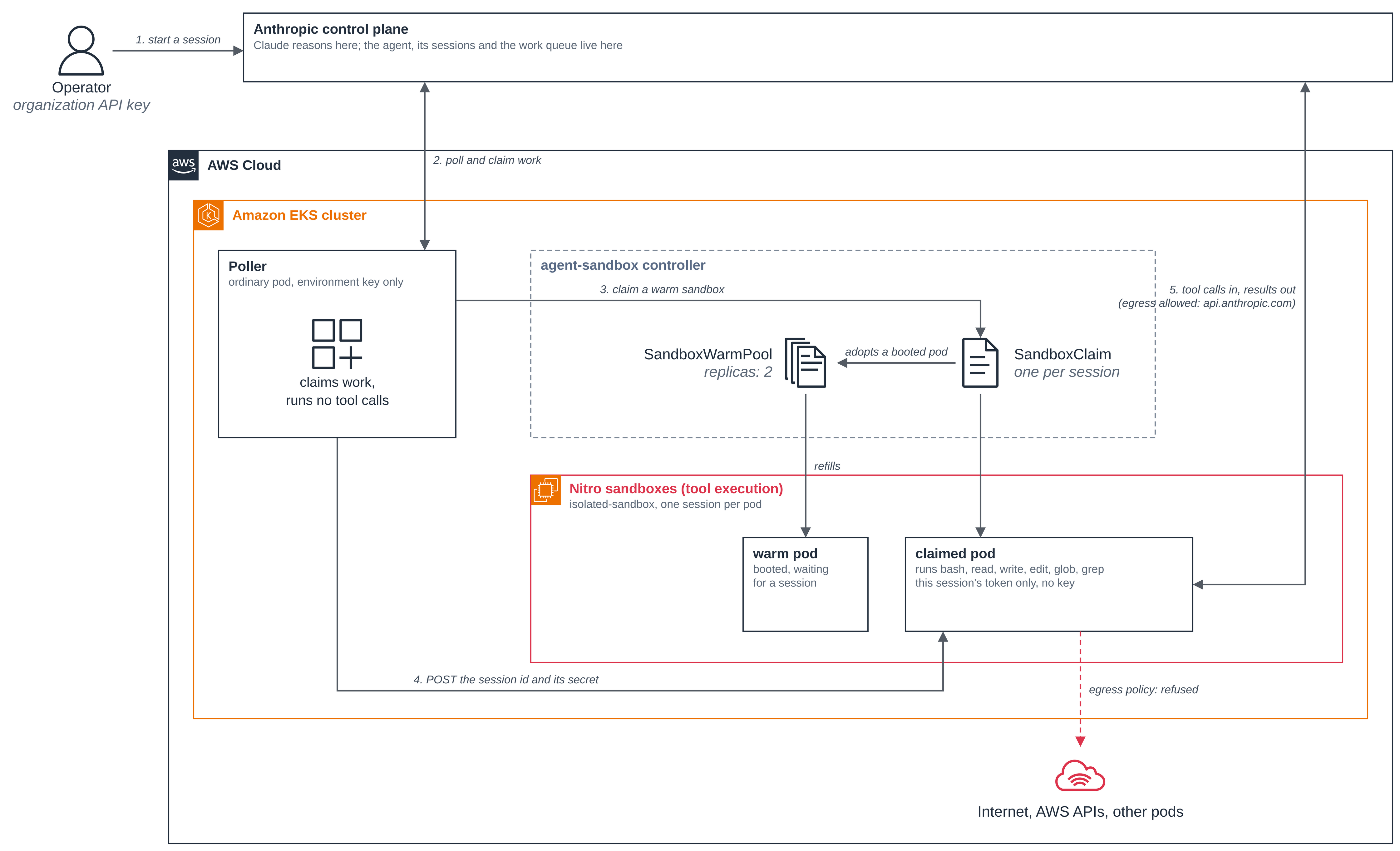
Those tool calls are code the model chose to run, so this blueprint gives each session its own Nitro sandbox:
- Claude reasons on Anthropic's side; the tools run in your cluster. An ordinary poller Deployment claims work from the environment's queue. It runs no tool calls itself.
- Each session gets its own pod. The poller claims a sandbox that is already booted from
a
SandboxWarmPooland hands it the session. The sandbox'sSandboxTemplatesetsruntimeClassName: isolated-sandbox, so the commands run on a kernel no other pod shares, and the pod is gone when the session ends. - Three credentials, each in one place. Your organization API key, which can create agents and read every session, stays on your machine. The environment key, which can claim any session in this environment's queue, is held only by the poller (and the optional autoscaler). Each work item carries a secret with a token for that one session; the poller hands it to the session's sandbox, and the sandbox runs on that token alone. The sandbox holds neither key and refuses to start if it finds one.
- The sandbox can reach the Claude API and its DNS; the internet, AWS APIs and other
pods are refused. An
ApplicationNetworkPolicyadmits the poller inbound, and allows the sandbox egress to CoreDNS andapi.anthropic.com. (The policy allows the addresses that name resolves to, so another name served from the same addresses would also be reachable.)
Figure 1: Claude reasons on Anthropic's side and the poller claims the session. A warm Nitro sandbox runs the session's tool calls, and its egress policy allows only the Claude API's hostname.
This folder was built against these releases:
| Component | Version |
|---|---|
Anthropic Python SDK (anthropic) |
1.13.0 |
agent-sandbox Python client (k8s-agent-sandbox) |
1.0.10 |
| agent-sandbox controller (kubernetes-sigs/agent-sandbox) | v1.0.10 |
The files:
| File | What it is |
|---|---|
Dockerfile, pyproject.toml |
The claude-sandbox-worker image: one image for the poller, the sandbox and the optional autoscaler |
src/worker/ |
The worker: poller.py, sandbox.py (claim and dispatch), serve.py (runs one session), guard.py (refuses any key a role must not hold) |
deploy/sandbox-template.yaml |
The SandboxTemplate that runs tool calls, and a SandboxWarmPool of two |
deploy/egress-policy.yaml |
The network policy: the poller in, DNS and api.anthropic.com out |
deploy/poller.yaml, deploy/rbac.yaml |
The poller Deployment, and what it may do: manage SandboxClaims and read Sandboxes |
deploy/autoscaler.yaml |
Optional: sizes the warm pool from the work queue |
deploy/claude-platform-aws/ |
Optional, for Claude Platform on AWS: that mode's network policy, and the trust and STS policies for its Pod Identity role |
scripts/setup_agent.py, submit.py, stats.py |
Run on your machine with the organization key (on Claude Platform on AWS, your AWS credentials): create the agent and environment, start a session, read the queue stats |
.env.example |
The four values the blueprint needs on the Claude API; copy it to .env, which git ignores |
Step 1: Install agent-sandbox and turn on network policy. Install the controller with
its extensions (SandboxTemplate, SandboxWarmPool, SandboxClaim). If you ran the warm
pool blueprint, this upgrades it in place:
kubectl apply -f https://github.com/kubernetes-sigs/agent-sandbox/releases/download/v1.0.10/sandbox-with-extensions.yaml
kubectl -n agent-sandbox-system rollout status deploy/agent-sandbox-controller
EKS Auto Mode accepts network policies without enforcing them until the Network Policy Controller is enabled, once per cluster. If you have not run the coding agent blueprint:
kubectl apply -f ../../getting-started/coding-agent/enable-network-policy.yaml
Step 2: Create the agent and the self-hosted environment. On your machine, with your
organization API key in .env:
python3 -m venv .venv && .venv/bin/pip install anthropic==1.13.0
cp .env.example .env     # fill in ANTHROPIC_API_KEY
set -a; . ./.env; set +a
.venv/bin/python scripts/setup_agent.py
AGENT_ID is set; keeping agent agent_...
ANTHROPIC_ENVIRONMENT_ID is set; keeping environment env_...

Add these to .env:
  AGENT_ID=agent_...
  ANTHROPIC_ENVIRONMENT_ID=env_...
This output is from a .env that already held AGENT_ID and ANTHROPIC_ENVIRONMENT_ID,
so the script kept that agent and environment. With neither set, it creates both and prints
their ids, then tells you how to get the environment key.
The agent uses the built-in agent_toolset_20260401 tools. There is no API that creates
an environment key, so generate it in the Console as the script says, put the three values
in .env, and load the file again with set -a; . ./.env; set +a.
Step 3: Build and push the image.
export ACCOUNT_ID=$(aws sts get-caller-identity --query Account --output text)
export REGISTRY=$ACCOUNT_ID.dkr.ecr.$AWS_REGION.amazonaws.com
aws ecr create-repository --repository-name claude-sandbox-worker --region $AWS_REGION
aws ecr get-login-password --region $AWS_REGION \
  | docker login --username AWS --password-stdin $REGISTRY
docker build --platform linux/amd64 -t $REGISTRY/claude-sandbox-worker:v1 .
docker push $REGISTRY/claude-sandbox-worker:v1
docker logout $REGISTRY
The workloads set imagePullPolicy: IfNotPresent for the fixed :v1 tag, so a node that already pulled :v1 keeps using its cached copy; when you rebuild the image, push it under a new tag (for example :v2) and update the tag in deploy/poller.yaml, deploy/autoscaler.yaml and deploy/sandbox-template.yaml.
Step 4: Give the cluster the environment key. The poller needs the environment key;
the sandboxes get only the environment id. Both are read from .env, so the key never
appears on a command line:
kubectl create secret generic anthropic-env-key \
  --from-env-file=<(grep '^ANTHROPIC_ENVIRONMENT_KEY=' .env)
kubectl create configmap anthropic-env \
  --from-env-file=<(grep '^ANTHROPIC_ENVIRONMENT_ID=' .env)
Step 5: Apply the network policy. egress-policy.yaml
is an ApplicationNetworkPolicy that selects the sandbox pods. It admits the poller on the
dispatch port, and lets out DNS and HTTPS to the Claude API. Here it is in full, without its
header comment; How the network policy works explains each
rule:
apiVersion: networking.k8s.aws/v1alpha1
kind: ApplicationNetworkPolicy
metadata:
  name: claude-sandbox-worker-egress
spec:
  podSelector:
    matchLabels:
      app: claude-sandbox-worker
  policyTypes:
    - Ingress
    - Egress
  ingress:
    - from:
        - podSelector:
            matchLabels:
              app: claude-poller
      ports:
        - { protocol: TCP, port: 8080 }
  egress:
    - to:
        - ipBlock: { cidr: 0.0.0.0/0 }
      ports:
        - { protocol: UDP, port: 53 }
        - { protocol: TCP, port: 53 }
    - to:
        - domainNames:
            - api.anthropic.com
      ports:
        - { protocol: TCP, port: 443 }
Apply it, and wait for its PolicyEndpoint, which shows the controller has handed the policy
to the nodes:
kubectl apply -f deploy/egress-policy.yaml
until kubectl get policyendpoints -o name | grep -q '^policyendpoint.networking.k8s.aws/claude-sandbox-worker-egress-'; do sleep 2; done
Step 6: Deploy the sandbox and the poller. Here is the part of
sandbox-template.yaml that matters. The pool keeps two of
these booted:
apiVersion: extensions.agents.x-k8s.io/v1beta1
kind: SandboxTemplate
metadata:
  name: claude-sandbox-worker
spec:
  networkPolicyManagement: Unmanaged   # egress-policy.yaml is the policy for these pods
  podTemplate:
    metadata:
      labels:
        app: claude-sandbox-worker
    spec:
      runtimeClassName: isolated-sandbox
      automountServiceAccountToken: false
      restartPolicy: Never              # one session, then the pod completes
      containers:
        - name: worker
          image: <ACCOUNT_ID>.dkr.ecr.<AWS_REGION>.amazonaws.com/claude-sandbox-worker:v1
          imagePullPolicy: IfNotPresent
          args: ["serve"]
          env:                          # no Anthropic key: the session's token arrives in the dispatch
            - name: ANTHROPIC_ENVIRONMENT_ID
              valueFrom:
                configMapKeyRef: { name: anthropic-env, key: ANTHROPIC_ENVIRONMENT_ID }
          securityContext:
            allowPrivilegeEscalation: false
            readOnlyRootFilesystem: true
            capabilities: { drop: ["ALL"] }
          resources: { requests: { memory: 2Gi } }
The memory request is what sizes the sandbox's VM: with none, the Nitro guest gets about
130 MiB, too little for the worker to start. The pod runs as a non-root user with its own
empty /workspace, and has no ServiceAccount token, so a command the model runs cannot
reach the Kubernetes API. Apply the RBAC, the template and pool, and the poller:
kubectl apply -f deploy/rbac.yaml
sed -e "s|<ACCOUNT_ID>|$ACCOUNT_ID|" -e "s|<AWS_REGION>|$AWS_REGION|" deploy/sandbox-template.yaml | kubectl apply -f -
sed -e "s|<ACCOUNT_ID>|$ACCOUNT_ID|" -e "s|<AWS_REGION>|$AWS_REGION|" deploy/poller.yaml | kubectl apply -f -
kubectl wait sandboxwarmpool/claude-sandbox-worker --for=jsonpath='{.status.readyReplicas}'=2 --timeout=600s
kubectl rollout status deploy/claude-poller
.venv/bin/python scripts/stats.py
workers_polling: 1
depth:           0  (waiting to be picked up)
pending:         0  (polled, not yet acknowledged)
workers_polling: 1 is the poller, connected to the queue with the environment key.
Step 7: Look inside a warm sandbox. Check its runtime class, the kernel and disks it sees, and which Anthropic credentials it holds. The last command prints variable names only, never values:
POD=$(kubectl get pods -l app=claude-sandbox-worker --field-selector=status.phase=Running -o jsonpath='{.items[0].metadata.name}')
kubectl get pod $POD -o jsonpath='{.spec.runtimeClassName}{"\n"}'
kubectl exec $POD -- sh -c 'uname -rv; cut -d" " -f1 /proc/uptime; ls /sys/block | tr "\n" " "; echo'
kubectl exec $POD -- sh -c 'env | cut -d= -f1 | grep ^ANTHROPIC_'
isolated-sandbox
6.18.54 #1 SMP PREEMPT_DYNAMIC Thu Oct 22 17:38:11 UTC 2026
25.00
dm-0 vda vdb vdc
ANTHROPIC_ENVIRONMENT_ID
The sandbox runs its own kernel. Its uptime matches the pod's age, about 25 seconds here,
because the sandbox booted with the pod, and it sees virtio disks (vda, vdb, vdc). On the
same node, an ordinary pod reported the node's kernel, 6.18.56 #2 SMP PREEMPT_DYNAMIC Fri
Oct 30 22:32:37 UTC 2026, and the instance's nvme disks: a different version, build and
boot from the sandbox's. The only Anthropic variable in the pod is the environment id: no
ANTHROPIC_API_KEY and no ANTHROPIC_ENVIRONMENT_KEY.
Step 8: Run a session. Start one from your machine. The script sends the task when it
creates the session, sets a spend ceiling of $1.00 (--budget-cents changes it), follows
the session until it settles and prints each tool call with its result:
.venv/bin/python scripts/submit.py "Run these commands with your bash tool: uname -rv; cat /proc/uptime; ls /sys/block; env | grep -c '^ANTHROPIC_' || true. Write their combined output to report.txt in your working directory, then read report.txt back to me."
Abridged; your text will differ:
Session sesn_... created; waiting for the cluster to pick it up...
  -> bash
  -> read

[tool] bash: cd /workspace && { uname -rv; cat /proc/uptime; ls /sys/block; env | grep -c '^ANTHROPIC_' || true; } > report.txt 2>&1; echo done
[result:ok] done

[tool] read: /workspace/report.txt
[result:ok] 6.18.54 #1 SMP PREEMPT_DYNAMIC Thu Oct 22 17:38:11 UTC 2026
         51.98 47.44
         dm-0
         vda
         vdb
         vdc
         0

[agent] I ran the four commands and saved their combined output to `/workspace/report.txt`. This is what the file contains:

[idle] end_turn

2 tool calls, 0 errors, list cost 0.02 USD
The commands ran in a sandbox: the guest's kernel build, an uptime of under a minute and
virtio disks. The last line of the report is 0: the agent's bash tool runs with every
ANTHROPIC_* variable removed from its environment. Beyond that, the sandbox process
itself holds no key to find: its only credential is this session's token, which arrived in
the dispatch rather than in an environment variable.
In the cluster, the poller's log names the SandboxClaim it created for the session and
the sandbox that claim adopted, and that sandbox's log shows each tool call it ran (dates
trimmed from the poller's lines, timestamps from the sandbox's):
kubectl logs deploy/claude-poller | grep -E 'SandboxClaim|claim Ready|-> sandbox='
kubectl logs <SANDBOX>     # the sandbox named in the poller's log; the pod has the same name
21:34:18,750 INFO k8s_agent_sandbox.k8s_helper Creating SandboxClaim 'sandbox-claim-0eac1de0' in namespace 'nitro-sandboxes-demo' using warm pool 'claude-sandbox-worker'...
21:34:18,822 INFO k8s_agent_sandbox.k8s_helper Resolved sandbox name 'claude-sandbox-worker-6jrhx' from claim status (claim Ready)
21:34:18,835 INFO worker.sandbox session=sesn_... work=sesn_... -> sandbox=claude-sandbox-worker-6jrhx

INFO worker.serve waiting for a dispatch on :8080
INFO worker.serve serving session sesn_... in /workspace
INFO anthropic.lib.tools._beta_session_runner session tool runner starting session_id=sesn_...
INFO anthropic.lib.tools._beta_session_runner executing tool tool=bash tool_use_id=sevt_...
INFO anthropic.lib.tools._beta_session_runner executing tool tool=read tool_use_id=sevt_...
INFO anthropic.lib.tools._beta_session_runner session idle for 60s after its turn ended; stopping
INFO worker.serve session sesn_... finished
The claim was Ready about 70 ms after the poller created it, because it adopted a sandbox that was already running; the pool booted a replacement in the background. When the session went idle the worker stopped its work item and exited, and the pod completed.
To see the network policy at work, run this in a warm sandbox. The session may have used the pod from Step 7, and that pod keeps running until its session has been idle for 60 seconds, so once it has completed, pick a running one again. The Claude API connects; the other two do not:
POD=$(kubectl get pods -l app=claude-sandbox-worker --field-selector=status.phase=Running -o jsonpath='{.items[0].metadata.name}')
kubectl exec $POD -- python -c "
import socket
for host in ('api.anthropic.com', 'example.com', 'sts.us-west-2.amazonaws.com'):
    try:
        socket.create_connection((host, 443), timeout=5).close(); print(host, 'connected')
    except OSError as e:
        print(host, type(e).__name__, e)"
api.anthropic.com connected
example.com OSError [Errno 101] Network is unreachable
sts.us-west-2.amazonaws.com TimeoutError timed out
The two refused hosts report different errors (example.com is unreachable,
sts.us-west-2.amazonaws.com times out), but they are blocked the same way.
How the network policy works, below, explains the policy, where it is
enforced, and why the messages differ.
Optional: size the pool from the queue. autoscaler.yaml
reads the environment's queue every 15 seconds and sets the pool to one warm sandbox for
each session waiting in the queue, at least 1 and at most 10. The poller acknowledges a
session as soon as it claims it, so a running session no longer counts: the pool grows when
sessions arrive faster than the poller hands them out. The autoscaler uses the environment
key too, and may only resize this one pool:
sed -e "s|<ACCOUNT_ID>|$ACCOUNT_ID|" -e "s|<AWS_REGION>|$AWS_REGION|" deploy/autoscaler.yaml | kubectl apply -f -
kubectl logs deploy/claude-autoscaler
2026-11-07 21:36:04,484 INFO worker.stats_adapter environment=env_... warm pool=nitro-sandboxes-demo/claude-sandbox-worker replicas in [1, 10] every 15s
2026-11-07 21:36:04,598 INFO worker.stats_adapter depth=0 pending=0 -> claude-sandbox-worker replicas None -> 1 (pool has 2)
It sets the replicas on every tick, so if anything else changes them, re-applying
sandbox-template.yaml for example, the next tick puts the target back.
How the network policy works
The policy from step 5 is an EKS Auto Mode ApplicationNetworkPolicy: a Kubernetes
NetworkPolicy that also accepts hostnames (domainNames) in an egress rule. Each part of
its YAML does one job:
| In the YAML | What it does |
|---|---|
podSelector, app: claude-sandbox-worker |
Selects the sandbox pods. The poller and the autoscaler are not selected. |
policyTypes, Ingress and Egress |
Makes the selected pods default-deny in both directions, so only the rules below are allowed. |
ingress, from app: claude-poller on TCP 8080 |
Lets the poller reach the dispatch port. No other pod can. |
egress, to 0.0.0.0/0 on UDP and TCP 53 |
Lets the sandbox look up names, with no address lookup or substitution needed (#104). |
egress, to domainNames: api.anthropic.com on TCP 443 |
Lets the sandbox fetch tool calls from the Claude API and post their results. |
Anything that matches no rule is refused: the public internet, AWS service endpoints such as STS, and other pods. (One carve-out sits above the policy: Kubernetes always allows traffic to and from a pod's own node, covered under No reusable credential below.)
Two other settings make the policy hold. The ConfigMap that step 1 applies turns on enforcement, once per cluster. Until it exists, EKS Auto Mode accepts network policies without enforcing them:
apiVersion: v1
kind: ConfigMap
metadata:
  name: amazon-vpc-cni
  namespace: kube-system
data:
  enable-network-policy-controller: "true"
And the SandboxTemplate from step 6 tells the agent-sandbox controller to leave these
pods' network policy to egress-policy.yaml:
spec:
  networkPolicyManagement: Unmanaged
With the default, Managed, the controller creates its own NetworkPolicy for the
template's pods, and with no rules of your own that policy allows the public internet.
Kubernetes network policies are additive, so a second policy allowing the internet would
undo this one's refusals.
Figure 2: The network policy around one sandbox pod. The policy admits the poller inbound and allows egress to CoreDNS for name lookups and the Claude API; the public internet, AWS APIs such as STS, and other pods are refused. The policy is enforced on the node, outside the sandbox.
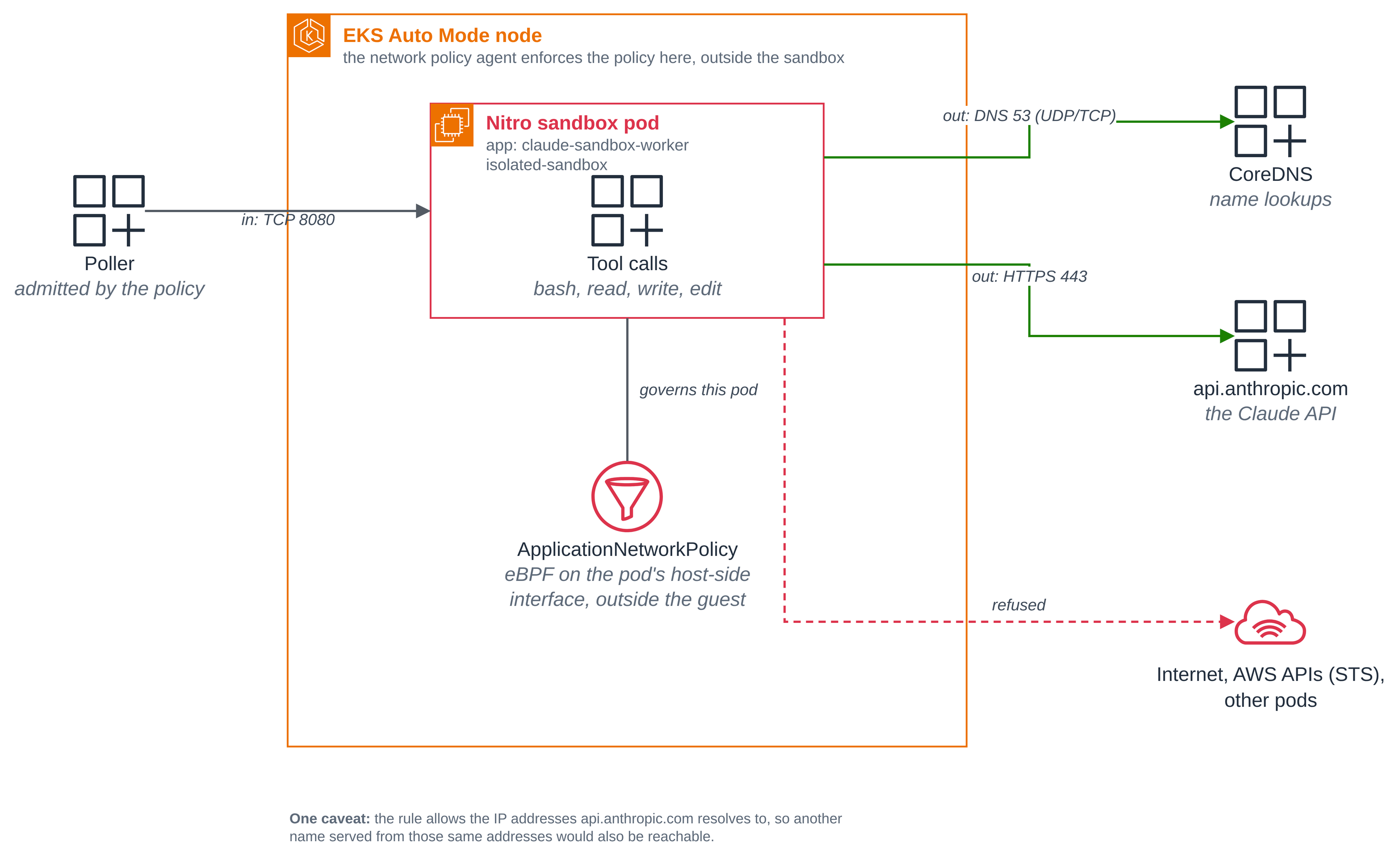
Where it is enforced. On EKS Auto Mode, a network policy agent on each node turns the
policy into eBPF programs attached to the pod's host-side virtual interface: on the node,
outside the sandbox's guest. AWS's documentation describes it this way: "The eBPF probes
attached to the Pod veth interface will then filter egress traffic ... based on the rules
in place. This ensures pods can only send cluster-external traffic to the IPs of allow
listed domains."
(EKS network policy documentation.)
Because the filtering lives on the node rather than in the guest, which has no access to
that interface, nothing the model runs inside the sandbox can change it, whatever UID it
runs as. In this blueprint that UID is 1000: the sandbox template sets runAsUser: 1000, which
fixes the identity the container starts with, and runAsNonRoot: true, which has the kubelet
refuse to start the container at all if the image would resolve to root. Changing the policy
is a separate matter from reaching a host it already allows: the domainNames caveat above
describes the reach that remains, and "No reusable credential" below describes what authority
a request on that path could carry.
Why the two refused hosts fail differently. Both hosts are refused the same way: their
IPv4 addresses are not in the allow list, so an IPv4 connection attempt gets no reply and
runs to the timeout. The messages differ only because of the hosts' DNS records.
example.com also publishes IPv6 (AAAA) addresses, and the sandbox has no route to global
IPv6 addresses, so an IPv6 attempt fails immediately with "Network is unreachable";
socket.create_connection tries the IPv4 addresses first (they time out), then the IPv6
address, and raises the last error it saw, the IPv6 one. sts.us-west-2.amazonaws.com
publishes only IPv4 addresses, so its single attempt times out. The IPv4 block is identical
for both; only the surfaced message differs.
No reusable credential, even if a request left. The sandbox runs as a non-root user
with all Linux capabilities dropped and a read-only root filesystem, sets
automountServiceAccountToken: false, and holds no AWS credentials and no reusable
Anthropic key: only this one session's token, delivered in the dispatch and scoped to that
session. A request that reached some other host would carry no AWS credential and no durable
key to replay. The one carve-out from the policy is the pod's own node, which Kubernetes
always allows the pod to reach; that is not a path to the internet. A link-local metadata
service at 169.254.169.254 also answers inside the sandbox, with placement and service
details only. Its iam/ paths return 404 and the pod has no Pod Identity, so there is no
role to assume.
That is the Claude API path. On Claude Platform on AWS
it is different: the sandbox pod's ServiceAccount has a Pod Identity role. The sandbox
passes its credential requests, to 169.254.170.23, on to the Pod Identity Agent on the
node, and the network policy applies to them, so that mode's policy has a rule allowing
that address. A command the sandbox runs can use that role for what it
allows, including claiming other sessions' work in its environment;
What the sandbox's role may do lists it.
Reading the enforcement on a node
Once the controller hands the policy to the nodes it appears as the `PolicyEndpoint` object that step 5 waits for. On each node the network policy agent attaches the eBPF programs and holds the resolved allow list for these pods: egress to CoreDNS on 53 and to the addresses `api.anthropic.com` resolves to on 443, ingress from the poller on 8080, and the pod's own node, which Kubernetes always permits. That is the policy's rules plus the node.How the hand-off works
A warm sandbox boots before its session exists, so it cannot be given the session at start-up. Instead:
- The poller's
client.beta.environments.work.poller(..., auto_stop=False)claims a work item.auto_stop=Falsemeans the poller does not stop the item when it moves on; the sandbox does, when the session ends. sandbox.pycallsSandboxClient.create_sandbox(warmpool=...)fromk8s-agent-sandbox. It creates theSandboxClaim, waits until the claim is Ready, and returns a handle with the sandbox's pod IP.- The poller POSTs the session id, the work item id and the work item's
secretto the sandbox's dispatch port. The secret carries a token for this one session, and it is the sandbox's only credential: the worker uses it for every call the session needs, including mounting any memory stores the session attaches. It goes only to the sandbox serving that session and is never logged. A work item without a secret is stopped instead of dispatched, and the sandbox refuses a dispatch that does not carry one. (On Claude Platform on AWS the POST carries no secret: the sandbox signs its calls with its Pod Identity role, and refuses a dispatch that does carry one.) serve.pyhands the session toEnvironmentWorker.handle_item(). It heartbeats the work item's lease, downloads the agent's skills into/workspace/skills/, runs each tool call and posts its result, and stops the work item when the session goes idle. Then the process exits.
Because the poller only claims and dispatches, sessions run in parallel, one pod each.
Optional: run it on Claude Platform on AWS
Claude Platform on AWS is the Claude API, operated by Anthropic and reached through your AWS account: requests are signed with AWS IAM (SigV4), name your workspace, and are billed through AWS Marketplace. Claude Managed Agents, including self-hosted sandboxes, is available there, and the same image, manifests and scripts run in this mode. Two session differences apply on that platform (details): a session on a self-hosted environment cannot attach memory stores (it is rejected when it is created), so the sandbox never mounts one; and a session that runs for 6 hours without a user event needs one to continue, which is longer than this blueprint's 30-minute claim deadline. What changes in the blueprint is how each part authenticates:
| Claude API (the walkthrough above) | Claude Platform on AWS | |
|---|---|---|
| Your machine | Organization API key | Your own AWS credentials |
| Poller and autoscaler | Environment key | A Pod Identity role |
| Sandbox | The session's token, from the dispatch | The same Pod Identity role; the dispatch carries no token |
| Sandbox egress | api.anthropic.com |
aws-external-anthropic.<region>.api.aws |
ANTHROPIC_PLATFORM=aws selects the mode. Each pod then builds the SDK's AnthropicAWS
client (client_factory.py), which signs every request with
the pod's AWS credentials, sends it to your workspace's Region and adds the
anthropic-workspace-id header. There is no environment key on this path, and
guard.py refuses to start a pod that holds one.
Before you start, sign up for Claude Platform on AWS on its page in the AWS Console, create a
workspace in your cluster's Region ($AWS_REGION) and note its id (wrkspc_...), and enable
outbound web identity federation once for the account; the
setup guide
covers each step. Your own AWS identity needs Managed Agents permissions, which the
AnthropicLimitedAccess managed policy grants. The commands below associate the role in
$NAMESPACE and apply everything else to kubectl's current namespace, which the hello
sandbox blueprint set to $NAMESPACE. Run the Claude API walkthrough's clean up
first if it is deployed there, or set NAMESPACE to a new namespace and switch to it:
export NAMESPACE=claude-platform-aws
kubectl create namespace $NAMESPACE
kubectl config set-context --current --namespace=$NAMESPACE
Create the agent and environment in your workspace. In place of step 2, add these lines
to .env. This path uses neither ANTHROPIC_API_KEY nor ANTHROPIC_ENVIRONMENT_KEY:
ANTHROPIC_PLATFORM=aws
ANTHROPIC_AWS_WORKSPACE_ID=wrkspc_...
Install the SDK with its aws extra, which adds the SigV4 signer, and run the setup script.
It signs with your AWS credentials, creates the agent and a self-hosted environment in the
workspace, and prints the AGENT_ID and ANTHROPIC_ENVIRONMENT_ID to add to .env. There is
no environment key to generate. Then build and push the image as in step 3.
python3 -m venv .venv && .venv/bin/pip install 'anthropic[aws]==1.13.0'
set -a; . ./.env; set +a
.venv/bin/python scripts/setup_agent.py
Give the three ServiceAccounts a Pod Identity role. The role trusts EKS Pod Identity. It
gets the AnthropicSelfHostedEnvironmentAccess managed policy, and
web-identity-token-policy.json,
the STS permission Claude Platform on AWS uses to federate each request to Anthropic, limited
to that use the way AWS's own Anthropic policies limit it. EKS adds credentials to a pod when
the pod starts, so create the associations before step 6, and give them about a minute to
take effect; a pod started earlier gets no credentials until it is recreated:
aws iam create-role --role-name claude-platform-worker \
  --assume-role-policy-document file://deploy/claude-platform-aws/pod-identity-trust.json
aws iam attach-role-policy --role-name claude-platform-worker \
  --policy-arn arn:aws:iam::aws:policy/AnthropicSelfHostedEnvironmentAccess
aws iam put-role-policy --role-name claude-platform-worker --policy-name web-identity-token \
  --policy-document file://deploy/claude-platform-aws/web-identity-token-policy.json
for sa in claude-poller claude-autoscaler claude-sandbox-worker; do
  aws eks create-pod-identity-association --cluster-name $CLUSTER_NAME --region $AWS_REGION \
    --namespace $NAMESPACE --service-account $sa \
    --role-arn arn:aws:iam::$ACCOUNT_ID:role/claude-platform-worker
done
Give the cluster the platform settings. In place of step 4, create only the ConfigMap;
there is no Secret on this path. The sandbox template, the poller and the autoscaler each
read these keys when the ConfigMap has them, and leave the variables out when it does not.
From sandbox-template.yaml:
            - name: ANTHROPIC_PLATFORM
              valueFrom:
                configMapKeyRef: { name: anthropic-env, key: ANTHROPIC_PLATFORM, optional: true }
            - name: ANTHROPIC_AWS_WORKSPACE_ID
              valueFrom:
                configMapKeyRef: { name: anthropic-env, key: ANTHROPIC_AWS_WORKSPACE_ID, optional: true }
            - name: AWS_REGION
              valueFrom:
                configMapKeyRef: { name: anthropic-env, key: AWS_REGION, optional: true }
kubectl create configmap anthropic-env --from-env-file=<(
  grep -E '^(ANTHROPIC_ENVIRONMENT_ID|ANTHROPIC_PLATFORM|ANTHROPIC_AWS_WORKSPACE_ID)=' .env
  echo "AWS_REGION=$AWS_REGION")
Apply this mode's network policy. In place of step 5, apply
claude-platform-aws/egress-policy.yaml. It
has the same name as step 5's policy and two different rules: HTTPS goes to your Region's
Claude Platform on AWS endpoint instead of api.anthropic.com, and egress is allowed to the
Pod Identity credential address, 169.254.170.23, on TCP 80. The sandbox passes its
credential requests to that address on to the Pod Identity Agent on the node, and the policy
applies to them, so without the rule they time out. Here it is without its header comment:
apiVersion: networking.k8s.aws/v1alpha1
kind: ApplicationNetworkPolicy
metadata:
  name: claude-sandbox-worker-egress
spec:
  podSelector:
    matchLabels:
      app: claude-sandbox-worker
  policyTypes:
    - Ingress
    - Egress
  ingress:
    - from:
        - podSelector:
            matchLabels:
              app: claude-poller
      ports:
        - { protocol: TCP, port: 8080 }
  egress:
    - to:
        - ipBlock: { cidr: 0.0.0.0/0 }
      ports:
        - { protocol: UDP, port: 53 }
        - { protocol: TCP, port: 53 }
    - to:
        - ipBlock: { cidr: 169.254.170.23/32 }   # EKS Pod Identity credentials
      ports:
        - { protocol: TCP, port: 80 }
    - to:
        - domainNames:
            - aws-external-anthropic.<AWS_REGION>.api.aws
      ports:
        - { protocol: TCP, port: 443 }
sed "s|<AWS_REGION>|$AWS_REGION|" \
  deploy/claude-platform-aws/egress-policy.yaml | kubectl apply -f -
until kubectl get policyendpoints -o name | grep -q '^policyendpoint.networking.k8s.aws/claude-sandbox-worker-egress-'; do sleep 2; done
Deploy and run a session. Continue with steps 6 to 8 as written; the optional autoscaler
works the same way. stats.py and submit.py sign with your AWS credentials because
ANTHROPIC_PLATFORM=aws is set in your shell. What to look for:
stats.pyreportsworkers_polling: 1once the poller is polling with its role. Two errors in the poller's log point at setup: a 403 that namessts:GetWebIdentityTokenmeans the role lacks the permissionweb-identity-token-policy.jsongrants, and "Outbound web identity federation is disabled for your account" means the account's one-time federation step is not done.- In step 7, with the last command's
grepchanged togrep -E '^(ANTHROPIC|AWS)_', the sandbox's Anthropic variables are the environment id,ANTHROPIC_PLATFORMandANTHROPIC_AWS_WORKSPACE_ID; there is still noANTHROPIC_API_KEYand noANTHROPIC_ENVIRONMENT_KEY. Among itsAWS_variables areAWS_REGIONand the two that EKS Pod Identity adds,AWS_CONTAINER_CREDENTIALS_FULL_URIandAWS_CONTAINER_AUTHORIZATION_TOKEN_FILE. - In step 8, the session's tool calls run in the sandbox as before. To include the new
endpoint in the network check, add
aws-external-anthropic.$AWS_REGION.api.awsto the hosts it tries: it should connect, whileexample.comand STS stay refused.api.anthropic.comis not in this mode's policy.
What the sandbox's role may do
On this path the sandbox does not run on one session's token. Its ServiceAccount has the
same Pod Identity role as the poller, and the commands the model runs can use it: the bash
tool removes only ANTHROPIC_* variables from their environment, so they see the credential
endpoint and the role's token file that EKS adds to the pod. The role may do what
AnthropicSelfHostedEnvironmentAccess allows, on every workspace in your account:
GetEnvironment, GetSession, UpdateSession, GetSkill, CallWithBearerToken, and
ProcessEnvironmentWork, which polls for, acknowledges, heartbeats, stops and posts results
for work items. It may also get the STS token Claude Platform on AWS uses for federation.
So a command in one session's sandbox can poll this environment's queue and claim other sessions waiting in it, which a session's token on the Claude API path cannot do. Two things still bound it: the network policy lets the sandbox reach only DNS and the Claude Platform on AWS endpoint, so STS and every other AWS API stay refused; and the role's policies allow only Claude Platform on AWS actions and its federation token. Give each trust boundary its own workspace and a role scoped to that workspace's ARN, as in the per-customer workspace isolation example.
Clean up this mode
The walkthrough's [clean up](#clean-up) removes the Kubernetes objects, including this mode's network policy, which has the same name. Then remove the associations and the role, with `NAMESPACE` set to the namespace you used:for sa in claude-poller claude-autoscaler claude-sandbox-worker; do
for id in $(aws eks list-pod-identity-associations --cluster-name $CLUSTER_NAME --region $AWS_REGION \
--namespace $NAMESPACE --service-account $sa --query 'associations[].associationId' --output text); do
aws eks delete-pod-identity-association --cluster-name $CLUSTER_NAME --region $AWS_REGION --association-id $id
done
done
aws iam delete-role-policy --role-name claude-platform-worker --policy-name web-identity-token
aws iam detach-role-policy --role-name claude-platform-worker \
--policy-arn arn:aws:iam::aws:policy/AnthropicSelfHostedEnvironmentAccess
aws iam delete-role --role-name claude-platform-worker
kubectl config set-context --current --namespace=nitro-sandboxes-demo
kubectl delete namespace claude-platform-aws
Good to know
- The file tools' path checks are not a sandbox. The SDK confines
read,writeandeditto the working directory, butbashcan run anything. The sandboxed pod is what bounds it. - Use one environment per trust boundary. An environment key reaches every session in its environment. Give separate users or tenants separate environments and keys. On Claude Platform on AWS, give them separate workspaces and roles.
- The dispatch port has no authentication of its own. A warm sandbox accepts the first well-formed POST on port 8080. The network policy is what keeps other pods and the internet from reaching it, and on the Claude API the sandbox refuses a dispatch that does not carry the session's secret.
- Each claim has a deadline. The poller creates claims with a 30-minute lifetime
(
SHUTDOWN_AFTER_SECONDS), after which the controller deletes the claim and its pod. That is also the longest a session can run; raise it for longer tasks. The sandbox then gets 90 seconds (terminationGracePeriodSeconds) to stop its work item and save any memory store changes before the pod is killed. - Set a budget. A session's
budgetcaps its list cost, so a runaway loop stops issuing model requests. - Size requests honestly. Each sandbox reserves its full memory request, and the sandbox is
sized from the pod's requests. Size
replicasto how many sessions start at once, not to your total session count.
Clean up
The commands use AWS_REGION and REGISTRY from the walkthrough. In a new shell, set them
again first, replacing <AWS_REGION> with the Region you deployed to:
export AWS_REGION=<AWS_REGION>
export REGISTRY=$(aws sts get-caller-identity --query Account --output text).dkr.ecr.$AWS_REGION.amazonaws.com
Remove the blueprint's objects, the image and its repository:
kubectl delete -f deploy/autoscaler.yaml --ignore-not-found
kubectl delete -f deploy/poller.yaml --ignore-not-found
kubectl delete -f deploy/sandbox-template.yaml --ignore-not-found
kubectl delete sandboxclaims -l anthropic.com/session-id
kubectl delete -f deploy/egress-policy.yaml -f deploy/rbac.yaml --ignore-not-found
kubectl delete secret anthropic-env-key --ignore-not-found
kubectl delete configmap anthropic-env --ignore-not-found
aws ecr delete-repository --repository-name claude-sandbox-worker --region $AWS_REGION --force
docker image rm $REGISTRY/claude-sandbox-worker:v1
rm -rf .venv
Keep .env if you will run the blueprint again. Otherwise delete it, and in the Claude Console
revoke the environment key, archive the agent and delete the self-hosted environment that
step 2 created (the SDK's client.beta.agents.archive and
client.beta.environments.delete do the last two).
agent-sandbox stays installed for other blueprints. To remove it as well, which deletes its CRDs and every Sandbox resource in the cluster, delete the release you installed in step 1:
kubectl delete -f https://github.com/kubernetes-sigs/agent-sandbox/releases/download/v1.0.10/sandbox-with-extensions.yaml