GitHub Actions runners, each job in its own sandbox
A pull request from a fork runs code you have not read on hardware you own. The job
usually needs a Docker daemon, and on a shared self-hosted runner that daemon is either
privileged on the node, where a malicious Dockerfile or test gets at the other jobs and
the node's credentials, or crippled, so continuous integration cannot build anything.
This blueprint removes that choice. It runs the official
GitHub Actions Runner Controller
(ARC) on Amazon EKS so that every ephemeral runner pod ARC creates for a queued job is its
own sandbox, with its own kernel, and is deleted when the job ends. A workflow that stands
in for an untrusted pull request, a privileged docker build plus a unit-test run, runs
contained to that one pod. The controller and its listener stay ordinary pods: only the
untrusted work is in a sandbox.
Before you start, review the prerequisites and shared setup on the home page, and run these blueprints first, which this one builds on:
- Getting started > Hello sandbox: the one-line opt-in, and how a pod shows that it ran in a sandbox.
- Getting started > Coding agent: turning
on network policy enforcement once per cluster, an
ApplicationNetworkPolicywith host names, and a GitHub credential held in a Secret created from a file. - CI/CD > docker-builds, at
examples/ci-cd/docker-builds/: that a privilegeddocker buildanddocker runare safe inside a sandbox without exposing the node. Here a real continuous integration system schedules that build for you, triggered by code you do not trust.
The commands below use files from this repository, so clone it if you have not already, and run them from this blueprint's folder:
git clone https://github.com/aws-samples/sample-eks-nitro-sandbox.git
cd sample-eks-nitro-sandbox/examples/ci-cd/github-actions
For this blueprint you also need Helm 3.14 or later,
which installs the two ARC charts from an OCI registry; the scripts use helm --labels and
read labels back from helm get metadata, neither of which is in earlier versions. You also
need jq, which the scripts use to read Helm's JSON. The run
on this page used Helm 4.2.4. You also need two things of your own: a
test repository you own and can afford to run untrusted-shaped jobs in, and a
least-privilege GitHub credential for it. Both are described in Step 2.
Every output block on this page is from one real run of this blueprint. Three kinds of local
name in that output are replaced by the same placeholders the commands use, because this
repository is public: <CLUSTER_NAME> for the kube context, <OWNER>/<TEST_REPO> for the
test repository, and <NODE_NAME> for an EC2 instance id. Pod names, pod UIDs, kernel
builds, uptimes, device lists and timings are exactly as the run printed them.
There is no model cost. The controller and listener are small ordinary pods that run continuously; a sandboxed runner pod exists only while a job runs. The only cost beyond the cluster is the outbound data the job's image pulls use, over the cluster's existing egress.
Overview
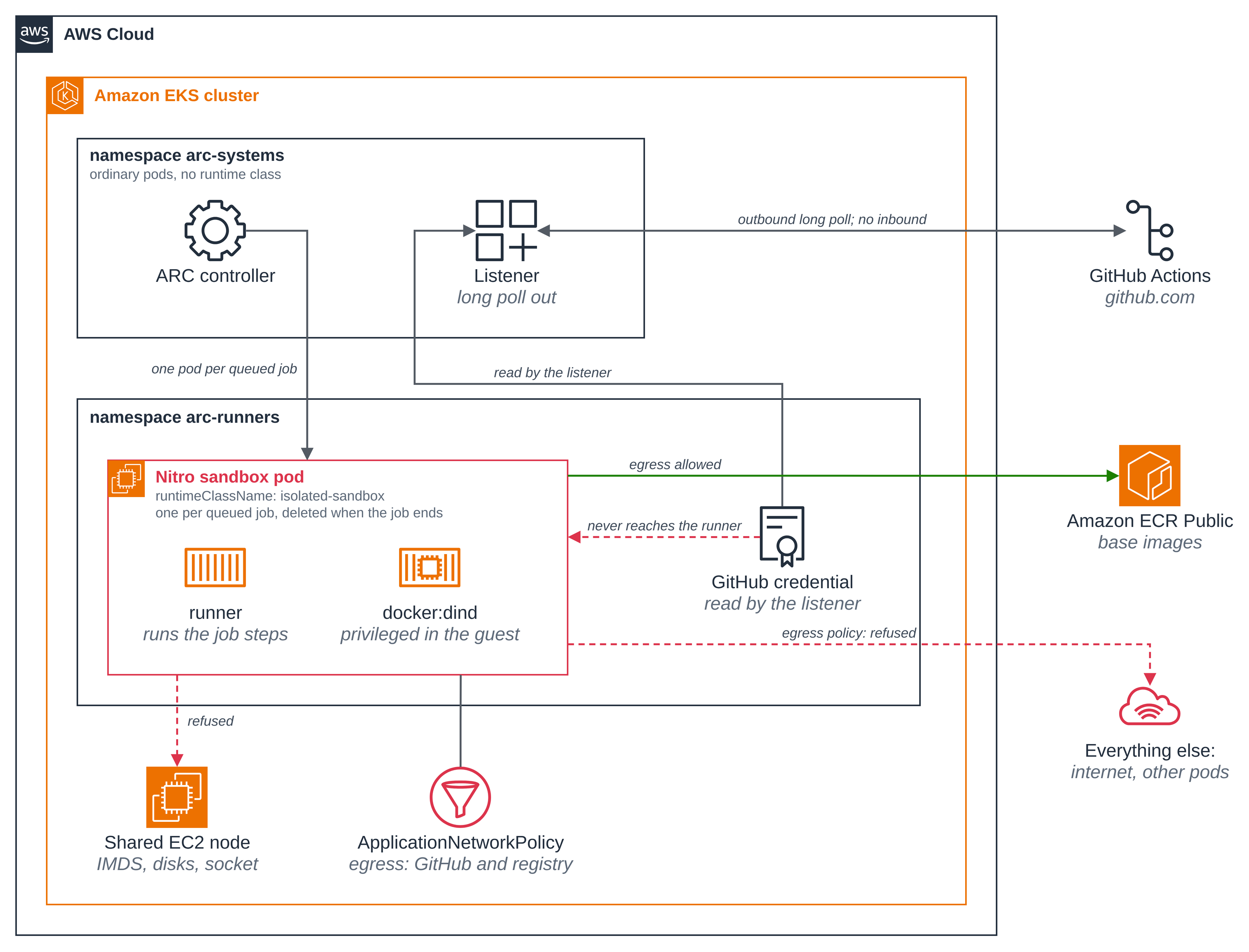
Only the runner pods are sandboxed. ARC's controller reconciles custom resources and its listener holds one outbound connection to GitHub. Both are trusted, both stay ordinary pods. The one thing that runs code from a pull request, the ephemeral runner pod, is the one thing that gets a sandbox.
One sandbox per queued job, and nothing between jobs. With minRunners: 0 no runner pod
exists until a job is queued. ARC creates one fresh pod for the job, runs it, and deletes it
when the job finishes. The next job gets a new pod with a new pod UID, so no build cache,
no checkout and no leaked credential carries from one job to the next.
The privileged daemon is privileged only inside the guest. containerMode: dind puts a
docker:dind sidecar in the runner's own pod. Because the runner and its Docker daemon
share one pod, the single runtimeClassName line covers both, and a docker build that
gets root does so inside the pod's own kernel.
The credential never reaches the runner. The GitHub credential is used by the controller
and the listener to register runners just in time. The runner pod is given no GitHub admin
credential and no AWS role, and the page checks both by variable name. It does not leave the
cluster-side pods, though: ARC builds a <listener>-config Secret next to the listener in
the controller's namespace whose config.json embeds the credential, so the credential
exists in two places, both outside the sandbox. "Where the credential lives" below says what
that means for clean up.
Figure 1: Only the per-job runner pod is a sandbox. The ARC controller and its listener stay
ordinary pods in arc-systems, the listener holds the one outbound connection to GitHub, and
the credential it reads never reaches the runner pod.
Versions
This folder was built against these releases. Pin each to its latest when you build.
| Component | Version |
|---|---|
gha-runner-scale-set-controller chart |
0.15.1 |
gha-runner-scale-set chart |
0.15.1, the same as the controller |
ghcr.io/actions/actions-runner |
the chart's own default tag, latest |
docker:dind sidecar |
owned by the chart through containerMode: dind |
Both charts must be on the same version: the controller refuses a runner scale set built by
a different one, and scripts/setup.sh stops if they disagree.
The runner image tracks the chart's default rather than a pinned tag on purpose. GitHub stops queuing jobs to a runner more than 30 days behind a release, and its broker refuses a deprecated runner outright (Amazon EKS clusters are not special here; the same happens on an ordinary runner). A pinned older tag therefore turns into a broken blueprint a month later. If you need a reproducible tag, pin it and plan to move it at least monthly.
This blueprint installs no agent-sandbox resources. The runner pods are sandboxes because of
one runtimeClassName line in the chart's template.spec, not because of a
SandboxTemplate or a warm pool.
Files
| File | What it is |
|---|---|
deploy/runner-scale-set-values.yaml |
The runner scale set's Helm values: the runtimeClassName, containerMode: dind, and the runner container's size |
deploy/egress-policy.yaml |
The runner pods' egress ApplicationNetworkPolicy |
deploy/ordinary-pod.yaml |
An ordinary pod, for the comparison in Step 6 only |
workflow/untrusted-pr-workflow.yaml |
The untrusted-shaped workflow to copy into your test repository |
scripts/setup.sh |
Creates the namespace, the credential Secret, the egress policy and the runner scale set |
scripts/clean.sh |
Removes what this blueprint created, and says what stays |
.env.example |
The local values the blueprint needs; copy to .env, which git ignores |
Quick start
# 1. the shared ARC controller, once per cluster (see Step 1)
helm install arc oci://ghcr.io/actions/actions-runner-controller-charts/gha-runner-scale-set-controller \
  --version 0.15.1 --namespace arc-systems --create-namespace

# 2. your test repository and credential
cp .env.example .env && $EDITOR .env

# 3. the credential Secret, the egress policy and the runner scale set
./scripts/setup.sh

# 4. copy the workflow into your test repository, commit and push, then run it
#    from the repository's Actions tab, and watch the sandbox appear and go
kubectl get pods -n arc-runners -w
Steps
Step 1: Install the ARC controller, once per cluster. The controller and the four ARC
custom resource definitions are shared by everything on the cluster that uses ARC: one
controller watches every namespace, and each definition holds every team's objects of that
kind. This blueprint therefore never installs, upgrades or reconfigures them. If ARC is already
on your cluster, skip this step and set ARC_VERSION in .env to the version that is
installed. If it is not, install it yourself at the version this blueprint pins:
helm install arc oci://ghcr.io/actions/actions-runner-controller-charts/gha-runner-scale-set-controller \
  --version 0.15.1 --namespace arc-systems --create-namespace
Pulled: ghcr.io/actions/actions-runner-controller-charts/gha-runner-scale-set-controller:0.15.1
Digest: sha256:c2497a6dedaaa723322abfe9ea2f5a81b9b8fbb90b38e45d7835b6c7629a3aae
NAME: arc
LAST DEPLOYED: Sun Oct 25 17:08:54 2026
NAMESPACE: arc-systems
STATUS: deployed
REVISION: 1
DESCRIPTION: Install complete
TEST SUITE: None
NOTES:
Thank you for installing gha-runner-scale-set-controller.

Your release is named arc.
The controller goes in arc-systems and the runners in arc-runners, in a later step.
Keeping them apart is GitHub's documented practice in the
ARC quickstart:
the controller is trusted, the runners are not.
Step 2: Supply a test repository and a least-privilege credential. Copy .env.example
to .env, which git ignores, and fill in your cluster name, your test repository URL and
one credential. Use a repository you own and are willing to run untrusted-shaped jobs in,
not one that matters.
A GitHub App is the least-privilege choice and rotates its own tokens. For a
repository-scoped runner set it needs Administration: read and write and
Metadata: read-only; for an organization-scoped set it needs Self-hosted runners:
read and write instead of Administration. Install it on the one test repository, not on
every repository in the account. A fine-grained personal access token whose repository
access is only that one repository, with the same two permissions, works too. Either way,
the credential goes in a file of its own and only its path goes in .env:
A GitHub App's private key is already a .pem file, so point .env at it. For a token,
put it in a file of its own. Type it at a prompt rather than in the command, so the token
itself does not land in your shell history:
( umask 077
  printf 'Paste the token, then press Enter: '
  read -rs TOKEN
  printf '%s' "$TOKEN" > ~/.github-arc-token
  unset TOKEN
  echo )
scripts/setup.sh builds a Kubernetes Secret from that file with
kubectl create secret generic --from-file, so the credential is never an argument to a
command and never visible to another process in ps, and it suspends shell tracing around
every place that handles it. It creates the Secret when none is there, and replaces one this
blueprint already owns outright rather than merging into it, so moving from a token to a GitHub
App does not leave the old token in the Secret beside the new keys.
It uses no form of kubectl apply for the Secret at all. A client-side apply copies the
whole object, credential included, into its last-applied-configuration annotation, and
kubectl describe secret prints annotations even though it hides the data. A server-side
apply adds no such annotation, but it keeps refreshing one that is already there, so a
Secret that had once been applied client-side would go on carrying the current credential
in plain view. setup.sh therefore uses create for a Secret that is absent and replace
for one this blueprint already owns, and then removes that annotation after every write and
stops if it is still present — which catches a Secret left annotated by an earlier tool or
by your own kubectl apply.
The Helm values reference the Secret by name, so the credential is not in the release's values either:
githubConfigSecret: __GITHUB_SECRET_NAME__ # a NAME, never an inline token
Authenticating ARC to GitHub, and the practice of referencing a Secret rather than inlining a credential, are described in authenticating ARC to the GitHub API.
Step 3: Create the runner scale set. scripts/setup.sh checks the cluster before it
changes anything: the isolated-sandbox RuntimeClass is present, network policy enforcement
is on, and the ARC controller is installed at the pinned version. It stops with the command
to run if any of those is not true. Then it creates the arc-runners namespace and labels
it ManagedBy=github-actions, creates the credential Secret, applies the egress policy and
waits for its PolicyEndpoint, and installs the runner scale set.
./scripts/setup.sh
==> 1/7 tools, context and RuntimeClass
  context '<CLUSTER_NAME>', isolated-sandbox present.

==> 2/7 network policy enforcement
  enforcement is on.

==> 3/7 the ARC controller (shared; this sample does not install it)
deployment "arc-gha-rs-controller" successfully rolled out
  controller 0.15.1 is installed and ready; using it as it is.

==> 4/7 the runners namespace
namespace/arc-runners created
namespace/arc-runners labeled
  created namespace 'arc-runners' and labelled it ManagedBy=github-actions.

==> 5/7 the GitHub credential Secret
secret/github-credential created
  Secret 'github-credential' created from the token file.
  no last-applied-configuration annotation on it.

==> 6/7 the runner pods' egress policy
applicationnetworkpolicy.networking.k8s.aws/github-actions-runner-egress created
  applied, with CoreDNS at 10.100.0.10.
  waiting for the PolicyEndpoint of github-actions-runner-egress...
  PolicyEndpoint: github-actions-runner-egress-lj7wh

==> 7/7 the runner scale set
Pulled: ghcr.io/actions/actions-runner-controller-charts/gha-runner-scale-set:0.15.1
Digest: sha256:2ae7e43db61047aa3c4182e73c8f58ace35e796fa07d41b64fb3c39e81e1f365
NAME: github-actions-nitro
LAST DEPLOYED: Sun Oct 25 17:09:10 2026
NAMESPACE: arc-runners
STATUS: deployed
REVISION: 1
DESCRIPTION: Install complete
TEST SUITE: None
NOTES:
Thank you for installing gha-runner-scale-set.

Your release is named github-actions-nitro.
  waiting for the listener pod in 'arc-systems'...
pod/github-actions-nitro-6695d4f4-listener condition met

==> setup complete
  ARC controller:    namespace arc-systems, version 0.15.1 (shared; not installed by this sample)
  Runner scale set:  release 'github-actions-nitro' in namespace arc-runners
  Registered with:   https://github.com/<OWNER>/<TEST_REPO>
  Egress policy:     github-actions-runner-egress, PolicyEndpoint github-actions-runner-egress-lj7wh

Next, copy the workflow into your test repository and trigger it:

  cp workflow/untrusted-pr-workflow.yaml <your-clone>/.github/workflows/
  (commit and push, then run it from the repository's Actions tab)

A runner pod appears only while the job runs. Watch for it with:

  kubectl --context <CLUSTER_NAME> get pods -n arc-runners -w
The listener pod is the thing to watch for. It runs in arc-systems, not with the runners,
and its readiness is what "registered with GitHub" means. It holds a single outbound
long-poll HTTPS connection and creates no runner pods until a job is queued, so this blueprint
needs no Ingress, no LoadBalancer and no NodePort: nothing accepts an inbound connection.
Step 4: Only the runner pods carry the runtime class. The gha-runner-scale-set chart
exposes template.spec, an ordinary Kubernetes PodSpec. That is where this blueprint sets the
runtime class, so every ephemeral runner pod boots as a sandbox:
template:
  spec:
    runtimeClassName: isolated-sandbox
    nodeSelector:
      kubernetes.io/arch: amd64
    containers:
      - name: runner
        image: ghcr.io/actions/actions-runner:latest
        command: ["/home/runner/run.sh"]
        resources:
          requests: { cpu: "1", memory: "2Gi" }
          limits:   { cpu: "1", memory: "2Gi" }
Most blueprints here set no CPU or memory requests. This one does, for two reasons: a real
docker build needs more memory than the default sandbox size, and equal requests and
limits give the pod Guaranteed quality of service, so one queued job takes exactly one
sandbox of a known size. Change them to suit your own builds.
Ask the Kubernetes API what each pod actually asked for. The controller and the listener
report no runtime class; the runner pod template reports isolated-sandbox:
kubectl get pods -n arc-systems \
  -o custom-columns='POD:.metadata.name,RUNTIME CLASS:.spec.runtimeClassName'
kubectl get autoscalingrunnerset -n arc-runners \
  -o jsonpath='{.items[0].spec.template.spec.runtimeClassName}{"\n"}'
POD                                      RUNTIME CLASS
arc-gha-rs-controller-557d5846d4-4r5qh   <none>
github-actions-nitro-6695d4f4-listener   <none>

isolated-sandbox
In dind container mode the chart renders the docker:dind sidecar itself and ignores any
container you name dind in template.spec, so its storage driver and volumes cannot be
set through these values. The chart's default, overlay2 on an emptyDir inside the guest,
builds and runs images in the sandbox, so this blueprint mounts no
/etc/docker/daemon.json. If a future guest cannot run overlay2, the fallback is to mount
one setting storage-driver: vfs.
Step 5: Queue a job and watch one sandbox appear, then go. Copy the workflow into your
test repository, commit and push it, then run it from the repository's Actions tab. Its
runs-on matches the runner scale set's release name, so a run makes ARC create one pod:
cp workflow/untrusted-pr-workflow.yaml <your-clone>/.github/workflows/
Watch the namespace before, during and after the run:
kubectl get pods -n arc-runners -w
NAME                                READY   STATUS    RESTARTS   AGE
github-actions-nitro-runner-wcltn   2/2     Running   0          8m38s
github-actions-nitro-runner-s6g5d   0/2     Pending   0          0s
github-actions-nitro-runner-s6g5d   0/2     Pending   0          0s
github-actions-nitro-runner-s6g5d   0/2     Init:0/2   0          0s
github-actions-nitro-runner-s6g5d   0/2     Init:0/2   0          3s
github-actions-nitro-runner-s6g5d   0/2     Init:0/2   0          5s
github-actions-nitro-runner-s6g5d   0/2     Init:1/2   0          19s
github-actions-nitro-runner-s6g5d   0/2     Init:1/2   0          20s
github-actions-nitro-runner-s6g5d   0/2     PodInitializing   0          26s
github-actions-nitro-runner-s6g5d   1/2     PodInitializing   0          26s
github-actions-nitro-runner-s6g5d   2/2     Running           0          27s
github-actions-nitro-runner-s6g5d   2/2     Running           0          99s
github-actions-nitro-runner-wcltn   1/2     Completed         0          21m
github-actions-nitro-runner-wcltn   1/2     Terminating       0          21m
github-actions-nitro-runner-wcltn   0/2     Terminating       0          21m
github-actions-nitro-runner-wcltn   0/2     Completed         0          21m
github-actions-nitro-runner-wcltn   0/2     Completed         0          21m
github-actions-nitro-runner-wcltn   0/2     Completed         0          21m
github-actions-nitro-runner-wcltn   0/2     Completed         0          21m
github-actions-nitro-runner-s6g5d   1/2     Completed         0          21m
github-actions-nitro-runner-s6g5d   1/2     Terminating       0          21m
github-actions-nitro-runner-s6g5d   0/2     Terminating       0          21m
github-actions-nitro-runner-s6g5d   0/2     Completed         0          21m
github-actions-nitro-runner-s6g5d   0/2     Completed         0          21m
github-actions-nitro-runner-s6g5d   0/2     Completed         0          21m
github-actions-nitro-runner-s6g5d   0/2     Completed         0          21m

(abridged: the Step 6 comparison pod's own lines are left out. The watch was started
while the first job's pod was already running, which is why the first line is not an
empty namespace; the second job's pod is the one shown appearing from nothing.)
Nothing is running before the job is queued, one pod appears for it, and the pod is gone when the job finishes.
That last part matters for the next two steps: ARC deletes the runner pod the moment the
job ends, so a command run afterwards has nothing left to read. The workflow's final step
therefore holds the pod open for four minutes, after the work is done, and prints
=== HOLDING-POD-OPEN ===. Run the commands in Steps 6 to 9 while it is held, including the
kubectl logs ones: the pod's log goes with the pod, so once ARC deletes it the job's output
is gone from the cluster as well as from the Actions tab. On a
workflow_dispatch run you can change how long with the hold_seconds input.
Record the pod's name and UID while it is held, then do the same on a second run. The two UIDs differ, which is how you can tell the second job got a fresh pod and not a reused one:
kubectl get pods -n arc-runners -l actions-ephemeral-runner=True \
  -o custom-columns='POD:.metadata.name,UID:.metadata.uid,RUNTIME CLASS:.spec.runtimeClassName,NODE:.spec.nodeName'
POD                                 UID                                    RUNTIME CLASS      NODE
github-actions-nitro-runner-wcltn   08ca0d6d-9837-49a2-880a-23340b86b266   isolated-sandbox   <NODE_NAME>
github-actions-nitro-runner-s6g5d   deb13418-81b8-4882-ba60-e82b3cda5a31   isolated-sandbox   <NODE_NAME>

(the first job's pod, then the second job's: different names and different UIDs)
Step 6: Read the job's own account of the machine it ran on. The workflow's first step prints three readings. Read them from the pod rather than from the Actions tab, while the job's final step holds the pod open: this policy does not allow the host GitHub uploads job logs to, so the Actions tab has no log for this run. "How the network policy works" below explains that, and it is a deliberate trade rather than a fault.
The job's console log is on the runner itself, under _diag/pages/. Note that
kubectl logs is not where it is: the runner container's own stdout carries the runner's
diagnostics, not the steps' output. Define this helper once and reuse it in Steps 7 to 9; it
drops the colour-coded lines where the runner echoes each script, and the timestamps, leaving
what the Actions tab would have shown:
POD=$(kubectl get pods -n arc-runners -l actions-ephemeral-runner=True \
  -o jsonpath='{.items[0].metadata.name}')

joblog() {
  kubectl exec -n arc-runners "$POD" -c runner -- \
    sh -c 'cat /home/runner/_diag/pages/*.log' \
    | grep -vF $'\x1b[36;1m' | sed 's/^[^ ]*Z //' | grep -vE '^(##\[|shell: )'
}

joblog | sed -n '/SANDBOX-EVIDENCE-BEGIN/,/SANDBOX-EVIDENCE-END/p'
=== SANDBOX-EVIDENCE-BEGIN ===
kernel:        6.18.54 #1 SMP PREEMPT_DYNAMIC Thu Oct 22 17:38:11 UTC 2026
uptime:        32.39 seconds
block devices: dm-0 vda vdb vdc vdd
product name:  m8i.enclave
cpus:          1
MemTotal:        2173468 kB
=== SANDBOX-EVIDENCE-END ===
Now the same three readings from an ordinary pod on the same node. While the runner pod is
held open, read its node, fill that into the comparison pod and apply it. The NODE check
matters: with an empty value the comparison pod would be scheduled anywhere, and "the same
node" would quietly not hold.
NODE=$(kubectl get pods -n arc-runners -l actions-ephemeral-runner=True \
  -o jsonpath='{.items[0].spec.nodeName}')
[ -n "$NODE" ] || { echo "no runner pod is running; trigger the workflow and run this while it holds the pod open"; }
sed "s|<NODE_NAME>|$NODE|" deploy/ordinary-pod.yaml | kubectl apply -n arc-runners -f -
kubectl wait --for=condition=Ready pod/ordinary-comparison -n arc-runners --timeout=120s
kubectl exec -n arc-runners ordinary-comparison -- \
  sh -c 'uname -rv; cut -d" " -f1 /proc/uptime; ls /sys/block | tr "\n" " "; echo'
pod/ordinary-comparison created
pod/ordinary-comparison condition met

6.18.54 #2 SMP PREEMPT_DYNAMIC Thu Oct 22 00:16:59 UTC 2026
2996.06
dm-0 loop0 loop1 loop2 loop3 loop4 loop5 loop6 loop7 nvme0n1 nvme1n1 zram0
The runner pod runs its own kernel build, its uptime matches the pod's age because the
sandbox booted with the pod, and it sees virtio disks where the ordinary pod sees the
instance's nvme devices. Note that the kernel version can be the same in both: it is
the build and the boot that differ, so compare uname -rv and not uname -r.
Remove the comparison pod when you are done with it, by its exact name:
kubectl delete pod ordinary-comparison -n arc-runners
Step 7: The privileged build and the arbitrary test code both complete. The workflow does
the two things that make continuous integration dangerous, on purpose. It builds an
attacker-shaped Dockerfile, which needs a real Docker daemon, and it runs unit tests,
which is arbitrary code execution. Both run on the job's own in-pod daemon:
- name: Untrusted docker build
  run: |
    docker build -t untrusted-pr:ci .
    docker run --rm untrusted-pr:ci
    echo "DOCKER-BUILD-CONFIRMED"
Read it from the pod, as in Step 6, while the job holds the pod open:
joblog | sed -n '/DOCKER-BUILD-BEGIN/,/UNIT-TESTS-END/p'
=== DOCKER-BUILD-BEGIN ===
#0 building with "default" instance using docker driver

#1 [internal] load build definition from Dockerfile
#1 transferring dockerfile: 271B done
#1 DONE 0.0s

#2 [internal] load metadata for public.ecr.aws/docker/library/alpine:3.20
#2 DONE 0.5s

#3 [internal] load .dockerignore
#3 transferring context: 2B done
#3 DONE 0.0s

#4 [1/3] FROM public.ecr.aws/docker/library/alpine:3.20@sha256:d9e853e87e55526f6b2917df91a2115c36dd7c696a35be12163d44e6e2a4b6bc
#4 resolve public.ecr.aws/docker/library/alpine:3.20@sha256:d9e853e87e55526f6b2917df91a2115c36dd7c696a35be12163d44e6e2a4b6bc done
#4 sha256:25f1d6b1951ac8eb3740558fe94cb83d377bdadf95fd9f98b50d2e1b96130471 3.63MB / 3.63MB 0.1s done
#4 DONE 0.1s

#4 [1/3] FROM public.ecr.aws/docker/library/alpine:3.20@sha256:d9e853e87e55526f6b2917df91a2115c36dd7c696a35be12163d44e6e2a4b6bc
#4 extracting sha256:25f1d6b1951ac8eb3740558fe94cb83d377bdadf95fd9f98b50d2e1b96130471 0.1s done
#4 DONE 0.2s

#5 [2/3] RUN echo "building untrusted pull request image"
#5 0.133 building untrusted pull request image
#5 DONE 0.1s

#6 [3/3] RUN id && echo "UNTRUSTED-BUILD-RAN" > /built.txt
#6 0.141 uid=0(root) gid=0(root) groups=0(root),1(bin),2(daemon),3(sys),4(adm),6(disk),10(wheel),11(floppy),20(dialout),26(tape),27(video)
#6 DONE 0.1s

#7 exporting to image
#7 exporting layers 0.0s done
#7 exporting manifest sha256:800bde964eff02bc84eed10ac9965484db8fbbfd43a2ef2329eb164cb2d3f251 done
#7 exporting config sha256:cdf30133c6adc95ed120a0ac6566d0583c91cf3d0ec7b2be1875618e6ff6b501 done
#7 exporting attestation manifest sha256:51f4abceaa0d4ad9fa0259b362beafb5c0869438dacf7e821211bef36201c4e2 done
#7 exporting manifest list sha256:5146068c75313f1f74d1671ba8f9ef7afdab5e92da181a6aaa9d05c4344227f9 done
#7 naming to docker.io/library/untrusted-pr:ci done
#7 unpacking to docker.io/library/untrusted-pr:ci 0.1s done
#7 DONE 0.1s
UNTRUSTED-BUILD-RAN
DOCKER-BUILD-CONFIRMED
=== DOCKER-BUILD-END ===
=== UNIT-TESTS-BEGIN ===
Unable to find image 'public.ecr.aws/docker/library/python:3.12-alpine' locally
3.12-alpine: Pulling from docker/library/python
39a526054cd9: Pulling fs layer
7b229517ed22: Pulling fs layer
6505b46c81c2: Pulling fs layer
37737182bc17: Pulling fs layer
39a526054cd9: Download complete
37737182bc17: Download complete
7b229517ed22: Download complete
6505b46c81c2: Download complete
9ad09c55f902: Download complete
8b658d4a4a02: Download complete
7b229517ed22: Pull complete
6505b46c81c2: Pull complete
39a526054cd9: Pull complete
37737182bc17: Pull complete
Digest: sha256:b658b05ce9c4eb97ec6fc19424818a1f31993659c2b505a532f470e83807815d
Status: Downloaded newer image for public.ecr.aws/docker/library/python:3.12-alpine
test_add (__main__.TestDemo.test_add) ... ok
test_upper (__main__.TestDemo.test_upper) ... ok

----------------------------------------------------------------------
Ran 2 tests in 0.001s

OK
UNIT-TESTS-PASSED
=== UNIT-TESTS-END ===
The tests run in a throwaway container on that same daemon, which is also how untrusted test
code should be run. They use the Python standard library's unittest rather than installing
pytest, because the egress policy allows no package index: nothing in this job may reach
one, by design. The test file goes in on standard input because a bind mount would resolve
against the dind daemon's filesystem rather than the runner container's.
Step 8: No credential reached the runner pod. Runners register just in time, so the admin credential stays with the controller and the listener. The workflow prints variable names, never values. Read the same from the live pod while it is held open, asking which Secret each variable and volume actually refers to rather than only what they are called:
kubectl get pods -n arc-runners -l actions-ephemeral-runner=True -o jsonpath='
  env names:    {.items[0].spec.containers[*].env[*].name}{"\n"}
  env secrets:  {.items[0].spec.containers[*].env[*].valueFrom.secretKeyRef.name}{"\n"}
  volumes:      {.items[0].spec.volumes[*].name}{"\n"}
  vol secrets:  {.items[0].spec.volumes[*].secret.secretName}{"\n"}
  serviceaccount: {.items[0].spec.serviceAccountName}{"\n"}'
  env names:    DOCKER_HOST RUNNER_WAIT_FOR_DOCKER_IN_SECONDS ACTIONS_RUNNER_INPUT_JITCONFIG GITHUB_ACTIONS_RUNNER_EXTRA_USER_AGENT ACTIONS_RUNNER_RETURN_VERSION_DEPRECATED_EXIT_CODE

  env secrets:  github-actions-nitro-runner-wcltn

  volumes:      dind-sock dind-externals work kube-api-access-r6tqp

  vol secrets:

  serviceaccount: github-actions-nitro-gha-rs-no-permission
No github_token, github_app_private_key or AWS_ variable is present, and no volume or
variable refers to the credential Secret. The runner pods are also given no EKS Pod Identity
association, so there is no AWS role to assume: the build pulls its public base images
anonymously. The chart gives the runner pod a ServiceAccount with no permissions of its own.
The pod is not credential-free, though, and the output above says so: it carries
ACTIONS_RUNNER_INPUT_JITCONFIG, from a Secret ARC names after the runner pod itself and
owns with that pod's EphemeralRunner. That is the just-in-time registration config, which
is what "runners register just in time" means in practice. It is worth being exact about the
difference, because it is the whole point of this step:
| The credential this blueprint creates | The runner pod's JIT config | |
|---|---|---|
| What it can do | administer the repository's runners | act as this one ephemeral runner, for one job |
| How long it lasts | until you revoke it | at most this pod's lifetime |
| Where it lives | the runners' namespace, and the listener's config Secret | a Secret named after this pod, deleted with it |
| Is it in the runner pod? | no | yes, by design |
So the only credential in the pod's spec is that one runner's own config, not the credential that could add or remove runners.
Be clear that this is a statement about the pod spec, not about everything the job can see.
A GitHub Actions job is also handed its own GITHUB_TOKEN and an ACTIONS_RUNTIME_TOKEN, in
the job message the runner collects over its own connection rather than in the pod spec,
which is exactly why a check of the spec cannot see them. It is also handed any secret the
workflow names; this one names none, and it is granted no OIDC token, which would need
id-token: write.
GITHUB_TOKEN is the one a malicious pull request would reach for, and its reach is set
by the workflow's permissions: block, not by anything else on this page. This blueprint's
workflow sets the narrowest block that still lets the checkout step work if you take up the
genuine fork pull request option below:
permissions:
  contents: read
Without a permissions: block a workflow gets the repository's default, which on many
repositories still includes contents: write. Set it explicitly on any workflow that runs
code you have not read. Two limits on what that buys you:
permissions:does not governACTIONS_RUNTIME_TOKEN. That token reaches the Actions cache, which is scoped to the repository and the ref rather than to one run, and this run's artifacts. So a workflow that runs untrusted code should not share a cache with workflows you trust. The egress policy only partly limits this, and it is worth being precise about which half: the contents live on Azure blob storage (*.blob.core.windows.net), which is not on the allowlist, so uploads and downloads fail; but those services' API is under*.actions.githubusercontent.com, which is on the allowlist, because a self-hosted runner needs that wildcard to work at all. Calls to the API therefore still go through.- By default, a pull request from a fork gets a read-only
GITHUB_TOKEN. That default is a repository setting, not a law, and the fork pull request option below asks you to change settings in that same area, so do not treat the fork case as self-protecting: setpermissions:explicitly and leave any "send write tokens to fork pull requests" option off. The block is what bounds the token forworkflow_dispatchand for pull requests from the same repository in any case.
Revoking the credential at GitHub, as "Where the credential lives" says, is what makes every
copy of the administering credential useless. GITHUB_TOKEN expires when the job ends.
Step 9: The escape probes, and what they are worth. The workflow's last step tries to
reach the node's instance-metadata credentials, list the node's nvme devices both from the
runner container and from a privileged container on the job's own daemon, and open the
node's container runtime socket. It fails the job if any of them succeeds.
joblog | sed -n '/ESCAPE-PROBES-BEGIN/,/ESCAPE-PROBES:/p'
=== ESCAPE-PROBES-BEGIN ===
node-role-credentials: refused
host-nvme-devices: not visible
--- privileged container on the job's own daemon ---
privileged sees: Unable to find image 'public.ecr.aws/docker/library/alpine:3.20' locally
3.20: Pulling from docker/library/alpine
Digest: sha256:d9e853e87e55526f6b2917df91a2115c36dd7c696a35be12163d44e6e2a4b6bc
Status: Downloaded newer image for public.ecr.aws/docker/library/alpine:3.20
PRIV-PROBE-RAN
dm-0 vda vdb vdc vdd
privileged-host-nvme: not visible
node-containerd-socket: not visible
=== ESCAPE-PROBES-END ===
ESCAPE-PROBES: all contained
Be clear about what each probe is worth, because three of the four would also pass on an ordinary pod:
- The instance-metadata probe is answered by the network policy, not by the sandbox:
the policy does not allow
169.254.169.254, so the request is refused before the question of isolation arises. Separately, whether a pod can reach instance metadata at all depends on the node's hop limit, so "a pod cannot reach it" is not true in general. - The
nvmeread from the runner container, and the runtime socket, are blocked for any namespaced pod that mounts no host paths, so an ordinary runner passes them too. - The
nvmeread from a privileged container on the job's own daemon is the telling one. In an ordinary pod, a privileged container does see the node's devices. Here it does not, because "privileged" is privileged inside the guest. The container prints a marker, and a missing marker or a non-zero exit fails the job: an empty result because the container never ran would otherwise read as containment that was never measured.
They are worth running because they fail closed, so a future regression that did expose the node would break the job rather than pass quietly. They are not what shows the job ran in a sandbox. The load-bearing evidence for that is Step 6: the pod's own kernel build, its own boot and its virtio disks.
Where the credential lives
The credential is used by the cluster-side pods and never by the runner, but it is not in
only one place. scripts/setup.sh creates your Secret in the runners' namespace, and for
each runner scale set ARC then builds a listener in the controller's namespace with a
<listener>-config Secret beside it whose config.json embeds the credential, so the
listener can authenticate. Both copies are outside the sandbox, and both are owned by the
runner scale set, so uninstalling it removes them.
That matters for clean up rather than for the runner: scripts/clean.sh confirms, after the
uninstall, that no listener, pod or Secret for this scale set is left in the controller's
namespace, and says so if any is, because what it is confirming gone is a copy of your
credential. Revoke the credential at GitHub when you are finished with the blueprint; that is
the only step that makes it useless wherever a copy may remain.
How the network policy works
Every ephemeral runner pod ARC creates carries the label
actions-ephemeral-runner: "True", so one policy covers every per-job pod without naming
any of them. Here is the whole file as it is in the folder, apart from its header comment.
DNS (port 53) is allowed to any IP address rather than pinned to the cluster's CoreDNS
Service, which avoids an address lookup and keeps name resolution working wherever the
cluster places it:
apiVersion: networking.k8s.aws/v1alpha1
kind: ApplicationNetworkPolicy
metadata:
  name: github-actions-runner-egress
  labels:
    ManagedBy: github-actions
spec:
  podSelector:
    matchLabels:
      actions-ephemeral-runner: "True"
  policyTypes:
    - Ingress
    - Egress
  # Nothing reaches a runner pod. The job is driven by the runner's own outbound
  # long poll, so no inbound connection is ever needed.
  ingress: []
  egress:
    # Name lookups: DNS on port 53 to any IP.
    - to:
        - ipBlock: { cidr: 0.0.0.0/0 }
      ports:
        - { protocol: UDP, port: 53 }
        - { protocol: TCP, port: 53 }
    # The hosts a self-hosted runner needs, from GitHub's own list in the
    # self-hosted runners reference, plus the registry the build pulls from.
    - to:
        - domainNames:
            - github.com                             # register the runner, fetch the job
            - api.github.com                         # the Actions API
            - "*.actions.githubusercontent.com"      # the Actions broker and job service
            - codeload.github.com                    # download the actions a workflow uses
            - ghcr.io                                # GitHub container registry
            - "*.pkg.github.com"                     # GitHub Packages
            - pkg-containers.githubusercontent.com   # container layer downloads
            - public.ecr.aws                         # base images this sample's build pulls
            # Amazon ECR Public answers a layer download with a redirect to
            # CloudFront, at a generated host name, so the pull needs this too.
            # It is wider than one registry: it allows every host under
            # cloudfront.net.
            - "*.cloudfront.net"
      ports:
        - { protocol: TCP, port: 443 }
| In the YAML | What it does |
|---|---|
podSelector on actions-ephemeral-runner: "True" |
Selects every ephemeral runner pod ARC creates, present and future, and nothing else |
policyTypes: [Ingress, Egress] |
Both directions are governed, so anything not allowed below is refused |
ingress: [] |
Nothing reaches a runner pod. The job is driven by the runner's own outbound long poll, so no inbound connection is ever needed |
ipBlock: 0.0.0.0/0 on 53 |
Name lookups, allowed to any IP so resolution keeps working wherever the cluster places its resolver |
github.com, api.github.com, *.actions.githubusercontent.com |
What a self-hosted runner needs to register, collect a job and report back. These are a subset of GitHub's list in the self-hosted runners reference, enough for this workflow |
codeload.github.com |
Downloads the actions a workflow refers to. This workflow uses none, so it is here for workflows that do |
ghcr.io, *.pkg.github.com, pkg-containers.githubusercontent.com |
Container and package pulls from GitHub, on the same reference list. This workflow needs none of them either: the runner image is pulled by the kubelet on the node, outside this policy. Remove them if your workflows never pull from GitHub's registries, since ghcr.io also accepts pushes |
public.ecr.aws and *.cloudfront.net |
The base images this blueprint's docker build pulls. Amazon ECR Public answers a layer download with a redirect to CloudFront at a generated host name, so the pull needs both |
no rule for 169.254.170.23 |
The runner pods have no EKS Pod Identity association and need no AWS credential. A policy for a pod that does have a role needs that rule, or its credential requests time out |
Enforcement is turned on once per cluster with the amazon-vpc-cni ConfigMap in
kube-system, which scripts/setup.sh checks and stops without. It is enforced on the
node, outside the guest: the node's network policy agent attaches to the pod's host-side
interface, so nothing in the runner pod can change it, whatever UID it runs as — not even a
root command in a build container on the pod's own Docker daemon. containerMode: dind puts
that daemon in the pod as a privileged docker:dind sidecar, and Step 7's docker build
records exactly that case: its RUN id prints uid=0(root). setup.sh waits for
the policy's PolicyEndpoint before you queue a job, because that is how the controller
says it has handed the policy to the nodes.
Its limits are worth stating plainly, because this policy constrains untrusted code:
- An allowlist of hosts is not a stop on getting data out. A
domainNamesrule allows the addresses a name resolves to, so another name served from the same addresses is reachable too.*.cloudfront.netis the widest entry, and it allows every host served from CloudFront, including a distribution an attacker owns. Code in the job can also reachgithub.comandapi.github.comwith a token of its own. Treat the policy as a limit on what the job can reach, not as a guarantee that nothing leaves. - A pod can always reach its own node. Kubernetes allows that traffic whatever the policy says. It is not a path to the internet, but the node's own host-network services, such as the kubelet's port 10250, are on it.
- Only pods the selector matches are restricted. Another pod in the same namespace with
no
actions-ephemeral-runnerlabel, such as the comparison pod in Step 6, is not covered. Add a namespace-wide default-deny if you want everything in the namespace restricted. - With this policy you get no job log in the Actions tab at all. This is the one
consequence that will surprise you, so it is worth stating before you hit it. The runner
uploads its log to Azure blob storage, and
*.blob.core.windows.netis deliberately not on the allowlist, so the upload never happens and asking GitHub for the log returns Azure's own error rather than a truncated log:
<Error><Code>BlobNotFound</Code><Message>The specified blob does not exist.
Measured on this blueprint, with the control that makes it conclusive: a stock, unsandboxed
runner's job in the same repository, with no egress policy, returns a readable log from the
same endpoint. The job itself runs perfectly well; it is only the log delivery that fails.
Read the job's output from the pod instead, from the runner's own _diag/pages/ log,
which is what Steps 6 to 9 below do with the joblog helper. Not kubectl logs: the runner
container's stdout is its diagnostics, not the steps' output. That works because the runner pod is in your cluster, which is also why a
sandboxed runner is easier to inspect here than an ordinary one, not harder.
It also makes a job slow to report that it finished. On this run the last step ended at 17:20:19 and GitHub recorded the job as complete at 17:30:55: ten and a half minutes later, with nothing running. The pod had already gone. The most likely reading, from the timings plus the blocked host rather than from anything GitHub documents, is that the runner spends that time retrying the upload it cannot make. Expect it, and do not read it as a hung job.
The same host serves step summaries, artifacts and the cache, so a workflow that uploads an
artifact or uses actions/cache needs it too. Adding *.blob.core.windows.net would allow
any Azure storage account, which is a wide entry to open to untrusted code, so this
blueprint leaves it off and reads the log from the cluster. Add it only if you decide the
Actions log is worth that, and know what you are widening. GitHub notes its host list can
change, so re-check it against the self-hosted runners reference when you build.
- No package index is allowed, on purpose. The workflow installs nothing: the build runs
no apk add and the tests use the Python standard library. Adding either would mean adding
its index host, and a package index is a large surface to open to untrusted code.
The workflow asks the policy both ways, from inside the runner, so a pass cannot be confused with a policy that allows everything. Read this step's output from the pod too:
joblog | sed -n '/EGRESS-BEGIN/,/EGRESS-END/p'
- name: Egress policy, both ways
  run: |
    for url in https://api.github.com https://example.com https://registry-1.docker.io; do
      rc=0
      curl -sS -o /dev/null --connect-timeout 8 "$url" 2>/dev/null || rc=$?
      echo "$url -> exit $rc"
    done
=== EGRESS-BEGIN ===
https://api.github.com -> exit 0
https://example.com -> exit 28
https://registry-1.docker.io -> exit 28
=== EGRESS-END ===
curl exits 0 when it connects and 28 when the connection times out. A refusal has two
shapes, and both mean the same thing: a name that publishes only IPv4 addresses times out,
while a name that also publishes IPv6 addresses can fail at once with "Network is
unreachable". Neither is a broken cluster.
Optional: a genuine fork pull request
The bundled workflow is untrusted-shaped rather than genuinely untrusted: it writes its own
Dockerfile and tests inline instead of checking out pull-request contents, so a run is
self-contained and the same every time. The property it shows, a privileged build plus
arbitrary code contained to a per-job sandbox, is the same either way.
To run real pull-request code, the workflow already has a pull_request trigger. Turn on
your repository's setting for running workflows from fork pull requests, open a pull request
from a fork, and add a checkout step. Everything on this page holds unchanged: the job still
gets one fresh sandbox, the credential still stays out of it, and the egress policy still
applies. What changes is that the code in the sandbox is now genuinely someone else's, which
is the case this blueprint exists for.
Good to know
- The controller and the CRDs are shared, so this blueprint does not own them. One
controller watches every namespace, and deleting an ARC custom resource definition deletes
every team's objects of that kind.
scripts/setup.shchecks for the controller and stops with the command rather than installing it, andscripts/clean.shnever removes it. - Both charts must be on one version. The controller refuses a runner scale set built by a different version, which shows up as a scale set that never produces a listener.
- A pinned older runner image breaks the blueprint, not just the version number. GitHub's broker refuses a deprecated runner, the runner exits, and ARC reads that exit as "outdated" and tears down the listener, which leaves the queued job with nowhere to go. This is not specific to sandboxes: an ordinary runner pinned to the same old tag fails the same way.
maxRunnersis the cap on concurrent sandboxes. This blueprint sets 2. Each runner pod reserves its full memory request up front, so plan node capacity by reservation rather than by average use.- The
dindsidecar is the chart's, not yours. Indindcontainer mode the chart ignores a container you namedindintemplate.spec, so you cannot change its storage driver, arguments or volumes through the values. kubectl execinto a runner pod still works, because the sandbox's control channel is not the network. That is useful when a job fails, and it is also why a job's own output is not the only way to inspect a run.- The escape probes are not the proof. Three of the four pass on an ordinary pod too, and one of them is answered by the network policy rather than by the sandbox. Step 6's kernel build, boot and virtio disks are what show the job ran in a sandbox. Step 9 says which probe is worth what.
- The credential exists in two places in the cluster, neither of them the runner. Your
Secret in the runners' namespace, and the listener's
config.jsonSecret that ARC builds in the controller's namespace. Revoking the credential at GitHub is the step that makes every copy useless. - The job holds its pod open for four minutes at the end. That is only so the page's
inspection commands have a live pod to read, since ARC deletes it as soon as the job ends.
Drop that step for real work: it keeps a sandbox, and a
maxRunnersslot, busy for no reason.
Clean up
clean.sh reads the same .env that setup.sh used, so there is nothing to set again:
cd sample-eks-nitro-sandbox/examples/ci-cd/github-actions
./scripts/clean.sh
==> the runners namespace
  'arc-runners' is labelled ManagedBy=github-actions; it is this sample's.

==> 1/4 the runner scale set
release "github-actions-nitro" uninstalled
  uninstalled 'github-actions-nitro'.
  waiting for any in-flight runner pod to go...
  no runner pods left.

==> 2/4 the egress policy
applicationnetworkpolicy.networking.k8s.aws "github-actions-runner-egress" deleted from arc-runners namespace
  deleted github-actions-runner-egress.

==> 3/4 the GitHub credential Secret
secret "github-credential" deleted from arc-runners namespace
  deleted github-credential.

==> 4/4 the runners namespace
namespace "arc-runners" deleted
  deleted namespace arc-runners.

==> the listener, and ARC's copy of the credential
  no autoscalinglistener left for this scale set in 'arc-systems'.
  no secret left for this scale set in 'arc-systems'.
  no pod left for this scale set in 'arc-systems'.
  no Secret named after this scale set in 'arc-systems'.

==> what stays
  The ARC controller in 'arc-systems' and the four ARC CRDs stay.
  They are shared: one controller watches every namespace, and each CRD holds
  every team's objects of that kind, so deleting one would delete another team's
  runner sets. This sample did not install them, so it does not remove them.

  If you installed them only for this sample, and nothing else on the cluster
  uses ARC, remove them yourself:

    helm --kube-context <CLUSTER_NAME> uninstall arc -n arc-systems
    kubectl --context <CLUSTER_NAME> delete namespace arc-systems
    kubectl --context <CLUSTER_NAME> delete crd \
      autoscalingrunnersets.actions.github.com \
      autoscalinglisteners.actions.github.com \
      ephemeralrunnersets.actions.github.com \
      ephemeralrunners.actions.github.com

  Check nothing else uses ARC first:

    kubectl --context <CLUSTER_NAME> get autoscalingrunnersets -A

  Network policy enforcement is a cluster-wide setting and also stays. The
  workflow file in your test repository, and the credential you created on
  GitHub, are yours to remove: delete the workflow, and revoke the token or
  uninstall the GitHub App.

Clean up complete.
clean.sh uninstalls the runner scale set first, because that is what creates runner pods,
and waits for any in-flight runner pod to go. It deletes the egress policy, and the namespace
itself, only once both the runner pods and the scale set are confirmed gone: removing the
policy while a job was still running, or while the controller could still start one, would
leave that job's egress unrestricted, and deleting the namespace would remove the policy
while a pod was still terminating. If either is still there, or could not be read, it keeps
both and says so. It also deletes the credential Secret, and finally confirms that no
listener, pod or Secret for this scale set is left in the controller's namespace, as
"Where the credential lives" explains.
It only touches a namespace labelled ManagedBy=github-actions, and a lookup that fails
counts as "could not determine" rather than "already gone", so anything it could not delete
or confirm is named at the end and makes it exit non-zero.
It leaves the ARC controller and the four ARC CRDs, and prints the commands to remove them, because they are shared cluster-wide and this blueprint did not install them. If you installed them only for this blueprint, check that nothing else uses ARC first:
kubectl get autoscalingrunnersets -A
Network policy enforcement is a cluster-wide setting and also stays. Two things outside the cluster are yours to remove: the workflow file in your test repository, and the credential you created on GitHub, which should be revoked or uninstalled rather than left to expire.
To remove the namespace the Getting started blueprints created, and the cluster itself, follow the Hello sandbox clean up.