Generate a Cedar policy and watch the guest enforce it
This blueprint generates a Cedar policy from a
workload's own pod spec, attaches it to the pod, and shows the confidential sandbox guest
enforce it. The expected container starts, and an operator who is allowed by Kubernetes to
exec into the pod is still refused by the policy inside the guest. The pod runs in a Nitro
sandbox in confidential mode (runtimeClassName: confidential-sandbox), which treats the
node as untrusted and needs a Cedar policy that pins what the pod may run.
Cedar is an open-source authorization language. Its policies are separate from application
code, so they can be authored, read and audited on their own, and each request is decided by
explicit permit and forbid rules (cedar-policy/cedar).
Here the generated policy is the check that runs inside the guest and decides what the pod
may run.
The workload makes no network connections, so it boots network-isolated
(sandbox.amazonaws.com/network-isolated: "true"): the guest comes up with no network device
besides loopback, no route out and no DNS. kubectl logs keeps working, because it uses the
VM's internal control channel, not the network.
Before you start, review the prerequisites and shared setup
on the home page, and run the hello sandbox
blueprint first so you have a cluster with the runtime classes. This blueprint swaps
isolated-sandbox for confidential-sandbox, and like hello sandbox's network-isolated
variant it reads its proof from the pod's logs, because the generated policy refuses exec. The
commands below use files from this repository, so clone it if you have not already, and run
them from this blueprint's folder:
git clone https://github.com/aws-samples/sample-eks-nitro-sandbox.git
cd sample-eks-nitro-sandbox/examples/policy/cedar-policy
This blueprint needs the Cedar policy generator the Amazon EKS User Guide names,
eks-nitro-sandbox-genpolicy, on your PATH. See the Amazon EKS User Guide,
Isolated and confidential pods, Cedar policies, for the generator and how to obtain it.
The generator reports no version string of its own; the only pinned artifact is the
workload's base image, resolved to a digest at policy-generation time and shown in the
generated policy. A run creates no AWS resources: one small pod runs while the blueprint is up.
Overview
The workload is one pod. Its spec sets a confidential runtime class and the container
settings the guest should accept: a pinned image, explicit numeric user and group IDs, a
read-only root filesystem and all capabilities dropped. The policy generator reads that spec
with its confidential profile and emits a Cedar policy that pins those settings and permits
reading the pod's logs, and nothing else. Setup attaches the policy to the pod as the
sandbox.amazonaws.com/policy annotation and starts it.
- A policy generated from the workload's own spec. The generator resolves the image to a digest and pins it, along with the process arguments, the identity, the filesystem and the capabilities. The generated policy document is committed next to the manifest, so you can read it without running anything.
- The guest enforces the policy. The
confidential-sandboxguest checks the container against the admission policy before it starts, and evaluates every later operation against the runtime policy. The expected container starts; a changed spec, without a regenerated policy, is refused. - Two separate decisions for exec. Kubernetes RBAC decides whether a caller may request an exec; the guest's policy decides whether the exec actually runs. The operator passes RBAC and is still refused inside the guest, because the generated policy has no exec permit. This is enforcement that sits below the operator, not in an admission controller outside the sandbox.
- No network at all. The pod boots network-isolated, so the guest has no network device besides loopback, no route and no DNS. The generator sees the annotation and leaves the guest-metadata and credential permits out of the policy. There is no network to restrict and so no network policy.
Figure 1: A Cedar policy generated from the pod spec and enforced inside the confidential guest. The operator generates the policy from the pod spec with the generator's confidential profile and attaches it to the pod. The guest admits the expected container, which logs a ready marker. When the operator runs kubectl exec, Kubernetes RBAC allows the request, and the guest still denies the Exec action because the policy has no exec permit.
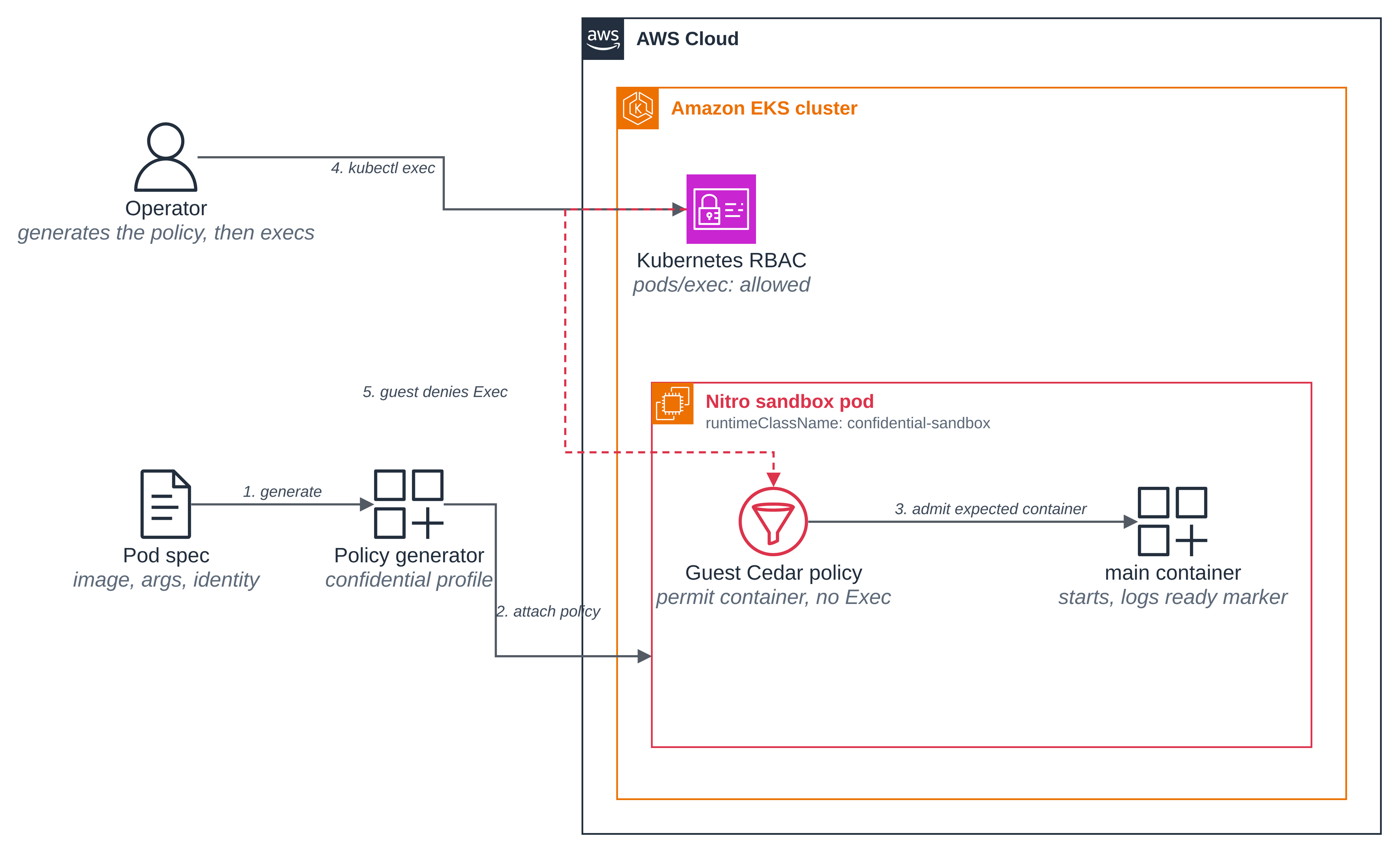
This blueprint demonstrates policy enforcement inside the guest only. It makes no attestation and no key-release decision; those belong to the planned Confidential section's attested-decryption blueprints. The generator does predict the policy's PCR17 measurement, which an external verifier such as AWS KMS would check before releasing a secret, but this blueprint does not use it.
Files
| File | What it is |
|---|---|
deploy/pod.yaml |
The workload: a confidential-sandbox pod with pinned identity, filesystem and capabilities |
deploy/namespace.yaml |
The cedar-policy-sample namespace, labelled as the blueprint's own |
policy/confidential-profile.yaml |
The generator profile: the confidential posture, reduced for the preview guest schema |
policy/policy.generated.yaml |
The generated Cedar policy, committed so the page can show it without a run |
scripts/setup.sh |
Generate the policy, attach it, apply the pod, wait for Ready |
scripts/clean.sh |
Delete the pod and the namespace, and verify they are gone |
How it works
Confidential mode needs a policy. confidential-sandbox protects the pod from the node as
well as from other pods. Unlike isolated-sandbox, which applies a permissive built-in default
when a pod carries no policy, confidential mode enforces a strict default-deny posture: a pod
needs a Cedar policy that pins down what it may run (Amazon EKS User Guide, Cedar policies).
That policy is the subject of this blueprint.
A reduced confidential profile. The generator ships a built-in confidential profile, and
the Amazon EKS User Guide also documents custom profiles: a YAML file passed to --profile
where omitted fields take their defaults. This blueprint ships a custom profile,
policy/confidential-profile.yaml. It pins the container
admission fields (the image digest, process arguments, environment, working directory,
hostname, mounts, identity, capabilities, security settings, masked and read-only paths,
seccomp, AppArmor, namespaces and sysctls) and denies exec and stdin, as the built-in
confidential profile does. It differs from the built-in profile in omitting the fields the
current preview guest schema does not define yet: the OCI-hardening attributes are not pinned,
and encrypted ephemeral-layer enforcement is not required. On this preview guest the built-in
confidential profile's policy is rejected at sandbox set-up, before any container starts; the
reduced profile is accepted. When the preview guest schema defines those fields, generate with
--profile confidential to pin them too; the exec and admission behaviour this blueprint shows is
unchanged. The workload boots network-isolated, so the guest has no network, no Pod Identity
and no NTP, and the fields the profile omits change nothing it relies on.
Step 1: Describe the workload. deploy/pod.yaml chooses the confidential
runtime, the network-isolated annotation, and the container settings the guest should accept.
Explicit numeric user and group IDs make the intended identity clear. The exec-refusing policy
means the proof is read from the pod's logs, so the container prints it at start-up: its kernel
build, uptime and disks (that it ran in a sandbox) and its interfaces, routes and a name lookup
(that it has no network).
metadata:
  annotations:
    sandbox.amazonaws.com/network-isolated: "true"
spec:
  runtimeClassName: confidential-sandbox
  hostname: cedar-policy-demo
  automountServiceAccountToken: false
  enableServiceLinks: false
  securityContext:
    runAsUser: 65534
    runAsGroup: 65534
    runAsNonRoot: true
    supplementalGroupsPolicy: Strict
    seccompProfile:
      type: RuntimeDefault
  containers:
    - name: main
      image: public.ecr.aws/amazonlinux/amazonlinux:minimal
      imagePullPolicy: IfNotPresent
      securityContext:
        allowPrivilegeEscalation: false
        readOnlyRootFilesystem: true
        capabilities:
          drop: [ALL]
The complete manifest requests 1 vCPU and 1 GiB, with requests equal to limits. These settings become the inputs to the generated admission policy.
Step 2: Generate the policy, attach it and start the pod. scripts/setup.sh runs the
generator with the profile above, decodes the policy envelope into a readable form under the
repository's tmp/, renders the pod with the encoded policy in its
sandbox.amazonaws.com/policy annotation, and applies the pod. It creates the
cedar-policy-sample namespace only if it does not already exist, and reuses it only when it
carries this blueprint's managed-by label, so it never adopts a namespace another demo owns. The
pod boots network-isolated, so there is no network policy to apply and no cluster-wide
enforcement to turn on.
./scripts/setup.sh
== 1/4 generate the confidential Cedar policy from deploy/pod.yaml ==
info: wrote base64 envelope to .../tmp/cedar-policy/policy.b64
--- Predicted PCR17 ---
d748a7bde04e75e1f69c3ba4009d3c6831b7f911ae5f49ca7629aa8195869f9496c3aa66ee6fd18b50fc42ad053f5194
== 2/4 decode the policy envelope into readable form ==
== 3/4 render the pod and namespace with the chosen NAMESPACE ==
== 4/4 apply the pod and wait for the guest to admit it ==
namespace/cedar-policy-sample created
pod/cedar-policy-demo created
pod/cedar-policy-demo condition met

cedar-policy-demo is Ready and enforcing its generated Cedar policy.
Abridged. The generator prints a predicted PCR17, the measurement an external verifier would
check; this blueprint does not use it. This capture was taken from a fresh run into a namespace
that did not exist, so it shows the namespace/... created line; a re-run into an existing
blueprint namespace shows reusing namespace ... instead. The policy travels to the guest as the
gzipped, base64-encoded JSON envelope in the annotation, which is not readable by eye, so setup
also leaves a decoded copy under tmp/ and the blueprint commits a readable copy, shown below.
Step 3: What the generated policy pins. The generated admission policy permits creating the
main container only when the container matches the settings from the pod spec. Here is the
start of the admission rule from
policy/policy.generated.yaml, the committed readable copy:
// Container: main
permit(
    principal,
    action == Agent::Action::"CreateContainer",
    resource == Workload::Container::"main"
)
when {
    (context.image_ref == "public.ecr.aws/amazonlinux/amazonlinux@sha256:478c519817ce1c2cdc64700e4395775143446f8706706906b942960f0394ff2e" || ...) &&
    context.run_as_user == 65534 &&
    context.run_as_group == 65534 &&
    context.read_only_rootfs == true &&
    context.capabilities_effective.isEmpty() &&
    context.no_new_privileges == true &&
    ...
};
The image tag is resolved to its digest at generation time, so the parent instance cannot
substitute a different image at run time. The runtime policy permits reading logs, stats,
termination logs and the guest's own set-up actions, and has no Exec and no stdin permit:
// Runtime: stdin writes are denied (no permit policy)
// Runtime: exec is denied (no permit policy)

// Runtime: allow log reading
permit(
    principal,
    action == Agent::Action::"ReadLogs",
    resource
);
The complete policy, admission and runtime, is in
policy/policy.generated.yaml.
Step 4: The pod opted into the confidential sandbox, network-isolated. The pod runs
runtimeClassName: confidential-sandbox, carries the network-isolated annotation, and holds
the encoded policy in its annotation:
kubectl -n cedar-policy-sample get pod cedar-policy-demo \
  -o jsonpath='{.spec.runtimeClassName}{"\n"}'
kubectl -n cedar-policy-sample get pod cedar-policy-demo \
  -o jsonpath='{.metadata.annotations.sandbox\.amazonaws\.com/network-isolated}{"\n"}'
kubectl -n cedar-policy-sample get pod cedar-policy-demo \
  -o jsonpath='{.metadata.annotations.sandbox\.amazonaws\.com/policy}' | wc -c
confidential-sandbox
true
3240
Step 5: Prove the pod ran in a sandbox, and has no network, from its logs. The policy
refuses exec, so the proof is read a different way: the container prints its kernel build,
uptime and block devices (that it ran in a sandbox) and its interfaces, route count and a name
lookup (that it has no network) when it starts, and the page reads them with kubectl logs,
which the policy permits.
kubectl -n cedar-policy-sample logs cedar-policy-demo -c main
kernel:  6.18.51 #1 SMP PREEMPT_DYNAMIC Thu Oct  1 23:28:07 UTC 2026
uptime:  3.43s
disks:   dm-0 dm-1 dm-2 loop0 loop1 loop2 loop3 loop4 loop5 loop6 loop7 vda vdb vdc
ifaces:  dummy0 lo
addrs:
routes:  0
dns:     no answer
confidential-policy-ready
An ordinary (non-sandbox) pod started on the same cluster shows, instead:
kernel:  6.18.51 #2 SMP PREEMPT_DYNAMIC Wed Oct  7 22:33:11 UTC 2026
uptime:  166.49s
disks:   dm-0 nvme0n1 nvme1n1 zram0
ifaces:  eth0 lo
addrs:   169.254.1.1 192.168.162.177
routes:  2
dns:     answer
The kernel version string matches, but the build does not (#1 ... Oct 1 against
#2 ... Oct 7): the guest runs its own kernel. The disk list carries vda vdb vdc, the
guest's virtio devices, where the ordinary pod sees the instance's nvme; confidential mode's
encrypted overlay adds the dm- and loop devices. The guest's uptime, about 3 seconds,
matches the just-started pod, because the VM booted with the pod, where an ordinary pod's
/proc/uptime reports the uptime of the node it runs on.
The addrs, routes and dns lines are the network-isolation proof. The guest's only
interfaces are lo and a dummy0 placeholder, with no non-loopback IPv4 address (addrs is
empty: it lists the non-loopback IPv4 addresses from /proc/net/fib_trie), where the ordinary
pod has an eth0 with its 169.254.1.1 and VPC 192.168.x.x addresses. routes: 0 means no
route table entry at all, for any address family, where the ordinary pod has a default route
and its VPC route. And the name lookup gets no answer because there is no DNS, where the
ordinary pod resolves. The dummy0 interface is a stand-in the guest creates so loopback-only
software still finds a non-loopback device; the empty addrs line shows it has no IPv4 address,
and routes: 0 that nothing has a route, so it is not a path off the pod. The last line,
confidential-policy-ready, is the marker that shows the expected container started.
Step 6: An operator's exec is refused inside the guest. The caller is allowed to
create pods/exec in the namespace, so an exec failure is the guest's policy and not RBAC:
kubectl auth can-i create pods/exec -n cedar-policy-sample
yes
The exec is still refused, by the guest, with its Cedar decision:
kubectl -n cedar-policy-sample exec cedar-policy-demo -c main -- /bin/true
error: Internal error occurred: Internal error occurred: error executing command in
container: failed to exec in container: failed to create exec "66eb...7dc3d": policy denied
Agent::Action::"Exec" on container "main" reasons=[] errors=[]
Kubernetes allowed the request; the guest denied the operation. The message names the exact
Cedar action, Agent::Action::"Exec", so a generic exec failure (RBAC, a dead pod, a network
blip) cannot pass as policy enforcement. This is the whole point of the blueprint: the check runs
inside the guest, below the operator.
Step 7: A changed spec, without a regenerated policy, is refused. Change one pinned setting in the workload, here the container's command, and apply it with the policy generated for the original spec. The guest refuses to start the container, because it no longer matches the admission policy:
# cedar-policy-changed carries the original policy annotation but a changed command.
kubectl -n cedar-policy-sample get pod cedar-policy-changed
kubectl -n cedar-policy-sample get pod cedar-policy-changed \
  -o jsonpath='{.status.containerStatuses[0].state.waiting.message}{"\n"}'
NAME                   READY   STATUS               RESTARTS   AGE
cedar-policy-changed   0/1     RunContainerError    3          61s
failed to create containerd task: ... policy denied Agent::Action::"CreateContainer" on
container "main": []
The admission policy pins the process arguments, so a container with a different command is a
different container to the policy, and the guest denies Agent::Action::"CreateContainer".
Regenerating the policy from the changed spec would let it start again. The policy and the
workload travel together: change one without the other and the pod does not run.
No network to reach
The workload makes no network connections, so it needs no network policy. Instead of restricting egress with a policy, the pod removes the network entirely: it carries one annotation, and the guest boots with no network device besides loopback.
metadata:
  annotations:
    sandbox.amazonaws.com/network-isolated: "true"
With the annotation, the guest comes up with no route out, no DNS, no instance metadata and no
Pod Identity credentials (Amazon EKS User Guide, Isolated and confidential pods, Services).
The annotation works in either runtime class. kubectl logs, cp and exec keep using the
VM's internal control channel, which is why this page can read the proof from the logs even
though the pod has no network, and the generator leaves the guest-metadata and credential
permits out of the policy for a network-isolated pod.
Step 5 shows the proof, read from the logs: the net-isolated guest has ifaces: dummy0 lo, an
empty addrs, routes: 0 and dns: no answer, where an ordinary pod on the same cluster has
ifaces: eth0 lo, addrs with its link-local and VPC addresses, routes: 2 and dns: answer.
The only interfaces are loopback and a dummy0 placeholder with no non-loopback IPv4 address;
there is no route table entry, for any address family, and no name resolution. This is removal
of the network, not a policy over it: there is no NetworkPolicy, no PolicyEndpoint, and no
cluster-wide network policy enforcement to turn on.
A blueprint whose sandbox does need a network restricts its egress with a network policy instead; the coding agent blueprint shows that shape.
Good to know
- This blueprint shows policy enforcement inside the guest only. It makes no attestation and no key-release decision. The generator predicts the policy's PCR17 measurement, which an external verifier such as AWS KMS would check before releasing a secret, but this blueprint does not use it. The planned Confidential section's attested-decryption blueprints show that step.
- The policy and the workload travel together. The policy annotation is immutable on a
running pod, so
setup.shrecreates the pod to apply a regenerated policy. A pod left from an earlier run keeps enforcing the earlier policy. - A reduced profile on the preview guest. The blueprint's profile pins the container
admission fields and denies exec and stdin, but omits the fields the current preview guest
schema does not define yet: the OCI-hardening attributes are not pinned, and encrypted
ephemeral-layer enforcement is not required. Generate with the built-in
--profile
  confidential
to pin those too once the guest schema supports them; the exec and admission behaviour the blueprint shows holds either way. dummy0is not a way out. The network-isolated guest shows adummy0interface besidelo, there so loopback-only software finds a non-loopback device. The emptyaddrsline shows it has no non-loopback IPv4 address androutes: 0that nothing has a route, so it is not a path off the pod. The proof that the pod has no network is the emptyaddrs,routes: 0and the failed name lookup, not the absence ofdummy0.addrsreads IPv4 from/proc/net/fib_trie; the stronger signal,routes: 0, covers every address family.
Clean up
Set the variables again in a new shell if needed, then remove the blueprint:
./scripts/clean.sh                   # delete the pod and the namespace
./scripts/clean.sh --keep-namespace  # delete the pod, keep the namespace
clean.sh deletes the namespace only after confirming it carries this blueprint's managed-by
label, verifies each deletion, and exits non-zero if anything it was asked to remove is still
there. The blueprint creates no AWS resources, so there is nothing to delete in the account, and
no cluster-wide setting to undo. To remove the cluster, follow the
hello sandbox clean up.