Warm pools with agent-sandbox
Before you start, review the prerequisites and shared setup on the home page, and run the hello sandbox blueprint first so you have a cluster with the runtime classes. The commands below use files from this repository, so clone it if you have not already, and run them from this blueprint's folder:
git clone https://github.com/aws-samples/sample-eks-nitro-sandbox.git
cd sample-eks-nitro-sandbox/examples/getting-started/warm-pool
A sandboxed pod does more work at startup than a regular pod: containerd launches the pod's Nitro sandbox, which boots with its own kernel, before the containers start. On a node that is already up, with the image already pulled, a sandboxed pod took 3.2 to 3.7 seconds from create to Ready, against 0.8 to 0.9 seconds for an ordinary pod (Figure 4 below). For an interactive agent, where a user or a model is waiting for a code cell to run, that is the difference between a tool that feels instant and one that feels slow.
agent-sandbox is a Kubernetes SIG
project that adds a Sandbox API and a warm-pool controller for agent workloads. Because
a Nitro Sandbox is a RuntimeClass on a pod template, agent-sandbox works with it
unchanged.
Step 1: Install agent-sandbox with its extensions (SandboxTemplate,
SandboxWarmPool, SandboxClaim). This folder was built against v1.0.10:
kubectl apply -f https://github.com/kubernetes-sigs/agent-sandbox/releases/download/v1.0.10/sandbox-with-extensions.yaml
kubectl -n agent-sandbox-system rollout status deploy/agent-sandbox-controller
Step 2: Create the template and the pool. warm-pool.yaml
points a SandboxTemplate at isolated-sandbox, marks it network-isolated, and asks a
SandboxWarmPool to keep five booted:
apiVersion: extensions.agents.x-k8s.io/v1beta1
kind: SandboxTemplate
metadata:
  name: nitro-agent
spec:
  podTemplate:
    metadata:
      annotations:
        sandbox.amazonaws.com/network-isolated: "true"   # optional: no network besides loopback
    spec:
      runtimeClassName: isolated-sandbox
      containers:
        - name: agent
          image: public.ecr.aws/docker/library/python:3.12-slim
          imagePullPolicy: IfNotPresent
          command: ["sleep", "infinity"]
---
apiVersion: extensions.agents.x-k8s.io/v1beta1
kind: SandboxWarmPool
metadata:
  name: nitro-agent-pool
spec:
  replicas: 5                       # five sandboxes booted and waiting
  sandboxTemplateRef:
    name: nitro-agent
kubectl apply -f warm-pool.yaml
kubectl wait sandboxwarmpool/nitro-agent-pool --for=jsonpath='{.status.readyReplicas}'=5 --timeout=600s
kubectl get sandboxwarmpool nitro-agent-pool
NAME               READY   DESIRED   AGE
nitro-agent-pool   5       5         11s
Step 3: Claim one. A SandboxClaim is what your
application creates per user session or per task:
apiVersion: extensions.agents.x-k8s.io/v1beta1
kind: SandboxClaim                  # created per user session / per task
metadata:
  name: session-7f3a
spec:
  warmPoolRef:
    name: nitro-agent-pool
time ( kubectl apply -f claim.yaml \
  && kubectl wait sandboxclaim/session-7f3a --for=condition=Ready --timeout=60s )
sandboxclaim.extensions.agents.x-k8s.io/session-7f3a created
sandboxclaim.extensions.agents.x-k8s.io/session-7f3a condition met

real    0m1.978s
user    0m0.955s
sys 0m0.406s
The claim adopts a pod that was already running, so nothing boots on the claim path. The
time above covers both kubectl commands. Timed from the moment the apply returns, three
claims were each Ready in 0.8 seconds, about what an ordinary pod takes to start. The
launch-type label shows the adopted pod came from the pool, as every pod here did:
kubectl get sandbox -o custom-columns='NAME:.metadata.name,LAUNCH-TYPE:.metadata.labels.agents\.x-k8s\.io/launch-type'
NAME                     LAUNCH-TYPE
nitro-agent-pool-4pwxg   warm
nitro-agent-pool-6j26d   warm
nitro-agent-pool-nlbv2   warm
nitro-agent-pool-qxf9f   warm
nitro-agent-pool-t8fzv   warm
nitro-agent-pool-xc4x6   warm
Six sandboxes for a pool of five: the claimed one, and the replacement the pool boots in the background to get back to five. After each of those three claims the pool was back to five ready in about 4 seconds, which is a cold sandbox boot, off the path the claim waits on.
Step 4: Use it. Your application talks to the claimed sandbox as it would to any pod:
kubectl exec to run code, kubectl cp to move files, kubectl logs to read output.
POD=$(kubectl get sandboxclaim session-7f3a -o jsonpath='{.status.sandbox.name}')
echo 'print(sum(range(10)))' > /tmp/hands.py
kubectl cp /tmp/hands.py $POD:/tmp/hands.py
kubectl exec $POD -- python3 /tmp/hands.py
kubectl exec $POD -- python3 -c 'import socket; socket.create_connection(("1.1.1.1", 443), timeout=3)'
kubectl get sandboxwarmpool nitro-agent-pool
45
Traceback (most recent call last):
  File "<string>", line 1, in <module>
  File "/usr/local/lib/python3.12/socket.py", line 865, in create_connection
    raise exceptions[0]
  File "/usr/local/lib/python3.12/socket.py", line 850, in create_connection
    sock.connect(sa)
OSError: [Errno 101] Network is unreachable
command terminated with exit code 1
NAME               READY   DESIRED   AGE
nitro-agent-pool   5       5         19s
Code runs, files move, and the sandbox has no route out. Delete the claim and its pod is torn down; nothing from that session survives into the next one:
kubectl delete -f claim.yaml
A pattern worth copying: separate the brain from the hands. The coding agent blueprint put the whole agent in one sandbox, the easiest way to start. The warm pool enables the design Anthropic describes in Scaling Managed Agents: decoupling the brain from the hands: run the agent's reasoning loop on an ordinary pod with model access and no local shell, and give it one tool: claim a warm sandbox and run code in it. Mark the sandbox template network-isolated, as above. Now the component that can talk to the internet cannot run commands, and the component that can run commands has no network besides loopback. The only wire between them is the Kubernetes API, which keeps working under network isolation because exec uses the sandbox's internal control channel, as step 4 showed.
The brain and hands blueprint builds this
pattern with one change of wire. Its hands run sandboxd, the agent-sandbox runtime daemon,
and the brain reaches it with the upstream agent-sandbox MCP server, so commands, files and
output stay off the Kubernetes API, which is what you want once many agents run at once.
The price is that the hands need a pod network to be reached on. So instead of booting
network-isolated, they carry a network policy that admits only pods labelled app=brain (and
the pod's own node, which Kubernetes always allows), on sandboxd's two ports, and lets them
open no connection on the pod network. Pick the
Kubernetes API wire shown here when exec traffic is light, and sandboxd when it is not.
Figure 3: Warm pool with the brain and hands separated. The driver pod reasons and talks to Bedrock; the claimed sandbox runs code with no network besides loopback; the Kubernetes API is the only wire between them.
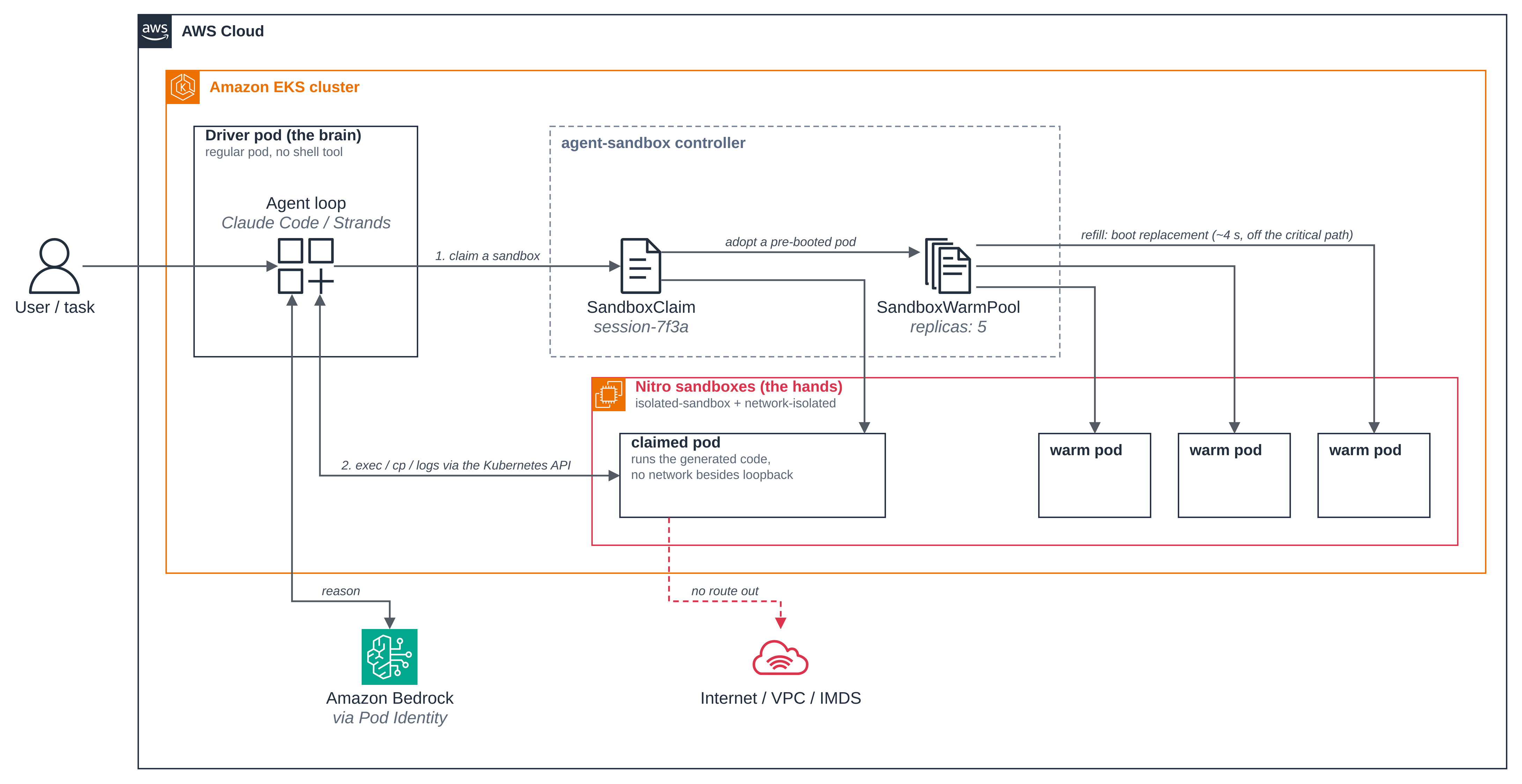
Figure 4: Time to Ready. A cold start boots a sandbox; a warm-pool claim adopts one that
is already running, so nothing boots. Measured three times each on a node that was already
up, with the image already pulled, timed from the moment the create returned until
kubectl wait reported Ready, so each figure includes one kubectl round trip. A cold start
on a new node, or with an image to pull, takes longer; a claim served by a warm pod waits
on neither.
| Path to a ready pod | Create to Ready |
|---|---|
| Ordinary pod, cold start | 0.8 to 0.9 s |
| Sandboxed pod, cold start | 3.2 to 3.7 s |
| Sandboxed pod, warm-pool claim | 0.8 s |
| The pool booting the replacement, after a claim | about 4 s, off the claim's path |
Sizing. Each sandbox reserves its full memory request up front, so bin-packing is by
reservation, not by usage: size requests honestly and expect fewer, larger pods per node
than with regular containers. A warm pool trades its idle replicas for the latency win;
size replicas to your peak claim rate, not your total session count.
Clean up
Delete the warm pool before anything else, so it stops booting replacements, then remove agent-sandbox, including its CRDs and every Sandbox resource in the cluster:
kubectl delete -f warm-pool.yaml --ignore-not-found
kubectl delete -f https://github.com/kubernetes-sigs/agent-sandbox/releases/download/v1.0.10/sandbox-with-extensions.yaml
rm -f /tmp/hands.py
If this is the last blueprint you ran, follow the hello sandbox clean up to remove the namespace and the cluster.