Run an image whose layers only the sandbox can read
This blueprint publishes a container image to Amazon ECR whose every filesystem layer is ciphertext, and gets it running. A build machine encrypts the layers with a data key that AWS KMS wraps. The node pulls and transfers only ciphertext. Inside the sandbox, the guest's own image runtime asks KMS for the layer key, and KMS releases it only to a sandbox whose attestation matches the policy the key was gated on. The container that then starts is an ordinary workload: the image it runs carries no decryption code at all.
The pod uses runtimeClassName: confidential-sandbox, which treats the node as untrusted
and binds key release to a Cedar policy that pins what the pod may run. The build machine
is trusted with the original image and stays outside the cluster.
Before you start, review the prerequisites and shared setup on the home page and the Confidential section page, which covers the trust boundary, the key-policy shape and the attested decrypt that this and the other Confidential blueprints share. Three blueprints lead into this one:
- cedar-policy generates a Cedar policy for a
confidential-sandboxpod and shows the guest enforce it, with no attestation step. - hello sandbox introduces the readings that show a pod ran in a sandbox.
- coding agent introduces EKS Pod Identity
and an
ApplicationNetworkPolicywithdomainNames.
The commands below use files from this repository, so clone it if you have not already:
git clone https://github.com/aws-samples/sample-eks-nitro-sandbox.git
cd sample-eks-nitro-sandbox/examples/confidential/encrypted-image
cp .env.example .env    # then fill in CLUSTER_NAME, AWS_REGION and KUBE_CONTEXT
On your own machine the scripts need the AWS CLI, kubectl, jq, curl and a container
runtime (docker by default; set CONTAINER_CLI for finch or podman), plus two tools
the Amazon EKS User Guide names:
| Tool | Where it is documented |
|---|---|
eks-nitro-sandbox-genpolicy, the Cedar policy generator |
Amazon EKS User Guide, Cedar policies |
nitro-sandbox-keyprovider, the ocicrypt key provider that wraps the layer key with KMS |
Amazon EKS User Guide, Encrypted container images |
Both must be on your PATH; set GENPOLICY or KEYPROVIDER in .env if your copies are
named differently. You do not need skopeo
installed: the setup script runs it in a container.
A run costs the KMS key, ECR storage for one encrypted image (about 37 MB), and the compute of one sandboxed pod and two small ordinary pods while the blueprint is up. The clean up schedules the key for deletion, which AWS completes after a waiting period of at least 7 days.
Overview
The blueprint has one sandboxed pod and two ordinary pods, all in one namespace. The sandboxed pod runs the encrypted image. The two ordinary pods are controls: one runs the same image in its original plaintext form so the page can show what an ordinary pod reads, and one holds the sandboxed pod's own IAM role and tries to decrypt the layer key without an attestation.
- Every published filesystem layer is ciphertext. Every layer descriptor in the published image carries an encrypted media type and an annotation holding the layer key wrapped by KMS. The manifest and the image configuration stay readable, by design, so registries and runtimes can still inspect them. A layer blob pulled straight from ECR fails to decompress.
- The attestation is the boundary, not the credential. The pod's role has no identity policy at all; its one permission lives in the key policy, conditional on the attested measurement. An ordinary pod with the very same role, asking KMS to decrypt the very same wrapped layer key, is refused by an explicit deny.
- Change one pinned value and KMS stops releasing the key. A second pod runs the same image with one extra environment variable. Its Cedar policy differs, so its measurement differs, and KMS refuses the layer key. The container cannot start, and the reason it gives is an authorization denial, not a generic failure.
- Decryption belongs to the guest. The workload image is a stock public base image with no AWS or KMS code in it. The guest's image runtime decrypts and unpacks the layers before the container's first instruction runs.
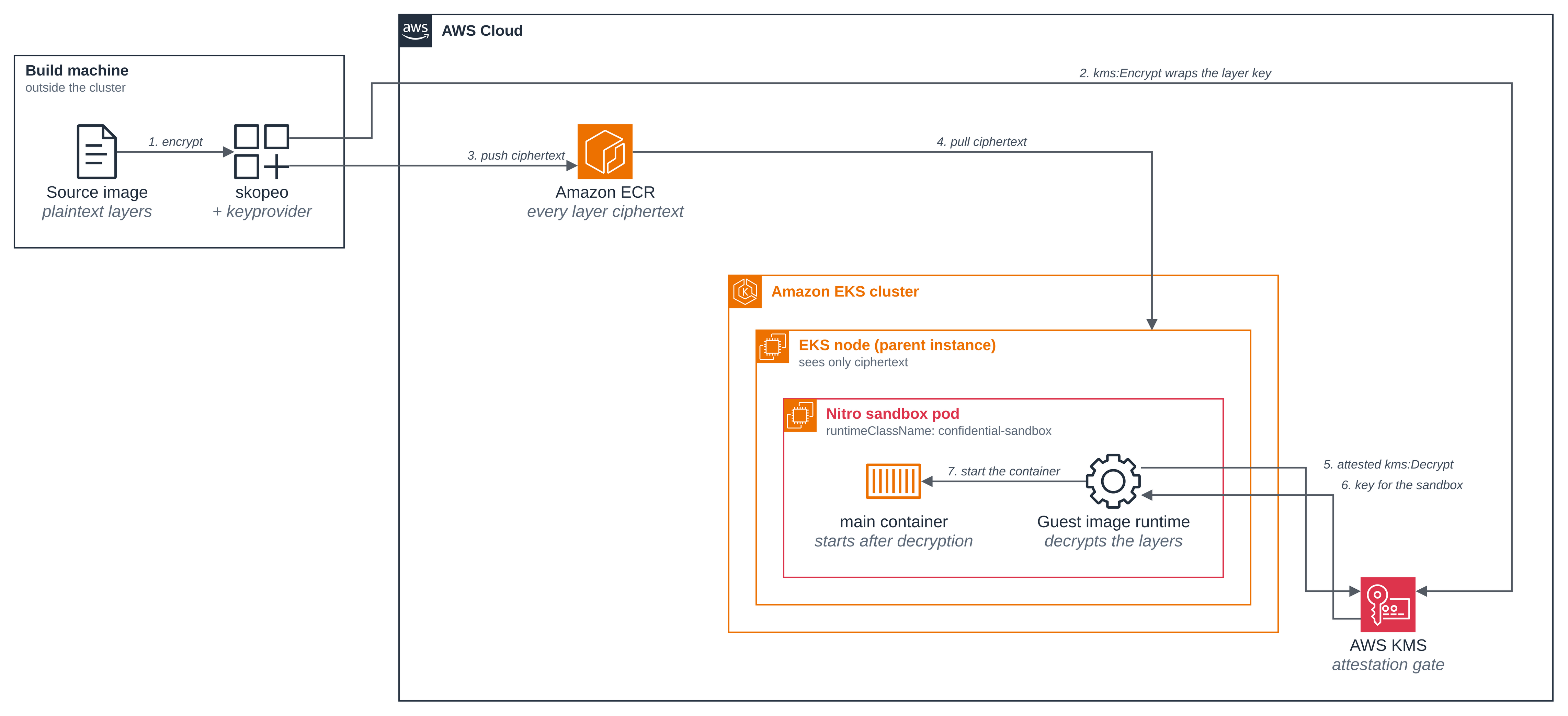
Figure 1: The image's journey, from the build machine to the container that runs it. Every layer published to Amazon ECR is ciphertext, and the layer key that opens them travels wrapped by AWS KMS; the layers are decrypted inside the sandbox by the guest's own image runtime, which is why the workload image needs no decryption code. Who KMS will release that layer key to is Figure 2.
Versions
| Component | Pinned to |
|---|---|
| skopeo, run in a container | quay.io/skopeo/stable:v1.20.0 (SKOPEO_IMAGE in .env) |
| Source image for the workload | public.ecr.aws/amazonlinux/amazonlinux:minimal (SOURCE_IMAGE in .env) |
| AWS CLI image, for the credentials control pod only | public.ecr.aws/aws-cli/aws-cli:2.31.19 |
eks-nitro-sandbox-genpolicy |
Reports no version string of its own. The pinned artifact is the image, resolved to a digest at generation time and visible in the generated policy. |
nitro-sandbox-keyprovider |
Reports no version string of its own. The key it wrapped with is recorded in each layer's annotation, and the blueprint reads it back. |
Files
| File | What it is |
|---|---|
deploy/pod.yaml |
The workload: a confidential-sandbox pod running the encrypted image |
deploy/plain-pod.yaml |
An ordinary pod running the same image unencrypted, on the same node, for comparison |
deploy/credentials-pod.yaml |
An ordinary pod with the same IAM role, asking KMS to decrypt the layer key with no attestation |
deploy/egress-policy.yaml |
The sandbox's egress: DNS, Pod Identity and the KMS endpoint, nothing else |
deploy/enable-network-policy.yaml |
The one-line, once-per-cluster change that makes network policies enforced |
deploy/namespace.yaml |
The encrypted-image-sample namespace, labelled as the blueprint's own |
deploy/service-account.yaml |
The pod's service account, which the Pod Identity association names |
../_shared/confidential-profile.yaml |
The generator profile the Confidential blueprints share |
../_shared/kms-key-policy.json |
The attestation gate: allow on a match, explicitly deny otherwise |
../_shared/pod-identity/role-trust-policy.json |
The role trust policy, scoped to one cluster, namespace and service account |
policy/policy.generated.yaml |
The generated Cedar policy from a real run, committed so you can read it without running anything |
scripts/setup.sh |
The whole flow, ending with the three pods running |
scripts/changed-pod.sh |
The refused case: one pinned value changed |
scripts/clean.sh |
Remove everything the blueprint created |
How it works
Step 1: Turn on network policy enforcement, once for the cluster. An EKS Auto Mode
cluster accepts network policies without enforcing them until the amazon-vpc-cni
ConfigMap says so. This is a setting the whole cluster shares, so the blueprint's scripts
never change it: apply it yourself, and setup.sh checks it and stops with this command if
it is off. Pods that no policy selects are unaffected.
kubectl apply -f deploy/enable-network-policy.yaml
Step 2: Run the setup. One script does the whole flow. It creates four AWS resources,
each tagged ManagedBy=encrypted-image, encrypts and publishes the image, generates the
Cedar policy, sets the gate to the policy's measurement, and starts the pods.
./scripts/setup.sh
== 1/8 check the tools, the cluster and the Region ==
  context:  <your-context>
  network policy enforcement: on
== 2/8 create the ECR repository and the KMS key ==
  created ECR repository encrypted-image-sample
  created KMS key arn:aws:kms:us-west-2:<ACCOUNT_ID>:key/1734bb73-1b98-4176-9894-4851172cf7c7
  it denies every decrypt already: created with a policy, not the default one
== 3/8 create the pod's IAM role and the born-denied key policy ==
  created IAM role arn:aws:iam::<ACCOUNT_ID>:role/encrypted-image-sample-pod
  the role has no identity policies (0 inline, 0 attached)
  waiting for the new IAM role to be visible to KMS...
  the key policy allows no decrypt yet (gated on an all-zero measurement)
== 4/8 create the namespace, the service account, the association and the egress policy ==
  created Pod Identity association a-wvityzeszzb7kf12b
  egress policy applied and handed to the nodes (1 PolicyEndpoint)
== 5/8 encrypt every layer and push to ECR ==
  published <ACCOUNT_ID>.dkr.ecr.us-west-2.amazonaws.com/encrypted-image-sample:v1-1734bb73
== 6/8 check every published layer is ciphertext wrapped with this key ==
  all 1 layer(s) encrypted and wrapped with this key
== 7/8 generate the Cedar policy and set the gate to its measurement ==
  predicted PCR17: 39d27a343980e05d6eab151889f9cda9e1a7320b847286bc2caf30ca65b897aed1d801a12f12fa3e1a7faa44ee0f2e5b
  image digest pinned under both permits: <ACCOUNT_ID>.dkr.ecr.us-west-2.amazonaws.com/encrypted-image-sample@sha256:690b253fb55d8234cc2158ab18d4e6c8e4c85f2b3c6800eeaee0db0fb7e377e8
  the gate now releases the layer key only to this measurement
== 8/8 start the pods ==
  the egress policy is programmed for encrypted-image-demo on its node
  attempt 1 of the credentials pod reached no answer from KMS; replacing it
  the same role, with no attestation, was refused the layer key

encrypted-image-demo is Ready: its layers were decrypted inside the sandbox.
Abridged: kubectl's own created and condition met lines, skopeo's copy progress, the
whole Cedar policy the generator prints, and the closing list of commands are all left out,
and the account ID is replaced with <ACCOUNT_ID>. Two lines are worth reading twice.
The key is created with a policy of its own, not the default one, and that policy denies
every decrypt: kms:CreateKey with no policy attaches the AWS default key policy, whose
"Enable IAM policies" statement allows kms:* to the account, and the key would then
spend the time until the gate went on able to decrypt for any sufficiently privileged
identity in the account. The birth policy is the gate's template with the one conditional
allow taken out, so it names no role and needs none to exist yet, and both denies are
already on it carrying an all-zero measurement no sandbox can present. Step 3 adds the
allow once the role is there.
And the pod reaching Ready in step 8 is the headline result: it could only start because
KMS accepted its attestation and released the layer key.
The "attempt 1 of the credentials pod" line is a retry, not an error; the Good to know section explains it.
Step 3: Encrypt and publish. skopeo copies the source image to ECR, encrypting as it
goes. The nitro-sandbox-keyprovider generates the layer data key and calls kms:Encrypt
to wrap it, and the wrapped key travels in the layer's annotations. This is the invocation
setup.sh runs, in a container with the keyprovider and the credentials copied in:
OCICRYPT_KEYPROVIDER_CONFIG=/run/ocicrypt.json \
  skopeo copy \
    --dest-authfile /run/authfile.json \
    --encryption-key "provider:awskms:$KMS_KEY_ARN" \
    "docker://$SOURCE_IMAGE" \
    "docker://$ENCRYPTED_IMAGE_URI"
with the keyprovider configuration in the shape the Amazon EKS User Guide, Encrypted
container images, documents. The path is the one the binary has inside the build
container; the guide's own example installs the keyprovider on the build machine and names
it in /etc/ocicrypt.json.
{"key-providers":{"awskms":{"cmd":{"path":"/run/keyprovider","args":[]}}}}
Two things the guide is explicit about. --encryption-key must be given a full key ARN,
not an ID or an alias, because the sandbox derives the KMS endpoint from the ARN recorded
in the image rather than trusting any Region the node reports. And --encrypt-layer is
left out deliberately, so that every layer is encrypted: that flag selects individual
layers, and an image mixing encrypted and plaintext layers is not supported. The pull
fails, naming the layers that are not encrypted, and the policy generator refuses to
generate for such an image.
Step 4: Every published layer is ciphertext. Read the manifest back from ECR. The layer
media type gains an +encrypted suffix, and each layer carries two annotations.
aws ecr batch-get-image --repository-name encrypted-image-sample \
  --image-ids imageTag=v1-1734bb73 \
  --accepted-media-types application/vnd.oci.image.manifest.v1+json \
  --query 'images[0].imageManifest' --output text \
  | jq '{config: .config.digest,
         layers: [.layers[] | {mediaType, digest, size, annotations: (.annotations | keys)}]}'
{
  "config": "sha256:acbf110d8a44591c61483aabb846d7f5de398d7f01d7362166e3e1d7184bb07b",
  "layers": [
    {
      "mediaType": "application/vnd.oci.image.layer.v1.tar+gzip+encrypted",
      "digest": "sha256:6dea5028fecd0a8be466ff4de0c85e239532c1046e5521ac116267001bf6ebdf",
      "size": 37483317,
      "annotations": [
        "org.opencontainers.image.enc.keys.provider.awskms",
        "org.opencontainers.image.enc.pubopts"
      ]
    }
  ]
}
The two digests are the ones steps 5 and 12 read back: the layer blob the node pulls, and the image configuration. Both descriptors stay in plaintext, which is how a registry can still serve the image at all.
The key-provider annotation is not an opaque label: decode it and it names the key this run gated, and holds the wrapped layer key itself.
... | jq -r '.layers[0].annotations["org.opencontainers.image.enc.keys.provider.awskms"]
             | @base64d | fromjson | {v, key_arn, ciphertext_bytes: (.ciphertext | length)}'
{
  "v": 1,
  "key_arn": "arn:aws:kms:us-west-2:<ACCOUNT_ID>:key/1734bb73-1b98-4176-9894-4851172cf7c7",
  "ciphertext_bytes": 472
}
That check matters more than it looks. A layer could be encrypted and still be wrapped with
some other key, from an earlier run or another repository, and the only symptom would be a
kms:Decrypt denial at start-up that reads like a permissions problem. setup.sh asserts
this for every layer, which is the "wrapped with this key" line in its output.
Step 5: A layer blob pulled from ECR is not readable. Download the layer the node would pull, confirm the bytes are the ones the descriptor names, and then try to treat them as the gzipped tar the media type claims:
aws ecr get-download-url-for-layer --repository-name encrypted-image-sample \
  --layer-digest sha256:6dea5028fecd0a8be466ff4de0c85e239532c1046e5521ac116267001bf6ebdf \
  --query downloadUrl --output text | xargs curl -sS -o layer.blob
sha256sum layer.blob
gzip -t layer.blob
file -b layer.blob
6dea5028fecd0a8be466ff4de0c85e239532c1046e5521ac116267001bf6ebdf  layer.blob

gzip: layer.blob: not in gzip format
DOS executable (COM)
file reporting "DOS executable (COM)" is worth a word: it is not one. file guesses from
the first few bytes, and on ciphertext that guess is arbitrary, which is the point. On an
earlier run of this blueprint the same command said data.
The digest matching the descriptor is what makes the failed gzip -t mean something: these
are exactly the bytes the parent instance pulls, not a truncated download. file has
nothing to say about them.
Step 6: Describe the pod. The pod picks the confidential runtime class and the service account the Pod Identity association names. The fields that matter most here are the numeric user and group IDs:
spec:
  runtimeClassName: confidential-sandbox
  serviceAccountName: encrypted-image-pod
  hostname: encrypted-image-demo
  automountServiceAccountToken: false
  securityContext:
    runAsUser: 65534
    runAsGroup: 65534
    runAsNonRoot: true
    supplementalGroupsPolicy: Strict
    seccompProfile:
      type: RuntimeDefault
  containers:
    - name: main
      image: <ENCRYPTED_IMAGE_URI>
      imagePullPolicy: Always
      env:
        - name: AWS_REGION
          value: <AWS_REGION>
        - name: AWS_DEFAULT_REGION
          value: <AWS_REGION>
The generator cannot read /etc/passwd or /etc/group out of encrypted layers, so an
image with a non-numeric USER and no runAsUser in the pod spec would fail generation,
and the image's own group list is unknowable. Setting runAsUser and runAsGroup
numerically, and supplementalGroupsPolicy: Strict, lets it pin the identity exactly
(Amazon EKS User Guide, Encrypted container images). It still prints a warning about the
group set:
warning: <ACCOUNT_ID>.dkr.ecr.us-west-2.amazonaws.com/encrypted-image-sample:v1-1734bb73: image
has encrypted layers, cannot read /etc/group from encrypted layers. Image-derived
supplemental groups are unknown, so the policy will permit additional groups beyond the
ones it pins.
imagePullPolicy: Always is deliberate, and differs from the other blueprints here: the guest
asks KMS for the layer key as part of the pull, and that request is the thing this blueprint
is about. Both Region variables are set, to the same value, because the Pod Identity
webhook injects AWS_DEFAULT_REGION only when the manifest does not already declare
AWS_REGION alone; a policy generated with --with-pod-identity expects it in the pinned
environment either way, and the guest refuses to create a container whose environment does
not match.
This pod also sets CPU and memory requests, where most blueprints here set none. The guest decrypts and unpacks every layer inside the sandbox before the container starts, and the small default VM has nowhere to put the unpacked filesystem:
      resources:
        requests:
          cpu: "1"
          memory: 1Gi
Requests only, and no limits: a sandbox is sized from its requests, so a limit above the request would not give the VM any more room.
Step 7: What the generated policy pins, and its measurement. setup.sh runs the
generator with the shared profile and the Pod Identity flag:
eks-nitro-sandbox-genpolicy \
  --profile ../_shared/confidential-profile.yaml \
  --with-pod-identity \
  --output-file-b64 policy.b64 \
  rendered-pod.yaml
The admission policy permits creating the main container only on an exact match. Here is
the start of it, from policy/policy.generated.yaml:
// Container: main
// WARNING: image has encrypted layers; /etc/group is unreadable so image-derived supplemental groups are unknown.
permit(
    principal,
    action == Agent::Action::"CreateContainer",
    resource == Workload::Container::"main"
)
when {
    context.image_ref == "<ACCOUNT_ID>.dkr.ecr.us-west-2.amazonaws.com/encrypted-image-sample@sha256:690b253fb55d8234cc2158ab18d4e6c8e4c85f2b3c6800eeaee0db0fb7e377e8" &&
    context.working_dir == "/" &&
    context.run_as_user == 65534 &&
    context.run_as_group == 65534 &&
    context.additional_gids == [65534] &&
    context.read_only_rootfs == true &&
    context.capabilities_effective.isEmpty() &&
The environment is pinned by name and by value, which is what the changed pod in step 10 moves:
    context.env_names == ["PATH", "AWS_REGION", "AWS_DEFAULT_REGION",
                      "AWS_STS_REGIONAL_ENDPOINTS",
                      "AWS_CONTAINER_CREDENTIALS_FULL_URI",
                      "AWS_CONTAINER_AUTHORIZATION_TOKEN_FILE",
The same digest is pinned again under the permit that prepares the image, which is the operation that performs the decrypt:
permit(
    principal,
    action == Agent::Action::"PrepareImage",
    resource
)
when {
    context.image_ref == "<ACCOUNT_ID>.dkr.ecr.us-west-2.amazonaws.com/encrypted-image-sample@sha256:690b253fb55d8234cc2158ab18d4e6c8e4c85f2b3c6800eeaee0db0fb7e377e8"
};
setup.sh checks for that pin under both permits rather than grepping for the digest,
because the generator also writes the digest into a comment and a grep would pass on a
policy that did not enforce it.
See using a signed image instead of a pinned image reference.
The generator prints the measurement the guest will extend this policy into, and a
ready-to-paste KMS condition with it. PCR17 measures the policy, and PCR8 measures the
certificate that signed the sandbox environment image. The condition always uses
PCR8:ServiceName rather than a raw PCR8 value, because AWS rotates that certificate
and the raw value changes with it (Amazon EKS User Guide, Cedar policies).
--- Predicted PCR17 ---
39d27a343980e05d6eab151889f9cda9e1a7320b847286bc2caf30ca65b897aed1d801a12f12fa3e1a7faa44ee0f2e5b
--- KMS Key Policy Condition ---
"Condition": {
  "StringEqualsIgnoreCase": {
    "kms:RecipientAttestation:PCR17": "39d27a343980e05d6eab151889f9cda9e1a7320b847286bc2caf30ca65b897aed1d801a12f12fa3e1a7faa44ee0f2e5b",
    "kms:RecipientAttestation:PCR8:ServiceName": "eks.amazonaws.com"
  }
}
Step 8: The gate, read back from the live key. setup.sh fills in
../_shared/kms-key-policy.json and reads the policy
back off the key. These are its two decrypt statements, as the key reports them:
aws kms get-key-policy --key-id "$KMS_KEY_ARN" --policy-name default \
  --query Policy --output text \
  | jq '[.Statement[] | select(.Sid == "AttestedDecryptOnly"
         or .Sid == "DenyUnlessThePolicyMeasurementMatches")]'
[
  {
    "Sid": "AttestedDecryptOnly",
    "Effect": "Allow",
    "Principal": {
      "AWS": "arn:aws:iam::<ACCOUNT_ID>:role/encrypted-image-sample-pod"
    },
    "Action": "kms:Decrypt",
    "Resource": "*",
    "Condition": {
      "StringEqualsIgnoreCase": {
        "kms:RecipientAttestation:PCR8:ServiceName": "eks.amazonaws.com",
        "kms:RecipientAttestation:PCR17": "39d27a343980e05d6eab151889f9cda9e1a7320b847286bc2caf30ca65b897aed1d801a12f12fa3e1a7faa44ee0f2e5b"
      }
    }
  },
  {
    "Sid": "DenyUnlessThePolicyMeasurementMatches",
    "Effect": "Deny",
    "Principal": "*",
    "Action": [
      "kms:Decrypt",
      "kms:ReEncryptFrom"
    ],
    "Resource": "*",
    "Condition": {
      "StringNotEqualsIgnoreCase": {
        "kms:RecipientAttestation:PCR17": "39d27a343980e05d6eab151889f9cda9e1a7320b847286bc2caf30ca65b897aed1d801a12f12fa3e1a7faa44ee0f2e5b"
      }
    }
  }
]
The whole policy has five statements, and the other three matter too:
... | jq -c '[.Statement[] | {Sid, Effect, Action}]'
[{"Sid":"KeyAdministration","Effect":"Allow","Action":["kms:CancelKeyDeletion","kms:CreateAlias","kms:DeleteAlias","kms:DescribeKey","kms:DisableKey","kms:EnableKey","kms:GetKeyPolicy","kms:GetKeyRotationStatus","kms:ListAliases","kms:ListGrants","kms:ListKeyPolicies","kms:ListResourceTags","kms:PutKeyPolicy","kms:ScheduleKeyDeletion","kms:TagResource","kms:UntagResource","kms:UpdateAlias"]},{"Sid":"BuildTimeEncrypt","Effect":"Allow","Action":"kms:Encrypt"},{"Sid":"AttestedDecryptOnly","Effect":"Allow","Action":"kms:Decrypt"},{"Sid":"DenyUnlessThePolicyMeasurementMatches","Effect":"Deny","Action":["kms:Decrypt","kms:ReEncryptFrom"]},{"Sid":"DenyUnlessTheAttestationComesFromAnEKSSandbox","Effect":"Deny","Action":["kms:Decrypt","kms:ReEncryptFrom"]}]
KeyAdministration lists its actions rather than using kms:*, and holds neither
kms:Decrypt nor kms:ReEncryptFrom. Leaving out ReEncryptFrom is as important as
leaving out Decrypt: it would let a key administrator re-wrap the layer key under a
second, ungated key and decrypt it there, without touching this policy.
Be clear about what that does and does not buy. The same statement keeps
kms:PutKeyPolicy, because the key has to stay manageable, so a key administrator can
always replace this policy, remove the denies and then decrypt. What the gate binds is the
pod's role and anyone holding its credentials, which in confidential mode includes the
node. Leaving out ReEncryptFrom closes the administrator path that needs no policy
change; it does not, and cannot, shut out the account's key administrators.
BuildTimeEncrypt is what the keyprovider used
in step 3, and encryption is never gated on attestation, only decryption. The two denies
apply to every principal, and because a negated condition operator is also true when the
condition key is absent, they catch a request that carries no attestation document at all.
The condition keys are the public AWS KMS ones for Nitro Enclaves
(AWS KMS condition keys for AWS Nitro Enclaves,
cryptographic attestation support in AWS KMS);
the administration statement takes the place of the
default key policy's
broad "Enable IAM policies" statement.
Step 9: The pod ran in a sandbox, and the decryption happened there. The generated
policy denies exec, so the pod prints its readings itself and the page reads them with
kubectl logs. That these lines exist at all is the proof the decryption worked: they come
from a shell inside layers that were ciphertext in the registry.
kubectl -n encrypted-image-sample logs encrypted-image-demo -c main
kernel:  6.18.54 #1 SMP PREEMPT_DYNAMIC Thu Oct 22 17:38:11 UTC 2026
uptime:  4.65s
disks:   dm-0 dm-1 dm-2 loop0 loop1 loop2 loop3 loop4 loop5 loop6 loop7 vda vdb vdc
product: m8i.enclave
encrypted-image-ready
kms:     HTTP 404 (curl exit 0)
blocked: HTTP 000 (curl exit 28)
encrypted-image-probes-done
The ordinary pod, running the same image unencrypted on the same node, reads:
kubectl -n encrypted-image-sample logs encrypted-image-plain -c main
kernel:  6.18.54 #2 SMP PREEMPT_DYNAMIC Thu Oct 22 00:16:59 UTC 2026
uptime:  2482.62s
disks:   dm-0 loop0 loop1 loop2 loop3 loop4 loop5 loop6 loop7 nvme0n1 nvme1n1 zram0
product: m8i.xlarge
encrypted-image-plain-ready
The kernel version is the same in both, 6.18.54, and the build is not: #1 ... Oct 22
17:38 against #2 ... Oct 22 00:16. The guest runs its own kernel. The uptime is under
five seconds against about 41 minutes, because the VM booted with the pod while the
ordinary pod reads the node's uptime. The disks are vda vdb vdc, the guest's virtio
devices, where the ordinary pod sees the instance's nvme; confidential mode's encrypted
overlay adds the dm- devices. And product_name reads m8i.enclave against the
m8i.xlarge instance type. Same machine, same image contents, two different places to be
running.
The uptimes are worth pinning down, because what they point at is the whole claim. The node's launch time and each container's start time are enough:
aws ec2 describe-instances --instance-ids <NODE_INSTANCE_ID> \
  --query 'Reservations[0].Instances[0].LaunchTime' --output text
kubectl -n encrypted-image-sample get pod encrypted-image-demo \
  -o jsonpath='{.status.containerStatuses[0].state.running.startedAt}{"\n"}'
kubectl -n encrypted-image-sample get pod encrypted-image-plain \
  -o jsonpath='{.status.containerStatuses[0].state.running.startedAt}{"\n"}'
2026-10-25T14:05:48+00:00
2026-10-25T14:47:10Z
2026-10-25T14:47:15Z
The ordinary pod's container started at 14:47:15 and read 2482.62 seconds, which puts the
boot it is reporting at 14:05:52, four seconds after the node was launched at 14:05:48: it
is reading the machine's own boot. The sandbox pod's container started five seconds earlier,
at 14:47:10, and read 4.65 seconds, which puts its boot at 14:47:05, about 41 minutes after
the node. By the time the sandbox read that number the machine had been up for over forty
minutes, so the 4.65 seconds cannot be the machine's: it is a boot of its own, which
happened when the pod started. (Both figures are really lower bounds, since each uptime is
read a moment after the container starts rather than exactly at startedAt.)
The runtime class and the policy annotation are on the pod:
kubectl -n encrypted-image-sample get pod encrypted-image-demo \
  -o jsonpath='{.spec.runtimeClassName}{"\n"}'
kubectl -n encrypted-image-sample get pod encrypted-image-demo \
  -o jsonpath='{.metadata.annotations.sandbox\.amazonaws\.com/policy}' | wc -c
confidential-sandbox
3544
The policy denies exec, and the caller is allowed by Kubernetes to request one, so the refusal is the guest's decision and not RBAC:
kubectl auth can-i create pods/exec -n encrypted-image-sample
kubectl -n encrypted-image-sample exec encrypted-image-demo -c main -- /bin/true
yes
error: Internal error occurred: Internal error occurred: error executing command in
container: failed to exec in container: failed to create exec "b5e88030004e...": policy
denied Agent::Action::"Exec" on container "main" reasons=[] errors=[]
Abridged: the exec id is shortened.
Step 10: The same credentials, with no attestation, get nothing. The credentials pod is an ordinary pod using the same service account, so EKS Pod Identity gives it the same IAM role. It asks KMS to decrypt the same wrapped layer key read out of the published image, without an attestation document. If it ever succeeded it would write the plaintext to a file and delete it unread, so a layer key cannot reach the logs; what it prints is the exit status and the error.
kubectl -n encrypted-image-sample logs encrypted-image-credentials -c main
role:    arn:aws:sts::<ACCOUNT_ID>:assumed-role/encrypted-image-sample-pod/<session>
request: kms:Decrypt on the image's wrapped layer key, with no attestation document
exit:    254

An error occurred (AccessDeniedException) when calling the Decrypt operation: User:
arn:aws:sts::<ACCOUNT_ID>:assumed-role/encrypted-image-sample-pod/<session> is not
authorized to perform: kms:Decrypt on resource:
arn:aws:kms:us-west-2:<ACCOUNT_ID>:key/1734bb73-1b98-4176-9894-4851172cf7c7 with an
explicit deny in a resource-based policy
encrypted-image-credentials-done
Wrapped here to fit the page: the error is one long line, and encrypted-image-credentials-done
is the marker setup.sh waits for before it reads the result. The pod redacts the account ID
and the role session itself, so nothing identifying reaches its logs. "With an explicit deny in a resource-based policy" is the key policy's second
statement doing its job. This matters because in confidential mode the node is untrusted
and can obtain these same credentials: the Amazon EKS User Guide, Security model and
parent instance trust assumptions, says to treat Pod Identity credentials as visible to
the parent instance and to assume anything the role permits is reachable from it. Here the
role permits nothing without an attestation KMS accepts.
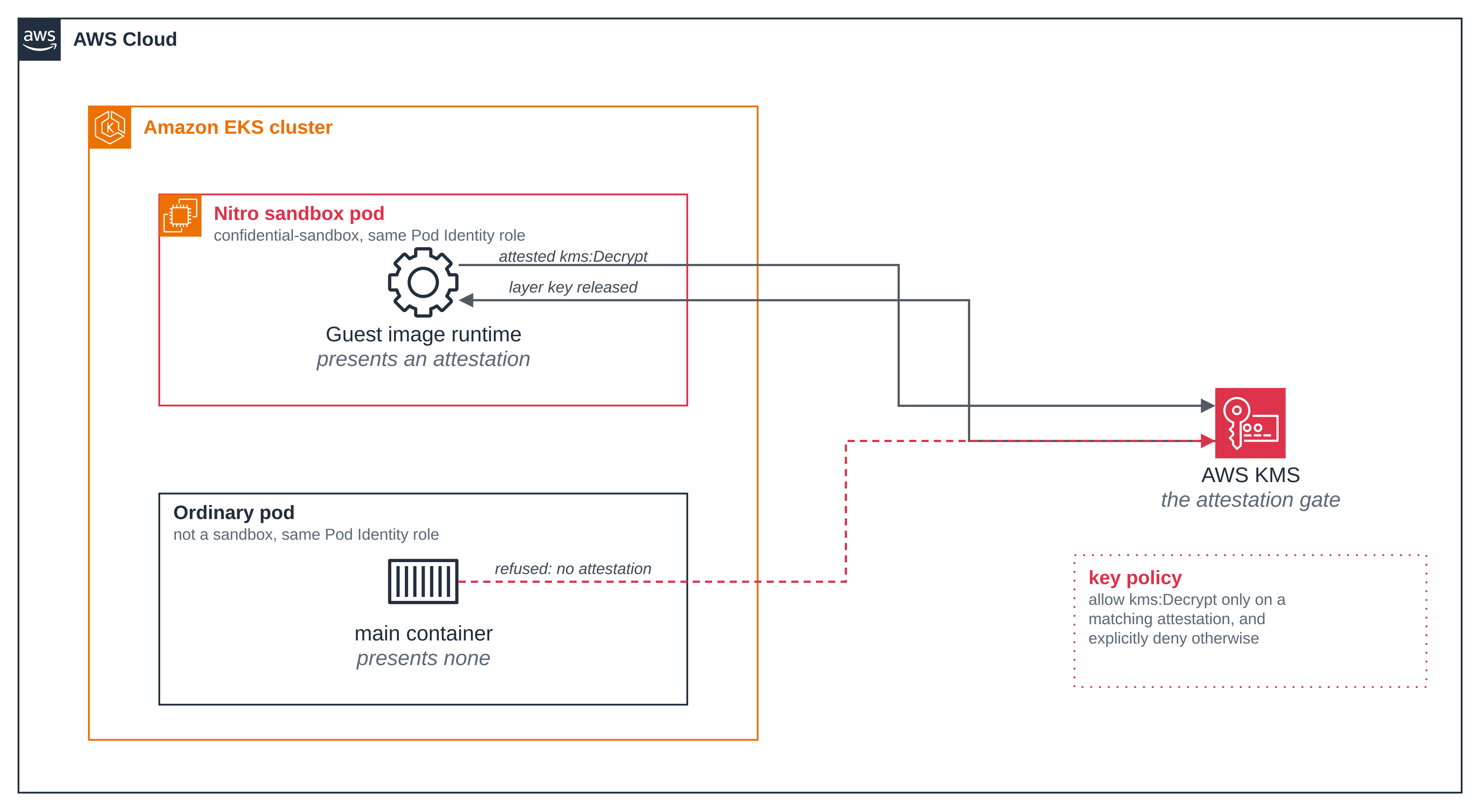
Figure 2: What AWS KMS will release the layer key to. Both pods hold the same Pod Identity role and ask for the same thing; only the one that can present an attestation the key policy accepts gets an answer. The credential is not the boundary.
Step 11: Change one pinned value and KMS refuses. This script renders the same pod with one extra environment variable, regenerates its policy, confirms the measurement really did change and that the gate is still the approved one, and starts it. It changes nothing about the key policy, so this pod cannot succeed however long it retries.
./scripts/changed-pod.sh
== 1/4 render the same pod with one pinned value changed ==
  added env DEMO_VARIANT=changed; the rest of the spec is unchanged
== 2/4 generate the policy for the changed pod ==
  approved PCR17: 39d27a343980e05d6eab151889f9cda9e1a7320b847286bc2caf30ca65b897aed1d801a12f12fa3e1a7faa44ee0f2e5b
  changed  PCR17: 72e112138a430cef12f0870dd514dee566014c47c83007d6acc6c73a247ee919f64d5fde2ca29f8bdb369e9d6baa2c91
== 3/4 confirm the gate still expects the approved measurement ==
  the gate is bound to the approved measurement, unchanged
== 4/4 start the changed pod and wait for the refusal ==
pod/encrypted-image-changed created
NAME                      READY   STATUS             RESTARTS     AGE
encrypted-image-changed   0/1     CrashLoopBackOff   1 (6s ago)   36s

failed to create containerd task: failed to create shim task: Others("Other:
prepare_image: rpc status: Status { code: UNKNOWN, message: \"prepare_image: KMS Decrypt
failed: service error: unhandled error (AccessDeniedException): Error { code:
\\\"AccessDeniedException\\\", message: \\\"User:
arn:aws:sts::<ACCOUNT_ID>:assumed-role/encrypted-image-sample-pod/<session> is not
authorized to perform: kms:Decrypt on resource:
arn:aws:kms:us-west-2:<ACCOUNT_ID>:key/1734bb73-1b98-4176-9894-4851172cf7c7 with an
explicit deny in a resource-based policy\\\" }\" }")

The changed pod was refused the layer key by KMS and cannot start.
Abridged: the generator's policy output and some of the error's inner fields are left out,
and the script replaces the account ID and the role session. STATUS depends on where in
the pod's retry cycle you catch it, so it reads CrashLoopBackOff here and
RunContainerError on another run; both are the same refusal. One added environment
variable moved the measurement completely, and the failure is at prepare_image, the
operation that decrypts the layers, with an authorization denial. The script requires that
wording:
"KMS Decrypt failed" on its own is only a wrapper that throttling, a network error or an
expired credential would also wear, and none of those would show the gate working.
Remove it when you have read it. A pod left in place keeps retrying for as long as it exists:
./scripts/changed-pod.sh --delete
Step 12: The image carries no decryption code. The workload image is the stock
public.ecr.aws/amazonlinux/amazonlinux:minimal, encrypted and nothing else. Its
configuration is plaintext in the registry, so you can read it without decrypting anything.
The config descriptor's digest comes from the manifest in step 4:
aws ecr get-download-url-for-layer --repository-name encrypted-image-sample \
  --layer-digest sha256:acbf110d8a44591c61483aabb846d7f5de398d7f01d7362166e3e1d7184bb07b \
  --query downloadUrl --output text | xargs curl -sS -o image-config.json
jq '{os, architecture, config: {User: .config.User, Entrypoint: .config.Entrypoint,
     Cmd: .config.Cmd, Env: .config.Env}, layers: (.rootfs.diff_ids | length)}' image-config.json
{
  "os": "linux",
  "architecture": "amd64",
  "config": {
    "User": null,
    "Entrypoint": null,
    "Cmd": [
      "/bin/bash"
    ],
    "Env": [
      "PATH=/usr/local/sbin:/usr/local/bin:/usr/sbin:/usr/bin:/sbin:/bin"
    ]
  },
  "layers": 1
}
One layer, no entrypoint, and a default command of /bin/bash. Nothing was added to the
base image. The base image itself ships no AWS or KMS code: searching its filesystem for
anything matching aws or kms, with timezone names excluded, finds three DNF repository
configuration files and no executable or library.
docker create --name probe public.ecr.aws/amazonlinux/amazonlinux:minimal /bin/true
docker export probe | tar -t > minimal-fs.txt
docker rm probe
grep -iE "aws|kms" minimal-fs.txt | grep -vE "/$|zoneinfo"
etc/cloud/cloud.cfg.d/10_aws_dnfvars.cfg
etc/dnf/vars/awsdomain
etc/dnf/vars/awsregion
The decryption happened before the container's first instruction, in the guest's image runtime, using the key KMS released to the attestation. The workload never sees it. The Confidential section page describes that exchange.
How the network policy works
The sandbox has a network, so its egress is restricted. This is the complete policy, as the
file ships; setup.sh fills in the two placeholders at apply time.
apiVersion: networking.k8s.aws/v1alpha1
kind: ApplicationNetworkPolicy
metadata:
  name: encrypted-image-egress
spec:
  podSelector:
    matchLabels:
      app: encrypted-image
  policyTypes:
    - Ingress
    - Egress
  egress:
    - to:
        - ipBlock: { cidr: 0.0.0.0/0 }
      ports:
        - { protocol: UDP, port: 53 }
        - { protocol: TCP, port: 53 }
    - to:
        - ipBlock: { cidr: 169.254.170.23/32 }   # EKS Pod Identity credentials
      ports:
        - { protocol: TCP, port: 80 }
    - to:
        - domainNames:
            - kms.<AWS_REGION>.amazonaws.com     # unwrap the layer key
      ports:
        - { protocol: TCP, port: 443 }
setup.sh reads <AWS_REGION> from .env; the DNS rule's 0.0.0.0/0 is a literal in
the file, so nothing is substituted for it.
| Part | What it does |
|---|---|
podSelector |
Selects only the sandboxed pod, by its app: encrypted-image label. Neither control pod carries that label: the plain pod is the comparison for the readings, and the credentials pod is meant to reach KMS the ordinary way, so that what stops it is the key policy and not the network. |
policyTypes: [Ingress, Egress] |
Denies all ingress and all egress except the rules below. Nothing in the blueprint needs to reach the pod. |
| DNS rule | Lets the pod resolve names, allowed to any IP address on port 53 rather than pinned to the cluster's CoreDNS Service address. |
| Pod Identity rule | 169.254.170.23:80 is the credential endpoint. It is served inside the guest, but the sandbox passes the requests on to the Pod Identity Agent on the node, and this policy applies to them: without the rule they time out. |
| KMS rule | The one external destination. The domainNames form resolves the name and allows the addresses behind it. |
There is no ECR rule, and none is needed. The node pulls the encrypted layer blobs and
transfers them into the sandbox; the guest never talks to the registry (Amazon EKS User
Guide, Encrypted container images). The only call the guest makes out of the pod for this
blueprint is the one kms:Decrypt.
It is enforced on the node, outside the guest. The node's network policy agent attaches
eBPF programs to the pod's host-side interface, which the guest has no access to, so nothing
inside the sandbox can change it, whatever UID it runs as. In this blueprint that UID is 65534:
the pod sets runAsUser: 65534 with runAsNonRoot: true (step 6), and the generated Cedar
policy pins context.run_as_user == 65534 (step 7), so root is refused twice over — once by
the kubelet, which will not start a container that would resolve to root, and again by the
guest agent, whose CreateContainer policy permits only that one UID. Kubernetes always
allows traffic between a pod and its own node.
Both directions, from the pod's own logs. Exec is denied, so the pod probes for itself and prints the results, which are the last two readings in step 9:
kms:     HTTP 404 (curl exit 0)
blocked: HTTP 000 (curl exit 28)
HTTP 404 from the KMS endpoint is a connection that completed: TCP and TLS both
succeeded, and KMS answered a bare GET with a 404, which is the allowed case. The blocked
probe, to example.com, resolved (DNS is allowed) and then got no connection at all before
its 15 second deadline, which is curl exit 28. A blocked host can also fail at once with
"Network is unreachable" rather than timing out, when it publishes IPv6 addresses too; both
are the same refusal.
Its limits. A domainNames rule allows the addresses the name resolves to, so any other
name served from those same addresses is reachable too. DNS stays open to CoreDNS, which is
why the blocked probe resolves before it fails to connect. And the pod can always reach its
own node.
Good to know
- The pod's network readings come 60 seconds in, not at start-up. A pod's network policy
is programmed on the node shortly after the pod starts, and a probe in its first seconds
can run before the policy is in force. The first run of this blueprint showed exactly that:
the blocked probe returned
HTTP 200from a host the policy denies. The readings are worth nothing unless they are taken once the policy is in force, so the container waits. - A pod can come up on a recycled IP with a stale datapath. On a busy cluster, a pod
created soon after a policy appears in its namespace can get a network that does not
match the policy and stay that way for as long as it lives. The credentials pod was
observed with no egress at all for its whole life, while a pod created minutes later on
the same node reached AWS KMS first time.
setup.shapplies the egress policy early, minutes before any pod, and starts the credentials pod up to three times, treating "no answer from KMS" as no evidence rather than as a denial. The "attempt 1 ... replacing it" line in its output is that retry. - The gate is the two conditions the generator emits. They are also the minimum the
Amazon EKS User Guide, Security model and parent instance trust assumptions, asks for on
a KMS key that protects confidential workload data.
PCR17binds key release to this exact policy document, and so to the image digest, the environment, the identity and the mounts it pins.PCR8:ServiceNameis the condition on the system image signing certificate, used rather than a rawPCR8value so that it stays valid when AWS rotates that certificate. A key policy can carry more registers; if you add one, give it a deny statement of its own: registers listed together in one deny are ANDed, so such a deny only fires when every one of them mismatches. The Confidential section page sets this out in full. - A new IAM role is not immediately visible to KMS.
kms:PutKeyPolicyrefuses a policy naming a role AWS has only just created, with "one or more invalid principals". It is an ordinary propagation delay;setup.shretries on that error and on no other, which is the "waiting for the new IAM role to be visible to KMS" line. - The image tag carries part of the key id. The tag is
v1-<first 8 of the key id>, so a run that creates a new key publishes a new image reference. A node that prepared an earlier run's image can otherwise offer its layer key, wrapped under that run's key, for this one, and the resulting denial looks exactly like a measurement mismatch when it is not. - A reduced generator profile on the preview guest. The shared profile pins the
container admission fields and denies exec and stdin, but omits the two the current
preview guest's policy schema does not define: the OCI hardening attributes are not
pinned, and the policy does not assert the encrypted ephemeral layer. The runtime class
still gives the pod an encrypted overlay, as the
dm-devices in step 9 show; the policy just does not assert it. Generate with--profile confidentialonce the guest schema defines those fields. - Operator tooling reports a synthetic image digest. For an encrypted image, the digest
in
.status.containerStatuses[].imageID, and incrictl inspecti, is derived by the runtime and will not match whataws ecr describe-imagesorskopeo inspectreturn, because the layers are unpacked inside the sandbox rather than on the node (Amazon EKS User Guide, Encrypted container images). Compare digests against the registry, not againstkubectl. - The workload is outside the confidentiality boundary. Confidential mode keeps the node from reading the layers. It does nothing about what the container does with them once it is running. See the Confidential section page.
- The shared profile permits instance metadata, and the network policy is what withholds
it.
_shared/confidential-profile.yamlsetsimds: allow, so the Cedar policy does not stand in the way of the metadata service. In confidential mode that service is a path worth thinking about, and here it is simply unreachable: the egress policy allows DNS, the Pod Identity address and the KMS endpoint, and169.254.169.254is not among them. If you reuse the profile without an egress policy like this one, the sandbox can reach instance metadata. - The build machine's own AWS credentials go into the build container.
setup.shresolves your credential chain and copies the result into the skopeo container, because the keyprovider there callskms:Encrypt. That container gets whatever your chain resolves to, which on a workstation is often more thankms:Encrypt. It runs on the default bridge network, not the host's, and the credentials file is removed with the container's work directory when the copy finishes.
Clean up
Set the variables again in a new shell if needed, then remove everything:
cd sample-eks-nitro-sandbox/examples/confidential/encrypted-image
./scripts/changed-pod.sh --delete    # if you ran step 11 and have not removed it
./scripts/clean.sh
Cleaning up in context <your-context>, Region us-west-2, namespace encrypted-image-sample.
Deleting pod encrypted-image-sample/encrypted-image-changed...
Deleting pod encrypted-image-sample/encrypted-image-credentials...
pod "encrypted-image-credentials" deleted from encrypted-image-sample namespace
Deleting pod encrypted-image-sample/encrypted-image-plain...
pod "encrypted-image-plain" deleted from encrypted-image-sample namespace
Deleting pod encrypted-image-sample/encrypted-image-demo...
pod "encrypted-image-demo" deleted from encrypted-image-sample namespace
applicationnetworkpolicy.networking.k8s.aws "encrypted-image-egress" deleted from encrypted-image-sample namespace
serviceaccount "encrypted-image-pod" deleted from encrypted-image-sample namespace
Deleting namespace encrypted-image-sample (carries app.kubernetes.io/managed-by=encrypted-image)...
namespace "encrypted-image-sample" deleted
Deleting Pod Identity association a-wvityzeszzb7kf12b...
Deleting IAM role encrypted-image-sample-pod...
Deleting ECR repository encrypted-image-sample and the encrypted image in it...
Deleting the alias alias/encrypted-image-sample...
Scheduling the KMS key 1734bb73-1b98-4176-9894-4851172cf7c7 for deletion in 7 days (the shortest AWS allows)...
arn:aws:kms:us-west-2:<ACCOUNT_ID>:key/1734bb73-1b98-4176-9894-4851172cf7c7 2026-11-01T14:59:23.663000+00:00
Deleting the run files under .../tmp/encrypted-image...

Clean up complete. The KMS key is scheduled, not yet destroyed; AWS removes it after its waiting period.
Network policy enforcement stays on for the cluster: it is shared, and other workloads may rely on it.
The first changed-pod line has no "deleted" line under it because that pod was already
gone. The account ID is replaced with <ACCOUNT_ID> and the local path is shortened.
clean.sh removes all four AWS resources, each only after reading that resource's own tags
and finding ManagedBy=encrypted-image on it; a resource without the tag is left alone and
the clean up reports itself incomplete. It deletes objects inside the namespace only after
confirming the namespace carries this blueprint's label, and each pod by its exact name rather
than by a label selector. A lookup that cannot run counts as a failure, never as "already
gone", and the script exits non-zero if anything was left behind.
It opens by naming the context, the Region and the namespace it is about to act on, and it
stops if AWS_REGION is not set rather than letting the AWS CLI pick one up from your
ambient configuration. The reason is the first line of this section: an ecr or kms
lookup in the wrong Region comes back with that service's own not-found exception, which
would otherwise be reported as "already gone" while the resource is still there in the
Region the run used. The run files under the repository's tmp/ are removed only when
there is nothing to come back for: a clean up that left something behind, or one run with
--keep-aws-resources, keeps them, because they hold the resource ids. Note that
--keep-aws-resources still deletes the namespace and the service account, so it is
setup.sh that makes the kept key and repository usable again, not changed-pod.sh.
Two things it does not do. The KMS key is scheduled, not destroyed: AWS enforces a waiting period of at least 7 days and there is no way to remove a key sooner. And it leaves network policy enforcement on, because that is a cluster-wide setting other workloads may depend on; remove it yourself if nothing else needs it.
To keep the AWS resources for another run:
./scripts/clean.sh --keep-aws-resources
To remove the cluster, follow the hello sandbox clean up.