EBS volumes for sandboxed pods
Before you start, review the prerequisites and shared setup on the home page, and run the hello sandbox blueprint first so you have an EKS Auto Mode cluster with the runtime classes. The commands below use files from this repository, so clone it if you have not already, and run them from this blueprint's folder:
git clone https://github.com/aws-samples/sample-eks-nitro-sandbox.git
cd sample-eks-nitro-sandbox/examples/storage/ebs
This blueprint needs the AWS CLI, which the home page already lists, for one step that reads the provisioned volume back from EC2. What it costs beyond the cluster is the EBS volumes it provisions: one for the single pod and one per StatefulSet replica, each billed while it exists. The clean up deletes them.
A sandboxed pod is an ordinary pod in most ways, and storage is one of them: it mounts
volumes through the same CSI drivers. This blueprint gives an isolated-sandbox pod a
dynamically provisioned Amazon EBS volume, and a StatefulSet whose replicas each get their
own volume that outlives the pod. The volume is provisioned by the EKS Auto Mode EBS CSI
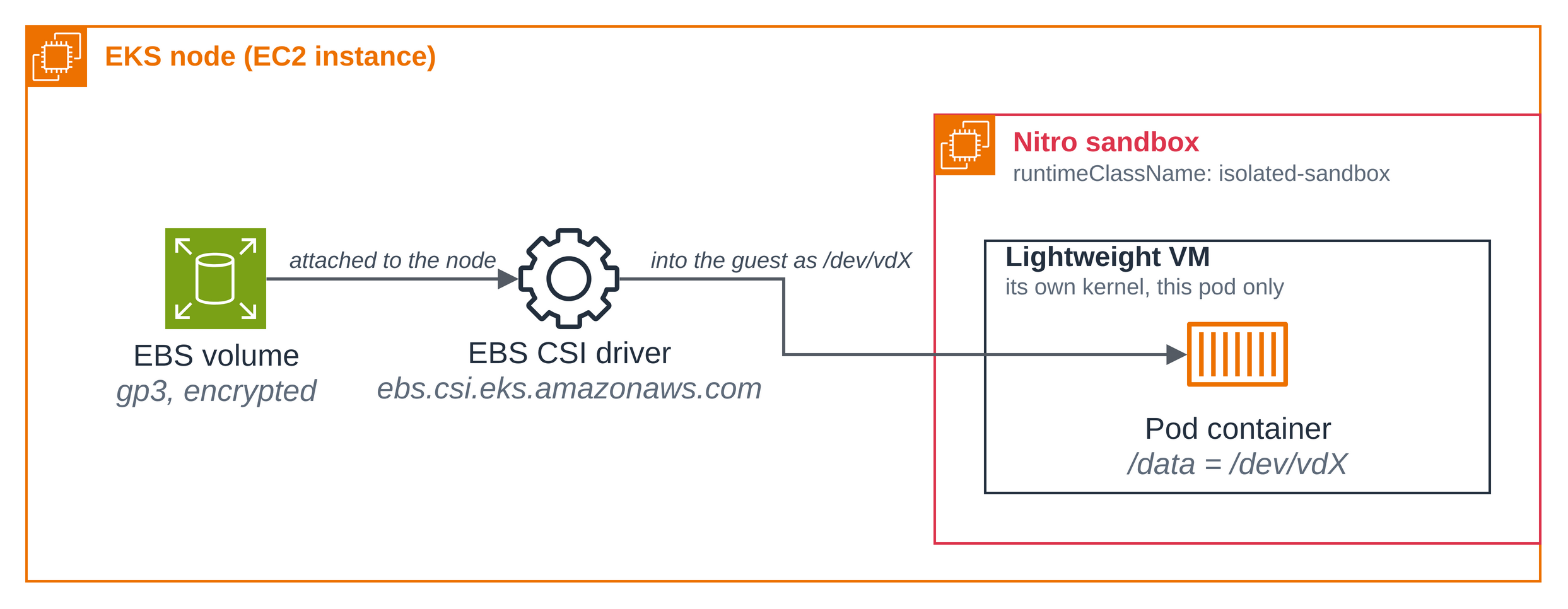
driver, attached to the node, and passed into the guest, where the pod sees it as a virtio
block device. The pod spec is an ordinary one with the runtime class added.
- The CSI driver stays an ordinary part of the cluster. It runs on the node, attaches the EBS volume to the node, and passes the block device into the guest. Nothing about the sandbox changes how a volume is provisioned.
setup.shchooses the StorageClass. It uses the cluster's default class when that class fits (Auto Mode provisioner, gp3, encrypted), and otherwise creates the blueprint's own non-default class. It never changes a StorageClass, so it never alters what other workloads on the cluster provisions through.- Inside the guest the volume is a virtio device. The pod sees
/dataon a/dev/vd*device, where an ordinary pod on the same node sees annvmedevice for the same kind of volume. - The pod needs no network for its storage. The EBS data path does not use the pod
network, so the pod boots with
sandbox.amazonaws.com/network-isolated: "true": only loopback, no route out, and it still mounts and writes its volume. - Single-writer by design. The claim is
ReadWriteOncePod, so a second pod claiming the same volume staysPending. For data shared by several pods at once, use the EFS or S3 Files blueprint in this section.
Figure 1: How an EBS volume reaches a sandboxed pod. The EKS Auto Mode EBS CSI driver on
the node attaches the volume and passes the block device into the guest, where the pod
mounts it at /data as a virtio device.
This folder was built against these releases:
| Component | Version |
|---|---|
EKS Auto Mode EBS CSI driver (ebs.csi.eks.amazonaws.com) |
built into EKS Auto Mode; not separately installed |
busybox image (public.ecr.aws/docker/library/busybox) |
1.37 |
The files:
| File | What it is |
|---|---|
deploy/storage-class.yaml |
The blueprint's own gp3, encrypted, non-default nitro-sandbox-ebs class, used only when the cluster's default does not fit. |
deploy/pod-ebs.yaml |
One isolated-sandbox pod on a ReadWriteOncePod claim, non-root with fsGroup, network-isolated. |
deploy/pod-ebs-second.yaml |
A second pod that claims the same volume, to show it stays Pending. |
deploy/pod-ordinary.yaml |
An ordinary (non-sandboxed) pod with its own EBS volume, for the virtio-vs-nvme comparison in Step 2. |
deploy/statefulset-ebs.yaml |
A StatefulSet whose replicas each get their own volume via volumeClaimTemplates, with a headless Service. |
scripts/setup.sh |
Chooses the StorageClass, then applies the PVC and pod and waits for the volume to attach. |
scripts/clean.sh |
Deletes the pods, the StatefulSet and the Service, every PVC this blueprint creates and its EBS volume, and the blueprint's own StorageClass if setup created it. |
The walkthrough uses the shared Region default from the home page, and a namespace of its own so the blueprint's objects are easy to find and remove on a shared cluster. Set them in your shell:
export AWS_REGION=us-west-2
export NAMESPACE=nitro-ebs-sample
setup.sh creates the namespace if it is absent and labels it as this blueprint's, so the
clean up only ever touches objects this blueprint created.
Step 1: Create the pod and its claim. scripts/setup.sh chooses a
StorageClass, creates the namespace if it is absent, and applies
deploy/pod-ebs.yaml: a ReadWriteOncePod claim bound through the
class it chose, and an isolated-sandbox pod that mounts it at /data. The pod runs as a
non-root user with fsGroup set, and boots network-isolated.
spec:
  runtimeClassName: isolated-sandbox   # the one-line opt-in; the RuntimeClass carries the scheduling constraints
  automountServiceAccountToken: false
  securityContext:
    runAsNonRoot: true
    runAsUser: 1000
    runAsGroup: 1000
    fsGroup: 2000
    seccompProfile:
      type: RuntimeDefault
spec:
  accessModes:
    - ReadWriteOncePod
  storageClassName: <STORAGE_CLASS>   # setup.sh renders this with the class it chose
  resources:
    requests:
      storage: 10Gi
./scripts/setup.sh
Step 1/3: choose the StorageClass
  the cluster has no default StorageClass; using the sample's own 'nitro-sandbox-ebs'.
storageclass.storage.k8s.io/nitro-sandbox-ebs created
  created the sample's own non-default StorageClass 'nitro-sandbox-ebs'.
Step 2/3: create the namespace (only if absent) and apply the PVC and pod
namespace/nitro-ebs-sample created
namespace/nitro-ebs-sample labeled
  created namespace 'nitro-ebs-sample' and labelled it 'app.kubernetes.io/part-of=nitro-sandbox-ebs'.
persistentvolumeclaim/ebs-sandbox-data created
pod/ebs-sandbox created
Step 3/3: wait for the volume to attach and the guest to boot
pod/ebs-sandbox condition met

ebs-sandbox is Ready with its EBS volume mounted at /data, bound through 'nitro-sandbox-ebs'.
(This run created the sample's own StorageClass 'nitro-sandbox-ebs'; the clean up deletes it.)
NAME               STATUS   VOLUME                                     CAPACITY   ACCESS MODES   STORAGECLASS        VOLUMEATTRIBUTESCLASS   AGE
ebs-sandbox-data   Bound    pvc-5e8fb5a2-2975-492f-80e2-b1ad154b3229   10Gi       RWOP           nitro-sandbox-ebs   <unset>                 109s

Assert it with:  NAMESPACE=nitro-ebs-sample ./scripts/test.sh
Tear down:       NAMESPACE=nitro-ebs-sample ./scripts/clean.sh
This cluster had no default StorageClass, so setup created the blueprint's own non-default
class nitro-sandbox-ebs, and the claim is bound through it. volumeBindingMode:
WaitForFirstConsumer means the volume is not created until the pod is scheduled, so the
claim is Bound once the pod is Ready.
How setup chooses the StorageClass below shows both
branches: using a cluster default that fits, and creating the blueprint's own class.
Step 2: Prove the pod ran in a sandbox. The pod's own view is the evidence: its kernel
is the guest's, its uptime matches the pod's age because the VM booted with the pod, and its
disks are virtio where an ordinary pod sees nvme.
kubectl exec ebs-sandbox -n "$NAMESPACE" -- uname -rv
kubectl exec ebs-sandbox -n "$NAMESPACE" -- cat /proc/uptime
kubectl exec ebs-sandbox -n "$NAMESPACE" -- sh -c 'ls /sys/block'
kubectl exec ebs-sandbox -n "$NAMESPACE" -- df -hT /data
6.18.51 #1 SMP PREEMPT_DYNAMIC Thu Oct 1 23:28:07 UTC 2026
23.78 17.79
dm-0
vda
vdb
vdc
vdd
Filesystem Type Size Used Available Use% Mounted on
/dev/vdd ext4 9.7G 28.0K 9.7G 0% /data
The kernel is the guest's own build, the uptime (23.78 seconds) matches the pod's age
because the VM booted with the pod, the disks are virtio (vda, vdb, ...), and /data is
on /dev/vdd. Apply deploy/pod-ordinary.yaml, an ordinary
pod that mounts the same kind of EBS volume, and it shows an nvme device instead. The page
renders <STORAGE_CLASS> with the class this run used:
sed "s|storageClassName: <STORAGE_CLASS>|storageClassName: nitro-sandbox-ebs|" deploy/pod-ordinary.yaml | kubectl apply -n "$NAMESPACE" -f -
kubectl wait --for=condition=Ready pod/ordinary-pod -n "$NAMESPACE" --timeout=5m
kubectl exec ordinary-pod -n "$NAMESPACE" -- sh -c 'ls /sys/block'
kubectl exec ordinary-pod -n "$NAMESPACE" -- df -hT /data
dm-0
nvme0n1
nvme1n1
nvme2n1
zram0
Filesystem Type Size Used Available Use% Mounted on
/dev/nvme2n1 ext4 9.7G 24.0K 9.7G 0% /data
This block is from an earlier run of the same, unchanged ordinary pod: on this run its
ls /sys/block hit a transient exec error, and its df line (/dev/nvme2n1) matches.
The same kind of EBS volume is presented to an ordinary pod as an nvme device; the
sandboxed pod sees its own volume passed into the guest as a virtio /dev/vd* device.
Remove the comparison pod and its claim when you are done with it, since clean.sh does not
own it:
kubectl delete pod ordinary-pod -n "$NAMESPACE"
kubectl delete pvc ordinary-ebs-data -n "$NAMESPACE"
Step 3: A non-root process writes the volume. The container runs as uid 1000 with
fsGroup: 2000. Kubernetes applies the fsGroup as the group owner of the mounted volume
and makes it group-writable, so the unprivileged process writes /data without root.
kubectl exec ebs-sandbox -n "$NAMESPACE" -- id
kubectl exec ebs-sandbox -n "$NAMESPACE" -- ls -ld /data
kubectl exec ebs-sandbox -n "$NAMESPACE" -- sh -c 'echo hello > /data/from-non-root && cat /data/from-non-root'
uid=1000 gid=1000 groups=1000,2000
drwxrwsr-x 3 root 2000 4096 Oct 23 02:27 /data
hello
The mount is group-owned by gid 2000, the fsGroup, and group-writable (drwxrwsr-x), so
the uid-1000 process writes it without root.
Step 4: The pod has no network, and still writes its volume. The pod booted with
sandbox.amazonaws.com/network-isolated: "true", so only loopback has an address and there
is no route out. The EBS data path does not use the pod network, so the volume still mounts
and writes.
kubectl exec ebs-sandbox -n "$NAMESPACE" -- ip -o addr show
kubectl exec ebs-sandbox -n "$NAMESPACE" -- ip route show default
1: lo inet 127.0.0.1/8 scope host lo\ valid_lft forever preferred_lft forever
1: lo inet6 ::1/128 scope host noprefixroute \ valid_lft forever preferred_lft forever
Only lo has an address and ip route show default prints nothing, yet Step 3 wrote to
/data: the storage path and the network are independent.
Step 5: Data survives the pod. Delete the pod and let setup.sh recreate it. The claim
stays Bound with no pod, the replacement binds the same PersistentVolume, and what the
previous pod wrote is still there.
kubectl exec ebs-sandbox -n "$NAMESPACE" -- sh -c 'echo "marker $(date -u)" >> /data/boot-log.txt'
kubectl delete pod ebs-sandbox -n "$NAMESPACE"
kubectl get pvc ebs-sandbox-data -n "$NAMESPACE"
./scripts/setup.sh
kubectl exec ebs-sandbox -n "$NAMESPACE" -- cat /data/boot-log.txt
pod "ebs-sandbox" deleted from nitro-ebs-sample namespace
NAME STATUS VOLUME CAPACITY ACCESS MODES STORAGECLASS VOLUMEATTRIBUTESCLASS AGE
ebs-sandbox-data Bound pvc-5e8fb5a2-2975-492f-80e2-b1ad154b3229 10Gi RWOP nitro-sandbox-ebs <unset> 4m46s
...
booted 2026-10-23T02:27:33Z as uid 1000
marker Fri Oct 23 02:29:58 UTC 2026
booted 2026-10-23T02:30:51Z as uid 1000
The PVC stayed Bound while no pod existed, the replacement bound the same
PersistentVolume, and /data still holds the lines the earlier guest wrote, including the
marker: the data outlived the guest that wrote it. (The setup.sh output between the two is
omitted here, at the ... line; on this second run it reuses the class and the namespace.)
Step 6: One pod at a time. The claim is ReadWriteOncePod, so while ebs-sandbox holds
it a second pod claiming the same volume stays Pending. Apply
deploy/pod-ebs-second.yaml, which claims ebs-sandbox-data.
kubectl apply -f deploy/pod-ebs-second.yaml -n "$NAMESPACE"
kubectl get pod ebs-sandbox-second -n "$NAMESPACE"
kubectl get pod ebs-sandbox-second -n "$NAMESPACE" \
-o jsonpath='{.status.conditions[?(@.type=="PodScheduled")].message}{"\n"}'
kubectl delete pod ebs-sandbox-second -n "$NAMESPACE"
pod/ebs-sandbox-second created
NAME READY STATUS RESTARTS AGE
ebs-sandbox-second 0/1 Pending 0 26s
0/3 nodes are available: 1 Insufficient cpu, 1 node(s) had untolerated taint(s), 1 node(s) unavailable due to PersistentVolumeClaim with ReadWriteOncePod access mode already in-use by another pod. no new claims to deallocate, preemption: 0/3 nodes are available: 1 Preemption is not helpful for scheduling, 2 No preemption victims found for incoming pod.
pod "ebs-sandbox-second" deleted from nitro-ebs-sample namespace
The second pod stays Pending, and the scheduler names the reason (unavailable due to
PersistentVolumeClaim with ReadWriteOncePod access mode already in-use by another pod):
ReadWriteOncePod restricts the volume to one pod
cluster-wide, which is the constraint a single-attach block device needs. ReadWriteOnce
would restrict it only to one node, letting two pods on that node both claim it, so this
blueprint uses ReadWriteOncePod for every claim.
Step 7: Read the volume back from EC2. encrypted: "true" in the StorageClass is a
request. Read the answer back off the EC2 volume so the gp3-and-encrypted claim is checked
against AWS, not against the class that asked for it.
VOL=$(kubectl get pv "$(kubectl get pvc ebs-sandbox-data -n "$NAMESPACE" -o jsonpath='{.spec.volumeName}')" \
-o jsonpath='{.spec.csi.volumeHandle}')
aws ec2 describe-volumes --volume-ids "$VOL" --region "$AWS_REGION" \
--query 'Volumes[0].{VolumeType:VolumeType,Encrypted:Encrypted}' --output table
-----------------------------
| DescribeVolumes |
+------------+--------------+
| Encrypted | VolumeType |
+------------+--------------+
| True | gp3 |
+------------+--------------+
AWS reports the volume as gp3 and Encrypted: True: the StorageClass request reached the
volume.
Step 8: Per-replica volumes with a StatefulSet. A bare pod is not recreated when its
node is removed, so anything expected to survive node churn uses a controller.
deploy/statefulset-ebs.yaml runs two isolated-sandbox
replicas, each with its own volume through volumeClaimTemplates, which is what EBS under a
sandbox requires: a block device attaches to exactly one guest, so replicas cannot share one
claim. Each claim names the same class the run used (render <STORAGE_CLASS> with it).
volumeClaimTemplates:
- metadata:
name: data
labels:
app: ebs-sandbox-set
spec:
accessModes:
- ReadWriteOncePod
storageClassName: <STORAGE_CLASS>
resources:
requests:
storage: 10Gi
sed "s|storageClassName: <STORAGE_CLASS>|storageClassName: nitro-sandbox-ebs|" deploy/statefulset-ebs.yaml | kubectl apply -n "$NAMESPACE" -f -
kubectl rollout status statefulset/ebs-sandbox-set -n "$NAMESPACE" --timeout=10m
kubectl logs ebs-sandbox-set-0 -n "$NAMESPACE"
kubectl delete pod ebs-sandbox-set-0 -n "$NAMESPACE"
kubectl rollout status statefulset/ebs-sandbox-set -n "$NAMESPACE" --timeout=10m
kubectl logs ebs-sandbox-set-0 -n "$NAMESPACE"
service/ebs-sandbox-set created
statefulset.apps/ebs-sandbox-set created
Waiting for 2 pods to be ready...
Waiting for 1 pods to be ready...
Waiting for 1 pods to be ready...
partitioned roll out complete: 2 new pods have been updated...
--- /data/boot-log.txt ---
booted 2026-10-23T02:33:42Z as ebs-sandbox-set-0
--- device backing /data ---
Filesystem Type Size Used Available Use% Mounted on
/dev/vdd ext4 9.7G 28.0K 9.7G 0% /data
pod "ebs-sandbox-set-0" deleted from nitro-ebs-sample namespace
Waiting for 1 pods to be ready...
partitioned roll out complete: 2 new pods have been updated...
--- /data/boot-log.txt ---
booted 2026-10-23T02:33:42Z as ebs-sandbox-set-0
booted 2026-10-23T02:34:59Z as ebs-sandbox-set-0
--- device backing /data ---
Filesystem Type Size Used Available Use% Mounted on
/dev/vdd ext4 9.7G 28.0K 9.7G 0% /data
Each replica has its own claim, data-ebs-sandbox-set-0 and data-ebs-sandbox-set-1.
Deleting ebs-sandbox-set-0 brings it back on the same volume, and its boot log gains a
second line: the per-replica data outlived the pod too.
How setup chooses the StorageClass
EKS Auto Mode ships no StorageClass, so one has to exist for a claim to bind. A StorageClass is a cluster-wide object: changing it changes how every other claim on the cluster is provisioned. So this blueprint chooses a class and never changes one.
setup.sh chooses in this order, and renders every claim with the class it chose:
- The cluster's default class, when it fits. "Fits" means
provisioner: ebs.csi.eks.amazonaws.com,type: gp3(or unset, which is gp3), andencrypted: "true". If exactly one default class fits, setup uses it and creates nothing. The run shown above had no default class, so setup took the next branch. - Otherwise, the blueprint's own class.
deploy/storage-class.yamlis a non-default class namednitro-sandbox-ebs, following the Amazon EKS User Guide, Create a storage class:allowedTopologieslimited to Auto Mode nodes,WaitForFirstConsumer, gp3 and encrypted, no default-class annotation, and the blueprint's mark as a label. setup creates it withkubectl createonly when it is absent. If a class with that name already exists, setup reuses it only when it carries the blueprint's mark and uses the Auto Mode provisioner, and stops otherwise. The clean up deletes it when it carries the mark. STORAGE_CLASSnames a class explicitly and overrides the choice. Setup checks that class's provisioner. SettingSTORAGE_CLASS=nitro-sandbox-ebsruns the blueprint's own class branch above.
apiVersion: storage.k8s.io/v1
kind: StorageClass
metadata:
name: nitro-sandbox-ebs
labels:
app.kubernetes.io/part-of: nitro-sandbox-ebs
allowedTopologies:
- matchLabelExpressions:
- key: eks.amazonaws.com/compute-type
values:
- auto
provisioner: ebs.csi.eks.amazonaws.com
volumeBindingMode:
WaitForFirstConsumer
parameters:
type: gp3
encrypted:
   "true"
setup never runs kubectl apply over an existing StorageClass. On a cluster whose class was
created with kubectl apply, as the AWS guide does, applying a manifest that omits the
default-class annotation strips that annotation from the live class and changes how every
other claim on the cluster is provisioned. setup only ever kubectl creates the blueprint's
own class when it is absent.
To run the second branch yourself on a cluster whose default already fits, force the
blueprint's own class with STORAGE_CLASS. The two output blocks below are from an earlier
run, on a cluster whose default auto-ebs-sc fits:
NAMESPACE=nitro-ebs-own STORAGE_CLASS=nitro-sandbox-ebs ./scripts/setup.sh
Step 1/3: choose the StorageClass
  STORAGE_CLASS names the sample's own class 'nitro-sandbox-ebs'.
storageclass.storage.k8s.io/nitro-sandbox-ebs created
  created the sample's own non-default StorageClass 'nitro-sandbox-ebs'.
Step 2/3: create the namespace (only if absent) and apply the PVC and pod
...
ebs-sandbox is Ready with its EBS volume mounted at /data, bound through 'nitro-sandbox-ebs'.
(This run created the sample's own StorageClass 'nitro-sandbox-ebs'; the clean up deletes it.)
The created class is non-default and marked, and the cluster's default is untouched:
kubectl get storageclass
NAME                    PROVISIONER                 RECLAIMPOLICY   VOLUMEBINDINGMODE      ALLOWVOLUMEEXPANSION   AGE
auto-ebs-sc (default)   ebs.csi.eks.amazonaws.com   Delete          WaitForFirstConsumer   false                  60d
gp2                     kubernetes.io/aws-ebs       Delete          WaitForFirstConsumer   false                  77d
nitro-sandbox-ebs       ebs.csi.eks.amazonaws.com   Delete          WaitForFirstConsumer   false                  10s
auto-ebs-sc keeps its (default) marker; nitro-sandbox-ebs has none. clean.sh for
that run deletes nitro-sandbox-ebs (it carries the mark) and leaves auto-ebs-sc
untouched.
Good to know
- The blueprint never changes a cluster-wide setting. It chooses a StorageClass and, when
it creates its own, that class is non-default. Which class is the cluster default is the
operator's decision;
setup.shreads it but never sets, clears or moves it, and the clean up never touches the default. ReadWriteOncePod, notReadWriteOnce.ReadWriteOncerestricts a volume to one node, so two pods on that node could both claim it, which a single-attach block device cannot honour.ReadWriteOncePodrestricts it to one pod cluster-wide. For data several pods read and write at once, use the EFS or S3 Files blueprint in this section.- Mount a claim into exactly one container per pod. Neither access mode restricts two
containers in the same pod. Share data between containers with an
emptyDirinstead. - A volume cannot be expanded while the pod runs. The classes here set the default
allowVolumeExpansion: false. To test expansion, set it totruein the class before you provision the volumes. - Deleting a StatefulSet leaves its claims. The default
persistentVolumeClaimRetentionPolicyisRetain, so the per-replica claims, and their EBS volumes, outlive the StatefulSet until deleted. The clean up removes them. - Workloads in a sandbox get no IAM credentials from the metadata service. Use EKS Pod Identity if a workload talks to S3 or another AWS service alongside its EBS volume.
Clean up
The commands use the variables from the walkthrough. In a new shell, set them again first, with the values you used:
export AWS_REGION=us-west-2 NAMESPACE=nitro-ebs-sample
scripts/clean.sh deletes the pods, the StatefulSet and its headless
Service, and every PVC this blueprint creates, which deletes the EBS volume each one holds. It
reads each volume's ID before deleting the claim and then confirms with EC2 that the volume
is gone, and it exits non-zero if anything could not be deleted or confirmed. It deletes the
blueprint's own StorageClass only if setup created it (the class carries the mark), and never
touches the cluster default.
NAMESPACE="$NAMESPACE" ./scripts/clean.sh
Namespace 'nitro-ebs-sample' is this sample's (labelled app.kubernetes.io/part-of=nitro-sandbox-ebs).
Deleting pods...
pod "ebs-sandbox" deleted from nitro-ebs-sample namespace
Deleting the StatefulSet and its headless Service (a no-op unless applied)...
statefulset.apps "ebs-sandbox-set" deleted from nitro-ebs-sample namespace
service "ebs-sandbox-set" deleted from nitro-ebs-sample namespace
pod "ebs-sandbox-set-0" deleted from nitro-ebs-sample namespace
pod "ebs-sandbox-set-1" deleted from nitro-ebs-sample namespace
Deleting the single-pod claim (this deletes its EBS volume)...
persistentvolumeclaim "ebs-sandbox-data" deleted from nitro-ebs-sample namespace
Deleting any data-ebs-sandbox-set-* per-replica claims (one EBS volume each)...
persistentvolumeclaim "data-ebs-sandbox-set-0" deleted from nitro-ebs-sample namespace
persistentvolumeclaim "data-ebs-sandbox-set-1" deleted from nitro-ebs-sample namespace
Confirming the EBS volumes are gone (waiting up to 180s for the CSI driver to delete them)...
  ebs-sandbox-data: volume vol-0aba18066c580255b is gone.
  data-ebs-sandbox-set-0: volume vol-0be3cb42eea67cf74 is gone.
  data-ebs-sandbox-set-1: volume vol-009dff37b48c088fd is gone.
Deleting the sample's own StorageClass 'nitro-sandbox-ebs' (it carries the sample's mark and is not the cluster default)...
storageclass.storage.k8s.io "nitro-sandbox-ebs" deleted
The cluster's default StorageClass was never touched.

Clean up complete: every pod, the StatefulSet, the Service and every PVC this sample created are gone, their EBS volumes are confirmed deleted, and the sample's own StorageClass (if it created one) is removed.
This run created the blueprint's own class, so clean.sh deleted nitro-sandbox-ebs (it
carries the mark). The cluster had no default class, and clean.sh never touches one: when
setup used a cluster default that fits, this step finds no blueprint class to delete and leaves
the default as it was.
If this is the last blueprint you ran, follow the hello sandbox clean up to remove the namespace and the cluster.