AWS Nitro Sandbox on Amazon EKS
This site holds the code from the blog post Introducing Nitro Sandboxes: Hardware-Enforced Workload Isolation on Amazon EKS.
The Getting started blueprints build on each other:
- Hello sandbox: a plain pod that opts into a sandbox with one line, and a variant with no network.
- Coding agent: Claude Code in a sandbox that reads a GitHub issue, fixes it and opens a pull request.
- Warm pool: a pool of pre-booted sandboxes and a claim that adopts one in under 1 second.
The hello sandbox blueprint is all you need to see the isolation boundary. The coding agent and warm pool blueprints each start from a cluster that has finished the hello sandbox blueprint, and do not depend on each other. The coding agent blueprint needs Amazon Bedrock, a container registry and a GitHub repository; the warm pool blueprint needs the agent-sandbox controller.
The other blueprints are in the left menu, grouped by section.
How it works
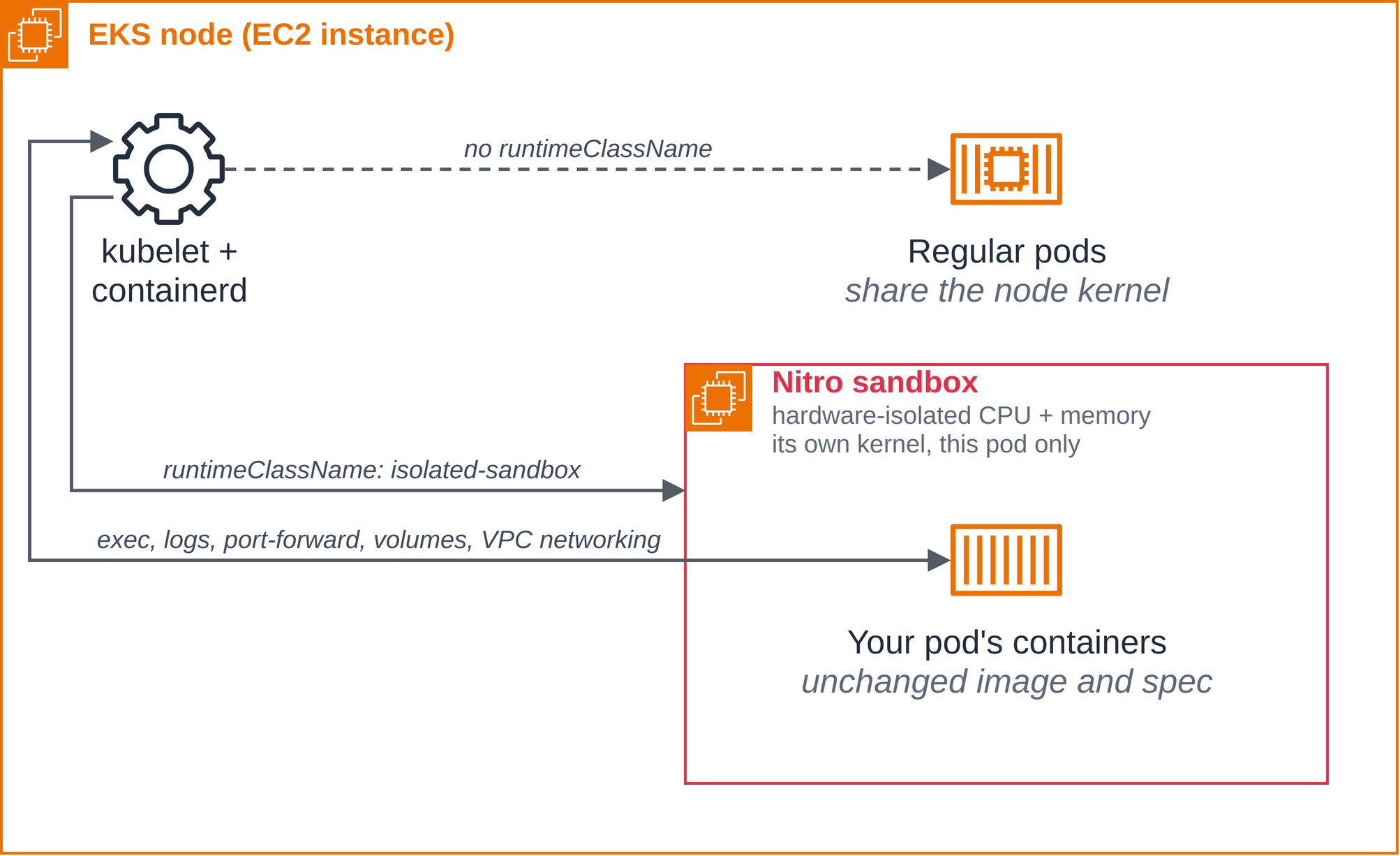
From the outside, a sandboxed pod is just a pod: the scheduler places it, it gets an IP
from your VPC, it mounts volumes through the same CSI drivers, and it answers to
kubectl
  exec
, logs and port-forward. What changes is what sits between the kubelet
and your containers. Instead of starting them on the node's kernel, containerd on the node
launches a Nitro sandbox for the pod: a dedicated hardware-isolated environment with its
own kernel, created by the Nitro hypervisor, which enforces the CPU and memory isolation
between sandboxes. The sandbox is a lightweight VM, and a first-level guest rather than
anything emulated or nested. The pod's containers run in it and share its kernel with each
other, and that kernel belongs to the pod alone.
Everything you control is a standard pod field:
- Two RuntimeClasses.
isolated-sandboxgives the pod its own VM and protects the node and the other pods from it.confidential-sandboxalso treats the node as untrusted, and needs a Cedar policy and KMS attestation conditions (see the user guide). - One annotation.
sandbox.amazonaws.com/network-isolated: "true"boots the VM with no network interface besides loopback: no other interface has an address, and there is no route out, no DNS, no instance metadata and no Pod Identity credentials.kubectl exec,cpandlogskeep working, because they use the VM's internal control channel. - A Cedar policy per pod. In isolated mode it is generated for you; in confidential mode it pins down what the pod may run and becomes part of what the sandbox attests to.
Figure 1: The isolation boundary. A sandboxed pod runs in its own Nitro sandbox, a lightweight VM with its own kernel; the node's kubelet still sees an ordinary pod.
Prerequisites
- An AWS account and the AWS CLI configured for it.
eksctlandkubectl.- Git, to clone this repository: each blueprint applies manifests and builds images from files in its folder.
- For the coding agent blueprint: Docker, Git
with
user.nameanduser.emailset, a GitHub account with the GitHub CLI (gh) signed in, and access to an Anthropic Claude model in Amazon Bedrock in your Region. The pod usesus.anthropic.claude-sonnet-5-5; changeANTHROPIC_MODELin the coding agent blueprint'sfix-issue.yamlto use another.
Clone this repository and run each blueprint's commands from that blueprint's folder; each
blueprint's page starts with the git clone and cd for its folder. They use these values;
change them if you like:
export CLUSTER_NAME=sandbox-demo
export AWS_REGION=us-west-2
export NAMESPACE=nitro-sandboxes-demo
The manifests name us-west-2 where a Region is needed. If you use another Region, change
it in the coding agent blueprint's fix-issue.yaml and egress-policy.yaml.