GitLab CI jobs, each in its own sandbox
A continuous integration system runs whatever is in the repository. On a self-hosted runner
that is your hardware, and the job that needs a Docker daemon is the hardest case: either the
daemon is privileged on the node, where a Dockerfile or a test can reach the other jobs and
the node's credentials, or it is not privileged and the build cannot be done at all.
This blueprint takes that choice away for a whole GitLab, not for one hand-written pod. A
self-hosted GitLab runs in the cluster, a GitLab Runner with the Kubernetes executor runs
beside it as an ordinary pod, and one line in the runner's config.toml puts every job pod
it creates in a Nitro sandbox. A pipeline then runs the hard case: one privileged
docker build job that starts its own Docker daemon, builds a multi-stage image and runs it.
It reads the evidence that it is in a sandbox of its own before it starts the daemon, and the
kernel the daemon is then privileged against is that sandbox's. No pipeline has to know.
Before you start, review the prerequisites and shared setup on the home page, and these blueprints, which this one builds on:
- Getting started > Hello sandbox: the one-line opt-in, and how a pod shows that it ran in a sandbox.
- CI/CD > Docker builds: that a privileged
docker buildanddocker runare contained to one sandbox. Here a real CI system schedules that build. - CI/CD > GitHub Actions runners: the same shape on the other forge, with the controller as an ordinary pod and one sandbox per queued job.
The commands below use files from this repository, so clone it if you have not already, and run them from this blueprint's folder:
git clone https://github.com/aws-samples/sample-eks-nitro-sandbox.git
cd sample-eks-nitro-sandbox/examples/ci-cd/gitlab-ci
Besides kubectl, the scripts need jq to read pod JSON,
openssl to generate GitLab's initial root password, and base64 and awk, which carry
values into GitLab and the token into the rendered config.toml without putting either on a
command line. The clean up also uses the AWS CLI, to confirm that the EBS volume behind
GitLab's data went with its claim. They run on bash, version 4 or later, for the associative
arrays scripts/run-pipeline.sh keeps the job pods in. The run on this page used kubectl
v1.35.0, jq 1.8.1, AWS CLI 2.38.0, OpenSSL 3.5.8 and bash 5.2.15.
You need no GitLab account and no GitLab.com project: the GitLab this blueprint talks to is the one it installs, and the runner's authentication token is minted from it.
Every output block on this page is from one run of this blueprint, which began with none of its
resources present on the cluster: the namespace, GitLab, the runner manager and any job pod
were all absent before it started. Local names in that output are replaced by the
placeholders the commands use, because this repository is public: <CLUSTER_NAME> for the
kube context, <NODE_NAME> for an EC2 instance id and <VOLUME_ID> for the id of the EBS
volume behind GitLab's claim. Pod names, pod UIDs, kernel builds, uptimes, device lists and
timings are as the run printed them.
There is no model or API cost. While the blueprint is up, one GitLab pod and its EBS volume run on the general-purpose pool; each pipeline run holds sandbox capacity for the length of its job, and the build pulls its base images over the cluster's existing egress.
Overview
Every job pod is a sandbox, and one line decides it.
runtime_class_name = "isolated-sandbox" in the Kubernetes executor block of the runner's
config.toml sets the RuntimeClass on every pod the runner creates for a job. A pipeline
committed before the runner was ever configured is isolated too, because the decision is the
runner's and not the pipeline's.
The runner manager stays an ordinary pod. It is the long-lived component: it holds the
runner authentication token, polls GitLab, and creates and deletes job pods through the
Kubernetes API. It runs no pipeline code, so it is not what needs isolating, and its pod spec
carries no runtimeClassName. Step 6 reads that back off the running pod.
A pod per job, created and deleted with the job. The Kubernetes executor creates a job pod
when a job starts and deletes it when the job ends, so a kubectl get pods afterwards finds
nothing and the pod has to be read while its job is in flight. This pipeline has one job, so
the run saw one pod, which Step 3 records; the page therefore shows one sandbox and does not
compare two. The pipeline declares no retry:, so that job ran once.
The privileged daemon runs against the pod's own kernel. privileged = true in the same
block is what lets the job's Docker daemon start. The daemon runs in the job's own
container, so the sandbox's single runtimeClassName covers it, and the kernel it is
privileged against is the guest's. The run shows that much directly: a container the
daemon starts reports the guest's kernel build, #1, and the guest's virtio disks. What follows
from it, that a privileged container in the guest is not a privileged container on the node,
is the runtime class's property rather than something this run measures: the Amazon EKS User
Guide, Isolated and confidential pods, describes the boundary and what it protects.
The blueprint publishes no endpoint outside the cluster. GitLab is a ClusterIP Service, and
there is no Ingress, LoadBalancer or NodePort anywhere in this folder, so nothing it creates
is reachable from outside your VPC. Inside the cluster it is an ordinary Service: the runner
and the job pods reach it, which is how they clone and report status. The operator reaches it
with kubectl port-forward.
What this blueprint does not limit. It ships no network policy, so a job pod, which has a network, reaches what any pod on the cluster reaches, including the internet. The boundary this blueprint creates is the sandbox's: the job's containers run in a lightweight VM with a kernel of their own, which is what Step 4 and Step 5 show, and what that boundary protects the node from is the runtime class's own property (Amazon EKS User Guide, Isolated and confidential pods). To restrict where a job pod can connect, see the network policy blueprint. The blueprint creates no IAM role and no EKS Pod Identity association, so a job pod has no role to assume in your account and this page claims no limit from one.
Figure 1: Only the job pods are sandboxes. GitLab and the runner manager stay ordinary pods
in gitlab-ci-demo, the manager creates one sandbox pod per CI job, and the runner
authentication token stays with the manager.
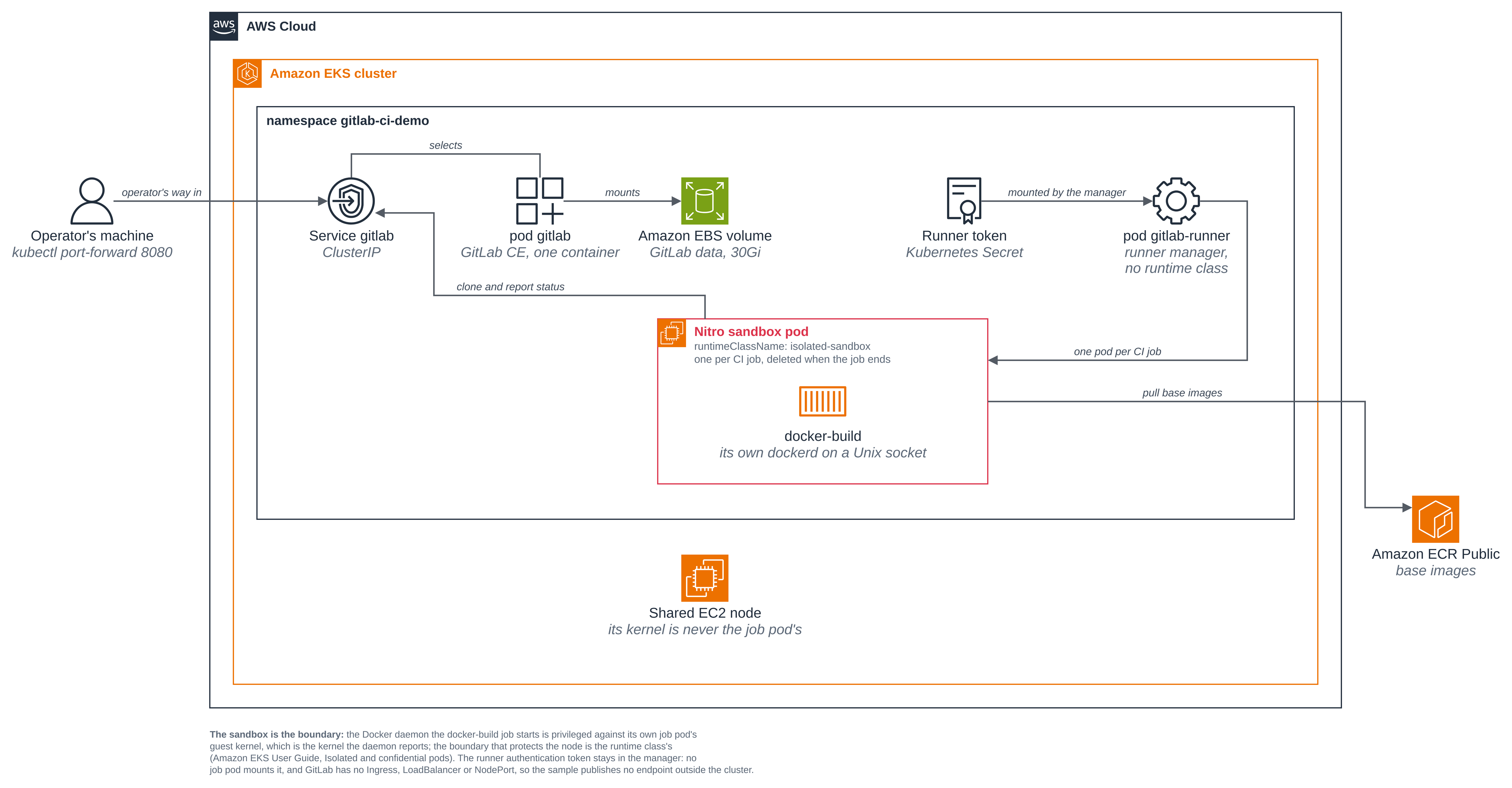
One sandbox pod is drawn because this pipeline has one job. The frame's own note is the general rule the runner follows: one pod per CI job, deleted when the job ends. A pipeline with more jobs gets another such pod for each of them, from the same one line of runner configuration and with no change to the pipeline.
Versions
This folder was built against these releases. Pin each to its latest when you build, and check the executor settings and the token workflow against the GitLab documentation for the version you pin.
| Component | Version | Why this one |
|---|---|---|
gitlab/gitlab-ce |
19.5.0-ce.0 |
The single-container image: git, Postgres, Redis, Sidekiq and the web app in one pod, so nothing needs an Ingress or a LoadBalancer to come up |
gitlab/gitlab-runner |
v19.5.0 |
The manager. This is the release the run on this page used, and the one runtime_class_name was confirmed on; v17.5.3 is the floor the spec sets, and no older release was tried here |
docker:29.9.2-dind |
29.9.2 |
The job's image, which carries both the daemon it starts and the client it uses. From Amazon ECR Public rather than Docker Hub, so a run is not subject to Docker Hub's pull limits |
alpine |
3.24.3 |
The comparison pod's image, the runner's default for a job that names none, and the nested container the build job runs at the end |
golang |
1.27.2-alpine3.24 |
The first stage of the image the build job builds |
The runner's helper image is left at the runner's own default for its version, which is the
matching gitlab-runner-helper tag. It is amd64, so node_selector keeps the job pods on
amd64 nodes.
This blueprint installs no agent-sandbox resources. The job pods are sandboxes because of one
line of runner configuration, not because of a SandboxTemplate or a warm pool.
Files
| File | What it is |
|---|---|
deploy/gitlab.yaml |
GitLab: the Deployment, its ClusterIP Service and its volume |
deploy/runner.yaml |
The runner manager: ServiceAccount, namespaced Role and RoleBinding, Deployment |
deploy/ordinary-pod.yaml |
An ordinary pod, for the comparison in Step 4 only |
runner/config.toml.template |
The runner configuration, and where this blueprint happens |
pipeline/.gitlab-ci.yml |
The pipeline: one privileged docker build job, which reads the sandbox evidence before it builds |
pipeline/ci/Dockerfile, pipeline/ci/main.go, pipeline/ci/go.mod |
The multi-stage build context the privileged job builds |
scripts/setup.sh |
The namespace and the self-hosted GitLab |
scripts/bootstrap-runner.sh |
The project, the runner authentication token, and the runner manager |
scripts/run-pipeline.sh |
Starts a pipeline, records each job pod while it exists, prints the logs |
scripts/clean.sh |
Removes everything the blueprint created, and confirms it is gone |
scripts/common.sh |
Shared by the four: .env, the pinned context, the namespace check |
.env.example |
The local values the blueprint needs; copy to .env, which git ignores |
Quick start
cp .env.example .env && $EDITOR .env    # KUBE_CONTEXT and NAMESPACE
./scripts/setup.sh                      # the namespace and GitLab (several minutes)
./scripts/bootstrap-runner.sh           # the project, the runner token, the runner manager
./scripts/run-pipeline.sh               # a pipeline, its job pods, and its logs
./scripts/clean.sh                      # when you are done
The steps below are those four, with what each one does and what it printed.
Step 1: Install the self-hosted GitLab
scripts/setup.sh creates the namespace, generates GitLab's initial root password into a
Secret, and applies the GitLab Deployment, its ClusterIP Service and a 30Gi claim for its
data. It changes nothing cluster-wide and creates no AWS resource: the only thing that
reaches your account is the EBS volume the CSI driver provisions for that claim, which
belongs to the claim.
GitLab's own container does set CPU and memory (1 CPU / 6Gi requested, 12Gi memory limit), unlike most pods on this site: it runs Puma, Sidekiq, Postgres, Redis, Gitaly and nginx together in one container, so with no request it would land on whatever node has room and be the first thing the kubelet evicts under pressure. These are this blueprint's own values, not a GitLab minimum; the GitLab documentation sizes a production install.
The namespace is created only when it is absent, and is labelled ManagedBy=gitlab-ci. A
namespace of that name that exists without the label is refused, because on a shared cluster
it is someone else's. Every later script checks that one label before it writes anything, and
the clean up checks it before it deletes anything.
This blueprint installs nothing shared, and needs no controller or operator. Unlike the
GitHub Actions blueprint, which needs one Actions Runner Controller for the whole cluster, GitLab
Runner with the Kubernetes executor is a plain Deployment with a namespaced Role: both
GitLab and the runner manager are this blueprint's own objects, in this blueprint's own namespace.
The one shared thing it relies on is the cluster's EBS CSI driver, which EKS Auto Mode
provides, and it is used exactly as it is: the script chooses a class, never creates or
changes one.
The StorageClass is chosen here and never changed. With STORAGE_CLASS unset the script
takes the cluster's default class and checks its provisioner is the EKS Auto Mode EBS CSI
driver; it never creates a class and never applies over one, because a StorageClass is
cluster-scoped and applying over the default class can take its default annotation away,
which changes how every other claim on the cluster is provisioned.
cp .env.example .env && $EDITOR .env
./scripts/setup.sh
==> 1/5 tools, context and RuntimeClass
  context '<CLUSTER_NAME>', isolated-sandbox present.

==> 2/5 the namespace
namespace/gitlab-ci-demo created
namespace/gitlab-ci-demo labeled
  created namespace 'gitlab-ci-demo' and labelled it ManagedBy=gitlab-ci.

==> 3/5 the StorageClass for GitLab's volume
  the cluster's default class is 'auto-ebs-sc'.
  provisioner ebs.csi.eks.amazonaws.com: GitLab's volume will be an EBS volume, and goes when its claim goes.

==> 4/5 GitLab's initial root password
  generated a root password into Secret 'gitlab-root'. It is not printed here.

==> 5/5 GitLab
persistentvolumeclaim/gitlab-data created
service/gitlab created
deployment.apps/gitlab created
  waiting for GitLab to become Ready. The single-container image migrates its
  database and starts its services on a first boot, which takes several minutes.
Waiting for deployment "gitlab" rollout to finish: 0 of 1 updated replicas are available...
deployment "gitlab" successfully rolled out

==> setup complete
  Namespace:    gitlab-ci-demo (labelled ManagedBy=gitlab-ci)
  GitLab:       Deployment gitlab, ClusterIP Service gitlab:8080, volume gitlab-data on auto-ebs-sc
  In-cluster:   http://gitlab.gitlab-ci-demo.svc.cluster.local:8080   (what the runner and the job pods use)

Next, create the project, mint a runner authentication token and start the runner manager:

  ./scripts/bootstrap-runner.sh
GitLab's own readiness endpoint is what the wait is on, not just a running container: the
single-container image migrates its database and starts Postgres, Redis, Gitaly, Sidekiq,
Puma and nginx on a first boot, and kubectl get pods shows Running for several minutes
before any of that is usable.
To look at it yourself, forward the Service to your own machine. The blueprint publishes nothing outside the cluster, so this is how an operator reaches it:
kubectl --context <CLUSTER_NAME> -n gitlab-ci-demo port-forward svc/gitlab 8080:8080
kubectl --context <CLUSTER_NAME> -n gitlab-ci-demo get secret gitlab-root \
  -o go-template='{{index .data "password" | base64decode}}{{"\n"}}'
Then open http://localhost:8080 and sign in as root. GitLab's external_url is set to
http://localhost:8080 so that the links on its own pages point back at your forwarded port.
The runner and the job pods do not use external_url: they are given the in-cluster Service
address instead, which is the next step.
Step 2: Create the project, mint the runner's token, and start the runner manager
scripts/bootstrap-runner.sh does four things against the GitLab from Step 1: it creates a
project, commits the pipeline to it, mints a project runner authentication token, and starts
the runner manager with that token.
Everything it asks GitLab to do, it sends to GitLab's own administration console on standard
input, so nothing it sends is ever an argument to a command. A reader who would rather click
can do all of it in the UI from Step 1: create a project, add the files from pipeline/,
then Settings > CI/CD > Runners > New project runner, and paste the glrt- token into
runner/config.toml.template yourself.
The pipeline files are committed with [ci skip] in the commit message, so that commit starts
no pipeline. Step 3 starts one, once there is a runner online to take it, which is what makes
the run on this page one you can watch from the beginning.
./scripts/bootstrap-runner.sh
==> 1/5 context and namespace
  context '<CLUSTER_NAME>', namespace 'gitlab-ci-demo' is this sample's.

==> 2/5 the project and the pipeline files
  asking GitLab to create the project and commit the pipeline. Its Rails console
  takes about half a minute to start, and this waits for it.
  project root/sandbox-ci (id 1), branch main
  committed .gitlab-ci.yml,ci/Dockerfile,ci/go.mod,ci/main.go at b1cd89e8, with [ci skip] so no pipeline starts yet.

==> 3/5 the runner authentication token
  asking GitLab for a project runner authentication token.
  runner id 1, token prefix 'glrt-' (the value is not printed).

==> 4/5 the Secret holding config.toml
  Secret 'gitlab-runner-config' holds the rendered config.toml, with the token in it.

==> 5/5 the runner manager
serviceaccount/gitlab-runner created
role.rbac.authorization.k8s.io/gitlab-runner created
rolebinding.rbac.authorization.k8s.io/gitlab-runner created
deployment.apps/gitlab-runner created
Waiting for deployment "gitlab-runner" rollout to finish: 0 of 1 updated replicas are available...
deployment "gitlab-runner" successfully rolled out
  waiting for GitLab to hear from the runner.
  the runner is online, last seen 2026-10-29 11:24:45 UTC.

==> the runner is ready
  Project:      root/sandbox-ci (id 1), branch main
  Runner:       'nitro-sandbox-runner', a project runner on that project
  Token:        in Secret 'gitlab-runner-config', prefix glrt-, never printed
  Job pods:     runtimeClassName isolated-sandbox, privileged, in namespace gitlab-ci-demo
The token is a runner authentication token: GitLab gives it the glrt- prefix, and it
replaced the registration tokens that had no prefix and are scheduled for removal. It never
appears on a command line, in the pod spec, or on this page. It leaves GitLab on standard
output, goes into a file in a private temporary directory, and reaches the Secret through
kubectl create secret --from-file. The script prints the prefix and refuses to go on if the
value it got does not start with glrt-.
create, not apply, is what writes that Secret. A client-side apply copies the whole
object, token and all, into a kubectl.kubernetes.io/last-applied-configuration annotation,
and kubectl describe secret prints annotations even though it hides data.
The two lines that are the whole blueprint
Here is the part of runner/config.toml.template that matters.
The script renders <GITLAB_URL>, <NAMESPACE> and <RUNNER_TOKEN> into it before storing
it in the Secret:
[[runners]]
  name = "nitro-sandbox-runner"
  # Where the manager talks to GitLab. The in-cluster Service address, not the external_url
  # GitLab builds its own page links from, which is the port-forward on the reader's machine.
  url = "<GITLAB_URL>"
  token = "<RUNNER_TOKEN>"
  executor = "kubernetes"
  # Where a job pod clones from. A job pod is inside the cluster, so it needs the Service
  # address too; without this it would be handed external_url and the clone would fail.
  clone_url = "<GITLAB_URL>"

  [runners.kubernetes]
    namespace = "<NAMESPACE>"

    # Every job pod this runner creates gets this RuntimeClass, so every CI job in every
    # pipeline runs in its own Nitro sandbox. No .gitlab-ci.yml changes.
    runtime_class_name = "isolated-sandbox"

    # Lets the build job start its own Docker daemon. The kernel that daemon is privileged
    # against is the guest's, which belongs to the job pod. It is set here, once, because it
    # is a runner setting and not a per-job one: there is no per-job switch, so it applies to
    # every job pod this runner creates.
    privileged = true
clone_url is there because a job pod is inside the cluster: without it the runner hands the
job GitLab's external_url, which is the port-forward on your own machine, and the clone
fails. url and clone_url both point at
http://gitlab.gitlab-ci-demo.svc.cluster.local:8080.
The sizes are in the same block, and unlike most pods on this site these job pods do set requests:
    cpu_request = "1"
    cpu_limit = "1"
    memory_request = "2Gi"
    memory_limit = "2Gi"
    # The helper, which clones the repository and uploads artifacts.
    helper_cpu_request = "250m"
    helper_cpu_limit = "500m"
    helper_memory_request = "512Mi"
    helper_memory_limit = "512Mi"
A sandbox is sized when it boots and cannot be resized in place (Amazon EKS User Guide, Isolated and confidential pods limitations, In-place resource resize), so a job pod has to ask for what the job needs up front. With no request at all the VM gets the small default size, and a job that unpacks a toolchain is killed for running out of memory with no log line to say so. These are this blueprint's values for this pipeline, not a platform minimum.
A job pod's VM is sized from the whole pod's requests, so each job pod's sandbox is the sum of
its build and helper containers, 1.25 CPU and 2.5Gi, plus the RuntimeClass's own overhead. No
job here declares a services: entry, so there are no service_* settings; a pipeline that
adds one should set them, or its service container gets the executor's defaults.
Step 3: Run the pipeline, and watch the job pods while they exist
scripts/run-pipeline.sh starts a pipeline on the project's default branch, which is what
GitLab's own Run pipeline button does, and then polls the namespace for job pods. That
polling is the only chance to see them: the runner creates a job pod when its job starts and
deletes it when the job ends, so a kubectl get pods afterwards finds nothing.
The script records each pod's name, UID, runtime class, node, containers with their
privileged flags, and what it mounts, as the pod appears. It then refuses the run on two
counts: if any job pod turned out not to carry runtimeClassName: isolated-sandbox, because
that job ran as an ordinary pod on the node, and if any job pod mounted the Secret holding
the runner authentication token, because that credential must not be inside the thing running
pipeline code.
./scripts/run-pipeline.sh
Abridged: step 1 of 5 is the context and namespace check Step 2 already showed, and the job log this output goes on to print is Step 4's and Step 5's blocks. Every line shown is as the script printed it.
==> 2/5 starting the pipeline
  pipeline 2 on b1cd89e8, with these jobs:
    1 docker-build

==> 3/5 and 4/5 the job pods, and the pipeline
  watching for job pods. Each one is created when its job starts and deleted when it
  ends, so this is the only moment they can be read.

  POD                                                UID                                    RUNTIME CLASS      PHASE
  pipeline 2: running
  runner-ysz4bpies-project-1-concurrent-0-cl7wqyi1   40642bce-0962-480e-8b5c-1ef210908868   isolated-sandbox   Pending
  pipeline 2: running

  pipeline 2 finished: success
    job 1 docker-build success

  jobs GitLab reported: 1
  job pods seen: 1
  distinct pod UIDs: 1 (one per job, so no job reused another's pod)
    runner-ysz4bpies-project-1-concurrent-0-cl7wqyi1
      uid 40642bce-0962-480e-8b5c-1ef210908868  runtime class isolated-sandbox  on <NODE_NAME>
      containers, privileged flag: init-permissions=true build=true helper=true
      volumes: repo,scripts,logs,kube-api-access-vjlrz
      volumes from a Secret: -
  no job pod mounts Secret 'gitlab-runner-config', which is where the runner authentication token is.
One pod observed for one job, with runtimeClassName: isolated-sandbox. The script compares
the pods it saw against the jobs GitLab reported and refuses a run where those disagree, which
catches a job whose pod it never saw. It cannot rule out a job that ran twice: it reads the
pods that exist, every two seconds, so a pod that came and went between two polls would be
missed. Nothing in this pipeline retries a job, and a reader who adds retry:, or a second
job, should read these counts as a floor rather than an exact census. The line about distinct
pod UIDs says nothing on its own with one pod, as here; it is the check that would catch two
jobs sharing one pod, and what this run shows is the one pod and its runtime class.
Every container of that pod carries the privileged flag, because privileged = true is a
runner setting rather than a per-job one; Step 5 says what that bounds and what it does not.
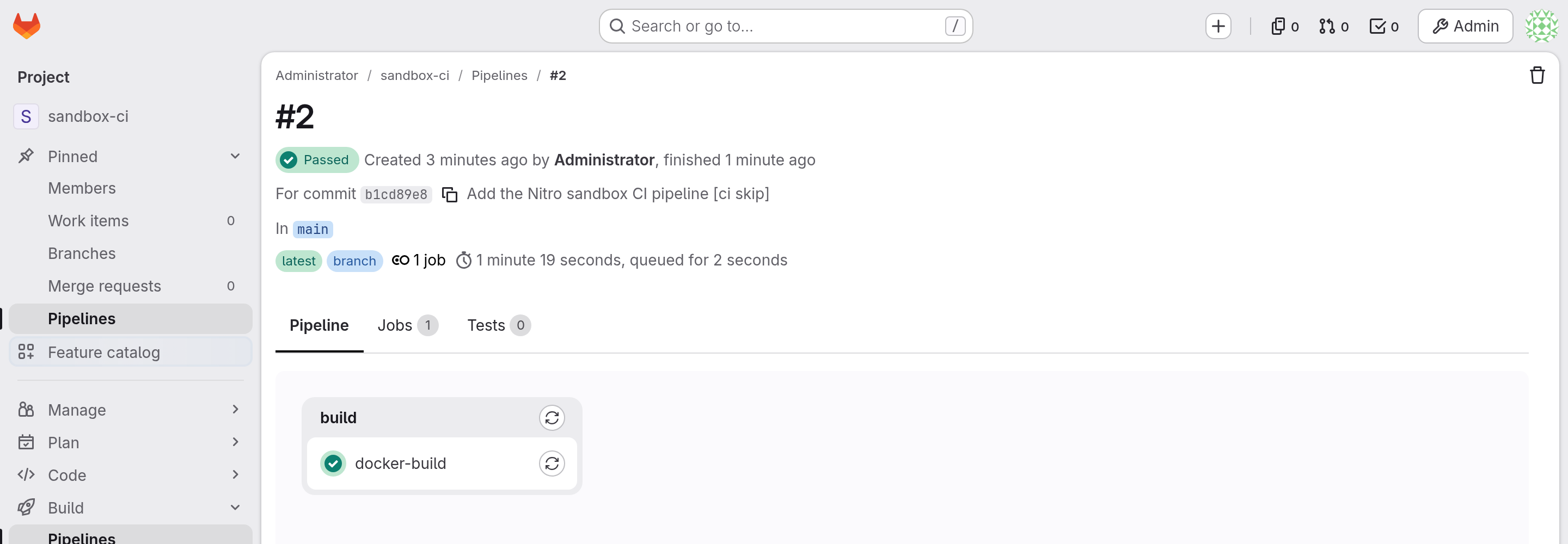
GitLab's own view of the same run is the pipeline page, which is where its Run pipeline
button leads. Forward the Service as Step 1 shows and open the project to see it. This is that
page for the run above, from the same pipeline the block records. The account it shows is
GitLab's own built-in root user, whose display name in a fresh GitLab is Administrator:
that is the account Step 1 has you sign in as and the one the scripts work as, not a user this
blueprint creates, so a reader's own screen says the same:
Figure 2: The same pipeline in GitLab's own UI, reached through kubectl port-forward. One
job, docker-build, which GitLab shows as passed. Nothing on this page mentions a sandbox or
a runtime class, because that decision is the runner's and not the pipeline's.
Step 4: What the job pod sees, next to what an ordinary pod on the same node sees
The job reads its sandbox evidence first, at the top of its own step and before it starts a
daemon or builds anything. This is that part of it, from
pipeline/.gitlab-ci.yml; it reads the things that tell a pod
running in a Nitro sandbox apart from any pod on the node:
docker-build:
  stage: build
  image: public.ecr.aws/docker/library/docker:29.9.2-dind
  variables:
    DOCKER_HOST: unix:///var/run/docker.sock
  script:
    - echo "pod $(hostname), job $CI_JOB_ID of pipeline $CI_PIPELINE_ID"
    - echo "--- its own kernel (an ordinary pod reports the node's) ---"
    - uname -rv
    - echo "--- its own boot (matches this pod's age, not the node's uptime) ---"
    - cut -d' ' -f1 /proc/uptime
    - echo "--- virtio disks (an ordinary pod sees the instance's nvme devices) ---"
    - ls /sys/block
    - echo "--- what the guest reports as its product (an ordinary pod reads the EC2 instance type) ---"
    - cat /sys/class/dmi/id/product_name
    - echo "--- the process this job script runs as ---"
    - id
    # ... the daemon, the build and the run follow, in Step 5.
This is what the job printed, abridged: the block stops where the readings do, at the line before the job starts its Docker daemon, and Step 5 picks the same log up from there. Every line shown is as the job printed it.
Executing "step_script" stage of the job script
$ echo "pod $(hostname), job $CI_JOB_ID of pipeline $CI_PIPELINE_ID"
pod runner-ysz4bpies-project-1-concurrent-0-cl7wqyi1, job 1 of pipeline 2
$ echo "--- its own kernel (an ordinary pod reports the node's) ---"
--- its own kernel (an ordinary pod reports the node's) ---
$ uname -rv
6.18.54 #1 SMP PREEMPT_DYNAMIC Thu Oct 22 17:38:11 UTC 2026
$ echo "--- its own boot (matches this pod's age, not the node's uptime) ---"
--- its own boot (matches this pod's age, not the node's uptime) ---
$ cut -d' ' -f1 /proc/uptime
18.52
$ echo "--- virtio disks (an ordinary pod sees the instance's nvme devices) ---"
--- virtio disks (an ordinary pod sees the instance's nvme devices) ---
$ ls /sys/block
dm-0
vda
vdb
vdc
vdd
$ echo "--- what the guest reports as its product (an ordinary pod reads the EC2 instance type) ---"
--- what the guest reports as its product (an ordinary pod reads the EC2 instance type) ---
$ cat /sys/class/dmi/id/product_name
m8i.enclave
$ echo "--- the process this job script runs as ---"
--- the process this job script runs as ---
$ id
uid=0(root) gid=0(root) groups=0(root),1(bin),2(daemon),3(sys),4(adm),6(disk),10(wheel),11(floppy),20(dialout),26(tape),27(video)
And this is what an ordinary pod, on the same node, printed for the same readings. The script creates it on the node the job pod ran on, reads it, and deletes it by its exact name:
==> 5/5 what an ordinary pod on the same node reports
  the job pods ran on <NODE_NAME>.

  --- its kernel (the node's, shared with every ordinary pod on it) ---
6.18.54 #2 SMP PREEMPT_DYNAMIC Thu Oct 22 00:16:59 UTC 2026
  --- its uptime (the node's, not this pod's age) ---
132.27
  --- its block devices (the instance's NVMe disks) ---
dm-0
loop0
loop1
loop2
loop3
loop4
loop5
loop6
loop7
nvme0n1
nvme1n1
zram0
  --- its product name (the EC2 instance type) ---
m8i.xlarge
The kernel version is the same on both sides, 6.18.54, so the version string is not the
evidence. What is, in this run:
- the kernel build differs. The job pod is on
#1, builtThu Oct 22 17:38:11; the ordinary pod on the same node is on#2, builtThu Oct 22 00:16:59. Two kernels, not one; - the job pod's uptime is
18.52seconds where the ordinary pod on that same node reports132.27. The guest booted seconds before the job script ran, which is what a VM that boots with its pod looks like; the block carries no pod start timestamp, so read it as consistent with the pod's age rather than measured against it. The node's own uptime is short in this run because Karpenter had just provisioned it for the job pod, which the job log in Step 5 shows it waiting for; on a node that has been up for hours the gap is hours wide, and what the two readings establish either way is that the clock the pod reports is not the node's; - the job pod's disks are
vdatovdd, virtio devices, where the ordinary pod sees the instance'snvme0n1andnvme1n1; - the product name is
m8i.enclavein the sandbox andm8i.xlargeon the node, which is the EC2 instance type.
The job also prints id, and the UID that prints is worth being exact about. It is the UID of
the job script's own process, in the build container of the job pod, which is UID 0
because this blueprint sets no securityContext and the job's image runs as root. That says
nothing about any other container of the pod, each of which has its own image and its own
USER. The job pod is scheduled on a shared EC2 node, and that root is root inside the pod's
own guest kernel.
The comparison pod is created on the node the job pod was scheduled on, and the script names that node in its output, so the two readings being compared always come from one machine. A pipeline with more jobs would get a pod each, and they need not land on one node, which is why the script picks the node from a pod it actually saw rather than from the cluster.
Step 5: The privileged docker build, contained to the job's own sandbox
The rest of the same job is the case that forces the choice this blueprint takes away. It starts a Docker daemon of its own, builds a two-stage image and runs it. Here is the part of it that matters, without the readings Step 4 shows and without the loop that waits for the daemon:
docker-build:
  # ... the readings in Step 4 come first, then:
  script:
    - dockerd --host=unix:///var/run/docker.sock >/tmp/dockerd.log 2>&1 &
    - docker build -t hello-nitro:$CI_PIPELINE_ID .
    - docker run --rm hello-nitro:$CI_PIPELINE_ID
Nothing in that job asks for a sandbox or for privilege. privileged = true in the runner's
configuration is what lets the daemon run, and the runner's runtime_class_name is what puts
the pod, daemon and all, in a sandbox.
The daemon is on a Unix socket, and that is deliberate. The usual GitLab shape for this is
a services: entry with DOCKER_HOST on TCP, as the GitLab documentation shows. With TLS off,
docker:dind listens on 0.0.0.0:2375, and a job pod has an address on your VPC, so that
would put an unauthenticated Docker daemon on the cluster network. This blueprint ships no network
policy, so nothing in it would restrict who could reach that port. A socket in the pod has no
such reach and needs no certificates. The other way round is to keep the service container and
turn TLS on (DOCKER_TLS_CERTDIR: "/certs"), which the GitLab documentation covers; the socket
is simpler and is what the Docker builds blueprint uses. The
Kubernetes executor runs its own shell as the container's command, so the docker:dind image's
entrypoint never runs and dockerd is started by the job.
privileged is a runner setting, not a per-job one. It lives in [runners.kubernetes],
and there is no per-job switch in .gitlab-ci.yml, which is why
runner/config.toml.template sets it once: one
privileged = true applies to every job pod that runner creates, whether or not a job uses
it. The pod table in Step 3 is where that shows, printing every container of the job pod with
its flag. A reader whose pipeline has jobs that need no daemon should know the setting reaches
those too: to hand privilege only to the daemon, the Kubernetes executor has
allowed_privileged_images and allowed_privileged_services, and a second runner with
privileged = false and its own tag is the other way; check both against the GitLab Runner
documentation for the version you pin. This blueprint keeps the single setting, because the
sandbox is what it is about, and each job pod's privilege is bounded by that pod's own sandbox,
which is the runtime class's property rather than something a privileged job demonstrates.
This is the job's log, abridged three ways: the readings Step 4 shows are left out; so are
BuildKit's own per-layer download and extract progress lines, its [internal]
context-transfer steps and its sub-second step completions, which is why some steps here show
no DONE line; and a waiting line the runner repeated word for word while a node was
provisioned for the job pod appears once. Every line shown is as the job printed it, in the
order it printed them.
===== job 1 docker-build (success) =====
Running with gitlab-runner 19.5.0 (70f5c12d)
  on nitro-sandbox-runner YsZ4BPIes, system ID: r_fVrvBiajmJKB
  UUID: 01a18767-9d93-78f1-aa17-ca5d64c9b96b
Preparing the "kubernetes" executor
Using Kubernetes namespace: gitlab-ci-demo
Using Kubernetes executor with image public.ecr.aws/docker/library/docker:29.9.2-dind ...
Using attach strategy to execute scripts...
Using effective pull policy of [] for container build
Using effective pull policy of [] for container helper
Using effective pull policy of [] for container init-permissions
Preparing environment
Using FF_USE_POD_ACTIVE_DEADLINE_SECONDS, the Pod activeDeadlineSeconds will be set to the job timeout: 1h0m0s...
Waiting for pod gitlab-ci-demo/runner-ysz4bpies-project-1-concurrent-0-cl7wqyi1 to be running on the node <unknown>, status is Pending
    Unschedulable: "0/3 nodes are available: 3 node(s) didn't match Pod's node affinity/selector. preemption: 0/3 nodes are available: 3 Preemption is not helpful for scheduling."
Waiting for pod gitlab-ci-demo/runner-ysz4bpies-project-1-concurrent-0-cl7wqyi1 to be running on the node <NODE_NAME>, status is Pending
    PodSandboxNotReady: "no pod sandbox exists"
    ContainersNotInitialized: "containers with incomplete status: [init-permissions]"
    ContainersNotReady: "containers with unready status: [build helper]"
Running on runner-ysz4bpies-project-1-concurrent-0-cl7wqyi1 via gitlab-runner-5b694d4d85-k6x7n...
Running on CPU: Intel(R) Xeon(R) 6975P-C (avx, avx2, avx512f)

Getting source from Git repository
Gitaly correlation ID: 01M63PHS11PEZSYXW89AZMZ2HK
Fetching changes with git depth set to 20...
Initialized empty Git repository in /builds/root/sandbox-ci/.git/
Created fresh repository.
Checking out b1cd89e8 as detached HEAD (ref is main)...

Skipping Git submodules setup

Executing "step_script" stage of the job script
$ echo "--- the daemon this job starts, on its own Unix socket ---"
--- the daemon this job starts, on its own Unix socket ---
$ dockerd --host=unix:///var/run/docker.sock >/tmp/dockerd.log 2>&1 &
$ i=0 # collapsed multi-line command
$ docker info --format 'daemon {{.ServerVersion}}, storage driver {{.Driver}}, {{.NCPU}} CPU, kernel {{.KernelVersion}}'
daemon 29.9.2, storage driver overlayfs, 2 CPU, kernel 6.18.54
$ echo "--- a multi-stage build context ---"
--- a multi-stage build context ---
$ mkdir -p build-context
$ cp ci/main.go ci/go.mod ci/Dockerfile build-context/
$ cd build-context
$ echo "--- docker build, in this pod's sandbox ---"
--- docker build, in this pod's sandbox ---
$ docker build -t hello-nitro:$CI_PIPELINE_ID .
#0 building with "default" instance using docker driver

#6 [stage-1 1/2] FROM public.ecr.aws/docker/library/alpine:3.24.3@sha256:be2656061b536c1883c4034790e21d0a09c5aaaf51968b89368a3c0371ea2c9a

#7 [build 1/4] FROM public.ecr.aws/docker/library/golang:1.27.2-alpine3.24@sha256:f92b6ef800e499660581efdabdf25d9d817a9d124eaf900924f0504e7e27e12d
#7 DONE 8.9s

#7 [build 1/4] FROM public.ecr.aws/docker/library/golang:1.27.2-alpine3.24@sha256:f92b6ef800e499660581efdabdf25d9d817a9d124eaf900924f0504e7e27e12d
#7 DONE 9.5s

#7 [build 1/4] FROM public.ecr.aws/docker/library/golang:1.27.2-alpine3.24@sha256:f92b6ef800e499660581efdabdf25d9d817a9d124eaf900924f0504e7e27e12d
#7 DONE 10.1s

#8 [build 2/4] WORKDIR /src
#8 DONE 21.2s

#9 [build 3/4] COPY go.mod main.go ./

#10 [build 4/4] RUN CGO_ENABLED=0 go build -o /hello main.go
#10 DONE 4.7s

#11 [stage-1 2/2] COPY --from=build /hello /hello

#12 exporting to image
$ echo "--- docker run, of the image this build produced ---"
--- docker run, of the image this build produced ---
$ docker run --rm hello-nitro:$CI_PIPELINE_ID
hello from a GitLab CI docker build inside a Nitro sandbox (linux/amd64, container df93b0fdc877)
$ echo "--- and what a nested container sees: the same guest kernel ---"
--- and what a nested container sees: the same guest kernel ---
$ docker run --rm public.ecr.aws/docker/library/alpine:3.24.3 sh -c 'uname -rv; ls /sys/block; id'
Unable to find image 'public.ecr.aws/docker/library/alpine:3.24.3' locally
3.24.3: Pulling from docker/library/alpine
Digest: sha256:be2656061b536c1883c4034790e21d0a09c5aaaf51968b89368a3c0371ea2c9a
Status: Downloaded newer image for public.ecr.aws/docker/library/alpine:3.24.3
6.18.54 #1 SMP PREEMPT_DYNAMIC Thu Oct 22 17:38:11 UTC 2026
dm-0
vda
vdb
vdc
vdd
uid=0(root) gid=0(root) groups=0(root),0(root),1(bin),2(daemon),3(sys),4(adm),6(disk),10(wheel),11(floppy),20(dialout),26(tape),27(video)

Cleaning up project directory and file based variables

Job succeeded
The daemon starts after the readings, which is the order the job's script: puts them in: the
evidence in Step 4 is read before anything in this block runs, so what the daemon then does is
known to be happening in that guest.
docker info reports kernel 6.18.54, which is the version, and the node runs that same
version. It is the uname -rv readings that carry the build: the build container's, in Step 4,
and the nested container's, at the bottom of this log. That last docker run is a container
started by the daemon the job began, inside the job pod's sandbox, and its uname -rv reports
6.18.54 #1 SMP PREEMPT_DYNAMIC Thu Oct 22 17:38:11 UTC 2026 with vda to vdd: the guest's build and
the guest's disks, not the node's.
Step 6: The runner manager is an ordinary pod
Only the job pods are sandboxes. The manager holds the token and talks to the Kubernetes API, so it is the component you would least want running pipeline code, and it does not:
kubectl --context <CLUSTER_NAME> -n gitlab-ci-demo get pod \
  -l app=gitlab-runner \
  -o custom-columns='POD:.metadata.name,RUNTIME CLASS:.spec.runtimeClassName,SA:.spec.serviceAccountName'
POD                              RUNTIME CLASS   SA
gitlab-runner-5b694d4d85-k6x7n   <none>          gitlab-runner
Its RBAC is a namespaced Role, not a ClusterRole: it creates job pods only in this
blueprint's own namespace, which is the namespace its config.toml names. Nothing in this
blueprint is cluster-scoped.
It also carries its own small CPU and memory requests and limits (100m/256Mi requested, 512Mi memory limit): the manager only polls GitLab and talks to the API server, while the work happens in the job pods it starts, so it is sized for that light, constant job rather than for the pipelines it runs.
Where the token is, and where it is not
The token is in one place, Secret gitlab-runner-config, mounted into the manager. A job pod
does not get it, and that is read off the job pod's own spec while its job is in flight, by
the names of what it mounts rather than by any value. A job pod is deleted when its job ends,
so there is nothing left to read afterwards: scripts/run-pipeline.sh records it during the
watch and prints it with the pod table in Step 3, and refuses the run if any job pod mounted
that Secret. These are the lines from that output:
    runner-ysz4bpies-project-1-concurrent-0-cl7wqyi1
      uid 40642bce-0962-480e-8b5c-1ef210908868  runtime class isolated-sandbox  on <NODE_NAME>
      containers, privileged flag: init-permissions=true build=true helper=true
      volumes: repo,scripts,logs,kube-api-access-vjlrz
      volumes from a Secret: -
  no job pod mounts Secret 'gitlab-runner-config', which is where the runner authentication token is.
volumes from a Secret: - is the line that matters: the job pod mounted no Secret at all.
repo, scripts and logs are the runner's own working volumes, and kube-api-access-* is
the projected ServiceAccount token every pod gets by default, which is not a Secret volume and
not this blueprint's. The privileged flag line above it is the one from Step 5: every container
of the job pod carries it, because privileged is set once for the runner and not per job.
The manager is the other side of that. Its own spec names the Secret, which is the one place the token is:
kubectl --context <CLUSTER_NAME> -n gitlab-ci-demo get pod -l app=gitlab-runner \
  -o jsonpath='{range .items[*]}{.metadata.name}{"\n  volumes: "}{.spec.volumes[*].name}{"\n  vol secrets: "}{.spec.volumes[*].secret.secretName}{"\n"}{end}'
gitlab-runner-5b694d4d85-k6x7n
  volumes: config-secret config kube-api-access-2q895
  vol secrets: gitlab-runner-config
Good to know
- A runner that does not know
runtime_class_namefails quietly, so the run checks for it.runtime_class_nameis the whole of this blueprint. A runner release that does not support the setting does not refuse the configuration: it ignores the line and runs the job as an ordinary pod on the node, which is exactly the outcome the blueprint exists to avoid. This was measured directly, by taking that line out of the runner's config, withprivilegedtaken out beside it so that no privileged container ran on the node, and running the pipeline: the job pod came up with no runtime class, as an ordinary pod on the node, and the readings at the top of its own step were the node's rather than a guest's, kernel build#2with the instance'snvme0n1andnvme1n1and the product namec6i.large, where the run above reports#1,vdatovddandm8i.enclave.scripts/run-pipeline.shrefuses such a run, naming the pod, so it is caught rather than quietly accepted. v17.5.3 is the floor the spec sets; the run on this page used v19.5.0 and no older release was tried, so treat the floor as the spec's and the pinned version as the tested one. - A job pod has a network, and nothing here restricts it. It clones from the GitLab Service, pulls base images from Amazon ECR Public and reports status back, and with no network policy it can reach anything else the cluster can reach. The sandbox boundary is the VM, not the network, and the Overview links the blueprint that shows how to limit the network.
CI_SERVER_URLinside a job is the port-forward address, not a reachable one. GitLab builds it fromexternal_url, which this blueprint sets tohttp://localhost:8080so its web UI works throughkubectl port-forward. Cloning is unaffected, becauseclone_urlin the runner's configuration overrides it, but a job that calls the GitLab API itself would need the in-cluster address instead. A reader who does not want the web UI can setexternal_urlto the Service address and dropclone_url.- A job pod's size is the sandbox's size. The VM is sized from the pod's requests, so each job pod's sandbox is the sum of its build and helper containers' requests, and a job that declared a service container would add that too. In production each sandbox reserves its full memory request up front, so plan node capacity by reservation rather than by usage: expect fewer, larger pods per node than with ordinary containers.
- A new config.toml needs a new manager pod, and the Deployment carries that for you.
The manager copies the mounted config to a writable path at start-up, because
gitlab-runnerrewrites its own config file and a Secret mount is read only. So a pod that is already running keeps the config it started with, however many times the Secret is rewritten: a re-run that minted a new token left the manager on the old one, GitLab never heard from the new runner, and the only sign was a wait that timed out.deploy/runner.yamltherefore carries the Secret'sresourceVersionas a pod-template annotation, whichscripts/bootstrap-runner.shrenders, so a changed config rolls the Deployment. AresourceVersionrather than a hash of the config, so no part of the credential goes into a pod annotation. - A reader who already runs GitLab can reuse the runner configuration, but not these
scripts. Nothing about the isolation depends on where GitLab runs:
runner/config.toml.templatewithurl,clone_urland a runner authentication token of your own, on a runner manager that can reach your instance, gives you the same sandboxed job pods. What does not transfer is the operator side.scripts/bootstrap-runner.shandscripts/run-pipeline.shdrive GitLab by running Ruby on the Rails console inside this blueprint's own GitLab pod, which is how they create the project, mint the token, start the pipeline and read the job logs. Against an instance you already run, do those four things in its web UI or through its REST API instead. Step 1 and the GitLab parts of the clean up do not apply either. - A first
FailedMounton a brand-new node is not a failure. When Karpenter has just provisioned the node GitLab lands on, the first attach can reportFailedMountand then succeed within seconds. It is worth waiting through before reading it as a problem. - GitLab's own health endpoints answer only on localhost, which breaks an
httpGetprobe./-/readiness,/-/livenessand/-/healthreturn 404 to every source address but localhost, and the kubelet probes from the node. AnhttpGetreadiness probe on/-/readinesstherefore never passes: the pod stays0/1 Runningwith no error anywhere, its Service gets no endpoint, and the runner reportsconnection refusedagainst a GitLab that is up and healthy. Measured on this cluster:/-/readinessanswered 200 on localhost and 404 from another pod at the same moment, while/exploreanswered 200 to both.deploy/gitlab.yamltherefore uses anexecprobe that curls localhost inside the container. The other way out is to add the pod's own network to GitLab's health-check address list, which needs a CIDR for your cluster; theexecprobe needs nothing cluster-specific and asks GitLab the same question. - Nginx inside the GitLab container must not be put on 8080. GitLab's Puma binds
127.0.0.1:8080itself, so nginx fails to start withAddress already in use - bind(2) for "127.0.0.1" port 8080and keeps restarting.deploy/gitlab.yamlleaves nginx on GitLab's own port 80 in the container and usesnginx['listen_port']to keepexternal_urlat the forwardedlocalhost:8080, which is what that setting is for. - A
script:line in.gitlab-ci.ymlthat holds a colon and a space is parsed as a mapping. GitLab then refuses the whole job withjobs:<name>:script config should be a string or a nested array of strings up to 10 levels deep, which does not mention YAML or point at the line. The one line inpipeline/.gitlab-ci.ymlthat needs a colon is quoted for that reason.
Clean up
./scripts/clean.sh
==> 1/6 context and namespace
  context '<CLUSTER_NAME>', namespace 'gitlab-ci-demo' is labelled ManagedBy=gitlab-ci.

==> 2/6 the EBS volume behind GitLab's claim
  claim gitlab-data is EBS volume <VOLUME_ID>, reclaim policy Delete.

==> 3/6 the runner manager
deployment.apps "gitlab-runner" deleted from gitlab-ci-demo namespace
  the runner manager is gone, so no new job pod will be created.

==> 4/6 the ordinary comparison pod

==> 5/6 the namespace
  deleting namespace 'gitlab-ci-demo'. The volume is detached as GitLab's pod goes, so
  this takes a minute or two.
namespace "gitlab-ci-demo" deleted

==> 6/6 confirming
  namespace 'gitlab-ci-demo' is gone.
  no pod labelled app=gitlab-ci-job is left anywhere on the cluster.
  waiting for EBS volume <VOLUME_ID> to go, in us-west-2.
  EBS volume <VOLUME_ID> is gone.

clean up complete. Removed: namespace gitlab-ci-demo and whatever was in it, which for a full run
of this sample is GitLab, its claim and its EBS volume, the runner manager with its
ServiceAccount, Role and RoleBinding, the root-password and runner-config Secrets, and any
job pod; plus the ordinary comparison pod, by its exact name.

Nothing is left behind: this sample installs nothing shared, changes no cluster-wide setting,
and creates no IAM role, Pod Identity association or ECR repository. To remove the sandbox
runtime class and the cluster itself, see the Hello sandbox clean up.
It deletes the runner manager first, so no new job pod is created while the rest goes, then the comparison pod by its exact name, then the namespace, which takes GitLab, its claim, the runner's RBAC and both Secrets with it. The project, its pipeline and the runner's record in GitLab go with GitLab itself: they were only ever rows in the database on that volume, so there is nothing separate to delete and nothing left in any GitLab you own.
It then confirms three things rather than assuming them: the namespace is gone, no pod
labelled app=gitlab-ci-job is left anywhere on the cluster, and the EBS volume behind
GitLab's claim was deleted. It reads that volume's id before deleting the claim, because
afterwards there is nothing left to read it from and "no claim" would look like "no volume".
A claim that exists but records no bound volume is reported as a volume it could not identify,
not as a volume that was never made: provisioning and binding are asynchronous, so a volume can
already exist before the claim names it.
Anything it could not confirm is reported and the script exits non-zero, because a lookup
that failed means "could not determine" and never "gone".
Nothing is left behind. This blueprint installs nothing shared, changes no cluster-wide setting, and creates no IAM role, Pod Identity association or ECR repository. To remove the sandbox runtime class and the cluster itself, see the Hello sandbox clean up.