Coding agents for developers
A developer opens a web app, picks a coding agent (Claude Code, Codex, Kiro CLI, OpenCode,
pi or oh-my-pi) and gets a live terminal running that agent a second or two later. Each
session runs in its own Nitro sandbox, claimed from a warm pool for that CLI, with its
workspace on Amazon S3 Files
so it survives the pod going away. A session's pod can open only its own folder, through a
short-lived credential scoped to that one folder: even as root inside the sandbox, it is
refused on any other session's folder. The web app is trusted first-party code and stays an
ordinary pod; it is reached only with kubectl port-forward.
Before you start, review the prerequisites and shared setup on the home page, and run these blueprints first, which this one builds on:
- Getting started > Coding agent: Amazon
Bedrock through EKS Pod Identity, turning on network policy enforcement, and an
ApplicationNetworkPolicywith host names. - Getting started > Warm pool: agent-sandbox,
a
SandboxWarmPool, and claims that adopt a pod that is already running. - AI agents > Claude Managed Agents:
an app outside the sandbox that claims sandboxes from a pool, and a
SandboxTemplatewithnetworkPolicyManagement: Unmanaged.
The commands below use files from this repository, so clone it if you have not already, and run them from this blueprint's folder:
git clone https://github.com/aws-samples/sample-eks-nitro-sandbox.git
cd sample-eks-nitro-sandbox/examples/ai-agents/coding-agents-for-developers
For this blueprint you also need Docker to build the
images, the AWS CLI with the aws s3files commands, and kubectl. A run costs Amazon
Bedrock usage per token for the five CLIs that use it, and S3 and S3 Files storage for the
data each session keeps; the warm pools keep one pod per CLI running by default. Kiro CLI usage counts against the developer's own Kiro
plan.
Overview
- Any coding agent, one platform. Each CLI has its own image,
SandboxTemplateandSandboxWarmPool, built on one shared base image. Adding a seventh takes one Dockerfile, one template, one pool and one line in the app's agent list. - A warm start with a folder of its own. New agent and Restore both claim a pod that is already running, then mount that session's folder into it.
- Per-session permissions. The pod's own role cannot mount any folder. For each session the app hands the pod a short-lived credential that can mount only that session's access point. Even as root inside the sandbox, the pod is refused on any other session's folder.
- Every session in its own sandbox. Two terminals open side by side are two pods, each with its own kernel build, boot and virtio disks.
- No model API key in the sandbox. The five CLIs that use Amazon Bedrock reach it through EKS Pod Identity, with a role that may only invoke models (Codex's own role may also use Bedrock's server-side web search). Kiro CLI uses the developer's own Kiro sign-in, done once in the terminal and kept in the session's folder.
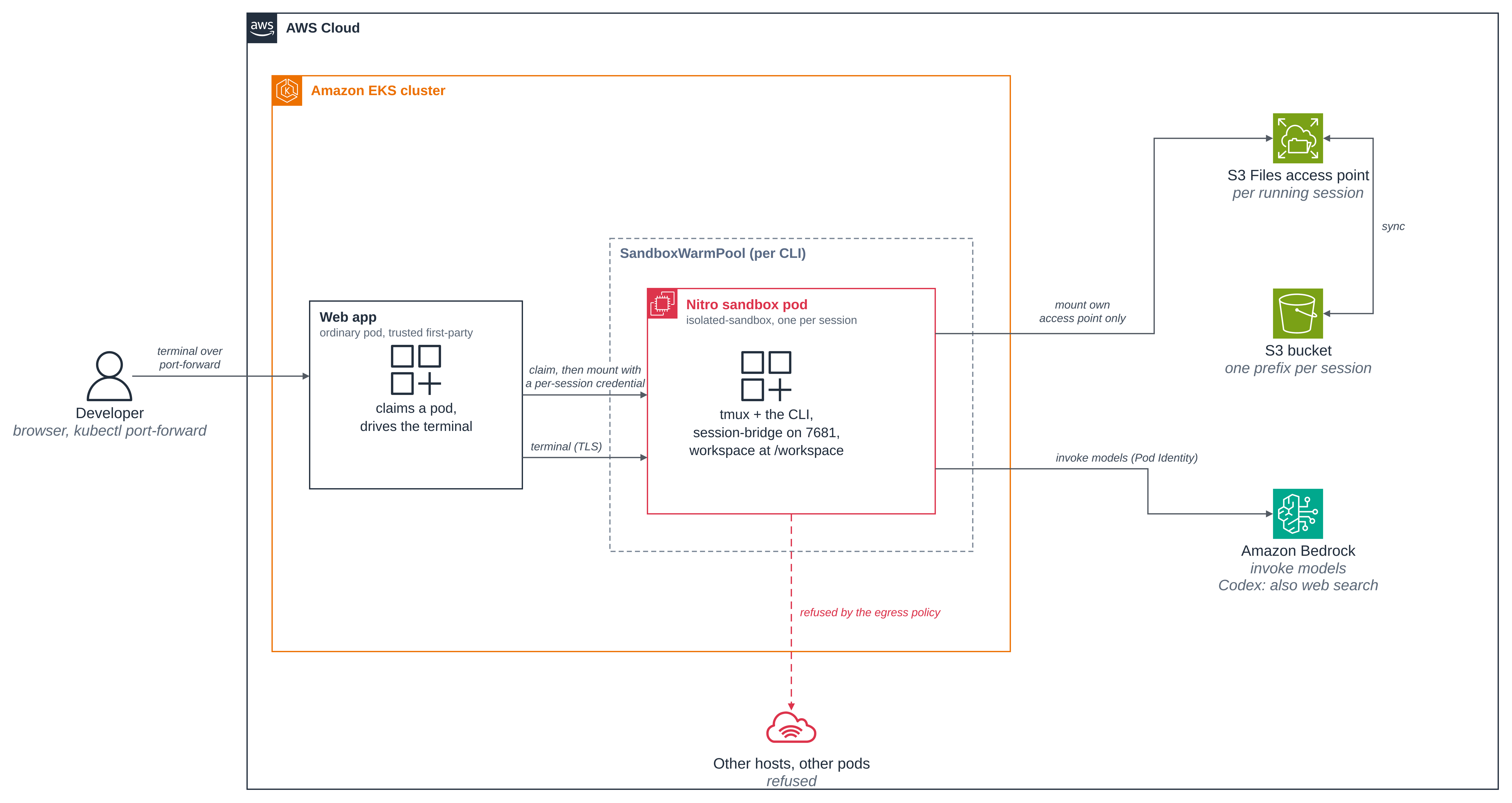
Figure 1: A developer picks a CLI in the web app; the app claims a warm Nitro sandbox pod from that CLI's pool, mounts the session's S3 Files folder into the guest with a credential scoped to that one access point, and relays a terminal to a small server in the pod over the pod network. The pod reaches Amazon Bedrock through a Pod Identity role that may only invoke models; its egress policy refuses everything else.
Versions
This folder was built against these releases. Pin each to its latest when you build, and the images record what they installed.
| Component | Version |
|---|---|
| agent-sandbox controller (kubernetes-sigs/agent-sandbox) | v1.0.10 |
| S3 Files mount helper (amazon-efs-utils) | 3.3.4 |
Claude Code (@anthropic-ai/claude-code) |
2.1.306 |
Codex CLI (@openai/codex) |
0.163.0 |
| Kiro CLI (kiro.dev) | 3.0.0 |
OpenCode (@opencode/cli) |
2.1.2 |
pi (@earendil-works/pi-coding-agent) |
1.3.0 |
oh-my-pi (@oh-my-pi/pi-coding-agent) |
18.12.5 |
xterm.js (@xterm/xterm) |
6.0.0 |
Go, to build session-bridge (golang image) |
1.27 |
GitHub CLI (cli/cli), in the session image |
2.103.3 |
Files
| File | What it is |
|---|---|
app/ |
The web app: the server (server/) and the xterm.js UI (public/), and its Dockerfile |
images/base/ |
The shared base image: the S3 Files mount helper, tmux, git, the GitHub CLI, session-entrypoint.sh, session-stop.sh, and session-bridge/, the small server that gives the app the session's terminal, with bridge-supervise.sh, which restarts it if it exits |
images/<cli>/ |
One Dockerfile per CLI, each FROM the base |
deploy/sandbox-template.yaml |
The per-CLI SandboxTemplate and SandboxWarmPool |
deploy/egress-policy.yaml |
The per-CLI egress policy |
deploy/rbac.yaml, deploy/app.yaml |
The service accounts and RBAC, and the app Deployment and Service |
deploy/app-policy.yaml |
The app's network policy: no ingress from the pod network |
iam/ |
The Bedrock, Codex, App and Mount role policies and trusts, and the per-session mount session policy |
scripts/setup.sh, scripts/clean.sh |
Create everything and apply it; remove it |
.env.example |
The local values the blueprint needs; copy to .env, which git ignores |
Quick start
With .env filled in (from .env.example) and the shared installs in place, on a clean
environment (if the blueprint is already installed from an earlier checkout, run
./scripts/clean.sh first; setup.sh stops and says so if it finds one):
cp .env.example .env     # set CLUSTER_NAME and AWS_REGION
./scripts/setup.sh
kubectl -n coding-agents-for-developers port-forward svc/agent-app 8080:8080
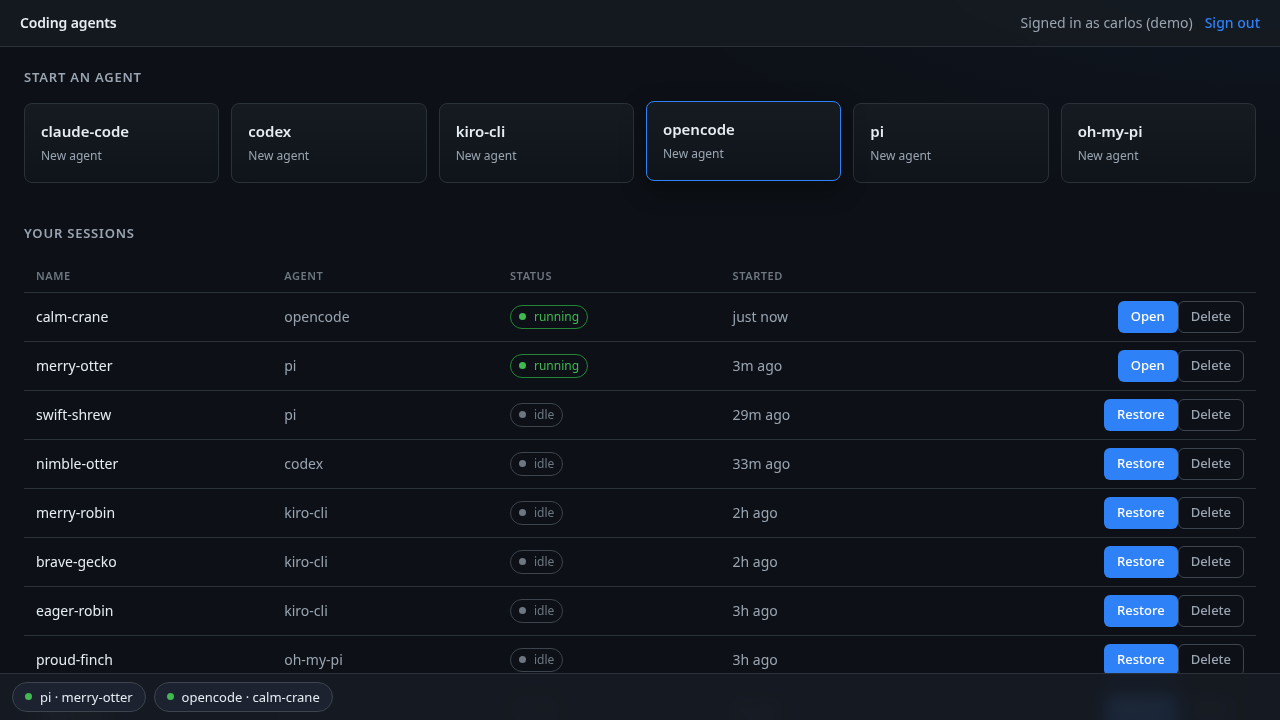
Then open http://127.0.0.1:8080. Pick a CLI under Start an agent to open a terminal;
your sessions are listed below, each with Open (while running) or Restore (once
idle) and Delete.
Step 1: The shared installs. setup.sh checks for agent-sandbox, the EFS CSI driver
(3.0.0 or newer, for S3 Files) and network policy enforcement, and stops with the command to
add any that is missing. It never installs a cluster-wide thing for you. If you have run
Getting started and the storage blueprints, they are already there.
Step 2: The AWS resources. setup.sh creates the blueprint's own S3 bucket, its S3 Files
file system and mount targets, the four IAM roles below, each with only what it needs, and
the role S3 Files itself assumes to sync the file system with the bucket. The bucket
has S3 Versioning turned on because S3 Files requires it to sync the file system with the
bucket (S3 Files prerequisites).
The sessions do not use the versions, but a deleted or overwritten file leaves one behind,
which is why Delete removes every version under the session's prefix.
| Role | Used by | May |
|---|---|---|
| Bedrock | The pods of claude-code, opencode, pi and oh-my-pi (service account agent-session), through Pod Identity |
bedrock:InvokeModel* scoped to this account's inference profiles and the Anthropic foundation models; nothing else, no S3 Files access |
| Codex | Codex's pods only (service account agent-session-codex), through Pod Identity |
bedrock-mantle:CreateInference for its model on the Bedrock "Mantle" endpoint, and the bedrock-websearch actions for its server-side web search; nothing else, no S3 Files access |
| App | The web app, through Pod Identity | Create (with tags), list and delete this file system's access points; list and delete object versions under the blueprint's prefix when a session is deleted; assume the Mount role |
| Mount | Assumed only by the app, narrowed per session | s3files:ClientMount and s3files:ClientWrite on the file system, and read objects in the bucket; each session policy narrows it to one access point |
kiro-cli's pods have no role: they run as service account agent-session-kiro, which has
no Pod Identity association, because Kiro CLI signs in with the developer's own Kiro
identity rather than AWS credentials.
Everything it creates is tagged ManagedBy=coding-agents-for-developers, so the clean up
removes only what the blueprint made.
Step 3: The images. setup.sh builds the base image, the six CLI images and the app,
and pushes them to ECR under a fixed tag, IMAGE_TAG in .env (default v1). The pods
use imagePullPolicy: IfNotPresent, so a node that already pulled a tag keeps its cached
copy: after you change an image, set a new tag (for example v2) and run setup.sh again.
Step 4: The templates, pools and app. For each CLI it applies a SandboxTemplate, a
SandboxWarmPool and an egress policy, then the app's Deployment, Service and RBAC. The
warm pods boot with no workspace; the folder is mounted after the claim (see
How a session starts).
Step 5: Open the app. kubectl port-forward to the ClusterIP Service, then the browser.
The sign-in is a drop-down of three demo developers with the password pre-filled: it is a
picker, not authentication, and the app is reachable only through your own port-forward.
==> Wait for the warm pools, then open the app
sandboxwarmpool.extensions.agents.x-k8s.io/agent-claude-code condition met
sandboxwarmpool.extensions.agents.x-k8s.io/agent-codex condition met
sandboxwarmpool.extensions.agents.x-k8s.io/agent-kiro-cli condition met
sandboxwarmpool.extensions.agents.x-k8s.io/agent-opencode condition met
sandboxwarmpool.extensions.agents.x-k8s.io/agent-pi condition met
sandboxwarmpool.extensions.agents.x-k8s.io/agent-oh-my-pi condition met
deployment "agent-app" successfully rolled out

Done. Open the app on your machine:

  kubectl --context sandbox-demo -n coding-agents-for-developers port-forward svc/agent-app 8080:8080

Then browse to http://127.0.0.1:8080
setup.sh prints your own CLUSTER_NAME where this shows sandbox-demo.
What a session looks like
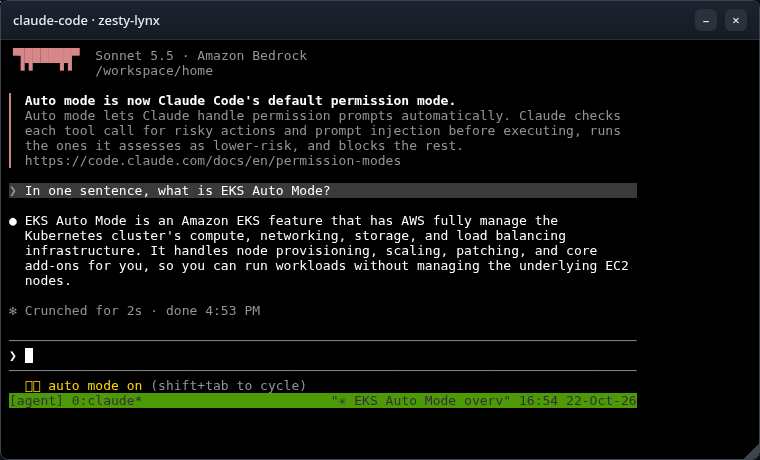
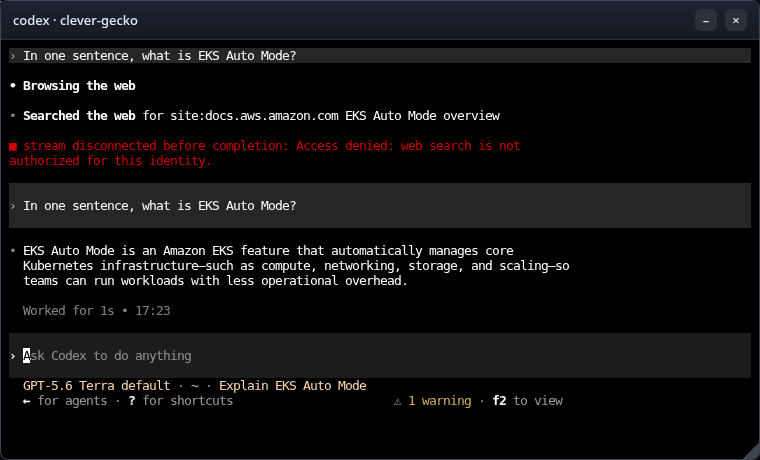
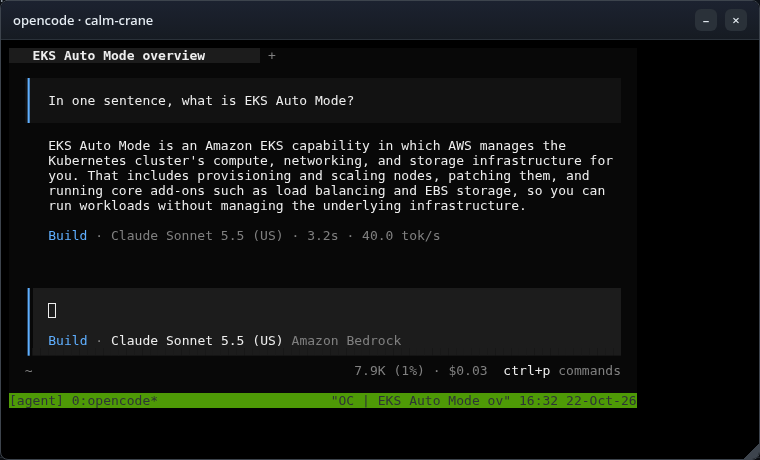
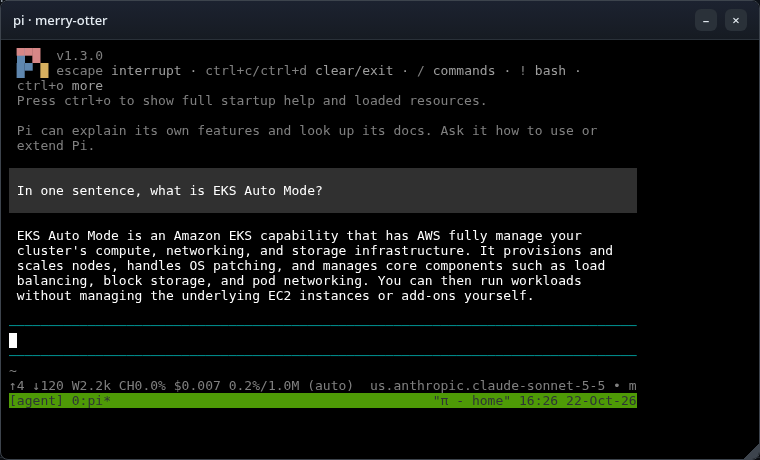
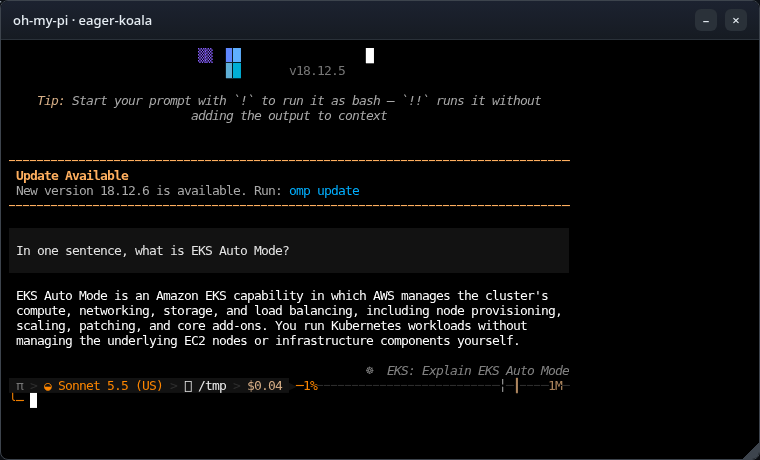
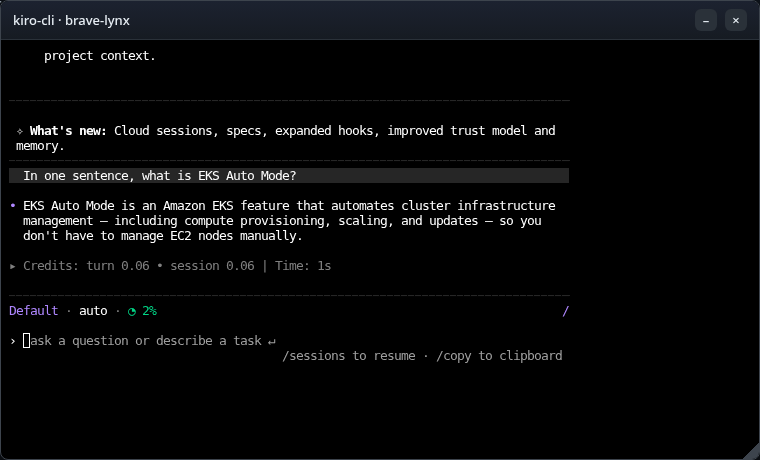
Each terminal is a floating window wired to the CLI running in its sandbox pod. These are
the six CLIs answering the same prompt, each on its own model: four on the Bedrock
inference profile in the app's agent list (Claude Sonnet here), Codex on a GPT model
served through the Bedrock "Mantle" OpenAI-compatible endpoint, and Kiro CLI through the
developer's own Kiro sign-in. These screenshots are from
earlier runs of this blueprint. On the fresh run, each of the five Bedrock CLIs answered
In one sentence what is EKS Auto Mode, typed into its terminal through the app, and Kiro
CLI stopped at its sign-in menu, since its sign-in is the developer's own rather than
Bedrock:
 Select login method
❯ Use with Builder ID
  Use with Google
  Use with GitHub
  Use with Your Organization
On an earlier run of this blueprint, a developer signed in from that menu with their own Kiro identity and asked one question. The terminal, abridged to the turn:
  In one sentence what is EKS Auto Mode
• EKS Auto Mode is an Amazon EKS feature that fully automates cluster
  infrastructure management — including compute provisioning, scaling, and
  updates — so you don't have to manage EC2 nodes manually.
▸ Credits: turn 0.06 • session 0.06 | Time: 1s
The terminal has tmux mouse mode on (set -g mouse on in the session's tmux config), so
the mouse wheel scrolls the CLI's output in the browser rather than its prompt history.
 |
 |
 |
 |
 |
 |
How a session starts
A warm pod boots before its session exists, and a SandboxClaim that adds a volume forces a
cold start, so the warm pods boot with no workspace and idle. That is why this blueprint has no
PersistentVolumeClaim: the session's folder is an S3 Files access point that the pod mounts
itself, after the claim.
Figure 2: Claims and warm pools. Each session is a SandboxClaim that adopts a pod its CLI's warm pool already has Ready, and the pool boots a replacement. The claim carries no volume, because a volume would force a cold start, so the workspace is mounted inside the pod after the claim.
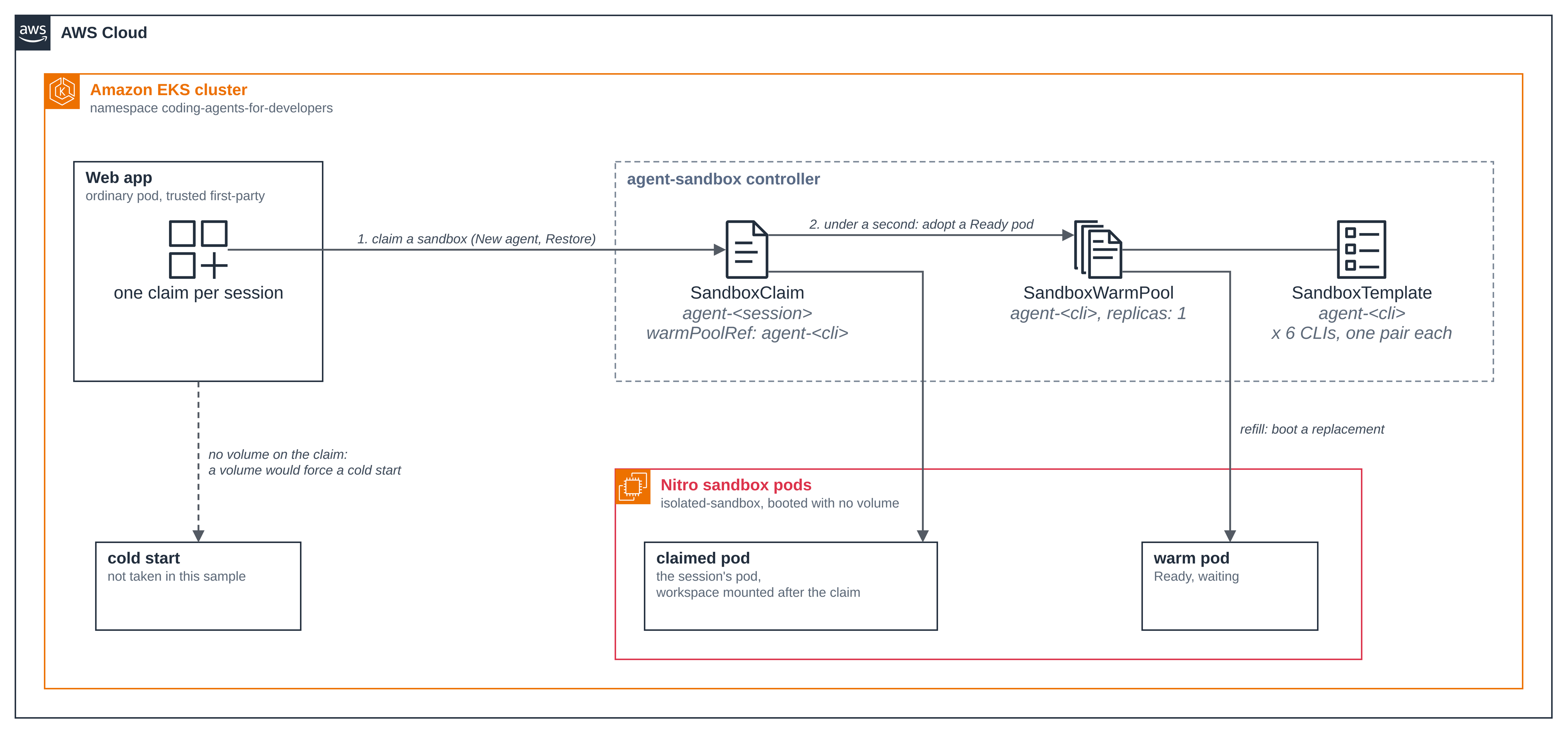
New agent and Restore both go through the same steps:
- The app claims a pod from the CLI's pool. The claim adopts a pod that is already running, so it is Ready in under a second; the pool boots a replacement.
- At the same time, the app creates an access point for this run of the session, rooted at
/<developer>/<cli>/<session>with a fixed POSIX user (uid/gid 1000) andcreationPermissionsthat make the access point create its own root directory owned by that user. The app does not pre-create the folder as a bucket object: an object written under the prefix first is imported owned by root, which the access point's user could not then write, so the CLI's home could not be created. On a Restore the folder is already there, and the new access point opens it as it is: its owner and mode stay. The two requests do not depend on each other and run side by side, so a Restore takes about as long as the slower of the two, not their sum; if the access point cannot be created, the app releases the claim and returns the error. - The app assumes the Mount role with a session policy that names only that access point,
and writes the resulting short-lived credential into the pod through the exec API's
standard input, to a memory-backed file, together with a fresh token for the pod's
session-bridge. Neither is ever on a command line or in the pod spec. - Inside the guest,
session-entrypoint.shmounts the access point at/workspacewith the S3 Files mount helper and that credential. Only this step runs as root, with theSYS_ADMINcapability the mount needs. Then tmux and the CLI start as an unprivileged user whose home is/workspace/home, so its settings, sign-in and history persist with the code. The CLI starts in/workspace/project, a folder of its own: Claude Code keeps its answer to "do you trust this folder?" per folder, but not for the home directory, so started in its home it asked again on every Restore. Before tmux and the CLI start, the entrypoint startssession-bridge, which the next section describes, and the app reads back the certificate it made (with the token, which it already has). - While the session runs, the app refreshes the credential before it expires, through
session-bridge.
How the terminal reaches the pod
Each session pod runs session-bridge, a small server built from
images/base/session-bridge/ with the Go standard
library only. The app reaches it directly on the pod network, on TCP 7681, for the three
things a session needs while it runs:
| Request | What it does |
|---|---|
GET /v1/terminal |
A WebSocket to a PTY running tmux attach as the session's user. The app relays the browser's terminal to it, keystrokes and resizes both ways. |
GET /v1/activity |
The last time the terminal had input or output, which the app reads every minute to find idle sessions. |
PUT /v1/credential |
Replaces the session's mount credential. It accepts only a well-formed credential, so a bad request leaves the running one in place. |
The app uses the Kubernetes exec API only at the edges of a session: two calls to start it
(run the entrypoint, then read back the bridge's token and certificate) and one to stop it, plus one
per running pod after an app restart (below). So the traffic between the app and a running
session's pod, however many developers have terminals open, does not go through the API
server. The browser's own connection to the app still does in this blueprint, because it
comes in through kubectl port-forward; a deployment that puts an authenticated endpoint
in front of the app takes the API server off that leg too.
- The network admits the app's pods, on one port. The pod's policy admits ingress only
from pods labelled
app: agent-app, on 7681, so another session's pod is refused at the network. The rule trusts the label, so anyone who can create a pod in this namespace with that label passes it; the token and the pinned certificate below are what stand behind it. - Only this session's token is accepted. The app makes a fresh token for each session start and hands it over on the start exec's standard input. The pod keeps it in a root-only file; the CLI runs as uid 1000 and cannot read it.
- The connection is pinned. At start the bridge makes its own TLS key and a self-signed certificate, and writes only the certificate to a root-only file. The app reads it once, over exec, and trusts that one certificate and nothing else, so code in the sandbox cannot stand in for the bridge: it has neither the key nor a way to replace the certificate. The key is never written to a file: it lives only in the bridge's memory, and every session start makes a new one.
- It starts before the CLI. The bridge holds its port before any code in the sandbox runs, and a warm pod that no session has claimed listens on nothing.
When the app restarts (a new image, a node replaced), every open browser terminal shows
[detached], because the browser's connection was to the old app pod. The CLIs keep
running in tmux in their own pods. The new app reads each running pod's token and
certificate back over exec, once, and starts serving when it has, or when the pick-up fails
(logged), or after 60 seconds, with the pick-up finishing in the background; until it
does, New agent, Restore, Close and Delete wait for it, for up to 90 seconds, then ask you
to try again. Reload the page, then
Open each session again. The app keeps each session's state, and the queue that runs
one session's actions one at a time, in memory, so it must run as one pod. The Deployment
has one replica, rolls out with the Recreate strategy (the old pod stops before the new
one starts on setup.sh or kubectl rollout restart), and the pod carries
karpenter.sh/do-not-disrupt, so EKS Auto Mode does not evict it to consolidate a node.
None of these covers a pod that is deleted or evicted another way (kubectl delete pod,
a node drain) or a node that stops answering: Kubernetes can then start a replacement while
the old pod is still shutting down, and for that time both can act on the same session.
When session-bridge exits, a small supervisor in the pod
(bridge-supervise.sh) starts it again a second later.
The new bridge has the same token and a new key and certificate, so the app's next check
fails on the certificate; after the second failed check the app reads the bridge back over
exec, once, and pins the new certificate. On the fresh run, the bridge in a codex pod was
stopped by hand (kill -TERM on its process, as root in the pod), and the pod's
/var/log/session-bridge.log showed:
bridge-supervise: session-bridge exited (143), starting it again
2026/11/07 15:41:48 session-bridge listening on :7681
and the app log, over the next two checks:
session mw6kgygj-merry-vole (pod agent-codex-hnqhk): idle check failed (1 in a row), will retry next minute: self-signed certificate
session mw6kgygj-merry-vole (pod agent-codex-hnqhk): idle check failed (2 in a row), will retry next minute: self-signed certificate
session mw6kgygj-merry-vole: session-bridge restarted in agent-codex-hnqhk; pinned its new certificate
The next check, a minute later, passed. When the pod itself is gone, or the bridge cannot be reached at all, the app cannot reach the terminal or refresh the mount credential. After five failed checks in a row it releases the session as it does an idle one: the folder stays, and Restore brings the session back on a new pod. The checks run a minute apart and each waits up to 10 seconds for an answer, so this usually takes six to eight minutes, and longer when the app has many sessions.
Upgrading from a version of this blueprint without session-bridge. Close every running
session with the old app first, set a new IMAGE_TAG in .env, and run setup.sh. Then
replace the warm pods that were already running, which still run the old image; each pool
boots new ones from the updated template. With every session closed, the only session pods
left are warm ones. <NAMESPACE> is NAMESPACE from .env
(coding-agents-for-developers unless you changed it):
kubectl --context <CLUSTER_NAME> -n <NAMESPACE> delete pod -l app=agent-session
A session left running on an old pod cannot be picked up by the new app, which has no way to reach it, and shows as idle. Its first Restore fails, after attempting a clean stop of the old pod's session and releasing the pod; the next Restore starts it on a new pod.
On a run of this blueprint, codex in the sandbox echoed a keystroke in 18.9 ms (median) from
inside its own pod, 23.9 ms from the app through session-bridge, and 25.9 ms from the app
over the exec API. The terminal is not faster for leaving the exec API: what changes is that
the API server is off the path between the app and the pod. What a developer feels is one
round trip from the browser to the cluster's Region, through kubectl port-forward.
Figure 3: How a session's folder reaches its pod. The pod boots with no folder. The web app hands it a short-lived credential that can mount only that session's S3 Files access point, so any other session's access point is refused.
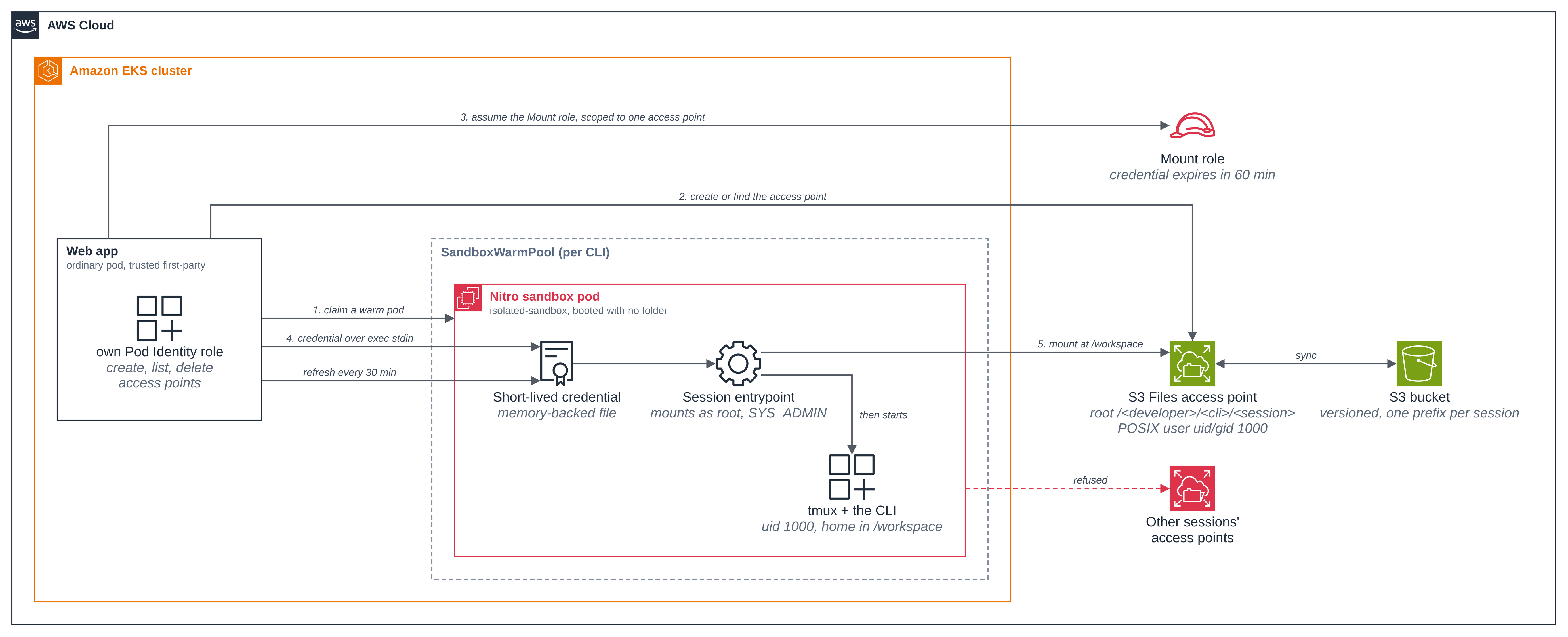
The mount needs root inside the guest, which is what the sandbox is for: the guest kernel belongs to the pod, not the node.
POST /api/new
/api/new developer=priya cli=opencode
start mw6kazzv-lively-vole: ensureAccessPoint + claimPod
start mw6kazzv-lively-vole: pod=agent-opencode-8bpgh node=i-0b7d80ef1bd724e5b ap=fsap-0d675aacc08856e59
start mw6kazzv-lively-vole: startSession azId=use1-az2
session started in agent-opencode-8bpgh
/api/new done session=mw6kazzv-lively-vole
The session lifecycle
A session pauses and resumes by releasing its claim and claiming a new one: the pod is disposable, the folder is not.
Figure 4: Pause and resume a session. Close or idle removes the claim, the pod and the access point, Restore mounts the same folder in a new pod through a new access point, and only Delete removes the folder.
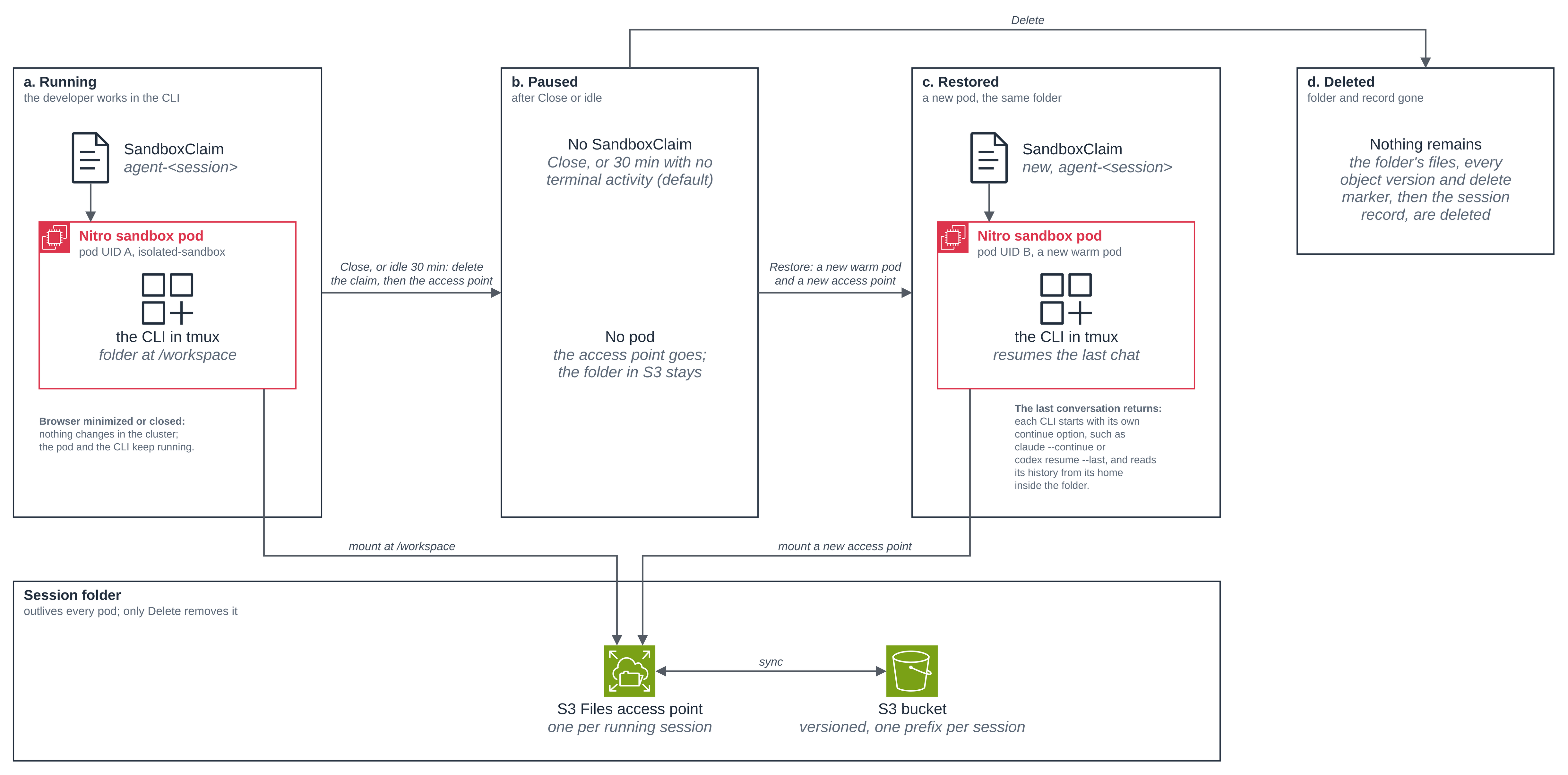
| Action | What happens |
|---|---|
| New agent | The app writes the session's record, then claims a warm pod and creates the access point at the same time, mounts the folder and starts the CLI. The pool boots a replacement. If no pod or no access point can be had, the app releases the claim and removes the record, so the list has no row for a session that never ran. |
| Minimize, or close the browser | Nothing changes in the cluster. The pod and the CLI keep running. |
| No terminal activity for the idle period (default 30 minutes) | The app reads, every minute, the last time each session's terminal had key input or printed output (tmux's session_activity and window_activity). An agent still working on its own keeps printing, so it is not idle; a CLI waiting at its prompt prints nothing. Once the period passes, it stops the session cleanly (below), deletes the SandboxClaim and then the session's access point: the pod and the access point go, the folder and its files stay. |
| Close the window | Same as idle: the session is stopped, the claim and the access point released, the folder stays, and the session moves to the session list. |
| Restore | The app claims a new warm pod (a new pod UID) and creates a new access point on the same folder, at the same time, mounts it and starts the CLI with its own continue-the-last-conversation option: claude --continue, codex resume --last, kiro-cli chat --v3 --resume, opencode --continue, pi --continue and omp --continue. The history is in the CLI's home inside the folder, so it comes back with it; a session restored before its first prompt starts the CLI fresh. |
| Delete | The session leaves the list at once: the app marks its record and finishes the Delete in the background. If the session is running, the app first empties its folder through the mount, in the pod, as it stops the session. Then it deletes every object version and delete marker under the session's prefix in the (versioned) bucket. S3 Files exports a change to the bucket only after 60 seconds with no writes to the file, so a file written just before Delete can arrive after the first pass: the app lists the prefix again every 15 seconds and deletes whatever came back, until the prefix has stayed empty for 90 seconds, a minute and a half to three minutes in all on these runs. Only then does it delete an access point, if one is left, and last the session's record. A closed session has no access point and its folder is drained the same way. Until the record is gone a Restore of the session is refused, and a Delete that fails, or that an app restart cuts short, is run again by the sweep a minute later. |
A session keeps its access point while anything may still have its folder mounted: while the app tracks it, while a start is in flight, while any claim for it exists, and, after a stop that failed, until the recorded pod is confirmed gone. A background sweep, which starts a minute after its last pass ends, deletes the access point of every recorded session that has none of those. That is how an access-point delete that failed after a Close is retried (Close itself still succeeds: the session is stopped and its folder is kept). The sweep also deletes an access point whose session has no record and no claim: a session gets its record before anything is made for it, and loses it only at the end of its Delete. A pass works through eight sessions at a time, so with a large backlog one pass can take well over a minute. Before the app deletes a recorded session's access point it writes its id into the session's record, so a Restore never reuses one that is being deleted, even across an app restart, and the app makes no second access point beside one it can list: a Restore waits for the old one to be gone (about a second on these runs) before it makes a new one on the same folder. After an app restart, a pod is picked up again only if its folder is still mounted and only one usable access point is listed for its session; otherwise the app looks again on a later pass, or releases the claim of a pod whose folder was already unmounted.
A file written just before Delete does not come back. On the fresh run, 30 files were
written into a running pi session's project/ folder (with kubectl exec) and the session
was deleted two seconds later. The app log:
session mw6k9a10-proud-wombat: stopped in agent-pi-srxqj, folder emptied
delete mw6k9a10-proud-wombat: removed 20 version(s) in round 1
Round 1 removed what had been exported before (the CLI's home and settings); the 30 new files were removed through the mount before S3 Files exported them, so they never reached the bucket. The Delete finished after 91 seconds, and the prefix had no versions and no delete markers at every check, 30 seconds apart, for the five minutes after the write. Before this change, the same check ended with the 30 files in the bucket under the deleted session's prefix about three minutes later: Delete had stopped looking after two empty lists 20 seconds apart, before S3 Files' 60-second wait had passed.
Before it releases a pod, the app runs session-stop.sh in it through the exec API: it
ends every process of the session's user, then unmounts /workspace. The CLIs keep SQLite
databases and lock files in their home on the S3 Files mount, and a lock on that mount is
a lease the server holds for the client. When a pod was deleted with the CLI still
running, nothing released those locks until the lease ran out, so a quick Restore found
the Codex conversation "open in another app" and opencode reported "database disk image
is malformed". Ending the processes first releases the locks at once. Every step of the
stop is bounded, so it ends within about 90 seconds: TERM, then KILL after 10 seconds, a
sync of at most 30 seconds, then the unmount, retried for up to 30 seconds while the mount
finishes closing files (on Delete, emptying the folder first adds at most 60 seconds). It
usually takes a second or two. If the stop fails, the app logs
it, records the pod in a ConfigMap in the namespace, and releases it anyway; until that pod
is confirmed gone, the session's next Restore does not start a new pod (it asks you to try
again) and Delete does not remove the folder.
What the app cannot read or do, it reports rather than assumes. If it cannot read a
session's activity time, it logs the failure and keeps the session; only a pod whose tmux
session is gone counts as idle since it started. If the SandboxClaim cannot be deleted,
Close and Delete return the error, the app keeps the session in its list so the next
minute's check retries the release, and Delete leaves the folder in place.
New agent is fast because the pod is already warm. On an earlier run of this blueprint, the
time from the click (POST /api/new) to a terminal with the CLI running was:
| New agent | Time |
|---|---|
| The first session on a new file system (codex, from the browser) | 17.5 s |
| Each later session, from a warm pod (kiro-cli, claude-code, opencode, oh-my-pi, pi) | 1.9 to 3.4 s |
| A second claude-code session while its pool of one was still refilling | failed after 120 s |
| Restore, from a warm pod, for each of the five Bedrock CLIs | 1.3 to 4.4 s |
On the fresh run, measured as the time the app's API call took, the first session on the new file system (claude-code) took 17.8 s, and every later New agent and Restore, each from a warm pod, took 1.9 to 2.7 s; Restore of pi took 2.5 s.
The first session is slower because it is the first mount of a new file system. The third
row is a cold start: with the warm pod already claimed, the claim makes a pod of its own,
and on that run the cluster had no free memory for it (0/4 nodes are available: 2
Insufficient memory), so it waited for EKS Auto Mode to add a node, longer than the app's
120-second limit. The app then released the claim and returned the error; the session's
folder stayed, so it was listed as idle, and its Restore took 1.4 s once the pool had a
warm pod again. Two Restores on the same run hit the same wait, and passed when retried.
So size POOL_REPLICAS to the rate at which sessions start, and expect a start that finds
both the pool and the cluster full to fail rather than wait for a node. While a start is
in flight, its tile reads Starting... and ignores further clicks, so a second click
does not claim a second pod; if the start fails, the tile shows the error at once, the app
stops and releases the pod it had claimed, and the next click tries again once that is
done.
Each session's actions run one at a time: a Restore clicked while a Close of the same session is still stopping its pod starts once the Close has finished, and a Restore clicked during a Delete is refused once the Delete has removed the folder. Different sessions do not wait for each other.
Close then Restore is the same path against the existing folder, so a restored session comes up on a new pod (a new pod UID) and the CLI continues its conversation. For pi on the fresh run (abridged to the lines that matter; the prompts were typed into its terminal through the app, and the Restore came a few minutes after the Close):
before: pod=agent-pi-jqgql uid=c17655b4-c540-4e2d-a2a0-50e1df0e74fb

 Remember the code word FINCH-9. Reply with only: noted
 noted

POST /api/close pi -> 200 1.128250 {"ok":true}

POST /api/restore pi -> 200 2.516528 {"session":"mw6k9a10-proud-wombat","display":"proud-wombat","cli":"pi"}
after: pod=agent-pi-srxqj uid=11471f5f-464a-4fbe-8351-e79afe2f2954

 What code word did I ask you to remember? Reply with only the word.
 FINCH-9
The middle numbers are the HTTP status and the seconds the call took: the Restore claimed
a warm pod and returned in 2.5 seconds, and the conversation came back intact on the new
pod. On an earlier run of this blueprint, the same check passed for claude-code (OTTER-4),
opencode (HERON-6), codex (LYNX-8) and oh-my-pi (PANDA-3), each on a new pod UID. On
the fresh run, opencode passed the same check (HERON-6) on a new pod UID as well.
Close works on any running session, including one the app did not start itself. On start,
the app lists the blueprint's SandboxClaims and picks up each session that still has a pod
and an access point, so a session keeps its idle check and credential refresh across an
app restart. On the fresh run, the app was restarted
(kubectl rollout restart deploy/agent-app) with six sessions running, one per CLI, and
the new pod's log showed:
session mw6kgygj-merry-vole: picked up after an app restart (pod agent-codex-hnqhk)
session mw6kazzv-lively-vole: picked up after an app restart (pod agent-opencode-fg5fl)
session mw6kh1mp-brave-panda: picked up after an app restart (pod agent-oh-my-pi-5w8zl)
session mw6k9a10-proud-wombat: picked up after an app restart (pod agent-pi-srxqj)
session mw6jrlld-proud-shrew: picked up after an app restart (pod agent-claude-code-mq7bq)
session mw6keynf-lively-gecko: picked up after an app restart (pod agent-kiro-cli-zk94p)
picked up 6 running session(s) after start
coding-agents-for-developers app on :8080, CLIs: claude-code, codex, kiro-cli, opencode, pi, oh-my-pi
session mw6jrlld-proud-shrew: mount credential refreshed
session mw6kgygj-merry-vole: mount credential refreshed
session mw6keynf-lively-gecko: mount credential refreshed
session mw6kazzv-lively-vole: mount credential refreshed
session mw6kh1mp-brave-panda: mount credential refreshed
session mw6k9a10-proud-wombat: mount credential refreshed
The app picked the sessions up before it started serving, and refreshed each mount
credential through session-bridge. Nobody had re-opened those sessions. Closing
merry-vole afterwards stopped its CLI
(session mw6kgygj-merry-vole: stopped in agent-codex-hnqhk), deleted its claim, and left
it in the list as idle, with its folder.
Minimizing a window or closing the browser only detaches the terminal; the CLI keeps running in tmux in its pod. On an earlier run of this blueprint, claude-code was asked to print a timestamp every 10 seconds for two minutes, and the browser was closed at 20:04:25, about 20 seconds in. The CLI kept working with no browser attached (the app was opened briefly at 20:05:40, while the task was still running), and when it was opened again at 20:07 the task had finished:
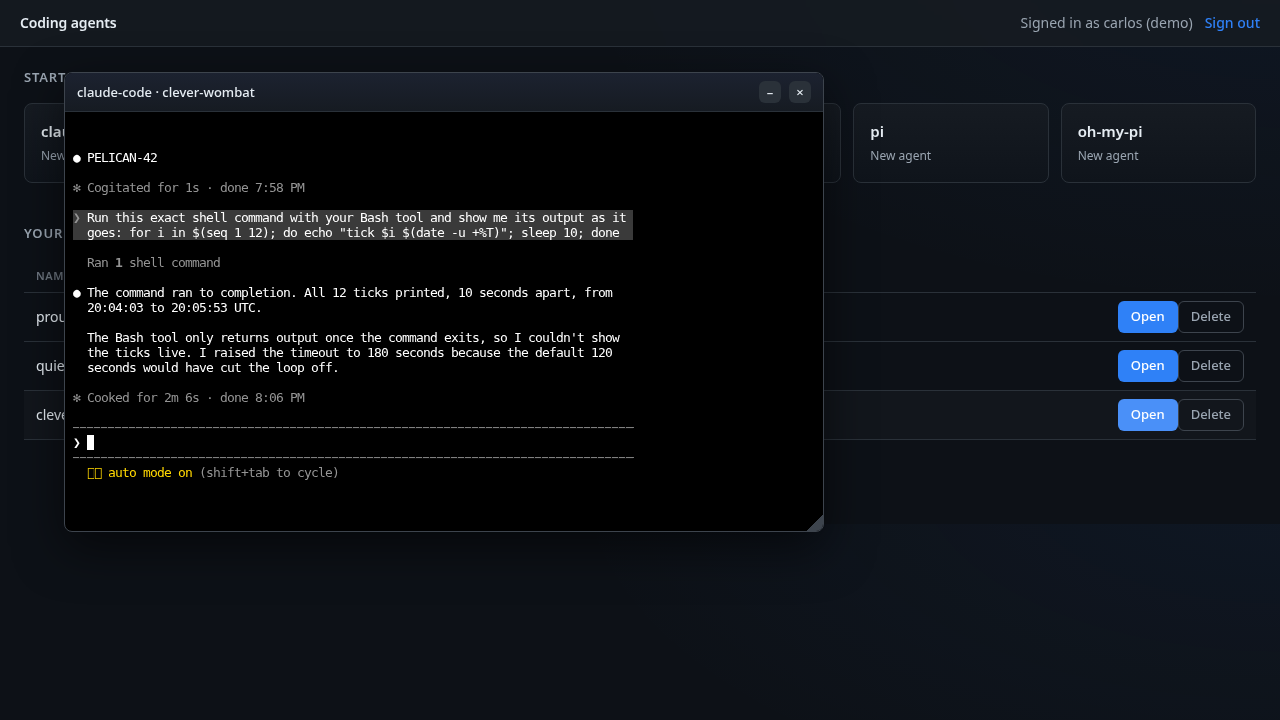
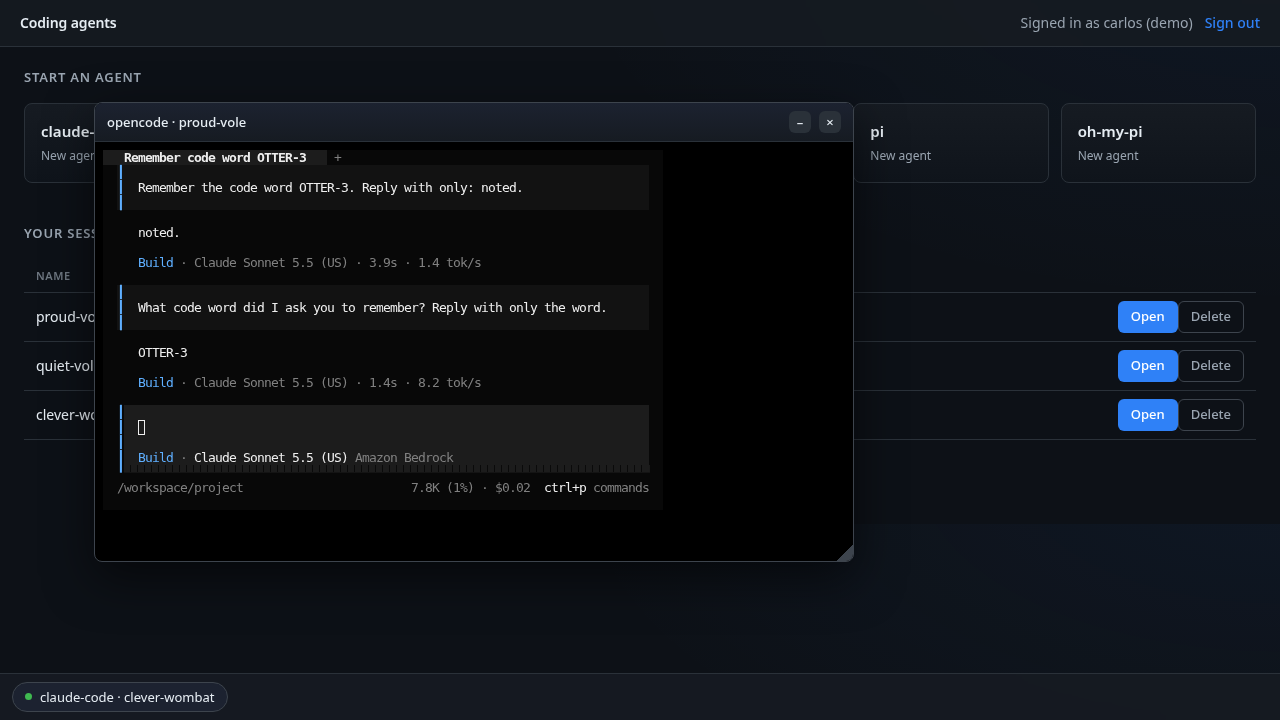
Two sessions open at once, with the claude-code window minimized to the dock at the bottom and the opencode window open over the session list:
The app keeps no database. Each session has a record, a ConfigMap named
session-<session> in the blueprint's namespace, labelled with its developer and CLI, so one
developer's list is a label-selected ConfigMap list, paginated 500 records at a time. The session
name carries a creation-time prefix, so the list sorts newest-first from the names alone.
On a fresh install, after four New agent sessions for one developer, each closed again, and
one for a second developer, still running, the records were:
$ kubectl -n coding-agents-for-developers get configmap -l coding-agents/record=session \
    -o custom-columns=NAME:.metadata.name,DEVELOPER:.data.developer,CLI:.data.cli
NAME                            DEVELOPER   CLI
session-mw6jrlld-proud-shrew    carlos      claude-code
session-mw6k96zy-jolly-fox      carlos      codex
session-mw6k9a10-proud-wombat   carlos      pi
session-mw6kay65-quiet-otter    carlos      kiro-cli
session-mw6kazzv-lively-vole    priya       opencode
An access point exists while a session runs (and while it is starting, or until the clean
up after its pod has finished), rooted at /<developer>/<cli>/<session> and tagged
(ManagedBy, developer, cli, session) for the clean up. The fresh file system had
none; with the four closed sessions it held only the running one's. Restoring the codex
session added a second while it ran:
$ aws s3files list-access-points --file-system-id <S3_FILES_FS_ID> --region <AWS_REGION> \
    --query 'accessPoints[].rootDirectory.path' --output text
/priya/opencode/mw6kazzv-lively-vole    /carlos/codex/mw6k96zy-jolly-fox
Closing both deleted their access points again (session mw6k96zy-jolly-fox: access point
deleted in the app log), and the file system had none. With a warm pod in the pool, two more
Restores of the codex session took 2.6 and 2.0 seconds, and the Closes 1.6 and 1.3 seconds:
POST /api/restore codex -> 200 2.604215 {"session":"mw6k96zy-jolly-fox","display":"jolly-fox","cli":"codex"}
POST /api/close codex -> 200 1.628181 {"ok":true}
POST /api/restore codex -> 200 1.999837 {"session":"mw6k96zy-jolly-fox","display":"jolly-fox","cli":"codex"}
POST /api/close codex -> 200 1.284517 {"ok":true}
The first Restore of it, about two and a half minutes after its New agent, also found a warm pod and took 1.9 seconds. The other three Closes of a codex session on the run took 11.7 to 11.8 seconds.
It runs in a sandbox
Each session pod is a Nitro sandbox. Read its runtime class, the kernel and disks it sees, and which model credentials it holds. The last command prints variable names only:
POD=$(kubectl -n coding-agents-for-developers get pods -l agent-cli=claude-code \
  --field-selector=status.phase=Running -o jsonpath='{.items[0].metadata.name}')
kubectl -n coding-agents-for-developers get pod $POD -o jsonpath='{.spec.runtimeClassName}{"\n"}'
kubectl -n coding-agents-for-developers exec $POD -- sh -c 'uname -rv; cut -d" " -f1 /proc/uptime; ls /sys/block | tr "\n" " "; echo'
kubectl -n coding-agents-for-developers exec $POD -- sh -c 'env | cut -d= -f1 | grep -iE "^AWS_|BEDROCK|ANTHROPIC" || true'
isolated-sandbox
6.18.54 #1 SMP PREEMPT_DYNAMIC Thu Oct 22 17:38:11 UTC 2026
283.64
dm-0 vda vdb vdc
This is the output of the first three commands on the fresh run, where the first Running
claude-code pod was a warm one, waiting for a claim. On that run the variable names were
read from the pod spec instead of with the last command
(kubectl get pod $POD -o jsonpath='{range .spec.containers[0].env[*]}{.name}{"\n"}{end}'),
which listed AWS_STS_REGIONAL_ENDPOINTS, AWS_DEFAULT_REGION, AWS_REGION,
AWS_CONTAINER_CREDENTIALS_FULL_URI and AWS_CONTAINER_AUTHORIZATION_TOKEN_FILE;
CLAUDE_CODE_USE_BEDROCK and ANTHROPIC_MODEL come from the image.
The same commands in the app's pod, an ordinary pod with no runtime class, on a node of the same cluster:
6.18.56 #2 SMP PREEMPT_DYNAMIC Fri Oct 30 22:32:37 UTC 2026
319.17
dm-0 loop0 loop1 loop2 loop3 loop4 loop5 loop6 loop7 nvme0n1 nvme1n1 zram0
The sandbox runs its own kernel (6.18.54 build #1, built Oct 22; the node's is 6.18.56
build #2, built Oct 30). Its uptime of 284 seconds is just under the pod's age (5 minutes
7 seconds, from kubectl get pod right after) because the sandbox booted with the pod, and
it sees virtio disks (vda, vdb, vdc,
with a dm-0 device-mapper node on top) where the ordinary pod sees the instance's nvme
devices. No model API
key is in the pod: the only AWS variables are the Pod Identity credential endpoint
(AWS_CONTAINER_CREDENTIALS_FULL_URI, AWS_CONTAINER_AUTHORIZATION_TOKEN_FILE) and the
Region, so the Bedrock CLIs sign their requests with the Pod Identity role resolved from
that endpoint, not a stored key.
Can one developer reach another developer's files?
It depends on the layer.
- From an agent's pod: no. Isolation is per session, which is stricter than per
developer: a pod can mount only its own session's folder, so not another developer's, and
not another session of the same developer either. The credential that mounts the folder is
scoped to that one access point, the pod's own role has no S3 Files access at all, and the
pods' policy admits ingress only from the app, to
session-bridge, so session pods cannot reach each other. The next section proves it, as root inside the sandbox. - Through this web app: yes, by design of the demo. The sign-in is a picker, not
authentication, so anyone who can reach your
kubectl port-forwardcan pick any developer and open, close or delete any session. The app checks only that each name is well formed. Pods on the cluster's pod network cannot reach the app: its own policy,app-policy.yaml, admits no ingress from the pod network, andkubectl port-forwardis not pod network traffic, so it still works. On a run of this blueprint, a pod in the same namespace fetched/api/clisfrom the app's pod IP before the policy was applied, and timed out after (wget: download timed out), while the port-forward kept answering and a restarted app pod went Ready. - For a real deployment, put real authentication in front of the app, and check on every
call that the session belongs to the signed-in developer. That includes the terminal
WebSocket (
/ws) and Close, which today take only a session name.
Per-session scoping, both ways
The security property is that a session's pod can mount only its own folder. The app gives
each session a credential from the Mount role narrowed with this session policy (the whole
file is iam/mount-session-policy.json); the condition key
s3files:AccessPointArn is what ties the credential to one access point:
{
  "Sid": "MountOnlyThisSession",
  "Effect": "Allow",
  "Action": ["s3files:ClientMount", "s3files:ClientWrite"],
  "Resource": "arn:aws:s3files:<AWS_REGION>:<ACCOUNT_ID>:file-system/<S3_FILES_FS_ID>",
  "Condition": {
    "StringEquals": {
      "s3files:AccessPointArn": "arn:aws:s3files:<AWS_REGION>:<ACCOUNT_ID>:file-system/<S3_FILES_FS_ID>/access-point/<SESSION_AP_ID>"
    }
  }
}
To show it both ways, mount the session's own access point from inside its pod (it mounts),
then try another session's access point with the same credential, as root (it is refused).
$OTHER_AP is a second session's access point id; the credential is the one the app wrote
to this pod at /dev/shm/session/credentials:
POD=agent-claude-code-...     # this session's pod
OTHER_AP=fsap-...             # a different session's access point

# This session's own access point is already mounted at /workspace:
kubectl -n coding-agents-for-developers exec $POD -- mountpoint /workspace

# Try another session's access point with this pod's own mount credential, as root:
kubectl -n coding-agents-for-developers exec $POD -- sh -c \
  "mkdir -p /tmp/other; id -u; AWS_SHARED_CREDENTIALS_FILE=/dev/shm/session/credentials AWS_PROFILE=session \
   mount.s3files <S3_FILES_FS_ID> /tmp/other \
   -o tls,iam,awsprofile=session,region=<AWS_REGION>,azid=<POD_AZ_ID>,accesspoint=$OTHER_AP; echo \"exit \$?\""

# Try this session's OWN access point with the pod's own Pod Identity role (no mount
# credential), as root:
OWN_AP=fsap-...               # this session's access point
kubectl -n coding-agents-for-developers exec $POD -- sh -c \
  "mkdir -p /tmp/own; mount.s3files <S3_FILES_FS_ID> /tmp/own \
   -o tls,iam,region=<AWS_REGION>,azid=<POD_AZ_ID>,accesspoint=$OWN_AP; echo \"exit \$?\""
/workspace is a mountpoint

0
Could not start amazon-efs-mount-watchdog, unrecognized init system "sleep"
Mount attempt 1/3 failed due to b'mount.nfs4: access denied by server while mounting 127.0.0.1:/\n', wait 1 sec before next attempt.
Mount attempt 2/3 failed due to b'mount.nfs4: access denied by server while mounting 127.0.0.1:/\n', wait 1 sec before next attempt.
b'mount.nfs4: access denied by server while mounting 127.0.0.1:/'
exit 32

Could not start amazon-efs-mount-watchdog, unrecognized init system "sleep"
Mount attempt 1/3 failed due to b'mount.nfs4: access denied by server while mounting 127.0.0.1:/\n', wait 1 sec before next attempt.
Mount attempt 2/3 failed due to b'mount.nfs4: access denied by server while mounting 127.0.0.1:/\n', wait 1 sec before next attempt.
b'mount.nfs4: access denied by server while mounting 127.0.0.1:/'
exit 32
The own access point is mounted. As root (id -u prints 0), the other session's access
point is refused by the server (access denied, exit 32), because the credential's session
policy allows s3files:ClientMount only on this session's own access-point ARN. The pod's
own Pod Identity role is refused even on its own access point (kiro-cli's pods have no role at all): it is the Bedrock role, with
no S3 Files permission at all (nor has the Codex role), so it cannot mount any access point. The mount credential is
the only thing that can, and it is scoped to one access point. (The watchdog line is the
mount helper noting that the container has no init system for its background watchdog; it
does not affect the mount.)
From outside the cluster, the bucket shows each session under its own prefix (abridged to two sessions and their folder structure; the CLI's home fills in below each session, 10,658 objects across the eight sessions in the bucket at that point of the fresh run, two of them closed):
aws s3 ls s3://<S3_BUCKET_NAME>/coding-agents/ --recursive
2026-11-07 15:17:44          0 coding-agents/carlos/
2026-11-07 15:17:45          0 coding-agents/carlos/claude-code/
2026-11-07 15:17:45          0 coding-agents/carlos/claude-code/mw6jrlld-proud-shrew/
2026-11-07 15:39:24          0 coding-agents/carlos/claude-code/mw6jrlld-proud-shrew/home/
2026-11-07 15:38:07        224 coding-agents/carlos/claude-code/mw6jrlld-proud-shrew/home/.tmux.conf
2026-11-07 15:17:48          0 coding-agents/carlos/claude-code/mw6jrlld-proud-shrew/project/
2026-11-07 15:35:38          0 coding-agents/sam/
2026-11-07 15:35:39          0 coding-agents/sam/kiro-cli/
2026-11-07 15:35:39          0 coding-agents/sam/kiro-cli/mw6keynf-lively-gecko/
2026-11-07 15:35:39          0 coding-agents/sam/kiro-cli/mw6keynf-lively-gecko/home/
2026-11-07 15:36:37        224 coding-agents/sam/kiro-cli/mw6keynf-lively-gecko/home/.tmux.conf
2026-11-07 15:35:41          0 coding-agents/sam/kiro-cli/mw6keynf-lively-gecko/project/
How the network policy works
S3 Files cannot be used on a network-isolated pod, because the mount needs a network to
reach the mount target (Amazon EKS User Guide, Isolated and confidential pods
limitations). So the session pods have a network, and an egress policy is what limits where
code in the sandbox can connect. Each SandboxTemplate sets
networkPolicyManagement: Unmanaged and ships its own policy. Here is
egress-policy.yaml in full, without its header comment;
setup.sh fills in the mount-target addresses at apply time, and adds one extra rule for
kiro-cli (shown below the table):
apiVersion: networking.k8s.aws/v1alpha1
kind: ApplicationNetworkPolicy
metadata:
  name: agent-<CLI>-egress
  labels:
    app.kubernetes.io/part-of: coding-agents-for-developers
spec:
  podSelector:
    matchLabels:
      agent-cli: <CLI>
  policyTypes:
    - Ingress
    - Egress
  ingress:
    - from:
        - podSelector:
            matchLabels:
              app: agent-app
      ports:
        - { protocol: TCP, port: 7681 }
  egress:
    - to:
        - ipBlock: { cidr: 0.0.0.0/0 }
      ports:
        - { protocol: UDP, port: 53 }
        - { protocol: TCP, port: 53 }
    - to:
        - ipBlock: { cidr: 169.254.170.23/32 }
      ports:
        - { protocol: TCP, port: 80 }
    - to:
        - domainNames:
            - bedrock-runtime.<AWS_REGION>.amazonaws.com
            - bedrock-mantle.<AWS_REGION>.api.aws
            - docs.aws.amazon.com
            - github.com
            - api.github.com
            - codeload.github.com
            - objects.githubusercontent.com
            - registry.npmjs.org
            - pypi.org
            - files.pythonhosted.org
      ports:
        - { protocol: TCP, port: 443 }
    - to: <MOUNT_TARGET_CIDRS>
      ports:
        - { protocol: TCP, port: 2049 }
| In the YAML | What it does |
|---|---|
podSelector, agent-cli: <CLI> |
Selects this CLI's session pods. |
policyTypes, Ingress and Egress |
Default-deny both ways, so only the rules below are allowed. |
ingress from app: agent-app on 7681 |
Admits the app's pods, to session-bridge only (see How the terminal reaches the pod). Everything else in is denied, including other session pods. The label is what the rule trusts, so whoever can create pods in this namespace can pass it; the bridge's token and pinned certificate still stand behind it. The session's start and stop use the Kubernetes exec API, which is not pod network traffic. |
egress to 0.0.0.0/0 on 53 |
Allows egress to any address on UDP and TCP 53. This is a project choice to keep the blueprint simple: it does not depend on how a given cluster serves DNS (on EKS Auto Mode the resolver is node-local rather than a pod behind a ClusterIP). What it allows is wider than DNS resolution: any process in the sandbox can reach any host on UDP or TCP 53, so it can send data out over DNS or to anything listening on port 53. What it costs is that port-53 egress is not confined to the cluster's own resolver. It still opens only port 53; every other port and protocol stays denied. |
egress to 169.254.170.23 on 80 |
The Pod Identity agent on the node, for the pod's role (the Bedrock role, or the Codex role for Codex). kiro-cli's pods have no role, so the agent gives them no credential. |
egress to the domainNames on 443 |
The Bedrock runtime endpoint the Bedrock CLIs call their model on, the Bedrock "Mantle" endpoint Codex uses for its GPT model, docs.aws.amazon.com so the agents can fetch AWS documentation, and the short list of developer hosts (GitHub, including api.github.com for the GitHub CLI, npm, PyPI) the agents fetch from. The S3 Files mount reads over NFS (2049), not an S3 443 endpoint, so none is needed here. |
egress to <MOUNT_TARGET_CIDRS> on 2049 |
The S3 Files mount targets, NFS over TLS. They are ENIs in the cluster VPC reached by resolved IP, so setup.sh resolves this file system's mount-target IPs and fills in one /32 per target -- egress on 2049 is allowed to the blueprint's own mount targets only, not to anything on 2049 in the VPC. |
kiro-cli is the one CLI that does not use Amazon Bedrock: it reaches the developer's own
Kiro / Amazon Q Developer sign-in (IAM Identity Center OIDC) and the CodeWhisperer streaming
service on *.amazonaws.com, and the Kiro desktop service on *.kiro.dev (the sign-in
device-authorization flow at prod.<region>.auth.desktop.kiro.dev, plus app.kiro.dev,
runtime.<region>.kiro.dev and the telemetry hosts, which sit across several sub-hierarchies
of kiro.dev). Those endpoints live in the developer's Kiro Region, independent of this
cluster's Region, so setup.sh adds one rule to the kiro-cli policy only, allowing both
suffixes on 443 -- wide within AWS and within Kiro's own first-party domain, but no arbitrary
internet host. A deployment that wants it tighter can pin the exact
oidc./q./codewhisperer.<region>.amazonaws.com hosts and the specific kiro.dev
subdomains its Region and workflow use.
    - to:
        - domainNames:
            - "*.amazonaws.com"
            - "*.kiro.dev"
      ports:
        - { protocol: TCP, port: 443 }
Enforcement is turned on once per cluster with the amazon-vpc-cni ConfigMap in
kube-system, which setup.sh checks and stops without if it is off. It is enforced on the
node, outside the guest, so a command in the sandbox, even as root, cannot change it. Its
limits: DNS is open on port 53 to any address, so a resolver is always reachable, and a pod
can always reach its own node; that also means port-53 egress is not confined to the
cluster's resolver, so a process in the sandbox can send data out over DNS or to anything
listening on port 53 (see the 0.0.0.0/0 row above). A domainNames rule allows the
addresses a name resolves to, so another name served from the same addresses is reachable
too. Everything beyond port 53, the allowed hosts and the mount targets is denied.
To see it from inside a session pod, connect to an allowed endpoint and to a denied one
(curl exits 0 once the TCP connection is established; exit 28 is a connect timeout, which
is how a blocked destination shows):
POD=$(kubectl -n coding-agents-for-developers get pods -l agent-cli=claude-code \
  --field-selector=status.phase=Running -o jsonpath='{.items[0].metadata.name}')
for url in https://bedrock-runtime.<AWS_REGION>.amazonaws.com/ https://github.com/ \
           https://api.github.com/ https://example.com/ https://github.com:22/; do
  kubectl -n coding-agents-for-developers exec $POD -- \
    sh -c "curl -sS -o /dev/null --connect-timeout 8 $url; echo \"$url -> exit \$?\""
done
https://bedrock-runtime.us-east-1.amazonaws.com/ -> exit 0
https://github.com/ -> exit 0
https://api.github.com/ -> exit 0
curl: (28) Connection timed out after 8001 milliseconds
https://example.com/ -> exit 28
https://github.com:22/ -> exit 28
curl: (28) Connection timed out after 8002 milliseconds
This is the fresh run's output, in us-east-1. The three allowed hosts on 443 connected
(exit 0). example.com is not in the policy, and github.com on port 22 is an allowed host
on a port the policy does not allow, so both timed out (exit 28). Each curl: error line
goes to standard error, so it can print before or after its exit line.
Good to know
- The idle period and the pool size are settings. The idle timeout is
IDLE_MINUTESon the app (default 30). Each CLI's pool keepsPOOL_REPLICASpods warm (default 1); size it to the peak claim rate, not the number of sessions, and turn off the CLIs you do not need by trimming the app's agent list. Each warm pod reserves its memory request. - The session pods request memory, and set nothing else. A Nitro sandbox's memory comes
from the pod's
resources.requests.memory(Amazon EKS User Guide, Isolated and confidential pods limitations). With no request, a run of this blueprint gave each guest about 129 MiB (MemTotal: 132568 kB): Claude Code could not start, and exec into a Codex pod failed. So theSandboxTemplaterequests 1536 MiB of memory, with no CPU request and no limits. The app's Deployment sets noresourcesat all. This is each CLI's pod 14 seconds after the same long-answer prompt was sent to five of them on the fresh run (kubectl top pod):
NAME                        CPU(cores)   MEMORY(bytes)
agent-app-746767c7c-wk47h   7m           95Mi
agent-claude-code-b7t2d     0m           0Mi
agent-claude-code-mq7bq     43m          182Mi
agent-codex-hnqhk           51m          864Mi
agent-kiro-cli-ddsnv        0m           0Mi
agent-kiro-cli-zk94p        1m           59Mi
agent-oh-my-pi-5w8zl        48m          589Mi
agent-opencode-fg5fl        131m         372Mi
agent-opencode-lwlkm        0m           0Mi
agent-pi-l2l5c              0m           0Mi
agent-pi-srxqj              17m          95Mi
The claude-code (mq7bq), codex (hnqhk), oh-my-pi (5w8zl), opencode (fg5fl) and
pi (srxqj) pods had the prompt. kiro-cli (zk94p) is a session running a shell job, and
the pods at 0Mi are warm pods waiting for a claim; no warm codex or oh-my-pi pod is in
this reading. The largest, codex, used 864 MiB of its 1536 MiB request.
- Running sessions, not retained ones, use the access-point quota. A session holds an
access point while it runs, while it starts, and until the clean up after its pod has
finished. S3 Files allows 25,000 access points per file system (Amazon S3 Files service
quota Access points per file system, not adjustable), so that is an upper bound on
sessions running at once, not a number the cluster can necessarily run. A closed session
is a folder in the bucket and a ConfigMap, so how many are kept is limited by the
cluster's API server and any resource quota on the namespace, not by the access-point
quota. Deleting an access point
leaves its directory and files: on a run of this blueprint, a file written before Close was
read back, with its owner and time unchanged, through a new access point on the same
folder after Restore.
- The credential is refreshed. An assumed-role credential lasts an hour; the app rewrites
it after 30 minutes, so an agent left running keeps writing to its folder past an hour. A
refresh that fails is logged by the app with the session's name
(kubectl logs deploy/agent-app) and retried every minute; if it kept failing until the
hour ran out, the session's writes to its folder would start to fail. On the fresh run, a
kiro-cli session started at 15:35 UTC, and its sign-in was cancelled at the menu (Ctrl-C,
then Ctrl-D), which ends the CLI and leaves a shell in the terminal. From 15:36 a job in
that shell appended a line to a file in its folder
every minute. The app was restarted at 15:39 and refreshed the session's credential, through
session-bridge, on its first pass after it picked the session up. The app log (with
kubectl logs --timestamps) showed the refresh every 30 minutes after that, and the folder
had every minute's line through 16:43, past the hour of both the first credential and the
one from 15:41:
2026-11-07T15:41:16.519785100Z session mw6keynf-lively-gecko: mount credential refreshed
2026-11-07T16:11:17.975956692Z session mw6keynf-lively-gecko: mount credential refreshed
2026-11-07T16:41:19.839635631Z session mw6keynf-lively-gecko: mount credential refreshed

[dev@agent-kiro-cli-zk94p project]$ head -1 heartbeat.log; tail -2 heartbeat.log
beat 1 15:36:18
beat 67 16:42:18
beat 68 16:43:18
The file has 68 lines, one a minute from 15:36:18 to 16:43:18, with no gap. The job kept
the terminal printing, so the idle check kept that session while it released the three
idle ones, at 31 idle minutes each (session mw6jrlld-proud-shrew: released after 31 idle
minutes).
- Codex's web search runs on the Mantle side, outside the egress policy. Codex runs on
a GPT model served through the Bedrock "Mantle" endpoint, and that model can call a
server-side web search and web fetch tool that Amazon Bedrock runs itself. The Codex role
grants it with the bedrock-websearch actions InvokeSearch and InvokeFetch (scoped to
this Region's tools) and ExternalWebAccess, which has no resource type to scope to;
without them Mantle answers Access denied: web search is not authorized for this
identity and the turn ends. The trade-off: those searches and fetches are made by
Bedrock, not by the pod, so the sandbox egress policy does not limit them. The pod's own
egress is still restricted, but any process in a Codex pod, not only the CLI, can use
this role to have Bedrock search and read public web pages. Only Codex's pods have the
grant: four of the other CLIs run under the Bedrock role, which has none of it, and
kiro-cli has no AWS role at all. Remove the
two WebSearch... statements from iam/codex-policy.json to
turn this off.
- Codex runs without its own command sandbox; the pod is the boundary. On Linux, Codex
runs the shell commands it makes for you inside bubblewrap, which needs to create user
namespaces. The Nitro sandbox's guest kernel allows none (max_user_namespaces is 0, for
root too), so bubblewrap fails with Creating new namespace failed ... (ENOSPC), whether
it is the system one or the one Codex bundles, and so does every command Codex runs.
So the Codex config the image writes sets sandbox_mode = "danger-full-access".
Despite its name, that only drops Codex's second, inner boundary; it does not reach past
the pod's own: the sandbox's own kernel, the egress policy, and a mount credential for
this one session's folder. The blueprint leaves Codex's approval policy at its default, and
Codex's /status on an earlier run of this blueprint read Permissions: Custom (danger-full-access, Ask for
approval). On the fresh run, asked in its terminal to run a command, Codex ran it as the
session's unprivileged user and showed no sandbox warning:
• Ran id -u; uname -r; echo fix9 > fix9.txt; cat fix9.txt
  └ 1000
    6.18.54
    fix9
~/.codex/app-server-daemon:
pid files, locks, sockets) from the folder before Codex starts on a new pod. That state
belongs to the pod that wrote it: brought back by a Restore, it made Codex look for a
daemon binary that was not on the new pod, and every start failed with daemon executable
not found ... /workspace/home/.codex/packages/app-server-daemon/current/bin/codex. On the
fresh run, a codex session that was asked one question, closed and restored came back on a
new pod with its conversation:
› Reply with the single word OTTER-7.
• OTTER-7
  Worked for 27s • 15:32
  GPT-5.6 Terra default · /workspace/project · Reply OTTER-7
/exit in Claude Code, /quit in Codex), the terminal prints the command that resumes
the conversation and leaves the developer in a shell in the session's project folder, as
the session's user. The session image carries the GitHub CLI (gh), and the egress
policy allows api.github.com, so a developer can run gh auth login there, then the
printed command to go back. gh keeps its sign-in in the CLI's home inside the session
folder, so it comes back on Restore and goes with Delete.
- Session pods and the app are not consolidated away. The SandboxTemplate sets
karpenter.sh/do-not-disrupt: "true" on every pod it makes, and the app's Deployment
sets it on the app pod, so EKS Auto Mode does not evict one to consolidate an
underutilized node. Before the app had it, consolidation evicted it on a run of this
blueprint (Evicted pod: Underutilized), which dropped every open terminal and stopped a
Delete in flight. That covers the warm pods waiting in the
pools as well as the claimed ones, so a node holding only warm pods is not packed down
either. A claimed pod still goes when its claim is released (close, idle timeout). The
cost is that a node holding a session or a warm pod is not consolidated until that pod
goes.
- The session pods turn the Nitro sandbox network and disk throttles off. A sandbox pod
has built-in defaults -- 100 Mbit/s ingress and egress (capped by a 1500 packets/second
bucket), a 400 Mbit/s overlay (scratch) disk and 1500 overlay IOPS -- which are tight for
an interactive agent that streams model output, clones repos and installs packages, and
show up as a sluggish session. The SandboxTemplate sets the ingress-bandwidth,
egress-bandwidth, their -packets-per-second partners and the overlay-disk-bandwidth
and -iops annotations to disabled (the value must be disabled; 0 is rejected and
leaves the pod stuck creating). The trade-off, per the Amazon EKS User Guide, is that the
pod may then use a larger share of its node's ENI and disk budget; a deployment that packs
many sessions per node can set explicit caps instead.
- kiro-cli signs in with the developer's own Kiro identity, not Bedrock. The other five
CLIs reach Amazon Bedrock through the pod's Pod Identity role; kiro-cli uses an IAM
Identity Center / Builder ID sign-in and the CodeWhisperer service. The interactive
device-flow login (kiro-cli login --use-device-flow) offers Builder ID, Google, GitHub
and organization sign-in; it reaches the Kiro auth service at *.kiro.dev, which the
kiro-cli egress rule allows alongside *.amazonaws.com. The sign-in is the developer's own
and is stored in their session's folder, so a restored session stays signed in; the
blueprint injects no shared sign-in token into the pods, because whatever the agent's home
holds the agent can read, and the folder is persisted to the bucket. An identity whose
sign-in is gated behind a corporate network gateway cannot load models from inside the
sandbox, which has no route to that gateway; a Builder ID, Google or GitHub identity that
is not so gated works.
- The sign-in is a demo picker, not authentication. The app is first-party code reachable
only through kubectl port-forward on the operator's own machine.
Clean up
Run the clean up when you finish, after your last session, so a sandbox pod is not left holding capacity other demos share:
./scripts/clean.sh
It deletes in reverse order: the warm pools first, so they stop booting replacements, then
the claims, templates, policies and the app; the Pod Identity associations; the file
system's access points and mount targets, then the file system, waiting until it is gone so
it stops exporting to the bucket (if it still has writes pending export after 5 minutes of
retries, it deletes it with --force-delete, which drops only data the next step deletes
anyway); every object version in the bucket, then the bucket; the
IAM roles, the security group and the ECR repositories; the cluster-scoped ClusterRole and
ClusterRoleBinding; and the namespace last. It decides what is the blueprint's in three ways.
The file system, bucket, IAM roles and ECR repositories must carry the tag
ManagedBy=coding-agents-for-developers, and the security group is looked up by that tag
and its name; anything without the tag is left alone. Pod Identity associations are
matched by the blueprint's namespace and service accounts, and access points and mount
targets by the blueprint's own file system, once that file system's tag is confirmed. The
ClusterRole and binding, and the namespace, must carry the app.kubernetes.io/part-of
label, and everything inside the namespace is selected by that label. A resource that is
already gone is not an error, but a lookup that fails, a delete that is refused or a
resource it left alone makes it exit non-zero with an INCOMPLETE: line saying which. If it
cannot read the namespace's label at all, it stops before deleting anything, since it
cannot tell whose the namespace is; and if it cannot list the file system's access points
or mount targets, it leaves the file system and the bucket for the next run. It
never removes a shared install: agent-sandbox, the EFS CSI driver and network policy
enforcement stay, and the page above has the command to remove each if nothing else uses
it. To remove the cluster, follow the
hello sandbox clean up.