Read an encrypted S3 file that only the sandbox can decrypt
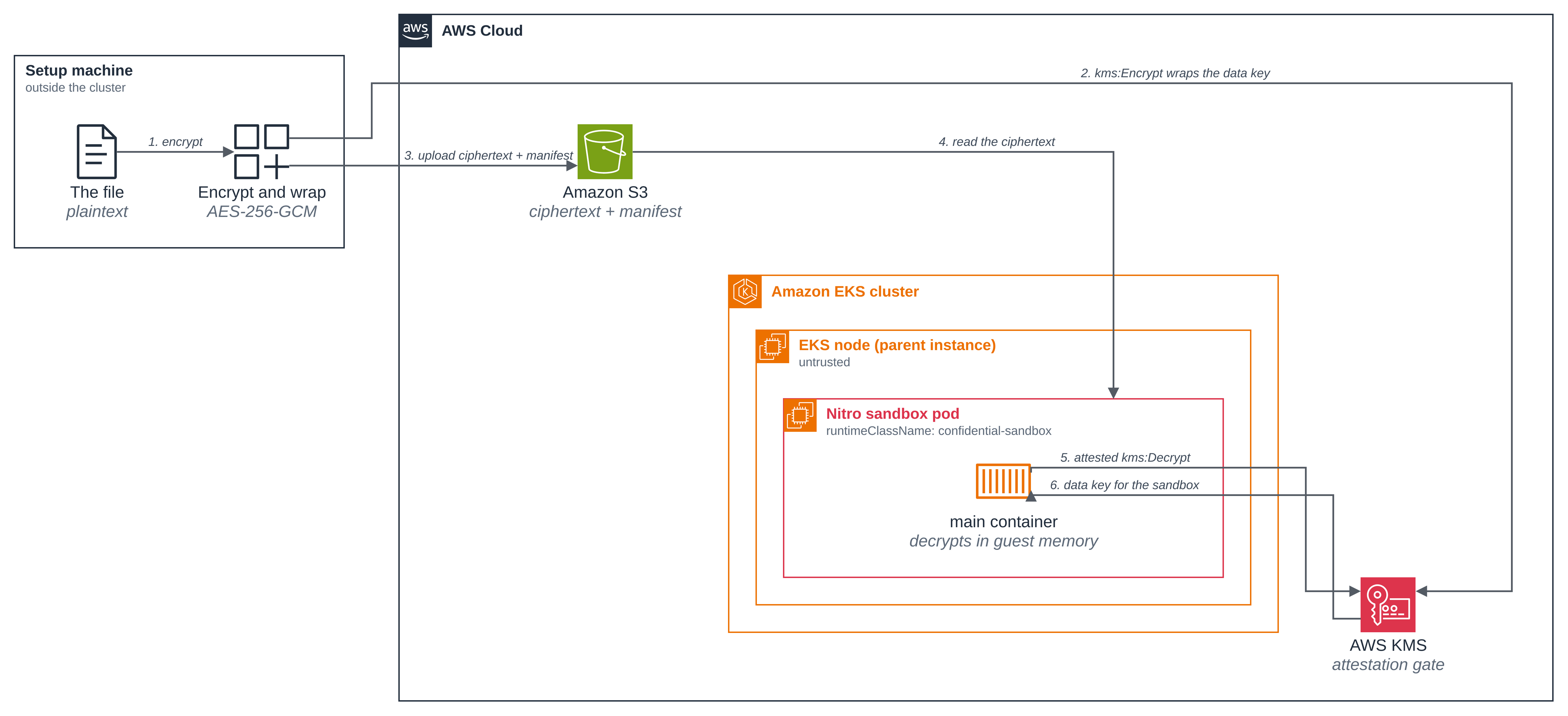
This blueprint uploads a file to Amazon S3 as AES-256-GCM ciphertext and gets it read back inside a sandbox. A setup machine encrypts the file under a random data key, wraps only that key with an AWS KMS key, and uploads the ciphertext with a small manifest holding the wrapped key. A Python application in the sandbox reads both, asks KMS to release the data key while presenting a signed attestation document, and decrypts the file in guest memory. KMS releases the key only to a sandbox whose attested policy matches the approved one. The application validates the file by length and SHA-256 and never prints its contents.
Wrapping a small data key, rather than handing the file to KMS, is what lets the file be
larger than KMS's own direct-encryption input
(KMS Encrypt API reference).
The pod uses runtimeClassName: confidential-sandbox, which treats the node as untrusted
and binds key release to a Cedar policy that pins what the pod may run. The setup machine is
trusted with the original file and stays outside the cluster.
Before you start, review the prerequisites and shared setup on the home page and the Confidential section page, which covers the trust boundary, the key-policy shape and the attested decrypt that this and the other Confidential blueprints share. Three blueprints lead into this one:
- cedar-policy generates a Cedar policy for a
confidential-sandboxpod and shows the guest enforce it, with no attestation step. - hello sandbox introduces the readings that show a pod ran in a sandbox.
- coding agent introduces EKS Pod Identity, which is where this pod's AWS credentials come from.
The commands below use files from this repository, so clone it if you have not already:
git clone https://github.com/aws-samples/sample-eks-nitro-sandbox.git
cd sample-eks-nitro-sandbox/examples/confidential/s3-encrypted-file
cp .env.example .env    # then fill in CLUSTER_NAME, AWS_REGION, KUBE_CONTEXT and S3_BUCKET
S3_BUCKET has no default and you have to choose one: an S3 bucket name is global, so pick
a name nobody has taken. A name also stays unavailable for a while after the bucket is
deleted, so a second run after a clean up may need a new one.
On your own machine the scripts need the AWS CLI, kubectl, jq, gzip, sha256sum and a
container runtime (docker by default; set CONTAINER_CLI for finch or podman), plus
the Cedar policy generator:
| Tool | Where it is documented |
|---|---|
eks-nitro-sandbox-genpolicy, the Cedar policy generator |
Amazon EKS User Guide, Cedar policies |
It must be on your PATH; set GENPOLICY in .env if your copy is named differently. You
do not need Python packages on the setup machine: the script runs the encrypt helper in the
image it has just built.
A run costs the KMS key, S3 storage for one 100 KiB object and its manifest, ECR storage for the application image, and the compute of one sandboxed pod and two small ordinary pods while the blueprint is up. The clean up schedules the key for deletion, which AWS completes after a waiting period of at least 7 days.
Overview
The blueprint has one sandboxed pod and two ordinary pods, all in one namespace. The sandboxed
pod reads the object and decrypts it. The two ordinary pods are controls: one runs the same
image with --readings-only so the page can show what an ordinary pod reads of the machine,
and one holds the sandboxed pod's own IAM role and asks KMS to decrypt the very same wrapped
data key without an attestation.
- The stored object is ciphertext, not the file. What S3 holds is AES-256-GCM ciphertext and a manifest carrying the wrapped data key and the nonce. The object's digest differs from the file's, and it is exactly 16 bytes longer, which is the GCM authentication tag. The bucket blocks public access in all four ways and encrypts at rest.
- The attestation is the boundary, not the credential. The pod's role has no identity policy at all. Its one KMS permission lives in the key policy, conditional on the attested measurement, and its one S3 permission is a bucket policy naming two objects. An ordinary pod with the very same role reads the object and is then refused the data key by an explicit deny, so whoever holds the credentials outside the sandbox has the ciphertext and not the file.
- Change one pinned value and KMS stops releasing the key. A second pod runs the same
image with one pinned environment value changed. Its Cedar policy differs, so its
measurement differs, and KMS refuses the data key. The pod ends
Failed, and the reason is an authorization denial rather than a generic failure. - The plaintext never leaves the guest. The application holds the file in memory, checks it against the length and SHA-256 its policy pins, and prints only a marker with those two values. Nothing on this page, and nothing in any log, is the file.
Figure 1: The file's journey, from the setup machine to the sandbox that reads it back. Only ciphertext and a wrapped key reach Amazon S3; KMS only ever handles the small data key, which is what lets the file be any size. Who KMS will release that key to is Figure 2.
The sandbox's network reach. This blueprint ships no network policy, so the pod's egress is unrestricted. What the key policy and the bucket policy limit is access to this data key and these two S3 objects; neither of them limits where the pod can connect, and neither would stop an application that chose to send the plaintext somewhere else. Restricting the datapath is a separate thing, and the network policy blueprint under Isolation is where that mechanism is shown, on a sandboxed pod, with one connection allowed and one refused.
Versions
| Component | Pinned to |
|---|---|
| Application base image | python:3.12.11-slim-bookworm |
boto3, the AWS SDK for Python, for S3 and KMS |
1.43.118 |
cryptography, AES-256-GCM and the unwrap of the KMS recipient response |
50.0.2 |
cbor2, the attestation request encoding |
6.1.5 |
asn1crypto, the CMS envelope KMS returns |
1.5.1 |
| AWS CLI image, for the credentials control pod only | public.ecr.aws/aws-cli/aws-cli:2.31.19 |
eks-nitro-sandbox-genpolicy |
Reports no version string of its own. The pinned artifact is the application image, resolved to a digest at generation time and visible in the generated policy. |
The four Python packages are in src/requirements.txt, each pinned
to the release that was current when the blueprint was built.
Files
| File | What it is |
|---|---|
src/app.py |
The application: read, attested decrypt, decrypt, validate, print the marker |
src/encrypt_file.py |
The operator side: encrypt the file and write the manifest |
src/requirements.txt |
The four pinned Python packages |
Dockerfile |
The application image, built from examples/confidential/ so it can take in the shared attested recipient |
deploy/pod.yaml |
The workload: a confidential-sandbox pod that reads the object and decrypts it |
deploy/plain-pod.yaml |
An ordinary pod running the same image with --readings-only, on the same node, for comparison |
deploy/credentials-pod.yaml |
An ordinary pod with the same IAM role, reading the object and asking KMS to decrypt the data key with no attestation |
deploy/bucket-policy.json |
The bucket policy: two object reads for the pod's role, no KMS action, and a TLS-only deny |
deploy/namespace.yaml |
The s3-encrypted-file-sample namespace, labelled as the blueprint's own |
deploy/service-account.yaml |
The pod's service account, which the Pod Identity association names |
../_shared/confidential-profile.yaml |
The generator profile the Confidential blueprints share |
../_shared/kms-key-policy.json |
The attestation gate: allow on a match, explicitly deny otherwise |
../_shared/attested_recipient.py |
The shared attested KMS recipient: ephemeral key, attestation document, unwrap CiphertextForRecipient |
../_shared/pod-identity/role-trust-policy.json |
The role trust policy, scoped to one cluster, namespace and service account |
scripts/setup.sh |
The whole flow, ending with the pods finished |
scripts/kms-gate-check.jq |
The one reading of a live key policy that both scripts use |
scripts/changed-pod.sh |
The refused case: one pinned value changed |
scripts/clean.sh |
Remove everything the blueprint created |
How it works
Step 1: Run the setup. One script does the whole flow. It creates five AWS resources,
each tagged ManagedBy=s3-encrypted-file, encrypts and uploads the file, generates the Cedar
policy, sets the gate to the policy's measurement, and runs the pods.
./scripts/setup.sh
== 1/9 check the tools, the cluster and the Region ==
  context:  <your-context>
== 2/9 create the private bucket, the ECR repository and the KMS key ==
  created S3 bucket <S3_BUCKET>
  the bucket blocks public access (all four) and encrypts at rest (AES256)
  created ECR repository s3-encrypted-file-sample
  created KMS key arn:aws:kms:us-west-2:<ACCOUNT_ID>:key/2fe74de7-aa4c-4020-b1a2-5e1f4372875f
  it denies every decrypt already: created with a policy, not the default one
== 3/9 create the pod's IAM role, the born-denied key policy and the bucket policy ==
  created IAM role arn:aws:iam::<ACCOUNT_ID>:role/s3-encrypted-file-sample-pod
  the role has no identity policies (0 inline, 0 attached)
  waiting for the new IAM role to be visible to KMS...
  the key policy allows no decrypt yet (gated on an all-zero measurement)
  the bucket policy grants the pod s3:GetObject on the two objects and nothing else
== 4/9 create the namespace, the service account and the association ==
namespace/s3-encrypted-file-sample created
serviceaccount/s3-encrypted-file-pod created
  created Pod Identity association a-vrlasehkuzkpmdez3
== 5/9 build the application image and push it to ECR ==
  pushed <ACCOUNT_ID>.dkr.ecr.us-west-2.amazonaws.com/s3-encrypted-file-sample:v1-ba8e83ed80ca
Abridged: the container build and push output is cut, and steps 6 to 9 are the ones below.
The account ID, the kube context and the bucket name are replaced with <ACCOUNT_ID>,
<your-context> and <S3_BUCKET>; the run used a bucket name of its own, as you will.
The key is created with a policy, never with the default one. kms:CreateKey with no
--policy attaches the
default key policy,
whose "Enable IAM policies" statement allows kms:* to the account root, and that includes
an unconditional kms:Decrypt. The script therefore creates the key with the gate's own
shape, with the conditional allow removed and an all-zero measurement no sandbox can present
in both denies, so the key refuses every decrypt from the moment it exists. The measurement
is replaced in step 5, once the policy has been generated.
Step 2: What the setup machine encrypts, and what it uploads. The file is 100 KiB of random bytes: what matters is that only the sandbox can read them back. A random 32-byte data key encrypts it with AES-256-GCM, and only that data key is handed to KMS. Neither the file nor the data key ever goes on a command line; both are passed as file paths.
The additional authenticated data is s3://<bucket>/<object key>. It is covered by the GCM
tag without being secret, so the same ciphertext copied to another key or another bucket no
longer decrypts. The application derives that string from its own pinned environment rather
than reading it out of the manifest.
== 6/9 encrypt the file, wrap its data key and upload both ==
  encrypted 102400 bytes with AES-256-GCM into 102416 bytes of ciphertext
  uploaded s3://<S3_BUCKET>/confidential/report.bin and the manifest beside it
  the stored object differs from the file and is 16 bytes longer (the GCM tag)
The script reads the object back out of S3 rather than trusting what it uploaded, and stops if the stored bytes are the plaintext file, if they are not the ciphertext this run made, or if the length is not the file's plus the 16 byte GCM tag.
Step 3: The manifest that travels beside the ciphertext. This is the whole object:
{
  "algorithm": "AES-256-GCM",
  "ciphertext_key": "confidential/report.bin",
  "encrypted_data_key": "AQICAHgtmiCOaE13rK/gzGl8tHWhAMfSqbGjinLYt3n/ASMTbQFAgXr3JCkWHhDC8YTcXZO8AAAAfjB8BgkqhkiG9w0BBwagbzBtAgEAMGgGCSqGSIb3DQEHATAeBglghkgBZQMEAS4wEQQMsmwOv0RryMLWESHdAgEQgDvaP5/VhZa/wnIkbXFfFyFxMgGiNldYYDG1RjlkjnPJ9TLNQC6kVO9GFC+JadeALTrVulGiJuaoUFrWpQ==",
  "key_arn": "arn:aws:kms:us-west-2:<ACCOUNT_ID>:key/2fe74de7-aa4c-4020-b1a2-5e1f4372875f",
  "nonce": "MqvhRTTcbtEDUacz",
  "version": 1
}
Nothing in it is a secret. encrypted_data_key is the data key as KMS wrapped it, and only
KMS can unwrap it, which it will do only for an attestation the key policy accepts. That is
the whole point: the manifest can sit in the open beside the ciphertext, and anyone who reads
both still has nothing.
Step 4: Permit ciphertext reads, and nothing else. The pod has a dedicated service
account and Pod Identity role with no attached or inline identity policies at all. An
S3 bucket policy
is the role's only access to the bucket, and it names the two objects key by key: no
s3:ListBucket, no write, no delete, no prefix wildcard, and no KMS action. A second
statement refuses any request to the bucket that is not over TLS, using
aws:SecureTransport.
{
  "Sid": "PodMayReadTheCiphertextAndItsManifest",
  "Effect": "Allow",
  "Principal": { "AWS": "<POD_ROLE_ARN>" },
  "Action": "s3:GetObject",
  "Resource": [
    "arn:aws:s3:::<S3_BUCKET>/<S3_CIPHERTEXT_KEY>",
    "arn:aws:s3:::<S3_BUCKET>/<S3_MANIFEST_KEY>"
  ]
}
That is the first of the two statements in deploy/bucket-policy.json;
setup.sh fills in the placeholders. It reads the installed policy back and stops unless it
holds exactly one Allow, for s3:GetObject on those two objects by the pod's role, and
grants no KMS action. Keeping KMS out of the bucket policy is what leaves the key policy as
the only thing between the credentials and the data key.
Step 5: Bind key release to the approved policy. The generator reads the rendered pod manifest and emits the Cedar policy, pinning the image by digest, the numeric identity, the environment, the mounts and the hostname. It also prints the measurement it predicts, which is what the key policy is set to expect. The script checks the pinned image digest is the one it just published and that the policy pins the bucket, the manifest key, the key ARN and the expected length and digest, then installs the gate and reads it back.
See using a signed image instead of a pinned image reference.
== 7/9 generate the Cedar policy and set the gate to its measurement ==
--- Predicted PCR17 ---
4274742b571865293d96d2fabc2d7d042d5fdf198227eed16154a9c6a35296e51bcea1d34864875cb693e724d6c43fed
--- KMS Key Policy Condition ---
"Condition": {
  "StringEqualsIgnoreCase": {
    "kms:RecipientAttestation:PCR17": "4274742b571865293d96d2fabc2d7d042d5fdf198227eed16154a9c6a35296e51bcea1d34864875cb693e724d6c43fed",
    "kms:RecipientAttestation:PCR8:ServiceName": "eks.amazonaws.com"
  }
}
  predicted PCR17: 4274742b571865293d96d2fabc2d7d042d5fdf198227eed16154a9c6a35296e51bcea1d34864875cb693e724d6c43fed
  image digest pinned under the CreateContainer permit: <ACCOUNT_ID>.dkr.ecr.us-west-2.amazonaws.com/s3-encrypted-file-sample@sha256:49731c64b80922507071112f3b1fd096837facc5db264f6be5d4720c6db04aae
  the policy pins the bucket, the manifest key, the key ARN, and the expected length and digest
  the gate now releases the data key only to this measurement
Abridged: the generator also prints the whole admission and runtime policy, several hundred lines of it, between the two headers above.
The condition block the generator prints is what setup.sh pastes into the key policy, with
no register added by hand. Why exactly these two conditions, and what they do and do not
bind, is on the Confidential section page.
Step 6: The gate, read back from the live key. These are the two statements that decide
whether the data key is released, from aws kms get-key-policy on this run's key. The two
administration statements above them are in
../_shared/kms-key-policy.json.
{
  "Sid": "AttestedDecryptOnly",
  "Effect": "Allow",
  "Principal": {
    "AWS": "arn:aws:iam::<ACCOUNT_ID>:role/s3-encrypted-file-sample-pod"
  },
  "Action": "kms:Decrypt",
  "Resource": "*",
  "Condition": {
    "StringEqualsIgnoreCase": {
      "kms:RecipientAttestation:PCR8:ServiceName": "eks.amazonaws.com",
      "kms:RecipientAttestation:PCR17": "4274742b571865293d96d2fabc2d7d042d5fdf198227eed16154a9c6a35296e51bcea1d34864875cb693e724d6c43fed"
    }
  }
},
{
  "Sid": "DenyUnlessThePolicyMeasurementMatches",
  "Effect": "Deny",
  "Principal": "*",
  "Action": [
    "kms:Decrypt",
    "kms:ReEncryptFrom"
  ],
  "Resource": "*",
  "Condition": {
    "StringNotEqualsIgnoreCase": {
      "kms:RecipientAttestation:PCR17": "4274742b571865293d96d2fabc2d7d042d5fdf198227eed16154a9c6a35296e51bcea1d34864875cb693e724d6c43fed"
    }
  }
}
A third statement, DenyUnlessTheAttestationComesFromAnEKSSandbox, is the same deny for
kms:RecipientAttestation:PCR8:ServiceName. Each register gets a deny of its own on purpose:
the keys inside one StringNotEqualsIgnoreCase block are ANDed, so a single deny listing both
would fire only when both failed to match, and a request matching one and not the other would
slip past it. Both scripts read the live policy through
scripts/kms-gate-check.jq and refuse to go on if they find the
merged form, a second Allow that can reach a decrypt, or a deny that has lost kms:Decrypt.
A denial only means "the measurement was refused" if the gate that produced it is the gate the
page says is there.
The condition keys are the AWS KMS Nitro Enclaves ones
(AWS KMS condition keys for AWS Nitro Enclaves;
cryptographic attestation support in AWS KMS),
and Recipient and CiphertextForRecipient are the
KMS Decrypt
parameters.
Step 7: The approved pod reads the file. The application does the attested decrypt
itself, through the shared recipient in
../_shared/attested_recipient.py: it generates an
ephemeral RSA key, asks the Nitro Secure Module for a document carrying the public key,
passes that document to kms:Decrypt as the Recipient, and requires the answer to come
back as CiphertextForRecipient and from the key it pinned. A response carrying a
Plaintext field, or a different key id, is refused rather than used. It then decrypts the
file with AES-256-GCM, checks it against the pinned length and SHA-256, and prints the
marker.
The pod sets CPU and memory requests, where most blueprints here set none: generating the ephemeral RSA key for the attested recipient is CPU-bound work the small default VM has neither the memory nor the time for.
      resources:
        requests:
          cpu: "1"
          memory: 512Mi
Requests only, and no limits: a sandbox is sized from its requests, so a limit above the request would not give the VM any more room.
The pod decrypts and exits, so it prints its own machine readings first: the generated policy
denies exec, by design, so the sandbox proof has to be in the pod's own logs.
kubectl -n s3-encrypted-file-sample logs s3-encrypted-file-demo -c main
variant: approved
kernel:  6.18.54 #1 SMP PREEMPT_DYNAMIC Thu Oct 22 17:38:11 UTC 2026
uptime:  4.94s
disks:   dm-0 dm-1 dm-2 loop0 loop1 loop2 loop3 loop4 loop5 loop6 loop7 vda vdb vdc
product: m8i.enclave
manifest: version=1 algorithm=AES-256-GCM wrapped_data_key=184B nonce=12B
s3:      read 102416 bytes of ciphertext sha256=128fec5b79b5e3986b3b5a61663cc913bb4c53151bb6c47a5187703e13e1b08d
kms:     CiphertextForRecipient 749B, no plaintext field
attested-s3-ok bytes=102400 sha256=840c79394c8bbb695485b4ebd7cf4a97264f6e0d966a721fcfbf0803d3a37fec
Those are the whole logs of the approved pod, unabridged. kms: CiphertextForRecipient 749B,
no plaintext field is the attested decrypt: KMS returned the data key encrypted to the
attestation document's public key and no plaintext at all, and only the private key inside
this guest could unwrap it. The last line is the result, 102400 bytes matching the digest
the setup machine recorded. The ciphertext the pod read has a different digest, so the object
in S3 is not the file.
Step 8: The same readings from an ordinary pod on the same node. setup.sh pins a plain
pod to the node the sandboxed pod landed on, running the same image and the same code with
--readings-only. Side by side, these show the sandboxed pod's containers ran in a VM of
their own.
kubectl -n s3-encrypted-file-sample logs s3-encrypted-file-plain -c main
variant: plain
kernel:  6.18.54 #2 SMP PREEMPT_DYNAMIC Thu Oct 22 00:16:59 UTC 2026
uptime:  1958.99s
disks:   dm-0 loop0 loop1 loop2 loop3 loop4 loop5 loop6 loop7 nvme0n1 nvme1n1 zram0
product: m8i.xlarge
s3-encrypted-file-readings-done
| Reading | Sandboxed pod | Ordinary pod, same node |
|---|---|---|
| Kernel | 6.18.54 #1, built Thu Oct 22 17:38:11 UTC 2026 |
6.18.54 #2, built Thu Oct 22 00:16:59 UTC 2026 |
| Uptime | 4.94s, which is the pod's age: the VM booted with the pod |
1958.99s, the node's uptime |
| Disks | vda vdb vdc, virtio devices, plus the dm- devices of the encrypted overlay |
nvme0n1 nvme1n1, the instance's own devices |
| Product name | m8i.enclave, the VM in the sandbox |
m8i.xlarge, the EC2 instance type |
The kernel version is the same in both, which is why uname -r on its own is not evidence.
It is the build number and date, the boot, the disks and the product name that differ.
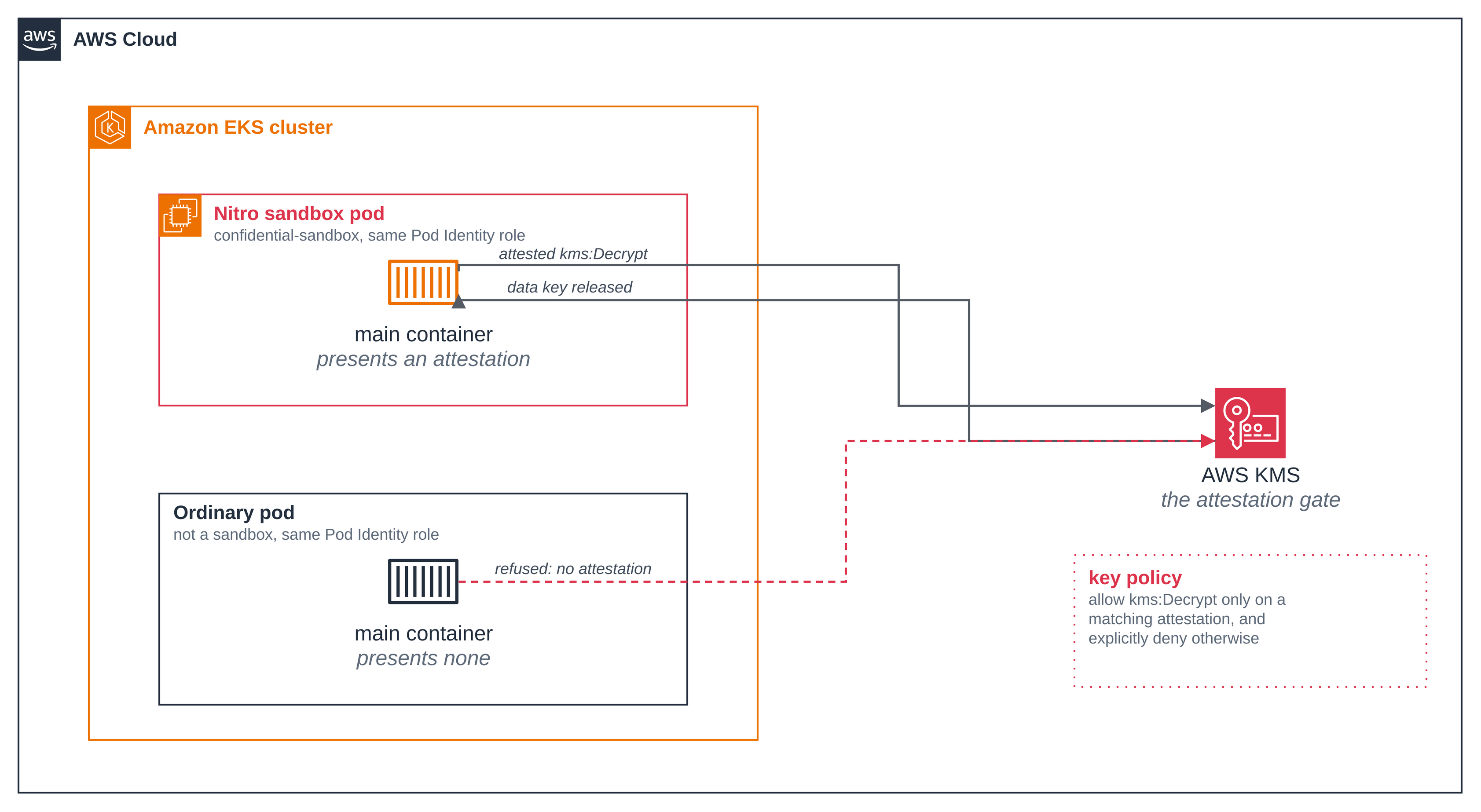
Step 9: Credentials alone are not enough. The last pod setup.sh runs is an ordinary
pod on the same service account, so EKS Pod Identity hands it the same IAM role. It reads the
same object, which the bucket policy permits, and then asks KMS to decrypt the same wrapped
data key. The only thing it does not have is an attestation document. In confidential mode
this stands for the node itself as much as for an operator: the parent instance can obtain
the same Pod Identity credentials the workload uses (Amazon EKS User Guide, Security model
and parent instance trust assumptions).
Figure 2: What AWS KMS will release the data key to. Both pods hold the same Pod Identity role and ask for the same thing; only the one that can present an attestation the key policy accepts gets an answer. The credential is not the boundary.
kubectl -n s3-encrypted-file-sample logs s3-encrypted-file-credentials -c main
role:    arn:aws:sts::<ACCOUNT_ID>:assumed-role/s3-encrypted-file-sample-pod/<session>
s3:      read 102416 bytes of ciphertext, sha256 128fec5b79b5e3986b3b5a61663cc913bb4c53151bb6c47a5187703e13e1b08d
request: kms:Decrypt on the file's wrapped data key, with no attestation document
exit:    254

An error occurred (AccessDeniedException) when calling the Decrypt operation: User: arn:aws:sts::<ACCOUNT_ID>:assumed-role/s3-encrypted-file-sample-pod/<session> is not authorized to perform: kms:Decrypt on resource: arn:aws:kms:us-west-2:<ACCOUNT_ID>:key/2fe74de7-aa4c-4020-b1a2-5e1f4372875f with an explicit deny in a resource-based policy
s3-encrypted-file-credentials-done
It read the same 102416 bytes of ciphertext the sandboxed pod read, by the same digest, and was then refused the data key by an explicit deny in the key policy. The pod itself replaces the account ID and the role session name before printing, which is why they appear here as placeholders.
setup.sh requires both halves: a pod that could not read the object would not show that
reading it is not enough, and a non-zero exit on its own is not enough either, because
throttling, a network failure and an expired credential all produce one. It looks for the
authorization wording that the attestation conditions, and only they, produce here.
Step 10: A changed spec is refused. The last part runs a second pod from the same image
with one pinned environment value changed, SAMPLE_VARIANT. The confidential profile pins
the container's environment, so the generated policy differs, its measurement differs, and
the gate setup.sh installed no longer matches. Nothing about the key policy is touched: it
stays bound to the approved pod's measurement, so this pod can never read the file, however
long it retries.
./scripts/changed-pod.sh
== 1/4 render the same pod with one pinned value changed ==
  SAMPLE_VARIANT=changed; the rest of the spec is unchanged
== 2/4 generate the policy for the changed pod ==
--- Predicted PCR17 ---
9fda03eb071ec3b691e2aa4482059b485536e587753c5381345aa5563ed7b3b892770eb82e1e75f84749739649885964
  approved PCR17: 4274742b571865293d96d2fabc2d7d042d5fdf198227eed16154a9c6a35296e51bcea1d34864875cb693e724d6c43fed
  changed  PCR17: 9fda03eb071ec3b691e2aa4482059b485536e587753c5381345aa5563ed7b3b892770eb82e1e75f84749739649885964
== 3/4 confirm the gate still expects the approved measurement ==
  the gate is bound to the approved measurement, unchanged
== 4/4 start the changed pod and wait for the refusal ==
pod/s3-encrypted-file-changed created
NAME                        READY   STATUS   RESTARTS   AGE
s3-encrypted-file-changed   0/1     Error    0          13s

variant: changed
kernel:  6.18.54 #1 SMP PREEMPT_DYNAMIC Thu Oct 22 17:38:11 UTC 2026
uptime:  4.66s
disks:   dm-0 dm-1 dm-2 loop0 loop1 loop2 loop3 loop4 loop5 loop6 loop7 vda vdb vdc
product: m8i.enclave
manifest: version=1 algorithm=AES-256-GCM wrapped_data_key=184B nonce=12B
s3:      read 102416 bytes of ciphertext sha256=128fec5b79b5e3986b3b5a61663cc913bb4c53151bb6c47a5187703e13e1b08d
attested-s3-error: ClientError: An error occurred (AccessDeniedException) when calling the Decrypt operation: User: arn:aws:sts::<ACCOUNT_ID>:assumed-role/s3-encrypted-file-sample-pod/<session> is not authorized to perform: kms:Decrypt on resource: arn:aws:kms:us-west-2:<ACCOUNT_ID>:key/2fe74de7-aa4c-4020-b1a2-5e1f4372875f with an explicit deny in a resource-based policy

The changed pod was refused the data key by KMS and could not read the file.
Delete it before you finish with the sample:  ./scripts/changed-pod.sh --delete
Abridged: the generator's own policy output is cut from step 2 of 4. The two measurements differ in the first character onward, from one changed environment value. The pod followed the same path as the approved pod as far as reading the same ciphertext, by the same digest, and then stopped at the decrypt with the same explicit deny the credentials pod got. It never received the data key, so it decrypted nothing, validated nothing and printed no marker.
The script checks the changed pod differs from the approved one in nothing but that one value, that its predicted measurement really is different, and that the live key policy is still the approved gate, before it starts the pod at all. Delete it when you have finished looking at it:
./scripts/changed-pod.sh --delete
Good to know
- The gate is the two conditions the generator emits. They are also the minimum the
Amazon EKS User Guide, Security model and parent instance trust assumptions, asks for on
a KMS key that protects confidential workload data.
PCR17binds key release to this exact policy document, and so to the image digest, the environment, the identity and the mounts it pins.PCR8:ServiceNameis the condition on the system image signing certificate, used rather than a rawPCR8value so that it stays valid when AWS rotates that certificate. The Confidential section page sets this out in full. - One file, read into memory in one piece. The application reads the whole object and
decrypts it in one AES-GCM operation, which is what lets it authenticate the file as a
whole. A file too large for the pod's memory needs an authenticated streaming or chunked
format, and this blueprint does not implement one. The pod therefore sets requests, where most
blueprints here set none: the application imports
boto3andcryptography, generates a 4096-bit RSA key for the attestation document, and holds the file in memory, which does not fit the small default VM. It sets requests only and no limits, because a sandbox is sized from its requests. - The pod is hardened beyond the runtime class. It mounts no Kubernetes service account
token, runs as a numeric non-root user with
runAsNonRoot, drops all capabilities, takes theRuntimeDefaultseccomp profile and has a read-only root filesystem. Those are also the values the generated Cedar policy pins, so the measurement changes if any of them does. - The bucket uses SSE-S3, not this blueprint's KMS key. Server-side encryption with the
blueprint's own key would mean S3 calling
kms:Decryptitself to serve the object, and S3 has no attestation document, so the gate would refuse it and nobody could read the object at all. The confidentiality here comes from the application encryption; the bucket's default encryption is the at-rest default every object in it gets as well. - The additional authenticated data binds the ciphertext to its location. It is
s3://<bucket>/<object key>, derived inside the guest from pinned environment values rather than read from the manifest. The same bytes copied to another key, or another bucket, no longer decrypt. An operator who moves the object and repoints the pod at it changes the pinned environment, so the measurement changes and the data key is not released either. - A pod can come up before its datapath is ready. On a busy cluster a new pod can take a
few seconds to reach anything outside the node, and a request that never reached AWS is no
evidence either way about the key policy. The credentials pod waits before it asks, retries
its request, and
setup.shstarts it up to three times, treating "no answer from KMS" as no evidence rather than as a denial. - A new IAM role is not immediately visible to KMS.
kms:PutKeyPolicyrefuses a policy naming a role AWS has only just created, with "one or more invalid principals". It is an ordinary propagation delay;setup.shretries on that error and on no other, which is the "waiting for the new IAM role to be visible to KMS" line. - The image tag carries a digest of the sources. The tag is
v1-<first 12 of a digest of
  the Dockerfile, the requirements and the three Python files>
, so a change to the application or to the shared attested recipient publishes a new reference rather than reusing a stale one under a tag the repository will not let it overwrite. - A reduced generator profile on the preview guest. The shared profile pins the container
admission fields and denies exec and stdin, but omits the two the current preview guest's
policy schema does not define: the OCI hardening attributes are not pinned, and the policy
does not assert the encrypted ephemeral layer. The runtime class still gives the pod an
encrypted overlay, as the
dm-devices in step 7 show; the policy just does not assert it. - An attestation document names the instance. It carries a module identifier built from the EC2 instance id, so anyone who receives one can tell which instance the sandbox ran on. Do not treat placement as confidential if you share attestation documents with third parties (Amazon EKS User Guide, Security model and parent instance trust assumptions).
- The pods redact their own output, and the page shows the result.
<ACCOUNT_ID>and<session>in the blocks above are not this page editing a log: the application and the credentials pod each replace them before printing. An AWS error names the full role session, and an EKS Pod Identity session name is built from the cluster and the pod names, so an unredacted denial would carry the account and the cluster into a log that anyone who can read the pod can read. The application catches every exception on one path and passes the whole report, type name and frames included, through that replacement before printing it, rather than listing the exception types it expects: a type that was not on such a list used to leave as an unhandled traceback, which never reached the replacement at all. The account id is matched only where an account id appears, between the colons of an ARN or before.dkr.ecr., because a bare twelve-digit pattern also matches twelve digits inside a SHA-256 and this application prints digests. - The workload is outside the confidentiality boundary. Confidential mode keeps the node from reading the plaintext. It does nothing about what the application does with it once it has it: this one validates it by length and digest and prints neither the file nor the data key, but that is the application's choice, not something the runtime enforces. See the Confidential section page.
- The shared profile permits instance metadata.
_shared/confidential-profile.yamlsetsimds: allow, so the Cedar policy does not stand in the way of the metadata service. The image setsAWS_EC2_METADATA_DISABLED=true, so the SDK in this pod does not fall back to it, and the metadata service holds no role in any case: itsiam/paths return 404 for a pod whose credentials come from EKS Pod Identity. If you want the sandbox unable to reach it at all, that is what a network policy does, and the network policy blueprint shows how.
Clean up
Set the variables again in a new shell if needed, then remove everything:
cd sample-eks-nitro-sandbox/examples/confidential/s3-encrypted-file
./scripts/changed-pod.sh --delete    # if you ran step 10 and have not removed it
./scripts/clean.sh
Cleaning up in context <your-context>, Region us-west-2, namespace s3-encrypted-file-sample.
Deleting pod s3-encrypted-file-sample/s3-encrypted-file-changed...
Deleting pod s3-encrypted-file-sample/s3-encrypted-file-credentials...
pod "s3-encrypted-file-credentials" deleted from s3-encrypted-file-sample namespace
Deleting pod s3-encrypted-file-sample/s3-encrypted-file-plain...
pod "s3-encrypted-file-plain" deleted from s3-encrypted-file-sample namespace
Deleting pod s3-encrypted-file-sample/s3-encrypted-file-demo...
pod "s3-encrypted-file-demo" deleted from s3-encrypted-file-sample namespace
serviceaccount "s3-encrypted-file-pod" deleted from s3-encrypted-file-sample namespace
Deleting namespace s3-encrypted-file-sample (carries app.kubernetes.io/managed-by=s3-encrypted-file)...
namespace "s3-encrypted-file-sample" deleted
Deleting Pod Identity association a-vrlasehkuzkpmdez3...
Deleting IAM role s3-encrypted-file-sample-pod...
Deleting ECR repository s3-encrypted-file-sample and the image in it...
Emptying S3 bucket <S3_BUCKET> (carries ManagedBy=s3-encrypted-file)...
  deleting 2 object version(s)...
Deleting S3 bucket <S3_BUCKET>...
Deleting the alias alias/s3-encrypted-file-sample...
Scheduling the KMS key 2fe74de7-aa4c-4020-b1a2-5e1f4372875f for deletion in 7 days (the shortest AWS allows)...
arn:aws:kms:us-west-2:<ACCOUNT_ID>:key/2fe74de7-aa4c-4020-b1a2-5e1f4372875f 2026-11-02T14:33:47.590000+00:00
Deleting the run files under .../tmp/s3-encrypted-file, including the plaintext file...

Clean up complete. The KMS key is scheduled, not yet destroyed; AWS removes it after its waiting period.
The first changed-pod line has no "deleted" line under it because that pod had already been
removed with ./scripts/changed-pod.sh --delete. The account ID, the kube context and the
bucket name are replaced as above, and the local path is shortened.
clean.sh removes all five AWS resources, each only after reading that resource's own tags
and finding ManagedBy=s3-encrypted-file on it; a resource without the tag is left alone and
the clean up reports itself incomplete. That check matters most for the bucket: emptying one
deletes its objects, and their versions, and there is no undoing it. It deletes objects inside
the namespace only after confirming the namespace carries this blueprint's label, and each pod by
its exact name rather than by a label selector. A lookup that cannot run counts as a failure,
never as "already gone", and the script exits non-zero if anything was left behind.
It opens by naming the context, the Region and the namespace it is about to act on, and it
stops if AWS_REGION is not set rather than letting the AWS CLI pick one up from your ambient
configuration: an ecr or kms lookup in the wrong Region comes back with that service's own
not-found exception, which would otherwise be reported as "already gone" while the resource is
still there in the Region the run used. The run files under the repository's tmp/, which
include the plaintext file, are removed only when there is nothing to come back for.
Two things it does not do. The KMS key is scheduled, not destroyed: AWS enforces a waiting
period of at least 7 days and there is no way to remove a key sooner. And the S3 bucket name
stays unavailable for a while after the bucket is deleted, so a later run may need a new
S3_BUCKET.
To keep the AWS resources for another run:
./scripts/clean.sh --keep-aws-resources
To remove the cluster, follow the hello sandbox clean up.