A procurement analyst whose tools are confined by bubblewrap
A procurement analyst compares three supplier proposals and writes a recommendation that
cites all three. It does that work through three tool processes, each started by a trusted
controller with bwrap, bubblewrap's
command-line program, inside one Nitro sandbox. Each tool process gets its own set of
namespaces, a short list of mounts and nothing else: it reads its assigned file and cannot
see a sibling's, it has no network at all, and the supplier key and the AWS credentials are
not in its mount list. The trusted controller makes every supplier and AWS call itself.
Before you start, review the prerequisites and shared setup on the home page and the Subagent security section page, which describes the analyst, the case and the files this blueprint shares with the other two. Run these blueprints first, which this one builds on and which it does not re-explain:
- Getting started > Hello sandbox: the one-line opt-in, and how a pod shows that it ran in a sandbox.
- Getting started > Coding agent: Amazon Bedrock through EKS Pod Identity.
- AI agents > Claude Managed Agents:
a sandboxed pod with
automountServiceAccountToken: false, and credentials shown by variable name and never by value.
The commands below use files from this repository, so clone it if you have not already, and run them from this blueprint's folder:
git clone https://github.com/aws-samples/sample-eks-nitro-sandbox.git
cd sample-eks-nitro-sandbox/examples/subagent-security/bubblewrap
For this blueprint you also need aws,
kubectl,
docker,
jq, openssl and python3 on your machine, and an Amazon Bedrock
inference profile your account can invoke. The scripts build and push two small images to
Amazon ECR, and one of those builds bubblewrap from source, so the first build takes a
minute or two longer than a plain image. A run costs one Bedrock turn, a few small Amazon S3
objects, and one sandboxed pod plus one small ordinary pod kept running until you clean up.
Every output block on this page is from one real run of this blueprint, run id
0eb808c7a8244688b2ceb854d71ed07a. Values from the account and cluster it ran on are
replaced by the same placeholders the commands use, because this repository is public:
<ACCOUNT_ID>, <CLUSTER_NAME> and <NODE_NAME>. The Region is left as us-west-2, the
default this repository's blueprints share. Run ids, pod names, kernel builds, uptimes, device
lists, inode numbers, namespace numbers, token counts and the model's own prose are exactly
as the run printed them. Where a block shows a file from this folder rather than a run's
output, it says so.
Overview
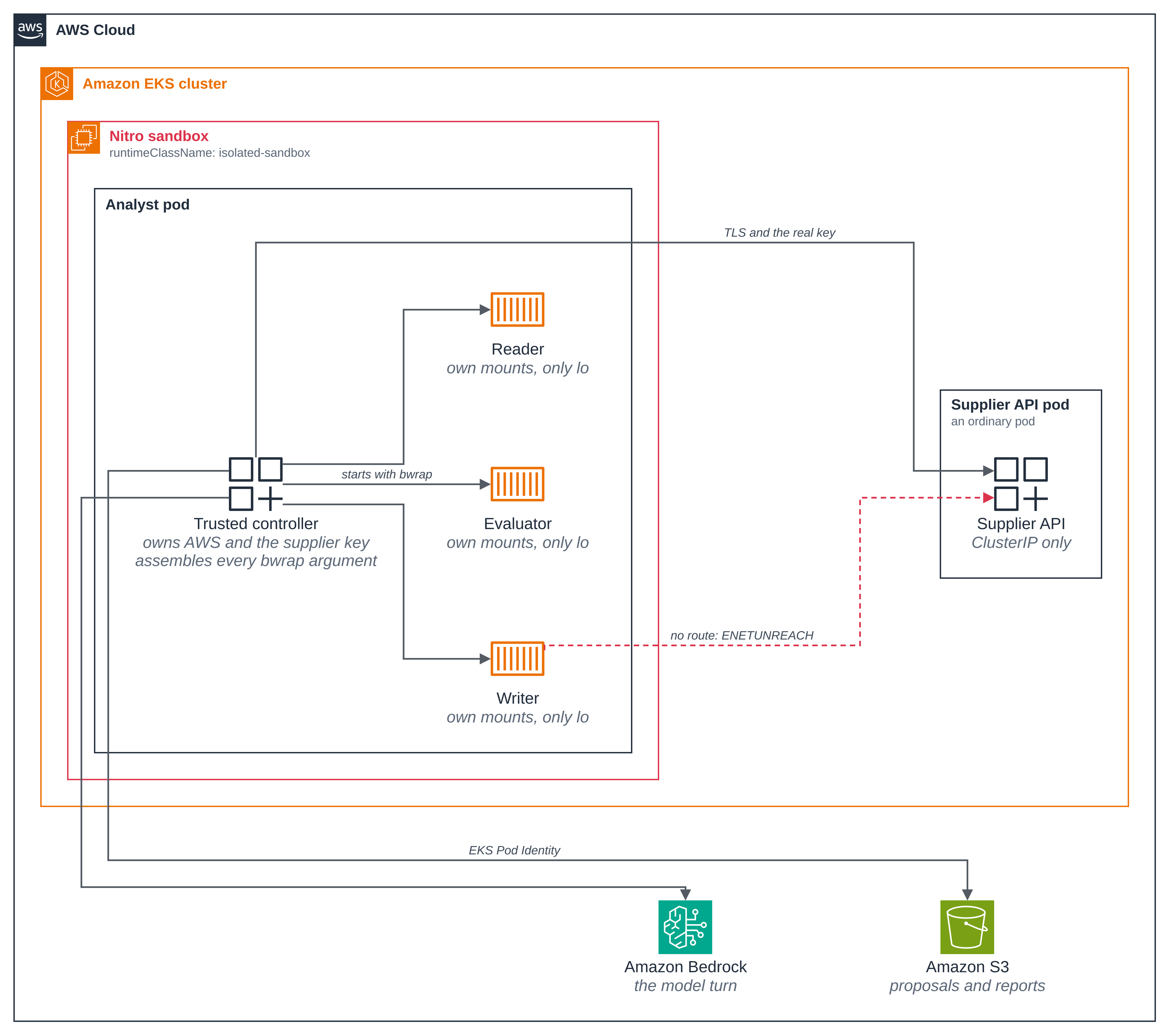
Two boundaries, doing different jobs. runtimeClassName: isolated-sandbox is the one
line that puts the whole pod in a Nitro sandbox: a hardware-isolated lightweight VM with its
own kernel, which its containers run in, and which is what separates this workload from the
node and from every other pod on it. bubblewrap is the boundary inside
that pod, between the trusted controller and the three tool processes it starts. Everything
bubblewrap governs, including the supplier key and the AWS credentials, sits inside the
sandbox.
- The boundary is an argument list, not a profile. bubblewrap has no configuration file,
no daemon and no proxy. The trusted controller builds the
bwrapargument list for each tool process: which paths to mount and in which direction, which namespaces to unshare, the UID to run as, the capabilities to drop, and a compiled seccomp filter to load. That list is the whole of the confinement policy, and this page shows it. - The tool roles are processes, not pods and not model sessions. The controller starts the reader, evaluator or writer for one action, hands it the facts it needs as a file, and reads one structured result. They share no writable directory.
- The tool processes have no network at all. Each one gets a private network namespace,
so
lois its only interface and it has no route to anywhere. That is what bubblewrap enforces here: not a hostname allowlist and not an HTTP filter, which it does not have. - So the trusted controller performs every external call. It holds the supplier key and calls the supplier API over TLS itself, and it reads the proposals from Amazon S3, calls Amazon Bedrock and saves the report with the pod's EKS Pod Identity credentials. The tool processes have no AWS role: neither the Pod Identity token file nor the supplier key file is in their mount list.
- The useful result is still checked. A deterministic comparison picks the supplier, the model explains it, and two gates check the model's own choice and its citations before the recommendation is accepted.
Figure 1: The two boundaries around the analyst. The Nitro sandbox holds the whole pod, including the supplier key and the AWS credentials; inside it, bubblewrap's boundary is the argument list the trusted controller assembles around each tool process it starts.
Versions
This folder was built against these releases. Pin each to its latest when you build.
| Component | Version |
|---|---|
| bubblewrap | 0.13.1, built from source in the Dockerfile at upstream commit 362936aea0d5c6e70f7af75d2d44b5a914cb4ba2, with no patches |
| libseccomp | the base image's libseccomp2 package, loaded through ctypes to compile the filters |
strands-agents |
1.62.0 |
boto3 |
1.43.118 |
pydantic |
2.14.1 |
| Python base image | 3.13 (public.ecr.aws/docker/library/python:3.13-slim) |
| busybox, for the comparison pod | 1.37.0 |
The build options are -Dman=disabled -Dtests=false -Dselinux=disabled
-Dbash_completion=disabled -Dzsh_completion=disabled, so the image carries the bwrap
executable and nothing else from the source tree. The commit is checked after the checkout
and the release tag is checked to point at it, so a tag moved upstream cannot change what
goes in the image. Both values are written into the image and the run reads them back.
The Python packages are locked with hashes in
../analyst/requirements.txt and installed with
pip --require-hashes, so a dependency that resolved to another version fails the build
rather than reaching the sandbox.
Files
Everything under ../analyst/ is shared with the other Subagent security
blueprints and listed on the section page. This blueprint adds:
| File | What it is |
|---|---|
Dockerfile |
The shared analyst plus bubblewrap, built from the pinned source |
src/controller.py |
The trusted controller: it owns AWS and the supplier key, and starts each tool process |
src/sandbox.py |
The launcher: the bwrap argument list, which is the whole confinement policy |
src/filters.py |
The seccomp filters the application compiles with libseccomp |
src/toolbox.py |
The program bubblewrap starts: the shared worker plus this blueprint's probes |
src/preflight.py |
Starts one tool process, so setup fails clearly on a guest that cannot run one |
deploy/analyst-pod.yaml |
The sandboxed pod, with the init container the guest needs |
deploy/ordinary-pod.yaml |
An ordinary pod on the same node, for the comparison in step 11 |
scripts/setup.sh |
Builds the images and creates everything the blueprint needs |
scripts/run.sh |
Runs one procurement case and copies its result out |
scripts/correlate.py |
Checks the run's record against the supplier API's own request log |
scripts/clean.sh |
Removes what this blueprint created, and says what stays |
.env.example |
The local values the blueprint needs; copy to .env, which git ignores |
What this blueprint does and does not bound
This matters before the steps, because the blueprint is about confinement and it would be easy to read more into it than it shows.
What bubblewrap bounds, and the run demonstrates: the three tool processes the controller starts. For each of them, which paths exist at all and in which direction they can be written, which namespaces it has, what UID it runs as, which capabilities it holds, whether it can build a further user namespace, which syscalls the application's filters refuse, and that it has no network.
What nothing in this blueprint bounds: the analyst pod's own egress. This blueprint ships no
network policy, so the pod, and the trusted controller inside it, which is under no bwrap
boundary, reaches whatever the cluster and the VPC allow. Every refusal on this page is
bubblewrap refusing a tool process; none of them is the pod being unable to reach
something. To restrict a sandbox's egress on the node, see
Isolation > Network policy, which is the blueprint
for that mechanism.
The two are worth keeping apart, and this blueprint is the clearest case of it: a tool process has no route to the supplier API at all, while the controller beside it reaches that same address and port in the same run. That pair is how the page's network refusal is attributable.
What this blueprint gives up to run bubblewrap at all, which the other sandboxed pods here
do not: the working container is privileged: true, because bwrap cannot mount a private
procfs in the guest without it. That rules out allowPrivilegeEscalation: false and it
leaves the container's own seccomp profile unconfined, and the run prints both facts about
the controller rather than glossing them. What the tool processes get instead is
bubblewrap's own doing, and the run reads it from /proc: UID 1000, an empty capability
bounding set, no_new_privs, and a seccomp filter. Step 5 has the detail.
Steps
Step 1: Set your local values. Copy the example file and fill in your cluster's name
and Region. .env is gitignored, so nothing from your own account or cluster ends up in a
tracked file.
cp .env.example .env && $EDITOR .env
This is .env.example as it is in the folder, not a run's output:
# Copy this file to .env and fill it in. .env is gitignored: nothing from your own
# account or cluster belongs in a tracked file.
#
#   cp .env.example .env && $EDITOR .env

# Your cluster's name, and the Region it is in.
CLUSTER_NAME=
AWS_REGION=us-west-2

# The kube context to pin every kubectl call to. Leave it empty to use the current
# context. Set it on a shared machine, where another session can change the current one
# in the middle of a run.
KUBE_CONTEXT=

# The namespace this sample creates and owns. Change it to run this sample twice, or
# beside another demo; it reaches every object the scripts apply.
NAMESPACE=subagent-security-bubblewrap

# The Amazon Bedrock inference profile the analyst's model turn uses. The run on the page
# used this one.
BEDROCK_MODEL_ID=global.anthropic.claude-sonnet-4-5-20250929-v1:0

# Optional. Left empty, setup.sh names the bucket and the role for this sample and your
# account id. Set them to run a second copy beside the first.
# BUCKET=
# ROLE_NAME=
Step 2: Build the images and create everything the blueprint needs. One script, seven stages. It checks the cluster before it creates anything, builds and pushes the supplier API image and the analyst image, seeds the proposals into a new S3 bucket, creates the IAM role and its Pod Identity association, starts the sandboxed pod, and then starts one real tool process in it. It creates nothing outside this blueprint's own namespace and changes no cluster-wide setting.
./scripts/setup.sh
Abridged: the two image builds' own output and docker's credential-store warning are cut, and your names will differ.
==> 1/7 tools, cluster and cluster-wide settings
  account:  <ACCOUNT_ID>
  region:   us-west-2
  context:  <CLUSTER_NAME>
  model:    global.anthropic.claude-sonnet-4-5-20250929-v1:0

==> 2/7 namespace subagent-security-bubblewrap and the analyst ServiceAccount
namespace/subagent-security-bubblewrap created
serviceaccount/analyst created

==> 3/7 the supplier API key and its sample certificate authority
secret/supplier-key created
  created the supplier-key Secret
secret/supplier-tls created
configmap/supplier-ca created
  created a 30-day sample certificate authority and the supplier-tls Secret

==> 4/7 the synthetic supplier API
  created the ECR repository pod-isolation/subagent-analyst-bubblewrap-supplier-api
  built and pushed pod-isolation/subagent-analyst-bubblewrap-supplier-api:6477c8d7c039259448ff
service/supplier-api created
service/supplier-api-alias created
deployment.apps/supplier-api created
Waiting for deployment "supplier-api" rollout to finish: 0 of 1 updated replicas are available...
deployment "supplier-api" successfully rolled out

==> 5/7 the S3 bucket and the proposals
  created the bucket subagent-analyst-bubblewrap-<ACCOUNT_ID>
  seeded the case, 3 proposals and one other case's object

==> 6/7 the IAM role and its EKS Pod Identity association
  created the IAM role subagent-analyst-bubblewrap
  created the Pod Identity association a-ii5fm9m9dhqcylvdq

==> 7/7 the bubblewrap analyst image and its sandboxed pod
  created the ECR repository pod-isolation/subagent-analyst-bubblewrap
  built and pushed pod-isolation/subagent-analyst-bubblewrap:34ac654e944cad3fd2c9
pod/analyst created
pod/analyst condition met
{
  "bubblewrap": {
    "reported": "bubblewrap 0.13.1",
    "pinned_version": "0.13.1",
    "source_commit": "362936aea0d5c6e70f7af75d2d44b5a914cb4ba2"
  },
  "max_user_namespaces": 128,
  "child_uid": 1000,
  "child_gid": 1000,
  "child_cap_eff": "0000000000000000",
  "child_no_new_privs": "1",
  "child_interfaces": [
    "lo"
  ]
}

==> ready
  namespace:  subagent-security-bubblewrap
  bucket:     subagent-analyst-bubblewrap-<ACCOUNT_ID>
  role:       subagent-analyst-bubblewrap
  model:      global.anthropic.claude-sonnet-4-5-20250929-v1:0
  run record: /path/to/sample-eks-nitro-sandbox/tmp/bubblewrap/state.env

Run one procurement case:
  ./scripts/run.sh
The last stage is the one worth reading. bubblewrap needs two things from the Nitro guest that are not there by default, and a guest that cannot provide them fails here rather than in the middle of a run. Step 5 says what those two things are.
The run record under the repository's tmp/ is what run.sh and clean.sh read, so
neither needs anything set again.
Step 3: Run one procurement case. The controller runs in the sandbox and prints every check as it reaches it. Each run gets a fresh id and its own directories inside the pod, so one run cannot read or resume another's.
./scripts/run.sh
Every line the run printed, in order. The run id, the inode and namespace numbers, the token count and the model's prose will differ.
==> running one procurement case in the sandbox
PASS bwrap reports the pinned version: bubblewrap 0.13.1
PASS the image records the upstream source commit bwrap was built from: 362936aea0d5c6e70f7af75d2d44b5a914cb4ba2
PASS the guest allows user namespaces: /proc/sys/user/max_user_namespaces is 128
PASS the trusted controller runs as UID/GID 1000
PASS the trusted controller has no capability it can use (CapEff 0000000000000000, CapPrm 0000000000000000); the privileged container's other readings are CapBnd 000001ffffffffff, NoNewPrivs 0 and Seccomp 0
PASS the tool process runs as UID/GID 1000, mapped alone in its own user namespace: uid_map 1000 0 1
PASS the tool process has no capabilities at all: CapInh 0000000000000000, CapPrm 0000000000000000, CapEff 0000000000000000, CapBnd 0000000000000000, CapAmb 0000000000000000 are all empty
PASS the tool process cannot gain privilege through exec: NoNewPrivs is 1
PASS the tool process runs under one seccomp filter, the baseline this application compiled: Seccomp mode 2, Seccomp_filters 1
PASS the tool process has its own user namespace
PASS the tool process has its own pid namespace
PASS the tool process has its own net namespace
PASS the tool process has its own ipc namespace
PASS the tool process has its own uts namespace
PASS the tool process has its own mnt namespace
PASS the tool process has its own hostname, bubblewrap-analyst
PASS the tool process's whole mount list is ['/', '/dev', '/dev/full', '/dev/null', '/dev/pts', '/dev/random', '/dev/tty', '/dev/urandom', '/dev/zero', '/input', '/opt/analyst', '/opt/bubblewrap', '/output', '/proc', '/tmp', '/usr'], and neither the supplier key's directory, nor the Pod Identity token's, nor /var/run/secrets is in it
PASS the tool process's whole environment is ['HOME', 'LANG', 'PATH', 'PWD', 'PYTHONDONTWRITEBYTECODE', 'PYTHONPATH']
PASS so the tool process holds no AWS variable and no model API key
PASS the AWS SDK uses the Pod Identity container credential provider
PASS the caller is this sample's Pod Identity role
PASS no model API key is in the sandbox: ANTHROPIC_API_KEY, OPENAI_API_KEY, BEDROCK_API_KEY, AWS_BEARER_TOKEN_BEDROCK are all absent
PASS the S3 proposal matches the case entry for northstar
PASS the S3 proposal matches the case entry for harbor
PASS the S3 proposal matches the case entry for cedar
PASS the image's fixtures match the objects in S3
PASS IAM returns AccessDenied for overwriting a source proposal
PASS IAM returns AccessDenied for deleting a source proposal
PASS IAM returns AccessDenied for reading another case's object
PASS the reader reads its assigned case at /input/case.json
PASS the reader's own read probe opens the same file
PASS and /input/case.json is the controller's own file, device 64786 inode 8388785
PASS the controller may write that same file at the same UID, and left it unchanged
PASS so the reader's write is refused by the read-only bind mount, not by a file mode: EROFS
PASS the controller opens the writer's private file at the same UID
PASS so the writer's private file is absent from the reader's mount list, not merely unreadable: ENOENT
PASS the controller opens the supplier key file at the same UID
PASS so the supplier key file is absent from the reader's mount list, not merely unreadable: ENOENT
PASS the controller opens the Pod Identity token file at the same UID
PASS so the Pod Identity token file is absent from the reader's mount list, not merely unreadable: ENOENT
PASS the writer writes its own output directory
PASS and the controller reads back what the writer wrote
PASS a further user namespace succeeds in a child started without --disable-userns
PASS so --disable-userns is what refuses a further user namespace: ENOSPC
PASS getppid succeeds under the baseline filter alone
PASS uname succeeds under the baseline filter alone
PASS three seccomp filters are loaded in the child: the baseline and the two this run added, Seccomp_filters 3
PASS and with both added, getppid returns EPERM
PASS and with both added, uname returns EPERM
PASS the controller reaches the supplier API's own address and port
PASS the reader's interface list is loopback alone: ['lo']
PASS so the reader has no route to that same address: ENETUNREACH
PASS the evaluator's interface list is loopback alone: ['lo']
PASS so the evaluator has no route to that same address: ENETUNREACH
PASS the writer's interface list is loopback alone: ['lo']
PASS so the writer has no route to that same address: ENETUNREACH
PASS the supplier API answers the controller's authenticated read with 200
PASS the supplier API refuses an invalid key with 401
PASS the availability staged for the evaluator holds the case's own supplier ids and one boolean each: ['cedar', 'harbor', 'northstar']
PASS the offline comparison names the one supplier that meets every requirement
PASS the controller's own comparison agrees with the evaluator's
PASS the writer saves the comparison in its own output directory
PASS the controller submits the writer's draft, which the supplier API accepts with 201
PASS the model called the evidence tool
PASS Bedrock returned a real turn with nonzero token usage
PASS the model's own choice matches the verified comparison
PASS the model's analysis cites all three proposals
PASS the choice gate rejects an answer naming an ineligible supplier
PASS the choice gate rejects an answer that names the supplier only in its prose
PASS the citation gate rejects an answer missing one source key
PASS the report object round-trips through S3: recommendation.md
PASS the report object round-trips through S3: comparison.json
PASS the evidence and the report were scanned for the supplier key before being written, and the run was stopped if it appeared
PASS and so was every one of the 10 files left in the pod for this run, read off the disk after the last write: calls.json, checks.json, evaluator/in/facts.json, evidence.json, reader/in/case.json, recommendation.md, writer/in/comparison.json, writer/in/private.json, writer/out/comparison.json, writer/out/draft.txt
ANALYST_COMPLETE=0eb808c7a8244688b2ceb854d71ed07a
74 checks passed
  bubblewrap 0.13.1, source commit 362936aea0d5c6e70f7af75d2d44b5a914cb4ba2
  model usage: 2637 tokens on global.anthropic.claude-sonnet-4-5-20250929-v1:0
  2 authenticated requests correlated with the supplier API's own log, each arriving once, and no other request from this run
==> done
  run id:         0eb808c7a8244688b2ceb854d71ed07a
  recommendation: /path/to/sample-eks-nitro-sandbox/tmp/bubblewrap/runs/0eb808c7a8244688b2ceb854d71ed07a/recommendation.md
  evidence:       /path/to/sample-eks-nitro-sandbox/tmp/bubblewrap/runs/0eb808c7a8244688b2ceb854d71ed07a/evidence.json
  S3 report:      s3://subagent-analyst-bubblewrap-<ACCOUNT_ID>/reports/rfp-001/0eb808c7a8244688b2ceb854d71ed07a/
The order is deliberate: the layer first, then what it made of a tool process, and only then
AWS and the business work. A guest that cannot start a bwrap child fails on the third line
rather than after a page of checks that would have passed anywhere.
The last line before "done" is the cross-check in
scripts/correlate.py, which reads the supplier API's own request
log out of its pod and compares it with the run's record. In this blueprint no tool process
makes a supplier call, because none of them has a network, so what the comparison
establishes is the other half of that claim: the only requests the server saw for this run
are the trusted controller's own, each arriving exactly once. An empty log would satisfy
that on its own, so it also requires the run to have contained both a successful read and an
accepted draft submission.
Step 4: Read the recommendation. The analyst's output is a Markdown report naming one
supplier and citing all three proposals, saved to Amazon S3 and copied out to the
repository's tmp/.
cat ../../../tmp/bubblewrap/runs/<RUN_ID>/recommendation.md
# Procurement recommendation

**Case:** rfp-001, equipping a new customer service office with 100 workstations

**Recommended supplier:** Northstar Office Systems (`northstar`)

## Procurement Analysis: 100 Workstations for Customer Service Office

### Requirements
- **Budget:** $125,000 USD
- **Delivery:** Within 30 days
- **Warranty:** Minimum 24 months

### Supplier Comparison

| Supplier | Price | Delivery | Warranty | Status |
|----------|-------|----------|----------|--------|
| **Northstar Office Systems** | $120,000 | 28 days | 36 months | ✅ Eligible |
| Harbor Supply Partners | $105,000 | 45 days | 24 months | ❌ Late delivery |
| Cedar Workplace Group | $130,000 | 21 days | 36 months | ❌ Over budget |

### Analysis

**Northstar Office Systems** (`proposals/rfp-001/northstar.json`) is the only eligible supplier, meeting all three requirements:
- Under budget by $5,000 (96% of budget)
- Delivers within timeline (28 of 30 days allowed)
- Exceeds warranty minimum with 36 months coverage

**Harbor Supply Partners** (`proposals/rfp-001/harbor.json`) offers the lowest price at $105,000 but fails the delivery requirement with 45 days, exceeding the 30-day maximum by 15 days.

**Cedar Workplace Group** (`proposals/rfp-001/cedar.json`) provides the fastest delivery at 21 days and strong 36-month warranty but exceeds the budget by $5,000.

### Recommendation

Award to **Northstar Office Systems** as the sole compliant bidder offering excellent value with extended warranty coverage while staying under budget and meeting delivery requirements.
Everything from the second heading down is the model's own prose, and it cites all three
proposal keys. The two lines above it are rendered by the blueprint from the checked
recommended_supplier field, not from the prose, so the headline and the gate always read
the same value. Harbor is the cheapest bid and loses on delivery; Cedar is the fastest and
is over budget.
Step 5: What the guest has to allow, and what it does not reach. bubblewrap builds its
boundary out of Linux namespaces, and an unprivileged process can only create one if it can
create a user namespace first. Inside a Nitro sandbox guest, user.max_user_namespaces
starts at zero, so bwrap fails with ENOSPC. A pod-level sysctl is refused by the
kubelet as SysctlForbidden, so the pod raises it with a short root init container instead,
which writes the guest's own kernel setting and exits. That is a setting in the VM that
belongs to this pod; it is not a node setting, and no other pod on the node is affected.
The init container alone is not enough. bwrap also mounts a private procfs for its child's
PID namespace, and the ordinary container procfs masks refuse that with EPERM, so the
working container runs privileged too. Here are the two parts of
deploy/analyst-pod.yaml that carry those settings, trimmed
from the file in the folder rather than taken from a run:
spec:
  runtimeClassName: isolated-sandbox
  securityContext:
    runAsNonRoot: true
    runAsUser: 1000
    runAsGroup: 1000
    fsGroup: 1000
  initContainers:
    - name: enable-guest-userns
      image: <ANALYST_IMAGE>
      command:
        - sh
        - -ec
        - |
          echo 128 > /proc/sys/user/max_user_namespaces
          test "$(cat /proc/sys/user/max_user_namespaces)" = 128
      securityContext:
        privileged: true
        runAsUser: 0
        runAsGroup: 0
        runAsNonRoot: false
  containers:
    - name: analyst
      image: <ANALYST_IMAGE>
      securityContext:
        privileged: true
Both privileges reach the guest's own kernel and stop there: the guest is the lightweight VM that holds this pod's containers, and the node's kernel is on the other side of the Nitro boundary. That is the point of the pairing on this page. It is also a real cost, and the run prints it rather than leaving it implied. These lines are from the step 3 output:
PASS bwrap reports the pinned version: bubblewrap 0.13.1
PASS the image records the upstream source commit bwrap was built from: 362936aea0d5c6e70f7af75d2d44b5a914cb4ba2
PASS the guest allows user namespaces: /proc/sys/user/max_user_namespaces is 128
PASS the trusted controller runs as UID/GID 1000
PASS the trusted controller has no capability it can use (CapEff 0000000000000000, CapPrm 0000000000000000); the privileged container's other readings are CapBnd 000001ffffffffff, NoNewPrivs 0 and Seccomp 0
The controller is a process in a privileged container and still has no capability it can
use: a non-root exec starts with an empty permitted set, so CapPrm and CapEff are
both zero. The three readings after that are the cost, and the run reports them rather
than asserting them.
CapBndis everything. The bounding set limits the capabilities this process and its descendants can gain from file privilege during an exec; it says nothing about what the process holds now, which is why the run reads the sets separately rather than one off the other. What it means here is that although the controller holds nothing, a setuid binary in the image could put a capability into play, the more so becauseNoNewPrivsis- The tool processes have no such opening:
--cap-drop ALLempties their bounding set too, which the next block shows. NoNewPrivsis 0.privileged: truecannot be combined withallowPrivilegeEscalation: false, which is the setting that would raise it.Seccompis 0, so no filter applies to the controller. This pod does not setseccompProfile, because a privileged container does not get the container runtime's default profile even when the pod asks for one.
The tool processes do have both, and that is bubblewrap's doing rather than the pod's:
PASS the tool process runs as UID/GID 1000, mapped alone in its own user namespace: uid_map 1000 0 1
PASS the tool process has no capabilities at all: CapInh 0000000000000000, CapPrm 0000000000000000, CapEff 0000000000000000, CapBnd 0000000000000000, CapAmb 0000000000000000 are all empty
PASS the tool process cannot gain privilege through exec: NoNewPrivs is 1
PASS the tool process runs under one seccomp filter, the baseline this application compiled: Seccomp mode 2, Seccomp_filters 1
uid_map 1000 0 1 is the single-identity mapping bwrap sets up: one UID is mapped, and
it is 1000. All five capability sets are read, and all five are empty. That matters because
they say different things: CapEff is what the process can use now; CapPrm what it may
move into CapEff; CapInh is eligible to contribute across an exec when the executable's
own file capabilities permit it; CapAmb is the set preserved across an ordinary,
unprivileged exec; and CapBnd limits the capabilities this process and its descendants
can gain from file privilege during an exec. An empty CapBnd beside a non-empty CapPrm
would be a coherent state, so "no capabilities at all" is only true if each set is checked,
and the run checks each one.
Step 6: Look at the argument list, which is the whole policy. bubblewrap reads no
configuration file. src/sandbox.py assembles the switches for one tool
process, and nothing in that list comes from a model, from a supplier document or from a
tool's own output. Here is the function from the folder, in full:
def command(workspace, *, extra=(), disable_userns=True):
    """The argument list for one tool process, bar the file descriptors and the action.

    workspace is the role's own directory: its `in` becomes /input read-only and its
    `out` becomes /output read-write. disable_userns is a parameter because the page
    needs the control case: the same call with the two --*-userns switches left out, to
    show that what refuses a nested user namespace is those switches and not the kernel.
    """
    workspace = Path(workspace)
    arguments = ["bwrap", *(f"--unshare-{name}" for name in NAMESPACES)]
    if disable_userns:
        # --disable-userns sets the child's own user-namespace limit to zero, so the tool
        # cannot build a further namespace to work from. --assert-userns-disabled makes
        # bwrap fail rather than continue if it could not do that.
        arguments += ["--disable-userns", "--assert-userns-disabled"]
    arguments += [
        "--uid", "1000", "--gid", "1000",
        # Drops the capability bounding set, not only the effective set, so no exec in
        # the child can gain one back. bwrap also sets no_new_privs.
        "--cap-drop", "ALL",
        "--new-session", "--die-with-parent", "--hostname", HOSTNAME,
        "--clearenv",
    ]
    for name, value in CHILD_ENVIRONMENT:
        arguments += ["--setenv", name, value]
    arguments += [
        # The interpreter and its libraries, read-only. /usr/local is inside /usr, which
        # is where the base image keeps python3.
        "--ro-bind", "/usr", "/usr",
        "--symlink", "usr/bin", "/bin", "--symlink", "usr/sbin", "/sbin",
        "--symlink", "usr/lib", "/lib", "--symlink", "usr/lib64", "/lib64",
        "--ro-bind", str(ANALYST_CODE), str(ANALYST_CODE),
        "--ro-bind", str(LAYER_CODE), str(LAYER_CODE),
        # A procfs for this child's own PID namespace, and a minimal /dev. The private
        # procfs is why the child cannot read another process's /proc entries.
        "--proc", "/proc", "--dev", "/dev",
        "--dir", CHILD_HOME,
        # --perms and --size apply to the operation that follows them.
        "--perms", "0700", "--size", str(TMPFS_BYTES), "--tmpfs", "/tmp",
        "--ro-bind", str(workspace / "in"), "/input",
        "--bind", str(workspace / "out"), "/output",
        "--chdir", "/output",
    ]
    return arguments + list(extra)
Three choices in it are worth saying out loud.
--unshare-allis not used. It is the best-effort form: a namespace the kernel will not give it is skipped and the child runs anyway. Each namespace this blueprint claims is named one at a time, so a kernel that refuses one fails the call instead.- The mounts are named one at a time too. There is no "bind everything and then
exclude". The child's filesystem starts empty, and it holds exactly what the list puts
there, which is why step 7's refusals are
ENOENT. - The three roles differ only in their workspace.
--ro-bind <role>/in /inputand--bind <role>/out /outputare the per-role part. Everything else, the namespaces included, is identical for the reader, the evaluator and the writer, because none of them is given a network to differ about.
The run reads back what that list produced. Six namespaces, one of them the mount
namespace bwrap always makes, each compared with the controller's own and found to be a
different one; a hostname of its own, because uts is unshared; and an environment that is
exactly the five names the list sets plus the PWD bwrap fills in from --chdir. These
lines are from the step 3 output:
PASS the tool process has its own user namespace
PASS the tool process has its own pid namespace
PASS the tool process has its own net namespace
PASS the tool process has its own ipc namespace
PASS the tool process has its own uts namespace
PASS the tool process has its own mnt namespace
PASS the tool process has its own hostname, bubblewrap-analyst
PASS the tool process's whole environment is ['HOME', 'LANG', 'PATH', 'PWD', 'PYTHONDONTWRITEBYTECODE', 'PYTHONPATH']
PASS so the tool process holds no AWS variable and no model API key
--clearenv is what makes the last two lines true: the controller's own AWS_REGION, its
Pod Identity variables and everything else it holds are dropped, and the five the list names
are put back.
The run records the list it rendered, so you can read what it actually passed rather than only the code that builds it. The two file descriptor numbers and the action are appended per call and are not in this list.
The full argument list this run passed, one argument per line
jq -r '.bwrap_argument_list[]' ../../../tmp/bubblewrap/runs/0eb808c7a8244688b2ceb854d71ed07a/evidence.json
bwrap
--unshare-user
--unshare-pid
--unshare-net
--unshare-ipc
--unshare-uts
--disable-userns
--assert-userns-disabled
--uid
1000
--gid
1000
--cap-drop
ALL
--new-session
--die-with-parent
--hostname
bubblewrap-analyst
--clearenv
--setenv
PATH
/usr/local/bin:/usr/bin:/bin
--setenv
HOME
/home/analyst
--setenv
LANG
C.UTF-8
--setenv
PYTHONPATH
/opt/analyst:/opt/bubblewrap
--setenv
PYTHONDONTWRITEBYTECODE
1
--ro-bind
/usr
/usr
--symlink
usr/bin
/bin
--symlink
usr/sbin
/sbin
--symlink
usr/lib
/lib
--symlink
usr/lib64
/lib64
--ro-bind
/opt/analyst
/opt/analyst
--ro-bind
/opt/bubblewrap
/opt/bubblewrap
--proc
/proc
--dev
/dev
--dir
/home/analyst
--perms
0700
--size
16777216
--tmpfs
/tmp
--ro-bind
/var/lib/analyst/0eb808c7a8244688b2ceb854d71ed07a/reader/in
/input
--bind
/var/lib/analyst/0eb808c7a8244688b2ceb854d71ed07a/reader/out
/output
--chdir
/output
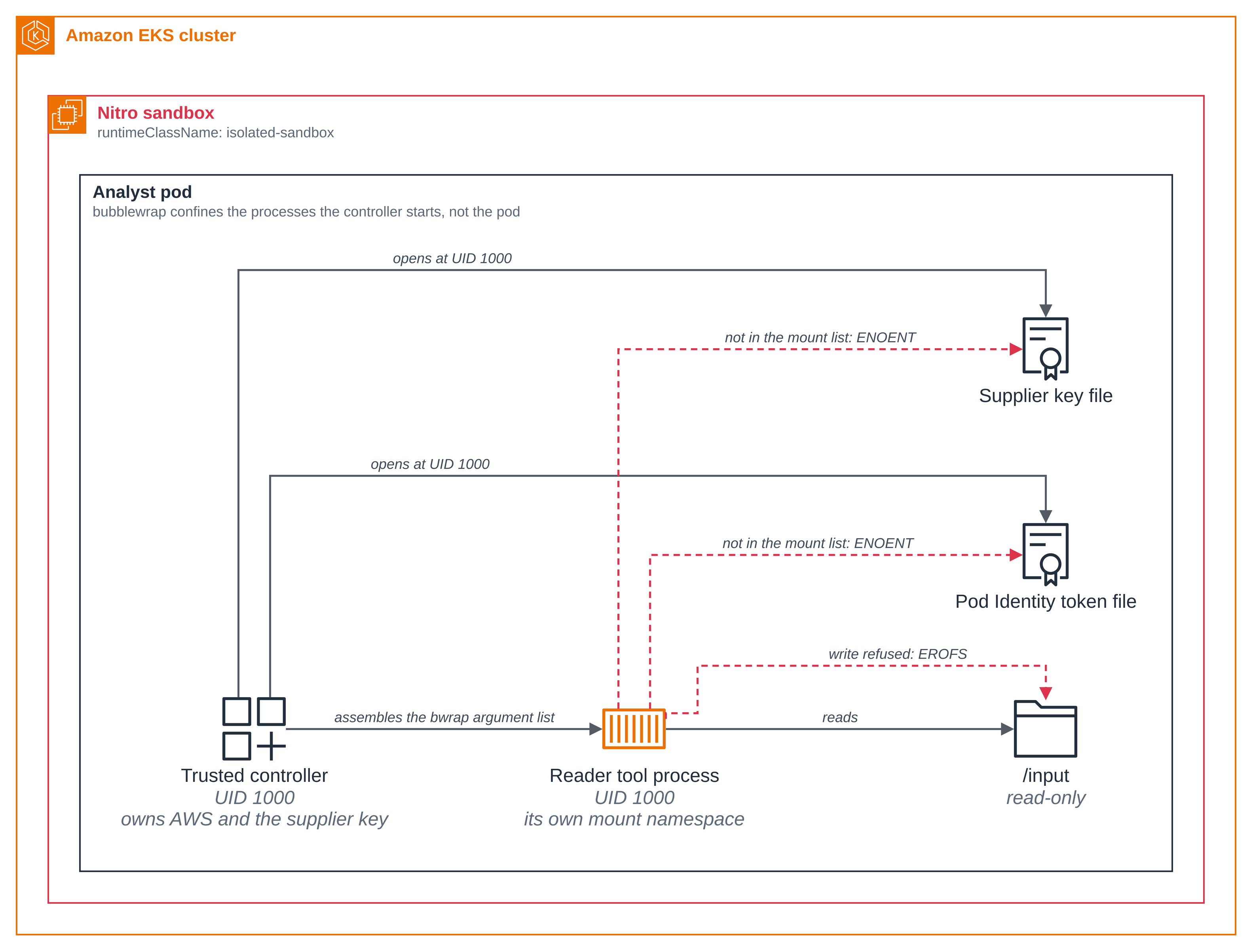
Step 7: A read refused outside the mounted paths. The reader's workspace gives it
/input read-only and /output read and write. Nothing else from the pod is mounted, so a
path the list does not name does not exist for the child.
Figure 2: What a tool process can see, at the level bubblewrap confines it. The argument list is the whole boundary: the trusted controller opens the supplier key file and the Pod Identity token file at UID 1000, and the same two paths are simply absent from the tool process's mount list, so it gets ENOENT rather than a permission error.
The run exercises the boundary in both directions, and each refusal has a control beside it where the same thing succeeds. These lines are from the step 3 output:
PASS the tool process's whole mount list is ['/', '/dev', '/dev/full', '/dev/null', '/dev/pts', '/dev/random', '/dev/tty', '/dev/urandom', '/dev/zero', '/input', '/opt/analyst', '/opt/bubblewrap', '/output', '/proc', '/tmp', '/usr'], and neither the supplier key's directory, nor the Pod Identity token's, nor /var/run/secrets is in it
PASS the reader reads its assigned case at /input/case.json
PASS the reader's own read probe opens the same file
PASS and /input/case.json is the controller's own file, device 64786 inode 8388785
PASS the controller may write that same file at the same UID, and left it unchanged
PASS so the reader's write is refused by the read-only bind mount, not by a file mode: EROFS
PASS the controller opens the writer's private file at the same UID
PASS so the writer's private file is absent from the reader's mount list, not merely unreadable: ENOENT
PASS the controller opens the supplier key file at the same UID
PASS so the supplier key file is absent from the reader's mount list, not merely unreadable: ENOENT
PASS the controller opens the Pod Identity token file at the same UID
PASS so the Pod Identity token file is absent from the reader's mount list, not merely unreadable: ENOENT
PASS the writer writes its own output directory
PASS and the controller reads back what the writer wrote
Two errno values carry the whole argument, and they are the reason this is a claim about bubblewrap rather than about file permissions.
EROFS, notEACCES. The file the reader cannot write is the controller's own file. The run compares the device and inode the child read through/inputwith the device and inode the controller recorded from a descriptor it had open. Both numbers, because an inode number is unique only within one filesystem, so matching inodes on different devices would be different files. The mode on that file lets this user write it, and the controller does write it, in the same run, without changing a byte. So what refuses the child is the read-only bind mount.ENOENT, notEACCES. The supplier key file is mode 0440 and group-owned by the group the pod runs as, so the controller, running as that same UID 1000, opens it in this very run; the same is true of the Pod Identity token file and of the writer's private file. A permission error would mean the path was there and the mode said no.ENOENTmeans the mount list does not put it there at all, which the run also shows directly by printing the child's whole mount list.
What this shows is a refusal at the UID the tool processes run as, which is the same UID
the controller runs as. It is not a claim about root: bwrap is given --uid 1000 and no
tool process in this blueprint runs as root, so the page has no evidence either way about what
root inside the guest could open, and does not claim any.
Step 8: A forbidden process operation refused. A tool process could try to climb out of its boundary in two obvious ways: build a further user namespace to work from, or make a syscall the application meant to block. The run shows both refused, each against a control where the same call succeeds.
--disable-userns sets the child's own user-namespace limit to zero, and
--assert-userns-disabled makes bwrap fail rather than carry on if it could not. The
control is the same probe in a child started without those two switches, which is why
src/sandbox.py takes disable_userns as a parameter at all:
PASS a further user namespace succeeds in a child started without --disable-userns
PASS so --disable-userns is what refuses a further user namespace: ENOSPC
Without the first line, a kernel that refused user namespaces outright would look exactly like bubblewrap's switch working.
The seccomp filter is the part bubblewrap does not supply. bwrap has no syscall allowlist
of its own: --add-seccomp-fd takes a compiled BPF program on a file descriptor and loads
it, and the caller decides what is in it. src/filters.py compiles them
with libseccomp, and this is the list every tool process gets, from the folder:
BASELINE = ("ptrace", "process_vm_readv", "process_vm_writev", "bpf", "keyctl",
            "kexec_load", "mount", "umount2", "pivot_root", "setns", "userfaultfd")
That is a denylist, so a syscall nobody thought of is permitted; a production filter is usually built the other way round, by denying everything and naming what the workload needs. Treat it as a starting point rather than as a certified allowlist.
--add-seccomp-fd may be given more than once, and the filters stack. The run adds two
more, one blocking getppid and one blocking uname, and shows that both reach the child:
each call succeeds under the baseline alone and returns EPERM with the two added, and the
child's own Seccomp_filters count goes from 1 to 3.
PASS getppid succeeds under the baseline filter alone
PASS uname succeeds under the baseline filter alone
PASS three seccomp filters are loaded in the child: the baseline and the two this run added, Seccomp_filters 3
PASS and with both added, getppid returns EPERM
PASS and with both added, uname returns EPERM
The two syscalls are harmless on purpose. What is being shown is that an
application-supplied filter reaches the child and that two of them apply, not that these
particular calls are dangerous. The number each filter blocks and the number the probe calls
both come from libseccomp's own seccomp_syscall_resolve_name, so the filter and the probe
cannot disagree about which syscall a name means; a hard-coded number would be right on one
architecture and silently wrong on another, and the probe would then look permitted because
it had called something else.
Step 9: No network for the tool processes. net is in the list of namespaces the
launcher unshares, so each tool process gets a private network stack with nothing in it but
loopback. There is no destination policy to write, because there is no route.
PASS the controller reaches the supplier API's own address and port
PASS the reader's interface list is loopback alone: ['lo']
PASS so the reader has no route to that same address: ENETUNREACH
PASS the evaluator's interface list is loopback alone: ['lo']
PASS so the evaluator has no route to that same address: ENETUNREACH
PASS the writer's interface list is loopback alone: ['lo']
PASS so the writer has no route to that same address: ENETUNREACH
The control is the controller itself. It resolves the supplier API's Service name, opens a
TCP connection to that address and port, and only then asks each tool process to connect to
the very same address and port. The controller reaches it; all three get ENETUNREACH.
Without that pair the refusal could be a wrong address or a cluster with no route at all.
All three roles are measured rather than one. The launcher builds the same namespace list for each of them, so a single reading would be a fair inference, but this page and its first figure say "a tool process" rather than "the reader", and a claim about three processes is worth reading three times.
This is also the whole of what bubblewrap decides about the network here. It has no hostname allowlist and no HTTP method or path filter, so there is no "allowed host" to show and no operation-level refusal to pair a control with: the tool processes are offline, and the trusted controller performs their I/O. That is the trade this layer makes, and it is why the section page's comparison puts bubblewrap where it does.
Step 10: What the trusted controller owns, and what IAM allows it. The controller holds the supplier key and the pod's Pod Identity credentials, makes every supplier call, and is the only thing in the pod that talks to AWS. Within AWS, IAM is the boundary, not bubblewrap:
PASS the AWS SDK uses the Pod Identity container credential provider
PASS the caller is this sample's Pod Identity role
PASS no model API key is in the sandbox: ANTHROPIC_API_KEY, OPENAI_API_KEY, BEDROCK_API_KEY, AWS_BEARER_TOKEN_BEDROCK are all absent
PASS the S3 proposal matches the case entry for northstar
PASS the S3 proposal matches the case entry for harbor
PASS the S3 proposal matches the case entry for cedar
PASS the image's fixtures match the objects in S3
PASS IAM returns AccessDenied for overwriting a source proposal
PASS IAM returns AccessDenied for deleting a source proposal
PASS IAM returns AccessDenied for reading another case's object
The three AccessDenied lines are IAM's doing. The role's policy, in
../analyst/iam/permissions-policy.json, grants
s3:GetObject on this case's proposals and reports and s3:PutObject on the reports prefix
only, so overwriting a source, deleting one, and reading another case's object are each
outside it. The other case's object is really there, because setup.sh seeds it, so the
denial names an object that exists and is readable with other credentials rather than being
a missing key.
Every supplier call in this blueprint is the controller's own, because no tool process has a network to make one with. The reply's availability map is the one input to this run that a supplier controls, and it is rebuilt from the case's own supplier ids before it is staged for the evaluator rather than forwarded: the keys come from the case document the controller read from Amazon S3, and the only thing taken from the reply is one boolean per supplier. So the file handed to a confined tool process carries no string the supplier chose.
PASS the supplier API answers the controller's authenticated read with 200
PASS the supplier API refuses an invalid key with 401
PASS the availability staged for the evaluator holds the case's own supplier ids and one boolean each: ['cedar', 'harbor', 'northstar']
PASS the controller submits the writer's draft, which the supplier API accepts with 201
The 401 is the supplier API's own control: the server really does check the header, so the
200 and the 201 the controller gets are a valid key being accepted and not the server
waving anything through.
The controller holds the real key for all three of those calls, so the last thing the run does is look for that key in what it is about to leave behind. Two scans, and the second is the broader one:
PASS the evidence and the report were scanned for the supplier key before being written, and the run was stopped if it appeared
PASS and so was every one of the 10 files left in the pod for this run, read off the disk after the last write: calls.json, checks.json, evaluator/in/facts.json, evidence.json, reader/in/case.json, recommendation.md, writer/in/comparison.json, writer/in/private.json, writer/out/comparison.json, writer/out/draft.txt
The first takes each document's bytes, looks for the key's bytes in each one separately,
and then writes those same byte objects, so neither document reaches the disk if the key is
in it. The second reads back, off the disk, every file left in the pod for this run and
names them: the two documents, the record of every call, the facts staged for the
evaluator, the comparison staged for the writer and each role's output. That is more than
run.sh copies out, which is recommendation.md, evidence.json, checks.json and
calls.json; the rest stay in the pod until the clean up deletes it, and they are scanned
because they exist, not because they travel.
Three things about the second scan are deliberate, and the first two are what make the sentence true rather than nearly true.
- It runs after the last write. Nothing below it in the controller touches the
filesystem, and nothing on the way out of the program does either:
checks.jsonis written just above the scan, and the program's last statement runs the analyst and nothing else.checks.jsonis the one file the first scan cannot have covered, because it holds the first scan's own result, so the second scan is what covers it. - The count comes from the traversal that did the scanning, not from a second walk. Two walks can see two different sets of files, and then "every one of the N files" is a sentence about two different Ns.
- It looks for the literal key, in bytes. The key is encoded once and both scans look for those bytes. Each document is encoded once too, scanned, and then written without being encoded again, so a file that is not text is scanned the same way as one that is and nothing re-encodes between a scan and a write. What the scan would not find is an encoded, hashed or split form of the key, and it says nothing about anything outside the run's directory. A read it cannot perform raises rather than being skipped, because a scan that could not read a candidate must not report success.
Either scan raises rather than recording a flag, so the line after it is the result. The second line is the one thing not inside the files it covers, because it is the result of covering them. No model API key is placed in the sandbox, and the controller checks that by variable name, printing the names it looked for rather than any value.
Step 11: Show that the pod ran in a sandbox. Read the analyst pod's runtime class, then its own account of the machine it is running on.
The pod's age and the node's age are read too, because the uptime below only means anything beside them.
export NAMESPACE=subagent-security-bubblewrap
NODE=$(kubectl get pod analyst -n $NAMESPACE -o jsonpath='{.spec.nodeName}')
kubectl get pod analyst -n $NAMESPACE -o jsonpath='{.spec.runtimeClassName}{"\n"}'
kubectl get pod analyst -n $NAMESPACE --no-headers | awk '{print "pod age:  "$5}'
kubectl get node $NODE --no-headers | awk '{print "node age: "$4}'
kubectl exec analyst -n $NAMESPACE -- sh -c 'uname -rv; cut -d" " -f1 /proc/uptime; ls /sys/block | tr "\n" " "; echo; cat /sys/class/dmi/id/product_name'
isolated-sandbox
pod age:  43s
node age: 15m
6.18.54 #1 SMP PREEMPT_DYNAMIC Thu Oct 22 17:38:11 UTC 2026
42.73
dm-0 vda vdb vdc
m8i.enclave
Now the same readings from an ordinary pod on the same node. Pinning the node is the point: a reading from a pod on another instance would compare nothing.
[ -n "$NODE" ] || echo "the analyst pod is not running; run ./scripts/setup.sh first"
sed -e "s|<NAMESPACE>|$NAMESPACE|g" -e "s|<MANAGED_BY>|bubblewrap|g" -e "s|<NODE_NAME>|$NODE|g" \
  deploy/ordinary-pod.yaml | kubectl apply -f -
kubectl wait --for=condition=Ready pod/ordinary-comparison -n $NAMESPACE --timeout=2m
kubectl exec ordinary-comparison -n $NAMESPACE -- sh -c 'uname -rv; cut -d" " -f1 /proc/uptime; ls /sys/block | tr "\n" " "; echo; cat /sys/class/dmi/id/product_name'
6.18.54 #2 SMP PREEMPT_DYNAMIC Thu Oct 22 00:16:59 UTC 2026
946.95
dm-0 loop0 loop1 loop2 loop3 loop4 loop5 loop6 loop7 nvme0n1 nvme1n1 zram0
m8i.xlarge
Four readings differ, and each says something:
| Reading | Sandboxed analyst | Ordinary pod on the same node |
|---|---|---|
uname -rv |
6.18.54 #1, built Oct 22 17:38 |
6.18.54 #2, built Oct 22 00:16 |
/proc/uptime |
42.73, against a pod age of 43s |
946.95, about 16 minutes, which is the node's own age of 15m |
/sys/block |
dm-0 vda vdb vdc, virtio |
dm-0 loop0 to loop7, nvme0n1 nvme1n1, zram0, the instance's own |
product_name |
m8i.enclave |
m8i.xlarge |
The analyst pod runs its own kernel build, built 17 hours after the node's, and the
uptime is the giveaway: 42 seconds against a pod 43s old, because the sandbox booted when
the pod did, while the ordinary pod reports the node's uptime and the node had been up 16
minutes. It sees virtio disks where the ordinary pod sees the instance's nvme devices,
and it names the enclave rather than the instance type.
One thing to know about the uptime row before you read your own. Each pod reports the uptime of the kernel it is running on, so the analyst reports its sandbox's and the ordinary pod reports the node's. How large that difference is depends on how long the node has been up, and EKS Auto Mode may have provisioned it moments before the pod: on one run here the node had been up 69.82s against the sandbox's 54.78s, which is correct and not striking. The comparison does not rest on that row. The kernel build, the disks and the product name differ whatever the node's age.
Note that the kernel version can be the same in both. It is the build number and the
boot that differ, so compare uname -rv and not uname -r. And the runtime class on the
pod shows what was asked for, not what ran, so it supports the claim without proving it;
the readings inside the guest are what prove it.
Everything in step 5 to step 10 happened inside that boundary. The bwrap argument lists,
the supplier key and the AWS credentials are all in this pod, so they are what the sandbox
contains, not what protects the pod from the node. The two privileges step 5 describes reach
the guest's own kernel, which is this pod's, and the readings above are what show that
kernel is not the node's.
Remove the comparison pod when you are done with it, by its exact name:
kubectl delete pod ordinary-comparison -n $NAMESPACE
What bubblewrap's confinement is, and is not
Everything the run shows is bubblewrap deciding what a tool process may do. It is worth being precise about how far that reaches, because a reader may be looking for a pattern to copy.
- It is a boundary the caller constructs, and it is only as good as the argument list.
bubblewrap gives you mounts, namespaces, UID and GID, capability dropping,
no_new_privs, a seccomp loading point and a child lifetime. It makes no decisions for you. A mount left in the list is a path the tool can reach, and there is no profile linter, no audit log and no default-deny to fall back on. That is the layer's whole character: the smallest useful set of primitives, and the application owns the policy. - It is enforced inside the pod, on the process. The restrictions are applied to the
child
bwrapstarts, by the kernel, atexectime. What the run shows is those restrictions holding for a process at UID 1000 making a specific call. It is not a demonstration that no process in the pod could reach those things by other means. - It does not bound the pod. The analyst pod has no network policy in this blueprint, so the
pod's egress is whatever the cluster and the VPC allow. The trusted controller is under no
bwrapboundary and reaches Amazon Bedrock, Amazon S3 and the supplier API directly. A reader who wants the pod's egress restricted on the node wants Isolation > Network policy. - No network is not a data-loss control. A tool process here cannot send anything
anywhere, which is a strong statement, but the controller reads its
/outputand the controller is not confined. What a tool writes to/outputis what the application chooses to do with. - The controller is trusted, and is not confined. It holds the supplier key and the AWS credentials by design. bubblewrap is placed around what it launches, not around it. A defect in the controller is not something bubblewrap is placed to catch.
- There is no credential broker. The other two blueprints in this section have a layer that can hold a credential on a tool's behalf. bubblewrap has nothing of the kind, which is why the tool processes here are offline and the application performs their I/O. The section page lists what a layer has to supply for the three blueprints to show the same thing; bubblewrap supplies the file and process boundary and refuses the network outright, and supplies no allowed host and no brokered credential, because it has no proxy to put one in. A tool process here is handed no supplier credential at all, so there is nothing for the run to compare: the whole of its environment is the six variable names step 5 prints.
Good to know
- bubblewrap confines the tool processes, not the application that starts them. The controller is trusted code inside the sandbox: it reads the supplier key, holds the AWS credentials and builds the argument lists. The boundary this page shows is around what it launches.
- The tool processes can read this blueprint's own code.
/opt/analystand/opt/bubblewrapare bound read-only, because the child has to run the worker. So a tool can read the controller's source, which is published here anyway. What is not in its mount list is the credential files and the other roles' directories, and the code it can read is code it cannot change. - Two switches in the argument list are there and are not demonstrated.
--die-with-parenthas the kernel kill the child if whatever startedbwrapdies, and--new-sessionputs the child in a session of its own so it does not share the controller's terminal. Both are in the list this page shows and neither has a check on this page, so take them as settings the blueprint uses rather than as behaviour it establishes. The bubblewrap manual at the pinned version is what to read for them. - The child's cgroup namespace is the controller's. The launcher does not pass
--unshare-cgroup, and the run's evidence records that the one namespace it does not claim is shared. bubblewrap can unshare it; this blueprint does not need to, and the page does not claim it. - A refusal has to be told apart from a failure. The shared worker reports a denied open
or socket as structured data and lets everything else raise, and this blueprint's probes
report the errno of the one operation they perform. The controller then checks for the
exact errno it asked for, never for "any error". A
bwrapstart-up failure, a timeout or a crash leaves no result line and fails the run, so a broken step can never read as a successful denial. - The pod is less hardened than the other sandboxed pods here, and that is the cost of
this layer.
privileged: trueis what letsbwrapmount a private procfs in the guest, and it rules outallowPrivilegeEscalation: falseand leaves the container seccomp profile unconfined. Step 5 prints what the controller actually holds. If that trade is not one you want, the two other blueprints in this section run the same analyst under layers that need no privilege. - The gates are task-specific correctness checks, not a defence against prompt injection. They check that the model's explicit choice matches a comparison computed without it and that it cited the originals. They say nothing about whether the prose is otherwise sound.
- The sandbox is sized by its requests. This pod sets CPU and memory requests, which most blueprints here do not, because it has to hold a Python interpreter, the Strands Agents and AWS SDK packages and a short-lived tool process at once. A pod with no requests gets a small default VM of about 130 MiB and is killed for running out of memory with no output at all. Its limits are higher than its requests on purpose: the requests size the sandbox, and the two need not match (Amazon EKS User Guide, Isolated and confidential pods limitations).
- Everything about the supplier is synthetic. The proposals are invented, the supplier API holds no real records, and a purchase order against it orders nothing. The proposals hold no customer data.
- The blueprint certificate authority is generated at setup and lasts 30 days. It is created
on your machine, kept in a Kubernetes Secret and a ConfigMap, and never committed. Run the
clean up and
setup.shagain to replace expired material.
Clean up
clean.sh reads the same run record setup.sh wrote, so there is nothing to set again.
cd sample-eks-nitro-sandbox/examples/subagent-security/bubblewrap
./scripts/clean.sh --delete-aws
==> 1/4 the namespace's own objects
pod "analyst" deleted from subagent-security-bubblewrap namespace
pod "ordinary-comparison" deleted from subagent-security-bubblewrap namespace
deployment.apps "supplier-api" deleted from subagent-security-bubblewrap namespace
namespace "subagent-security-bubblewrap" deleted

==> 2/4 the EKS Pod Identity association
  deleted the association a-ii5fm9m9dhqcylvdq.

==> 3/4 the AWS resources
  deleted the bucket subagent-analyst-bubblewrap-<ACCOUNT_ID>.
  deleted the IAM role subagent-analyst-bubblewrap.
  deleted the ECR repository pod-isolation/subagent-analyst-bubblewrap.
  deleted the ECR repository pod-isolation/subagent-analyst-bubblewrap-supplier-api.

==> 4/4 the local run files
  removed /path/to/sample-eks-nitro-sandbox/tmp/bubblewrap.

==> what stays
  This sample changed no cluster-wide setting and installed nothing shared, so there is
  nothing of that kind to undo.

  The isolated-sandbox RuntimeClass and the cluster itself are not this sample's. The
  hello sandbox sample's clean up covers removing the cluster.

Clean up complete.
--delete-aws also removes the run record under the repository's tmp/, which is where
run.sh copied the recommendation, so copy anything you want to keep out of there first.
It deletes in reverse order of creation, starting with the sandboxed pod, which is what
holds sandbox capacity other workloads on the cluster share. It touches a namespace only
when that namespace carries this blueprint's app.kubernetes.io/managed-by label, and an AWS
resource only when it carries ManagedBy=bubblewrap. A lookup that fails counts as "could
not determine" rather than "already gone", so anything it could not delete or confirm is
named at the end and makes it exit non-zero.
Without --delete-aws it removes the cluster objects and the Pod Identity association and
keeps the S3 bucket, the IAM role and the images, so a second run skips the build. It keeps
the run directory too, and setup.sh refuses to start while that directory exists:
creating it is how setup.sh checks that no other run is using these names. What is in it
is the only place an earlier run's names are written down, and every copy of this blueprint
marks its resources the same way, so a clean up that had lost them could report "already
gone" for names that were never created. To start another run, finish that one with
--delete-aws. If you want to keep its AWS resources, move the run directory aside rather
than deleting it: it is the only place their names are written down, and it also holds that
run's supplier API key and blueprint certificate authority.
This blueprint changes no cluster-wide setting and installs nothing shared, so the clean up has
nothing of that kind to undo. The isolated-sandbox RuntimeClass and the cluster are not
this blueprint's; the
hello sandbox clean up covers
removing the cluster itself.