Shared EFS storage for sandboxed pods
Before you start, review the prerequisites and shared setup on the home page, and run the hello sandbox blueprint first so you have an EKS Auto Mode cluster with the runtime classes. This blueprint also builds on the coding agent blueprint for turning on network policy enforcement once per cluster. The commands below use files from this repository, so clone it if you have not already, and run them from this blueprint's folder:
git clone https://github.com/aws-samples/sample-eks-nitro-sandbox.git
cd sample-eks-nitro-sandbox/examples/storage/efs
This blueprint needs the AWS CLI, which the home page already lists, for the steps that create the file system and read it back. It also needs the Amazon EFS CSI driver installed on the cluster as a shared prerequisite; Install the EFS CSI driver below has the one-time setup for a cluster that does not have it. What it costs beyond the cluster is the EFS file system, billed for the data stored while it exists: the two pods are small and the shared directory holds a couple of tiny files, and the clean up deletes the file system.
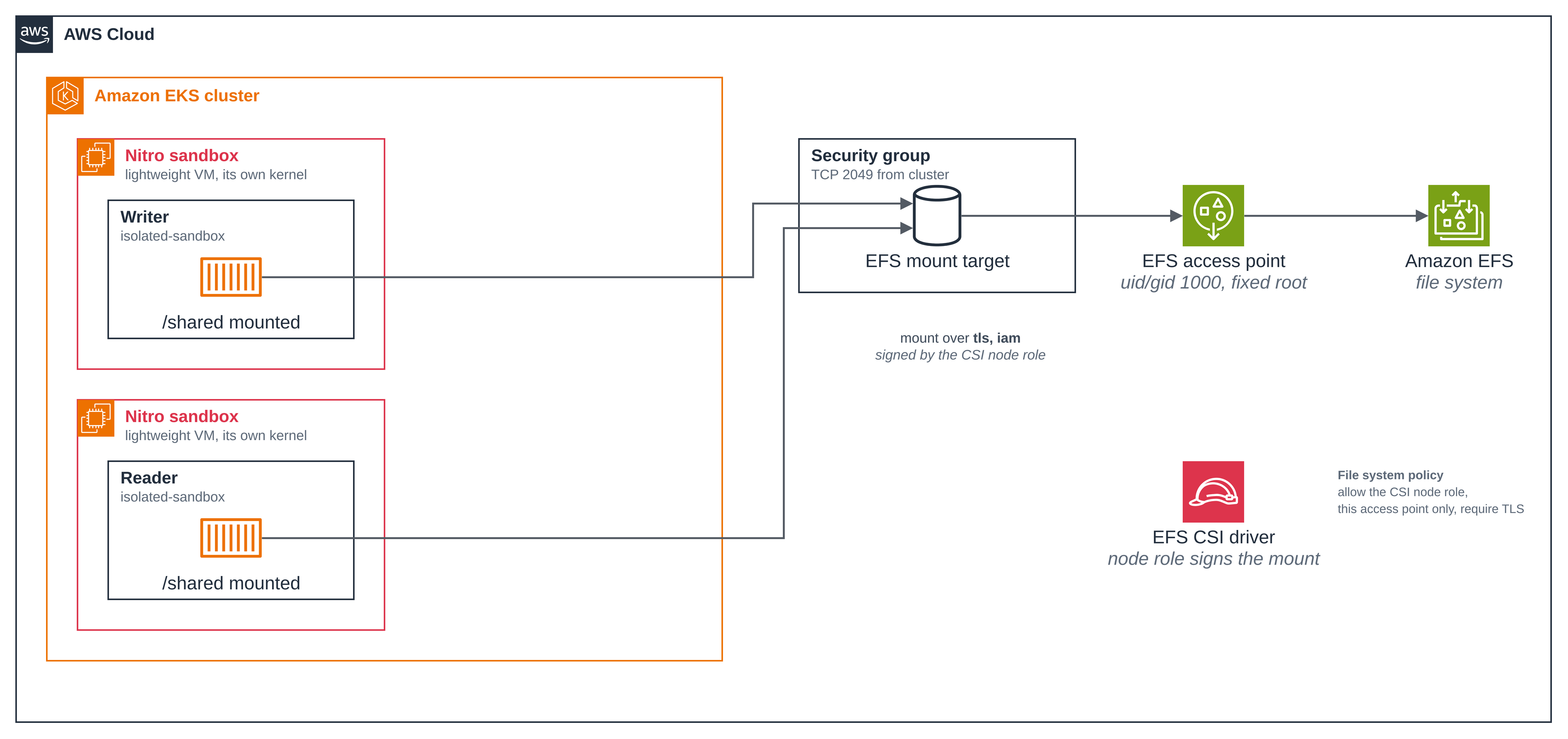
Two sandboxed pods, a writer and a reader, mount one Amazon EFS file system through a single
EFS access point at
/shared, each over TLS with IAM authorization. A file written through one appears through
the other, so it is one shared POSIX file system that many hardware-isolated pods read and
write at once. Each pod is an ordinary pod spec with one line added, the runtime class.
- Two sandboxed pods share one file system. The writer and the reader are both
isolated-sandboxpods on the sameReadWriteManyclaim. The page writes a file through the writer and reads it through the reader, then writes back the other way. - Each pod runs in its own sandbox. Both pods show their own kernel build and their own virtio disks, next to what an ordinary pod shows. (hello sandbox.)
- The mount lives inside the guest. In each pod,
/sharedis annfs4mount whose endpoint is the guest's own loopback TLS endpoint, and the node holds no NFS mount for these pods. The guest terminates its own TLS to the mount target; the node coordinates the CSI operation but is not on the file-data path. - The access point pins the identity and the root directory. Every mount through it runs as one POSIX UID/GID under a fixed root directory, whatever user the client claims, and cannot see the rest of the file system.
- Access is authorized by IAM, bounded by three resource controls. The pods mount with
tls,iam, so the connection is signed with the CSI driver's identity and the EFS file system policy decides by principal, on top of the mount-target security group and the access point. The workload's own ServiceAccount has no AWS identity and mounts no API token.
Figure 1: Two sandboxed pods share one EFS file system. A writer and a reader, each an
isolated-sandbox pod, mount the same access point at /shared over TLS with IAM
authorization. Each reaches the file system through a mount target whose security group admits
NFS from the cluster only, and through one access point that pins the identity and the root
directory.
This folder was built against these releases:
| Component | Version |
|---|---|
| Amazon EFS CSI driver add-on (kubernetes-sigs/aws-efs-csi-driver) | v3.5.1-eksbuild.1 on the run below; the blueprint needs 3.5.1 or newer |
busybox image (public.ecr.aws/docker/library/busybox) |
1.37 |
The files:
| File | What it is |
|---|---|
deploy/efs.yaml |
The blueprint's non-default nitro-sandbox-efs StorageClass, a static access-point PV (mount options tls,iam), its ReadWriteMany PVC, a workload ServiceAccount with no identity, and the writer and reader isolated-sandbox pods. |
deploy/egress-policy.yaml |
The egress ApplicationNetworkPolicy: DNS on port 53 to any address and NFS (TCP 2049) to the mount targets, deny all ingress. |
iam/file-system-policy.json |
The EFS file system policy template: TLS required, this access point only, ClientMount/ClientWrite only, the CSI node principal only. |
scripts/setup.sh |
Checks the EFS CSI driver (shared, reused, never changed); creates the NFS security group, file system, mount targets and access point; applies the file system policy; then deploys the namespace, the egress policy, the StorageClass, the PV, the PVC and the two pods. |
scripts/clean.sh |
Deletes the Kubernetes objects; --delete-aws-resources also releases the access point, mount targets, file system and security group. |
The walkthrough uses the shared Region default from the home page, a cluster of your own, and a namespace of its own so the blueprint's objects are easy to find and remove on a shared cluster. Set them in your shell:
export CLUSTER_NAME=<your-cluster>
export AWS_REGION=us-west-2
export NAMESPACE=nitro-efs-sample
Create the storage and deploy the pods
Step 1: Run setup. scripts/setup.sh does everything the walkthrough
below needs. It first confirms the Amazon EFS CSI driver is installed at 3.5.1 or newer and
reads, without changing it, which IAM role the driver's node service account uses. It creates
the blueprint's own resources, each tagged ManagedBy=storage-efs and auto-delete=no: an NFS
security group that admits TCP 2049 from the cluster security group only, an encrypted EFS
file system, one mount target per cluster Availability Zone, and an access point that pins
UID/GID 1000 under /storage-efs. It applies a file system policy that requires TLS, confines
access to this access point reached through a mount target, grants only ClientMount and
ClientWrite, and allows only the CSI node principal. Finally it deploys the Kubernetes side:
the namespace, the egress ApplicationNetworkPolicy (waiting for its PolicyEndpoint before
the pods start), the StorageClass, the static PV, the ReadWriteMany PVC, and the writer and
reader pods, and waits for both to become Ready.
The PV mounts the access point with tls,iam, and the pods run as a non-root user with
fsGroup so the unprivileged process can write the shared directory:
spec:
  mountOptions:
    - tls
    - iam
  csi:
    driver: efs.csi.aws.com
    volumeHandle: <EFS_FILE_SYSTEM_ID>::<EFS_ACCESS_POINT_ID>
spec:
  runtimeClassName: isolated-sandbox   # the one-line opt-in
  serviceAccountName: efs-workload     # no AWS identity, no API token
  automountServiceAccountToken: false
  securityContext:
    runAsNonRoot: true
    runAsUser: 1000
    runAsGroup: 1000
    fsGroup: 1000
./scripts/setup.sh
The run below started on a cluster with none of the blueprint's AWS resources present. The
nitro-efs-sample namespace already existed, empty, from an earlier run (the blueprint never
deletes the namespace, only what is inside it), so setup reused it rather than creating it.
This block is exactly what that run printed, and it predates the correction of the minimum:
the check then enforced 2.0.0, so its first line reads (>= 2.0.0) where the current check
prints (>= 3.5.1). The driver that run found, v3.5.1-eksbuild.1, already met 3.5.1, so
nothing else in the block is affected.
Step 1/5: check the Amazon EFS CSI driver (a shared install; reused, never changed)
  found aws-efs-csi-driver v3.5.1-eksbuild.1 (>= 2.0.0).
  CSI node principal (read, not changed): arn:aws:iam::<ACCOUNT_ID>:role/AmazonEKS_EFS_CSI_NodeRole
Step 2/5: create the sample's security group, file system, mount targets and access point
  created NFS security group sg-EXAMPLE (TCP 2049 from sg-CLUSTER only).
  creating an encrypted EFS file system...
  ensuring one mount target per cluster Availability Zone...
  creating the EFS access point (uid/gid 1000, root /storage-efs)...
Step 3/5: apply the EFS file system policy (TLS required, this access point only, CSI node principal only)
  file system policy applied.
Step 4/5: record the mount-target addresses for the network policy
  mount targets: <MOUNT_TARGET_IP> <MOUNT_TARGET_IP> <MOUNT_TARGET_IP>
Step 5/5: deploy the egress policy and the two sandbox pods
  namespace 'nitro-efs-sample' already exists and is this sample's; reusing it.
applicationnetworkpolicy.networking.k8s.aws/efs-shared-egress created
  waiting for the PolicyEndpoint to be programmed...
storageclass.storage.k8s.io/nitro-sandbox-efs created
serviceaccount/efs-workload created
persistentvolume/storage-efs-shared created
persistentvolumeclaim/storage-efs-shared created
pod/efs-writer created
pod/efs-reader created
  waiting for both pods to become Ready (sandbox VM boot + NFS mount)...
pod/efs-writer condition met
pod/efs-reader condition met

EFS storage is ready and both pods are Running. Resource IDs and addresses: .../examples/storage/efs/.env
Setup writes the resource IDs and the mount-target addresses to a gitignored .env, which it
uses to render the manifests. The EFS CSI driver, its service accounts, their IAM roles and
their Pod Identity associations are a shared install and are not touched.
Step 2: The claim is bound and both pods are Running. The claim binds ReadWriteMany, so
both pods mount the same volume.
kubectl get pods,pvc -n "$NAMESPACE"
NAME             READY   STATUS    RESTARTS   AGE
pod/efs-reader   1/1     Running   0          23s
pod/efs-writer   1/1     Running   0          23s

NAME                                       STATUS   VOLUME               CAPACITY   ACCESS MODES   STORAGECLASS        VOLUMEATTRIBUTESCLASS   AGE
persistentvolumeclaim/storage-efs-shared   Bound    storage-efs-shared   5Gi        RWX            nitro-sandbox-efs   <unset>                 23s
Step 3: Prove each pod ran in a sandbox. Each pod's own view is the evidence: its kernel
is the guest's build, and its disks are virtio where an ordinary pod sees nvme.
kubectl exec efs-writer -n "$NAMESPACE" -- uname -rv
kubectl exec efs-writer -n "$NAMESPACE" -- sh -c 'ls /sys/block'
6.18.51 #1 SMP PREEMPT_DYNAMIC Thu Oct  1 23:28:07 UTC 2026
dm-0
vda
vdb
vdc
The kernel is the guest's own build and the disks are virtio (vda, vdb, ...). An ordinary
pod on the same kind of node sees nvme devices instead, as the
hello sandbox page shows side by side.
Step 4: The mount lives inside the guest. In each pod, /shared is an nfs4 mount whose
server address is the guest's own 127.0.0.1: the NFS client and the TLS endpoint run inside
the guest, reached over a local port the EFS mount helper opens.
kubectl exec efs-writer -n "$NAMESPACE" -- grep ' /shared ' /proc/mounts
127.0.0.1:/ /shared nfs4 rw,relatime,vers=4.1,rsize=1048576,wsize=1048576,namlen=255,hard,noresvport,fatal_neterrors=none,proto=tcp,port=46195,timeo=600,retrans=2,sec=sys,clientaddr=127.0.0.1,local_lock=none,addr=127.0.0.1 0 0
The server is 127.0.0.1 and the connection runs over a local port (port=46195): the guest
terminates its own TLS to the mount target. The node holds no NFS mount for these pods, so the
plaintext file traffic does not traverse the node.
Step 5: The access point pins the identity, and a non-root process writes /shared. The
access point enforces UID/GID 1000 under its fixed root directory, whatever user the client
claims. The container runs as uid 1000 with fsGroup: 1000, so the unprivileged process
writes the shared directory.
kubectl exec efs-writer -n "$NAMESPACE" -- id
kubectl exec efs-writer -n "$NAMESPACE" -- sh -c 'echo hello-from-writer > /shared/from-writer'
kubectl exec efs-writer -n "$NAMESPACE" -- ls -ln /shared
uid=1000 gid=1000 groups=1000
total 4
-rw-r--r--    1 1000     1000            18 Oct 21 13:16 from-writer
The file is owned by UID/GID 1000, the identity the access point enforces, and the uid-1000 process wrote it without root.
Step 6: The two pods share one file system. Read the writer's file through the reader, and write back the other way.
kubectl exec efs-reader -n "$NAMESPACE" -- cat /shared/from-writer
kubectl exec efs-reader -n "$NAMESPACE" -- sh -c 'echo hello-from-reader > /shared/from-reader'
kubectl exec efs-writer -n "$NAMESPACE" -- cat /shared/from-reader
hello-from-writer
hello-from-reader
The reader sees the file the writer wrote, and the writer sees the file the reader wrote: one shared file system, not two empty mounts.
Step 7: IAM authorizes the mount. The pods mount with tls,iam, so the EFS mount helper
signs the connection with the CSI driver's node identity, and the file system policy decides
by principal. Read the policy back from EFS:
aws efs describe-file-system-policy --file-system-id "$EFS_FILE_SYSTEM_ID" \
  --region "$AWS_REGION" --query 'Policy' --output text
{
  "Version": "2012-10-17",
  "Statement": [
    {
      "Sid": "AllowCSINodePrincipal",
      "Effect": "Allow",
      "Principal": { "AWS": "arn:aws:iam::<ACCOUNT_ID>:role/AmazonEKS_EFS_CSI_NodeRole" },
      "Action": [
        "elasticfilesystem:ClientMount",
        "elasticfilesystem:ClientWrite"
      ],
      "Resource": "arn:aws:elasticfilesystem:us-west-2:<ACCOUNT_ID>:file-system/<EFS_FILE_SYSTEM_ID>",
      "Condition": {
        "StringEquals": { "elasticfilesystem:AccessPointArn": "arn:aws:elasticfilesystem:us-west-2:<ACCOUNT_ID>:access-point/<EFS_ACCESS_POINT_ID>" },
        "Bool": { "elasticfilesystem:AccessedViaMountTarget": "true" }
      }
    },
    {
      "Sid": "DenyInsecureTransport",
      "Effect": "Deny",
      "Principal": "*",
      "Action": "*",
      "Resource": "arn:aws:elasticfilesystem:us-west-2:<ACCOUNT_ID>:file-system/<EFS_FILE_SYSTEM_ID>",
      "Condition": { "Bool": { "aws:SecureTransport": "false" } }
    }
  ]
}
The policy allows only the CSI node role, only ClientMount and ClientWrite (never
ClientRootAccess), only on this access point, only over a mount target, and denies anything
without TLS. The mount-target security group admits exactly one rule, TCP 2049 from the
cluster security group:
aws ec2 describe-security-groups --group-ids "$EFS_SECURITY_GROUP_ID" \
  --region "$AWS_REGION" --query 'SecurityGroups[0].IpPermissions' --output json
[
  {
    "IpProtocol": "tcp",
    "FromPort": 2049,
    "ToPort": 2049,
    "UserIdGroupPairs": [ { "UserId": "<ACCOUNT_ID>", "GroupId": "sg-CLUSTER" } ],
    "IpRanges": []
  }
]
The group admits NFS from a security group, not a CIDR, so only interfaces that carry the cluster security group, the cluster's own nodes and pods, can reach the mount targets.
How the network policy works
These pods have a network: they reach the mount targets to mount the file system. So the
blueprint restricts their egress with an ApplicationNetworkPolicy, an EKS Auto Mode
NetworkPolicy, and does not set sandbox.amazonaws.com/network-isolated on them, because that
would remove the device used to reach the mount target.
deploy/egress-policy.yaml allows DNS on port 53 to any address
and NFS to the mount targets, and denies everything else, including all ingress. It is shown
here as it is in the repository, with its one placeholder: setup.sh (Step 5, the deploy)
expands <MOUNT_TARGET_BLOCK> into one ipBlock line per mount-target IP, from the addresses
it recorded in .env. The DNS rule is a literal 0.0.0.0/0 and needs no substitution.
spec:
  podSelector:
    matchLabels:
      app: efs-shared
  policyTypes:
    - Ingress
    - Egress
  egress:
    - to:
        - ipBlock: { cidr: 0.0.0.0/0 }
      ports:
        - { protocol: UDP, port: 53 }
        - { protocol: TCP, port: 53 }
    - to:
        <MOUNT_TARGET_BLOCK>
      ports:
        - { protocol: TCP, port: 2049 }
| Part | What it does |
|---|---|
podSelector: app=efs-shared |
Selects the writer and reader pods. |
policyTypes: [Ingress, Egress] |
Governs both directions; with no ingress rule, all ingress is denied. |
First egress rule, 0.0.0.0/0 port 53 |
DNS to any address on UDP and TCP 53. On EKS Auto Mode CoreDNS runs as a per-node systemd service rather than a pod behind a ClusterIP, so the resolver a pod reaches is node-local; allowing port 53 to any address keeps name resolution working wherever Auto Mode places it. DNS is name resolution only, so opening it broadly is safe; the rule still opens only the two DNS ports. |
Second egress rule, <MOUNT_TARGET_BLOCK> |
NFS (TCP 2049) to each EFS mount-target IP, one per Availability Zone. setup.sh expands one - ipBlock: { cidr: <ip>/32 } line per address from aws efs describe-mount-targets. |
Network policy is turned on once per cluster through the amazon-vpc-cni ConfigMap, as the
coding agent page describes; setup.sh waits
for the policy's PolicyEndpoint to appear before it starts the pods. The policy is enforced
on the node, outside the guest, so a command inside the sandbox cannot change it. Its limit:
DNS is open on port 53 to any address, so a resolver is always reachable, and a pod can
always reach its own node. Everything beyond DNS and the mount targets is denied.
With only DNS and NFS allowed, an outbound internet connection from inside the sandbox is refused:
kubectl exec efs-writer -n "$NAMESPACE" -- wget -T 5 -q -O /dev/null https://example.com
echo "exit: $?"
exit: 1
The connection times out and wget exits non-zero: the only egress the pods have is to DNS
and the mount targets.
Optional: see the IAM check refuse a mount
Because the mount is IAM-authorized, the file system policy decides it by principal in both
directions. Add an explicit Deny for the CSI node principal to the policy and recreate a
pod, and its mount is refused even though the security group and the access point would admit
it. (Restore the allow policy with ./scripts/setup.sh afterwards.)
Mounting arguments: -t efs -o accesspoint=<EFS_ACCESS_POINT_ID>,tls,iam <EFS_FILE_SYSTEM_ID>:/ ...
Mount attempt 1/3 failed due to b'mount.nfs4: access denied by server while mounting 127.0.0.1:/'
NAME         READY   STATUS              RESTARTS   AGE
efs-writer   0/1     ContainerCreating   0          72s
The signed mount is refused at the NFS layer and the pod stays ContainerCreating: the IAM
check is visible in both directions, allowed for the CSI node principal and denied when the
policy denies it.
Good to know
- The EFS CSI driver is a shared install. The blueprint reads which role the driver's node service account uses and never changes the driver, its service accounts, their IAM roles or their Pod Identity associations. The least privilege for this file system lives in the file system policy, which belongs to the blueprint's own file system, not on the shared node role.
- The pods have no AWS identity of their own, but their mount uses a shared one. The pods' ServiceAccount has no Pod Identity association and mounts no API token. The mount is signed with the CSI driver's node role, the same role every EFS mount on the cluster uses. What bounds these pods' use of it is the egress policy, which lets them reach only this file system's mount targets, and the file system policy, which allows that role only through this access point.
- What else the shared node role can mount is the cluster owner's choice. If you own the
cluster, check it: the role's own IAM policies may allow
elasticfilesystem:ClientMounton every file system in the account (the AWS-managedAmazonElasticFileSystemClientReadWriteAccesspolicy does), and a file system with no file system policy accepts any client that can reach its mount targets. To narrow it, scope the role's mount permissions to named file systems or to a resource tag, and give every file system a policy. The blueprint does not change the role, because other workloads' mounts depend on it. - The access point is the trust boundary. Every mount through it runs as UID/GID 1000 under one root directory and cannot see the rest of the file system. Give each trust boundary its own access point or file system, and keep the mount-target security group as narrow as the network allows.
ReadWriteMany, shared on purpose. Unlike an EBS volume, which one pod holds at a time, this EFS access point is mounted by both pods at once. For a single pod that needs durable block storage, use the EBS blueprint; when the same data must also be addressable as plain S3 objects, use the S3 Files blueprint.- Do not set
network-isolatedon these pods. They need a network to reach the mount target, so they take an egress network policy instead of the network-isolated annotation. - The pods pin their node while the blueprint is up. They are bare pods, and nothing recreates
a bare pod that EKS Auto Mode removes when it consolidates an underused node, so both carry
karpenter.sh/do-not-disrupt: "true". That also keeps their node from being consolidated until the clean up deletes them. A real workload runs under a controller instead.
Install the EFS CSI driver
This blueprint needs the Amazon EFS CSI driver on the cluster, at 3.5.1 or newer, with EKS Pod
Identity roles for its controller and node service accounts. On the maintainers' cluster it
was already installed; on a cluster without it, install it once following the
Amazon EFS CSI driver guide,
and setup.sh will find and reuse it. The driver's node service account must carry a Pod
Identity association, because this blueprint mounts with IAM authorization, which needs the mount
signed with the node role's identity. setup.sh looks for the driver in the two places it
can recognise — the aws-efs-csi-driver EKS add-on, and failing that the efs-csi-node
daemonset in kube-system — and compares every component of the version it finds against
3.5.1, not the major alone, so a 3.x driver older than 3.5.1 is caught. It then stops with
the command that fits: update-addon when the add-on is too old, create-addon when it
found neither the add-on nor that daemonset, and for a driver running as that daemonset, a
note to upgrade it the way it was installed rather than a command that would fail. A lookup
it cannot make, and a daemonset whose containers are not the ones it expects, stop the run
saying the version could not be determined; neither is read as "not installed". It also stops
when the node service account has no association, and it never creates or changes the
driver's roles.
Clean up
The commands use the variables from the walkthrough. In a new shell, set them again first:
export CLUSTER_NAME=<your-cluster> AWS_REGION=us-west-2 NAMESPACE=nitro-efs-sample
scripts/clean.sh deletes the two pods, the PVC and workload
ServiceAccount, the static PV, the egress policy, and the blueprint's own StorageClass. It checks
the namespace carries the blueprint's label before deleting anything inside it, and exits
non-zero if it skipped or could not confirm a delete.
NAMESPACE="$NAMESPACE" ./scripts/clean.sh
To release the EFS file system and everything else setup.sh created, add
--delete-aws-resources. It uses .env as its deletion record and deletes the access point,
every mount target, the file system (and all data on it), and the NFS security group, then
deletes .env:
NAMESPACE="$NAMESPACE" ./scripts/clean.sh --delete-aws-resources
Deleting EFS access point fsap-EXAMPLE...
Deleting EFS mount targets...
Deleting EFS file system fs-EXAMPLE (and all data on it)...
Deleting NFS security group sg-EXAMPLE...
Released the EFS access point, mount targets, file system and NFS security group.
The shared EFS CSI driver, its service accounts, their IAM roles and their Pod
Identity associations were left exactly as they were. The 'nitro-efs-sample' namespace is
left in place.
Neither mode touches the shared EFS CSI driver, its service accounts, their IAM roles or their
Pod Identity associations. If a mount-target delete reports the interface is still in use,
wait for the mount-target network interfaces to disappear and run it again; clean.sh is safe
to re-run.
If this is the last blueprint you ran, follow the hello sandbox clean up to remove the namespace and the cluster.